Personalized video outreach can lift reply rates well above plain text email — Salesforce’s 2026 State of Sales report puts signal-personalized outreach at 15-25% reply rates against a 3-5% industry average for generic cold email. But the same format that builds trust when done well can just as easily tank your numbers. Get the details wrong and a “personalized” video reads as generic, robotic, or worse, fake. This builds on our comprehensive guide to personalized video marketing with the specific mistakes that undercut results for sales prospecting teams.
Updated August 2026
Key Takeaways
- Segmentation is the foundation of personalized video outreach — HubSpot’s 2026 State of Marketing report found 93.2% of marketers say personalized, segmented experiences drive more leads and purchases.
- Poor audio quality damages credibility faster than shaky video — a $30 external microphone and a quiet room fix most of it.
- Vague calls-to-action waste the personalization work you already did; a specific ask like “does Tuesday or Wednesday work for 15 minutes?” outperforms “let’s connect.”
- A newer, sixth mistake has emerged in 2026: personalized video that reads as generic AI output. Forrester research found 19% of B2B buyers report less confidence in a purchase after encountering inaccurate or misleading AI-generated content.
- Tracking watch time, click-through, and CTA engagement lets you tailor follow-up instead of treating every viewer the same way.
Mistake 1: Not Segmenting Your Audience
Sending the same personalized video outreach message to every prospect defeats the purpose of personalizing in the first place. HubSpot’s 2026 State of Marketing report found that 93.2% of marketers say personalized, segmented experiences lead to more leads and purchases, yet only 12.6% of teams actually build hyper-personalized, behavior-based campaigns. Segmentation is the gap between those two numbers.
When you skip segmentation, prospects can tell your video wasn’t built with them in mind. A Chief Marketing Officer cares about ROI and strategic positioning; a Sales Development Representative cares about tools that save time. Address both the same way and neither one feels understood.
Why Segmentation Matters
Segmentation groups leads by shared traits so your message maps to their specific priorities instead of a generic pitch. It also determines video length and format: shorter, sub-60-second videos work best for top-of-funnel prospects, while 2-5 minute walkthroughs suit bottom-of-funnel leads who already know your product. A “combined video” — a short personalized intro attached to a longer pre-recorded demo — lets you personalize the moment that matters most without re-recording the whole pitch for every segment.
How to Segment Effectively
Start with role and buyer persona — a VP of Sales and an SDR have different priorities and should never get the same script. Layer in industry next; what lands for a SaaS company won’t land the same way for a manufacturer. Finally, factor in funnel stage: reserve fully 1-to-1 personalized video for high-priority, bottom-of-funnel accounts, and use mass-personalized video with dynamic name and company merge fields for top-of-funnel volume outreach. For your highest-value accounts, spend a few extra minutes researching the company’s stated goals before you record — it’s the difference between a video that sounds researched and one that sounds templated. If you’re layering video into a broader sequence rather than a one-off send, track drip-campaign metrics from the first send rather than retrofitting analytics later.
Mistake 2: Getting Personalization Wrong
Personalization in video outreach means referencing something specific and business-relevant about the recipient, not repeating their name several times or listing personal details you found on social media. Get the balance wrong in either direction — too generic or too invasive — and you lose the prospect before your ask lands.
What Good Personalization Looks Like
Skip the basic “Hi Sarah” opener and reference something concrete instead: “I noticed you’re hiring SDRs” or “I saw your post about improving response rates.” Visual touches reinforce the message — showing the prospect’s website or company logo as a dynamic background signals the video was built for them specifically, not mass-produced. Pairing that with a personalized landing page, a genuine smile, and steady eye contact on camera does more for trust than any scripted line.
When Personalization Goes Too Far
Overusing a name — “Hi John… so John… as I mentioned, John” — reads as robotic, not warm. Referencing too much personal detail can make a prospect uneasy about how much data you actually have on them. Keep personalization focused on business context: their role, their company, their stated challenges. Save the deeper, more specific research for warmer, later-stage conversations where that context has already been earned.
| Personalization Level | Key Elements | Best Use Case |
|---|---|---|
| Basic | Recipient name, company name | Mass outreach, initial contact |
| Intermediate | Dynamic visuals (prospect’s website), custom thumbnails | Targeted prospecting, LinkedIn messages |
| Advanced | Specific pain points, references to recent activity, tailored script | High-value accounts, late-stage deals |
Mistake 3: Poor Video Quality
Bad lighting, muffled audio, or a cluttered background undercut even a well-personalized script by signaling carelessness to a prospect you’re trying to win over. Audio matters more than most reps assume: viewers tolerate slightly soft visuals far more readily than they tolerate background noise, echo, or a hard-to-follow track.
Pro tip
A $30 clip-on lapel microphone will do more for your personalized video outreach than any lighting upgrade. Record in a quiet room, keep the camera at eye level, and avoid sitting with a bright window behind you — it silhouettes your face and undoes the personal connection you’re trying to build.
How to Improve Video Quality
Fix audio first: record away from traffic, HVAC noise, and open-office chatter, and invest in an external mic rather than relying on your laptop’s built-in one. For lighting and framing, natural light or a basic ring light beats overhead fluorescents, and eye-level camera placement with direct eye contact reads as more trustworthy on screen. Keep the background simple — a cluttered room competes with your message instead of supporting it.
| Feature | Impact on Quality | Practical Fix |
|---|---|---|
| Lighting | Poor lighting damages credibility | Use natural light or a basic ring light |
| Audio | Noisy or muffled audio causes drop-off | Use a $30 external mic; record in a quiet space |
| Background | Distracts from your message | Keep it simple and tidy |
| Framing | Looks unprofessional | Camera at eye level; use a face-bubble overlay |
Using Dynamic Backgrounds Instead of a Perfect Setup
If your physical setup isn’t ideal, dynamic backgrounds solve the problem without a studio. Sendspark’s AI video personalization platform overlays your face bubble onto the prospect’s website or LinkedIn profile, so the video still looks polished and personalized even from a home office. In May 2025, ecommerce platform Brikl integrated Sendspark’s personalized video features into their outreach and saw a 62% jump in email open rates and a reply rate over four times their previous average, while their SDRs created videos 40% faster using the automated personalization tools.
Mistake 4: Missing or Weak Calls-to-Action
A personalized, well-shot video still fails if the ask at the end is vague. “Let’s connect” leaves the prospect unsure what to do next, and that hesitation kills momentum right when you had their attention. Your video CTA needs to state a specific, low-friction next step the moment the video ends.
How to Write Better CTAs
Replace “let’s chat” with something concrete: “Does Tuesday or Wednesday work for a 15-minute call?” Match the ask to the video’s purpose — “schedule a demo” for a product pitch, “download the guide” for educational content — and lead with action verbs like get, start, book, or claim. Place the CTA in the final third of the video, and add a small reassurance underneath it, like “takes less than two minutes,” to reduce friction for cold prospects who aren’t ready to commit yet. CTA placement and phrasing also shift by channel — see our best practices for LinkedIn video outreach for platform-specific guidance.
Record One Video. AI Personalizes Thousands.
Sendspark is the AI video personalization platform for B2B sales. Record once, and AI voice cloning generates thousands of individually personalized videos with dynamic backgrounds and personalized thumbnails — each prospect hears their name, sees their website, in your voice. Sales teams see 2-3x more replies.
Get Started Now| CTA Type | Purpose | Example Phrases |
|---|---|---|
| Lead generation | Collect contact info | “Get your free guide”, “Talk to an expert” |
| Sales / signup | Drive a transaction | “Start your free trial”, “Claim your discount” |
| Click-through | Move to another page | “See how it works”, “Discover what’s new” |
| Click-to-call | Start a conversation immediately | “Book a call”, “Speak with an advisor” |
Using Analytics to Improve CTAs
Video analytics tell you which CTAs are actually driving clicks. Real-time notifications alert you the moment a prospect clicks, so you can follow up while your video is still fresh in their mind. Watch time and heatmaps show where viewers drop off — if most stop around the 30-second mark, move your CTA earlier or trim the video. With CRM integrations into platforms like HubSpot and Salesforce, engagement data syncs automatically and can trigger follow-up workflows for anyone who clicked.
Mistake 5: Not Tracking Performance or Following Up
Skipping performance tracking means treating every viewer identically, whether they watched the full video or clicked away after three seconds. Watch time, completion rate, click-through rate, and CTA engagement each tell you something different about intent, and together they should shape how — and whether — you follow up.
Common mistake
Sending the exact same follow-up email to everyone who received your video, regardless of whether they watched 5 seconds or the whole thing, wastes the one signal video gives you that plain email doesn’t: proof of attention.
Key Metrics to Watch
Watch time and completion rate are the clearest signals of genuine interest — someone who watches 80% or more of your video is worth a prompt follow-up. A consistent drop-off point, like the 30-second mark, tells you to rework your opening. Click-through rate shows whether your subject line and thumbnail earned the open in the first place, and CTA clicks signal buying intent strong enough to warrant an immediate response.
Tailoring Your Follow-Up Strategy
Someone who watches the whole video but skips the CTA needs an email addressing likely objections, not a repeat of the same ask. Someone who bails after a few seconds needs a shorter video with a sharper hook next time. Multiple views from the same account often mean the video is being shared internally — that’s your cue to offer a group demo. And anyone who clicks the CTA should get a phone call or a direct calendar link, not another automated touch. Send timing affects all of this too — our guide on how to schedule video outreach for maximum views covers when your videos are most likely to get watched in the first place.
Mistake 6: Sounding Like Every Other AI-Generated Video
By 2026, AI-generated video is common enough in B2B outreach that “personalized” no longer automatically reads as authentic — it can just as easily read as templated AI output, and prospects are increasingly primed to notice the difference. Forrester research (via Digital Commerce 360, October 2025) found that 19% of B2B buyers reported less confidence in a purchase decision after encountering inaccurate or misleading AI-generated content, and buyers now expect proof over promises rather than a polished pitch alone.
Why AI Content Skepticism Changes the Rules
HubSpot’s 2026 State of Marketing report found that 62.7% of marketers now believe brands need more human-centered content specifically to compete with AI content saturation. That doesn’t mean AI-personalized video stops working — Salesforce’s 2026 State of Sales report shows signal-personalized outreach still hitting 15-25% reply rates against a 3-5% industry average for generic cold email. It means the bar for what counts as an authenticity signal just moved. A video built from your own recorded voice and face, with AI voice cloning inserting real context rather than a generic AI avatar reciting a script, still clears that bar. A video that looks and sounds like every other synthetic avatar in a prospect’s inbox does not, and repeated exposure to that sameness is starting to produce a kind of synthetic media fatigue among buyers who once found any personalization novel.
How to Avoid Video Sameness
Record your own intro rather than defaulting to a stock AI avatar — Sendspark’s AI voice cloning personalizes from your actual recorded voice, not a synthetic narrator, so the “one video, thousands of personalized versions” trick still sounds like you. Reference something specific and recent about the prospect that a templated tool couldn’t know without real research. And when a video’s personalization is dynamically generated, don’t try to hide it: AI disclosure isn’t the risk it might seem. Buyers who feel misled by unclear AI use are the ones Forrester’s research shows losing trust and confidence in the deal, a pattern closer to buyer validation than rejection — prospects want the effort behind the personalization to be genuine and don’t mind knowing AI helped scale it, as long as the underlying voice and message are actually yours. That combination of transparency and authenticity is what prevents the trust erosion the AI-skeptical share of buyers is primed to react to.
Video: Sendspark’s official YouTube channel
How Sendspark Helps You Avoid These Mistakes
Sendspark addresses each of these six mistakes by combining AI-driven personalization with automation that doesn’t sacrifice authenticity. You record one AI-personalized intro using a placeholder like “Watermelon,” and AI voice cloning replaces it with each prospect’s actual name — “Hey Bob,” “Hey Sarah,” “Hey Michael” — generating thousands of personalized videos from a single recording, all in your own voice.
AI Personalization Features
Dynamic backgrounds pull in a prospect’s website or LinkedIn profile as the video backdrop, so each video looks custom-built without extra recording time. The Combined Video feature pairs a personalized intro with a pre-recorded demo, giving you the personal touch on the part that matters most without re-recording the whole pitch for every segment. Because the voice and face are genuinely yours, the output avoids the generic-AI-avatar problem described above.
Integration and Analytics
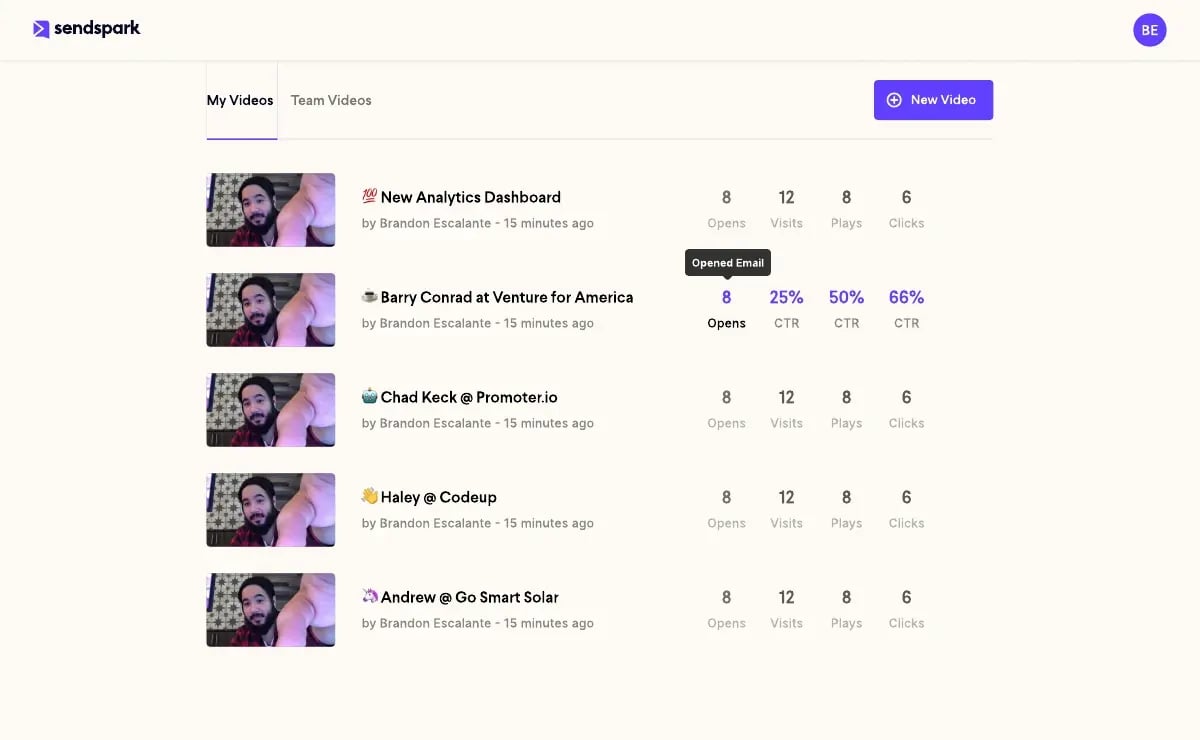
Sendspark connects with more than 50 platforms, including HubSpot, Salesforce, Outreach, and SalesLoft, so video engagement data — watch time, clicks, completion — syncs directly into your CRM instead of living in a separate dashboard. Real-time alerts notify you the moment a prospect watches, and CRM merge tags handle the name and company personalization automatically across thumbnails and landing pages.
Quick Reference: Mistake vs. Fix
| Mistake | Why It Hurts Reply Rates | Fix |
|---|---|---|
| Not segmenting your audience | Generic videos feel mass-produced and get ignored | Group by role, industry, and funnel stage before recording |
| Getting personalization wrong | Overuse of names/details feels robotic or invasive | Reference business-relevant context, not personal trivia |
| Poor video quality | Bad audio/lighting signals carelessness | External mic, quiet room, eye-level camera |
| Weak calls-to-action | Vague asks stall momentum | Specific, low-friction next step in the final third |
| Not tracking performance | Every viewer gets treated the same | Use watch time and CTA clicks to tailor follow-up |
| Sounding like generic AI video | Erodes trust with AI-skeptical buyers | Use your own voice/face; be upfront about AI personalization |
Frequently Asked Questions
What are the most common mistakes in personalized video outreach?
The most common mistakes are skipping audience segmentation, overusing a prospect’s name or personal details, recording with poor audio or lighting, ending with a vague call-to-action, and not tracking watch time or clicks to guide follow-up. A newer sixth mistake is producing video that reads as generic AI output rather than a genuine, personally recorded message.
Does AI voice cloning make personalized video outreach sound fake?
Not when it’s built from your own recorded voice. AI voice cloning inserts a prospect’s real name and details into audio recorded by an actual person, which sounds different from a synthetic AI avatar reciting a fully generated script. The distinction matters more in 2026, since Forrester research shows 19% of B2B buyers lose confidence in a purchase after encountering AI content that feels inaccurate or misleading.
How do I segment my audience for personalized video outreach?
Start with role and buyer persona, since a VP of Sales and an SDR respond to different priorities. Add industry or vertical next, then factor in funnel stage — reserve fully 1-to-1 video for high-priority, late-stage accounts, and use mass-personalized video with dynamic name and company fields for top-of-funnel volume.
What’s the ideal length for a personalized video outreach message?
Keep cold, top-of-funnel outreach under 60 seconds; more than two-thirds of viewers watch to the end within that window, and attention drops sharply after 30 seconds. Warmer, bottom-of-funnel prospects who already know your product can handle a longer 2-5 minute walkthrough.
How can I tell if my personalized video outreach is actually working?
Track watch time, completion rate, click-through rate, and CTA clicks rather than judging by reply volume alone. A prospect who watches 80% or more of your video but doesn’t click the CTA is a warmer lead than the reply count suggests, and deserves a different follow-up than someone who dropped off in the first five seconds.
Is personalized video outreach still effective now that AI video is everywhere?
Yes — Salesforce’s 2026 State of Sales report shows signal-personalized outreach still achieving 15-25% reply rates against a 3-5% industry average for generic cold email. The format works; the bar has just moved toward videos that read as genuinely personal rather than templated, since buyers are actively more skeptical of obviously synthetic content.
How many personalized sales videos should a rep send before changing their approach?
Give a segment and script combination enough volume to read the signal clearly — typically 20-30 sends — before drawing conclusions. If completion rates or CTA clicks stay low across that batch, the issue is usually segmentation, opening hook, or CTA clarity rather than volume, so adjust one variable at a time and retest.
Sources & References
- HubSpot 2026 State of Marketing Report — “93.2% of marketers report that personalized/segmented experiences led to more leads and purchases” and “62.7% believe we need more unique, human-centered content to compete with AI content” (2026)
- Forrester Research, via Digital Commerce 360 — “19% of business buyers said they were less confident in their purchase decisions because AI systems produced inaccurate or misleading results” (2025)
- Salesforce 2026 State of Sales Report — “Signal-personalized outreach achieves 15-25% reply rates, compared to the 3-5% industry average for cold email” (2026)
Record One Video. AI Personalizes Thousands.
Sendspark is the AI video personalization platform for B2B sales. Record once, and AI voice cloning generates thousands of individually personalized videos with dynamic backgrounds and personalized thumbnails — each prospect hears their name, sees their website, in your voice. Sales teams see 2-3x more replies.
Get Started NowTopics: blog