Video is the future of business communication. Why? It’s personal, engaging, and far more effective than text. Tools like Sendspark make it easy to record, personalize, and share videos that drive results. Here’s what you need to know:
- 3x higher response rates: Businesses using video outperform text-based outreach.
- AI-powered personalization: Sendspark lets you record once and customize videos for thousands, using features like voice cloning and dynamic backgrounds.
- Seamless sharing: Instantly generate links, GIF previews, or embed videos in emails and LinkedIn.
- Analytics integration: Track video engagement and sync insights with CRMs like HubSpot or Salesforce.
Sendspark simplifies video outreach, helping businesses stand out in crowded inboxes while saving time.
How to Make AI Personalized Videos at Scale (2 Min Demo)
How Sendspark Records Videos
Sendspark gives you the tools to create engaging, personalized videos that leave a lasting impression. With three recording modes - webcam, screen, or a combination of both - you have the flexibility to tailor your message to your audience. The platform is accessible via a Chrome Extension for quick browser-based use or a Desktop App for recording over applications like PowerPoint or PDFs. Let’s dive into what each mode offers.
Webcam Recording for Personal Messages
The “Face” mode is designed for direct, camera-to-viewer communication, making it ideal for introductions, product pitches, or follow-ups where a personal touch matters. You can enhance your appearance with features like a “Touch Up Appearance” slider, background blur, or virtual backgrounds. The built-in 3-second countdown and on-screen pause/resume controls ensure a smooth recording experience.
For quick access, pin the Sendspark icon to your Chrome toolbar. Once your video is recorded, it’s hosted on a customizable landing page where you can add titles, logos, and call-to-action buttons to make your message stand out.
Screen Recording for Demos and Presentations
Screen recording is perfect for showcasing product demos, proposals, or presentations. You can choose to record a specific Chrome tab for a clean, professional look, an application window like Slack or PowerPoint, or your entire desktop to highlight multiple applications. For seamless audio and video sync, especially when working with non-browser applications, the Desktop App is your go-to tool. Recording a single Chrome tab also keeps your viewers focused by hiding bookmarks, open tabs, and desktop clutter.
Combined Webcam and Screen Recording
The “Both” mode combines the best of both worlds, overlaying your face in a resizable bubble on top of your screen content. You can adjust the bubble’s shape, size, and position - or use the “Spotlight” feature to enlarge it in the center of the screen for a personal introduction before transitioning to your demo.
For more dynamic presentations, such as PowerPoint slides or PDFs, the Desktop App allows you to overlay your camera bubble seamlessly. Plus, Sendspark’s “Add Video” feature lets you record a single high-quality demo and then personalize it with short introductions for different prospects - saving time while keeping your outreach personal.
“I’m confident I’ve found the best video prospecting tool, and it’s Sendspark. Welcome to the world where AI meets video.” - William Padilla, Account Executive, GRIN
How to Share Videos Instantly with Sendspark
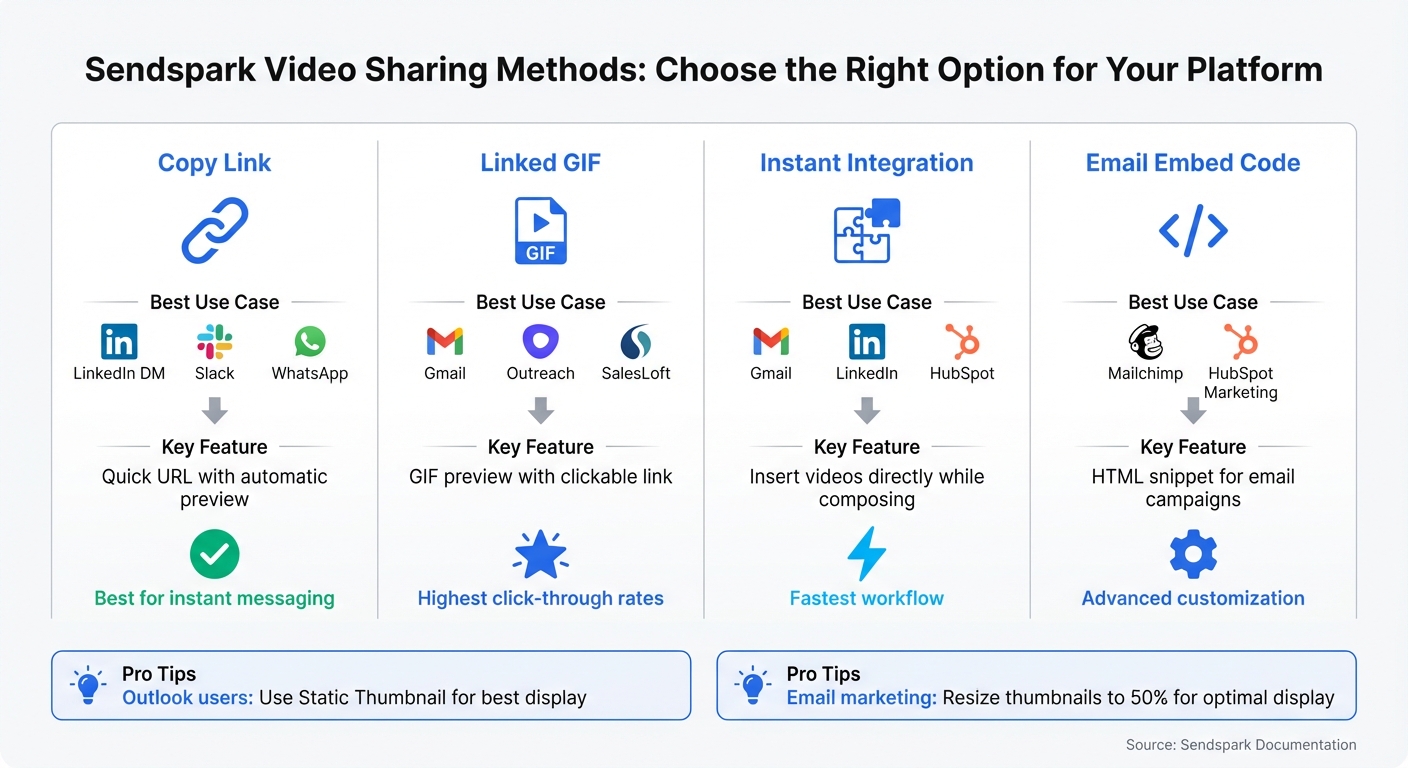
Sendspark Video Sharing Methods Comparison Guide
Once you’ve recorded your video, sharing it is just as simple.
Generate Shareable Video Links
Sendspark makes sharing videos a breeze by automatically generating a shareable URL after you record. Just click “Copy Link” to grab the link and share it wherever you need.
For email outreach, opt for the “Copy Animated Thumbnail” feature. This creates a clickable link paired with a GIF preview of your video, which grabs attention in crowded inboxes and often leads to higher click-through rates.
Sharing on platforms like Slack, WhatsApp, or LinkedIn DMs is seamless - just paste the link, and these platforms will “unfurl” it to display a video preview. No extra steps required.
| Sharing Method | Best Use Case | Key Feature |
|---|---|---|
| Copy Link | LinkedIn DM, Slack, WhatsApp | Quick URL with preview |
| Linked GIF | Gmail, Outreach, SalesLoft | GIF preview with clickable link |
| Instant Integration | Gmail, LinkedIn, HubSpot | Insert videos directly while composing |
| Email Embed Code | Mailchimp, HubSpot Marketing | HTML snippet for email campaigns |
Pro tip: If you’re using Outlook, stick to “Copy Static Thumbnail” to ensure the image displays correctly.
These sharing options help you integrate video links effortlessly into your communication workflows.
Add Videos to Emails and LinkedIn Messages
Beyond simple link sharing, Sendspark integrates directly into popular messaging platforms for even more convenience. By installing the Sendspark Chrome Extension, you can embed videos directly into Gmail, LinkedIn, HubSpot, and Outreach. Once installed, a Sendspark icon appears in the compose window, letting you record and insert videos without leaving the platform.
For LinkedIn, the extension works in Direct Messages, InMail, and Sales Navigator. Just note that video thumbnails will only display for 1st-degree connections or those who’ve already accepted your InMail. For public posts on LinkedIn or Facebook, download your video as an MP4 and upload it to ensure maximum visibility.
When using email marketing platforms like Mailchimp or HubSpot Marketing Cloud, leverage the HTML embed code provided by Sendspark. For the best display, resize the video thumbnail to 50%.
You can also customize the video landing page before sharing. Add a personalized title, your company logo, brand colors, and Call-to-Action buttons like “Book a Meeting” or “Reply with Video” to encourage immediate engagement. Take it a step further by using merge tags to automatically include the recipient’s name, company, or job title in the video page or thumbnail for a personal touch.
“Sendspark is ‘fiber for your funnel.’ Whenever leads, or customers, are stuck, you can send a Sendspark video to get things moving!” - Bethany Stachenfeld, Co-founder, Sendspark
sbb-itb-afd3f9e
AI Personalization for Sales Outreach at Scale
Creating personalized videos for every prospect can be a massive time drain, while generic videos often go unnoticed. Sendspark’s AI changes the game by letting you record once and personalize thousands of videos in just minutes. Here’s how its AI-powered features make personalization faster and more effective.
AI Voice Cloning to Say Recipient Names
Instead of recording a new video for each prospect, Sendspark uses AI to clone your voice and insert personalized greetings. For example, you can record a video using the placeholder word “watermelon” where the recipient’s name would go. The AI replaces “watermelon” with each prospect’s actual first name, creating a natural and customized introduction. This approach has been shown to boost email outreach replies by up to 300%.
A real-world success story comes from Warmly, which used this strategy in December 2025 to re-engage closed-lost opportunities. By personalizing their outreach, they achieved 2-3x higher email engagement and closed over $100,000 in ARR in just one month.
To get the best results, ensure your audio quality is top-notch. Use a good microphone, avoid background noise, and leave a short pause before and after saying “watermelon.” This helps the AI seamlessly insert names without sounding robotic.
Dynamic Video Backgrounds for Custom Visuals
Sendspark doesn’t stop at voice personalization. It also customizes the visuals behind your video bubble, automatically displaying relevant content like the prospect’s company website or LinkedIn profile. The AI even simulates scrolling and cursor movements, making it look like you’re actively browsing their site in real time.
This kind of visual personalization helps build trust quickly, showing prospects that you’ve done your homework. To avoid any hiccups, set a “fallback URL” for the background in case the prospect’s website link isn’t available in your data. With bulk personalization tools, you can scale this process effortlessly.
Record Once, Personalize Thousands of Videos
Sendspark allows you to import contacts from platforms like CSV files, HubSpot, or Salesforce, and then generates personalized videos for your entire list - whether it’s 100 or 10,000 prospects. The system processes these videos in minutes, making it easy to scale your outreach.
For cold outreach, keep your videos concise - 20–40 seconds is the sweet spot for maintaining engagement.
“Simply record one video, upload contacts and then generate videos, the time to generate 10, 100 or 1,000 videos is a matter of minutes.” - Ben Wright, Sendspark
Video Analytics and CRM Integration
Recording and sharing videos is only the beginning. The real magic happens when you track how viewers interact with your videos, turning video outreach into a measurable and effective sales strategy. Sendspark takes care of this by tracking every interaction and syncing the data directly into your CRM. This makes it easier to spot potential leads and automate timely follow-ups.
Track Video Engagement Metrics
Sendspark provides detailed insights into who’s watching your videos by capturing information like their name, location, device type, and browser. The platform’s dashboard offers powerful tools, such as engagement heatmaps, data on replayed or skipped sections, and click-through rates on CTAs (call-to-action buttons). If a prospect clicks a CTA or schedules a meeting through an embedded calendar, Sendspark immediately notifies you, ensuring you never miss the chance to follow up promptly.
For managers, the admin dashboard delivers a broader view, showing long-term stats, the best-performing videos, and the most active team members. These insights allow your team to focus on the most engaged viewers, boosting conversion rates.
And the best part? All these metrics are seamlessly integrated into your CRM, giving you actionable insights at your fingertips.
CRM Integration with HubSpot, Salesforce, and More
Sendspark takes video engagement data and feeds it directly into popular CRMs like HubSpot, Salesforce, Zoho, Close, and HighLevel. Every interaction - whether it’s a video view, watch percentage, CTA click, or even a like - gets logged as a timeline event in your CRM. This gives sales reps the information they need to tailor their outreach and close deals more effectively.
Want to connect Sendspark with HubSpot? It’s simple. Head to the Integrations tab, select “HubSpot”, click “Connect”, and enter your 7-digit Hub ID under “Tracking Snippets.” Once connected, you can automate workflows based on video engagement. For instance, you could move a lead to a “hot prospect” stage after they fully watch a demo or trigger a follow-up email when they click a CTA.
“Sendspark helps us increase the level of humanization, personalization, and trust in our prospecting emails to establish ourselves in the space and land big clients.” - Chris Draper, Head of Sales, OmniPanel
Conclusion: Improve Your Outreach with Sendspark
Sendspark is changing the way businesses connect with prospects, making video recording and personalization both easy and scalable. Instead of having to pick between time-intensive one-to-one videos or impersonal mass messages, you can record a single video and use AI to personalize it for thousands - complete with voice cloning and dynamic backgrounds.
The platform fits right into your workflow. Whether you’re using Gmail, LinkedIn, HubSpot, Salesforce, or one of over 50 supported tools, Sendspark lets you embed personalized videos directly into your sales sequences. Plus, real-time analytics help you follow up at the perfect moment.
The numbers speak for themselves. Sendspark users have reported double the LinkedIn reply rate. One customer even generated over $100,000 in annual recurring revenue (ARR) in just one month using the platform. With a stellar 4.8/5-star rating on G2 from more than 350 reviews, Sendspark has become a trusted tool for sales teams aiming to stand out in crowded inboxes and build meaningful connections.
FAQs
How does Sendspark make videos feel personalized for each recipient?
Sendspark adds a personal touch to videos by incorporating dynamic variables that adjust automatically for each recipient. Think of details like the recipient’s first name, company name, or job title appearing directly in the video. These elements are pulled straight from your contact data, so every video feels custom-made without extra work on your end.
This method helps you build authentic, one-on-one connections on a larger scale, making your messages stand out and resonate more effectively.
What are the advantages of using Sendspark for business communication?
Sendspark enables businesses to communicate more effectively through personalized AI-personalized video outreach, which can increase engagement and response rates. By using videos, messages feel more approachable and genuine, helping to build stronger relationships with prospects, customers, and even team members.
The platform allows users to either record new videos or upload existing ones with ease. Plus, it integrates smoothly with tools like HubSpot and email automation platforms, making it simple to share videos within outreach campaigns. Sendspark also incorporates AI-powered personalization, allowing businesses to customize videos for individual recipients effortlessly. This feature can help secure more meetings and potentially boost revenue.
On top of that, Sendspark includes tools to track video engagement and assess ROI. These insights help teams fine-tune their strategies for better outcomes. It’s a practical solution for creating, sharing, and optimizing personalized video communication in a professional environment.
How do I connect Sendspark to my CRM for seamless video sharing?
Sendspark makes it simple to integrate with popular platforms like HubSpot, Outreach, Gmail, LinkedIn, Intercom, and Zendesk. These integrations let you create and share personalized videos directly from your CRM or communication tools, helping you save time while keeping your outreach personal.
To get started, install the Sendspark Chrome Extension. This handy tool gives you instant access to video recording and sharing features right from your CRM or email interface. For instance, in HubSpot or Outreach, you can record videos straight from contact pages or email templates, making your messages more engaging and efficient.
Need help setting things up? Sendspark offers detailed, step-by-step guides to walk you through the process. This ensures you can seamlessly incorporate video into your workflow without disrupting your current systems.
Related Blog Posts
- How AI Personalization Boosts Social Video Impact
- How to Record Your Screen for Free: Complete Guide for Sales Teams
- Online Screen Recorder: No Download Required
- How to Record Your Computer Screen for Free
Topics: blog