Want to know if your videos are driving sales? The Sendspark and Salesforce integration brings video engagement data - like watch time, CTA clicks, and viewer behavior - directly into your CRM. Sales reps can track video interactions alongside emails and calls, making follow-ups more targeted and effective. Here’s what you need to know:
- What It Does: Tracks six key video events (e.g., Video Watched %, CTA Clicked) and syncs them with Salesforce.
- Why It Matters: Helps identify high-interest leads, prioritize outreach, and measure video ROI.
- How It Works: Uses Sendspark webhooks to push engagement data into Salesforce records, enabling real-time notifications and automated workflows.
Teams using Sendspark report 3x higher reply rates when adding personalized videos to their outreach. Ready to take your video strategy to the next level? Let’s dive into the details.
Why Connect Sendspark with Salesforce
Benefits of Tracking Video Engagement
Integrating Sendspark with Salesforce gives you more than just basic play counts - it provides detailed insights into how prospects interact with your videos. You’ll know exactly how much of the video they watched, whether they clicked on your call-to-action (CTA), or even if they liked the content. All of this information is added directly to Contact or Lead records in Salesforce, offering a complete view of engagement alongside emails, calls, and meetings. For a complete playbook, see our guide to broader playbook for sales automation in CRM.
The integration tracks six key events: Video Viewed, Video Played, Video Watched %, Video CTA Clicked, Video Liked, and Video Created. Each event sheds light on different aspects of engagement. For example, a prospect who watches 90% of your demo video and clicks the CTA is clearly more interested than someone who stops watching after 15 seconds. This level of detail helps you pinpoint high-intent prospects and prioritize your outreach efforts more effectively.
Another major advantage is the ability to measure the ROI of video in your sales process. By building reports in Salesforce, you can see exactly which deals were influenced by Sendspark videos, connecting video engagement directly to revenue. If your team uses AI-powered personalization, Sendspark can even generate personalized videos at scale for Salesforce contacts, seamlessly integrating them into automated cadences. This lets you maintain a personal touch without the need for manual effort for every prospect.
Next, let’s look at how these insights can directly impact your sales performance with timely, personalized outreach.
For a broader view of how these numbers connect to team performance, track the right sales enablement KPIs alongside your video engagement data.
How Video Tracking Affects Sales Performance
Detailed engagement metrics from Sendspark can significantly boost sales results. Teams that incorporate personalized Sendspark videos into their outbound campaigns report three times higher reply rates compared to text-only messages. And it’s not just about getting more responses - it’s about starting better, more qualified conversations. Experts in the field have highlighted how video personalization fosters deeper connections and leads to higher-quality interactions.
Real-time notifications take this a step further. When a prospect watches 85% of your product demo, for instance, your sales rep can follow up within minutes - not hours or days - referencing the exact content the prospect engaged with. This immediacy makes your outreach more relevant and impactful.
The integration also supports automated workflows based on engagement levels. For example, you can create Salesforce Processes and Flows that trigger specific actions, like updating a lead status to “Hot” when someone watches more than 75% of a video and clicks the CTA. You could also automatically assign follow-up tasks when a prospect re-watches a key video, such as one covering pricing. These automations ensure no engaged prospect is overlooked, while also reducing the burden of manual data entry for your team.
sbb-itb-afd3f9e
How to Set Up Sendspark and Salesforce Integration
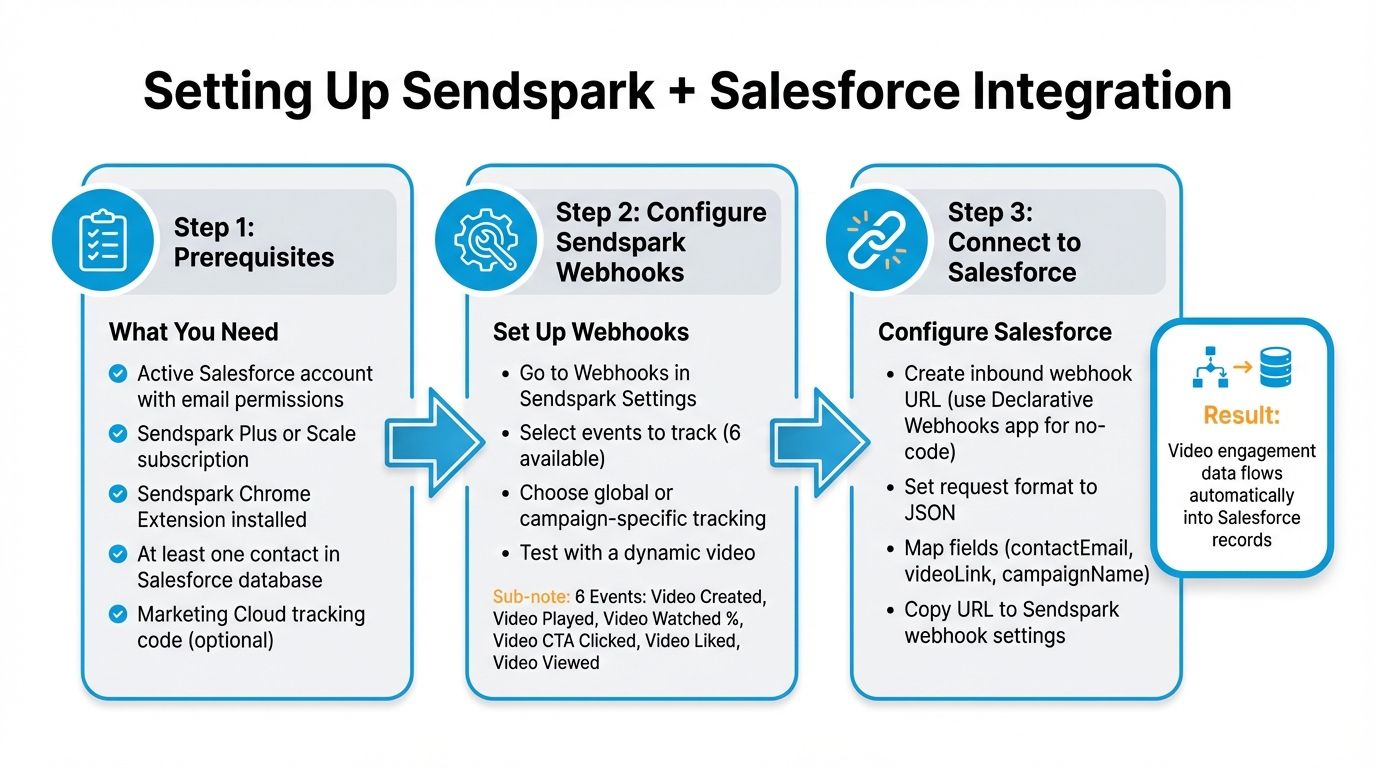
How to Set Up Sendspark and Salesforce Integration in 3 Steps
What You Need Before Starting
Before diving in, ensure you have an active Salesforce account with email permissions and a Sendspark Plus or Scale subscription.
“The Salesforce integration is only available on our plus and scale tiers.” - Sendspark
You’ll also need the Sendspark Chrome Extension installed to record and share videos directly within Salesforce emails. Additionally, make sure you already have at least one contact in your Salesforce database, as dynamic videos can only be shared with existing contacts.
Keep in mind that webhooks will only track interactions for video email sales funnels - not for every video in your Sendspark library. Also, to map engagement data to the correct Salesforce records, the viewer’s email address must be known. Installing the Marketing Cloud tracking code on Sendspark video pages ensures video page views are tracked alongside other website visits.
Finally, you’ll need to set up Sendspark webhooks to enable data to flow into Salesforce.
Setting Up Sendspark Webhooks
Once you’ve covered the prerequisites, it’s time to configure your webhooks. Since there isn’t an AppExchange solution for this, you’ll need to send data via webhooks. Start by heading to the Webhooks section in your Sendspark Settings. Here, you’ll add the webhook URL generated in Salesforce (we’ll cover this next) and select the events you want to track.
Sendspark allows you to track six types of events:
- Video Created
- Video Played
- Video Watched %
- Video CTA Clicked
- Video Liked
- Video Viewed
For instance, “Video Watched %” captures how much of a video a viewer watched before leaving, while “Video CTA Clicked” triggers when someone clicks the call-to-action button.
By default, webhooks are set to “global”, meaning they’ll track events across all dynamic campaigns in your workspace. If you prefer to focus on specific campaigns, use the “Connect Campaign” option to limit tracking. Once configured, test your setup by creating a dynamic video and interacting with it using effective video sales pitch techniques to confirm that data flows correctly into Salesforce.
After setting up your webhook in Sendspark, the next step is linking it to Salesforce.
Configuring Salesforce to Receive Engagement Data
To receive Sendspark data, you’ll need to create an inbound webhook URL in Salesforce. If you’re comfortable with coding, you can use APEX calls to create webhooks. For a no-code solution, the “Declarative Webhooks” app from Salesforce AppExchange is an alternative.
When configuring your inbound call template in the Declarative Webhooks app, set the request body format to JSON. Sendspark provides a sample JSON response with fields like contactEmail, videoLink, and campaignName, which you can map to Salesforce objects such as Contacts or Leads. Leave the response section blank, as Sendspark doesn’t require a specific return payload.
Finally, copy the Salesforce-generated URL and paste it into the Sendspark Webhook settings. This completes the integration, allowing Sendspark engagement data to flow seamlessly into your Salesforce records.
Video Engagement Metrics You Can Track in Salesforce
Metrics to Track
Once your Sendspark integration is set up, six types of video engagement events are automatically pushed into your Salesforce records:
- Video Viewed: Logged when someone opens the video page.
- Video Played: Recorded as soon as the video starts playing.
- Video Watched %: Displays the percentage of the video a viewer has watched.
- Video CTA Clicked: Indicates strong interest when a viewer clicks on your call-to-action (CTA) button, like “Book a Meeting” or “Request a Quote.”
- Video Liked: Captures positive feedback when viewers hit the thumbs-up button.
- Video Created: Confirms that a new personalized video has been generated for a contact.
“You will be able to see watch percentages, call-to-action conversions, and other video engagement metrics in order to follow up accordingly”.
These metrics are seamlessly integrated into your Salesforce records, giving your CRM even more actionable data.
How Metrics Connect to Salesforce Objects
Once these metrics are logged in Salesforce, they enable real-time actions based on viewer behavior. Sendspark links engagement data to your Salesforce records using the viewer’s email address. Through the Declarative Webhooks app, you can configure the webhook to send data to specific Salesforce objects, such as Leads or Contacts. The JSON payload contains fields like contactEmail, videoLink, campaignName, and thumbnailUrl, which are automatically updated on the relevant record.
This setup ensures that every video interaction is tracked alongside other CRM data. You can even initiate Salesforce Flows based on these events. For example, if a “Video CTA Clicked” event is logged, Salesforce can automatically create a high-priority task for the account owner or update the Lead Status to “Hot.”
“This will help you understand how viewers are engaging with video, build reports to see which deals were influenced by Sendspark, and understand what ROI Sendspark is providing to your sales process”.
How to Use Engagement Data to Improve Sales Outreach
Now that you understand engagement metrics, it’s time to turn those insights into actionable sales strategies. By focusing on specific viewer behaviors, you can create timely, personalized follow-ups that align with your prospects’ position in the buying process.
Creating Automated Workflows in Salesforce
Salesforce Flows can help you automate responses based on how prospects interact with your videos. For instance, if someone clicks on a video call-to-action (CTA), you can set up a workflow to automatically update their Lead status or assign a high-priority task for the account owner to follow up. You can also flag leads as highly engaged when they watch a significant portion of your content.
For a no-code solution, the Declarative Webhooks app from Salesforce AppExchange is a great option. It allows you to map Sendspark’s JSON payload - including details like contactEmail, videoLink, and thumbnailUrl - to Salesforce objects without needing to write Apex code. You can configure global webhooks to monitor all workspace activity or narrow the focus to specific video campaigns.
“And not only can you track, you can act! You will be able to see watch percentages, call-to-action conversions, and other video engagement metrics in order to follow up accordingly.”
– Bethany Stachenfeld, Co-founder, Sendspark
Building Reports and Dashboards
Use Salesforce to create reports that filter by watch percentage, helping you pinpoint your most engaged prospects. Add dashboard components that display real-time “Video CTA Clicked” events so sales reps can act immediately when a prospect shows interest. Combine data from events like Video Played, Video Liked, and Video Watched % to uncover trends in your pipeline and connect engagement metrics to deal progress. When setting up webhooks, ensure the data is mapped correctly to Salesforce objects like Leads, Contacts, or Opportunities so the metrics show up in the right reports.
These reports and dashboards provide a clear path for prioritizing follow-ups, which brings us to the next step.
Personalizing Follow-Ups Based on Engagement
Use engagement behavior to craft follow-ups that feel tailored. For example, if a prospect watched 100% of your product demo, they might be ready for a technical discussion or pricing details. On the other hand, someone who only watched 10% might need a more introductory approach. Tracking “Video Liked” events can also help you identify warm leads who haven’t scheduled a meeting yet, giving you a chance to reach out with personalized messaging.
Additionally, the “Share URL” and “Thumbnail URL” from the webhook payload can be used to automatically populate follow-up emails in Salesforce. This ensures your outreach feels consistent and effortless.
Best Practices for Video Tracking and Data Privacy
Tracking how viewers engage with your videos can provide valuable insights, but it comes with responsibilities. Gathering data effectively while respecting privacy and adhering to regulations is key. Before you connect any video tool to your CRM, it is worth running through a vendor security and data privacy checklist covering data retention, hosting location, and named sub-processors.
How to Track Email Addresses Accurately
Tracking video engagement goes beyond just knowing how many people watched. For deeper insights, it’s essential to link specific interactions - like views or clicks - to individual contacts. However, if you’re using standard email platforms like Gmail, the analytics you receive are often limited to general data, such as watch percentages, IP addresses, and locations. These don’t pinpoint the viewer’s identity.
To track individual viewers, sending videos through a supported CRM like Salesforce is a game changer. This approach connects each video view directly to a Salesforce record, enabling precise tracking of metrics like “Video Watched %” or “Video CTA Clicked” for specific Leads, Contacts, or Opportunities. Setting up webhooks allows the system to capture email addresses and tie them to these engagement metrics seamlessly.
If you’re managing personalized video campaigns at scale, embedding the Sendspark snippet code into your email ensures that the data integrates smoothly into your CRM. For an even easier workflow, the Sendspark Chrome extension lets you record and send videos directly through Salesforce emails, keeping everything connected.
This level of accuracy in email tracking ensures that your engagement metrics can be fully utilized for targeted follow-ups and meaningful interactions.
Staying Compliant with Data Privacy Laws
While accurate tracking is powerful, safeguarding privacy is equally important. Adhering to laws like GDPR and CCPA is not just about avoiding penalties - it’s about building trust. Sendspark’s Salesforce integration helps centralize viewer data, making it easier to handle access requests or deletions as required by these regulations.
Enterprise teams that need video engagement data flowing beyond Salesforce — into internal databases, data warehouses, or on-prem analytics systems — can use DreamFactory to create governed API endpoints for any data source. DreamFactory’s self-hosted platform provides role-based access and identity passthrough, which is particularly valuable for organizations with strict data residency or compliance requirements.
To align video tracking with your compliance framework, install the Salesforce Marketing Cloud tracking code on your video pages. This ensures that privacy standards applied to your website also extend to your video content. Additionally, when setting up webhooks, enable call authentication to secure data transfers between Sendspark and Salesforce.
For an added layer of privacy, limit Sendspark’s engagement triggers to only those that are essential. This approach reduces potential privacy risks while still providing actionable insights. Keep in mind that the Salesforce integration is available exclusively with a Plus or Scale tier subscription.
Conclusion
Integrating Sendspark with Salesforce changes the game for video outreach in sales. Instead of wondering if prospects actually watched your videos, you’ll get clear engagement metrics - like watch percentages, CTA clicks, and viewer behavior - right in your CRM. This kind of visibility allows your team to focus on prospects who are genuinely interested and identify which deals are being influenced by your video content. It’s all about turning insights into actionable steps and smarter workflows.
With tools like webhooks to sync engagement data into Salesforce, a Chrome extension for quick personalized videos, and dynamic video campaigns for scaling personalization, the possibilities are endless. Once set up, you can automate workflows that trigger tasks for key events - like when a prospect clicks on your video CTA. Already, more than 10,000 revenue teams are using Sendspark, and teams that include personalized videos in their outreach see 3x higher reply rates.
Make the most of this engagement data. Use Salesforce reports to measure video ROI, build dashboards to spotlight your hottest leads, and tailor follow-ups based on what your prospects actually watched. These tools, combined with automated workflows and real-time reporting, create a direct link between video engagement and sales success. As Emilia K., VP of Marketing at Userpilot, puts it:
“Sendspark videos work as pre-boarding. If prospective customers watch the videos, then they understand why they need our product better, and are more receptive to demos”.
Just remember, this integration is a premium feature available with Plus and Scale subscriptions.
FAQs
Can I track video engagement on Leads and Contacts?
Yes, it’s possible to monitor video engagement on Leads and Contacts by syncing video view data with Salesforce records. This integration provides access to key metrics like watch percentages and call-to-action interactions directly within the records. These insights make it easier to track and assess engagement levels efficiently.
What if Salesforce can’t identify the viewer’s email?
If Salesforce can’t match the viewer’s email, Sendspark might record video engagement as anonymous activity. This makes it tougher to connect the interaction to a specific contact or lead. To prevent this, make sure emails are properly captured and passed through the integration. You can do this by embedding videos in personalized emails or within CRM workflows. Without identifiable data, follow-ups may have to depend on broader indicators like IP addresses or device information, which are less precise.
How do I trigger Salesforce Flows from video events?
Integrating Sendspark with Salesforce enables you to use video events as triggers for Salesforce Flows. For example, when someone views a video or clicks on a call-to-action (CTA), this engagement data can automatically update records in Salesforce. These updates can then kick off specific Flows, tailored to the video interactions being tracked.
Related Blog Posts
- Best Practices for Video in Sales Engagement Platforms
- How to Use Video Analytics for Better Outreach
- How to Use Video Analytics for Sales Follow-Ups
- Top Metrics for CRM-Triggered Video Campaigns
Topics: blog