Updated July 2026
Personalized video marketing is the fastest way to make a cold prospect feel like you recorded something just for them. Instead of a generic broadcast, you send a video that says their name, shows their website, and speaks to their situation. Done well, it turns ignored outreach into booked meetings.
What changed since this guide first went out is the "at scale" part. You used to choose between recording one video for one person or blasting a generic clip to everyone. AI video personalization erased that choice. Today you can record one video and personalize thousands of copies automatically, and this guide walks through exactly how.
Below you'll get a plain-English definition, the evidence that personalized video works, the three types you can send, how AI voice cloning and dynamic backgrounds changed the math, and a practical checklist for videos that actually convert.
Key Takeaways
- Personalized video marketing tailors a video to a specific viewer — their name, company, website, or context — instead of a one-size-fits-all clip, and it consistently beats generic video and plain text.
- The demand is real: McKinsey reports 71% of consumers expect personalized interactions and 76% get frustrated without them, while personalization typically drives a 10-15% revenue lift.
- There are three types — one-to-one, mass-personalized, and hybrid/combined — and the right one depends on how hot the lead is and how much you need to scale.
- AI voice cloning and dynamic backgrounds collapsed the old scale-vs-authenticity tradeoff: one recording becomes thousands of videos that each feel one-to-one.
- Sendspark customers report 200-300% higher email response rates and 40-50% more meetings booked from AI-personalized video outreach.
What Is Personalized Video Marketing?
Personalized video marketing is the practice of sending video that is tailored to one specific viewer — using details like their name, company, role, or website inside the video itself — rather than a generic broadcast. It moves past text-based personalization to make the viewer feel directly addressed, which is why it earns more opens, replies, and meetings than one-size-fits-all content.
Traditional video marketing aims for broad appeal with a single clip everyone sees. Personalized video speaks to one person. Picture a prospect opening a video where you greet them by name, reference their company's recent news, and show their own website in the background. That level of relevance captures attention in a way a generic explainer never will. For how this fits into a full-funnel B2B video marketing strategy, not just outbound prospecting, see our practical playbook for sales teams.
Historically, creating personalized video meant recording a separate clip for every prospect — accurate, but slow and impossible to scale. Modern personalized video marketing is powered by AI video personalization instead. These tools automate the customization so you can generate thousands of unique videos from a single recording, making true one-to-one communication possible without a one-to-one time cost.
For B2B sales and marketing teams, that shift matters. When each video feels like a direct conversation, you cut through generic outreach and build trust faster. If you want the strategic playbook behind this channel, Sendspark's comprehensive guide to AI video personalization for outbound sales goes deeper than this overview.
Does Personalized Video Marketing Actually Work?
Yes — personalized video marketing consistently outperforms generic video and text outreach on engagement, conversion, and ROI. It works because it combines two things buyers respond to: the trust that comes from seeing a real person, and the relevance that comes from a message built for them specifically. The data from independent research and real sales teams backs this up.
Start with video's baseline pull. The Wyzowl State of Video Marketing 2026 report found that 91% of businesses now use video as a marketing tool, 93% of video marketers call it an important part of their strategy, and 82% say it delivers good ROI. Layer personalization on top of a medium that already performs, and the returns compound.
Personalization has its own strong track record. According to McKinsey, personalization typically drives a 10-15% revenue lift, can cut customer acquisition costs by up to 50%, and can raise marketing ROI by 10-30%. McKinsey also found that 71% of consumers now expect personalized interactions and 76% get frustrated when they don't get them — so generic outreach is not neutral, it actively disappoints.
The conversion effect is measurable at the CTA level too. HubSpot found that personalized calls to action convert 202% better than default CTAs across a study of more than 300,000 CTAs. A personalized video is essentially one long, personalized call to action, so that principle applies to the whole message, not just the button.
Sales teams see the payoff in their pipeline. Sendspark customers, using its AI video personalization platform for B2B sales, report a 200-300% increase in email response rates and roughly 50% higher click-through rates. Those videos translate into 40-50% more meetings booked, with some teams hitting a 2:1 meeting-to-reply ratio — while saving 10+ hours per campaign by automating creation and distribution.
"Personalized video stopped being a nice-to-have for us. Our SDRs used to spend hours writing individual messages that got ignored. With AI-personalized video we're seeing reply rates we didn't think were possible — it shows the prospect you did your homework, instantly."
— Head of Sales Development, B2B SaaS company
The mechanism is simple. Video conveys tone, facial expression, and sincerity in a way text cannot, which builds rapport quickly. When that video is also personalized, it signals real effort and relevance, so the viewer feels valued instead of processed. That combination is what drives the engagement and conversion numbers above.
Record One Video. AI Personalizes Thousands.
Sendspark is the AI video personalization platform for B2B sales. Record once, and AI voice cloning generates thousands of individually personalized videos with dynamic backgrounds and personalized thumbnails — each prospect hears their name, sees their website, in your voice. Sales teams see 2-3x more replies.
The 3 Types of Personalized Video (and When to Use Each)
There are three main ways to create personalized video: one-to-one, mass-personalized (template plus variables), and hybrid. They differ on authenticity, scalability, and effort per video, which makes each one a better fit for a different stage of the funnel. If you're starting from a plain screen recording and wondering which of these applies to you, our guide to screen recording vs. AI video personalization breaks down exactly where a recording ends and AI personalization begins. Matching the type to the moment is how you get the results without burning hours you don't have.
1. One-to-one personalized video
One-to-one personalized video is a unique clip recorded for a single prospect. It delivers the highest authenticity because everything — the greeting, the references, the ask — is built for that person. You can call out a specific line from a discovery call or a detail from their site, and the connection feels genuinely personal. Beyond traditional sales reps, AI video personalization is increasingly used by digital entrepreneurs — coaches, consultants, and creators selling AI services — to reach potential clients at scale without losing the personal feel that converts.
The catch is scale. Manual one-to-one videos take real time per prospect, so reserve them for high-value moments: hot leads showing strong intent, follow-ups after a discovery call to confirm next steps, or re-engaging a cold high-value account where the deal size justifies the effort. In those spots, a truly custom video shows a level of commitment generic outreach can't touch.
2. Mass-personalized video (template + variables)
Mass-personalized video uses one pre-recorded template with dynamic fields — the viewer's name, company, or a custom thumbnail — inserted automatically for each recipient. You record the core message once, and the personalized elements get added programmatically. Historically this felt less authentic than one-to-one because the body of the message was identical for everyone.
Its advantage is near-infinite scale: thousands of unique videos from one recording. That makes it ideal for top-of-funnel prospecting where you need reach, and for lifecycle emails like welcome, onboarding, and re-engagement sequences, where a personalized touch lifts open and click-through rates without any per-prospect recording. If you send video from your inbox, this is the type most personalized video software for B2B sales is built to automate.
3. Hybrid / combined video
Hybrid video combines both approaches. You record a short, personalized intro for a specific prospect, then attach it to a longer, reusable demo, explainer, or product walkthrough. The prospect gets a personal greeting and relevant context up front, then rolls into standardized content you never have to record again.
This balance is powerful: the intro builds rapport and relevance while the reusable core keeps you efficient and on-message. Hybrid works well for prospecting at scale when you want a personal touch plus a demo, and for onboarding or sharing complex product details. It's the "record once, reuse forever" middle path between the other two types.
| Type | Best for | Scales? | Authenticity | Effort per video |
|---|---|---|---|---|
| One-to-one | Hot leads, post-discovery follow-ups, re-engaging cold high-value accounts | No (manual) | Highest | High |
| Mass-personalized (template + variables) | Top-of-funnel prospecting, lifecycle and onboarding emails | Yes (automated) | Moderate — high with AI | Low after setup |
| Hybrid / combined | Prospecting at scale, onboarding, sharing demos with a personal intro | Yes (reusable core) | High (personal intro) | Moderate — short intro only |
How AI Voice Cloning and Dynamic Backgrounds Changed Personalized Video
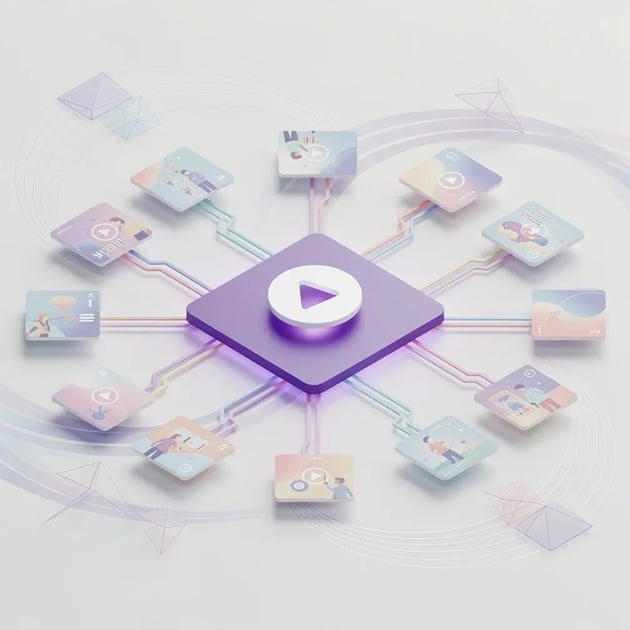
Since 2024, generative AI has rewritten personalized video marketing by collapsing the old tradeoff between scale and authenticity. AI voice cloning and dynamic backgrounds now let you generate thousands of videos that each feel one-to-one. That shift moved the category past simple token swaps into genuine hyper-personalization — mass-personalized video that no longer feels mass-produced.
The biggest lever is AI voice cloning. You record your core script once, in your own voice. AI then produces a named greeting for every prospect in that same cloned voice, so a single recording becomes thousands of videos that each open with "Hi [name]" spoken by you. Nobody re-records anything, yet each prospect hears their own name in a voice that sounds human because it is yours. Sendspark's guide to AI voice cloning best practices and guardrails covers how to do this without sounding synthetic.
Dynamic backgrounds handle the visual half. Instead of a generic backdrop, the video automatically inserts each prospect's own website, company logo, or a relevant screenshot behind you. The viewer literally sees their world referenced in the frame, which signals you did the research and makes the message land as bespoke. Teams using dynamic backgrounds that show the prospect's website report higher watch-through rates because the opening frame is instantly relevant. The same principle applies to adding a logo to a video thumbnail, which extends that same personalization to the preview image itself.
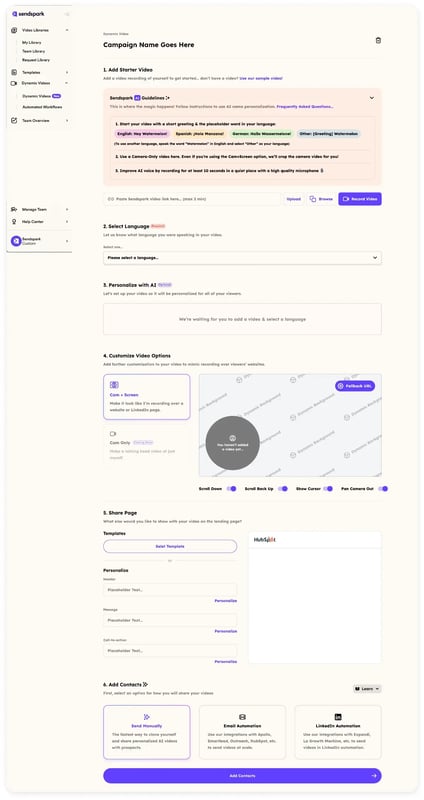
These capabilities are the core of Sendspark, the AI video personalization platform for B2B sales. The idea is straightforward: you record one video, and AI voice cloning plus dynamic backgrounds generate thousands of individually personalized videos — each prospect hears their name and sees their own website, in your cloned voice. Personalization that used to be impossible at scale now runs on autopilot, and it feels as personal as a one-to-one recording.
The frontier keeps moving. AI avatars and synthetic voice can extend personalization to fully AI-generated videos for specific use cases, though human-recorded video with AI personalization usually keeps a higher trust factor. Meanwhile, signal-based personalization and intent data decide who gets which video and when, triggering the right message off a prospect's real-time behavior or firmographics so relevance peaks at the moment of delivery.
Advanced strategy
Pair AI voice cloning with signal-based triggers: when a prospect visits your pricing page, auto-generate a personalized video that names them, shows their website, and references the exact page they viewed. Relevance plus timing is what pushes watch-through rate up.
How to Create Personalized Videos That Convert
Creating personalized videos that convert takes more than dropping in a first name. It comes down to four things: personalize on real context, keep it relevant instead of creepy, design the whole experience from thumbnail to CTA, and lead with genuine warmth. Get those right and you lift both reply rates and booked meetings; get them wrong and personalization can backfire.
Go beyond "Hi {FirstName}"
A name token is table stakes now — prospects have seen it a thousand times, so it no longer signals effort. Personalize on context instead: reference a recent funding round, a job posting, a product launch, or something specific on their website. Context-based personalization proves you actually looked, which is the whole point. Use tokens for the greeting, but let the substance of the message carry the personalization.
Don't overdo it — and don't be creepy
There's a line between relevant and unsettling. Repeating someone's name five times in 30 seconds reads as scripted, and referencing data they didn't knowingly share makes them wonder how much you're tracking. Keep personalization to details a reasonable person would expect you to know from public sources, and use their name once or twice, not constantly. Our guide to AI video personalization without being creepy breaks down where that line sits.
Common mistake
Cramming every data point you have into one video. Over-personalization spikes discomfort and drops replies. Pick one or two relevant, public details — not a dossier — and let the rest of the message do the work.
Design the whole experience, not just the video
A great video nobody opens is wasted effort. Earn the click with a personalized thumbnail or animated GIF preview that shows the personalization before the play button. Then host the video on a branded landing page — a digital sales room you control — with one clear call to action right below it, instead of sending viewers to a platform where ads or unrelated content compete for attention.
Measure what happens next. Track watch-through rate to see where viewers drop off, and reply rate to see what converts, then iterate. If you want a full framework, Sendspark's guide to tracking video ROI and the key metrics for sales teams maps engagement to revenue.
Lead with empathy and connection
Face-to-face works because so much of communication is non-verbal — expression, tone, and eye contact do the persuading. Bring that to the screen: smile, look into the camera, and use natural gestures. Personalization delivered without warmth feels contrived, but a friendly human speaking directly to a named prospect is hard to ignore. This human element is exactly why personalized video beats a wall of text for sales prospecting.
Pro tip
Keep outbound personalized videos to 30-60 seconds. Watch-through rate drops sharply past the one-minute mark, and a tight, warm, well-personalized clip outperforms a long one nearly every time.
Personalized Video Marketing at a Glance
Here's the whole guide in one view — what each part of personalized video marketing is for and where it fits your outreach.
| Element | What it does | Why it matters |
|---|---|---|
| Definition | Video tailored to one viewer's name, company, and context | Feels like a conversation, not a broadcast |
| Proof | 91% of businesses use video (Wyzowl); personalization lifts revenue 10-15% (McKinsey) | Both trends are established, not experimental |
| Three types | One-to-one, mass-personalized, hybrid | Match the type to lead value and scale needs |
| AI layer | AI voice cloning + dynamic backgrounds | One recording becomes thousands of one-to-one videos |
| Execution | Context over tokens, right length, clear CTA, warmth | Lifts watch-through and reply rates |
Frequently Asked Questions
What is personalized video marketing?
Personalized video marketing is sending video tailored to a specific viewer — using their name, company, role, website, or context — instead of a generic clip everyone sees. It combines the trust of video with the relevance of personalization, which is why it earns higher open, reply, and conversion rates than text or generic video.
Does personalized video marketing actually work?
Yes. McKinsey reports personalization typically drives a 10-15% revenue lift and that 71% of consumers expect personalized interactions. HubSpot found personalized CTAs convert 202% better than default ones. Sendspark customers report 200-300% higher email response rates from AI-personalized video outreach.
How do you create personalized videos at scale?
You use AI video personalization instead of recording one clip per person. With Sendspark you record one video, and AI voice cloning plus dynamic backgrounds generate thousands of individually personalized videos — each with the prospect's name and website. That's how teams get one-to-one relevance without one-to-one effort.
What is the difference between personalized and mass-produced video?
Mass-produced video is a single generic clip sent to everyone. Personalized video adapts to each viewer — name, company, website, or a custom thumbnail. Modern AI makes mass-personalized video feel one-to-one, so you get the scale of mass production with the relevance of a custom recording.
How long should a personalized sales video be?
Keep outbound personalized videos to 30-60 seconds. Watch-through rate drops sharply past one minute, so a short, warm, well-personalized clip almost always outperforms a longer one. Save longer videos for later-stage moments where the prospect has already opted into more detail.
Is AI-generated personalized video better than recording one-to-one?
For scale, yes. AI voice cloning and dynamic backgrounds let one recording become thousands of personalized videos, which manual recording can't match. For your highest-value accounts, a true one-to-one recording still wins on authenticity. Most teams use AI for volume and reserve manual videos for hot leads.
How much does personalized video marketing software cost?
Pricing varies by volume and features. Sendspark's plans start at $49/month for solo users and scale up for teams that need AI voice cloning, dynamic backgrounds, and CRM integrations. Compare options in our guide to the best personalized video software for B2B sales before you commit.
Sources & References
- Wyzowl — "91% of businesses use video as a marketing tool; 93% say it's an important part of their strategy" (State of Video Marketing 2026)
- McKinsey & Company — "Personalization drives a 10-15% revenue lift; 71% of consumers expect personalized interactions" (2025)
- HubSpot — "Personalized CTAs convert 202% better than default CTAs" (study of 300,000+ CTAs)
- McKinsey & Company — "The future of personalization and how to get ready for it"
Record One Video. AI Personalizes Thousands.
Sendspark is the AI video personalization platform for B2B sales. Record once, and AI voice cloning generates thousands of individually personalized videos with dynamic backgrounds and personalized thumbnails — each prospect hears their name, sees their website, in your voice. Sales teams see 2-3x more replies.