Eighty-seven percent of marketers say video gives them a positive ROI — but most B2B sales teams are still treating video production like a Hollywood shoot. The teams getting the most replies aren’t the ones with the best cameras. They’re the ones with the most efficient production workflow. This guide covers everything: setup, scripting, recording, editing, and how AI is changing what “production at scale” even means for B2B sales and marketing teams. If you want the strategy layer, start with the B2B video marketing ultimate guide — this guide focuses on how to make the videos.
Key Takeaways
- B2B video production doesn’t need expensive gear — a quality webcam and proper lighting outperform a $5,000 camera in a poorly lit room, every time.
- According to Wyzowl, 87% of marketers say video gives a positive ROI — and B2B teams using personalized video see 200-300% higher email reply rates.
- The script is the most important production element: a clear problem-solution structure keeps videos under 90 seconds and maximizes watch completion.
- AI tools let B2B teams record one master video and auto-generate personalized versions for hundreds of prospects — eliminating hours of repetitive recording.
- The winning production workflow: record once, personalize at scale with AI, track opens and replies in your CRM.
What Is B2B Video Production?
B2B video production is the process of creating video content specifically for business-to-business communication — from cold outreach and sales demos to proposal walkthroughs and customer onboarding. Unlike brand or consumer video, B2B video production is measured by one metric: does it move a prospect or customer toward a decision?
That distinction changes every production decision you make. A consumer brand video might run 2-3 minutes and prioritize aesthetics. A B2B sales video should run 60-90 seconds, lead with a specific business problem, and have one clear call to action. You’re not making a commercial — you’re having a conversation at scale.
The Main Types of B2B Sales Videos
Understanding the type of video you’re producing determines the setup, script, and distribution strategy. Most B2B teams produce four main types:
| Video Type | Purpose | Ideal Length | Funnel Stage |
|---|---|---|---|
| Prospecting video | Cold outreach to book a meeting | 30-90 seconds | Top of funnel |
| Demo video | Show product solving a specific problem | 2-5 minutes | Mid funnel |
| Follow-up video | Re-engage after a meeting or proposal | 60-90 seconds | Mid to bottom funnel |
| Onboarding video | Guide new customers through setup or processes | 2-10 minutes | Post-sale |
For sales prospecting, the prospecting video is the workhorse. This guide focuses primarily on prospecting and follow-up videos because that’s where production efficiency matters most — you’re recording (or personalizing) these at high volume.
The B2B Video Production Setup You Actually Need
A practical B2B video production setup costs under $300 and takes 30 minutes to configure. You need a decent webcam or camera, good lighting, clear audio, and a clean background. According to HubSpot’s video marketing research, video quality expectations for B2B sales content are much lower than for marketing campaigns — prospects care about the message, not production value.
Camera Options
The most practical options for B2B sales teams, ranked by value:
- Logitech C920 or C922 webcam ($70-100) — Records 1080p, sits on your monitor, requires no setup. The most common choice for SDRs and AEs recording daily prospecting videos.
- Built-in laptop camera — Acceptable if you’re close to the screen and have good lighting. Many modern MacBooks record sharp 1080p. Test it before committing — if it looks grainy, a $70 webcam will immediately upgrade your quality.
- Mirrorless or DSLR with USB capture card ($500+) — Worth considering for polished demos or executive thought leadership content. Unnecessary for high-volume daily prospecting.
Pro tip
Position your camera at or slightly above eye level. A camera angled up at you from a laptop keyboard makes you look unprofessional. Stack books under your laptop or use an adjustable stand to get the lens to face level.
Audio
Audio quality matters more than video quality in B2B production. A crisp $50 USB microphone with slightly blurry video is more watchable than crystal-clear 4K video with room echo. Options:
- USB condenser mic ($40-80) — Blue Snowball, Audio-Technica ATR2100. Plug in, position 6-8 inches from your mouth, done.
- Headset mic — A gaming headset or Apple AirPods Pro sound surprisingly clean for short prospecting videos. Acceptable for high-volume outreach.
- Built-in laptop mic — Avoid where possible. Room noise and keyboard typing are clearly audible and signal low effort to prospects.
Lighting
One ring light or a window to your side transforms your video quality. Place your primary light source facing you — never behind you (backlight makes you a silhouette). A simple 10-inch ring light costs $25-40 and solves 90% of lighting problems for desk-based recording.
Background and Recording Software
Three background options for B2B video, each with trade-offs:
- Real environment — A tidy office or bookshelf reads as authentic. Avoid cluttered or distracting spaces.
- Virtual background — A branded office image or solid color is clean but can look artificial on lower-end webcams.
- Dynamic personalized background — Show the prospect’s own website or LinkedIn profile behind you. Sendspark’s video personalization does this automatically — it signals genuine research and dramatically increases engagement.
For recording software, Sendspark’s screen recorder handles webcam capture, optional screen share, and video hosting with a trackable link — all from your browser. No download required.
How to Write a B2B Sales Video Script That Gets Replies
The script is the single most important element of B2B video production. A well-structured 60-second script consistently outperforms a polished 3-minute monologue. Use a four-part structure that mirrors how B2B buyers make decisions: acknowledge their context, state the problem, offer the solution, and make the next step clear.
The 4-Part B2B Video Script Structure
- Personalized opener (5-10 seconds) — Reference something specific about the prospect: their company, a recent announcement, a role change, a LinkedIn post. This proves the video wasn’t mass-sent. Example: “Hey Sarah, I noticed Acme just launched a new outbound sales team last month…”
- Problem statement (10-15 seconds) — Name the specific pain point your prospect likely has, given their role and company stage. Don’t describe your product yet. Example: “A lot of VP Sales at companies at your stage tell us that cold email reply rates have dropped below 2% — and it’s getting harder to stand out.”
- Solution bridge (15-20 seconds) — Briefly explain how you solve that specific problem. One sentence on the mechanism, one on the outcome. Cite a result if you have one: “We help outbound teams personalize video at scale — one customer went from 1.8% to 5.4% reply rate in their first 30 days.”
- Single call to action (5-10 seconds) — Ask for one specific thing. Not “let me know if you have any questions.” Something concrete: “Would a 15-minute call Thursday or Friday make sense?” or “I put a link below to our ROI calculator — takes 2 minutes.”
Total: under 90 seconds. For in-depth scripting frameworks, the B2B video script guide covers advanced structures including demo scripts, proposal walk-throughs, and re-engagement templates. For proven outreach-specific scripts, see 8 proven video scripts for sales prospecting.
Common mistake
Don’t read your script word-for-word. Write it as bullet points, not full sentences, so your delivery sounds natural. Prospects can tell immediately when someone is reading — it kills the conversational tone that makes video effective.
Script Length by Video Type
| Video Type | Target Length | Approximate Word Count | Script Format |
|---|---|---|---|
| Cold prospecting | 30-60 seconds | 75-150 words | 4-6 bullet points |
| Follow-up after meeting | 60-90 seconds | 150-225 words | 6-8 bullet points |
| Product demo highlight | 2-3 minutes | 300-450 words | Structured outline |
| Proposal walkthrough | 3-5 minutes | 450-750 words | Slide-by-slide notes |
Sendspark’s AI script generator and teleprompter writes a first draft based on your prospect’s name, company, and role, then displays it as a scrolling prompt while you record. This cuts script-writing time from 10 minutes per video to under 2.
Record One Video. AI Personalizes Thousands.
Sendspark is the AI video personalization platform for B2B sales. Record once, and AI voice cloning generates thousands of individually personalized videos with dynamic backgrounds and personalized thumbnails — each prospect hears their name, sees their website, in your voice. Sales teams see 2-3x more replies.
Get Started NowRecording and Editing B2B Sales Videos Efficiently
Efficient B2B video production means recording in as few takes as possible and keeping editing to a minimum. The goal isn’t a polished broadcast — it’s an authentic conversation. One small stumble or natural pause makes you sound human, not unprepared. Most top-performing SDR videos are first or second takes.
Recording Workflow
A consistent pre-recording routine eliminates wasted time and mental overhead:
- Environment check (2 minutes) — Lighting on, mic plugged in, browser tabs closed, phone on silent. A notification popping up mid-recording means starting over.
- Script review (1-2 minutes) — Read your bullet points twice. Don’t memorize — internalize the flow so you can talk through them naturally.
- Camera check (30 seconds) — Confirm your face is centered, eyes are near the top third of the frame, and your background is clean.
- Record (1-2 takes) — If a take is good enough, use it. Perfectionism kills volume. A “good enough” first take sent today beats a perfect third take sent tomorrow.
The Minimal Editing Approach
For prospecting and follow-up videos, minimal editing is correct. The only exception is longer demos where you cut dead time between screen shares. For short outreach videos:
- Trim the first 1-2 seconds of dead air at the start
- Trim the final second after your CTA ends
- Do not add music, text overlays, or transitions — they signal “marketing video” and reduce the personal, 1:1 feel that makes video email effective
Most B2B video platforms handle basic trimming in-browser. Sendspark’s editor lets you trim and add a click-through CTA button directly on the video — no separate editing software needed. Every view, play completion, and CTA click is tracked through video analytics built into the platform.
Thumbnails That Get Clicked
The thumbnail is the first thing your prospect sees in their inbox. A custom thumbnail showing your face with a visible play button overlay significantly outperforms a generic static frame. For personalized video campaigns, Sendspark auto-generates a thumbnail with a play button — this is enough for most outreach scenarios. If you want to test custom thumbnails, a screenshot from the video at a moment of strong eye contact is consistently the highest-performing option.
How AI Transforms B2B Video Production at Scale
AI fundamentally solves the scale problem in B2B video production. Recording personalized videos one by one is effective but unsustainable at volume — a team of 10 SDRs sending 50 personalized videos per week would spend 20+ hours on recording alone. AI separates the recording step from the personalization step, collapsing that production time to near-zero.
The “Record Once, Personalize at Scale” Workflow
Here’s how AI-powered B2B video production works in practice:
- Record one master video — A single, well-structured prospecting video using the 4-part script framework. This is your evergreen recording.
- AI generates a personalized intro — Sendspark’s AI voice cloning creates a unique opening that says each prospect’s name and company in your actual voice. No re-recording required.
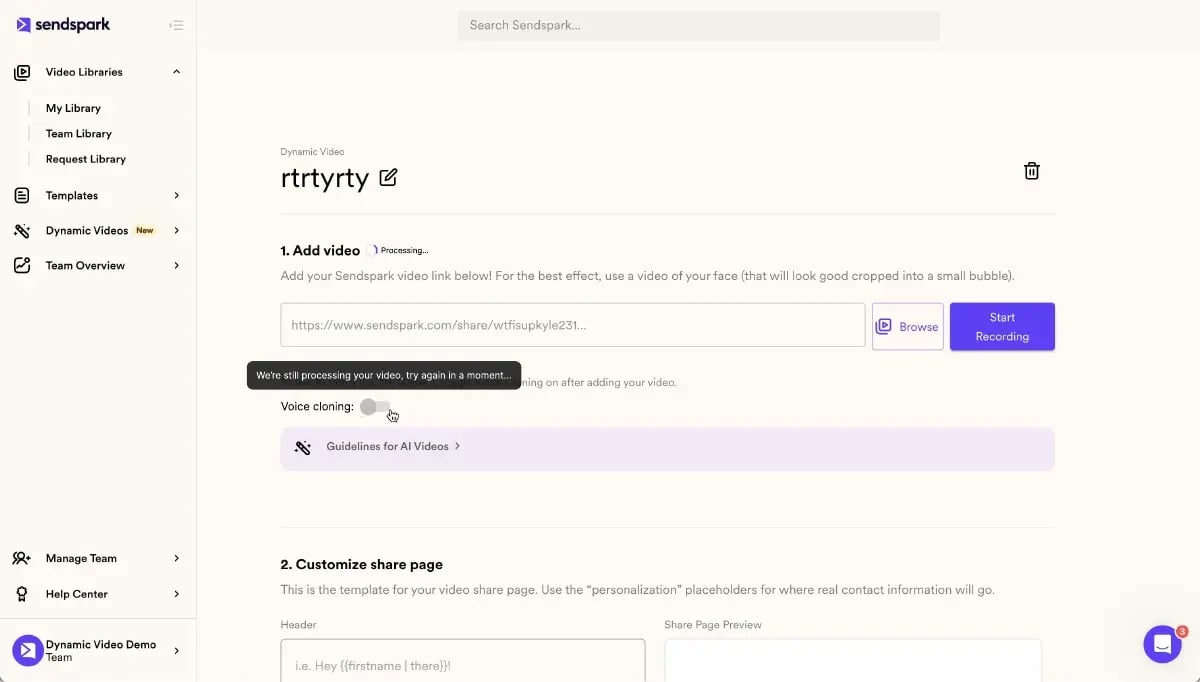
- Dynamic background personalizes the scene — The AI swaps in each prospect’s website or LinkedIn profile as the video background, making every recipient feel the video was made specifically for them.
- Combine and send at scale — The platform merges the AI intro with your master recording and delivers personalized versions to your entire prospect list.
This is Sendspark’s AI Personalized Video feature. Instead of recording 50 individual videos, you record once and AI handles the personalization. According to the Salesforce State of Sales report, B2B buyers expect personalization at every touchpoint — AI video production is how teams deliver that expectation at scale.
Advanced strategy
Build a library of master recordings for different buyer personas and funnel stages: one for cold VP-level outreach, one for post-demo follow-up, one for reactivating stale pipeline. AI personalizes each for every recipient. You get template efficiency with custom-video impact.
CRM Integration: Closing the Production Loop
Production efficiency means nothing if you can’t measure results. AI-powered B2B video platforms connect directly with your CRM so every video view, play completion, and CTA click is recorded against the contact and deal record. With HubSpot integration, you can trigger automated follow-up sequences when a prospect watches more than 80% of your video — one of the highest-intent signals in a B2B sales workflow.
B2B Video Production Method Comparison
| Production Method | Videos Per Week (1 rep) | Time Investment | Personalization Level | Scalability |
|---|---|---|---|---|
| Manual 1:1 recording | 20-30 | 5-8 hours | High | Low |
| Generic template video | Unlimited | 30 minutes setup | None | High |
| AI-powered personalization | Unlimited | 1-2 hours (one-time master + setup) | High (name, company, website) | High |
The AI approach delivers the personalization quality of 1:1 recording with the throughput of templates. For B2B teams doing 50-500 outreach videos per week, this is the only production model that scales without proportionally scaling headcount or hours.
Frequently Asked Questions
What is B2B video production?
B2B video production is the process of creating video content for business-to-business sales and marketing — including cold outreach videos, product demos, follow-up messages, and onboarding content. Unlike consumer video, B2B video prioritizes message clarity and measurable business outcomes over production polish.
How long should a B2B sales video be?
Cold prospecting videos should be 30-90 seconds. Follow-up and mid-funnel videos work well at 60-120 seconds. Product demos run best at 2-5 minutes. Shorter is almost always better in B2B outreach — a concise video with a clear CTA outperforms a longer, comprehensive one in reply rate.
What equipment do I need for B2B video production?
The minimum effective setup is a 1080p webcam ($70-100), a USB microphone ($40-80), and one ring light. Total cost is under $200. Audio quality matters more than camera quality — poor audio is the most common reason prospects stop watching a sales video.
How do B2B teams produce personalized videos at scale?
AI-powered platforms like Sendspark let teams record one master video and auto-generate personalized versions for each prospect using AI voice cloning and dynamic backgrounds. This cuts production time from hours to minutes per campaign without sacrificing personalization quality.
What makes a good B2B video script?
A strong B2B video script follows a four-part structure: personalized opener (reference something specific about the prospect), problem statement (name their pain point), solution bridge (brief mechanism and outcome), and one clear CTA. Write it as bullet points, not full sentences, so your delivery sounds natural.
How do I measure B2B video production ROI?
Track views, play completion rates, CTA clicks, and downstream pipeline impact per video campaign. The strongest engagement signal is completion rate above 80% — connect your video platform to your CRM so these signals trigger automated follow-up and appear in deal records.
Do I need to edit my B2B sales videos?
For short prospecting and follow-up videos, minimal editing is the right approach — trim dead air at the start and end, nothing else. Adding music, text overlays, or transitions makes outreach videos feel like marketing ads, reducing the 1:1 connection that drives video email performance. Save heavy editing for longer demos and thought leadership content.
Sources & References
- Wyzowl — State of Video Marketing — “87% of marketers say video gives them a positive ROI” (2024)
- HubSpot — Video Marketing Research — “Video quality expectations for B2B sales content are much lower than for marketing campaigns; message clarity drives engagement” (2024)
- Salesforce — State of Sales — “B2B buyers expect personalization at every touchpoint throughout the sales process” (2024)
Record One Video. AI Personalizes Thousands.
Sendspark is the AI video personalization platform for B2B sales. Record once, and AI voice cloning generates thousands of individually personalized videos with dynamic backgrounds and personalized thumbnails — each prospect hears their name, sees their website, in your voice. Sales teams see 2-3x more replies.
Get Started Now