Interactive videos are changing how businesses engage with buyers, offering a dynamic alternative to static emails and traditional content — and pairing interactive video with a digital sales room gives buyers one place to explore it at their own pace. Here’s why they work:
- Higher Engagement: Personalized videos boost response rates by 85%, and interactive features like quizzes and clickable elements increase engagement by up to 591%.
- Better Retention: Viewers retain 60% more information when they actively participate, compared to passive content consumption.
- Proven Results: Companies using interactive videos have seen reply rates triple and conversion rates double.
Key features include:
- Hotspots: Clickable overlays for seamless navigation or direct links to products.
- Quizzes and Polls: Gather insights while keeping viewers engaged.
- Personalized Intros: Tailored content grabs attention and encourages action.
Tools like Sendspark make it easy to scale personalization with AI, track video engagement, and integrate with CRMs for streamlined sales outreach. Interactive videos are not just a trend - they’re a powerful way to connect with buyers and drive results.
Browse our picks for the interactive video software.
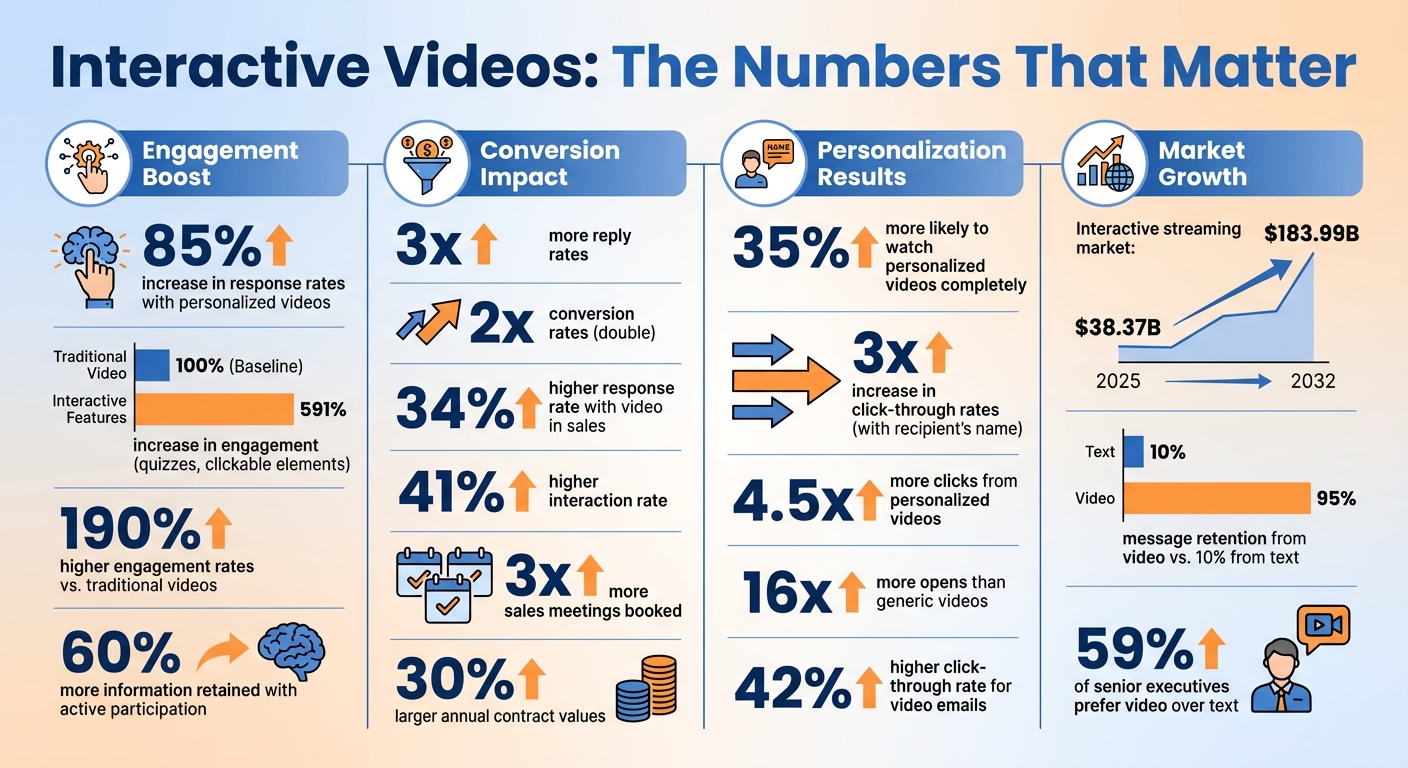
Interactive Video Engagement Statistics and Performance Metrics
Unlock the Power of Personalized Videos: Boost Engagement & Conversion with Interactive CTAs!
Interactive Video Features That Increase Engagement
Interactive videos are all about participation. Instead of passively watching, viewers get to actively engage, thanks to features like hotspots, quizzes and polls, and personalized intros. These tools transform a one-sided presentation into a dynamic conversation, which is exactly what makes them so effective.
Hotspots and Clickable Elements
Hotspots are clickable overlays that can display extra details, navigate to other sections, or link directly to product pages. Think of them as interactive buttons layered over objects, text, or people in a video. Their main advantage? Convenience. Viewers don’t have to pause the video to search for more information - it’s all right there, ready to explore without breaking the flow.
Here’s why this matters: interactive video campaigns have been shown to achieve up to 190% higher engagement rates compared to traditional videos. And the market for interactive streaming is expected to grow from $38.37 billion in 2025 to $183.99 billion by 2032. For instance, in 2024, the Southern California Toyota Dealers Association used an interactive video campaign to promote the bZ4X electric vehicle. By including product cards that viewers could swipe through, they saw a 33-point boost in purchase consideration and an 85% increase in new vehicle registrations in their target area.
“A great pro-tip is to place an interactive element within the first few seconds. This immediately signals to the viewer that this isn’t your typical, lean-back video. It trains them to start looking for ways to engage.” - Mindstamp
When creating interactive videos, keep a few things in mind. Hold shots for 3–4 seconds to ensure viewers notice the clickable elements. Also, make sure the clickable object is clearly visible - avoid awkward angles or extreme close-ups that might confuse viewers.
And if hotspots get viewers involved, quizzes and polls take it a step further by turning them into active participants.
Quizzes and Polls for Two-Way Interaction
Quizzes and polls create a dialogue with your audience. This taps into the generation effect, a psychological principle where people retain up to 60% more information when they actively participate rather than passively watch. It’s a powerful way to make your message stick.
These tools also help you gather insights and qualify leads in real time. By asking prospects about their goals or challenges, you’re not just engaging them - you’re collecting valuable data. Even better, you can use this feedback to personalize their experience. For example, if someone selects “improving response rates” as their top priority, the video can automatically branch into a segment focused on email engagement solutions.
The results speak for themselves. Interactive content can double or even triple conversion rates compared to static videos, and user activity can increase by up to 591%. To keep things smooth, limit your questions to three to five per video. This keeps the experience engaging without overwhelming your audience.
Personalized Intros and Dynamic Elements
Personalized intros take engagement to the next level by making the experience feel tailor-made. Adding a viewer’s name, company logo, or website to a video thumbnail or intro instantly grabs their attention. It’s a small touch that signals the message was created just for them.
This approach works wonders. Personalized videos are 35% more likely to be watched all the way through. Including just a recipient’s name can lead to a 3x increase in click-through rates, and personalized videos generate up to 4.5x more clicks and 16x more opens than generic ones.
The best part? You don’t need to create a unique video for every prospect. Record a single base video with placeholders, and let AI handle the personalization. You can even overlay the video onto a prospect’s LinkedIn profile or company website for added context. This method combines the personal touch of customization with the efficiency of scaling to thousands of viewers.
These features - hotspots, quizzes, and personalized intros - work together to create a richer, more engaging experience that keeps viewers invested from start to finish. They’re not just watching; they’re participating. And that makes all the difference.
How to Create Personalized Interactive Videos with Sendspark
Sendspark makes it easy to create personalized videos that grab attention and drive engagement. Here’s how you can craft a video that feels tailor-made for each recipient, while still keeping the process efficient.
Record a Base Video with Placeholders
Start by recording a single base video using Sendspark’s Chrome extension or Mac app. Instead of addressing each prospect by name, use a placeholder like “Watermelon” for their first name. Keep the video short - about 30 to 60 seconds works well. If you need to include a longer pitch, you can use the “Combine Video” feature to attach a personalized intro to a pre-recorded demo.
“Making the creation aspect easy allows you to spend more time on the message, positioning, and personalization - all the stuff to make your campaign really work.”
- Ben Wright, VP of Revenue, Sendspark
Once your base video is ready, it’s time to layer in AI-driven personalization.
Add AI Personalization at Scale
Personalization is what makes your video stand out. Sendspark’s AI steps in to replace the placeholder name, like “Watermelon”, with each recipient’s actual first name - so “Hey Watermelon” becomes “Hey Bob” or “Hey Sarah”. The AI also updates landing pages dynamically with details like the prospect’s name, company, and logo. To make it even more personal, Sendspark overlays your video onto dynamic backgrounds, such as the recipient’s website or LinkedIn profile. This added touch makes your outreach feel thoughtful and customized.
Once you’ve personalized your video, you can add interactive elements to encourage action.
Add Hotspots and CTAs to Your Videos
After recording, use Sendspark’s landing page editor to include interactive features. Add clickable CTA buttons below the video to guide viewers toward actions like booking a demo or scheduling a call. Personalized CTAs are especially effective, performing three times better than generic ones. You can customize the button text and colors to match your branding. Placing the CTA directly below the video ensures it’s impossible to miss.
For example, Go Smart Solar used this approach in their cold email outreach and saw incredible results - achieving their best sales day of the year after launching their first Sendspark campaign.
sbb-itb-afd3f9e
How to Measure Interactive Video Performance
Sendspark Analytics provides essential insights - like views, watch time, completion rates, and interactive clicks - so you can focus on the leads that are most engaged.
Track Key Metrics with Sendspark Analytics
With Sendspark, you can track views (how many people opened your video), watch time (how long they stayed engaged), and completion percentages (whether they watched the entire video). For interactive elements, you’ll see data on clicks on CTAs, responses to polls or quizzes, and choices made in branching paths.
Even better, Sendspark pinpoints exactly who watched your video, sends real-time email alerts when prospects engage, and integrates seamlessly with tools like HubSpot, Salesforce, and more than 50 other platforms. This means your CRM is automatically updated with engagement data, making it easier to follow up with leads while your message is still fresh in their minds.
“Know exactly who watched your videos and for how long. Get email alerts for interactions and automatically update your CRM with these insights, allowing you to prioritize the most interested prospects.”
- Sendspark
This level of detail helps turn video engagement into actionable business outcomes.
Results You Can Expect from Interactive Videos
Sendspark’s metrics reveal the impact of interactive videos. For instance, personalized videos can boost response rates by 85% compared to text-only outreach, and viewers are 35% more likely to watch personalized videos all the way through.
Interactive videos also lead to stronger conversion rates. Companies using video in their sales efforts report a 34% higher response rate and a 41% higher interaction rate. Even better, video outreach often results in 3x more sales meetings booked and 30% larger annual contract values.
Here’s a real-world example: In May 2025, a compliance SaaS company used Sendspark to target operations leaders at financial institutions. By tailoring their messages to reference specific company updates - like new analyst hires - they saw a noticeable boost in reply rates and sped up their sales cycle.
These results showcase how interactive videos can transform engagement into measurable success.
Best Practices for Interactive Videos in Sales Outreach
Combine Personalized Intros with Product Demos
Recording a custom video for every lead can be a major time drain, while generic demos often fail to grab attention. A better approach? Combine a short, personalized intro with a pre-recorded product demo using Sendspark’s Combined Video feature. Start with a 60-second introduction that mentions the prospect by name and includes relevant details - like a recent funding round or major company milestone - then attach your standard demo. This way, you keep it personal without creating a fully custom video for every lead.
For example, after their Series A funding, Qwilr’s sales team used Sendspark to create these personalized 60-second videos. They referenced prospects’ funding achievements and showcased how Qwilr could help scale outbound sales efforts. The result? A 3× jump in reply rates and several prospects moving straight into the sales pipeline.
Take it up a notch by using AI to overlay the prospect’s website or LinkedIn profile in the video background while you speak. Add a personalized thumbnail - like displaying their company name on a virtual whiteboard - to pique curiosity and increase click-through rates. Then, distribute the video through emails and LinkedIn messages to maximize engagement.
Embed Videos in Email and LinkedIn Messages
Personalized thumbnails are a game-changer for boosting clicks. Use animated GIF previews in emails or record your video with the recipient’s website visible in the background. These subtle touches signal that the content is tailored for them, which is why personalized videos often generate 4.5× more clicks and 16× more opens compared to generic alternatives.
Keep your videos short - under 60 seconds, with 30 seconds being ideal for first contact. Include a clear call-to-action (like a Calendly link) on the video’s landing page so prospects can easily move from watching the demo to scheduling a meeting.
“Curate your audience and keep videos under 60 seconds, ideally around 30 seconds. Address the person by name and explain why you’re reaching out. Keep it relevant, simple, and offer a hook.”
- Ben Wright, VP of Revenue, Sendspark
AI-personalized videos tend to perform better overall, achieving a 42% higher click-through rate than standard text-and-image emails. Plus, 59% of senior executives say they prefer watching videos over reading text. To make follow-ups smoother, sync video engagement data - like views and clicks - directly with your CRM.
Use CRM Integration and Automation for Scale
To take your interactive video strategy to the next level, connect your outreach efforts to your CRM for real-time lead prioritization. By integrating Sendspark with platforms like HubSpot or Salesforce, you can automatically log video engagement data - such as who watched your video and for how long. This allows you to focus on leads who are actively engaging with your content.
Set up instant email alerts for video views and call-to-action clicks so you can follow up promptly while your message is still fresh in the prospect’s mind. Additionally, leverage AI to record one base video and customize key elements - like the recipient’s name, company logo, or LinkedIn profile - for hundreds of prospects at once. This approach lets you scale personalization without sacrificing efficiency.
Sendspark integrates with over 50 platforms, including tools like Clay for enrichment data and Expandi for LinkedIn automation. It also works seamlessly with Apollo and Smartlead for deploying sequences. You can even automate video creation triggered by CRM events or pipeline stages, enabling you to build workflows that respond to prospect behavior without requiring constant manual input.
Conclusion
Interactive videos give sales teams a way to cut through the noise and truly connect with buyers. By incorporating features like hotspots, quizzes, and personalized elements, you turn passive viewers into active participants. The results speak for themselves: personalized videos can increase response rates by 85%, drive 4.5× more clicks compared to generic content, and help viewers retain 95% of your message - far more than the 10% retention from reading text. This level of engagement creates a strong foundation for scalable, effective outreach.
With Sendspark’s AI-powered personalization, you can record a single base video and customize it for hundreds of prospects. Plus, real-time engagement tracking through integrated analytics ensures you know exactly when and how to follow up. By syncing video analytics with your CRM, you can monitor engagement and focus on the leads that matter most.
“Sendspark allows our team to bring a human element to the buying journey.”
- Alberto Piña, Braustin Mobile Homes
Why not test interactive videos in your next sales campaign? Add a personalized intro, embed a clear call-to-action, and see the results for yourself. With over 50,000 companies already using Sendspark and a 4.8/5 rating on G2, it’s clear that interactive video isn’t just a passing trend - it’s becoming the gold standard for sales teams that want to combine personalization with efficiency.
FAQs
How do interactive videos boost engagement compared to traditional videos?
Interactive videos have a knack for grabbing attention and keeping viewers hooked in ways traditional videos simply can’t match. They can boost response rates by as much as 85% and make viewers 35% more likely to watch all the way through. Why? Because these videos invite viewers to actively participate with features like hotspots, quizzes, and personalized intros, turning passive watching into an engaging experience.
Traditional videos are more of a one-way street - viewers watch, and that’s it. Interactive videos, on the other hand, spark direct interaction, making them a game-changer for sales and marketing teams aiming to build stronger connections with prospects. By tailoring content and encouraging two-way engagement, these videos deliver a noticeable lift in both response and conversion rates.
How can interactive videos boost engagement in sales outreach?
Interactive videos can make sales outreach more engaging and tailored to each prospect. By incorporating features like hotspots, quizzes, and customized intros, these videos encourage viewers to actively participate, which can lead to higher response rates and better overall interaction.
AI-powered tools, such as Sendspark, take this a step further by enabling sales teams to personalize videos at scale. With these tools, you can dynamically include details like the recipient’s name, their company information, or even a custom background - like their website. This not only saves time but also adds a personal touch that feels more human and relatable.
For the best results, consider following up after meetings or interactions with a personalized video. Adding interactive elements - like clickable links or questions - can prompt immediate actions while providing insights into viewer engagement. This feedback helps fine-tune your future outreach strategies for even better results.
How does AI help create personalized interactive videos at scale?
AI opens up the ability to produce personalized interactive videos on a large scale by automating crucial customization steps. Take platforms like Sendspark, for instance. They use AI to replicate voices that seamlessly pronounce each recipient’s name, add personalized backgrounds such as a prospect’s website, and generate thousands of unique videos from just one recording. This approach not only saves time but also delivers highly engaging and customized content for your audience.
Related Blog Posts
- Sales Video Best Practices: A Complete Checklist
- How to Use Video in Sales Outreach Without Wasting Time
- Video Drip Campaigns: Key Metrics to Track
- Top Tools for Personalizing Sales Videos in 2026
Topics: blog