Video can transform sales outreach by improving email open rates by 16% and reply rates by 26%. Adding video to your emails can triple conversions, while video in proposals helps close deals 41% faster. Yet, creating personalized videos for every prospect can feel overwhelming and time-consuming.
Here’s the solution: AI-powered tools like Sendspark make personalization scalable. You can record one video and customize it for hundreds of prospects using features like AI voice cloning, dynamic website backgrounds, and automated workflows. This approach saves time while increasing engagement.
Key Takeaways:
- Personalization at Scale: AI tools create thousands of tailored videos from one recording.
- Easy Integration: Connect video tools to CRMs like HubSpot or Salesforce to automate workflows.
- Track Engagement: Use analytics to focus on high-interest prospects.
- Save Time: Automate repetitive tasks like video creation and email embedding.
With these strategies, you can boost response rates, build stronger connections, and close deals faster - all without sacrificing efficiency.
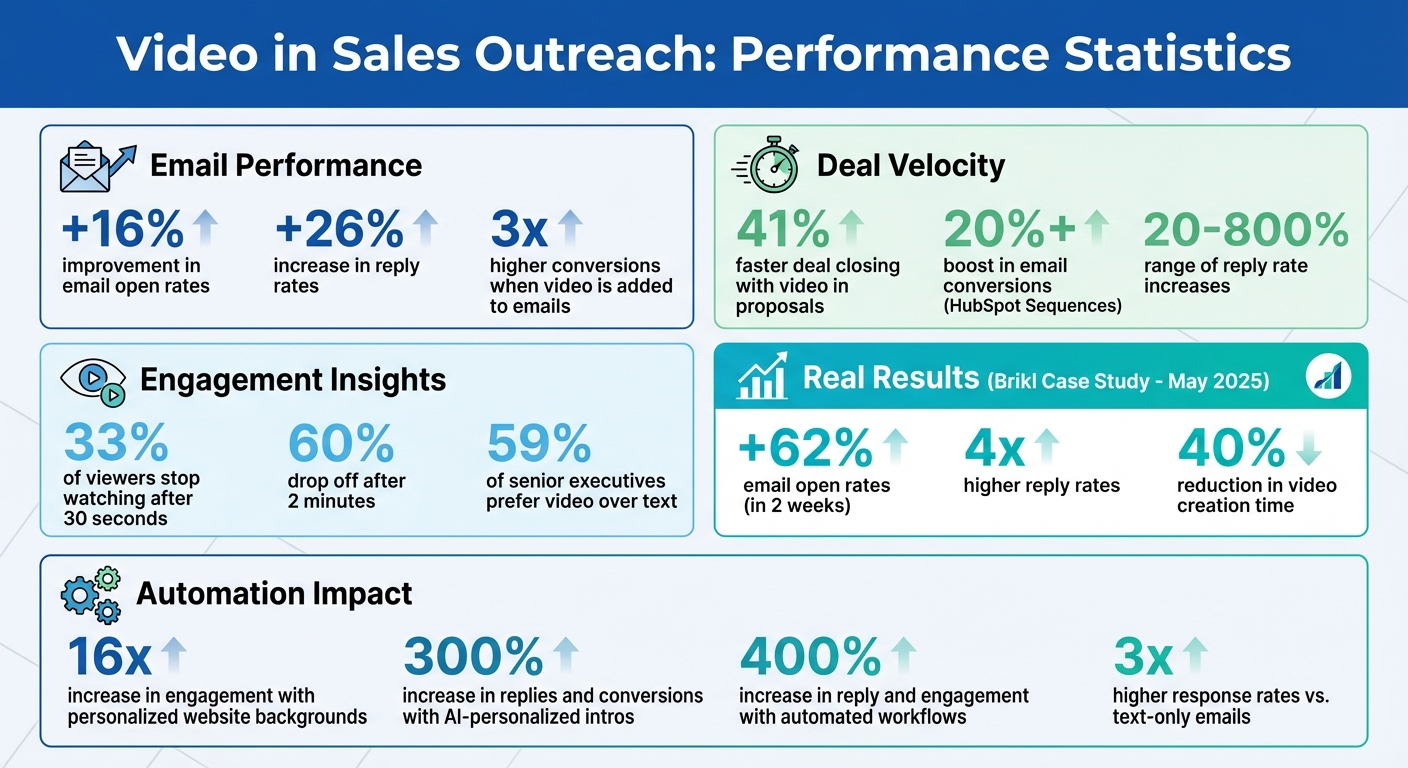
Video Sales Outreach Statistics: Impact on Email Performance and Conversion Rates
How to Make AI Personalized Videos for Sales Outreach (Updated 2025)
Step 1: Record One Video and Personalize It for Every Prospect
Recording individual videos for every prospect is a massive time sink. Sendspark tackles this challenge by letting you record a single video and scale personalization effortlessly. With one base video, their AI generates thousands of unique versions, each customized for a specific recipient. Let’s dive into how these personalization features work.
In May 2025, the ecommerce platform Brikl adopted Sendspark’s personalized video tools for their outbound campaigns. Within just two weeks, email open rates jumped by 62%, and reply rates soared to over four times their usual numbers. On top of that, their Sales Development Representatives cut video creation time by 40% compared to manual methods.
Check out our guide on video outbound playbook to learn more.
Add Prospect Names Using AI Voice Cloning
Start your base video by saying something like, “Hi Watermelon”, where the prospect’s name will go. Sendspark’s AI analyzes your voice, creates a voice clone, and replaces “Watermelon” with each recipient’s actual name. The result? Thousands of personalized videos from one recording.
To get the best results, focus on audio quality. Use a high-quality microphone and record in a quiet, echo-free space. Background noise can make the AI-generated names sound unnatural. Leave a short pause before and after saying “Watermelon” so the inserted name flows naturally in the sentence. Once your video and contact list are ready, hit “Generate Videos.” Sendspark will create personalized versions - usually in under a minute.
Use Prospect Websites as Video Backgrounds
Personalized visuals are a game-changer. Instead of a generic background, Sendspark dynamically displays each prospect’s website or LinkedIn profile behind your camera bubble. It feels like you recorded the video while browsing their site, adding a thoughtful touch.
To activate this feature, include each prospect’s homepage URL or LinkedIn profile URL in the “Background URL” field when uploading your contact list. Sendspark overlays your video onto their actual website during playback. This simple yet powerful feature can increase email engagement by up to 16x. It’s a quick way to enhance personalization without extra effort.
Combine Personalized Intros with Pre-Recorded Demos
Re-recording your pitch for every prospect? Not necessary. With Sendspark’s “Combined Videos” feature, you can pair a short, personalized intro with a pre-recorded demo. Record a 20–40 second intro that mentions the prospect’s business, then merge it with your standard product demo.
After recording your intro, a preview window will appear with an “Add Video” button. Click it, choose your pre-recorded demo, and Sendspark will stitch the two together seamlessly. This approach saves hours while delivering tailored content. A single, well-crafted demo addressing common challenges can be paired with unique intros for each prospect. These AI-personalized intros can drive up replies and conversions by as much as 300%. A small personal touch at the start can make a huge difference.
Step 2: Connect Your Video Tool to Your Sales Stack
After crafting your personalized video strategy, the next step is to connect your video tool to your sales stack. Why? Because manually pasting videos into every email is a time sink. Tools like Sendspark integrate with top CRMs, including HubSpot and Salesforce, to automate this process. Once linked, your video tool becomes part of your existing workflow, delivering those tailored videos automatically - no extra steps needed.
To get started, head to the Integrations tab in Sendspark. Choose your CRM, click “Connect” to sync engagement data, add your CRM’s tracking ID, and install the Chrome Extension. This setup allows you to record and embed videos directly from your CRM’s email compose window. By integrating your video tool with your sales stack, you can combine the power of personalization with the efficiency of automation.
Automatically Add Videos to Email Campaigns
Manually embedding videos in every email is a hassle. Instead, use Sendspark’s “Dynamic Video Snippet.” Just copy it into your CRM email template, and the integration will handle the rest. It automatically pulls data from CRM fields - like or Sendspark - to personalize video thumbnails and landing pages for each recipient.
This approach isn’t just convenient; it’s effective. Sales teams using personalized videos in HubSpot Sequences have reported a 20%+ boost in email conversions. Campaigns powered by Sendspark have seen reply rates climb anywhere from 20% to 800%. Plus, videos are shared as clickable GIF thumbnails instead of bulky attachments, ensuring high deliverability while increasing engagement.
“Sendspark helps us increase the level of humanization, personalization, and trust in our prospecting emails to establish ourselves in the space and land big clients.” – Chris Draper, Head of Sales, OmniPanel
Create Videos Automatically Based on CRM Activity
Sendspark’s “Agentic Workflows” take automation a step further by generating personalized videos whenever prospects hit key stages in your pipeline. For example, when a prospect is enrolled in a sequence or their contact details are updated, Sendspark can instantly create an AI-powered video tailored just for them.
To set this up, map CRM fields like “First Name” and “Company” to Sendspark variables. Make sure to include the “Email” field - without it, the integration won’t work. Adding a short delay after contact enrollment also gives the AI time to generate the video. Teams using these automated workflows have reported reply and engagement increases of up to 400%.
sbb-itb-afd3f9e
Step 3: Measure Video Performance and Adjust Your Approach
Creating personalized videos is just the beginning. The real value comes from understanding how your audience interacts with them. Without tracking viewer engagement, you risk wasting time on disinterested prospects and overlooking those who are genuinely interested.
With Sendspark’s analytics, you can see exactly who watched your videos, how much they watched, and whether they clicked on your call-to-action (CTA). You’ll even get instant notifications when a prospect engages with your video, allowing you to follow up while your message is still top of mind. This timing is crucial: research shows that 33% of viewers stop watching after 30 seconds, and 60% drop off after two minutes. If you notice a trend of viewers leaving around the 30-second mark, it might be time to tighten your video script and deliver your key message earlier.
Track Viewer Behavior and Engagement
Sendspark’s analytics dashboard provides insights like play counts, watch durations, and email open rates, helping you understand what content resonates most with your audience. Use this data to guide your follow-ups. For example, if someone watches more than half of your video or clicks on your CTA, that’s a strong signal of interest and a great opportunity for immediate outreach. On the other hand, if someone opens your email but doesn’t play the video, it might be worth rethinking your approach or message.
Sales teams that incorporate personalized videos with performance tracking often see improvements in email open rates, response rates, and overall efficiency. These insights also allow you to automate follow-ups and refine your strategy based on real data.
Integrate Video Data with Your CRM
By syncing video engagement data with tools like HubSpot or Salesforce, your entire sales team gains a clear view of prospect activity. When a prospect watches your video, this interaction is automatically logged in their CRM profile, saving you from manual data entry. You can even set up workflows to trigger tasks when someone watches over 50% of a video, ensuring no warm lead slips through the cracks. Teams using personalized videos within HubSpot Sequences often experience a 20% or greater boost in email conversions, highlighting the power of seamless CRM integration.
Step 4: Automate Repetitive Video Tasks
Recording a fresh video for every prospect can eat up valuable time - time that could be better spent closing deals. The solution isn’t to ditch video altogether; it’s to automate the repetitive parts so your team can focus on what truly matters: building connections and sealing the deal.
Use Templates for Common Sales Scenarios
Why start from scratch every time? Instead, create ready-to-use templates for recurring scenarios. Tools like Sendspark let you save video landing page setups - complete with headers, call-to-action buttons, and embedded calendars - that can be applied to new videos with just one click. By standardizing elements like email subject lines and landing page CTAs, you can channel your energy into crafting the actual video content.
You can also build a library of templates tailored to specific sales scenarios, like competitor comparisons, post-demo follow-ups, meeting agendas, or proposal walkthroughs. For instance, if a prospect schedules a demo, simply grab your “Just Booked a Demo” template, record a quick personalized intro, and combine it with a pre-recorded product walkthrough. This keeps things personal while cutting down on production time. And the best part? Automation makes scaling this process even easier.
“Using Sendspark transformed our customer success approach. We built a library of pre-recorded answers, allowing our team to quickly respond to common customer questions with personalized videos.”
- Dan Vermont, Head of Operations, Brikl
Scale Your Outreach Without Adding Headcount
Automation doesn’t just save time - it supercharges your team’s capacity. By integrating Sendspark with your CRM through Agentic Workflows, video creation can be triggered automatically. For example, when a prospect is added to a sequence in Outreach or HubSpot, or when they fill out a form or book a meeting via Calendly, the system generates a personalized video without any manual effort.
This means your team can send personalized videos to hundreds - or even thousands - of prospects without needing to hire more people. AI handles the tedious tasks with the best sales AI tools, like cloning voices, inserting prospect names, and even using their websites as video backdrops. Meanwhile, your sales reps can focus on the high-impact work: discovery calls, negotiations, and closing deals. Teams that incorporate video into their outreach often see response rates up to 3× higher compared to text-only emails.
Conclusion
This guide has explored how AI is reshaping video outreach by shifting the focus from repetitive tasks to meaningful, strategic engagement. With tools like AI voice cloning and dynamic backgrounds, you can record a single video and personalize it at scale, reaching hundreds of prospects without spending endless hours in front of the camera. By connecting Sendspark directly to your CRM and sales tools, you can trigger video creation automatically based on pipeline activity. AI-generated templates simplify recurring scenarios, such as demo follow-ups or meeting agendas, making your outreach both efficient and impactful.
The results speak for themselves. Real-world use cases have shown noticeable improvements in email open rates, reply rates, and demo bookings. Other examples highlight similar boosts in response and conversion rates, proving the effectiveness of personalized video outreach.
Detailed engagement tracking ensures your follow-up efforts are focused on the most interested prospects, while automation handles the rest. With Sendspark, your team can send tailored videos to thousands of prospects without needing to grow your team. In fact, teams that incorporate video into their outreach have seen up to 3x higher response rates compared to text-only emails. Additionally, 59% of senior executives say they prefer watching a video over reading text.
The takeaway? Automate the repetitive tasks and focus on personalizing the moments that matter. Sendspark turns video creation into a scalable system that drives meetings, accelerates deals, and boosts engagement like never before.
FAQs
How does AI voice cloning make video outreach more personal and efficient?
AI voice cloning lets you take a single audio recording and transform it into personalized voice-overs for each recipient. It adapts to your tone while seamlessly incorporating details like the recipient’s name, company, or product. This makes your videos feel custom-made without the need for endless retakes, saving you time and helping you scale personalized outreach with ease.
When paired with Sendspark’s tools, the cloned voice integrates perfectly into your video, keeping lip-sync and visual flow intact. The result? A natural, human-like experience that connects with prospects, boosting both engagement and trust. By automating repetitive tasks, allowing quick script tweaks, and maintaining a consistent, polished tone, AI voice cloning takes your personalization efforts to the next level.
What are the advantages of using video tools with CRMs like HubSpot or Salesforce?
Integrating video tools with your CRM - whether it’s HubSpot, Salesforce, or another platform - lets sales teams handle video outreach seamlessly within their current workflows. This integration doesn’t just save time; it simplifies tracking by syncing key video metrics like views, watch time, and clicks directly to contact records. With everything in one place, reps can monitor engagement without constantly switching between platforms. Plus, you can automate follow-ups, update pipeline stages, or add notes based on how prospects interact with your videos - all from a single dashboard.
Adding personalized videos to your CRM email sequences can dramatically improve conversion rates. For instance, embedding videos in email workflows has been shown to boost response rates by over 20%, giving sales reps a distinct edge over plain-text outreach. On top of that, syncing video engagement data with your CRM helps teams prioritize leads, predict revenue, and stay aligned on performance goals.
Sendspark makes video outreach scalable by supporting bulk imports and offering integrations with tools like HubSpot and Salesforce. Sales teams can quickly produce hundreds of personalized videos and send them using their existing email templates. This reduces manual effort, freeing up time for higher-value tasks like closing deals.
How can tracking video engagement make sales outreach more effective?
Tracking video engagement can elevate your sales outreach by making it sharper and more focused. By diving into metrics like who viewed your video, how long they watched, and which segments grabbed their attention, you can quickly spot the most interested prospects and direct your follow-up efforts where they’ll have the biggest impact.
These insights let you tailor your next message to match the viewer’s behavior. For instance, you might emphasize a feature they seemed particularly interested in or clarify something they skipped over. The payoff? Outreach that feels more relevant, builds trust, and boosts response rates. With Sendspark’s real-time engagement data, you can fine-tune your videos, prioritize leads, and streamline your sales process - leading to higher open rates, quicker sales cycles, and steady growth. Plus, you’ll save valuable time by focusing only on prospects who are genuinely interested.
Related Blog Posts
- How to Create Personalized Sales Videos That Convert
- 7 Ways Video Messages Improve Customer Response Rates
- Cold Email vs Video Email: Which Gets More Replies?
- Sales Video Best Practices: A Complete Checklist
Topics: blog