The average cold email now gets a reply just 3.43% of the time, according to Instantly’s 2026 Cold Email Benchmark Report. Automated personalized video follow-ups buck that trend, but only when they’re triggered by real signals instead of blasted on a fixed schedule.
Sendspark is an AI video personalization platform for B2B sales: record one video, and AI voice cloning plus dynamic backgrounds generate thousands of individually personalized videos, each addressing a specific prospect by name and referencing their company. Teams using this kind of CRM-triggered video automation see a 200-300% increase in email response rates and book 40-50% more meetings.
This guide covers the CRM setup, timing rules, and personalization mechanics that make automated video follow-ups actually convert as part of a broader sales prospecting program, plus what changed in 2026 that makes signal-based triggers matter more than ever and the new AI disclosure rules that now apply to voice-cloned video. For a deeper look at wiring your CRM to a video platform, see our comprehensive guide to video CRM integration.
Updated September 2026
Key Takeaways
- Signal-triggered video automation still converts in 2026 even as the platform-average cold email reply rate has fallen to 3.43%, per Instantly’s 2026 Cold Email Benchmark Report.
- Teams automating personalized video follow-ups with AI voice cloning and CRM triggers see 200-300% higher email response rates and book 40-50% more meetings.
- The EU AI Act’s Article 50 transparency rules take effect August 2, 2026, requiring clear disclosure on AI-generated deepfake audio and video – a new compliance step for voice-cloned outreach.
- Clean CRM data matters: Validity’s 2025 State of CRM Data Management report found 76% of CRM users say less than half their organization’s data is accurate and complete.
- Timing beats volume: send the first follow-up within 24 hours of a trigger event, meeting reminders 48 hours out, and re-engagement videos after 5-7 days of silence.
Pre-Automation Setup Checklist
Getting automated video follow-ups right starts with three things: clean CRM data, a video template built for AI personalization, and your sales tools connected before you turn anything on. Skipping this setup is the single biggest cause of follow-up automation going wrong – wrong names, broken merge tags, or videos that never trigger at all.
Verify Your CRM Data
Accurate data is the foundation of effective personalization. When AI voice cloning inserts a name or a dynamic background pulls in a company website, that information has to be correct, or the video reads as sloppy rather than personal.
Validity’s 2025 State of CRM Data Management report, based on 602 CRM users and administrators across the US, UK, and Australia, found that 76% say less than half of their organization’s CRM data is accurate and complete. The same report found 37% of CRM users had lost revenue directly because of poor data quality.
Start by standardizing your data: capitalize names consistently, include country codes on phone numbers, and validate email addresses before they enter a sequence. Use deduplication or fuzzy matching to merge duplicate records so you don’t send the same prospect two different personalized videos.
“Messy data leads to missed deals and lost time.” – Habib Benabdeslam, Datablist
Fill in missing fields next. Job titles, LinkedIn URLs, and company websites are frequently used as personalization triggers, and third-party enrichment tools can fill these gaps before a campaign launches. Set fallback variables in your CRM (like “there” instead of a missing first name) so a video still sounds natural even when a field is empty.
Choose Your Video Template
Select a template built for AI personalization. While recording, use a clear placeholder word in place of the recipient’s name so voice cloning has something consistent to detect and replace – this keeps the swap sounding natural rather than robotic.
Sendspark’s Combine Video feature lets you pair a short, personalized intro with a pre-recorded demo, so you don’t have to re-record your entire pitch for every prospect. Keep initial outreach videos under 60 seconds; save 2-5 minute videos for prospects who’ve already shown interest and want the technical walkthrough.
Your template should support customizable CTA buttons, dynamic landing pages that pull in CRM data automatically, and dynamic GIF thumbnails that display the recipient’s name or logo – thumbnails are what get a video opened in the first place.
Connect Your Sales Tools
Sync your CRM and sales tools before automating anything, so personalized videos can trigger from CRM events and drop into email sequences without manual work. Installing the Sendspark Chrome extension lets you record and share directly from your browser without breaking your workflow.
Use merge tags like or so thumbnails and landing pages update automatically for each recipient. Build workflows that trigger video creation on specific events – a form fill, a status change to sales-qualified, or a sequence enrollment – and add a short delay (around 15 minutes) so the AI has time to generate the video before the email actually sends.
Pro tip
Set a fallback variable for missing first names before you flip automation on. A blank merge field (“Hi ,”) is one of the fastest ways to torch trust with a prospect you were trying to personalize for.
Connect scheduling tools like Calendly so meetings can be booked directly from a video’s landing page, and integrate Gmail or Outlook for seamless embedding. Once your data is clean, your template is ready, and your tools are connected, the next step is nailing when to actually send.
When to Send Video Follow-Ups
Timing determines whether an automated video follow-up gets watched or ignored. Send your first video within 24 hours of a trigger event, meeting reminders 48 hours before a scheduled call, and re-engagement videos after 5-7 days of prospect silence – each window is built around when someone is still primed to open a video from you specifically.
Send First Follow-Ups Within 24 Hours
Speed matters more than most reps assume. Research by Dr. James Oldroyd, published in the MIT / InsideSales.com Lead Response Management study, found that contacts responded to within five minutes are 21 times more likely to qualify than contacts reached after 30 minutes. That urgency compounds across the first 24 hours: a personalized video sent while a conversation is still fresh reads as attentive, not automated.
If you met someone at a networking event or they just filled out a form, sending a personalized video the next day keeps the interaction top of mind. Plan for a full follow-up sequence rather than a single touch – mix video, calls, and social interaction across 5-7 touchpoints so you stay visible without feeling like a bot. For more on pacing a full outreach cadence, see How to Use Video in Sales Outreach Without Wasting Time.
Send Meeting Reminders 48 Hours in Advance
Pre-meeting videos reduce no-shows while adding a personal touch. Send these roughly 48 hours before a scheduled call, giving the prospect time to prepare or reschedule if something comes up.
Embed a short, pre-recorded video into the confirmation email your scheduling tool sends the moment a meeting is booked. Keep it to 40-90 seconds, cover the agenda and key discussion points, and include a reschedule link on the video’s landing page so a prospect can adjust the time without emailing you directly.
Follow Up After 5-7 Days of Silence
When a prospect goes quiet, wait 5-7 days before re-engaging rather than following up the next day. That gap gives them room to consider your offer without feeling chased, and a video that arrives after a week reads as a deliberate check-in rather than desperation.
Skip the generic “just checking in” message. Share a relevant case study, answer a common objection, or offer one specific tip tied to their business instead. If your video analytics show a prospect rewatching an earlier video, that’s the moment to call – active engagement is the clearest signal you’ll get that they’re still evaluating.
Record One Video. AI Personalizes Thousands.
Sendspark is the AI video personalization platform for B2B sales. Record once, and AI voice cloning generates thousands of individually personalized videos with dynamic backgrounds and personalized thumbnails -- each prospect hears their name, sees their website, in your voice. Sales teams see 2-3x more replies.
Get Started NowHow to Personalize Your Videos
Sendspark personalizes videos at scale using three mechanics: AI voice cloning that inserts each recipient’s name in your own voice, dynamic backgrounds that pull in their website or LinkedIn page, and a Combine Video feature that pairs a short personalized intro with a reusable demo. Record once, and AI handles the rest for every prospect on your list.
Add Recipient Names with AI Voice Cloning
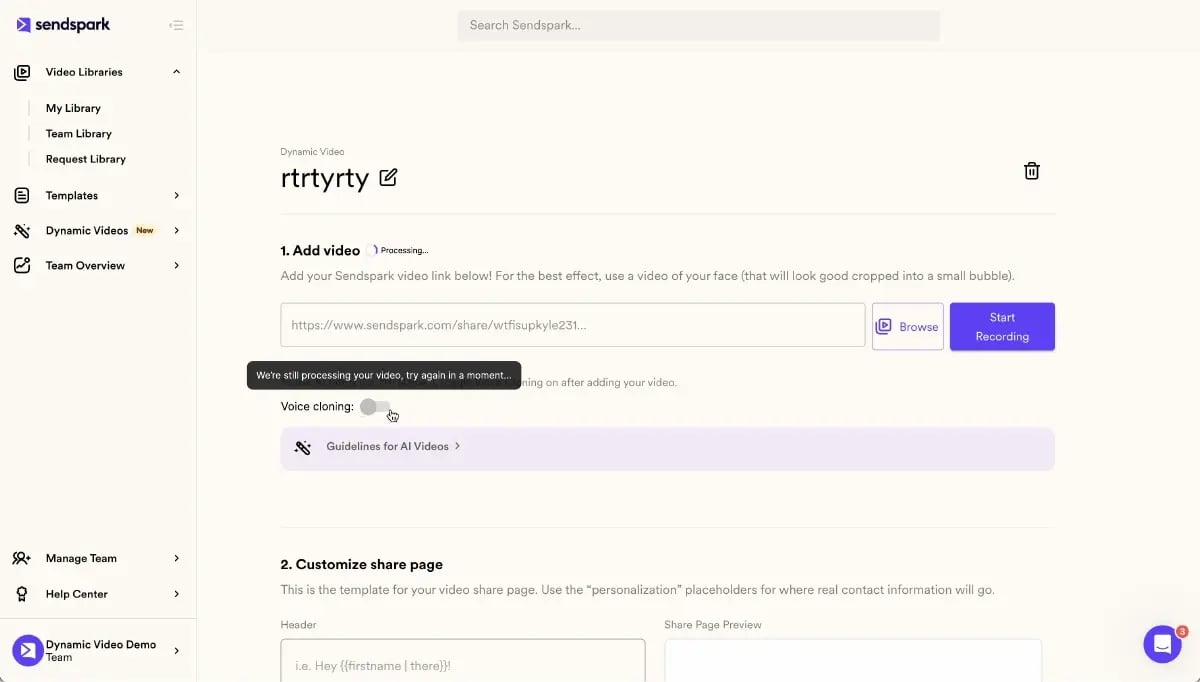
Record a master video using a placeholder word, like “Watermelon,” in place of the recipient’s name. Sendspark’s AI recognizes the placeholder and replaces it with each prospect’s actual first name using a cloned version of your voice, producing a natural, one-on-one experience without re-recording anything.
Upload a CSV of your contact list or sync your CRM directly (HubSpot, Salesforce, or Zoho all work), then use the “Generate Videos” feature to create personalized videos for your entire list in bulk. Generation typically takes about a minute per video, though larger batches can take up to 10 minutes. If this runs inside a sales sequence, schedule the personalized video as the second step so generation finishes before the email sends.
Display Recipient Websites as Backgrounds
Sendspark’s AI can automatically pull a recipient’s website or LinkedIn page and use it as the video background, creating an instant visual connection the moment the video plays. Brikl, an ecommerce platform, added this to their outreach in May 2025: within two weeks, their email open rates jumped 62% and reply rates were more than 4x higher than their previous baseline, while SDRs produced personalized videos 40% faster than manual recording.
Pair a dynamic background with a clickable GIF thumbnail that shows the recipient’s own website – it grabs attention and tends to slip past spam filters more easily than an embedded video file. See How to Scale Personalized Video Messaging for more on getting this working across a full contact list.
Merge Personalized Intros with Demo Videos
You don’t need to re-record your entire product demo for every prospect. Sendspark’s AI-personalized video intros feature attaches a short personalized intro, addressing the recipient by name or a specific challenge they face, to a single pre-recorded demo, producing one seamless video that feels bespoke without sacrificing production quality.
Keep the combined video to 20-40 seconds of personalized intro and use the first five seconds to say something specific and relatable to that recipient. As Hamish Stephenson, CEO of Selr.io, puts it: “The first 5 seconds is the most important. Hook them in with thought-provoking personalization about them.”
Common mistake
Sending a voice-cloned video with no disclosure at all. Starting August 2, 2026, the EU AI Act’s Article 50 requires clear, accessible disclosure when audio or video content is AI-generated or manipulated. A one-line note on the video’s landing page (“This video uses AI voice cloning to personalize the greeting”) is enough to stay ahead of the rule and builds trust rather than eroding it.
Signal-Triggered Automation vs. Generic AI Personalization in 2026
Generic AI personalization is losing effectiveness industry-wide in 2026, while automation triggered by real buying-signal events, like a form fill, a status change, or a pricing-page visit, keeps converting. The platform-average cold email reply rate has fallen to 3.43%, but teams using intent-driven timing and signal-based triggers still clear 10%+, according to Instantly’s 2026 Cold Email Benchmark Report.
CRM-Event Triggers That Actually Convert
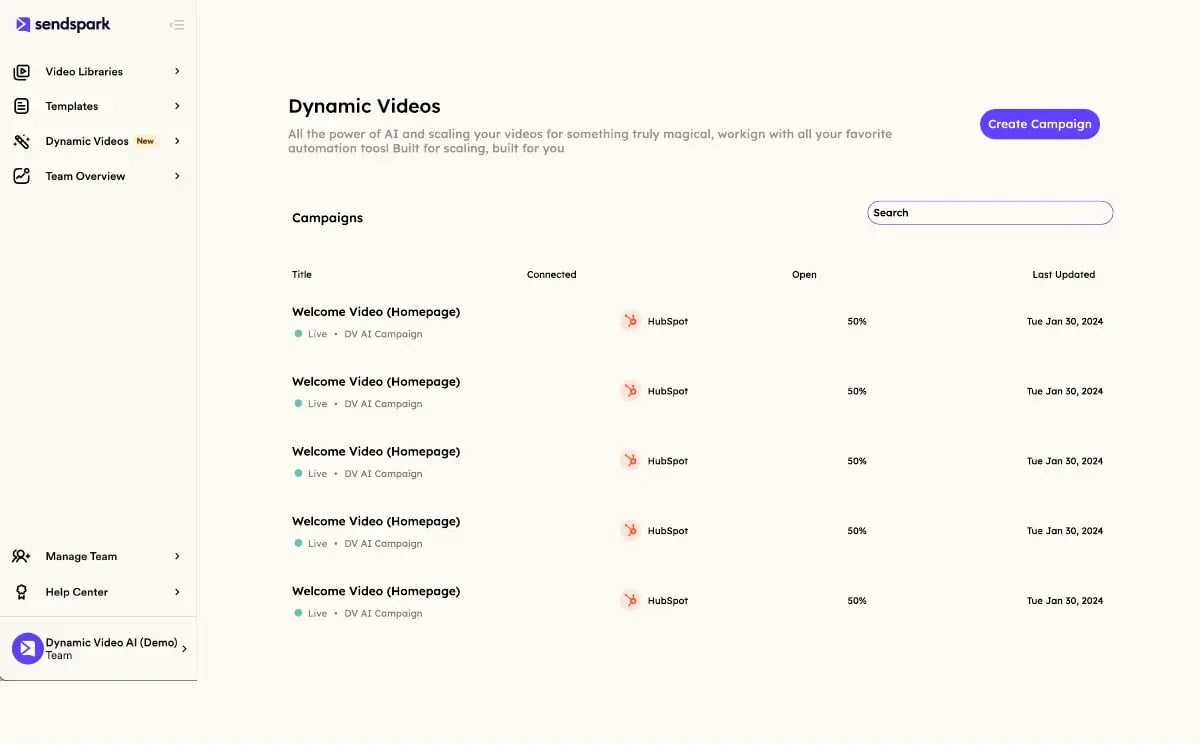
Sendspark’s Agentic Workflows link CRM actions directly to video creation. A prospect’s status changes to “Qualified” in HubSpot or Salesforce, and Sendspark automatically generates a personalized video and drops it into your outreach sequence, no manual step required. When configuring “Add to Sequence” actions in the Outreach integration, use the Prospect ID rather than the email address to avoid enrollment errors, and keep that same short delay in place so generation finishes before send.
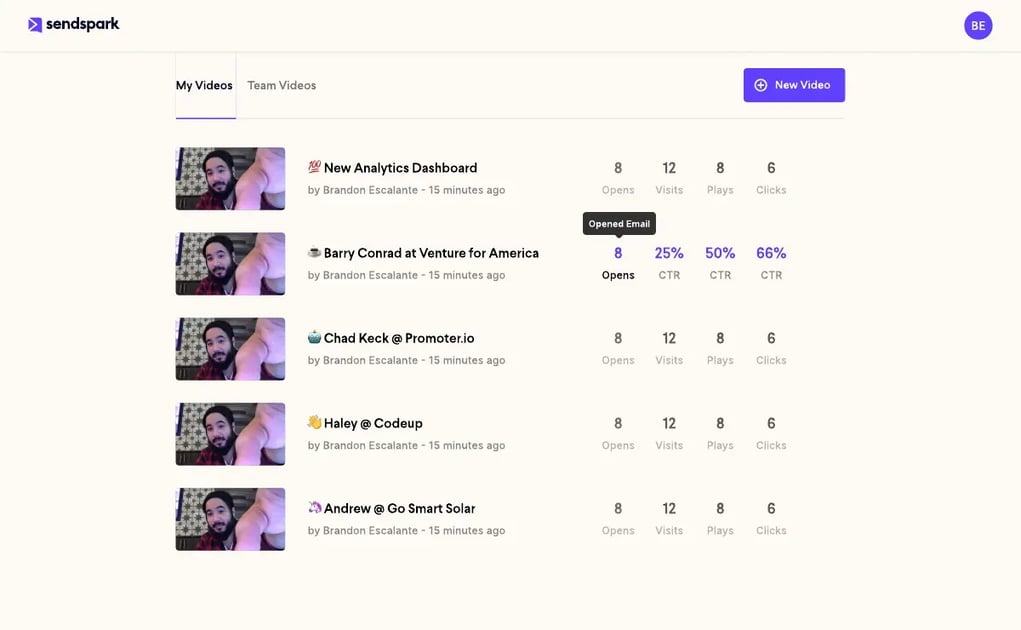
Copy the “Share Snippet” for your sequence tool (Outreach, SalesLoft, or Apollo) into your email template, and use a clickable GIF thumbnail rather than an embedded video file, since full video files can trigger spam filters and aren’t supported by every email client. Once videos are live, Sendspark’s video analytics dashboard tracks opens, plays, click-through rate on your CTA, and watch time per prospect, syncing that data back to your CRM so engaged prospects get flagged for a priority follow-up automatically.
The 2026 Reply-Rate Divergence: Signal vs. Generic AI
Instantly’s 2026 Cold Email Benchmark Report puts the platform-wide average cold email reply rate at 3.43%, with top-quartile senders reaching 5.5% and the top 10% clearing 10.7% or higher, driven largely by intent-driven timing and micro-segmentation rather than raw send volume. The gap exists because most “personalized” AI outreach today only inserts a name or company into a template, and prospects have learned to spot that pattern instantly.
Signal-triggered video automation works differently: the trigger itself (a demo request, a pricing page visit, a status change) is evidence the prospect is already engaged, so the video arrives at a moment when attention is already there. That’s the mechanical difference between “automation” that just runs on a timer and automation that reacts to what a prospect is actually doing – the same principle covered in our AI Video Personalization: Late-Stage Sales Guide.
New Disclosure Rules for AI Voice-Cloned Video
Article 50 of the EU AI Act introduces synthetic media transparency obligations for providers and deployers of AI systems that generate synthetic audio, image, or video content, including deepfake-style outputs that could appear authentic to a viewer. The rule requires AI-generated content to be marked in a machine-readable format and disclosed clearly, distinguishably, and accessibly to the person receiving it.
These obligations apply from August 2, 2026. Systems already on the market before that date get a grace period until December 2, 2026 to meet the machine-readable marking requirement specifically. For any sales team using AI voice cloning in outreach to EU-based contacts, that means adding a simple, visible disclosure to voice-cloned videos is no longer optional – and doing it now, ahead of enforcement, costs a single sentence on a landing page.
| Dimension | Generic AI Outreach (2026 average) | Signal-Triggered Video Automation |
|---|---|---|
| Reply rate | 3.43% (Instantly, 2026) | 10%+ for top-performing signal-based campaigns |
| Trigger basis | Fixed schedule or blast send | CRM event: status change, form fill, page visit |
| Personalization depth | Name/company merge fields only | Voice cloning, dynamic background, tailored intro |
| Prospect perception | Detectable as templated AI content | Reads as a response to their specific action |
| Disclosure requirement (EU AI Act, Aug 2026) | Same obligation, often ignored | Built into landing page copy from the start |
Frequently Asked Questions
How do you automate personalized video follow-ups?
Connect your CRM to a platform like Sendspark, then build workflows that trigger video generation on specific events, such as a form submission or a status change to sales-qualified. AI voice cloning and dynamic backgrounds personalize each video automatically, so you record once and the system handles the rest for every contact.
What’s the best software for triggering personalized videos from CRM events?
Sendspark’s Agentic Workflows connect directly to HubSpot and Salesforce status changes, letting a qualification event trigger video generation without any manual step. The key requirement is a two-way sync between your CRM and video platform so triggers fire in near real time.
Do you have to disclose AI voice cloning in sales videos?
Yes, for outreach touching the EU: Article 50 of the EU AI Act requires clear, accessible disclosure when video or audio content is AI-generated, effective August 2, 2026. A simple disclosure line on the video’s landing page satisfies the requirement and builds trust with recipients.
How is signal-based video outreach different from generic AI personalization?
Generic AI personalization inserts a name or company into a template regardless of what the prospect is doing. Signal-based outreach triggers only when a real action happens, like a pricing page visit or a CRM status change, which is why it still clears 10%+ reply rates while the industry average has fallen to 3.43%.
When should you send an automated video follow-up?
Send the first video within 24 hours of a trigger event, meeting reminders 48 hours before a scheduled call, and re-engagement videos after 5-7 days of prospect silence. Each window is timed to when a prospect is still primed to open a video from you specifically.
What tools send automated personalized videos without reps recording each one?
Sendspark records one master video with a placeholder name, then AI voice cloning and dynamic backgrounds generate a unique version for every contact on a list or CRM sync. Reps never re-record; the personalization happens automatically at generation time.
How do you keep CRM data clean enough for reliable video personalization?
Standardize name and phone formatting, deduplicate records, and fill missing fields like job title or company website before launching a campaign. Validity’s 2025 State of CRM Data Management report found 76% of CRM users say less than half their data is accurate, so this step catches problems before they show up in a prospect’s video.
Sources & References
- Instantly, 2026 Cold Email Benchmark Report – “The overall average reply rate is 3.43%, with top performers exceeding 10% reply rates” (2026)
- European Commission, Article 50 of the EU AI Act – transparency obligations for AI-generated and deepfake content apply from 2 August 2026 (2026)
- Validity, State of CRM Data Management in 2025 – “76% said less than half of their organization’s CRM data is accurate and complete” (2025)
- Dr. James Oldroyd, MIT / InsideSales.com Lead Response Management study – leads contacted within five minutes are 21x more likely to qualify than those reached after 30 minutes (2007)
- Datablist – “Messy data leads to missed deals and lost time,” Habib Benabdeslam (2026)
Record One Video. AI Personalizes Thousands.
Sendspark is the AI video personalization platform for B2B sales. Record once, and AI voice cloning generates thousands of individually personalized videos with dynamic backgrounds and personalized thumbnails -- each prospect hears their name, sees their website, in your voice. Sales teams see 2-3x more replies.
Get Started NowTopics: blog