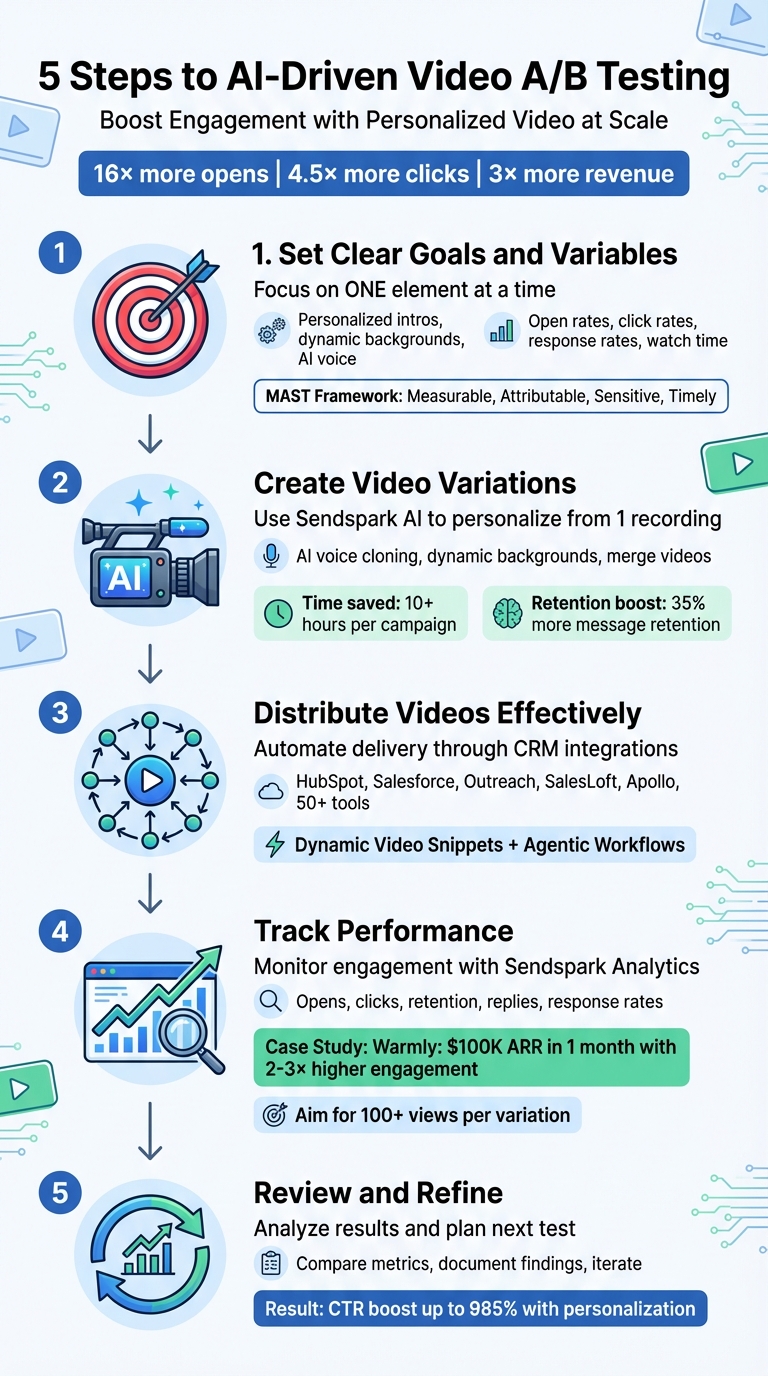
Want to boost engagement without spending hours on video creation? AI-powered A/B testing can help you test and refine personalized video strategies at scale. By using tools like Sendspark, you can create thousands of tailored videos from a single recording, saving time while driving results like 16× more opens, 4.5× more clicks, and up to 3× more revenue.
Here’s how it works in 5 steps:
- Set clear goals and variables: Focus on one element at a time, like personalized intros or dynamic backgrounds, and define measurable success metrics.
- Create video variations: Use Sendspark’s AI to personalize names, websites, and more - no extra recordings needed.
- Distribute videos effectively: Automate delivery through CRM integrations and workflows.
- Track performance: Use Sendspark’s analytics to measure engagement, clicks, and replies.
- Review and refine: Analyze results, identify trends, and use insights to improve future campaigns.
AI simplifies video personalization, making it scalable and impactful for sales and marketing teams. Start testing one variable today and watch your engagement rates soar.
5 Steps to AI-Driven Video A/B Testing Process
Step 1: Set Your Testing Goals and Variables
This step lays the groundwork for your AI-driven A/B testing, ensuring your personalization strategies deliver results you can measure and act on.
Start by defining clear testing goals. Pinpoint the part of your funnel that needs attention. Are you struggling to get prospects to open your emails? Maybe they’re not watching your videos or responding to outreach efforts. Identifying the problem area will guide the rest of your testing process.
Pick One Variable to Test
Focus on testing one element at a time - this is key to understanding what drives change. For example, you could test AI voice personalization, dynamic video backgrounds, or personalized introductions. If you try multiple changes, like a new thumbnail, different CTA phrasing, and AI-driven personalization all at once, you’ll never know which tweak made the difference.
High-impact variables, such as personalized video intros or dynamic backgrounds, are great starting points. Testing these individually helps you isolate their effect and measure their true value.
“Stop recording the same video over and over. Sendspark uses AI to personalize your videos with each prospect’s name and website - automatically.” - Sendspark
Once you’ve selected your variable, define the metrics you’ll use to measure its success.
Define Your Success Metrics
Set specific, measurable goals. Avoid vague objectives - replace them with clear targets, like boosting response rates by 10% or increasing CTA clicks by 20%. Your metrics should align with the stage of the funnel you’re testing.
- Top-of-funnel goals: Track open rates and click rates to see how well your thumbnails grab attention.
- Middle-of-funnel goals: Focus on response rates and watch time to assess how relevant your content is.
- Bottom-of-funnel goals: Measure CRM qualifications and meeting bookings to evaluate return on investment.
Key performance indicators (KPIs) for video outreach often include open rates, click rates, response rates, and watch time. Beyond initial engagement, track conversions like form fills or lead qualification within your CRM. To ensure your metrics are effective, apply the “MAST” framework: they should be Measurable (easy to track), Attributable (directly linked to your changes), Sensitive (able to capture small improvements), and Timely (show results quickly).
“A/B testing is more than just comparing numbers. It’s about translating product intuition into rigorous experiments, and then turning data into decisions.” - Gayatri Gattani, Data Scientist
Step 2: Build Video Variations with Sendspark AI
Once your testing goals are set, the next step is to create video variations. With Sendspark’s AI, you can transform a single recording into thousands of personalized videos - no need to record hundreds of individual clips. Simply record a master video using the Sendspark extension or Mac app, and the AI takes care of creating personalized variations. This approach can save you 10+ hours per campaign, all while keeping that personal touch that boosts engagement.
Now, let’s look at how to customize your video with Sendspark’s AI-driven personalization tools.
Add AI Voice Personalization
Begin by recording your base video with a placeholder word. Sendspark uses “Watermelon” as the default placeholder - just say it wherever you’d normally use the recipient’s name. For example, “Hi Watermelon, I noticed your company is expanding into new markets.”
Sendspark’s AI voice cloning then replaces the placeholder with each recipient’s name, perfectly matching your tone and lip movements. It also dynamically displays their company website in the background. To get the best results, pause briefly when saying the placeholder and use a quality microphone in a quiet setting.
Once your video is recorded, upload your contacts via CSV or sync with your CRM, then click “Generate Videos.” The AI will create the first personalized video model in about a minute. This process ensures efficiency without sacrificing the personal touch that drives engagement.
Add Dynamic Backgrounds
Dynamic backgrounds take personalization to the next level by displaying content specific to each prospect behind you as you speak. A great example is showing their company website in the background, instantly making your video more relevant without manual editing.
To set this up, include a “Background URL” column in your contact list. Sendspark will pull each prospect’s website and overlay it behind your camera bubble. You can also use LinkedIn profiles or other relevant pages. This visual personalization helps viewers retain 35% more of your message.
For an even smoother process, connect Sendspark with tools like HubSpot or Clay to automatically pull website URLs from your CRM. This eliminates manual data entry and ensures accuracy in every video.
Once your dynamic visuals are ready, you can refine your messaging further by combining personalized intros with pre-recorded demos.
Merge Personalized Intros with Pre-Recorded Demos
The “Combine Video” feature allows you to attach a short, AI-personalized introduction to a longer pre-recorded product demo or sales pitch. Record your demo once, and then pair it with personalized intros to create fully customized outreach videos.
This method is perfect for testing different introductory styles - such as a casual greeting versus a formal one - or experimenting with various value propositions in your opening. By keeping the core content consistent, you can isolate the impact of these personalization tweaks.
Before rolling out your full A/B test, generate videos for a small sample list (10–20 contacts) to ensure the AI voice, video model, and background overlays meet your quality standards. You can also set fallbacks for merge tags on the video share page so that every viewer has a polished experience, even if certain CRM data points are missing.
These personalization features not only align with your testing goals but also deliver measurable results. Personalized videos drive 4.5x more clicks and 16x more opens compared to generic video content, making the time spent on quality control well worth it.
Step 3: Distribute Videos and Segment Your Audience
Getting your videos to the right audience and properly segmenting them is key to reliable A/B testing results. With Sendspark’s integration options, you can automate video distribution while keeping control over which prospects see what. This ensures your tests stay accurate and unbiased. Here’s how to connect your tools and automate workflows to make video distribution as smooth as possible.
Connect with CRMs and Sales Tools
Sendspark works seamlessly with tools like HubSpot, Salesforce, Outreach, SalesLoft, Apollo, and over 50 other platforms to simplify video distribution. By syncing your CRM data with Sendspark, you can map essential fields like email, first name, company name, and website URL.
Once everything is connected, you can use Dynamic Video Snippets in your email templates. These placeholders automatically swap in the correct personalized video for each recipient when they open your email. For example, adding a single snippet to an Outreach sequence template ensures that every prospect receives their own tailored video - no manual work required.
If you’re using Outreach, consider using the Prospect ID instead of just the email address. This helps prevent enrollment errors that could affect the accuracy of your A/B test results.
Set Up Automated Workflows
Take these integrations a step further by creating automated workflows that trigger video delivery based on CRM actions. Sendspark’s Agentic Workflows can handle video creation and delivery automatically whenever a specific event occurs in your CRM. For instance, when a lead fills out a form or is marked as qualified, the workflow can generate a personalized video and add the contact to the appropriate email sequence.
To ensure smooth processing, include a 10- to 15-minute delay after enrollment so the AI has time to generate the video. You can also use router steps to check whether a prospect already exists in your sales tool. If they don’t, the automation can create their record before adding them to the sequence.
For those using SalesLoft, sending a plain text email first can help ensure the video is fully processed before it’s delivered. These automations not only save you time but also keep your A/B test segments clean and well-distributed, making it easier to track performance accurately in the next step.
sbb-itb-afd3f9e
Step 4: Track Performance with Sendspark Analytics
Sendspark’s analytics dashboard is your go-to tool for understanding what works. It provides detailed engagement metrics for your A/B tests, tracking everything from video opens and clicks to viewer retention and response rates. This data helps pinpoint which version resonates more with your audience and drives them closer to scheduling a meeting.
Track Engagement Metrics
Once your video distribution strategy is in place, it’s time to measure its impact. Sendspark makes it easy to monitor how prospects engage with your videos by tracking key metrics like opens, clicks, retention, replies, and response rates.
For example, in December 2025, the team at Warmly used Sendspark for a dynamic video campaign targeting “close lost” opportunities. By leveraging AI-generated personalized videos, they saw engagement rates 2-3 times higher than typical email outreach. The result? Over $100,000 in Annual Recurring Revenue (ARR) in just one month.
Learn more about video for alumni engagement.
Sync Data with Your CRM
To gain a fuller picture of engagement, you can sync Sendspark’s video analytics with your CRM. The platform integrates seamlessly with popular CRMs like HubSpot, Salesforce, Outreach, and SalesLoft. By mapping key fields such as email, name, company, and website, you ensure that all engagement data is accurately reflected in your CRM.
“Track engagement and ROI right within Sendspark, or within your CRM of choice.” - Sendspark
This integration allows you to see exactly who watched your video, how long they watched, and their overall level of interaction - all within your CRM.
Confirm Statistical Significance
For reliable results, make sure your A/B test reaches statistical significance. Aim for each variation to achieve at least 100 views. Sendspark’s ability to generate hundreds or even thousands of personalized videos in minutes ensures you can quickly gather enough data. Balance the number of views across variations, and once you hit your target sample size with a clear winner, use those insights to refine your next test. This approach keeps the cycle of improvement ongoing and effective.
Step 5: Review Results and Improve
Once you’ve collected enough data, it’s time to dig into the numbers and see which variation performed better. Look at metrics like watch time, click-through rates (CTR), reply rates, and meeting bookings. For instance, Warmly found that AI-personalized videos targeting closed-lost opportunities achieved 2-3x higher engagement compared to standard email outreach. This approach helped them close over $100,000 in ARR in December 2025 alone. By analyzing these results, you can turn test data into actionable changes, completing the cycle of continuous improvement.
Compare Metrics Between Variations
Sendspark’s analytics dashboard makes it easier to evaluate performance by pulling key engagement data for each variation. Focus on the metrics tied to your original goals - whether that’s video completion rates, CTA clicks, or booked meetings. To ensure accuracy, double-check that your CRM or sales tool correctly attributes each variation to the intended prospects.
Document Findings and Make Changes
Write down the main takeaways. Identify which variation performed better, by how much, and any trends - like whether certain industries responded more to dynamic backgrounds or if shorter videos worked better than longer ones. Keep a record of the campaign name and Sequence ID from your sales tool for future reference. Also, confirm that videos were successfully generated for all test subjects, as missing content could skew your results.
Plan Your Next Test
Use these insights to shape your next experiment. If AI voice cloning delivered strong results, consider testing dynamic backgrounds next - like featuring a prospect’s website in the video. Or, if the intro is already optimized, try experimenting with different CTAs, such as embedding a calendar link instead of a text-based scheduling request. This ongoing testing process ensures your video outreach stays effective and engagement rates continue to grow.
Conclusion
AI-powered video A/B testing is changing the game for sales and marketing teams by making personalization easier and more scalable. The process involves five key steps: setting clear objectives, creating variations with AI, distributing videos through automated workflows, analyzing performance, and refining based on data. Together, these steps establish a feedback loop that enhances engagement without overloading your team. Personalized videos are proven to perform better, generating 4.5× more clicks and 16× more video opens compared to generic ones. Plus, they help retain 35% more viewers, making them a powerful tool for outreach.
Sendspark takes this to the next level by turning a single video recording into thousands of personalized versions, all automatically delivered through CRM integrations.
The benefits of personalized video content are hard to ignore. Metrics show that personalized videos can boost click-through rates by 985%, generate 2–3× more replies, and drive up to 3× more revenue in B2B industries. On top of that, 75% of Americans prefer receiving personalized messages, highlighting the growing demand for tailored communication.
If you’re ready to see results, start small. Test one variable, measure its performance, and use the insights to fine-tune your next campaign. AI enables teams to experiment more often and improve faster, saving time and effort. With a free account available, now is the perfect time to dive into AI-driven video A/B testing and transform your outreach strategy.
FAQs
How many contacts are needed for a valid video A/B test?
When running a video A/B test, the number of contacts you need depends on factors like your goals and the level of statistical confidence you’re aiming for. As a rule of thumb, larger sample sizes tend to deliver more reliable insights. If you’re uncertain about the exact numbers, it’s worth checking out resources on statistical significance to find the best fit for your test.
What’s the best single variable to test first in personalized videos?
When testing personalized videos, the recipient’s name or a personalized greeting is the best element to start with. It’s highly noticeable and has a direct impact on engagement, making it a perfect choice for your initial A/B testing efforts.
How do I attribute meetings and revenue to each video variant in my CRM?
To connect meetings and revenue to specific video variants in your CRM, start by monitoring engagement metrics such as views, watch time, and CTA clicks through analytics tools. Once you have this data, associate it with individual video variants to assess their influence on generating meetings and revenue. This approach allows you to gauge how effectively each variant contributes to your overall results.
Related Blog Posts
- How AI Improves A/B Testing for Video CTAs
- How to Scale Personalized Video Messaging
- How AI Video Personalization Helps Revenue Teams
- A/B Testing Personalized Videos: Best Practices for Sales Teams
Topics: blog