Want to boost your sales outreach? Personalized videos can increase email opens by 16x, click-through rates by 4.5x, and reply rates by 2–3x. But not every personalized video performs well - small details, like your opening line or call-to-action (CTA), can make or break engagement. That’s where A/B testing comes in.
Learn more about sales video engagement planner.
Here’s how you can use Sendspark’s AI tools to test and scale personalized videos effectively, without wasting time recording each one individually:
- Plan your test: Focus on one metric (e.g., reply rate) and set clear goals.
- Segment your audience: Target specific groups (e.g., industries or pipeline stages) for precise insights.
- Create video variants: Use AI to personalize elements like names, backgrounds, or CTAs.
- Run your test: Randomly split recipients into control and test groups and run for 1–2 weeks.
- Analyze results: Track metrics like views, clicks, and replies to identify the winning version.
- Scale success: Use AI to replicate your best-performing video across thousands of prospects.
With personalized videos, you’re not just guessing what works - you’re using data to drive better results.
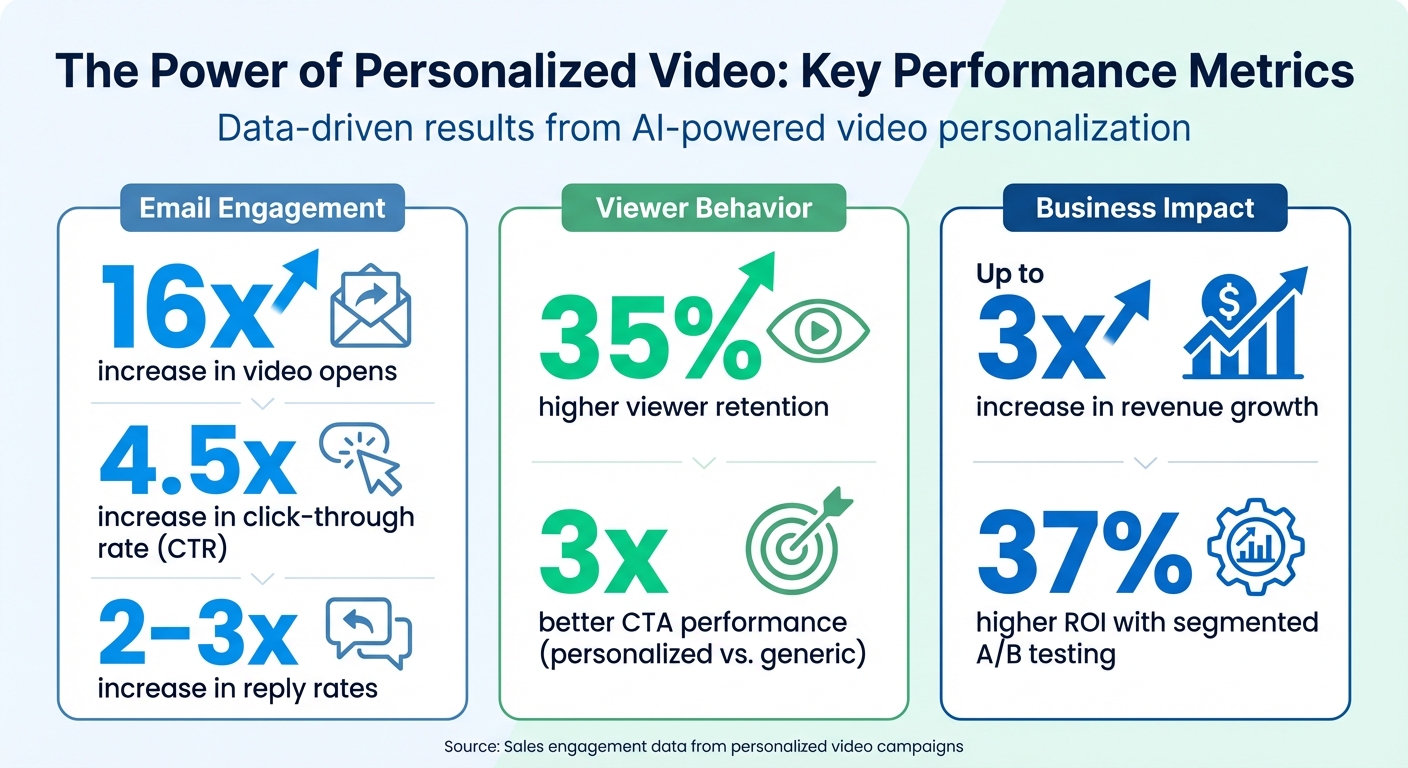
Impact of Personalized Video on Sales Outreach Performance Metrics
Pre-Test Planning Checklist
Before diving into A/B testing, having a clear plan is essential. A well-prepared test can provide actionable insights, while a poorly planned one often leads to wasted time and effort.
Define Your Test Objectives
Start by identifying one primary metric to focus on - this could be video play rate, reply rate, or meetings booked. Then, craft a hypothesis that outlines the expected outcome of your test. Sticking to a single metric helps keep your results clear and actionable. Think of this as your “North Star Metric”, representing the core value you’re delivering and acting as a leading indicator of long-term success.
Here’s an example: “If we add the prospect’s company website as a video background, reply rates will increase by 15% because it shows personalized research.” This kind of hypothesis gives your test structure and purpose. Additionally, set guardrail metrics - such as monitoring unsubscribe rates - to ensure your changes don’t inadvertently harm engagement.
“The core function of A/B testing is to transform conversations from ‘we think this will work’ to ‘we know this works.’” - Adobe Communications Team
Segment Your Audience
Testing on your entire database might sound tempting, but it’s not the best approach. Instead, divide your audience into segments based on factors like industry, pipeline stage, or ideal customer profile (ICP). This allows for more precise and actionable insights. Research shows that companies using segmented A/B testing see a 37% higher ROI compared to those testing broadly.
To ensure clear results, aim for distinct segments with sufficient size - typically 100 to 500 recipients per variant. Avoid excessive overlap between segments; a 40–50% overlap is the maximum recommended. If you’re comparing data sources, such as first-party CRM data versus third-party intent signals, keep those groups entirely separate to avoid muddying the results.
Set Testing Parameters
Using a power calculator can help determine the minimum sample size needed to achieve statistical significance. For most video prospecting tests, a segment size of 100–500 recipients per variant is ideal, depending on your baseline conversion rate and the improvement you’re trying to measure.
Set a fixed testing window of one to two weeks to account for natural fluctuations in prospect behavior. Ending a test too soon is a common mistake that can lead to unreliable results, often referred to as “optimizing into noise”. For smaller segments, prioritize high-traffic pipeline stages - like SQLs or demo requests - to speed up the process of reaching statistical significance.
| Parameter | Recommended Range |
|---|---|
| Sample Size per Variant | 100–500 recipients |
| Test Duration | 1–2 weeks |
| Significance Threshold (p-value) | Less than 0.05 |
| Segment Overlap | Less than 40–50% |
With these parameters in place, you’re ready to create engaging video variants that align with your objectives.
sbb-itb-afd3f9e
Creating Video Variants
Once your test parameters are in place, the next step is crafting the actual video variants. The idea is to create versions that differ by just one key element - whether that’s a personalized background, a specific call-to-action (CTA), or the way you address the recipient.
Use Sendspark’s ‘Record Once, Personalize at Scale’
Recording a unique video for each prospect isn’t practical. That’s where Sendspark’s AI comes in, allowing you to record one base video and personalize it for hundreds - or even thousands - of recipients.
Here’s how it works: record a single video with a placeholder (default: “Watermelon”) that the AI later swaps with each recipient’s name. For example, “Hey Watermelon” becomes “Hey Sarah” or “Hey Michael”, all without additional recording. The AI voice cloning technology matches your tone and cadence, ensuring the result sounds natural and seamless.
Beyond voice personalization, Sendspark enables you to use dynamic backgrounds. This feature overlays your video onto the recipient’s website or LinkedIn profile, instantly creating a sense of relevance without needing separate recordings. For a hybrid approach, try the Combine Video feature, which lets you merge a short, personalized AI-generated intro with a pre-recorded demo or pitch.
Once your video variants are tailored with these tools, the next focus is setting up clear controls and test versions.
Build Control and Test Variants
With personalized videos ready, it’s time to create distinct control and test versions. This step is essential for identifying which personalization element drives results.
Your control video should be simple and consistent - think of it as your baseline. For instance, it could feature a static professional background and a generic greeting like “Hi there” or “Hey team.” The test version, on the other hand, will include one specific personalization tweak you want to evaluate.
For example:
- If testing background personalization, the control group gets the static background, while the test group sees their company website displayed behind you.
- If testing name personalization, the control uses a generic greeting, while the test version includes the recipient’s name via AI-generated insertion.
Everything else - script, video length, and CTA placement - should remain identical. This ensures you can isolate the impact of the personalization element you’re testing.
You can also experiment with video thumbnails to test visual appeal. Add text overlays like “Hi [Name]” or include the recipient’s company logo to see if these hooks boost click-through rates. Sendspark notes that personalized calls-to-action perform three times better than standard ones, so even small adjustments can lead to noticeable improvements.
Add Trackable CTAs
Each variant needs a clear, measurable call-to-action. With Sendspark’s landing page editor, you can embed clickable buttons directly into the video player. Options like “Schedule a Demo”, “Reply to This Email”, or “View Pricing” work well, depending on your goals.
Set up analytics to track metrics such as video views, watch time, CTA clicks, and follow-through actions. These data points will help you identify the winning variant. To align with your test goals, try comparing a generic CTA like “Learn More” with a personalized one such as “[Name], Schedule Your Demo” to see which delivers better results.
Running the A/B Test
With your video variants prepared and calls-to-action (CTAs) in place, it’s time to launch your A/B test. This phase demands careful attention to how you distribute, automate, and time your test to ensure your results are both reliable and actionable.
Distribute Variants Evenly
To get accurate insights, your control and test groups need to be evenly split. Random distribution is key here - it eliminates selection bias and ensures each variant is presented to an equal portion of your audience. As AiSDR Blog explains:
“Make sure you distribute recipients randomly between groups to avoid selection bias. You can use a randomizer or random sort function to get this part done”.
If you’re using sales engagement tools like Outreach, SalesLoft, or Apollo, you’re in luck. These platforms include built-in randomization features that handle this step for you. For those relying on spreadsheets, a random sort function works just as well.
When it comes to sample size, aim for at least 1,000 recipients per variant to achieve reliable results. However, if you anticipate a significant performance difference between variants, smaller groups of 100–200 recipients may suffice. To make sure your test meets the standard 95% statistical significance threshold (p-value of 0.05), calculate your sample size beforehand using an A/B test calculator [5,16].
Consistency is also critical. Use identifiers like cookies or login data to ensure each prospect consistently sees the same variant throughout the test. This avoids confusion and keeps your data clean [5,18].
Automate Video Distribution
Automation can save you time and ensure precision in your test. Tools like Sendspark, integrated with CRMs such as HubSpot or Salesforce, make it easy to distribute video variants based on specific triggers in your sales pipeline.
For instance, you can set up workflows to send different video variations when prospects hit key milestones, like moving from “Lead” to “Qualified” or scheduling a demo. HubSpot users can embed Sendspark videos directly into marketing emails or sales sequences by copying the HTML embed code. CRM tokens can dynamically adjust the video thumbnails and landing pages to personalize the experience for each recipient.
If you’re running a large-scale test, you can import contact lists via CSV or API to generate thousands of personalized videos instantly. To maintain professionalism, set up fallback variables in your workflows. This ensures that, even if some prospect data (like a company name) is missing, the video will still display a polished, generic term for your video sales pitches.
Set Test Duration
Once your distribution is automated, it’s time to determine how long the test should run. A consistent testing period of 7–14 days is usually ideal. This window accounts for variations in prospect behavior and response times, allowing you to collect reliable data. As Tim Neusesser from NN/g notes, reaching the appropriate sample size is crucial for statistically sound results.
Timing matters, too. Avoid running tests during major holidays, end-of-quarter periods, or other times when prospect behavior might deviate from the norm. Additionally, keep your send times consistent throughout the test. This helps eliminate variables that could skew your results and ensures a fair comparison between variants.
Analyzing Test Results
Once your test wraps up, it’s time to dig into the data and figure out which video version struck the right chord with your audience.
Compare Performance Metrics
Sendspark’s analytics dashboard makes it easy to evaluate your video variants side by side. Pay close attention to four key metrics: open rates, watch time, CTA clicks, and reply rates.
| Metric | Performance Impact of Personalization |
|---|---|
| Video Opens | 16x increase |
| Click-through Rate (CTR) | 4.5x increase |
| Viewer Retention | 35% higher |
| Reply Rates | 2-3x increase |
| CTA Performance | 3x better |
| Revenue Growth | Up to 3x increase |
If viewers drop off right at the start, it’s a sign your hook might need some work. On the other hand, if they’re watching but not clicking your CTA, your call-to-action could use some tweaking. Also, take note of how prospects interact with personalized elements on your landing page, like dynamic text or brand-aligned visuals, to see what’s driving the best engagement. This data is also vital for finding ways to improve sales conversion on your landing pages. This analysis lays the groundwork for confirming your findings with statistical accuracy.
Check Statistical Significance
Raw numbers can be misleading, especially with smaller sample sizes. To ensure your data holds up, compare critical metrics like email open rates, reply rates, and bounce rates between your control and test groups. Sendspark’s analytics simplify this process by tracking when a video is opened, how many times it’s played, and the total watch time. Sales teams using Sendspark’s AI-personalized videos often report 2-3x more replies. Once you’ve confirmed statistical significance, you can dive deeper by analyzing direct feedback from your prospects.
Review Prospect Feedback
The numbers tell part of the story, but real understanding comes from listening to your audience. Prospect feedback provides the “why” behind the data. Review replies and comments for each video variant, looking for recurring themes. Do viewers mention feeling “recognized” or “valued”? Are they asking specific questions about your solution?
Bethany Stachenfeld, Co-founder of Sendspark, puts it perfectly:
“Video is NOT a silver bullet. You can’t JUST use video and expect it to work… Your content has to be valuable, relevant, and succinct”.
Also, pay attention to comments about visual elements, like the use of their website in the background. This confirms the impact of dynamic AI overlays. Questions like “How are you different?” suggest your video effectively highlighted your unique value. Finally, use Sendspark’s CRM integrations to connect feedback directly to the video variant each prospect viewed. This allows you to segment responses and refine your strategy for future campaigns.
Scaling Winning Variants
Once you’ve nailed down your winning video variant, it’s time to turn that success into a system that can drive results across your entire sales process.
Roll Out Winning Variants
You don’t need to re-record your video to scale it effectively. By using AI personalization, a single generic recording can be transformed into thousands of personalized versions. Here’s how it works: record your video with a generic placeholder, and AI voice cloning will seamlessly replace it with the recipient’s actual name. The result? personalized video contents that sound completely natural, without the extra effort.
Take it a step further by using dynamic backgrounds. For example, display each prospect’s website behind you in the video. Pairing this visual personalization with voice cloning creates the illusion of a fully custom video, all while saving you time. Save your winning structure as a reusable template to ensure consistency across your team.
For key accounts, consider a hybrid approach. Use the “Combine Video” feature to add a short custom intro to your master video. This method balances efficiency with a personal touch for high-priority prospects. Don’t forget to optimize your video thumbnails by adding text or logo overlays to grab attention and boost click-through rates.
Plan Next Tests
Once your winning variant is scaled, it’s time to refine your strategy and explore new testing opportunities. Use the data you’ve collected to pinpoint what to test next. For instance, if the winning variant used a formal tone, try a casual one in the next round. If you personalized with just the recipient’s name, experiment with adding a pain point or industry-specific reference to see if deeper personalization increases engagement.
Dive into your engagement analytics to guide future tests. If viewers consistently stop watching around the 45-second mark, try a shorter video format. On the other hand, if watch rates are strong but CTA clicks are low, test different calls-to-action or embed a calendar directly on the video landing page to simplify scheduling.
Sync Results with CRM
To make your success repeatable, integrate your analytics with your CRM system. Connecting performance data from your winning variant to tools like HubSpot or Salesforce allows for team-wide adoption and long-term tracking of its impact on conversions. With Sendspark’s native CRM integrations, you can automatically sync viewer data - such as who watched, how much they watched, and whether they clicked your CTA - right into your contact records.
Personalization tokens, like First Name, Job Title, and Company, can be used in video thumbnails and landing pages to keep the experience professional. Add fallback variables to ensure polished communication even when certain data points are missing. This automation makes it easy to distribute your winning variant at scale through HubSpot Marketing Hub or sales sequences, all while maintaining individual-level tracking.
Chris Draper, Head of Sales at OmniPanel, highlights the value of this approach:
“Sendspark helps us increase the level of humanization, personalization, and trust in our prospecting emails to establish ourselves in the space and land big clients”.
Conclusion
After carefully planning, running, and reviewing your tests, this final step cements your strategy for scaling success. A/B testing personalized videos removes the guesswork, replacing it with a data-driven approach that pinpoints what truly improves sales outreach. For example, personalized B2B videos have been shown to generate 16x more opens, 4.5x more clicks, and 35% higher viewer engagement.
With your test results in hand, you can combine efficiency with personalization using Sendspark’s “record once, personalize at scale” method. This allows a single base video to turn into thousands of customized versions. By recording one video with a placeholder, AI voice cloning fills in each prospect’s name naturally. Add dynamic backgrounds, such as displaying each prospect’s website, and you achieve a personalized touch at scale - without the manual workload.
Integrating your test data with your CRM is another key step. By tracking video views, watch time, and CTA engagement, you can prioritize follow-ups and fine-tune your strategy. Sales teams leveraging AI-powered personalization often see a 2x to 3x increase in total replies, while personalized CTAs deliver 3x better performance compared to generic ones.
FAQs
What should I A/B test first in personalized sales videos?
Start by testing different video CTAs (Call to Action) since this is what drives prospects to take action. Tools like Sendspark make it easy to create multiple CTA options and track how viewers engage with them in real time. You should also experiment with video length - keeping it under 2 minutes tends to hold attention better. Focusing on the CTA first lays a solid groundwork for fine-tuning other aspects, such as personalization or timing.
How can I tell if my results are statistically significant?
When analyzing A/B test results, determining statistical significance is key to understanding whether the observed differences are meaningful or just random. To do this, you can rely on methods like calculating p-values or using confidence intervals. These tools help you assess whether the variations in your test outcomes are unlikely to be due to chance.
Another crucial factor is your sample size. If your sample is too small, your results may lack reliability, making it hard to draw accurate conclusions. A larger sample size increases the likelihood of detecting real differences between variations.
By combining proper analysis techniques with sufficient sample sizes, you can confidently validate the impact of your test results and make informed decisions based on the data.
How do I scale the winning video without re-recording?
To streamline video scaling without the hassle of re-recording, tools like Sendspark can make a big difference. These AI-driven platforms let you craft a single base video and then personalize it automatically for multiple recipients. Features such as voice cloning, dynamic backgrounds (like showcasing a prospect’s website), and CRM integration handle the heavy lifting. This way, you can deliver tailored videos to a large audience - without needing to hit the record button every time.
Related Blog Posts
- How to Create Personalized Sales Videos That Convert
- How AI Improves A/B Testing for Video CTAs
- Video Messaging for Business: Stand Out in Sales Outreach
- Personalized Video Feedback: How to Create Custom Videos at Scale
Topics: blog