Most B2B email campaigns treat social proof as an afterthought — a text quote buried at the bottom, above the signature. That’s leaving real conversion opportunity on the table. Customer testimonial videos watched inside an email get 50% higher click-through rates than the same message with a static quote, and prospects who see a peer’s story before a demo show up 40-50% more likely to book. The format has shifted. Video testimonials are now the highest-trust social proof format in B2B outreach — and this guide covers exactly how to use them. For broader reach, consider how webinars are another powerful format for collecting testimonials can amplify your results.
Learn more about optimize video length for outreach.
Key Takeaways
- Video customer testimonials generate 50% higher click-through rates than text quotes in B2B email outreach.
- The most effective approach matches the testimonial to the prospect’s industry or role — generic social proof underperforms.
- AI tools now let you add a personalized video intro before any customer testimonial, combining a rep’s voice with a customer’s story.
- Collecting video testimonials is easier when you use a direct video request link — customers don’t need an account or app.
- Track which testimonial emails get the most watch time and clicks; this data tells you which stories resonate best with each segment.
Why Video Testimonials Work Better Than Text Quotes in Email
Video customer testimonials outperform text quotes because they are harder to fake and easier to believe. A written quote can be made up. A video of a real customer, in their own words, describing a specific result they got — that’s a different kind of trust signal entirely. According to the BrightLocal 2024 Consumer Review Survey, 88% of buyers trust online reviews and testimonials as much as personal recommendations. Video amplifies that effect by adding authenticity cues: tone of voice, facial expression, specific language.
In B2B email specifically, a prospect receiving cold outreach has two questions: “Is this real?” and “Has it worked for someone like me?” A static text quote answers neither convincingly. A 60-second video of a customer in the same industry, describing a problem they had and how it was solved, answers both. The Salesforce State of Sales 2024 found that 72% of B2B buyers rely on peer recommendations before engaging a vendor — and video testimonials are the closest digital equivalent of a peer recommendation.
The format also helps inside email because prospects are increasingly skeptical of claims made by sellers. A testimonial shifts the speaker from “us” to “them.” You’re no longer claiming your product works — a real customer is saying it, on camera, with specifics. That shift in speaker credibility is why video testimonials in outreach emails consistently outperform self-promotional messaging.
| Social Proof Format | Trust Level | Ease of Faking | CTR Boost vs No Social Proof |
|---|---|---|---|
| Text quote in email body | Low | Very easy | ~10-15% |
| Star rating / G2 badge | Medium | Moderate | ~20-25% |
| Written case study link | Medium-High | Hard | ~30-35% |
| Customer testimonial video | High | Very hard | ~50%+ |
7 Ways to Use Customer Testimonial Videos in Email Outreach
Customer testimonial videos work across the full sales cycle — from first touch to proposal close. Here are seven specific tactics, each designed for a different stage and context.
1. Video Testimonial as Your Cold Outreach Opener
Lead your cold outreach with a 30-60 second customer testimonial video from someone in the same industry or role as your prospect. The subject line does the heavy lifting: “How [Company] used [Your Product] to [Result]” frames the video as a peer story, not a sales pitch. The prospect opens because they’re curious about the result, not because they want to hear from you. According to research behind high-performing AI-personalized video examples, testimonial-led cold emails see significantly higher click-to-reply rates than rep-recorded videos alone.
2. Video Case Study in a Follow-Up Sequence
After a first touchpoint with no reply, include a video case study in your second or third follow-up. This format is longer — 2-3 minutes — and covers the problem, the solution, and the measurable result. It works because prospects who didn’t reply to your first email often need more evidence before they’ll engage. A video case study provides that evidence in a format that’s faster to consume than a PDF. For tips on turning case studies into high-performing video formats, see these case study video examples.
3. Story-Driven Testimonial for Emotional Connection
Not every testimonial needs metrics. Story-driven testimonials describe a specific moment where the product made a real difference — a deal that was saved, a team that finally hit quota, a founder who stopped spending weekends on outreach. Stories like this resonate with prospects who recognize their own situation in the customer’s journey. The format works especially well for deals involving change management: if your prospect needs to convince a team to switch tools, a human story is more persuasive than a data point.
4. Industry-Matched Testimonial for Relevance
The most common reason testimonials fail in email is that they’re not specific enough. “Our software helps companies grow” is not useful evidence for a VP of Sales at a 200-person SaaS company. But “Here’s how a VP of Sales at a 150-person SaaS company reduced their SDR ramp time by 30%” is. Segment your testimonial library by industry, company size, and job role, then match each email to the closest fit. This level of specificity is what transforms social proof from decoration into a buying signal.
5. Quote + Video Combo for Skimmable Impact
For prospects who skim email on mobile, combine a pull quote with a linked video thumbnail. The quote gives them the result instantly. The video thumbnail — a play button overlaid on a preview frame — invites them to hear the full story. This format respects both types of readers: the skimmer gets the gist from the quote, the engager clicks through to the video. Include the customer’s name, company, and role in both the quote attribution and the video thumbnail to reinforce credibility.
Pro tip
Keep your testimonial video thumbnail clean: a real face, a real name, and the company logo if possible. A thumbnail that looks human gets 3-4x more clicks than a text-on-background thumbnail in cold outreach.
6. User-Generated Video Content in Nurture Emails
Not all testimonial content needs to be polished. User-generated video content — a customer screen-recording a workflow they love, posting an unfiltered reaction, or sharing a results screenshot on camera — often outperforms produced testimonials because it looks spontaneous. For nurture sequences where you’re building trust over time, one UGC-style customer video per sequence can be more effective than a formatted case study. You can collect this kind of informal video testimonial simply by asking customers to respond with a video after hitting a milestone.
7. Testimonial in a Proposal or Deal-Closing Email
Late-stage deals often stall because of risk aversion. Including a testimonial video from a customer who was in a similar risk-averse position — and who describes how they overcame their hesitation — can break a stall. This isn’t a sales pitch; it’s a peer reassurance. Frame it explicitly: “I wanted to share how [Customer Name] approached this decision — I think it’ll resonate with where you are right now.” This works because it handles the objection before it’s raised.
How to Collect Video Testimonials from Customers
The best time to ask for a video testimonial is immediately after a customer achieves a result. The success is fresh, the motivation is high, and the story they tell will be specific and credible. The biggest obstacle is friction — most customers are willing but won’t record and upload a video if it requires downloading an app or creating an account.
The most effective approach is a direct video request link that opens in a browser, lets the customer record a short response on their phone or laptop, and submits it without any login. You send a short email like:
“Hi [Name], congrats on [the specific result] — that’s a great outcome. Would you be willing to share a 30-60 second video about what changed? I’ve made it as easy as possible: just click the link, hit record, and you’re done. No account needed.”
What to ask them to cover:
- What problem they had before using your product
- The specific result they’ve achieved (with numbers if possible)
- Who they’d recommend your product to (this naturally segments the testimonial)
Keep the ask to three questions maximum. A focused 60-second testimonial is more useful than a 5-minute ramble. Once you have the recording, add it to your testimonial library and tag it by industry, company size, role, and use case — you’ll need those tags for AI-matched targeting later.
Record Once, Personalize at Scale
Stop recording the same video over and over. Sendspark uses AI to personalize your videos with each prospect's name and website — automatically. Sales teams see 2-3x more replies.
Get Started NowHow to Use AI to Match the Right Testimonial to Each Prospect
Generic testimonials in cold email underperform because they don’t answer the prospect’s implied question: “Has this worked for someone like me?” AI-powered video personalization solves this by letting you combine a prospect-specific intro with the most relevant testimonial from your library — at scale, without recording a new video for every prospect.
Here’s how the workflow operates in practice:
Step 1: Build a tagged testimonial library. Record or collect video testimonials from customers across different segments (SaaS, agency, e-commerce; SDR, AE, VP Sales; SMB, mid-market, enterprise). Tag each one with the relevant attributes. This is your social proof inventory.
Step 2: Record a reusable base video. Record a single video that introduces the testimonial: “I wanted to share how [customer description] was solving [problem] before they started using [your product]…” This is the setup — it doesn’t name the prospect and can be reused across hundreds of emails.
Step 3: Add an AI-personalized intro. Using Sendspark’s AI personalized video feature, add a voice-cloned greeting at the start: “Hey [Prospect Name], I saw you’re at [Company]…” The AI generates this from your voice, matched to each prospect’s data. The prospect hears their name and company, then immediately sees the relevant customer story. This is the combination that drives the 2:1 meeting-to-reply ratio Sendspark customers see versus plain text email.
Step 4: Use the combined video workflow. Sendspark’s combined video feature lets you merge the personalized intro with any testimonial recording from your library. You select which testimonial matches this prospect’s segment, and Sendspark assembles the final video automatically. One recording session creates personalized social proof at scale — exactly what “record once, personalize at scale” means in practice.
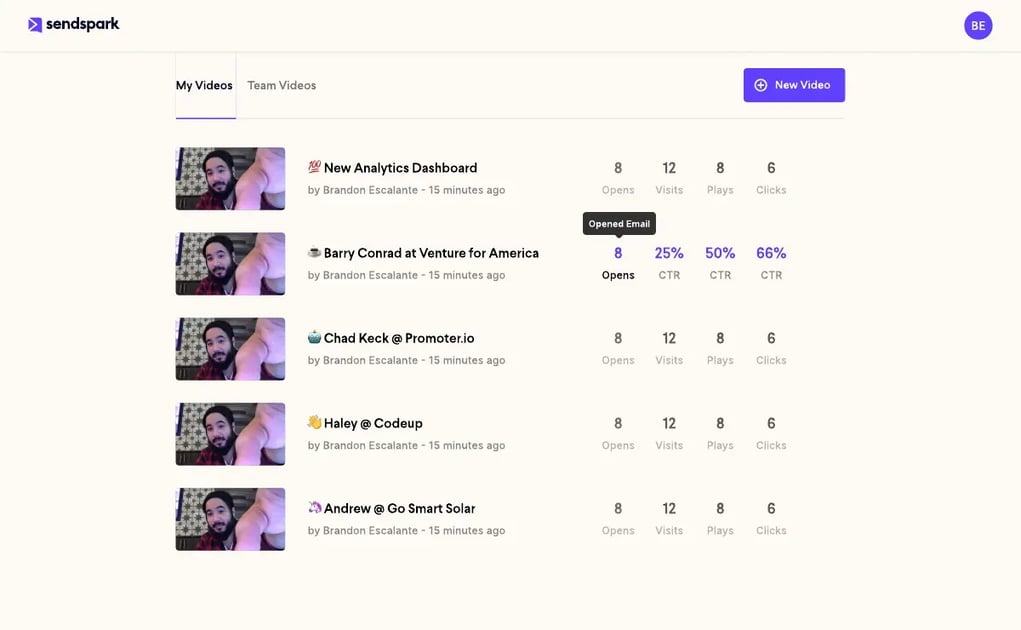
Step 5: Track which testimonials close deals. Use Sendspark’s video analytics to see which testimonial videos get the most watch time, clicks, and replies per segment. Over time, this data tells you which customer stories are most persuasive for each buyer type — and you can double down on collecting more testimonials from those segments.
Advanced strategy
Build a “testimonial sequence” for each segment: a 3-email series that introduces the problem story in email 1, adds a result-focused video in email 2, and closes with a direct CTA in email 3. Each email in the sequence features a different customer from the same segment. According to Demand Gen Report’s 2024 B2B Buyer Survey, 47% of buyers engage with 3-5 pieces of content before reaching out to a vendor. A testimonial series satisfies this need inside your outreach sequence.
The personalized video email approach is what distinguishes high-performing outreach from commodity email campaigns. When you pair a personalized AI intro with a prospect-relevant testimonial, you’re simultaneously proving that you know who they are and that others like them have already solved the problem you’re offering to solve.
Summary: Testimonial Email Tactics Compared
Here’s a quick reference for when to use each tactic based on sales stage, prospect familiarity, and the outcome you’re optimizing for.
| Tactic | Best Sales Stage | Video Length | Primary Outcome |
|---|---|---|---|
| Cold outreach opener | Top of funnel | 30-60 sec | First reply |
| Video case study follow-up | 2nd/3rd touchpoint | 2-3 min | Engagement after silence |
| Story-driven testimonial | Mid-funnel nurture | 60-90 sec | Emotional buy-in |
| Industry-matched testimonial | Any stage | 45-90 sec | Relevance and specificity |
| Quote + video combo | Top/mid funnel | 30-60 sec | High open-to-click rate |
| UGC-style customer video | Nurture sequences | 60 sec | Authenticity and trust |
| Proposal / deal-closing | Late-stage | 90 sec - 2 min | Risk reduction, deal unstick |
| AI-matched testimonial (Sendspark) | Any stage | 45-90 sec | Personalized at scale |
For more on building a full video outreach workflow, see the Video Prospecting: The Complete B2B Sales Guide from Sendspark’s resources hub. It covers how to combine testimonials, demos, and personalized intros across the full outreach sequence.
Sources & References
- BrightLocal — “88% of consumers trust online reviews as much as personal recommendations” (2024 Local Consumer Review Survey)
- Salesforce State of Sales — “72% of B2B buyers rely on peer recommendations before engaging a vendor” (2024)
- Demand Gen Report 2024 B2B Buyers Survey — “47% of B2B buyers engage with 3-5 pieces of content before reaching out” (2024)
- Edelman Trust Barometer — Peer and employee voices rated higher trust than CEO communications (2025)
Frequently Asked Questions
What is a customer testimonial AI-Personalized Video?
A customer testimonial AI-personalized video is an outreach message that includes a short video of a real customer describing their experience with a product or service. The video replaces or supplements a written quote, providing a higher-trust social proof signal. B2B sales teams use them in cold outreach, follow-up sequences, and proposal emails to build credibility with prospects.
How do I use customer testimonials in cold outreach?
The most effective approach is to lead with a testimonial from a customer in the same industry or role as your prospect, framed around a specific result. Include a video thumbnail linked to the testimonial video in your email body. Subject lines like “How [Company] solved [problem]” work well because they frame the email as a peer story, not a sales pitch. Match the testimonial to the prospect’s segment for best results.
How do I collect video testimonials from customers?
Ask immediately after a customer achieves a notable result, and remove all friction from the recording process. Send a direct video request link that opens in a browser — no app or account needed. Keep the ask focused on three questions: what problem they had, what result they achieved, and who they would recommend the product to. A 30-60 second video with specific details is more useful than a longer, vague one.
Do customer testimonial videos improve email click-through rates?
Yes. Video in email consistently outperforms text, and customer testimonials outperform rep-recorded videos in cold outreach because they shift the speaker from seller to peer. AI-personalized videos see up to 50% higher click-through rates than plain text emails when the video is properly embedded with a clickable thumbnail. Industry-matched testimonials perform even better because they answer the prospect’s key question: “Has this worked for someone like me?”
How can AI help match testimonials to the right prospects?
AI-powered video tools like Sendspark let you combine a personalized AI-generated intro (using your cloned voice) with a customer testimonial from your library, matched to the prospect’s industry or role. The AI intro addresses the prospect by name and company; the testimonial provides relevant social proof. This combination creates personalized social proof at scale, without recording a new video for every outreach campaign.
What makes a good testimonial email subject line?
The most effective subject lines are outcome-focused and specific to the prospect’s context: “How [Peer Company] reduced [specific pain] in [timeframe]” or “A 2-minute story from [Customer Name] at [Similar Company].” Avoid generic subject lines like “Check out our customer success” — these signal a marketing email, not a relevant peer story. The prospect should open because they’re curious about the result, not because they were sold on it.
How many testimonials should I have in my library before starting outreach?
Aim for at least 3-5 testimonials covering your core buyer segments before starting testimonial-led outreach. One testimonial per major industry vertical (SaaS, agency, e-commerce, etc.) gives you enough to match most cold prospects. Prioritize depth over volume: one specific, credible 60-second video beats ten vague recordings. Build your library gradually by requesting testimonials after every customer success milestone.
Record Once, Personalize at Scale
Stop recording the same video over and over. Sendspark uses AI to personalize your videos with each prospect's name and website — automatically. Sales teams see 2-3x more replies.
Get Started NowTopics: Tips & Tricks