Want to stand out in crowded inboxes? Adding video to your outreach might be the game-changer you need. Here’s why and how it works:
- Video boosts engagement: Emails with video can see up to 300% higher click-through rates. Personalized videos? Even better - 4.5x more clicks and 16x more opens.
- Build trust faster: Video conveys tone and emotion better than text, with 59% of executives preferring video over written communication.
- Proven results: Companies like Brikl saw a 46% increase in demos and a 6x jump in response rates after using video outreach.
- Efficiency at scale: AI sales tools let you personalize videos for hundreds of prospects without creating each one manually.
From first-touch outreach to follow-ups, video can help you secure more meetings. Keep videos short (45-60 seconds), focus on the prospect’s pain points, and always include a clear call-to-action. Track metrics like click-through rates and meeting bookings to refine your approach. Ready to make your outreach stand out? Video might just be your best tool yet.
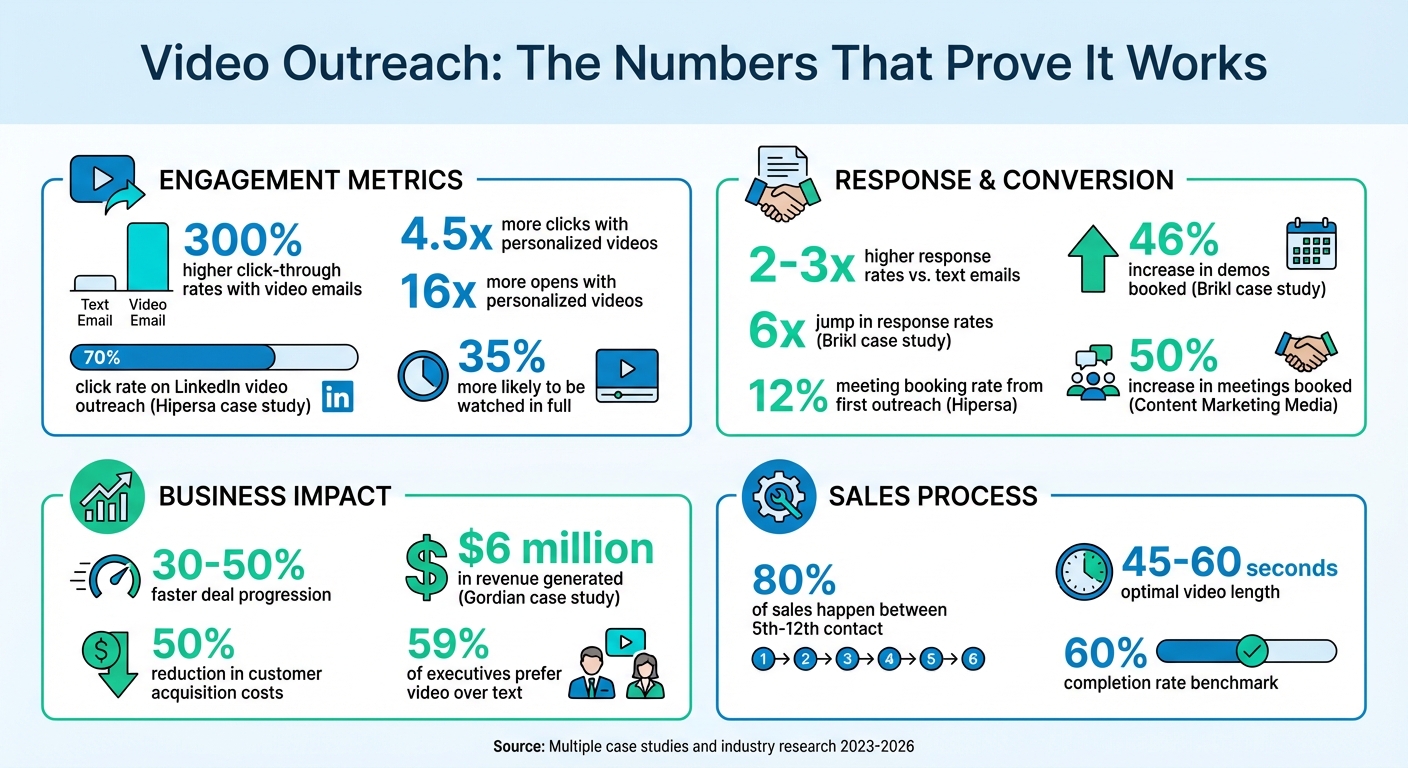
Video Outreach Performance Statistics for SDRs
Why Video Outreach Works
How Video Creates Connection and Trust
Video brings a personal touch to your outreach, allowing prospects to see and hear you, which makes your message feel more authentic. Unlike text, which can sometimes come across as flat or easy to misinterpret, video conveys emotion and enthusiasm through facial expressions and tone, making it a powerful tool for video sales pitches. As Ben Wright from Sendspark explains:
“Human connection isn’t dead. It’s actually what sets you apart. Personalized video stands out because it builds trust faster - your face and voice make the message more real.”
Using video also demonstrates effort and preparation. For instance, referencing a prospect’s LinkedIn profile or their company website shows you’ve taken the time to understand them, instantly boosting your credibility. This thoughtful approach makes your outreach feel personalized and valued, which often translates into better results.
Data That Shows Video Performance
The ability of video to create genuine connections is reflected in its performance metrics. Personalized video messages can achieve response rates 2 to 3 times higher than mass text emails. Sales teams incorporating video also report deals progressing 30% to 50% faster.
On platforms like LinkedIn, the results can be even more striking. For example, Hipersa saw a 70% click rate and a 12% meeting booking rate on their first outreach attempt using personalized video.
Additionally, personalized videos are 35% more likely to be watched in full, and they can reduce customer acquisition costs by up to 50%. Video’s visual format also acts as a “pattern interrupt”, grabbing attention in an inbox typically filled with text-heavy messages. This makes video not only engaging but also a strategic tool for standing out and driving meaningful interactions.
sbb-itb-afd3f9e
How to Personalize Videos at Scale
Using AI and Dynamic Personalization
Finding the balance between personalization and efficiency can be tricky when it comes to video outreach. Recording a unique video for every prospect? Not realistic. That’s where AI-driven personalization steps in to save the day.
For instance, AI voice cloning allows you to record a single video with a placeholder - like saying “Watermelon” instead of the prospect’s name. By leaving a brief pause before and after the placeholder, the AI can seamlessly replace it with the correct name, making the final product sound natural. A high-quality microphone and a quiet recording environment are key to keeping the cloned voice from sounding robotic or off-putting.
Dynamic backgrounds take personalization even further. Imagine your video bubble appearing over a prospect’s website or LinkedIn profile. This clever visual trick creates the impression that you’ve done your homework - without actually recording hundreds of individual videos. It’s a small touch that makes a big difference in engagement.
You can also personalize landing pages by automatically pulling in details like the contact’s first name, company name, or job title into headers and call-to-action sections. Don’t forget to set fallback terms (like using “there” if a first name isn’t available) to ensure the page always looks polished. These tailored CTAs can perform up to three times better than generic ones.
By combining AI-powered tools with smart personalization techniques, you can turn a single recording into an outreach powerhouse.
Recording Once and Personalizing for Many
The “record once, personalize at scale” strategy is all about efficiency without losing that personal touch. To make the most of it, focus on authenticity: speak naturally, maintain eye contact with the camera, smile, and use gestures to keep your delivery engaging. Start your videos with a hook - something like a compelling statistic or a thought-provoking question. Skip the generic “Hi, my name is…” intros; they don’t grab attention.
For high-value prospects, you can take things up a notch with a “Combine Video” feature. Record a short, 10-second personalized intro for each contact and seamlessly attach it to a longer, pre-recorded demo or case study. This method strikes the perfect balance between efficiency and a personal touch.
Once your main video is ready, upload your contact list via CSV or sync it directly from your CRM. With just one click, you can generate thousands of personalized videos tailored to your audience. This approach, especially when paired with AI-driven introductions, can boost response and conversion rates by as much as 300%.
Ask an SDR: how to boost outreach response rates
When to Use Video to Book More Meetings
Once you’ve nailed down AI-powered personalization, the next step is all about timing. Knowing when to send your video can make all the difference in turning a cold prospect into a warm lead.
First-Touch Outreach
Your first interaction with a prospect sets the stage for everything that follows. A video can act as a refreshing change in a crowded inbox, helping you stand out when most emails sound the same. While some SDRs hesitate to use personalized videos on cold leads, data suggests that doing so can significantly boost engagement and click-through rates.
Keep your videos short - between 45 and 60 seconds - to ensure clarity and maintain attention. Use this time wisely: skip the generic introductions and dive straight into something that grabs attention. Start with a compelling statistic, ask a question that highlights a pain point, or share a quick success story that resonates with the prospect’s situation.
For instance, SDRs at Hipersa use LinkedIn messages with video links as their first touchpoint. The results speak for themselves: 70% of prospects click to watch, nearly half watch the entire video, and 12% schedule a meeting from that initial outreach. Some experts even suggest saving highly personalized videos for later touches - like the second or third email - to balance effort with email deliverability, as the first email helps establish your sender reputation.
Follow-Up Videos for Non-Responders
If your initial outreach doesn’t get a reply, follow-up videos can help re-engage prospects who’ve shown some interest. Here’s a key stat: 80% of sales happen between the fifth and twelfth contact, yet many salespeople stop after just one attempt. A video follow-up can be the perfect way to reconnect, especially when a prospect opens your email but doesn’t respond. This behavior often signals interest, but something may still be holding them back.
Take Gabriel Onyango’s approach from January 2023 as an example. He created a 72-second video inspired by a testimonial on the prospect’s website. Without even asking for a meeting, the video prompted the prospect to re-engage.
When crafting follow-up videos, make the message about the prospect’s challenges, not your desire to book a meeting. Mention a specific trigger - like a recent job posting or company announcement - explain how it ties to their business, and wrap up with one clear call to action.
Brikl saw impressive results by switching from text-based follow-ups to personalized videos. Sales rep Chris’s team booked 46% more demos and achieved a sixfold increase in response rates.
Post-Meeting Recaps
Even after the meeting ends, the follow-up remains crucial. Instead of sending lengthy call recordings, create a concise 2-minute recap video. Highlight the features or solutions the prospect showed the most interest in, and clearly outline the next steps.
This approach works particularly well with senior executives - 59% of them prefer watching a video over reading text when given the choice. A short, personalized recap video reinforces key points from the meeting and gives your contact something easy to share with other stakeholders.
These recap videos are great for keeping the momentum going. Sending a quick reminder in the days or weeks after your meeting ensures you stay top of mind and reduces the chances of your deal slipping through the cracks.
How to Build a Video Outreach Workflow
A well-structured workflow is key to successfully booking meetings through personalized video outreach. Incorporate video at specific touchpoints, tailoring each one with thoughtful personalization.
Planning and Research
Start by setting clear goals for your campaign. Are you introducing your product to new leads, reconnecting with trial users, or following up on lost opportunities? Once your objectives are defined, segment your audience based on behavior and demographics. Tools like LinkedIn Sales Navigator can help you create detailed lists, such as “CMOs at pharmaceutical companies in Florida” or “CIOs at companies with over 250 employees.” You can also analyze social engagement to identify prospects interacting with relevant industry content.
Prioritize your prospect list to allocate your resources effectively. High-value accounts deserve fully customized 1-to-1 videos, while mid-tier prospects can be targeted with AI-assisted personalization.
Before recording, dig into individual pain points and context. Look for triggers that indicate high intent, such as a recent job change, a company posting new job openings, or a question about your product on LinkedIn. Plan visual personalization elements accordingly - record over their website, LinkedIn profile, or demonstrate a product feature that directly addresses their challenges.
“Making the creation aspect easy allows you to spend more time on the message, positioning, and personalization - all the stuff to make your campaign really work.”
- Ben Wright, VP of Revenue, Sendspark
With clear objectives and a well-researched target list, you’re ready to craft concise, engaging scripts.
Scripting and Recording Tips
The first five seconds of your video are critical - they determine whether your prospect watches or moves on. Start with a strong hook, like a relevant statistic, a thought-provoking question, or a specific observation about their business. Follow a 40-second structure: 0–5 seconds for the hook, 5–15 seconds for a value statement addressing a challenge, 15–25 seconds for social proof, and the final 10 seconds for a call-to-action. Aim for scripts between 70–80 words to stay within the ideal 30-second length for cold outreach.
Incorporate visual personalization by using Spotlight mode to display the prospect’s website or LinkedIn profile in the background. For the best quality, record near a window for natural light and use AI noise-cancellation tools to keep audio clear. Instead of reading directly from a script, use a teleprompter for key points while maintaining eye contact with the camera. Smile, use natural hand gestures, and keep your tone conversational.
Distribution and Tracking
Once your video is polished, focus on delivering and monitoring your outreach effectively.
Avoid attaching video files directly to emails, as this can trigger spam filters. Instead, include an animated GIF thumbnail that links to a hosted video landing page. Use CNAME whitelabeling to host video thumbnails and links on your secure subdomain, which helps bypass security filters and builds trust with recipients.
Distribute your videos across multiple channels, such as email sequences, LinkedIn messages, connection requests, or as follow-ups to cold calls. For example, Hipersa’s LinkedIn outreach with video links resulted in a 70% click rate, with nearly 50% of recipients watching the entire video and 12% booking a meeting just from the initial touch.
Sync your video platform with your CRM and engagement tools to automate distribution and track performance directly within lead records. Monitor real-time metrics like video views, watch duration, and CTA clicks to identify high-intent prospects. Set up alerts for video views so you can follow up immediately while your message is still fresh in their mind. Make sure your video landing page includes one clear call-to-action, such as an embedded calendar link or a “Reply” button, to streamline the next step. Content Marketing Media, under Josh Whitfield’s leadership, saw a 50% increase in meetings booked after incorporating video into their prospecting efforts.
“Video is not a silver bullet. There are ways to do video outreach right, and ways to do it wrong!”
- Sendspark
How to Measure and Improve Video Performance
Tracking the right metrics transforms video outreach from guesswork into a precise, data-driven strategy. These metrics not only reveal how engaged your audience is but also show how effectively your videos drive actions, like booking meetings. Start by keeping a close eye on your click-through rate (CTR) - this tells you how many recipients are intrigued enough by your subject line and thumbnail to click the video link. If your CTR is low, it might be time to rethink how you’re grabbing attention.
Next, dive into view duration and retention. A completion rate of around 60% is a great benchmark. If viewers are dropping off in the first few seconds, it’s a sign your hook needs work. On the other hand, if they’re disengaging later in the video, consider tightening up the content to maintain interest.
Reply and response rates are another critical metric, showing how many prospects take the next step after watching your video. But the ultimate goal? The meeting booked rate - this tracks how many video views directly result in a scheduled call. Real-time notifications can be a game-changer here, allowing you to follow up while your message is still fresh in the viewer’s mind.
Metrics to Track
To tie your video efforts directly to revenue, focus on actionable metrics. Start with open and play rates to gauge how well your subject line, thumbnail, and preview text are performing. Then, use watch time to pinpoint where viewers lose interest and identify parts of your video that may need fine-tuning. Link CTR is another key measure, showing how many viewers click on your call-to-action (CTA) button or calendar link.
Integrate these metrics with your CRM to see the bigger picture. For example, you can set up lead scoring based on video engagement. A prospect who watches your video multiple times or interacts with your CTA is clearly showing interest. Gordian, for instance, used video analytics alongside Marketo and Salesforce to track a campaign of five videos. By scoring leads based on how much of the video they watched, they generated $6 million in revenue. Glenn Hughes, a former Video Producer at Gordian, highlighted the impact:
“It proved that strategic planning and detailed video analytics can generate a tremendous return on investment for the organization”.
With these metrics in place, use the data to refine your strategy and get even better results.
Testing and Refining Your Approach
Once you’ve got your metrics, it’s time to experiment. A/B testing is your best friend here. Test one element at a time - like thumbnails, subject lines, video lengths, or CTAs - to see what resonates most with your audience. Use at least 250–300 contacts per variation and let the test run for 5–7 days. To ensure your findings are reliable, confirm them with an A/B testing calculator and aim for at least 95% confidence.
Start with thumbnails. For example, test whether using a prospect’s LinkedIn profile picture or a whiteboard with their name grabs more attention. If your CTR is underwhelming, the issue might be with the thumbnail or title rather than the video itself. Similarly, if your link CTR is low, try placing your CTA earlier in the video, ideally when engagement is at its peak.
If certain segments of your audience consistently ignore your videos, don’t dismiss it - use this as feedback. It might mean your targeting or messaging needs a closer look.
Conclusion
Video outreach has proven to be an effective way for SDRs to stand out and land meetings. With prospects overwhelmed by email overload, a well-crafted, personalized video can break through the noise and grab attention. In fact, video outreach can increase click-through rates by as much as 300%, boost reply rates by two to four times, and outperform text-only campaigns by 100% to 400%.
The secret lies in combining personalization with scalability. AI tools for sales prospecting make it possible to record one video and customize it for hundreds - or even thousands - of prospects. By tailoring elements like a prospect’s name, company, or LinkedIn profile, you can achieve a personal touch without spending hours on individual recordings. Case studies have shown that this approach leads to more demos and meetings booked.
Timing is just as important as personalization. Videos work well for first-touch outreach to make a strong impression, follow-ups to re-engage prospects who haven’t responded, and post-meeting recaps to solidify next steps. To maximize effectiveness, keep videos short - 45 to 60 seconds is ideal. Capture attention in the first five seconds, and always end with a single, clear call-to-action. Track key metrics like view duration, click-through rates, and meetings booked to evaluate and refine your strategy.
The tactics outlined in this guide - from leveraging AI for personalized videos to using strategic timing - can help you connect with prospects in a meaningful way. The SDRs who excel in 2026 won’t just rely on sending more emails. They’ll focus on delivering personalized, engaging messages that prospects actually want to watch. Video outreach allows you to build trust, showcase value, and demonstrate that you’ve done your homework - all in under a minute. Experiment with your video strategy, monitor engagement, and fine-tune your approach based on what works best.
FAQs
How do I avoid AI-Personalized Videos going to spam?
To ensure your AI-personalized videos don’t end up in spam folders, proper formatting is key. Keep the text brief - just 1-2 sentences - and avoid setting videos to autoplay. Make sure videos are embedded correctly to maintain functionality. Additionally, stick to best practices for email marketing, such as crafting compelling subject lines and ensuring your email setup is technically sound. Remember, higher recipient engagement can boost inbox placement since email providers often factor in interaction metrics when deciding where emails land.
What should I say in a 60-second SDR video?
In a short 60-second SDR video, the goal is to make an immediate connection. Start by introducing yourself and addressing the prospect by name - this personal touch grabs attention. Then, mention a specific pain point or interest that’s relevant to them. Follow this with a quick value proposition, explaining how you or your solution can help solve that issue. Finally, wrap it up with a clear and direct call-to-action, like scheduling a quick call or replying to the message.
Keep your tone friendly and conversational, and make sure the video stays between 30-60 seconds. Don’t forget to add subtitles - many people watch videos on mute, and this ensures your message gets across no matter what. This simple approach can make your outreach feel more genuine and boost your chances of getting a response.
How can I personalize videos at scale without sounding fake?
Top-performing SDRs rely on AI-powered tools like Sendspark to create personalized videos quickly while maintaining a genuine touch. These tools allow you to record a single base video and customize it with details like the recipient’s name or website. To keep your message from feeling artificial, stick to natural language, use high-quality recordings, and ensure smooth personalization. Features like AI-generated greetings with clear audio and natural pauses can make your outreach feel more authentic and engaging.
Related Blog Posts
- Top Tools for Personalizing Sales Videos in 2026
- AI Video in ABM: What Case Studies Show
- How SDRs Save Time with AI Video Follow-Ups
- Video Messaging for Business: Stand Out in Sales Outreach
Topics: blog