Video analytics can transform how you approach outreach. By tracking viewer engagement - like watch time, CTA clicks, and retention rates - you can identify which prospects are genuinely interested and refine your follow-ups for better results. Tools like Sendspark make this process straightforward by offering detailed insights such as heatmaps, device data, and real-time notifications, all of which sync with CRMs like HubSpot and Salesforce.
Learn more about video duration planning tool.
Here’s what you need to know:
- Key Metrics to Track: Total views, plays, watch time, CTA clicks, and heatmaps.
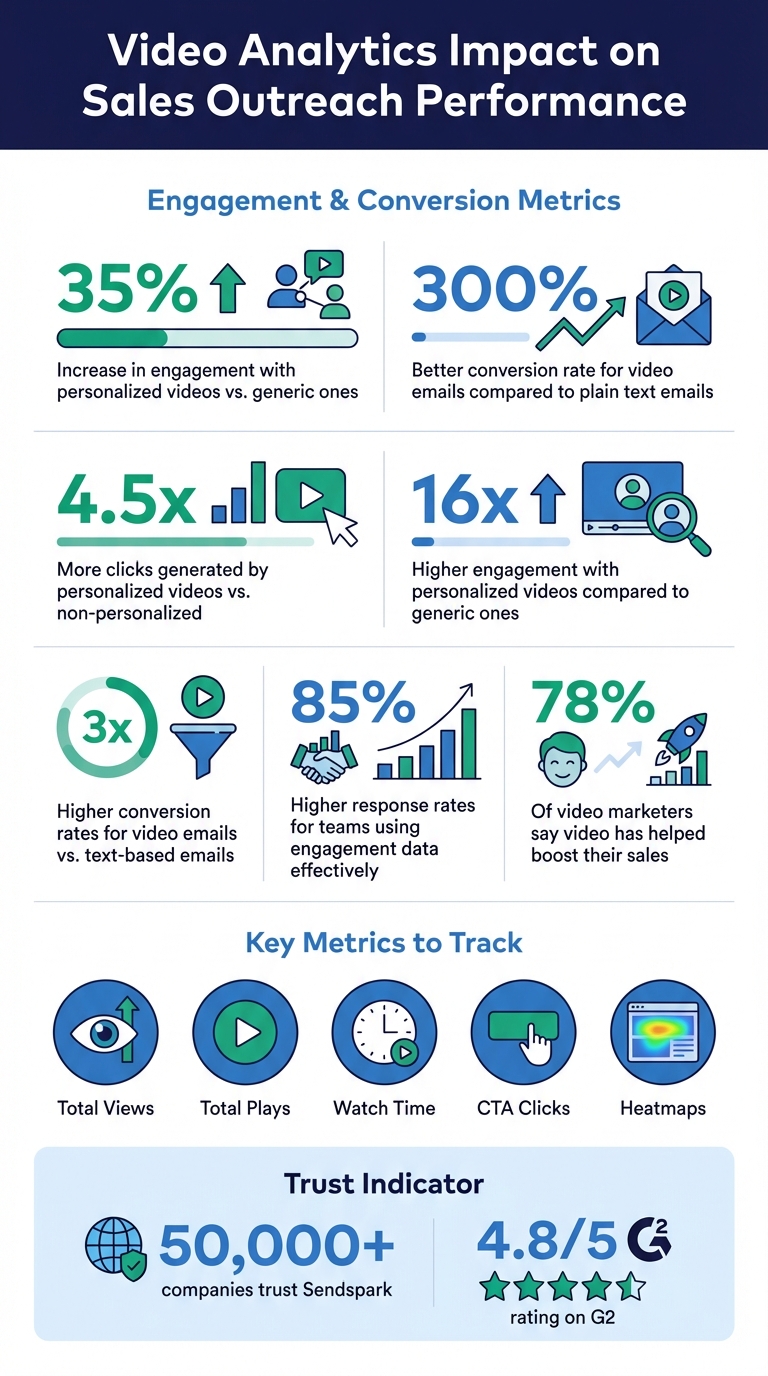
- Why It Matters: Personalized videos can boost engagement by 35%, and AI-personalized videos convert 300% better than plain text.
- How to Optimize: Use data to improve thumbnails, shorten videos, and refine CTAs.
- Automation: Set workflows to follow up with engaged leads based on viewer behavior.
With Sendspark, you can make data-driven decisions, personalize content at scale, and seamlessly integrate video analytics into your sales process to drive conversions.
These analytics become even more powerful when you connect them to your core sales enablement KPIs — quota attainment, ramp time, and win rate.
Video Analytics Impact on Sales Outreach Performance
How to Build a Video Selling Strategy - Sales Summit 2022
Key Video Metrics to Track
Not all video metrics are equally useful when it comes to gauging the success of your outreach efforts. For example, comparing total views (how many people visited your video page) to total plays (how many actually clicked play) can reveal how well your thumbnail and preview encourage action. If the gap between views and plays is wide, it might be time to rethink your thumbnail strategy. These insights are the foundation for tweaking your videos to drive better results.
Watch Time and Retention Rates
Watch time is a key indicator of how much interest your video generates. A full 100% view is a strong sign of engagement, while early drop-offs suggest your opening might not be grabbing attention. Tools like Sendspark’s heatmaps take this a step further by showing the exact moments where viewers lose interest. For instance, if viewers repeatedly drop off around the 30-second mark, it’s a clear signal to revisit that section. On top of this, personalized videos are 35% more likely to keep viewers engaged compared to generic ones. This highlights the importance of tailoring your videos to your audience.
Click-Through Rates and CTA Performance
Once you’ve ensured your audience is staying engaged, the next step is to see if they’re taking action. CTA performance measures whether your video inspires viewers to take the next step - whether it’s booking a meeting, visiting a landing page, or downloading a resource. Personalized videos can drive up to 4.5x more clicks than non-personalized ones. If your watch time is strong but your CTA clicks are low, it may mean your call-to-action isn’t clear or compelling enough. Experiment with different approaches, like moving the CTA to a more prominent spot, customizing the button text with the viewer’s name, or embedding calendar links directly into the video page for a smoother experience.
Viewer Segmentation by Engagement
Segmenting your audience based on their engagement levels can make follow-ups much more effective. For instance, a prospect who watches 80% of your video and clicks on a CTA is likely a high-priority lead, while someone who simply visits the page without playing the video might respond better to a shorter teaser or a more personalized thumbnail. Sendspark provides valuable viewer data, such as location, device, and browser, and also tracks actions like replays and “Likes”. Use this information to build segmented CRM lists, reaching out directly to highly engaged prospects while placing less-engaged viewers into nurturing sequences. This approach turns your raw data into actionable strategies for better results. This kind of engagement data is also a strong signal for scoring and prioritizing new leads earlier in the funnel – see our guide to generating quality leads through video marketing for the full playbook.
How to Set Up Sendspark Analytics
To make the most of your viewer data, setting up Sendspark Analytics is a must. By connecting Sendspark to your CRM, you can automate engagement tracking, giving your sales team instant access to who’s watching your videos - no manual updates required.
Connecting Sendspark to Your CRM
Start by navigating to the Integrations tab in your Sendspark settings. Under the “Apps” section, you’ll find built-in options for HubSpot, Salesforce, and Zoho. Select Connect next to your CRM and follow the on-screen instructions to complete the authorization process.
If you’re using HubSpot, there’s an extra step for more detailed tracking. Go to the “Tracking Snippets” section in Sendspark Integrations and paste your 7-digit Hub ID. This allows Sendspark to track video pages as “page views” within HubSpot, giving you a clearer view of how prospects interact with your content. Sendspark will automatically sync events like “Video Visited”, “Video Played”, “Video Watched”, “Video Liked”, and “Video CTA Clicked” to your CRM.
To make things even easier, filter activity in HubSpot by checking the “Sendspark” box in the contact record. This ensures your team can quickly spot which prospects are engaging with your videos. Once connected, you can monitor all these metrics right from your dashboard.
Using the Sendspark Analytics Dashboard
Getting to your analytics is straightforward. Click the Analytics button on any video in your Sendspark dashboard, and a modal will pop up with both high-level metrics and detailed viewer insights. Key metrics include:
- Total Views: The number of times the video page was opened.
- Total Plays: How many times the play button was clicked.
- CTA Clicks: The number of clicks on your call-to-action.
- Likes: How many viewers liked the video.
The Viewer Insights section is especially helpful for identifying prospects. Even if someone hasn’t filled out a form, you can still see details like their city, state, country, device, browser, and IP address. This information can help you tie anonymous viewers to specific accounts in your CRM. If you’re just exploring the platform, use the “Sample Data” toggle to preview engagement heatmaps and reports.
For accurate results, remember to log into Sendspark while testing - this excludes your own views from the data.
sbb-itb-afd3f9e
How to Optimize Outreach Using Analytics
Analytics can be a game-changer for outreach efforts. Teams that use engagement data effectively often see 85% higher response rates, compared to those who don’t. Below are practical ways to refine your video content and follow-up strategies using data insights.
Fine-Tuning Video Content with Data
Dive into metrics like watch percentages and heatmaps to identify where viewers lose interest. For example, if 60% of viewers drop off at the 45-second mark, consider trimming your script or moving key points earlier in the video. Similarly, compare “Total Views” to “Total Plays.” If people are landing on your video page but not hitting play, your thumbnail might need an upgrade. Tools like Sendspark’s thumbnail editor let you add personalized touches - like the recipient’s name or company logo - to make your video more enticing.
If your video gets plenty of plays but few clicks on your call-to-action (CTA), it’s time to rethink your approach. Try repositioning the CTA earlier in the video or making it more specific. For instance, replace a vague “Reply to this email” button with a direct calendar link to schedule a meeting.
Personalization and CTA Testing
Personalized videos generate 4.5x more clicks and 16x more opens than generic ones. But not all personalization is equally effective. Run A/B tests to compare AI-personalized intros with standard recordings. When crafting videos for AI personalization, use a placeholder word like “Watermelon” where the recipient’s name will go - Sendspark’s AI will seamlessly replace it with the correct name for each viewer.
Take personalization a step further by customizing landing page headers and text overlays with the recipient’s name or company. This creates a tailored experience that keeps their attention. Also, experiment with different CTA copy, button colors, and placement to see what drives the best results. Here’s a quick guide to optimizing key video elements:
| Element | Metric to Watch | Optimization Tip |
|---|---|---|
| Video thumbnail | Plays-to-Views Ratio | Use animated GIF previews or add the recipient’s logo |
| Video length | Watch Percentage | Shorten the video or move key points earlier if needed |
| CTA button | Clicks-to-Plays Ratio | Test new copy, colors, or embed a direct calendar link |
Once you’ve fine-tuned personalization and CTAs, use automation to follow up with engaged viewers.
Automating Follow-Ups for High-Engagement Prospects
After tracking engagement, automate follow-ups to save time and focus on high-intent leads. Sendspark syncs key events like “Video Watched %” and “Video CTA Clicked” directly to your CRM, making it easy to trigger workflows based on viewer behavior.
For example, in HubSpot or Salesforce, set up workflows to send follow-up emails or assign tasks to sales reps when a prospect watches more than 50% of a video but doesn’t click the CTA. For prospects who watch 80% or more, enable real-time notifications so your team can reach out immediately while your brand is still fresh in their mind. You can also filter activity in HubSpot by selecting the “Sendspark” option to build targeted lists of engaged viewers for your next outreach campaign.
Building Video Analytics into Sales Workflows
Once you’ve optimized your video content and set up automated follow-ups using analytics, the next step is weaving these insights into your overall sales process. By integrating video engagement data into your workflow with tools like Sendspark, you can create highly targeted outreach sequences and keep a close eye on key metrics that drive your pipeline. These insights lay the groundwork for more intentional and effective follow-ups.
Creating Outreach Sequences Based on Video Data
Sendspark works seamlessly with sales engagement platforms like Outreach, Apollo, and SalesLoft. This integration lets you design outreach sequences that adapt to how prospects interact with your videos. The platform captures detailed engagement events such as “Video Visited”, “Video Played”, “Video Liked”, and “Video CTA Clicked”, which can trigger specific follow-up actions.
For example, you can segment prospects based on how much of the video they watched. Those who watch 100% of the video could be added to a high-priority sequence with a direct meeting request, while those who watch less than 25% might get a follow-up with a short, attention-grabbing video to re-engage them.
Make use of dynamic variables like First Name and Company in your templates to add a personal touch at scale. Always include fallback options (e.g., using “there” if a name is unavailable) to ensure your videos remain polished, even if some CRM data is incomplete. Additionally, you can re-engage dormant leads by sending personalized product demos or customer testimonial videos, offering them a fresh incentive to reconnect.
Tracking Performance Over Time
To measure the impact of these sequences, track video-specific metrics like play rate and CTA click-through rate using the Sendspark Admin Dashboard. Heatmaps can help you identify patterns, such as sections prospects watch repeatedly, which can guide improvements to your sales script. Compare reply rates and booked meetings before and after incorporating video outreach to evaluate how it’s influencing your pipeline performance.
Conclusion
Video analytics takes the guesswork out of outreach, transforming it into a data-driven strategy. By understanding exactly who watched your videos, how much they engaged, and what actions they took, you can focus on the right leads and craft follow-ups with pinpoint accuracy. It’s no surprise that 78% of video marketers say video has helped boost their sales, and personalized videos generate 16x higher engagement compared to generic ones.
With Sendspark, scaling personalized outreach becomes effortless. Using features like AI-powered voice cloning and dynamic backgrounds, you can record a single video and customize it for thousands of prospects. Meanwhile, Sendspark’s analytics track every detail - watch time, heatmaps, CTA clicks, and even viewer locations. These insights integrate seamlessly with your CRM, enabling automated workflows that react instantly to viewer behavior.
Learn more about video management features.
This method doesn’t just improve outreach - it transforms your sales process. AI-personalized videos, for instance, deliver 3x higher conversion rates than text-based emails, and personalized videos are 35% more likely to keep viewers engaged. With over 50,000 companies trusting the platform and a 4.8/5 rating on G2, Sendspark has proven its ability to combine personalization with actionable insights at scale.
To maximize your results, focus on key metrics like watch time, CTA clicks, and engagement rates. Use heatmaps to fine-tune your messaging, automate follow-ups based on viewer behavior, and experiment to discover what resonates most with your audience. By marrying personalized video with detailed analytics, you create a feedback loop that consistently sharpens your outreach and drives better outcomes.
FAQs
How can video analytics help improve my sales outreach?
Video analytics can offer game-changing insights to supercharge your sales outreach. Tools like Sendspark let you monitor crucial metrics, including who watched your video, how much they viewed, their location, the type of device they used, and whether they interacted with your call-to-action.
This information helps you pinpoint highly engaged prospects, fine-tune your messaging to address where viewers lose interest, and improve your outreach strategies over time. By zeroing in on what connects best with your audience, you can boost engagement and drive higher conversion rates.
What are the most important metrics to track for video performance?
When evaluating how your video is performing, keep an eye on critical metrics like total views, unique viewers, and the completion rate - which shows the percentage of the video people actually watch. Dive into engagement heatmaps to pinpoint the parts of your video that grab the most attention. It’s also smart to track CTA clicks to gauge how well your call-to-action is driving results. For a more detailed understanding, analyze viewer specifics like location, device, and browser. Plus, real-time engagement notifications can give you the chance to respond quickly to viewer interest.
How does Sendspark work with CRMs like HubSpot and Salesforce?
Sendspark works effortlessly with HubSpot and Salesforce, making it simple to embed AI-personalized videos directly into CRM emails and contact records. Plus, engagement metrics - like video views and clicks - sync automatically with your CRM, giving you up-to-the-minute insights into how recipients are interacting with your content.
Even better, you can set up automated video creation based on CRM events. This helps streamline your outreach and ensures your communications are both timely and tailored, even when scaling up.
Related Blog Posts
- How to Use Video in Sales Outreach Without Wasting Time
- How To Track Video Performance In Social Selling
- How To Schedule Video Outreach For Maximum Views
- Best Practices for Video in Sales Engagement Platforms
Topics: blog