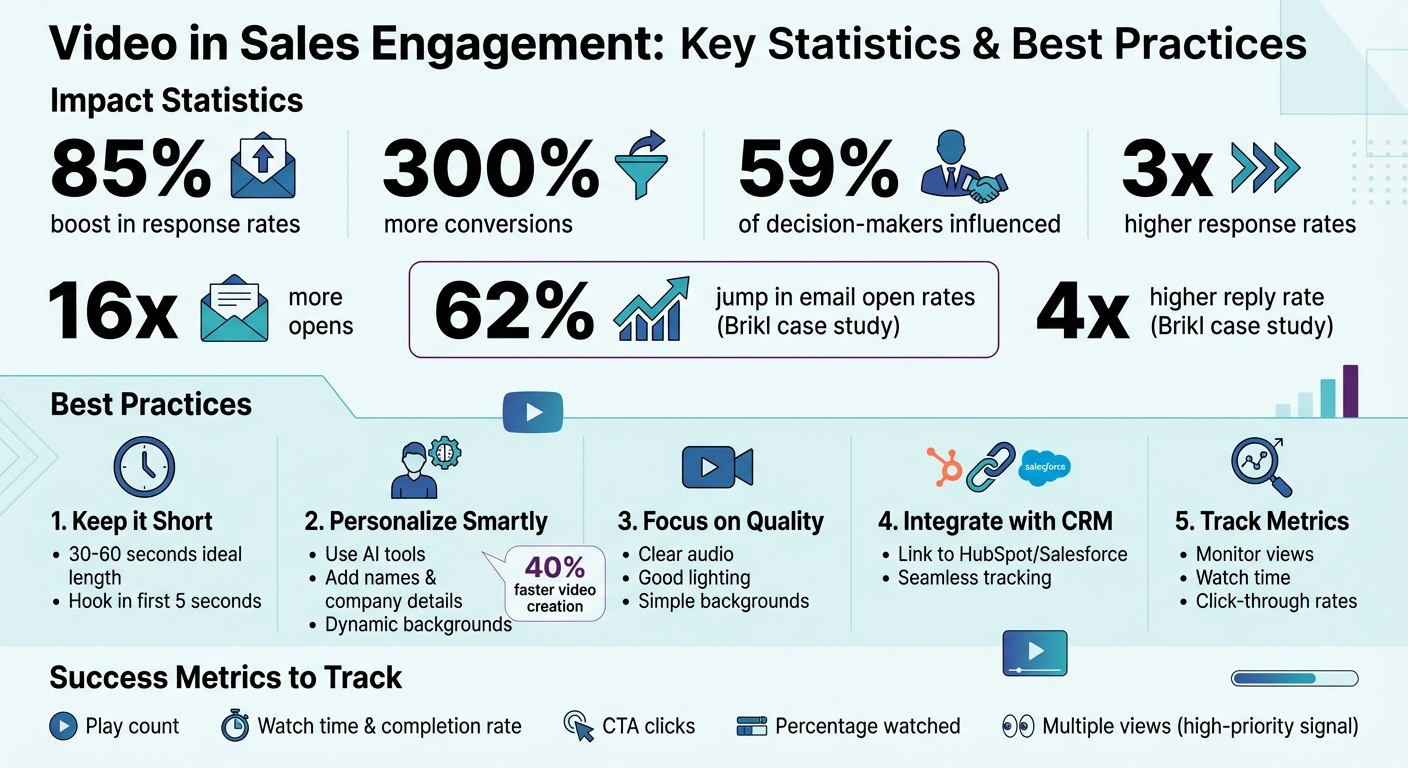
Video is no longer optional in sales outreach - it’s a game-changer. Personalized videos can boost response rates by 85%, drive 300% more conversions, and influence 59% of decision-makers to choose your product. But creating effective videos requires strategy. Here’s how:
- Keep it short: Aim for 30–60 seconds. Hook your audience in the first 5 seconds with a personalized statement or question.
- Personalize smartly: Use AI tools to add names, company details, or visuals like LinkedIn profiles to make videos feel tailored without extra effort.
- Focus on quality: Clear audio, good lighting, and simple backgrounds make a big difference. Test before sending.
- Integrate with your CRM: Link video tools to platforms like HubSpot or Salesforce for seamless recording, sharing, and tracking.
- Track metrics: Monitor views, watch time, and clicks to refine your approach and improve results.
Video works best when it’s strategic, personalized, and data-driven. Follow these steps to make your outreach stand out and close more deals.
Video Sales Engagement Statistics and Best Practices
Creating Effective Sales Videos
Keep Videos Under 60 Seconds
Your prospects are busy, so keeping your videos short is key. Aim for 30–60 seconds for prospecting videos. If your message takes longer than 40 seconds, it’s probably too much for an initial outreach.
“If you can’t get it done in under 40 seconds, don’t send it. No wasted seconds. Every 10 seconds buys you their attention for the next 10 seconds.” - Hamish Stephenson, CEO @ Selr.io
The first 5 seconds are make-or-break. Start with a personalized “You” statement or an engaging question to hook your viewer immediately. Then, present your main point quickly so even if they stop watching after 30 seconds, they’ve gotten something valuable. Wrap it up with one clear call to action - whether that’s sharing a meeting link, asking a question, or requesting a video reply.
Once you’ve grabbed their attention, make sure your message feels tailored to them.
Personalize Each Video Message
Generic videos often get ignored. While recording a unique video for every prospect isn’t practical, AI tools can help you create a personalized experience.
Record a base video with a placeholder, and let AI dynamically update it with the prospect’s name or relevant visuals. For example, you can have their LinkedIn profile or company website appear as the video background, making the message feel specific to them.
For high-priority accounts, go deeper. Mention their company by name, highlight a specific challenge they’re facing, or record your screen while navigating their website to illustrate a solution. Personalized thumbnails can also make a big difference - try using a GIF of yourself waving or holding a whiteboard with their name to boost click-through rates.
Once you’ve nailed personalization, focus on delivering a professional-looking video.
Ensure Good Video and Audio Quality
You don’t need fancy gear, but clear audio and visuals are non-negotiable. Poor audio, in particular, can make you seem less credible and less likable. For audio, find a quiet space and use headphones with a built-in mic or a simple USB microphone - avoid relying on your laptop’s internal mic. If there’s background noise, tools like Krisp.ai can help cancel it out. A small room with soft furnishings can also reduce echo.
For lighting, natural light is your best friend. Sit facing a window during the morning or afternoon, so the light hits your face directly - this avoids the dreaded silhouette effect. If you wear glasses and notice glare from a lamp, soften it with tissue paper over the light.
When it comes to framing, position your camera at eye level or slightly above by using a laptop stand or stacking books. Look directly into the camera lens to create a sense of eye contact. Keep your background simple but not completely blank - a plain wall or a tidy bookshelf works well. Avoid clutter or overly stark white backgrounds, as they can be distracting. Always do a test recording to catch any issues with visuals or audio before hitting record on the final version.
Connecting Video to Your Sales Workflow
Integrate Video Tools with Your CRM and Sales Platforms
To streamline your video outreach, connect your video platform directly to the tools your team already relies on. Many modern video platforms offer built-in integrations with popular systems like HubSpot, Salesforce, Outreach, and SalesLoft. This allows you to record, personalize, and send videos without bouncing between apps.
For example, you can use a browser extension to record and share videos directly within your CRM. Picture this: you’re drafting an email in HubSpot, hit a button to record a quick video, and insert it into your email sequence - all without leaving the platform. Some tools even include a “Share” module that generates code snippets, ensuring your videos display properly across different platforms.
Want to make personalization effortless? Sync your CRM fields with merge tags in your video tool. Using tokens like or Sendspark automatically customizes video thumbnails and landing pages. You can also pull CRM data to set dynamic backgrounds, such as a prospect’s website or LinkedIn profile, making the message feel personal without having to record hundreds of unique clips. For an extra touch, combine features to stitch a personalized intro onto a pre-recorded product demo.
By integrating these tools, you can automate much of the video creation process, saving time while still delivering a tailored experience.
Set Up Automated Video Workflows
Once your tools are connected, you can set up workflows to automate video creation and distribution based on CRM triggers. For instance, record a base video with placeholders, and let AI voice cloning update it for each recipient.
Map CRM fields to video personalization tokens to create one-to-one videos automatically. Import contact lists through CSV uploads, CRM syncs, or APIs, and let the platform generate unique video links for every recipient. You can also automate visual personalization - like displaying a prospect’s website in the video background - so every message feels customized without requiring extra effort. Once the videos are ready, grab the “Share Snippet” or HTML code and drop it into templates in your sales engagement tools, like Outreach or HubSpot Sequences.
Check out our guide on personalization boundaries in video to learn more.
Here’s a real-world example: In May 2025, Brikl, an ecommerce platform, integrated Sendspark’s personalized video features into their outreach campaigns. Within just two weeks, they saw a 62% jump in email open rates and a reply rate that was four times higher than before. Plus, their Sales Development Representatives created personalized videos 40% faster than they had previously.
Don’t forget to set fallback values for personalization tokens - like using “there” if a first name is missing - to avoid broken-looking landing pages. Also, make sure your video landing page updates dynamically with the prospect’s branding, colors, and a clear call-to-action to guide them toward the next step.
Test Video Embedding in Emails and Messages
When embedding videos in emails, avoid adding the actual video file - it could trigger spam filters. Instead, use a clickable GIF thumbnail that links to a hosted video landing page. The animated preview is far more eye-catching than a static image.
Before launching your campaign, resize the thumbnail to 400px and include personalization elements, like the prospect’s name or company logo, to boost click-through rates. The animated GIF snippet can make all the difference in grabbing attention.
Lastly, ensure your video landing page is optimized for action. Place a clear call-to-action directly below the video, such as an embedded calendar link or a “Reply to this email” button. Before sending at scale, authenticate your custom video link domain with SPF, DKIM, and DMARC to avoid delivery issues. Always test your emails first - verify that the GIF displays properly, the link works, and the landing page loads quickly on both desktop and mobile devices. These small steps can make or break your campaign’s success.
Using Video in Sales Outreach Campaigns
Place Videos at High-Impact Touchpoints
Adding videos strategically at key moments in your sales outreach can make a big difference. Focus on touchpoints where personalization has the most impact.
For example, in your first-touch prospecting emails, include a short video introduction. This video should explain why your solution exists and how it can benefit the prospect. If you’re reaching out to someone already using a competitor’s product, use the video to showcase how your solution is a game-changer - whether it’s faster, more efficient, or offers a better overall experience.
Another great opportunity is before scheduled meetings. Sending a quick video with the meeting agenda helps build rapport and ensures everyone is on the same page. This small step can reduce no-show rates significantly. After the meeting, instead of overwhelming stakeholders with a long recording, send a short recap video summarizing key takeaways and next steps. This makes it easier for anyone who missed the meeting to stay in the loop.
Videos are also excellent for visualizing pain points. For instance, you can highlight specific challenges like slow website load times or missed opportunities. When you’re ready to close the deal, consider walking prospects through your proposal using video. Explaining pricing and value in a dynamic way often works better than sending a static PDF. And for re-engaging cold leads, a friendly check-in video or a quick demo can reignite interest and encourage a response.
Next, let’s explore how AI can help you personalize these videos efficiently.
Use AI to Personalize Videos at Scale
Creating a custom video for every prospect sounds great but isn’t practical. On the other hand, generic videos often miss the mark. That’s where the “record once, personalize at scale” approach comes in. AI-powered tools allow you to create a single base video and personalize it for thousands of recipients by swapping out specific details, such as names or backgrounds.
For instance, you can record a base video with placeholders, and AI can replace the placeholder with the prospect’s name. You can also make the video more relevant by dynamically inserting a prospect’s website or LinkedIn profile as the background.
For a more personal touch without taking too much time, try hybrid personalization. Record a unique 10-second intro, then attach it to a pre-recorded product demo or customer testimonial. This method strikes a balance between personalization and efficiency.
Once your videos are tailored, the next step is to test their effectiveness.
Run A/B Tests on Video Campaigns
To see how well your video outreach performs, compare it to text-only campaigns. Measure the lift in engagement and response rates. You can also test fully personalized videos (recorded individually) against AI-personalized ones to find the right mix of scalability and authenticity.
Experiment with different email elements. For example, test subject lines like “Hey {Name} - recorded this for you 📹” against more traditional options. Try using static image thumbnails versus animated GIFs, or even hold up a whiteboard with the prospect’s name to grab attention. On the video side, test different hooks in the first few seconds, compare shorter 30-second videos to longer 60-second ones, and try various calls-to-action.
“The first 5 seconds is the most important. Hook them in with thought-provoking personalization about them. Humor here is key.”
– Hamish Stephenson, CEO, Selr.io
Finally, track video-specific metrics like play rates, watch percentages, and click-through rates on embedded calls-to-action. If viewers drop off after 10 seconds, it might be time to shorten your script or create a stronger opening. Use these insights to refine your approach, improving both personalization and placement strategies.
sbb-itb-afd3f9e
Tracking and Improving Video Performance
Monitor Video Engagement Metrics
Keep a close eye on metrics like video opens, views, watch time, and CTA clicks to understand how engaged your prospects are. Dive deeper into watch time and completion rates to pinpoint exactly where viewers lose interest or drop off.
Don’t overlook the play count - it’s a key indicator of initial interest. Also, track CTA clicks (like “Book a Demo” or “View Proposal”) and compare these results with text-based outreach to determine the return on investment.
Another important metric is the percentage of the video watched. This helps you assess how effective your opening hook is. If you notice a prospect watching your video multiple times, it’s a strong signal to prioritize them for follow-up.
Finally, make sure to integrate these findings into your CRM to streamline follow-up actions and make data-driven decisions.
Connect Video Data to Your CRM
Integrating video engagement data directly into your CRM ensures that all relevant metrics are tied to individual contact records.
This connection allows you to automate lead scoring based on viewer behavior. For instance, you could assign higher lead scores to prospects who watch a full customer testimonial compared to those who only view a short introduction. You can also set up CRM alerts to notify sales reps when a prospect watches multiple videos, signaling heightened interest.
Take Gordian’s example: In July 2023, they synced video engagement data with their CRM and automated lead scoring based on viewing percentages. This strategy helped them generate $6 million in revenue.
Refine Your Approach Based on Results
Use the engagement data you’ve gathered to fine-tune your video content. If your analytics reveal that viewers consistently stop watching at a specific point, consider revising your script to make it more concise or engaging.
Experiment with different thumbnail designs, like a waving GIF versus a static image personalized with the prospect’s name, and track which version gets more clicks.
How to Use Video for Prospecting I Top Video Sales Tips!
Conclusion
Video has become an essential tool for sales teams aiming to cut through crowded inboxes and build authentic connections with prospects. The secret lies in mastering three key elements: personalization at scale, smooth workflow integration, and data-driven adjustments.
When it comes to personalization, scaling is the real challenge. Creating a custom video for every prospect isn’t practical. That’s where AI-powered personalization steps in. It allows you to record a single video and dynamically tailor it for each recipient - like adding their name or featuring their website in the background. This approach boosts engagement without demanding excessive time or effort.
Equally important is seamless integration with your CRM. When your video tools sync directly with your CRM and sales engagement platforms, embedding videos into workflows becomes effortless. You can also automate follow-ups based on how prospects interact with your videos. This not only saves time but also ensures your outreach is smarter and more effective.
And let’s not forget the importance of tracking metrics. Treat video outreach as an evolving process. Use data like watch time and CTA clicks to fine-tune your strategy. For example, if viewers consistently drop off at a certain point, shorten your script. Or, if a GIF thumbnail with a friendly wave outperforms a static image, lean into that insight for future campaigns.
With over 50,000 companies already leveraging Sendspark and a stellar 4.8/5 rating on G2, it’s clear that personalized video delivers results. Sales teams report up to 3x higher response rates and 16x more opens, ultimately driving more closed deals.
FAQs
How can AI improve video personalization in sales outreach?
AI tools are transforming how sales teams create personalized videos at scale - and they’re doing it with minimal effort. Thanks to generative voice technology, a single recording can be customized for each recipient by naturally incorporating details like their name. On top of that, AI can tweak visuals dynamically, such as embedding the prospect’s website or logo into the video, delivering a truly tailored experience.
When integrated with CRMs like HubSpot or Salesforce, AI pulls in relevant data - things like company size or industry - and seamlessly weaves it into the videos. This automated process doesn’t just save time; it also drives better engagement. Why? Because personalized videos tend to outperform generic ones, often leading to higher response rates and more people watching them all the way through.
AI doesn’t stop at creating the videos; it also tracks how viewers interact with them. Metrics like watch time and clicks are fed back into the sales process, giving teams valuable insights to refine their outreach. Plus, follow-ups can be automated, making every interaction feel personal while delivering stronger results.
What are the best practices for using video tools with your CRM?
To seamlessly integrate video tools with your CRM, start by leveraging native integrations. These can automatically sync contacts, sequences, and activity logs, saving you from the hassle of manual data entry while keeping your CRM updated. By mapping CRM fields - like name, company, and website - to your video personalization engine, you can craft tailored experiences such as dynamic backgrounds or personalized greetings with minimal effort.
Take it a step further by automating video creation. Trigger videos based on CRM events like new leads, stage updates, or scheduled meetings. This approach ensures your prospects receive timely, relevant videos at key points in their journey. Additionally, log essential analytics - like views, watch time, and clicks - back into the CRM. These insights help sales reps focus their follow-ups on the most engaged prospects.
Don’t overlook the importance of clean data and privacy preferences. Include lightweight video thumbnails or GIFs in emails to boost deliverability while creating an engaging, seamless experience that encourages higher response rates.
How can I track and analyze the performance of my video outreach?
You can monitor and evaluate how your videos are performing using Sendspark’s built-in analytics and CRM integrations. Dive into metrics like total views, average watch time, and CTA (call-to-action) clicks to see how recipients are interacting with your content. Look for patterns, such as where viewers stop watching or which CTAs are driving the most engagement.
By connecting Sendspark with your CRM tools like HubSpot or Salesforce, you can automatically log engagement data for each prospect. This creates a centralized record for your sales team, making it easier to spot high-interest leads and fine-tune your video strategy for improved outcomes.
Related Blog Posts
- How to Create Personalized Sales Videos That Convert
- Sales Video Best Practices: A Complete Checklist
- How to Use Video in Sales Outreach Without Wasting Time
- The Ultimate Guide to Video Selling in 2026
Topics: blog