Video sales follow-ups outperform text-based emails by a wide margin. They double open rates, increase click-through rates by up to 300%, and generate 26% more replies. The reason? Video adds a personal touch that builds trust, stands out in crowded inboxes, and speeds up deal progression by 30–50%. Tools like Sendspark make creating personalized videos scalable with features like AI voice cloning and CRM integrations. For a proven template for each scenario, see how to respond to a not interested email.
Here’s a quick breakdown of the 10 examples:
- Post-Discovery Call Recap: Summarize calls with a short, personalized video to reinforce key points and next steps.
- Addressing Objections: Use videos to confidently handle concerns with visual walkthroughs.
- Customized Demo Follow-Up: Highlight relevant features from demos with tailored videos.
- Proposal Walkthroughs: Simplify complex proposals with a guided video explanation.
- Re-Engaging Stalled Deals: Rekindle conversations with engaging, personalized outreach.
- Post-Meeting Thank You: Leave a lasting impression with a quick thank-you video.
- Handling Competitor Questions: Address comparisons with confidence and clarity.
- Multi-Stakeholder Deals: Send role-specific videos to cater to different decision-makers.
- Demo Request Follow-Up: Set expectations and build rapport with a personalized video.
- Pre-Close Momentum: Address final concerns and encourage action with a direct call-to-action.
Why Video Works:
- Open rates are 2x higher.
- Click-through rates improve by up to 300%.
- Deals close faster, with higher contract values.
Key Tools & Features: Platforms like Sendspark allow you to create one video and personalize it at scale with AI, saving time while maintaining a human touch. Integrations with CRMs like HubSpot or Salesforce make tracking engagement seamless, helping you focus on prospects showing the most interest.
Pro Tip: Keep videos short (60–90 seconds) and always include a clear call-to-action, like a scheduling link, to make the next step easy.
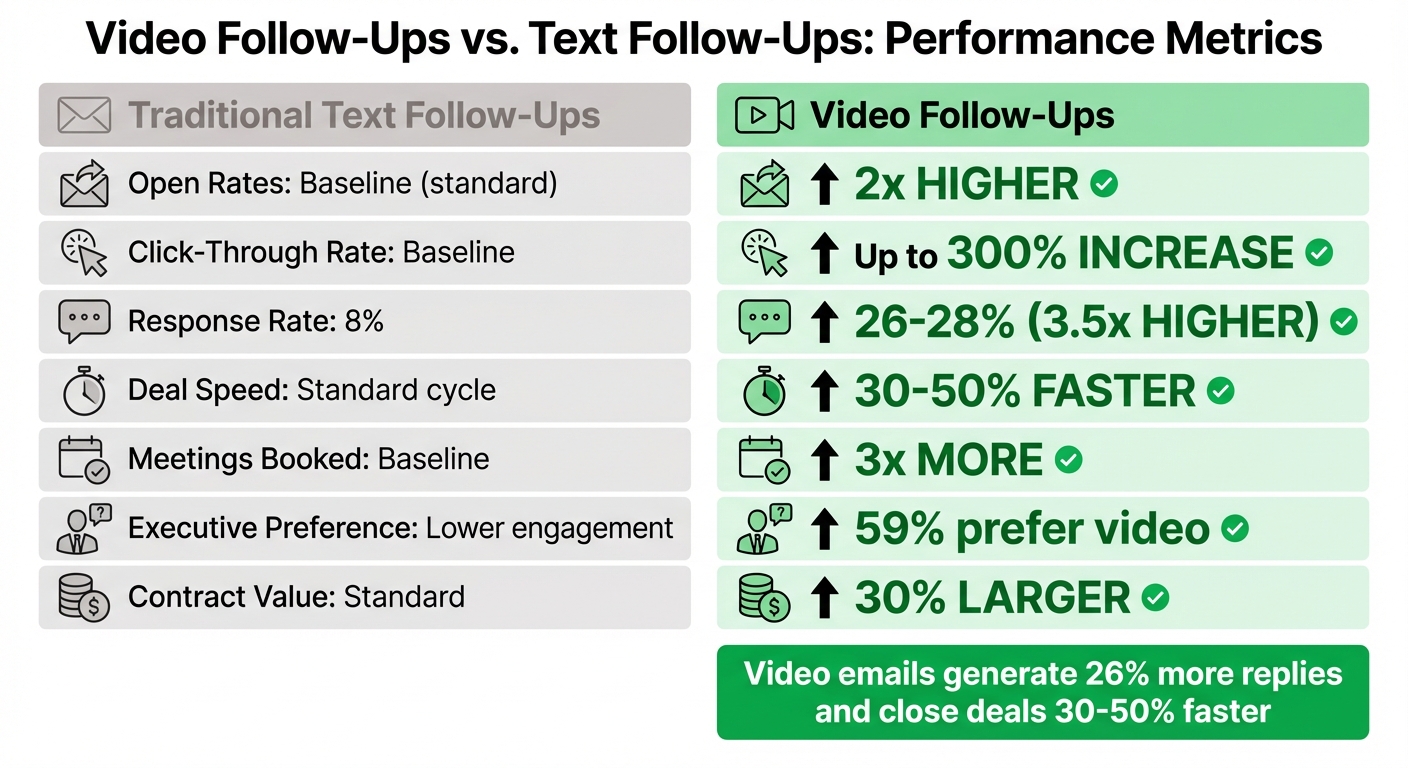
Video vs Text Follow-Ups: Performance Metrics Comparison
How to Record a Follow-Up Video that Gets Remembered | 5 Minute Sales Training
1. Post-Discovery Call Recap
After a discovery call, many sales reps follow up with a standard email summarizing the conversation. But let’s face it - text-heavy emails often get buried in crowded inboxes. A video recap, on the other hand, adds a personal touch, putting a face to the voice and strengthening the connection you built during the call. Plus, it helps move the deal forward faster.
The best post-discovery videos are short and sweet - 60 to 90 seconds is ideal. They should focus on three main points: what you learned about the prospect’s challenges, how your solution addresses their pain points, and the next steps in the process. To make your video more engaging, consider recording over visuals like the prospect’s website or a key slide from your discovery presentation. This not only adds context but also shows that you were paying attention during the call.
Tools like Sendspark take personalization to the next level. With Sendspark, you can record one recap video and use AI voice cloning to include each prospect’s name. The platform even dynamically displays the prospect’s website in the background, making every video feel tailor-made. This is a game-changer for high-volume teams, allowing them to send personalized updates to multiple prospects without sacrificing that personal connection.
For even more efficiency, integrate Sendspark with your CRM. By syncing with platforms like HubSpot or Salesforce, you can automatically pull in personalization tokens (like or ) from your contact data. Plus, you’ll get valuable insights, such as watch time and click-through rates, delivered straight to your CRM.
Don’t forget to end your video with a clear call-to-action. Embedding a calendar link or scheduling button right below the video makes it easy for prospects to take the next step, turning your recap into a powerful tool for closing deals.
2. Addressing Objections After Initial Pitch
When prospects raise concerns after your pitch, relying solely on text might not cut it. Video, with its ability to convey confidence and tone, offers a more effective way to ease hesitation. In fact, 59% of senior executives prefer watching a video over reading text, making it a great choice for busy decision-makers.
The next step? Use a concise visual walkthrough to show, not tell. Record a screen share that directly addresses the prospect’s concern - whether it’s their website, a specific feature, or a process. For instance, if they’re worried about implementation time, create a video that walks them through your onboarding process, using real data to provide context. Concrete demonstrations are far more persuasive than abstract claims.
To take this approach further, tools like Sendspark can help streamline objection handling with AI. For example, you can use AI voice cloning to create one video addressing a common concern - like pricing or integration challenges - and then personalize it for each prospect by adding their name and website as the backdrop. This method gives a tailored, high-touch experience while allowing you to connect with multiple prospects efficiently.
Tracking engagement is also critical. By integrating Sendspark with your CRM (like HubSpot or Salesforce), you can automatically insert personalization tokens such as and Sendspark. You’ll also gain access to analytics, showing who watched your video and for how long. If a prospect spends significant time watching a video about security concerns, it’s a strong indicator they’re reconsidering their stance.
Finally, end your video with a clear call-to-action. Include options like a calendar link or a “Book a 10-Minute Call” button to make it easy for prospects to take the next step. Since 80% of sales happen between the fifth and twelfth contact, reducing friction for re-engagement is crucial to moving deals forward.
3. Customized Demo Follow-Up
After a live product demo, prospects often need a recap that focuses on the features most relevant to them. But here’s the challenge: creating personalized follow-up videos for every lead takes a lot of time, and generic follow-ups rarely seal the deal. In fact, personalized demos boast a 37% higher conversion rate than generic ones. Unfortunately, most sales reps simply don’t have the bandwidth to create custom videos for every prospect.
This is where AI-powered tools can make a huge difference. Instead of recording multiple demos, you can create one video that addresses common pain points and use Sendspark to tailor it for each prospect. For example, AI voice cloning can seamlessly incorporate the prospect’s name into the video, and you can even display their website in the background - all without needing to re-record. To make it even more personal, you can add a short webcam intro that greets the prospect by name and highlights two or three key features discussed during your live demo. Pete Prowitt, Director of Sales at Loom, sums it up perfectly:
“A product demo is not a ‘feature dump.’ The fastest way to lose a prospect’s attention is to list features or functionality that aren’t relevant to their business”.
This strategy builds on the personalized approaches discussed earlier, offering a way to scale your follow-ups while still making them feel tailored. Plus, it sets the stage for smarter engagement tracking.
Keep your demos short - ideally between one and three minutes. Use analytics to your advantage: Sendspark tracks metrics like watch time and CTA clicks, and CRM integrations can trigger follow-ups automatically. For instance, if a prospect re-watches the part of the demo about integration capabilities, that’s a clear sign to focus on that topic in your next conversation.
Finally, always include a clear call-to-action at the end of the video. Whether it’s a calendar link or a “Book a Technical Deep Dive” button on the landing page, make the next step easy and obvious. This is especially important since 67% of buyers prefer content tailored to their specific needs. A well-placed CTA can turn hesitant prospects into closed deals.
4. Moving Deals Forward After Proposal Review
Once you’ve sent a proposal, the waiting game can often slow things down. But there’s a way to keep the momentum alive: video walkthroughs. These can help speed up the review process and keep your deal moving forward. Did you know that 59% of senior executives prefer watching a video to reading text? A short, 60–90 second video follow-up can highlight the most important parts of your proposal, like pricing, ROI, and key features, in a way that’s easy to digest. For a step-by-step approach to async pitch delivery, see our complete video pitch deck guide.
Using screen recording tools, you can visually guide prospects through the proposal. For example, you can overlay your webcam in a small bubble while walking them through the document, pointing out critical pain points or simplifying complex sections. This approach reduces confusion and cuts down on endless email threads.
Dan Vermont, Head of Operations at Brikl, shared how his team scaled this process:
“Using Sendspark transformed our customer success approach. We built a library of pre-recorded answers, allowing our team to quickly respond to common customer questions with personalized videos”.
With tools like Sendspark, you can take this a step further. Record one proposal walkthrough and use voice cloning to personalize it for each prospect - adding their name or even featuring their website in the background. This saves hours of time while maintaining a personal touch. For deals involving multiple stakeholders — often coordinated in a digital sales room — you can create tailored versions that address the unique concerns of each decision-maker.
But personalization isn’t the only advantage. Analytics can sharpen your follow-up strategy. Real-time alerts and CRM integrations, like those with Salesforce and HubSpot, can log engagement data and notify your team when a prospect is actively reviewing the proposal. This allows you to focus on the deals that are most likely to close.
To drive action, end your video with a clear call-to-action, such as a “Schedule Next Steps” button or a Calendly link.
Cat King, Outbound Success Coach at MySalesCoach, emphasizes the power of video:
“A well-crafted video message cuts through the noise, offering a personalised, human touch that static emails and LinkedIn messages simply can’t replicate”.
5. Re-Engaging Stalled Opportunities
Here’s a striking fact: 80% of sales happen between the fifth and twelfth contact, yet many sales reps give up after just one attempt. Using video follow-ups is an effective way to cut through the silence and rekindle stalled conversations without sounding pushy. This method not only grabs attention but also opens the door for renewed engagement.
When prospects go quiet, standard text emails often fall flat. In contrast, video follow-ups stand out, offering a personal touch that reminds recipients there’s a real person ready to assist.
Just like personalized videos can jumpstart early-stage conversations, they can also bring dormant opportunities back to life - without being intrusive. AI tools make this process even easier. For instance, you can record one video and let AI customize it for multiple recipients. Tools like Sendspark make this seamless by allowing you to insert each prospect’s name in your own voice and even showcase their website in the background. The result? Every video feels personalized, even when you’re reaching out at scale.
“I’m confident I’ve found the best video prospecting tool, and it’s Sendspark. Welcome to the world where AI meets video”.
- William Padilla, Account Executive at GRIN
Timing is everything. Use triggers like a new job posting, a website update, or industry news to show you’re paying attention. Keep your video concise - around 60–90 seconds - and focus on addressing the prospect’s primary challenge. Wrap things up with a clear call-to-action, such as an embedded calendar link, to make scheduling a meeting as easy as possible.
Finally, use engagement analytics to identify which prospects are warming up again. By tracking who watches your videos and for how long, you can zero in on leads showing renewed interest. Plus, CRM integrations with tools like HubSpot and Salesforce automatically log this activity, helping your team prioritize the most receptive prospects. These strategies can seamlessly fit into your existing CRM workflows, making follow-ups more efficient and effective.
6. Post-Meeting Thank You and Next Steps
The moments right after a meeting can be game-changers. While many sales reps stick to sending a generic email, it’s worth noting that 59% of senior executives prefer watching a video over reading text. A short thank-you video can cut through the noise of crowded inboxes and leave a stronger impression, reinforcing the personal connection you’ve just built.
Keep your video short and to the point - 60 to 90 seconds is the sweet spot. Start by addressing the prospect by name, then briefly recap the main challenge you discussed and the solution you proposed. End with a clear call-to-action, like including a calendar link for scheduling the next meeting.
Thanks to AI, personalizing these videos is now scalable without losing that human touch. You can record one video and let AI handle the personalization - adding the prospect’s name in your voice or even displaying their website in the background. By syncing this process with your CRM, you can automatically populate details like , ensuring each video feels tailored, even when reaching out to multiple prospects.
On top of that, analytics help you track how engaged your prospects are. When someone watches your video, their activity - like watch time and clicks on your call-to-action - gets logged directly into their CRM timeline. This visibility lets you pinpoint the right moment to follow up. For example, in 2025, Brikl’s sales team sent personalized videos within 24 hours of meetings and saw a 43% increase in demo bookings. That’s the power of combining personalization with timing.
sbb-itb-afd3f9e
7. Handling Competitor Questions
When prospects start comparing your solution to competitors, plain text emails can fall flat. They often lack the depth and nuance needed to address these concerns effectively. Video follow-ups, on the other hand, allow you to bring in elements like tone, facial expressions, and confidence - all of which can make your message more impactful. Personalization is crucial here, just as it is in other follow-up strategies. Emir Atli, Co-founder of HockeyStack, puts it perfectly:
“By responding to rejection with a video, you can successfully reflect your positive and self-confident attitude to them through your facial expressions and gestures.”
One smart tactic is to use picture-in-picture mode while presenting over a competitor’s website or a comparison slide. This lets you visually highlight specific gaps in their offering and show how your solution fills them. Additionally, by reviewing competitor feedback, you can pinpoint common concerns and directly address them in your video. This approach blends personalization with visual storytelling, making your message much more engaging.
If you’re looking to scale this strategy, consider recording a single comparison video and customizing it with AI tools. For example, AI can help you insert a prospect’s name or display their website in the background using CRM merge tokens. With analytics, you can track who watches your video, how often, and which sections they re-watch. Integrations with platforms like HubSpot and Salesforce make it easy to log these view events in your contact’s timeline, helping you prioritize follow-ups. If a prospect revisits specific parts of your video, it’s a clear signal to reach out.
Tools like Sendspark simplify the process by offering AI-driven personalization and dynamic video backgrounds, making it easy to create and distribute tailored responses at scale.
Keep your videos short and focused - 30 seconds to 1 minute is ideal. Highlight one or two key differentiators rather than overwhelming your audience with a full feature list. Even if a prospect initially chooses a competitor, a thoughtful and well-crafted video can leave a lasting impression, keeping the door open for future opportunities or referrals.
8. Nurturing Multi-Stakeholder Deals
Managing multi-stakeholder deals requires more than just personalized follow-ups - it calls for tailored communication that resonates with a variety of decision-makers. In B2B sales, you’re often dealing with a range of stakeholders, from technical leads and finance teams to executives. This is where video follow-ups shine, allowing you to craft targeted messages for each individual.
The secret lies in role-specific personalization. For instance, when addressing a CFO, you might zero in on ROI and cost-saving benefits. On the other hand, a technical lead might appreciate a screen recording that highlights integrations or security features. With AI-powered tools, you can take this a step further - record one video and automatically personalize it for each stakeholder by adding their name, job title, or even showcasing their company’s website.
Engagement tracking is another essential piece of the puzzle. Analytics can reveal which stakeholders watched your video and for how long, giving you insights to refine your next steps. By integrating this data with your CRM, you gain a clear picture of engagement across the board, helping you strategize more effectively. This approach has proven successful time and again.
Chris Draper, Head of Sales at OmniPanel, shares his perspective:
“Sendspark helps us increase the level of humanization, personalization, and trust in our prospecting emails to establish ourselves in the space and land big clients.”
This insight highlights the value of personalized video in engaging stakeholders at every level. Videos also serve as a powerful tool when your primary contact needs to share your message internally. A well-crafted video acts as a high-impact, portable summary that retains both context and emotional appeal, even when forwarded to others.
For best results, keep your videos concise - between 60 and 90 seconds - and include a clear call-to-action. Sales teams using personalized videos in HubSpot Sequences report more than a 20% boost in email conversions, proving just how effective video can be in advancing deals.
9. Follow-Up After Demo Request
When a prospect asks for a demo, they’re already showing some level of interest - but that doesn’t mean you should rely on basic automation to seal the deal. Instead, use this as a chance to stand out with a personalized video follow-up. A video does more than a standard confirmation email ever could - it adds a human element by showing your face, tone, and body language, which text just can’t convey.
Smart sales teams take this moment to set clear expectations and address any specific challenges the prospect mentioned in their request. A short, 60–90-second video can preview the demo, spotlight features that matter most to them, and map out the next steps - all while building rapport. This strategy works especially well for teams handling a high volume of demo requests. Tools like Sendspark make it even easier by letting you record one video and personalize it for each prospect. For example, you can automatically include their name, company logo, or even a background from their website. This approach not only makes your outreach feel tailored but also sets the stage for effective engagement tracking.
Engagement tracking is where things get really interesting. Real-time analytics let you see exactly when a prospect watches your video and how long they stay engaged. This data helps you zero in on leads who are ready for immediate follow-up. Plus, this information integrates directly into your CRM, making it easy to plan your next move strategically. Sales teams that use personalized video in their demo follow-ups report a 41% increase in click-through rates compared to generic content. Even better, AI-personalized videos can boost click-through rates by as much as 65% over plain text emails.
Cat King, Outbound Success Coach at MySalesCoach, sums it up perfectly:
“A well-crafted video message cuts through the noise, offering a personalised, human touch that static emails and LinkedIn messages simply can’t replicate.”
10. Building Momentum Before Close
As you approach the final stage of the sales process, your video follow-ups need to do more than just communicate - they should seal trust and tackle any lingering doubts. Research highlights that 80% of sales happen between the fifth and twelfth contact, which makes consistent, high-quality follow-ups essential. At this point, video messages become a powerful tool to address last-minute concerns, emphasize the value you bring, and create an emotional connection that text alone can’t achieve.
When prospects have last-minute questions or need extra reassurance, recording a quick screen capture can be a game-changer. Instead of scheduling another call, walk them through the proposal or application visually. This “show, don’t tell” method lets you demonstrate exactly how your solution addresses their problem. Not only does this approach save time, but it also drives results - sales teams using video in these final follow-ups report deals progressing 30–50% faster, and annual contract values increasing by 30%.
AI-powered tools make personalization at scale easier than ever. Platforms like Sendspark allow you to record one video and automatically customize it with each recipient’s name, company logo, or website in the background. This matters because 59% of senior executives prefer watching a video over reading text, and personalized videos can boost response rates by 2–3 times. Plus, real-time analytics show who viewed your video and for how long, helping you focus follow-ups on the most engaged prospects.
Andrew Wood from Go Smart Solar shared his experience:
“We had the best sales day of the year after our first Sendspark campaign.”
To maximize impact, keep your videos short - around 60–90 seconds - and include a clear call-to-action, like a “Schedule a Closing Call” button, directly beneath the video. This approach streamlines the process, removes barriers, and guides prospects toward the finish line while maintaining a personal touch.
Comparison Table
Video follow-ups consistently outperform traditional text follow-ups across the metrics that sales teams care about most.
Here’s a side-by-side comparison of how video follow-ups measure up against text-based follow-ups:
| Metric | Traditional Text Follow-Up | Video Follow-Up |
|---|---|---|
| Open Rates | Standard baseline | 2x higher |
| Click-Through Rate (CTR) | Baseline | Up to 300% increase |
| Response/Reply Rate | 8% (typical) | 26% to 28% (up to 3.5x higher) |
| Deal Progression Speed | Standard sales cycle | 30–50% faster |
| Meetings Booked | Baseline | 3x more |
| Time Investment | Low (templates) | Low with AI personalization |
| Executive Preference | Lower engagement | 59% prefer video over text |
| Annual Contract Value | Standard | 30% larger |
Let’s take a closer look at how video follow-ups deliver these results. Sendspark’s approach - “record once, personalize at scale” - makes it easy to create a single video and let AI handle the customization. This means each prospect gets a personalized experience, complete with their name, company details, and relevant context, without sacrificing scalability.
This efficient personalization doesn’t just save time; it also accelerates deals and boosts buyer engagement. Sendspark integrates seamlessly with platforms like HubSpot and Salesforce, syncing personalized engagement data automatically. You can track viewer behavior, such as watch time and CTA clicks, through detailed analytics.
Real-world success stories back this up. For instance, Brikl saw a 43% jump in demo bookings, while Go Smart Solar reported a 50% increase in click-through rates after using tailored video campaigns.
“We had the best sales day of the year after our first Sendspark campaign.”
- Andrew Wood, Go Smart Solar
Conclusion
Personalized video follow-ups have become a game-changer for sales teams aiming to rise above the noise. Why? Because AI-personalized videos outperform traditional text-based follow-ups by a wide margin - doubling open rates, boosting click-through rates by up to 300%, and generating 26% more replies.
Videos bring a human element to sales. They let prospects see your face, hear your voice, and feel like you’re speaking directly to them. This creates an instant connection and builds trust in a way text emails simply can’t replicate.
Of course, scalability has always been a hurdle. Recording hundreds of personalized videos for individual prospects isn’t feasible for most teams. That’s where tools like Sendspark come in. These platforms use AI to personalize a single video with each prospect’s name and even display their website in the background. The payoff? Sales teams leveraging this method have reported three times as many meetings booked and annual contract values that are 30% higher.
When creating these videos, keep them short - 30 seconds to a minute works best. Address the prospect’s specific challenges and always include a clear call-to-action, like an embedded calendar link for easy scheduling. AI tools not only simplify personalization but also track engagement, helping you focus on the prospects most likely to convert.
FAQs
How do video follow-ups enhance my sales process?
Video follow-ups can transform your sales process by making your outreach more engaging and memorable. A personalized video not only grabs attention in crowded inboxes but also creates a stronger sense of connection. Plus, they’ve been shown to improve open rates and boost click-through rates, giving you a better chance to spark meaningful conversations with potential clients.
They’re also an excellent tool for keeping the sales process moving. Whether you’re re-engaging leads, confirming meeting details, or sharing customized demos, videos help you communicate in a way that feels personal and relevant. Since most sales require multiple touchpoints, videos let you stay persistent without coming across as pushy. This approach builds trust and helps you close more deals.
How can I easily personalize video follow-ups at scale?
You can simplify personalized video follow-ups on a large scale with tools like Sendspark. This AI-powered platform lets you record a single video and then automatically customizes it for each recipient. It can even clone your voice to include their name and add personalized touches like their website as the background. The result? Each video feels unique - without the hassle of recording multiple versions.
Sendspark also works seamlessly with CRMs like HubSpot and Salesforce, using data from these platforms to automate both personalization and distribution. This means sales teams can connect with prospects, revive interest from leads, and maintain a personal touch in their outreach - all while saving valuable time.
Why are video follow-ups more effective than traditional emails?
Videos are a game-changer when it comes to follow-ups because they create a genuine, personal connection with prospects. Unlike plain text, a video lets your recipient see your face and hear your voice, which makes your outreach feel more relatable and human. This kind of interaction builds trust and rapport much faster than words alone.
On top of that, videos have a way of standing out in cluttered inboxes. They’re more visually engaging and easier to digest, which means they’re more likely to grab attention and spark a response. In fact, studies show that emails featuring videos can lead to noticeably higher open and click-through rates. If you’re looking to increase engagement and build stronger connections, video follow-ups are a tool worth using.
Related Blog Posts
- How to Create Personalized Sales Videos That Convert
- Sales Video Best Practices: A Complete Checklist
- Best Video Message Templates for Sales Teams
- AI Video Personalization: Late-Stage Sales Guide
Topics: blog