Personalized sales videos are changing the game for outreach. Why? They grab attention, boost engagement, and lead to higher conversions compared to plain text emails. Here’s what you need to know:
- 91.5% of sales emails go unopened, but personalized videos increase response rates by 85% and generate 4.5x more clicks.
- Adding video to proposals can boost close rates by 41% and shorten sales cycles by 26%.
- Tools like Sendspark make it easy to create videos at scale using AI for voice personalization and dynamic backgrounds.
Key Steps to Get Started:
- Set Up Sendspark: Create an account, install the Chrome extension, and connect your CRM for seamless integration.
- Record a Base Video: Use simple equipment, good lighting, and clear audio to create a strong foundation.
- Leverage AI Tools: Personalize videos with recipient names and custom backgrounds using Sendspark’s AI features.
- Add CTAs and Share Strategically: Include clear next steps, distribute via email or LinkedIn, and track results with analytics.
Why It Matters: Personalized videos outperform generic content by a wide margin, helping you build stronger connections and close more deals. Start small - use video best practices to record a few videos this week and see the difference for yourself.
For teams starting out, check out our guide to best free screen recording software for sales videos to compare free and AI-powered recording options.
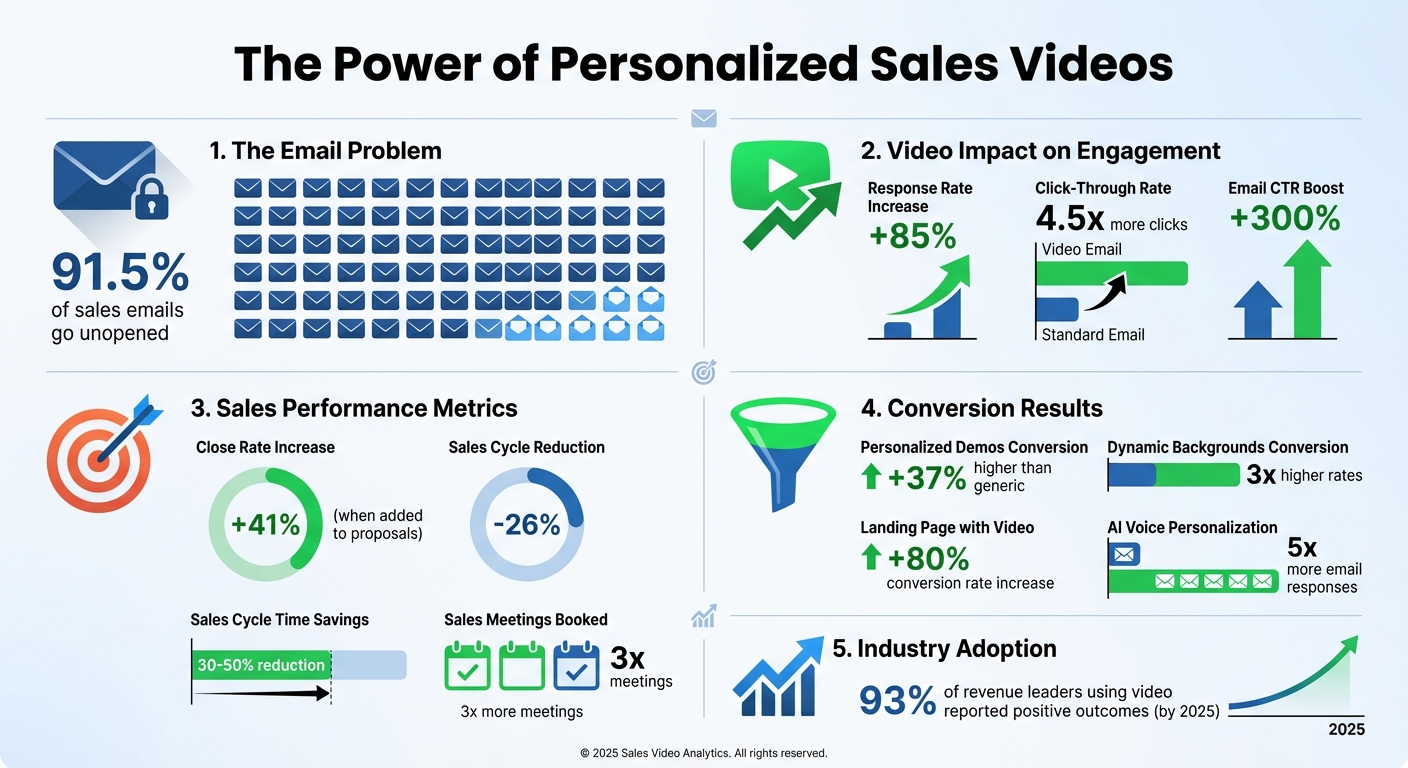
Personalized Sales Video Statistics and Impact on Conversion Rates For a deep look at Vidyard's avatar feature versus AI voice cloning, compare Vidyard AI Avatars vs voice-cloning approaches.
How to Make AI Personalized Videos for Sales Outreach (Updated 2025)
Step 1: Set Up Your Sendspark Account
To get started with personalized video creation, sign up for a free Sendspark account. Once you’re in, install the Chrome extension. This handy tool lets you record your camera, screen, or both - right from your browser. After installation, click the Chrome puzzle icon and pin the Sendspark purple icon for quick and easy access. Then, follow the on-screen guide to complete your account setup and tool configuration. For a deeper look at how this works, see how AI video personalization works without feeling invasive.
Create Your Account and Install the Chrome Extension
For the best experience, install both the Chrome extension and the Desktop App. The Chrome extension is perfect for quick browser-based recording and integrations - it even adds shortcuts to Gmail, LinkedIn, Outreach, and HubSpot for seamless video embedding. Meanwhile, the Desktop App offers better audio and video quality, allowing you to record over applications like PowerPoint or PDFs. Once you’re set up, visit your Workspace Settings to upload your logo and brand colors, ensuring every video you send reflects your branding. For a detailed comparison, see our guide to free screen recorders with audio for B2B sales.
Connect Sendspark to Your CRM and Sales Tools
To track video engagement and streamline outreach, connect Sendspark to your CRM. Head to the integration settings and link platforms like HubSpot, Salesforce, or Zoho. You can also automate personalized videos in Salesloft to optimize your sales cadence. This integration enables Sendspark to map personalization tokens - like , , and - to your CRM fields, ensuring each recipient gets a tailored experience. Don’t forget to set fallback variables for missing data, so messages still come across as professional and polished.
Configure Workflow Automations
Save time by automating your video workflows. Connect Sendspark to Zapier to trigger video creation whenever specific CRM events occur, such as when a new contact is added or fills out a form. You can refine your targeting by using the Sequence ID from your CRM’s URL to ensure videos are generated for the right audience. During setup, map CRM fields - like First Name and Company Name - to Sendspark’s dynamic variables. Always test your workflow with a single contact before going live to ensure everything works smoothly.
“Using Sendspark transformed our customer success approach. We built a library of pre-recorded answers, allowing our team to quickly respond to common customer questions with personalized videos.” - Dan Vermont, Head of Operations, Brikl
Step 2: Record Your Base Video
Start by recording your base video - it’s the starting point for all the personalization you’ll add later. Don’t stress about having fancy equipment; your smartphone, a good webcam, or even your laptop’s built-in camera will do the job. What matters most is getting the lighting, audio, and overall vibe right.
Tips for Recording Your Video
Let’s talk lighting. If possible, position yourself facing a window to take advantage of natural light, making sure your face is the brightest part of the shot. If you’re stuck with artificial lighting, you can soften it by placing a sheet of white paper over the light source. For the background, aim for something visually appealing but not distracting - think a bookshelf or a few plants. Avoid blank white walls or overly busy spaces that might pull focus away from you.
Audio quality is key - arguably even more important than the video itself. (See our personalized video outreach mistakes guide — poor audio is mistake #3.) Find a quiet spot to record, and if needed, use a headset with a microphone or noise-canceling software to cut down on background noise. When you start speaking, make your point quickly. Use the first 30 seconds to grab attention, following the Minto Pyramid approach for delivering your message. As Hamish Stephenson, CEO of Selr.io, advises: “The first 5 seconds is the most important. Hook them in with thought-provoking personalization about them. Humor here is key”. Keep the entire video short - 20 to 40 seconds is ideal for cold outreach videos.
Dress appropriately for your audience. If you’re addressing corporate clients, go formal; for startups, business casual works well. Start your video with a smile and a friendly wave to create a welcoming thumbnail. Speak naturally - it’s all about being genuine and relatable.
Getting Ready for AI Personalization
Once you’ve nailed the footage, it’s time to prepare your content for AI-driven tweaks. If you’re planning to use AI voice cloning, make sure your script includes placeholders for personalization. For example, when mentioning the prospect’s name, use a stand-in word like “Watermelon.” So, instead of saying, “Hi, John,” you’d record, “Hi, Watermelon, I noticed your company is making impressive strides.” Later, the AI will replace “Watermelon” with the actual name seamlessly.
For dynamic backgrounds, consider a hybrid recording style - like a webcam bubble over a screen recording. This setup makes it easy for tools like Sendspark to swap out your generic background with something specific, like the prospect’s LinkedIn profile or company website. To ensure the AI works smoothly, your audio needs to be crystal clear. Record in a quiet space, speak at a steady, natural pace, and focus on how your words sound. You might even need to tweak spellings in your script to ensure the AI nails the right pronunciation and tone.
sbb-itb-afd3f9e
Step 3: Use Sendspark’s AI Personalization Tools
Once you’ve created your base video, it’s time to take it to the next level with Sendspark’s AI-powered personalization tools. These features allow you to scale your outreach while keeping that all-important personal touch intact.
Add AI Voice Personalization
With Sendspark, you can make your videos feel truly one-on-one. By using the CRM integrations mapped to Sendspark, placeholders in your recording are swapped with each recipient’s name. Here’s how it works: upload your base video, and Sendspark’s AI voice cloning technology replaces the placeholder with the actual name of each prospect - using your own voice. The result? It sounds as though you recorded a unique video for every recipient. Businesses leveraging this feature have seen up to 5x more email responses thanks to this level of personalization.
To make it work seamlessly, ensure your CSV file or CRM integration includes accurate first names for each recipient. The AI uses this data to generate personalized videos in minutes, turning one recording into thousands of tailored messages.
Insert Dynamic Video Backgrounds
Take personalization a step further by adding dynamic backgrounds to your videos. Imagine showing each prospect their company website, LinkedIn profile, or even their logo in the background of your video. This subtle yet powerful visual cue instantly communicates that the video was made just for them.
Setting this up in Sendspark is simple. Use tokens like {CompanyWebsite} or {LinkedInURL} in your video settings, and the platform will automatically overlay the appropriate background during the video generation process. When combined with AI voice personalization, these dynamic backgrounds can significantly boost engagement. In fact, campaigns using these features have achieved 3x higher conversion rates compared to generic videos.
Merge Personalized Intros with Pre-Recorded Demos
To scale your efforts while keeping things personal, try merging short, personalized intros with pre-recorded demos. Start by recording a brief, casual intro (10–20 seconds) where you mention the recipient’s name and company. Then, combine it with your demo video using Sendspark’s seamless merging tools.
This method saves time while maintaining authenticity, and the results speak for themselves - personalized demos have a 37% higher conversion rate than generic ones. Keep your intro friendly and genuine, and let the demo handle the detailed pitch. Together, they create a polished, customized experience that resonates with your audience.
Step 4: Add CTAs, Share Videos, and Track Results
Now it’s time to turn your personalized videos into measurable outcomes. This step involves adding clear calls-to-action (CTAs), sharing your videos strategically, and tracking their performance.
Add Clear Calls-to-Action
Your CTA should focus on one specific action - whether it’s booking a meeting, replying to your message, or downloading a resource. As video selling coach Chris Bogue advises, “One simple thing you want them to do next (reply, schedule a meeting, etc)”.
You can incorporate CTAs in several ways: as banners, post-roll screens, or directly on the landing page using tools like Sendspark. Keep your videos concise - 30 to 40 seconds for prospecting - and deliver the CTA in the final 10 seconds. To make it seamless, embed a calendar scheduler on your landing page so prospects can book a meeting without navigating away. Personalize your CTAs using dynamic fields, such as the prospect’s name or company, which can boost clicks by up to 4.5 times compared to non-personalized content.
Adding a video to your landing page can also work wonders, potentially increasing conversion rates by as much as 80%. Once your CTA is in place, the next step is to focus on how and where you share your video.
Distribute Videos via Email and LinkedIn
Sharing your video effectively is just as important as creating it. For email, Sendspark’s “GIF + Link” format offers a great way to grab attention by displaying a visual preview in the recipient’s inbox. You can further personalize the thumbnail by including a whiteboard with their name or a screenshot of their company website.
LinkedIn is another powerful platform for video outreach. With Sendspark’s Chrome extension, you can record and send videos directly through LinkedIn messages. For a more personal approach, you can also share videos via instant messaging apps like WhatsApp.
Personalized videos have proven to be highly effective, increasing response rates by 85% and reply rates by 26% compared to text-only emails. For example, in a 60-day period ending in 2024, a nine-person team at ReviewTrackers saw a 92% jump in response rates and doubled their new customer meetings by incorporating personalized video into their outreach strategy.
Track Performance with Sendspark Analytics
Once your video is out in the world, it’s essential to measure its impact. Sendspark’s analytics dashboard provides valuable insights, such as who’s watching your videos, how long they stay engaged, and which CTAs they click. Even better, the platform syncs this data directly with your CRM, automatically logging video views as sales activities.
Pay close attention to watch time to identify which parts of your video sales pitch resonate and where viewers lose interest. Completion rates can help you confirm the ideal video length, typically between 30 and 90 seconds for cold outreach. If you notice a prospect watching your video multiple times or all the way through, that’s a strong signal to follow up immediately.
Videos can supercharge your email performance, boosting click-through rates by up to 300% compared to emails without video. In fact, by 2025, 93% of revenue leaders using video reported seeing positive outcomes. Monitoring these metrics allows you to fine-tune your approach and drive better results.
Conclusion
Creating personalized sales videos doesn’t have to be complicated. With a clear plan and the right tools, like Sendspark, you can take your outreach from bland and impersonal to engaging and effective. By setting up your account, crafting a strong base video, using AI tools for personalization, and keeping an eye on your results, you can make a real impact.
Here’s why this approach works: personalized videos boost response rates by 85% and generate 4.5 times more clicks than generic content. Teams using this strategy have also reported booking three times more sales meetings and cutting their sales cycles by 30% to 50%. That’s not just improvement - it’s a game-changer for your sales pipeline.
This shift is backed by real-world insights:
“People respond to people, not paragraphs. A video breaks through digital barriers by creating instant connection.”
- Ben Wright, Sendspark
Start small. Focus on your top prospects, record a few personalized videos this week, and test different calls-to-action. Use the data to refine your approach. With Sendspark’s AI tools, you can scale your efforts while keeping the personal touch that makes video outreach so effective.
A quick, 60-second video that mentions your prospect by name, highlights their company, and offers a clear next step can cut through the noise like nothing else. Don’t wait - start making personalized sales videos today and get ahead of your competition.
FAQs
How do personalized sales videos help increase email response rates?
Personalized sales videos bring a fresh, human element to your outreach by customizing the content for each recipient. This method not only grabs attention in crowded inboxes but also strikes a chord with your audience on a more personal level.
By focusing on specific needs or interests, these videos can drive email reply rates up by 25% or more. They establish a sense of connection and relevance that plain text emails just can’t achieve, making them an effective way to elevate your sales efforts.
What do I need to create personalized sales videos?
To get started with creating personalized sales videos, you’ll need a few key tools:
- A recording device: Whether it’s a smartphone, webcam, or DSLR camera, make sure it captures clear, high-quality video.
- A good microphone: An external mic or a headset with a reliable microphone will help ensure your voice sounds crisp and free from distracting background noise.
- Proper lighting: A ring light, soft-box, or even positioning yourself in good natural light can make a big difference in how professional your video looks.
- Sendspark’s teleprompter feature: This handy tool allows you to read AI-generated scripts tailored to your audience while recording, keeping your delivery smooth and on point.
- A computer with internet access: You’ll need this to customize video templates, generate scripts, and share your videos seamlessly using the Sendspark platform.
Once you have these essentials in place, you’ll be all set to create polished, engaging sales videos that truly connect with your audience!
How can AI-powered personalization make sales videos more effective?
AI-powered personalization is revolutionizing sales videos by making them feel like genuine, one-on-one interactions. Instead of relying on generic messaging, these tools enable you to craft scripts that include personal touches - like the prospect’s name, their company, or their specific challenges. The result? Videos that save you time while staying relevant and engaging.
Here’s the game-changer: with a single recording, you can tailor videos for hundreds of prospects. By using placeholders (like “first name”) and importing contact details from a CSV file or CRM, the process becomes both efficient and scalable. And the payoff is clear - many users report up to 3× higher conversion rates and noticeable improvements in engagement. By merging personalization with scale, AI helps you build stronger connections with U.S. buyers and close deals more effectively.
Related Blog Posts
- 7 Ways Video Messages Improve Customer Response Rates
- What Is Asynchronous Video Communication for Sales?
- Cvent acquires ON24, expanding its B2B sales engagement capabilities
- Loom vs Vidyard vs Other Video Tools: Feature Comparison
Topics: blog