AI is transforming video prospecting, making it faster, more engaging, and scalable. Instead of spending hours creating individual videos, sales teams can now use AI tools like Sendspark to personalize video outreach at scale. Here’s what you need to know: See also our collection of 10 proven video prospecting examples for real-world formats that work.
See our roundup of the sales Chrome extensions.
- Why it matters: Personalized videos are 16× more likely to be opened and generate 4.5× more clicks than generic ones. They also boost response rates by up to 85%.
- Key features: AI voice cloning, dynamic backgrounds (e.g., showing a prospect’s website), and CRM integrations make it possible to create thousands of tailored videos from a single recording.
- Time savings: AI reduces video creation time from hours to minutes, saving over 20 hours per week for teams.
- Results: Teams using AI-powered videos report 3× more email conversions, 2× more LinkedIn replies, and a 280% higher ROI.
Sendspark simplifies this process with tools that integrate with platforms like HubSpot and Salesforce, allowing sales reps to focus on building relationships instead of repetitive tasks. Personalized video outreach is no longer a challenge - it’s an opportunity.
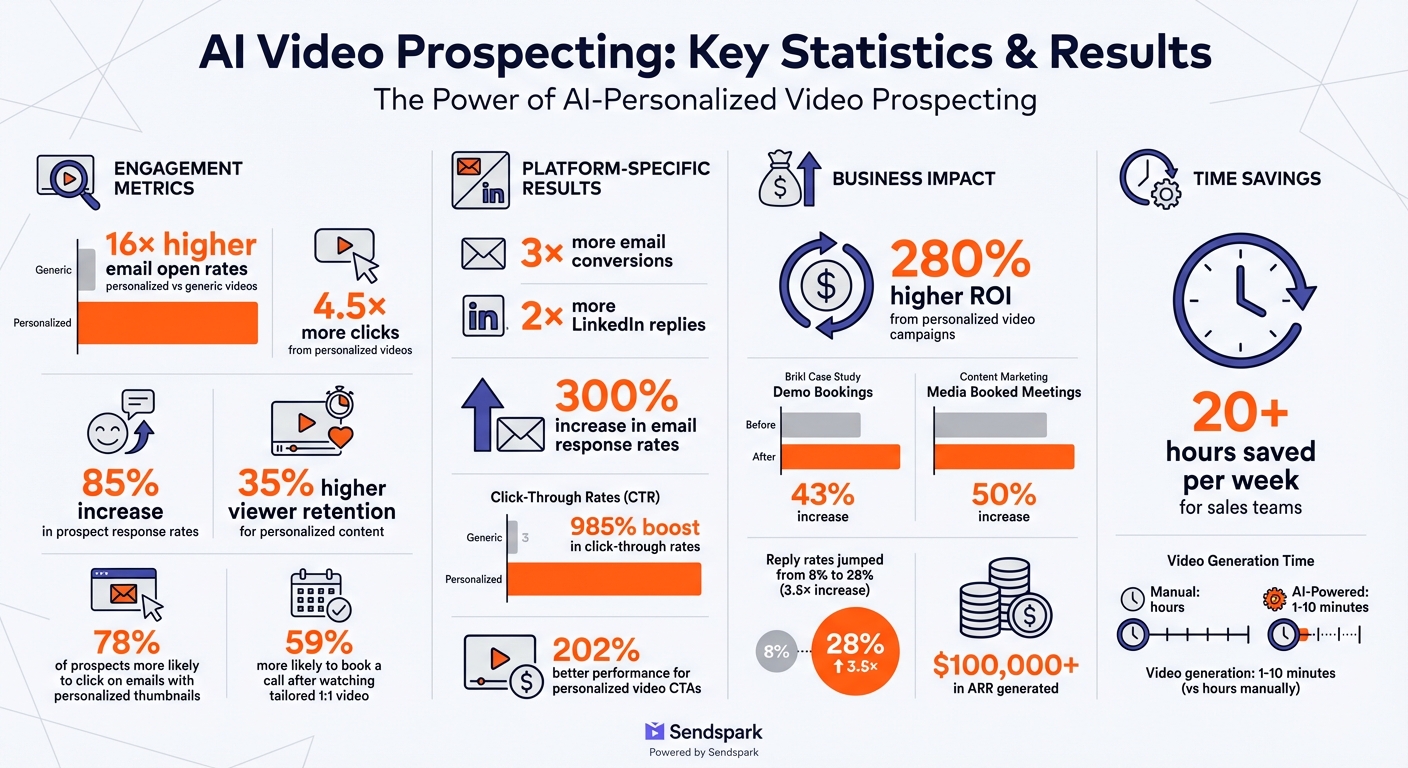
AI Video Prospecting Statistics: Engagement Rates and ROI Benefits
How to Make AI Personalized Videos for Sales Outreach (Updated 2025)
Problems with Traditional Video Prospecting
Video outreach comes with three major hurdles: time-consuming production, low engagement from impersonal content, and the challenge of scaling personalized efforts. These are exactly the issues AI personalization aims to solve. For teams scaling personalization through paid channels, our guide on AI ad targeting in 2026 covers how AI ad agents and predictive audiences fit into the playbook.
Time Required for Manual Video Recording
Creating videos manually is a massive time sink. Imagine recording 100 separate videos for 100 prospects - you’re stuck repeating the same pitch over and over. This eats into hours that could be spent closing deals or nurturing leads. Sales reps often find themselves bogged down in production mode instead of focusing on more strategic tasks.
And it doesn’t end with recording. Editing adds another layer of complexity. Combining personalized intros with demo content manually can take forever. This process creates a bottleneck that slows down outreach efforts. Worse, even after all this effort, generic videos often fail to engage prospects effectively. For deeper benchmarks, see the 2026 personalized vs. generic video ROI benchmarks.
Poor Engagement from Generic Videos
Numbers don’t lie: 78% of prospects are more likely to click on a cold email featuring a personalized thumbnail, and 59% are more likely to book a call after watching a tailored 1:1 video. Generic videos, on the other hand, fall flat because they lack relevance. Prospects can instantly tell when a video isn’t made specifically for them, which erodes trust and interest.
Without personal touches - like mentioning the prospect’s name or company - viewership drops significantly. In fact, videos without these elements are 35% less likely to be watched all the way through.
“AI-powered video tools address this challenge by humanizing communication.” - Rick Koleta, Founder, RiteGTM
Even if a generic video does manage to grab attention, it’s often a one-and-done effort, making it impossible to replicate success at scale.
Difficulty Scaling Personalized Outreach
Here’s the catch: personalized videos work, but they’re not scalable. Each video is crafted for one recipient and can’t be reused, so as your prospect list grows, so does the time you need to invest. For SDRs looking to scale their outreach, AI video follow-up sequences are a proven next step.
This puts sales teams in a tough spot. They can either spend hours creating personalized 1:1 videos that resonate or opt for generic videos at scale that are likely to be ignored. Traditional video tools don’t support bulk personalization or integrate seamlessly into sales workflows, making large-scale outreach campaigns a logistical nightmare.
How Sendspark’s AI Solves Video Prospecting Problems
Sendspark is reshaping video prospecting by using AI to simplify tasks like voice cloning, customizing backgrounds, and merging videos. This means you can create thousands of personalized videos without recording each one individually.
AI Voice Cloning for Personalized Greetings
Here’s how it works: you record a base video and use a placeholder word (like “Watermelon”) where the prospect’s name will go. Sendspark’s AI then steps in, cloning your voice and lip movements to swap out “Watermelon” with the actual name, such as “Hi Brandon” or “Hi Ben.” The process is quick - just one minute to generate the AI voice and video model for your campaign.
Personalization pays off. Using techniques like this can increase prospect response rates by 85%. For instance, Content Marketing Media saw a 50% bump in booked meetings after combining Sendspark with Clay to automate personalized video outreach.
“I’m confident I’ve found the best video prospecting tool, and it’s Sendspark. Welcome to the world where AI meets video.” - William Padilla, Account Executive, GRIN
To make the AI voice sound natural, use a good-quality microphone and keep background noise to a minimum. When recording, say “Hi Watermelon” with a slight pause before and after the placeholder word. This helps the AI blend the name seamlessly into the video.
And it doesn’t stop at personalized greetings - dynamic visuals take engagement to the next level.
Dynamic Video Backgrounds Using Prospect Data
Pairing personalized audio with tailored visuals creates a more engaging experience. Sendspark can overlay your video on the prospect’s website or LinkedIn profile, generating a “camera bubble” effect. It’s like you’re giving them a live walkthrough of their own digital assets.
This feature solves the problem of generic visuals by showing each recipient something they immediately recognize - their own brand. When prospects see their website or profile alongside your message, it grabs their attention far more effectively than a generic background. Together with hearing their name, this multi-sensory experience feels highly personal without requiring extra effort for each recipient.
“The combination of seeing your website and hearing your name feels personal and requires no extra work on your end!” - Sendspark
To use this feature, include a “Background URL” column with each prospect’s homepage or LinkedIn profile when importing contacts via CSV or CRM. Adjust the camera bubble settings to avoid covering key parts of their website.
By combining dynamic backgrounds with pre-recorded demos, you can deliver a streamlined yet personal message.
Combining Personalized Intros with Pre-Recorded Demos
Sendspark’s hybrid approach lets you pair a short personalized introduction with a pre-recorded demo or sales pitch. This way, you don’t have to repeat the same core message for every lead - just record a unique greeting for each prospect.
A 10-second intro takes far less time than creating a full 2-minute demo for every contact. Your main message remains consistent and polished, while the personalized intro adds the human touch that builds rapport. Personalized AI-personalized video campaigns can deliver a 280% higher ROI compared to standard video campaigns.
Dan Vermont, Head of Operations at Brikl, shared how this approach improved their workflow:
“Using Sendspark transformed our customer success approach. We built a library of pre-recorded answers, allowing our team to quickly respond to common customer questions with personalized videos.” - Dan Vermont, Head of Operations, Brikl
Keep your intros short and focused on the prospect’s challenges or recent achievements. With Sendspark’s “Combine Video” feature, you can easily stitch your intro to the pre-recorded video - no advanced editing skills needed.
How to Implement AI Personalization with Sendspark
Getting started with AI-personalized video prospecting involves five straightforward steps. These steps help you make the most of Sendspark’s AI capabilities by connecting your sales tools, automating video creation, and scaling distribution.
Step 1: Record Your Base Video
Head over to the Dynamic Video section in Sendspark and click Create Dynamic Video. Here, you’ll record a single video using a placeholder name like “Watermelon.” For example, say, “Hi Watermelon.” Later, Sendspark’s AI will replace “Watermelon” with each recipient’s first name, while cloning your voice and syncing your lip movements.
For the best results, use a high-quality microphone and record in a quiet space. This ensures the AI-cloned voice sounds natural. Leave a brief pause before and after saying “Watermelon” to help the AI create smooth transitions.
Keep in mind, the opening seconds of your video will appear as an animated GIF preview in emails. Smile, make eye contact, and wave to grab attention right away. Before scaling, test the AI voice quality with a small group of 10–20 contacts. The AI typically takes 1–10 minutes to generate personalized videos.
Step 2: Connect Sendspark to Your CRM and Data Tools
To import prospect data, you can upload a CSV file, integrate directly with CRMs like HubSpot, Salesforce, or Zoho, or use an API. Be sure to map key fields such as First Name, Email, and Background URL.
For automated workflows, set up triggers in your CRM that prompt Sendspark to create personalized videos when prospects reach specific stages in your pipeline. If you’re using LinkedIn profiles as dynamic backgrounds, make sure to add the Sendspark LinkedIn cookie before generating videos.
Step 3: Configure Personalization Settings
Activate Voice Cloning in the Dynamic Video settings. Include the “Background URL” field when importing contacts to overlay personalized elements - like a prospect’s website or LinkedIn profile - behind your camera bubble.
Use Merge Tags (e.g., First Name, Company Name, Job Title) to personalize the video share page header, message, and call-to-action. Set fallback options for merge tags, so even if data is missing, your message remains polished (e.g., defaulting to “there” if a first name isn’t available).
To keep your videos on-brand, set global styles like your logo and colors under Manage Workspace. This ensures every video page looks professional and consistent without extra effort.
Step 4: Automate Video Distribution
Copy the code snippet from the “Share Campaign” section and embed it in your email template within your sales platform. For platforms like Salesloft, send a plain-text email first, then follow up with the video once AI generation is complete. For LinkedIn outreach, you can integrate Sendspark with Expandi to automate video delivery via LinkedIn messages.
Personalized videos can boost click-through rates by 985% compared to generic ones. Timing is critical - ensure the videos are fully generated before your automated sequences send them.
Step 5: Monitor Performance with Video Analytics
Use Sendspark’s analytics dashboard to track views, watch time, and call-to-action clicks. These insights reveal how prospects engage with your content and which videos drive the best results. You can also sync this data with HubSpot or Salesforce for a complete view of prospect behavior.
Personalized videos are proven to generate 4.5× more clicks and 16× more email opens. Additionally, viewers are 35% more likely to stay engaged with personalized video content. Use the analytics to identify drop-off points and refine your messaging to keep prospects hooked from start to finish.
sbb-itb-afd3f9e
Results and Benefits of Sendspark AI Personalization
Higher Engagement Rates
AI-personalized videos are game-changers for engagement. They can increase email responses by up to 300%, drive 4.5× more clicks, and achieve a 16× higher click-to-open ratio. On LinkedIn, personalized video outreach leads to 2× more replies. For example, Brikl’s sales team used Sendspark videos within 24 hours of receiving new leads, which boosted demo bookings by 43%. Similarly, an outbound agency saw reply rates jump from 8% to 28%, marking a 3.5× increase in engagement.
Viewer retention also improves by 35%. Emilia K., VP of Marketing at Userpilot, shared:
“Sendspark videos work as pre-boarding. If prospective customers watch the videos, then they understand why they need our product better, and are more receptive to demos”.
These impressive engagement metrics not only capture attention but also save time and make scaling efforts more efficient.
Time Savings and Scalability
Creating personalized videos manually can be a time sink, but Sendspark’s AI changes the game. With a single base video, the AI generates thousands of personalized versions in just 1–10 minutes. This automation saves sales teams over 20 hours per week. Dan Vermont, Head of Operations at Brikl, highlighted:
“Using Sendspark transformed our customer success approach. We built a library of pre-recorded answers, allowing our team to quickly respond to common customer questions with personalized videos”.
This streamlined process leads to a 280% higher ROI from personalized video campaigns compared to traditional AI-personalized videos.
Better CRM Data and Prospect Insights
The benefits extend beyond time savings. Sendspark’s real-time analytics provide deeper insights into prospect behavior, making follow-ups more effective.
The platform tracks who watched each video, how much of it they viewed, and any actions they took - like clicking on CTAs or booking a meeting. This data integrates seamlessly with CRMs like HubSpot and Salesforce, giving sales teams a full picture of engagement. For example, teams can prioritize follow-ups by focusing on prospects who watched at least 50% of a video, signaling genuine interest. Real-time alerts notify reps the moment a prospect interacts with a video, enabling timely responses. Plus, personalized video CTAs perform up to 202% better, offering clear feedback on what resonates with viewers.
Sendspark Integrations for Sales Workflows
Sendspark offers seamless integrations that weave its video capabilities into every step of your sales process. With compatibility across 50+ platforms, it simplifies video creation, sharing, and tracking within your existing tools.
CRM Integrations
Sendspark connects with popular CRMs like HubSpot, Salesforce, and Zoho, enabling automated video personalization based on CRM data. For example, when a prospect is added to a sequence or list, Sendspark can automatically generate personalized videos using details like their first name, company, or job title. Engagement metrics - such as who viewed the video, how long they watched, and their next actions - are synced back into the CRM. This feedback loop helps sales teams focus on leads showing genuine interest, making follow-ups more effective. Beyond CRMs, this automation enhances overall sales engagement strategies.
Sales Engagement Platform Integrations
Sendspark also works with tools like Outreach, SalesLoft, Apollo, Smartlead, and Instantly, allowing you to embed personalized videos directly into email sequences. Once you’ve created a dynamic campaign in Sendspark, you can simply copy and paste the provided snippet into your email templates. The snippet includes an animated GIF preview to grab attention. For instance, in September 2024, Content Marketing Media combined Sendspark’s AI-powered personalization with Clay lead data, resulting in a 50% increase in booked meetings, a 45% higher reply rate, and a threefold boost to their sales pipeline. These integrations ensure your videos reach prospects at the perfect moment.
Data Enrichment Tool Integrations
Sendspark’s partnership with Clay takes personalization to the next level by using lead data to create tailored videos. Key fields like name, company, and role are mapped to video templates, while dynamic background URLs - such as a prospect’s homepage or LinkedIn profile - are used to generate visually customized video backdrops. This feature complements CRM and sales engagement insights, making your messaging even more targeted. Additionally, the Clay integration allows teams to identify website visitors and send personalized video messages without relying on form submissions. For LinkedIn-specific backgrounds, you can add a LinkedIn cookie to Sendspark before creating the videos.
These integrations ensure Sendspark fits seamlessly into your sales workflows, helping you engage prospects with highly personalized, timely video content.
Conclusion
Say goodbye to the struggle between personalization and scalability in video prospecting. Sendspark’s AI technology allows sales teams to create a single base video and automatically customize it for thousands of prospects. With features like AI voice cloning, dynamic video backgrounds, and personalized landing pages, Sendspark turns time-consuming video creation into an automated, scalable process. Plus, it integrates smoothly with top CRMs and sales tools, making it a seamless addition to your workflow.
The results speak for themselves. Teams using Sendspark report 3× more email conversions, 2× more LinkedIn replies, 4.5× more clicks, and an impressive 16× higher open rate. In one standout case, the platform helped generate over $100,000 in ARR. These numbers prove the effectiveness of personalized video content in driving real outcomes.
“I’m confident I’ve found the best video prospecting tool, and it’s Sendspark. Welcome to the world where AI meets video.” – William Padilla, Account Executive, GRIN
Sendspark also offers viewer analytics that sync with your CRM, helping you identify which prospects watched your videos and prioritize follow-ups with high-intent leads. Integration with tools like Clay further enhances personalization by pulling in dynamic prospect data for your video templates.
Whether you’re a solo sales rep or part of a larger team, Sendspark equips you with the tools to make personalized video prospecting scalable and impactful. With 50,000+ campaigns powered and a 4.8/5 rating on G2, it’s clear that AI-driven video personalization isn’t just a trend - it’s a game-changer for modern sales.
FAQs
How does AI voice cloning make video outreach more personal?
AI voice cloning takes video outreach to a new level by replicating a speaker’s voice to naturally pronounce each recipient’s name. This means sales teams can turn a single recording into thousands of personalized videos, creating a one-on-one feel without the need for endless takes. Pairing this with dynamic features like custom backgrounds can make outreach efforts feel more genuine, boosting both connection and response rates.
What are the advantages of using dynamic video backgrounds in personalized outreach?
Dynamic video backgrounds add a personal touch to your outreach by showcasing visuals tailored to your prospect - think their website or LinkedIn profile - right behind the presenter. This approach immediately captures attention and makes your message feel directly relevant, increasing the likelihood of a response.
Beyond grabbing attention, these backgrounds project a sense of professionalism and effort, helping your message rise above the noise in crowded inboxes. They also provide useful visual context that reinforces your message, making it easier to remember. By blending personalization with visually relevant elements, dynamic backgrounds can play a big role in boosting reply rates and conversions.
How does Sendspark work with CRM systems to enhance video prospecting?
Sendspark works effortlessly with top CRM platforms like HubSpot and Salesforce, letting users sync contact lists and automate the process of creating personalized video messages. With the ability to trigger video creation directly from CRM events, Sendspark makes delivering customized outreach at scale both simple and effective.
By blending CRM data with Sendspark’s AI-driven personalization tools, this integration helps craft videos that feel tailored and meaningful to each recipient. It’s a smart way to enhance engagement while freeing up valuable time for your sales team.
Related Blog Posts
- How to Create Personalized Sales Videos That Convert
- How to Use Video in Sales Outreach Without Wasting Time
- How AI Improves A/B Testing for Video CTAs
- How to Scale Personalized Video Messaging
Topics: blog