Forty-four percent of salespeople give up after a single follow-up. But according to Salesforce’s State of Sales report, the average deal requires 8-12 touchpoints before it closes. That gap — between when reps stop and when prospects actually buy — is where most pipeline gets lost. A well-timed no response email reminder is often the difference between a deal that stalls and one that moves forward. For sales teams running Calendly demos, our guide to personalize your Calendly reminders with video walks through the full workflow.
Key Takeaways
- Most B2B sales require 5-8 touchpoints — yet 44% of reps stop after just one follow-up, leaving significant pipeline on the table.
- Timing is critical: send your first no response reminder 3-5 business days after your initial email, then space each subsequent touchpoint further apart.
- Vary your angle with every touchpoint — a different subject line, new value, or a different channel dramatically increases reply rates.
- Adding an AI-personalized video to your no-response follow-up increases reply rates by 2-3x compared to text-only reminders.
- AI voice cloning lets you record one follow-up video and automatically personalize it for every prospect, saving 10+ hours per campaign.
Why Prospects Don’t Reply (and What It Really Means)
Most no responses are not rejections. They are timing misses, inbox overwhelm, or the prospect genuinely needing another nudge to prioritize your message. Research by RAIN Group found that 80% of prospects say “no” four times before they say “yes” — and 92% of salespeople give up before that fifth touchpoint. The follow-up is where the sale happens, not the first email.
The most common reasons a prospect goes silent:
- Your email got buried. The average business professional receives 120+ emails per day. Your message likely wasn’t ignored on purpose — it was lost.
- Bad timing. They were traveling, in a product launch, or dealing with a budget freeze when your first email landed.
- The value wasn’t clear enough. Your first email may not have connected your offer directly to their specific pain.
- You reached the wrong person first. They needed to loop in a colleague before responding.
None of these reasons mean a permanent “no.” They mean your no response email reminder needs to do one of three things: re-establish timing, sharpen the value prop, or reduce friction to reply.
Pro tip
Before sending your next reminder, check if your prospect has visited your website or opened your previous email. If you use video analytics tracking or HubSpot sequences, you can see who viewed your message and tailor your follow-up accordingly — a warm opener like “I saw you checked out our page on X” outperforms cold re-sends every time.
When to Send a No Response Email Reminder: The Timing Guide
For B2B cold outreach, the optimal first follow-up window is 3-5 business days after your initial email. Send too soon and you seem desperate; wait too long and your first message fades from memory. After the first reminder, progressively increase the spacing between touchpoints — Gong’s research on top-performing sales reps shows that each subsequent follow-up should be spaced slightly further apart to avoid inbox fatigue.
The 5-Touch No Response Follow-up Sequence
| Touch | Timing | Angle | Channel |
|---|---|---|---|
| 1 (Initial) | Day 1 | Core value proposition | |
| 2 (First reminder) | Day 4–5 | New resource or insight | |
| 3 (Second reminder) | Day 10–11 | Social proof or case study | Email + LinkedIn |
| 4 (Video bump) | Day 16–17 | Personalized video message | Email + LinkedIn |
| 5 (Breakup) | Day 22–24 | Permission to close the loop |
For warm prospects — someone who attended a webinar, downloaded a resource, or requested a demo — compress the timing. Your first reminder can go out within 1-2 business days, and the sequence can run 10-14 days total instead of 24.
For post-proposal or post-demo follow-ups where the prospect has gone quiet, refer to our guide to follow-up emails after a sales call for specific timing and templates suited to mid-funnel conversations.
Record One Video. AI Personalizes Thousands.
Sendspark is the AI video personalization platform for B2B sales. Record once, and AI voice cloning generates thousands of individually personalized videos with dynamic backgrounds and personalized thumbnails — each prospect hears their name, sees their website, in your voice. Sales teams see 2-3x more replies.
Get Started Now10 No Response Email Reminder Templates (For Every Scenario)
The best no response email reminder is short (under 100 words), adds something new to the conversation, and uses a different opening angle than your previous email. Sending the same message again is the fastest way to a permanent unsubscribe. Each template below is designed for a specific stage of the follow-up sequence and a specific prospect situation.
Template 1: The Polite First Nudge (Day 4-5)
Subject: Re: [Your company] + [Their company]
Hi [First name],
Wanted to resurface this in case it got lost in the shuffle. [One sentence restating the core value — e.g., “We help B2B sales teams like yours see 2-3x more replies by adding AI-personalized video to their outreach.”]
Worth a quick 15-minute call this week to see if it’s a fit?
[Your name]
Template 2: The New Insight Follow-up (Day 4-5)
Subject: Thought you’d want to see this
Hi [First name],
I came across [relevant stat or recent news about their industry] and thought it connected directly to what I mentioned last week.
[One sentence tying the insight to your offer.]
Happy to walk through how other [industry] teams are handling this — 15 minutes this week?
[Your name]
Template 3: The Resource Share (Day 4-5)
Subject: [Resource title] — might be useful
Hi [First name],
I put together a guide on [topic directly relevant to their pain point] that a few of my customers found useful. Sharing it here in case it helps: [link].
No agenda — just thought it was worth passing along. If it prompts any questions, happy to connect.
[Your name]
Template 4: The Social Proof Bump (Day 10-11)
Subject: How [similar company] solved [their pain point]
Hi [First name],
[Similar company] was dealing with [specific challenge]. In 60 days, they saw [specific outcome — e.g., “a 3x increase in meeting bookings from cold outreach.”]
I think the same approach could work for [their company]. Is now a better time to reconnect?
[Your name]
Template 5: The Pattern Interrupt (Day 10-11)
Subject: Bad time?
Hi [First name],
If my timing is off or this isn’t a priority right now, just let me know and I’ll follow up in Q[next quarter].
If you’re still interested, 15 minutes this week is all we need.
[Your name]
Template 6: The Video Follow-up (Day 16-17)
Subject: Quick video for [First name] at [Company]
Hi [First name],
I recorded a quick 90-second video specifically for [Company] — [one sentence on what the video covers]. I think you’ll find the part about [specific relevant section] most useful.
[Video thumbnail link]
Happy to discuss what you see. 15 minutes this week?
[Your name]
This template pairs with an AI-personalized video from Sendspark’s AI video personalization platform. See the next section for how to create these at scale without recording individual videos for every prospect.
Template 7: The LinkedIn Touchpoint (Day 10-11, LinkedIn message)
Hi [First name] — I sent you an email last week about [topic]. Wasn’t sure if it reached you, so figured I’d try here.
[One sentence value prop.] Worth a quick call this week?
Template 8: The Post-Demo No Response (Day 2-3 after demo)
Subject: Next steps after our call
Hi [First name],
Enjoyed our call on [date]. Wanted to send over [what you discussed — pricing, a custom proposal, a relevant case study] as promised.
[One sentence summarizing the biggest takeaway from the call.]
What are the right next steps to move this forward?
[Your name]
Template 9: The Post-Proposal Reminder (Day 5-7 after proposal)
Subject: Following up on the proposal
Hi [First name],
Just checking in on the proposal I sent over last week. Do you have any questions or would you like to talk through any of the details?
I’m flexible this week — happy to set up a call or answer questions by email. What works best for you?
[Your name]
Template 10: The Breakup Email (Day 22-24)
Subject: Closing the loop
Hi [First name],
I’ve reached out a few times and haven’t heard back. I don’t want to keep cluttering your inbox, so I’ll assume the timing isn’t right.
If things change or this becomes a priority in a future quarter, I’d love to reconnect. I’ll leave the door open on my end.
[Your name]
Common mistake
Don’t change the email subject line between follow-ups. Keeping the same subject line (as a “Re:” thread) means your reminder appears in the same conversation thread, which dramatically increases open rates. Only switch subject lines when you’re deliberately starting a new angle — like the pattern interrupt or breakup email.
No Response Email Subject Lines That Work
If you do need a fresh subject line, these formulas consistently outperform generic follow-up lines in HubSpot’s analysis of B2B follow-up email performance:
- [Their company name] — simple personalization, high open rate
- “Re: [original subject]” — threads into previous conversation
- “Quick question about [pain point]” — specificity creates curiosity
- “Did you see this?” — curiosity-driven, works for resource shares
- “Checking in” — honest, no-frills, surprisingly effective
- “Worth revisiting?” — low-friction, invites a simple yes/no
No Response Email Reminder: Quick Reference Guide
| Template | Best Use Case | Sequence Position | Expected Reply Rate Lift |
|---|---|---|---|
| Polite nudge | Cold outreach, first follow-up | Touch 2 | Moderate |
| New insight | Cold/warm, adds new value | Touch 2–3 | Moderate–high |
| Social proof bump | Skeptical or hesitant prospects | Touch 3 | High |
| Video follow-up | Any prospect at touch 4 | Touch 4 | Very high (2-3x) |
| Pattern interrupt | Prospects who’ve gone completely silent | Touch 3–4 | Moderate |
| Breakup email | Final touchpoint, creates urgency | Touch 5 (last) | Surprisingly high |
How to Use AI Video in Your No Response Follow-ups
Adding a personalized video to your fourth follow-up — when text emails have already failed to get a reply — is the single highest-impact change you can make to a cold outreach sequence. Sales teams using AI-personalized video at this stage see 2-3x higher reply rates than text-only follow-ups, because video is intrinsically more personal, more memorable, and harder to ignore than another paragraph of text.
Why Video Follow-ups Get More Replies
A text email can be skimmed and dismissed in two seconds. A video thumbnail showing your prospect’s name — or better, their company website as the background — commands attention before they’ve even clicked play. Video follow-ups signal that you’ve put in genuine effort, which makes the prospect feel obligated to respond even if the answer is “not right now.”
Record Once, Personalize for Every Prospect
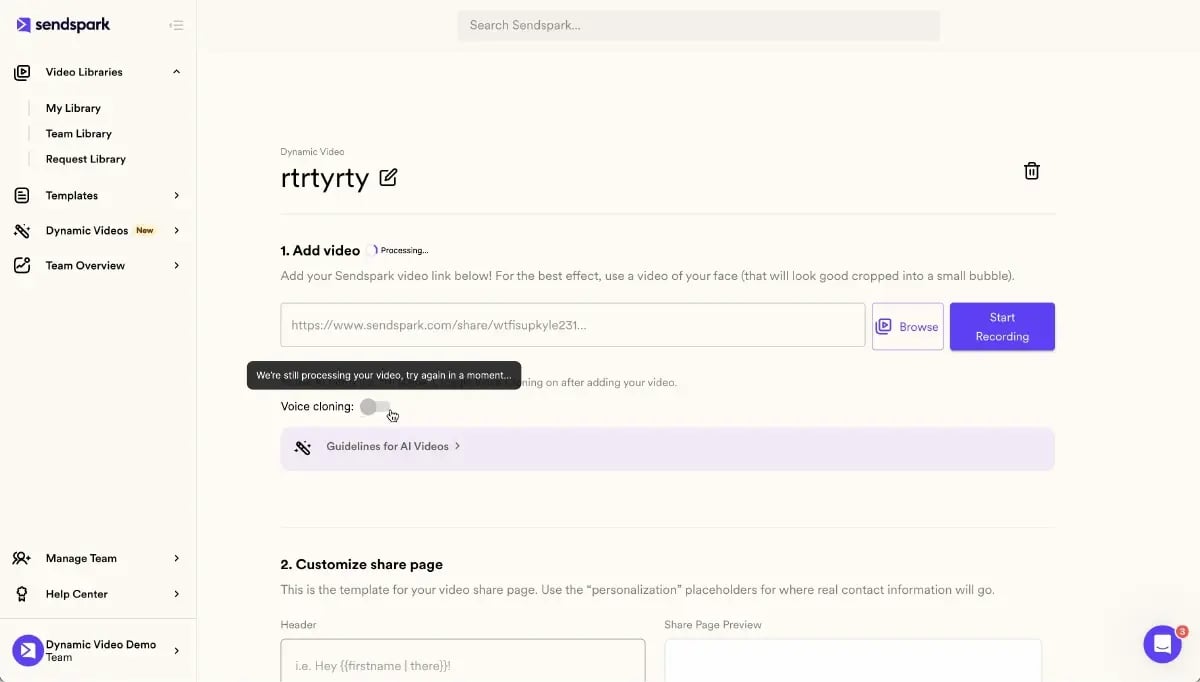
The traditional objection to video follow-ups is time: recording a unique 60-second video for every silent prospect is simply not scalable. Sendspark’s AI video personalization platform solves this entirely. You record one follow-up video once. Sendspark’s AI voice cloning then generates a personalized version for every prospect — using their name, their company details, and your cloned voice — without you recording each one individually.
The result: you can send hundreds of individualized video reminders in the time it would take to record ten manually. Each prospect receives a video that starts with their name, shows their company website as the background, and sounds exactly like you recorded it just for them.
What to Include in a Video Follow-up
- Open with their name: “Hey [First name], I’ve reached out a couple of times…” Personalization stops the scroll immediately.
- Acknowledge the silence: “I know you’ve been busy — I wanted to try a different format in case a quick video is easier than a long email.”
- One specific observation about their business: Show their website in the background, or reference something specific you noticed about their company — a recent hire, a product launch, a LinkedIn post.
- A clear, low-friction ask: “Is a 15-minute call this week realistic?” Not “Would you like to schedule a demo?” The ask should feel easy to say yes to.
- Keep it under 90 seconds. The drop-off rate on B2B outreach videos climbs sharply after 90 seconds.
For teams using HubSpot or Outreach, Sendspark’s HubSpot integration lets you insert personalized video thumbnails directly into your email sequences with one click. You can see exactly who watched your video, how much they watched, and whether they clicked your CTA — all synced back to your CRM automatically. The same is true for Outreach integration users.
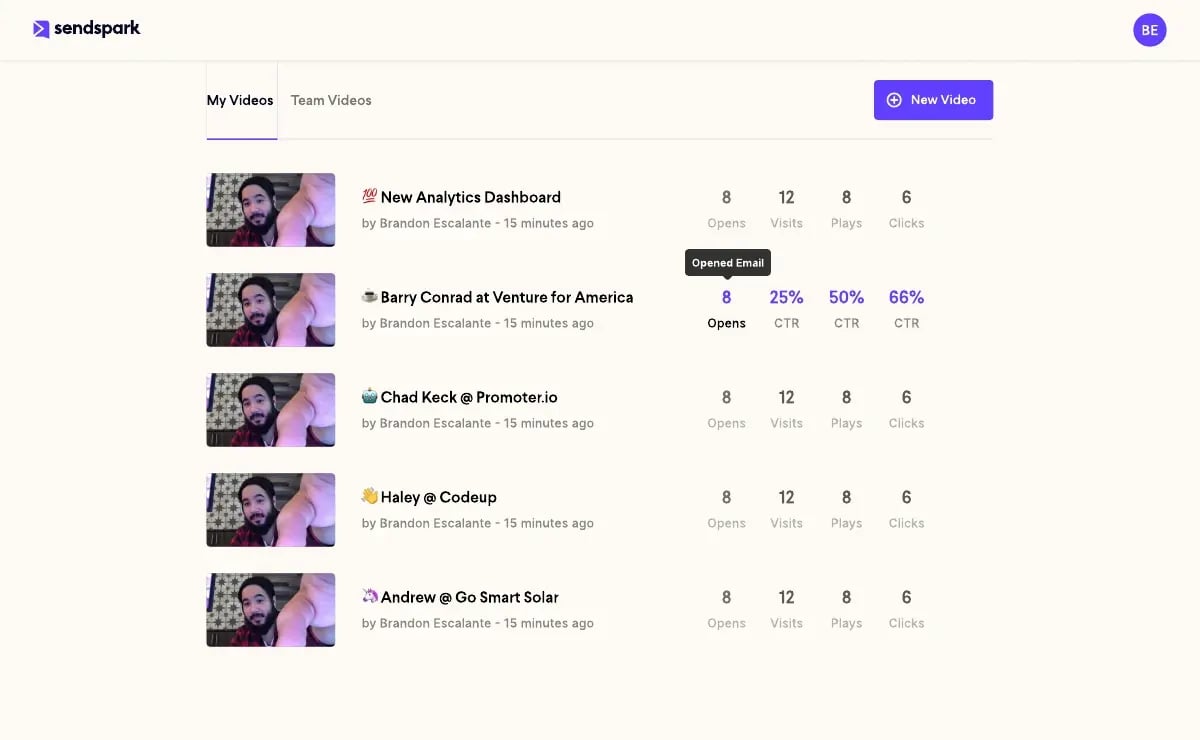
For teams doing outbound at scale, check out our guide on cold email follow-up sequences for how video fits into a multi-touch outbound cadence. And for sales prospecting teams running high-volume outreach, the AI voice cloning approach saves 10+ hours per campaign compared to recording individual videos.
Frequently Asked Questions
What is a no response email reminder?
A no response email reminder is a follow-up message sent to a prospect or contact who has not replied to your initial email. In B2B sales, these reminders are a standard part of outreach sequences because most deals require 5-8 touchpoints before a prospect engages. A good reminder adds new value rather than just repeating the original message.
How long should I wait before sending a no response email reminder?
For cold outreach, wait 3-5 business days before your first follow-up. For warm prospects who attended an event or requested information, 1-2 business days is appropriate. According to Gong’s research on top-performing sales reps, each subsequent follow-up should be spaced slightly further apart — 5 days, then 7 days, then 10 days — to avoid coming across as pushy.
How many follow-up emails should I send before giving up?
Most B2B sales teams find that 4-5 touchpoints is the optimal range for a cold outreach sequence. Fewer than 4 leaves significant reply potential on the table — RAIN Group research shows 80% of prospects say “no” four times before they say “yes.” More than 6 touches on a cold prospect typically signals a permanent disqualification and wastes rep time better spent on fresh pipeline.
What should I say in a no response email reminder?
Every no response email reminder should include something new: a relevant statistic, a case study, a resource, or a different angle on your value proposition. Never just re-send the original email. Keep the message under 100 words where possible, and end with one clear, low-friction call to action — like offering two specific time slots for a call.
Do video follow-ups actually get more replies than text emails?
Yes. B2B sales teams using personalized video in their follow-up sequences consistently report 2-3x higher reply rates compared to text-only emails. The key word is “personalized” — a generic screen recording performs only marginally better than text. Video that addresses the prospect by name, references their company, or shows their website as the background creates a level of personalization that text cannot replicate.
How can I send personalized video follow-ups at scale?
Sendspark’s AI video personalization platform lets you record one follow-up video and use AI voice cloning to automatically generate personalized versions for every prospect on your list. Each recipient hears their name spoken in your cloned voice and sees dynamic elements like their company website in the video background — without you recording each video manually. Sales teams save 10+ hours per campaign this way.
What is the best subject line for a no response email reminder?
The most reliable approach is to keep the same subject line from your original email (as a “Re:” thread), which threads the reminder into the existing conversation and lifts open rates significantly. When you do want a fresh subject line, specific and low-key options like “[Their company name]”, “Quick question about [pain point]”, or “Worth revisiting?” consistently outperform generic follow-up lines like “Following up on my previous email.”
Sources & References
- Salesforce State of Sales Report — “The average B2B deal requires 8-12 touchpoints before closing; 44% of salespeople give up after one follow-up” (2024)
- RAIN Group — Top Performance in Sales Prospecting — “80% of prospects say ‘no’ four times before they say ‘yes’; 92% of salespeople give up before the fifth touchpoint” (2023)
- HubSpot Sales Blog — Follow-Up Email Best Practices — Analysis of B2B follow-up email performance and subject line effectiveness (2024)
- Gong.io — Sales Follow-Up Email Research — Data on optimal follow-up spacing and top-performing patterns from analysis of millions of sales conversations (2024)
Record One Video. AI Personalizes Thousands.
Sendspark is the AI video personalization platform for B2B sales. Record once, and AI voice cloning generates thousands of individually personalized videos with dynamic backgrounds and personalized thumbnails — each prospect hears their name, sees their website, in your voice. Sales teams see 2-3x more replies.
Get Started Now