Email inboxes are overwhelming. With the average office worker receiving over 121 emails daily, most outreach efforts fail to grab attention. Traditional text emails often result in low engagement - reply rates hover between 1% and 5%, and open rates have dropped below 19%.
Personalized videos are changing the game. They cut through the noise by offering a visual, human touch that feels tailored to the recipient. Companies like Brikl and Go Smart Solar have seen response rates increase by up to 6x and click-through rates improve by nearly 50% using this approach.
Why Personalized Videos Work:
- Grab Attention: Video acts as a pattern interrupt in text-filled inboxes.
- Build Trust: Seeing your face and hearing your voice creates a personal connection.
- Boost Engagement: Videos improve reply rates, click-through rates, and even shorten sales cycles.
How to Get Started: Tools like Sendspark let you create personalized videos at scale using AI features like voice cloning, dynamic backgrounds, and CRM integrations. This makes it easy to deliver tailored outreach without spending hours recording individual messages.
If you’re still relying on plain text emails, you’re missing out on a powerful way to stand out and connect with your prospects.
How to Make AI Personalized Videos for Sales Outreach (Updated 2025)
sbb-itb-afd3f9e
How Personalized Video Improves Email Engagement
Personalized video transforms email outreach into something much more engaging - it feels like a conversation. Instead of just reading another sales pitch, prospects see your face, hear your voice, and connect with a real person. In a sea of generic emails, this human touch stands out. For a deeper dive, see our complete guide to personalized video marketing.
Building Human Connections at Scale
Text emails can only go so far. They can’t show a smile, convey enthusiasm, or communicate the non-verbal cues - like facial expressions, tone, and body language - that create empathy and trust. Video, however, can do all of that. Sending a brief, tailored video sends a clear message: the recipient matters enough for you to take the time to create something just for them.
The impact is clear. Viewers are 35% more likely to watch a personalized video all the way through compared to generic content. Why? Because personalization makes your intent crystal clear. Prospects immediately see that you’re reaching out to them specifically, which fosters a genuine connection.
Take Go Smart Solar, for example. In February 2026, they ran an A/B test with nearly identical email copy. The only difference? One version included a personalized video. The result? A nearly 50% increase in click-through rates. Similarly, Big Brothers Big Sisters of South Texas used personalized videos in their annual appeal and saw donations soar - raising 200% more than the previous year.
These meaningful connections are the foundation for the impressive results in engagement metrics that follow.
Increasing Reply Rates and Click-Through Rates
Once trust is established, the numbers speak for themselves. Personalized videos can boost click-through rates by up to 300% compared to plain text emails. Sales teams using this approach typically see 2–3 times more replies. Even calls-to-action perform better - personalized CTAs see a 202% improvement over generic ones.
“Sendspark videos work as pre-boarding. If prospective customers watch the videos, then they understand why they need our product better, and are more receptive to demos.”
- Emilia K, VP Marketing, Userpilot
Adding an animated GIF preview, such as a friendly wave or a personalized whiteboard message, can make the video feel even more tailored. This not only grabs attention but also helps bypass corporate firewalls and spam filters that might block embedded video files.
How to Create Personalized Videos with Sendspark
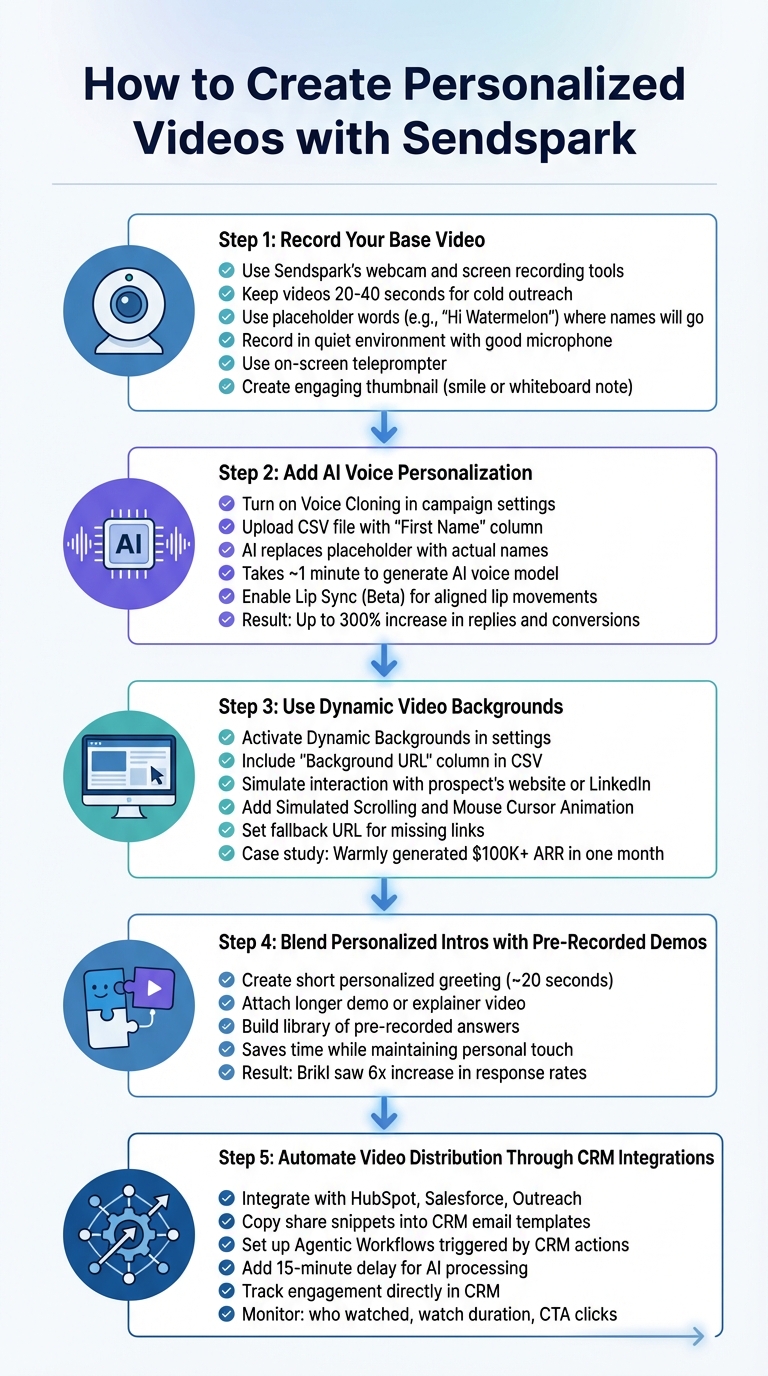
5-Step Process to Create Personalized Videos with Sendspark
Personalized videos don’t have to mean hours of recording individual messages. Sendspark makes it easy to scale personalization with its “record once, personalize at scale” system. Here’s how you can create thousands of customized videos from a single recording.
Step 1: Record Your Base Video
Start by recording a base video using Sendspark’s webcam and screen recording tools. Keep it concise - 20 to 40 seconds is ideal for cold outreach.
Here’s a tip: use a placeholder word where you’d normally say the recipient’s name. For example, begin your script with something like, “Hi Watermelon”, and leave a slight pause. Sendspark’s AI will later replace “Watermelon” with the recipient’s actual name, ensuring a seamless flow.
To ensure high-quality audio, record in a quiet environment with a good microphone. Use Sendspark’s on-screen teleprompter to stay on script and maintain eye contact. And for your video thumbnail? A smile or holding up a whiteboard with a quick note can grab attention right away.
Step 2: Add AI Voice Personalization
After recording your base video, take it to the next level with AI-powered voice personalization. Turn on Voice Cloning in your campaign settings and upload a CSV file with a “First Name” column. Sendspark’s AI will automatically replace the placeholder name with each recipient’s actual name. The system takes about a minute to generate the initial AI voice and video model.
Check out our guide on video segmentation best practices to learn more.
For an extra touch, enable Lip Sync (Beta) to align lip movements with the AI-generated names. This feature has been shown to increase replies and conversions by up to 300%.
Step 3: Use Dynamic Video Backgrounds
You can enhance personalization even further by adding dynamic video backgrounds. In your campaign settings, activate Dynamic Backgrounds and include a “Background URL” column in your contact CSV file. This feature can simulate real-time interaction with the prospect’s website or LinkedIn profile using options like Simulated Scrolling and Mouse Cursor Animation. To maintain professionalism, set a fallback URL for cases where a contact’s specific background link is unavailable.
For example, in December 2025, Warmly used Sendspark’s dynamic video tools to reconnect with “close lost” opportunities. This strategy resulted in 2–3x higher email engagement and generated over $100,000 in Annual Recurring Revenue within just one month.
Step 4: Blend Personalized Intros with Pre-Recorded Demos
Sendspark allows you to pair personalized intros with pre-recorded demo videos. You can create a short, personalized greeting (around 20 seconds) and then attach a longer demo or explainer video. This modular approach saves time while keeping the personal touch that boosts engagement.
“Using Sendspark transformed our customer success approach. We built a library of pre-recorded answers, allowing our team to quickly respond to common customer questions with personalized videos.”
- Dan Vermont, Head of Operations, Brikl
Brikl’s sales team saw a 6x increase in response rates by combining personalized intros with pre-recorded content, compared to traditional text-based outreach.
Step 5: Automate Video Distribution Through CRM Integrations
Manually sending videos isn’t scalable, but Sendspark integrates with platforms like HubSpot, Salesforce, and Outreach to automate the process. Copy the share snippets provided by Sendspark and paste them into your CRM email templates or HTML blocks.
For true automation, set up Agentic Workflows to trigger video creation based on CRM actions - like when a lead qualifies or submits a form. Add a 15-minute delay in your sequence to give the AI time to complete voice cloning and background processing before the email is sent. Double-check that the prospect’s email matches correctly in both Sendspark and your CRM.
Once integrated, you can track video engagement directly in your CRM. See who watched, how long they watched, and which calls-to-action they clicked. This data allows you to optimize your outreach and refine your approach over time.
Measuring Results with Sendspark Video Analytics
Creating personalized videos is just the start. To truly stand out in crowded inboxes, you need to understand how prospects engage with your content and use that data to fine-tune your strategy.
Which Metrics to Track
Sendspark’s dashboard makes it easy to measure video performance. Start by keeping an eye on Total Views (how often the video landing page is opened) compared to Total Plays (how often viewers hit play). This comparison helps you determine whether your email copy and video thumbnail are grabbing attention effectively.
Once viewers start watching, focus on watch time and heatmaps to see which parts of your video resonate most and where people lose interest. For instance, if a specific section sees a sharp drop-off, it may need adjustment to keep viewers engaged.
Pay attention to CTA clicks, too - this metric shows direct engagement. Sendspark also provides real-time notifications for viewer activity, enabling you to follow up while your message is still fresh. When paired with CRM automation, these notifications can trigger workflows or prompt your sales team to act immediately.
All this data not only highlights viewer behavior but also integrates into your CRM, making it easier to refine your outreach.
Using CRM Data to Improve Your Outreach
By combining video performance metrics with CRM data, you can turn viewer interactions into actionable insights. Sendspark integrates with platforms like HubSpot, Salesforce, and Zoho, automatically updating contact records with events such as “Video Visited”, “Video Played”, “Video Watched”, and “Video CTA Clicked.” This allows you to create smarter workflows, like assigning higher lead scores to contacts who watch more than 50% of your video or click your CTA. These workflows help your team focus on high-intent prospects.
You can also use CRM filters to segment your audience based on video behavior. For example, target contacts who opened but didn’t play your video for a follow-up, or reach out to those who watched the entire video but didn’t click the CTA with a tailored offer or phone call.
Heatmap data combined with CRM insights can take your strategy even further. If prospects from a particular industry consistently drop off at the same point in the video, consider creating industry-specific versions that address their needs earlier. This kind of targeted optimization can turn decent outreach into campaigns that achieve 2–3x higher click-through rates.
Conclusion
Key Benefits of Personalized Video
With over 121 business emails flooding inboxes daily, grabbing attention takes more than a clever subject line. Personalized video offers a much-needed shift from the monotony of plain text. When recipients spot personalized touches in your video, they stop scrolling - and that pause leads to engagement.
The numbers back this up: personalized videos significantly improve engagement and response rates. But it’s not just about better metrics. It’s about creating genuine human connections at scale. Prospects can see your face, hear your voice, and sense the energy behind your message. This approach transforms cold outreach into meaningful interactions and can even slash customer acquisition costs by up to 50%.
Knowing these advantages is important, but putting them into action is where the magic happens - and Sendspark makes that part easy.
How to Get Started with Sendspark
Turning these benefits into reality is simpler than you might think. Start by installing the Sendspark Chrome Extension and creating a base video with placeholders for personalized elements like your prospect’s name. Sendspark’s AI tools take it from there, customizing each video with features like AI voice cloning and dynamic backgrounds - imagine your recipient’s own website featured in the video.
You can import contacts directly from your CRM or a CSV file, generate personalized videos in bulk, and send them through platforms you already use, like email or LinkedIn. With a free version available, Sendspark lets you experiment without risk. And with a stellar 4.8/5 rating on G2 from over 350 reviews, you’ll be in good company alongside thousands of sales teams already achieving success.
Start small - launch a test campaign, monitor your analytics, and watch your reply rates soar. The sooner you dive in, the faster you’ll stand out in crowded inboxes.
FAQs
How do I personalize videos without recording each one?
You can start with one base video and let AI-powered tools handle the personalization for each recipient. By including placeholders for specific details, like names, the AI can seamlessly generate customized versions by filling in the unique information for each person. This approach saves time, allowing you to scale personalized content without the need to record multiple videos. It’s an efficient way to deliver dynamic, tailored messages to your audience.
Will AI-Personalized Videos get blocked or hurt deliverability?
AI-personalized videos, when formatted correctly, generally avoid being blocked or affecting deliverability. In fact, higher engagement can even improve inbox placement. To steer clear of spam filters, consider using thumbnails, animated GIFs, or cloud links in place of embedding large video files or autoplay videos. Sticking to these practices not only boosts performance but also minimizes the chances of your emails being marked as spam.
What should I track to know the videos are working?
To figure out how well your videos are performing, keep an eye on key metrics such as open rates, watch time, click-through rates, and conversion rates. These numbers give you a clear picture of how engaged your audience is and whether your video campaigns are hitting the mark.
Related Blog Posts
- How AI Video Personalization Helps Revenue Teams
- How AI Personalization Boosts Social Video Impact
- Video Messaging for Business: Stand Out in Sales Outreach
- Personalized Video Feedback: How to Create Custom Videos at Scale
Topics: blog