Personalized video feedback drives 16x more email opens and 4.5x more clicks than generic outreach — yet most sales and customer success teams still record individual videos one by one, burning hours they don’t have. The fix in 2026 is clear: use an AI video personalization platform to record one base video, clone your voice, and deliver thousands of individually tailored feedback videos — each prospect hears their name and sees their own website, all in your voice, in minutes.
Key Takeaways
- Personalized video feedback combines a recorded base video with AI voice cloning, dynamic backgrounds, and personalized thumbnails to create individually tailored videos at scale — without re-recording.
- In 2026, agentic CRM tools like HubSpot Breeze and Salesforce Agentforce can trigger personalized feedback videos automatically based on intent signals and pipeline stage.
- The mechanism is straightforward: record once, clone your voice, attach dynamic backgrounds (prospect website, LinkedIn), and route each unique video through your existing sales engagement stack.
- Personalized video feedback applies well beyond sales — customer success, agencies, hiring teams, and educators all benefit from the 1:1-at-scale model.
- Measuring ROI is simple: track watch time, completion rate, and CTA clicks in your video analytics dashboard, then sync engagement scores back to your CRM for lead prioritization.
What Is Personalized Video Feedback?
Personalized video feedback is a recorded video crafted for one specific recipient — using that person’s name, company context, and relevant details — rather than a generic broadcast. Instead of sending the same clip to everyone, you record one base video and let AI voice cloning, dynamic backgrounds, and personalized thumbnails do the customization work at scale.
How it differs from generic video outreach
Generic video outreach is broadcast by nature. You record once and send the same file to hundreds of people. It’s efficient, but it doesn’t feel personal, and prospects know it.
Personalized video feedback flips that model. The recipient hears their name spoken in your actual voice. They see their own company website or LinkedIn profile displayed as the video background while you talk. The thumbnail in their inbox shows their name in bold. Every signal says: this was made for you.
That distinction matters because HubSpot Research consistently shows that personalized touchpoints outperform generic ones on every metric — opens, clicks, replies, and booked meetings. The mechanism behind that performance is specificity: the viewer recognizes context that only applies to them, so they pay attention.
The “record once, personalize thousands” mechanism
The core mechanism behind Sendspark’s AI video personalization platform works in three layers:
- AI voice cloning: You record a base video using a placeholder word (like “Watermelon”) where a name would normally go. The AI clones your voice and replaces the placeholder with each recipient’s actual first name — in your tone, your cadence, your inflection.
- Dynamic backgrounds: Sendspark pulls each prospect’s website or LinkedIn URL and renders it as a live background behind you while you speak. The effect is immediate and striking — it shows you did your homework.
- Personalized thumbnails: The video preview image that lands in each inbox includes the recipient’s name overlaid on a branded thumbnail. Click rates jump because curiosity is personal.
Why feedback specifically benefits from video
Written feedback strips tone. A two-sentence comment in a CRM note or email can read as dismissive when the sender meant it as constructive. Video restores tone, facial expression, and warmth — the signals that make feedback land correctly.
Async-first organizations already know this. As GitLab’s async communication research shows, asynchronous video dramatically reduces the need for follow-up meetings because the message is clearer the first time. That principle scales directly into sales, customer success, and coaching contexts where feedback is frequent and nuanced.
Pro tip
Keep your base video between 20 and 40 seconds. Shorter videos have higher completion rates, and AI voice cloning sounds most natural when there’s less audio to stitch. Use that time to state the specific observation, the recommendation, and the next step — nothing more.
The 2026 Shift: AI Agentic Workflows for Video Feedback at Scale
In 2026, sending personalized video feedback is no longer a manual task you schedule into your day. Agentic CRM platforms now trigger the entire process automatically — detecting an intent signal, pulling the relevant deal context, generating the personalized video, and routing it to the prospect without a human initiating a single step.
Agentic CRMs as the trigger layer
HubSpot Breeze and Salesforce Agentforce represent a new class of agentic workflow tools. They don’t just automate tasks — they observe pipeline activity, score intent, and take autonomous action. When a high-intent prospect views your pricing page three times in two days, an agentic workflow can detect that signal and immediately queue a personalized feedback video via Sendspark’s HubSpot integration — no manual intervention needed. The video lands in the prospect’s inbox within minutes of the signal firing.
This is what separates agentic CRM from traditional automation. Traditional sequences rely on time delays: “send email 2 after three days.” Agentic workflows respond to behavior. The feedback loop becomes genuinely real-time, which is exactly what the complexity of modern B2B buying requires. According to Gartner’s B2B buying journey research, buyers now move through non-linear paths involving multiple stakeholders and channels — and static sequences simply can’t keep pace.
Conversation intelligence and the feedback brief
Conversation intelligence tools like Gong and Chorus add another layer to this agentic loop. After a discovery call, these platforms generate a call summary, identify objections raised, and flag key deal context. In an agentic workflow, that data flows directly into a feedback brief that shapes your base video script. You record a base video addressing the most common objection clusters, and multimodal AI synthesis handles the personalization — pulling the specific objection language from each call transcript and embedding it as context in the video’s dynamic background or thumbnail.
The result is video feedback that feels like it was written specifically for that conversation — because the underlying data was. The prospect who raised a budget concern gets a video that acknowledges budget considerations. The prospect who asked about integrations sees their tech stack’s homepage as the background. This is multimodal AI synthesis in practice: combining call transcripts, deal context vectors, and prospect website data into a personalized base that scales across your entire pipeline.
Voice cloning fidelity in 2026
One of the real shifts in 2026 is voice cloning fidelity. Earlier versions of AI voice cloning had an identifiable “robotic” quality — the cadence was slightly off, consonants felt clipped, and experienced ears could spot it immediately. Production-grade voice cloning in 2026 eliminates those artifacts. The AI now captures not just your tone and pitch but your natural pacing, regional inflection, and the micro-pauses you use for emphasis.
That fidelity matters because the trust signal in personalized video feedback is authenticity. If the recipient suspects the voice isn’t real, the relationship damage outweighs the personalization benefit. With current voice cloning quality, that risk is negligible — provided you record your base video in a quiet space with a decent microphone. The Salesforce State of Sales report notes that AI adoption in sales organizations has accelerated sharply, with reps reporting that AI-generated personalization now meets or exceeds the quality they could produce manually.
Async-first feedback culture meets AI scale
The async-first feedback culture pioneered by companies like GitLab and Atlassian has moved from startup novelty to mainstream practice. Teams that previously defaulted to a 30-minute Zoom call for feedback now send a 90-second async video instead — and recipients prefer it. They can watch on their own schedule, replay specific segments, and respond thoughtfully rather than in real-time pressure. According to McKinsey’s research on hybrid B2B selling, async touchpoints are now a core component of high-performing sales motions, not an afterthought.
When you combine async-first culture with agentic workflow triggers and AI voice cloning, personalized video feedback stops being a tactic reserved for your top 20 accounts. It becomes a playbook trigger that fires for every qualified prospect in your pipeline — at exactly the right moment, with exactly the right context, at a cost per video that approaches zero.
Record One Video. AI Personalizes Thousands.
Sendspark is the AI video personalization platform for B2B sales. Record once, and AI voice cloning generates thousands of individually personalized videos with dynamic backgrounds and personalized thumbnails — each prospect hears their name, sees their website, in your voice. Sales teams see 2-3x more replies.
Get Started NowFive Use Cases Driving Personalized Video Feedback Adoption
Personalized video feedback works wherever written or voice-only feedback creates ambiguity or friction — which turns out to be most professional contexts. The five use cases below account for the bulk of adoption in 2026, and each one maps directly to the “record once, personalize thousands” mechanism.
1. Sales outreach: from intro to deal recap loops
Sales is still the primary driver of personalized video adoption. Reps use it at every stage: a personalized intro to open a cold sequence, a post-demo recap that calls out specific pain points the prospect mentioned, and a closing nudge that references the prospect’s stated timeline. The Sendspark sales prospecting solution is built specifically for this loop — connecting your sequence tool to your CRM so each video fires at the right stage automatically.
The numbers from our B2B scale playbook are consistent: teams using personalized video feedback in sales sequences report 2–3x more replies compared to text-only emails, and deals close significantly faster when video is part of the follow-up cadence.
2. Customer success: QBRs and onboarding feedback at scale
Customer success teams face a specific challenge: they need to deliver personalized, thoughtful feedback to dozens or hundreds of accounts without the bandwidth to record individual videos. Personalized video feedback solves this directly. A CS manager records one QBR recap video, and Sendspark’s AI generates a unique version for each account — citing their specific metrics, renewal date, and outstanding action items.
The Sendspark customer success solution supports this use case natively, with CRM field mapping that pulls account-specific data directly into each video variant. Onboarding feedback follows the same pattern: one base video, personalized for each new customer’s setup state and first-week milestones.
3. Agencies: client review and creative feedback
Agencies spend enormous time on client feedback cycles. A design revision, a copy draft, a campaign report — all of these traditionally require either a written walkthrough or a screen share call. Personalized video feedback replaces both. The account manager records one walkthrough, and the AI personalizes the opening and closing with the client’s name, company, and specific project context. Clients get a video that feels like a dedicated review session without the scheduling overhead.
4. Hiring teams: candidate feedback at scale
Candidate experience is increasingly a competitive differentiator. Most hiring teams send a generic rejection email or, worse, nothing at all. A personalized video feedback note — 30 seconds, the candidate’s name, one specific observation, a genuine well-wish — takes seconds to generate and leaves a lasting impression. Employer brand benefits are measurable: candidates who receive personalized feedback are significantly more likely to reapply or refer peers.
5. Education and coaching: cohort-level feedback at 1:1 quality
Coaches and educators working with cohorts of 50+ students face the same personalization math problem as sales teams. Personalized video feedback gives them a way to deliver genuinely individualized observations — referencing specific work, specific progress, specific goals — without spending eight hours recording individual notes. One base video, one voice clone, fifty uniquely personalized feedback videos delivered before the next session.
Common mistake
Don’t try to personalize too many variables in a single video. Teams that add name, company, role, industry, and a custom talking point into one short video often end up with AI voice cloning errors or background rendering failures. Start with name and company website. Master those two layers first, then add complexity once your workflow is stable.
How to Build a Personalized Video Feedback Workflow
Building a personalized video feedback workflow takes about an afternoon the first time and runs automatically after that. The five steps below cover everything from defining your trigger to routing engagement data back to your CRM — using Sendspark as the AI video personalization platform at the center.
Step 1: Define your trigger
Every good personalized video feedback workflow starts with a specific trigger event. A CRM stage change (lead moves to “demo booked”), an intent signal (prospect visits the pricing page), a deal score threshold (opportunity exceeds 60% probability), or a time-based event (day 7 of onboarding) — all of these work. The more specific your trigger, the more relevant the video feels when it arrives.
In an agentic workflow using HubSpot Breeze or Salesforce Agentforce, these triggers fire automatically. For teams not yet on agentic platforms, a simple enrollment rule in a HubSpot sequence or a Zap in Zapier achieves the same result with a manual setup.
Step 2: Record your base video with placeholder slots
Record a 20–40 second video. Speak naturally. Where you’d normally say a name, say a clearly distinct placeholder word — “Watermelon” is the classic choice because it’s phonetically distinctive and easy for the AI to identify and replace. Leave a half-second pause before and after the placeholder.
Use a quality microphone. Record in a quiet space. Ambient noise, echo, and room reverb all degrade voice cloning fidelity. The quality of your base recording determines the quality of every personalized variant — it’s worth taking two minutes to get it right. For tips on structuring the script, see our ultimate guide to personalized video.
Step 3: Clone your voice — once
In Sendspark, enable the Voice Cloning feature and train it on your base recording. This is a one-time setup. From that point forward, Sendspark’s AI uses your voice model to replace the placeholder with each recipient’s first name — pulling from the “First Name” field in your contact list or CRM.
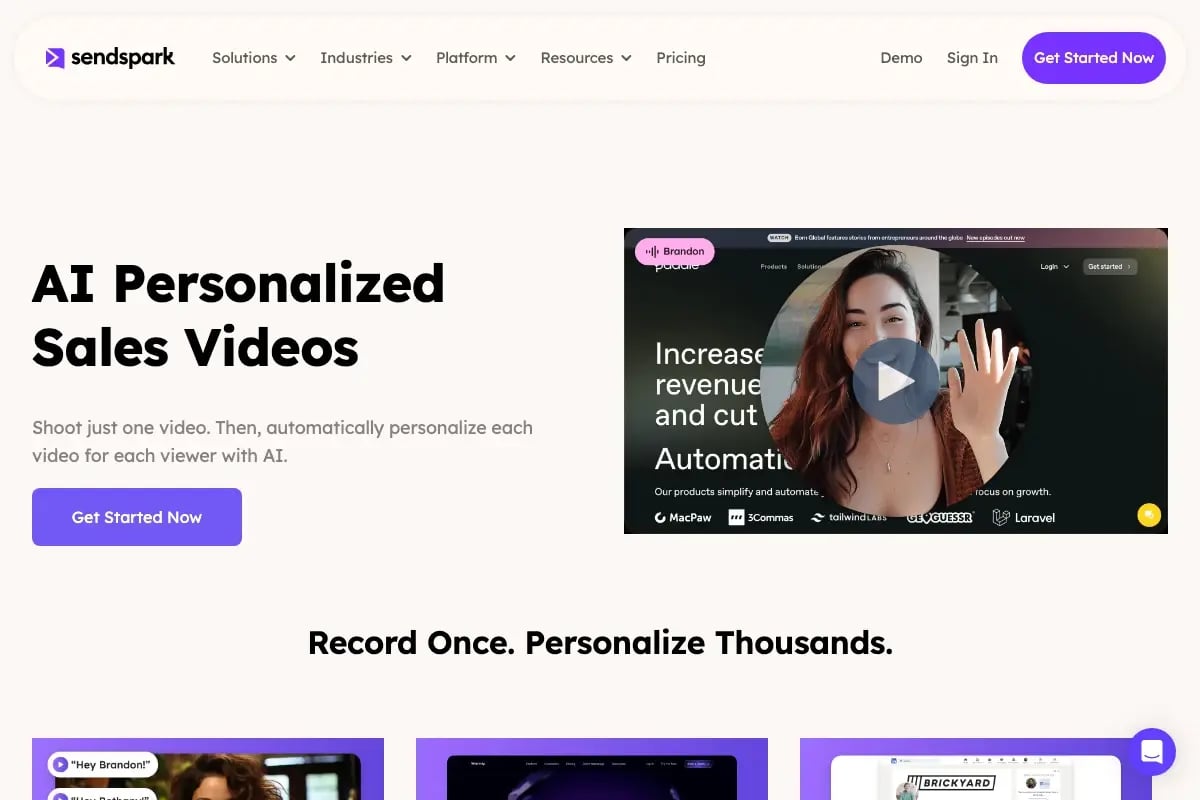
Before sending to your full list, test on a small batch of five to ten contacts. Listen to each output. Confirm the name replacement sounds natural in context. Adjust the base recording pace if any transitions feel abrupt.
Step 4: Connect dynamic backgrounds
Add a “Background URL” field to your contact data. This can be the prospect’s company website, their LinkedIn profile, or a custom URL you’ve sourced through an enrichment tool like Clay. Sendspark renders the URL as a live background during your video — simulating scrolling and natural mouse movement so it looks like a live browser session.
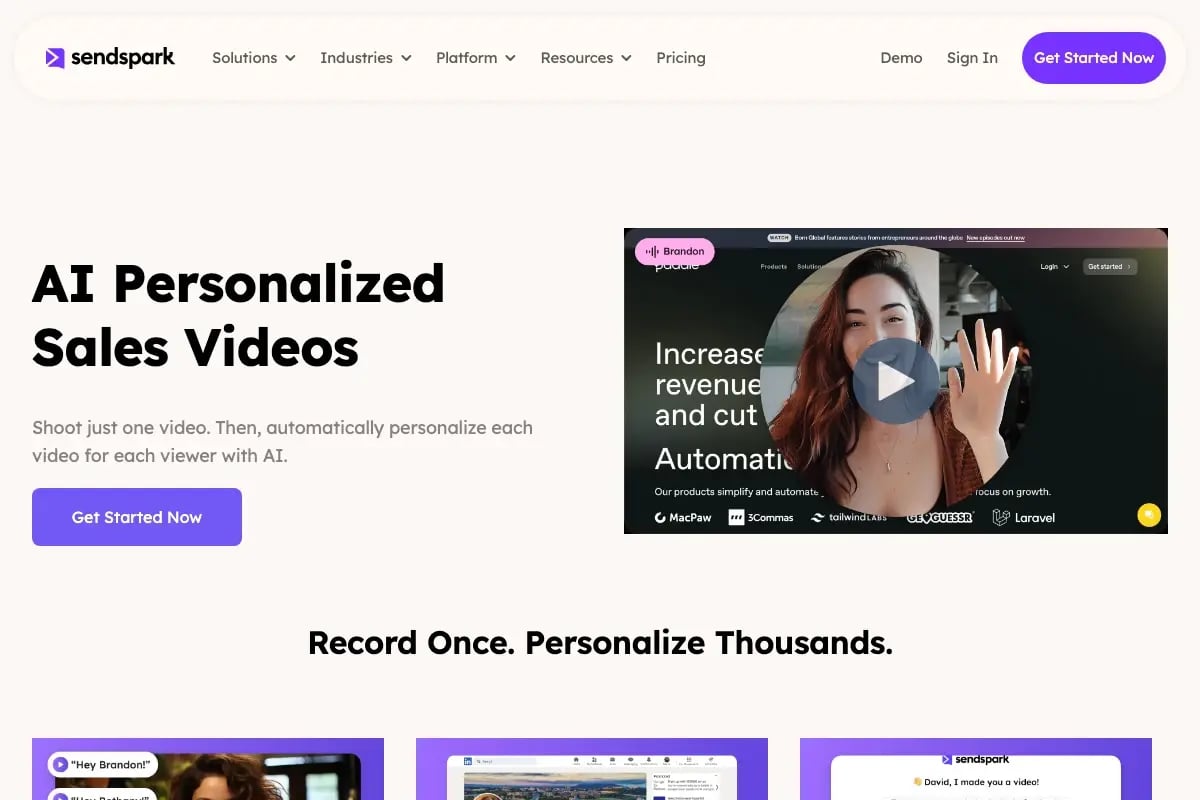
Set a fallback background for contacts where a URL is unavailable. A branded static background with your company logo works well as a default. Never leave the fallback empty — a broken or blank background undermines the entire personalization effect.
Step 5: Distribute and route engagement back to your CRM
Push the personalized videos through your existing sales engagement stack. Sendspark integrates with Outreach, Salesloft, Apollo, Smartlead, and Instantly — each video’s unique link and personalized thumbnail embed directly into your email templates, so the right video goes to the right prospect automatically.
After sending, Sendspark’s video analytics platform tracks opens, plays, completion rate, and CTA clicks. Add your HubSpot tracking code to Sendspark and that engagement data flows back into your CRM contact record automatically — enabling lead scoring based on video watch depth, and real-time notifications to your reps when a high-priority prospect watches their video. For a detailed integration walkthrough, see our CS video tactics guide.
Advanced strategy
Pair personalized video feedback with a conversation intelligence integration. Pull the top objection or question from each prospect’s Gong call transcript, add it to a custom CRM field, and reference that field in your dynamic background URL — loading a relevant case study or ROI calculator page as the backdrop. It turns a generic follow-up into a direct response to something the prospect actually said. For a full walkthrough of this approach, see our comprehensive guide to AI video personalization for outbound sales.
Choosing a Personalized Video Feedback Platform
The right personalized video feedback platform needs to do more than record and send video. In 2026, it needs to integrate with your agentic CRM stack, deliver production-quality voice cloning, and give you the analytics to prove ROI. Here are the six criteria that matter most — and how to evaluate them.
Six criteria for evaluation
1. Voice cloning quality. This is the differentiator that determines whether your personalization feels genuine or mechanical. Listen for natural pacing, accurate inflection, and clean name replacement without audio artifacts. Request a test with names that include unusual phonetics — that’s where lower-quality systems break down.
2. Dynamic background depth. Can the platform render live websites as video backgrounds? Does it simulate scrolling? Can it handle both desktop and mobile URL formats? Shallow implementations render a static screenshot; production-grade platforms render a live, scrolling session.
3. CRM and sales engagement integrations. Check for native connectors to HubSpot, Salesforce, Outreach, Salesloft, Apollo, and enrichment tools like Clay. API availability matters too — agentic workflow tools need programmatic access, not just UI-based connectors.
4. Agentic workflow support. Can the platform receive a trigger from an external CRM agent and generate a video without human input? This is the distinguishing capability for teams moving toward fully automated personalization at scale.
5. Analytics and engagement tracking. You need watch time, completion rate, CTA clicks, and the ability to push those metrics back to your CRM for lead scoring. Platforms that offer only play counts are not sufficient for data-driven sales teams.
6. Governance and brand controls. For teams with multiple reps sending video at scale, you need role-based access, approved background libraries, and brand-compliant thumbnail templates. Without these controls, personalization quality becomes inconsistent across the team.
Feature comparison
| Criteria | What to look for | Why it matters | Sendspark |
|---|---|---|---|
| AI voice cloning | Natural name replacement, no artifacts | Trust and authenticity of the feedback message | ✅ Production-quality, 2026 fidelity |
| Dynamic backgrounds | Live website rendering with scroll simulation | Shows prospect you researched them specifically | ✅ Full URL rendering + scroll simulation |
| CRM integrations | HubSpot, Salesforce, Clay, enrichment tools | Enables automated, data-driven personalization | ✅ Native + API access |
| Agentic workflow triggers | API-based video generation on external trigger | Required for fully autonomous feedback loops | ✅ Supported via API + Clay integration |
| Analytics depth | Watch time, completion, CTA clicks, CRM sync | Proves ROI and enables lead scoring | ✅ Full campaign analytics + HubSpot sync |
| Brand governance | Role-based access, approved templates | Maintains quality at scale across the team | ✅ Team controls + branded landing pages |
For a broader look at the landscape, our video personalization software shortlist covers the key players and where each one fits by use case.
When the platform matters more than the script
The quality of your personalized video feedback scales with the depth of the personalization layer, not just the quality of your script. A mediocre script delivered with a prospect’s name, their website as the background, and a thumbnail that shows their company name will outperform a brilliant script sent as a generic video. The platform is the multiplier. Choose one that matches the depth of personalization your use case demands — and that connects to the CRM and engagement tools your team already uses every day.
Frequently Asked Questions
What is personalized video feedback?
Personalized video feedback is a recorded video message tailored specifically for one recipient — using their name, company context, and relevant details rather than generic content. In 2026, AI voice cloning and dynamic backgrounds make it possible to deliver this level of specificity at scale, so you can send hundreds of individually personalized feedback videos without recording each one separately.
How do I send personalized video feedback at scale?
Record one base video with a placeholder where names go, then use an AI video personalization platform like Sendspark to clone your voice and generate a unique version for each contact on your list. Connect your CRM to map first names and background URLs automatically, then distribute through your existing sales engagement tools. The whole setup takes a few hours; after that, the workflow runs without manual input.
What is the best personalized video feedback tool in 2026?
Sendspark is purpose-built as an AI video personalization platform for B2B sales and customer success. It combines production-quality AI voice cloning, dynamic background rendering, personalized thumbnails, and deep CRM integrations — including native HubSpot and Salesforce connectors and API access for agentic workflows. It’s the most complete platform for teams that need to send personalized feedback at scale.
How does AI voice cloning work for video feedback?
You record a base video using a placeholder word instead of a recipient’s name. Sendspark’s AI analyzes your voice — tone, pacing, inflection — and builds a voice model. When you upload your contact list, the AI generates a unique audio clip for each recipient’s name and splices it into the base recording at the placeholder point. In 2026, voice cloning fidelity is production-quality: no robotic artifacts, no unnatural pauses.
Can personalized video feedback work for customer success teams?
Absolutely. Customer success is one of the strongest use cases. CS teams use personalized video feedback for QBR recaps, onboarding check-ins, renewal conversations, and health score follow-ups. Sendspark’s customer success solution maps CRM account fields directly to video variables, so each customer gets a video that references their specific metrics and milestones — at the scale a busy CS manager actually needs.
How do I measure the ROI of personalized video feedback?
Track four metrics: video open rate, play rate, completion rate, and CTA click rate. Compare these against your baseline text-only email metrics to calculate lift. Use Sendspark’s video analytics dashboard to monitor per-campaign performance, and sync engagement scores back to your CRM so reps can prioritize follow-up based on who watched the most. Teams consistently report 2–3x reply rate improvements and measurable reductions in time-to-close.
Record One Video. AI Personalizes Thousands.
Sendspark is the AI video personalization platform for B2B sales. Record once, and AI voice cloning generates thousands of individually personalized videos with dynamic backgrounds and personalized thumbnails — each prospect hears their name, sees their website, in your voice. Sales teams see 2-3x more replies.
Get Started NowSources & References
- Gartner — “B2B buying journeys are non-linear and involve multiple stakeholders, increasing demand for personalized async touchpoints” (2025)
- Salesforce State of Sales — “AI adoption in sales organizations has accelerated sharply; reps report AI-generated personalization now meets or exceeds manual quality” (2025)
- GitLab — “Async video communication reduces follow-up meetings and increases message clarity in distributed teams” (ongoing research)
- HubSpot Research — “Personalized video emails generate significantly higher open rates, click rates, and reply rates compared to text-only outreach” (2025)
- McKinsey — “Async touchpoints are now a core component of high-performing B2B sales motions; hybrid selling outperforms fully in-person or fully digital approaches” (2024)
Topics: blog