Video outreach gets 200–300% more replies than plain text email — but most B2B sales teams are still in Stage 1, recording one-off videos with no system behind them. The gap between a rep with a webcam and a team running AI-personalized video at scale is enormous.
This article maps out all five stages of the Video Outreach Maturity Model — from manual recording to enterprise AI video. You’ll find sales prospecting frameworks, a self-assessment table, and a new 2026 fast-track path that lets modern teams skip the slow stages entirely.
Check out our complete guide to video prospecting for deeper context alongside this model.
Key Takeaways
- The Video Outreach Maturity Model has five stages: Manual, Cadenced, AI-Personalized, Multi-Channel Automated, and Enterprise Scale.
- Most B2B sales teams are stuck at Stage 1 or 2 — often because no one has shown them what Stage 3 looks like in practice.
- AI-powered personalization (Stage 3) starts at $49/month and can increase reply rates by 2–3x compared to generic video.
- In 2026, new teams can skip Stages 1–2 entirely using an AI-native entry point — getting to personalized video outreach in 2–4 weeks.
- Enterprise teams at Stage 5 use AI voice cloning, dynamic backgrounds, and CRM-triggered video sequences to personalize at scale without extra recording time.
What Is the Video Outreach Maturity Model?
The Video Outreach Maturity Model is a five-stage framework for B2B sales teams. It maps the journey from manual recording to AI-personalized video sequences at enterprise scale. Each stage defines a clear combination of tools, workflows, and personalization depth — and knowing your stage tells you exactly what to build next.
The five stages are:
- Stage 1 — Beginner: Manual video recording, one prospect at a time
- Stage 2 — Developing: Video integrated into structured sales cadences
- Stage 3 — Maturing: AI-powered personalization at modest scale
- Stage 4 — Advanced: Multi-channel automation with video sequences
- Stage 5 — Scale: Enterprise AI video with voice cloning and CRM-triggered delivery
According to Salesforce’s State of Sales report, top-performing reps are 1.5x more likely to use video in their outreach than average performers. The model explains why — and how to get there faster.
Stage 1: Beginner — Manual Video Recording
At Stage 1, you record a unique video for each prospect by hand — no AI, no automation, no templates. You’re building the core habit: showing your face, using the prospect’s name, and saying something specific to them. This stage is where most reps start, and where many stay far too long.
Tools for Stage 1
A webcam and a basic video recording platform are all you need. Many reps start with Sendspark’s 7-day free trial, which gives you recording, a shareable link, and engagement tracking.
Keep videos between 20 and 40 seconds. Shorter videos get watched all the way through — longer ones get dropped halfway.
Use a custom thumbnail showing you pointing at the prospect’s company name or LinkedIn profile. That single change can lift click-through rates by up to 50%.
Stage 1 Best Practices
Record at least five videos per day to build the habit. Volume matters at this stage — you’re training yourself to be comfortable on camera and to personalize quickly.
Write a short script framework before you record. Check out these video prospecting scripts to build your first three templates. Having a structure prevents rambling and keeps videos tight.
Don’t worry about production quality at Stage 1. Natural lighting, a clean background, and a clear audio setup are enough. Authenticity outperforms polish every time in cold outreach.
Pro tip
Record a batch of five videos back-to-back each morning before you check email. Doing it first eliminates procrastination and keeps the habit consistent.
Stage 2: Developing — Video in Sales Cadences
At Stage 2, video stops being a one-off effort and becomes a repeatable part of your sales workflow. You place video touchpoints at specific days in your sequence, track who watches, and use that data to prioritize follow-up. This is where video starts generating measurable pipeline impact.
Adding Video to Sales Workflows
The most effective placement is Day 1 and Day 8 of a standard cadence. Day 1 video creates an immediate human connection. Day 8 video re-engages prospects who opened but didn’t reply.
Use dynamic variables in your video landing page copy — like the prospect’s first name and company — even if the video itself isn’t yet AI-personalized. It takes two minutes to set up and makes the page feel tailored.
Learn how to structure effective video follow-up messages at this stage. A well-timed follow-up video after a no-reply is often what converts a cold prospect into a booked meeting.
Tracking Engagement at Stage 2
At this stage, you need to know who watched, how much they watched, and whether they clicked your CTA. Without that data, you’re flying blind on what’s working.
Here’s a simple Stage 2 cadence structure to get you started:
| Day | Touch Type | Video? | Goal |
|---|---|---|---|
| Day 1 | Yes — intro video | First impression | |
| Day 3 | LinkedIn DM | No | Connection + context |
| Day 5 | No | Value-add content | |
| Day 8 | Yes — follow-up video | Re-engagement | |
| Day 12 | Phone + Email | No | Final ask |
Record One Video. AI Personalizes Thousands.
Sendspark is the AI video personalization platform for B2B sales. Record once, and AI voice cloning generates thousands of individually personalized videos with dynamic backgrounds and personalized thumbnails — each prospect hears their name, sees their website, in your voice. Sales teams see 2-3x more replies.
Get Started NowStage 3: Maturing — AI-Powered Personalization
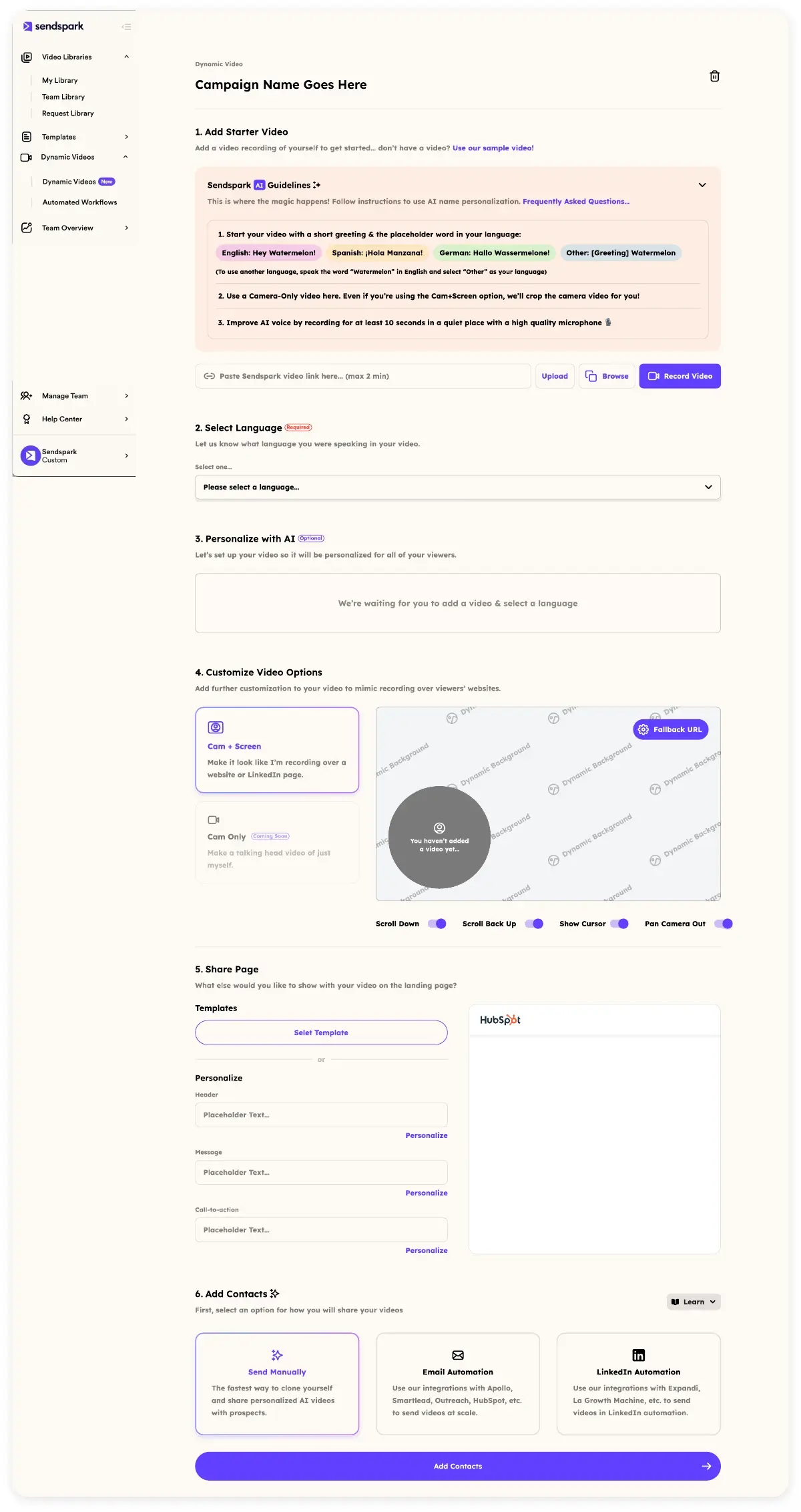
At Stage 3, you stop recording individual videos and start recording one video that AI personalizes for hundreds of prospects. You record a single template — say, a cold outreach intro — and Sendspark’s AI Personalized Video engine clones your voice to say each prospect’s name.
Dynamic backgrounds layer their website or LinkedIn profile behind you automatically — no re-recording needed. Every prospect gets a video that feels individually made for them.
The AI Personalization Workflow
The core technique at Stage 3 is sometimes called the “watermelon method” — your video template is generic on the outside, but AI makes it feel specific to each recipient on the inside. You record once, upload your prospect list, and Sendspark generates personalized versions automatically.
Here’s the basic workflow:
- Record a 20–40 second template video with a natural pause where you’d say the prospect’s name
- Upload your contact list with first names, company names, and website URLs
- Sendspark generates individual video pages with dynamic backgrounds and AI voice cloning for each prospect
- Send the personalized links via email or LinkedIn DM
Chris from Brikl used this approach and saw 6x response rates compared to his previous cold email campaigns. That’s not unusual — AI-personalized video consistently outperforms generic video because it signals genuine research without requiring extra recording time.
Syncing Video Data to Your CRM
Stage 3 is also when you need video engagement data flowing into your CRM. Knowing that a prospect watched 90% of your video is a strong buying signal — your CRM should reflect that.
Sendspark’s HubSpot integration pushes watch data, click-throughs, and reply activity directly into contact records. You can also explore how to send personalized videos at scale in HubSpot for a complete workflow guide.
Hipersa implemented CRM-synced video at this stage and reported 40% shorter sales cycles. When reps know exactly who engaged and when, follow-up timing becomes a competitive advantage.
Advanced strategy
Set up a HubSpot workflow that automatically enrolls any contact who watches 75%+ of your video into a high-priority follow-up sequence. It takes 20 minutes to configure and runs on autopilot.
Stage 4: Advanced — Multi-Channel Automation
At Stage 4, video outreach runs across email, LinkedIn, and SMS simultaneously — triggered by prospect behavior, not manual scheduling. You’re not just sending video; you’re building agentic video sequences that respond to intent signals. This stage requires solid CRM hygiene and 50+ integration capability.
Automating Video Sequences
Agentic video sequences are triggered automatically based on prospect actions — a website visit, a LinkedIn profile view, or a job change alert. Instead of a rep deciding when to send a video, the system does it based on real-time intent data.
For example, a prospect visiting your pricing page could automatically trigger an intent-triggered video from their assigned rep — personalized with their name and company, sent within minutes of the visit. That kind of speed-to-lead advantage is only possible with automation.
Use LinkedIn video for B2B sales as a dedicated channel at this stage, not an afterthought. LinkedIn video DMs have significantly higher open rates than email in many industries, especially for mid-market and enterprise prospects.
Apply LinkedIn prospecting best practices to make sure your video DMs align with platform norms and don’t feel like spam. Personalized thumbnails and a clear subject line in the message preview are critical.
Analytics at Scale
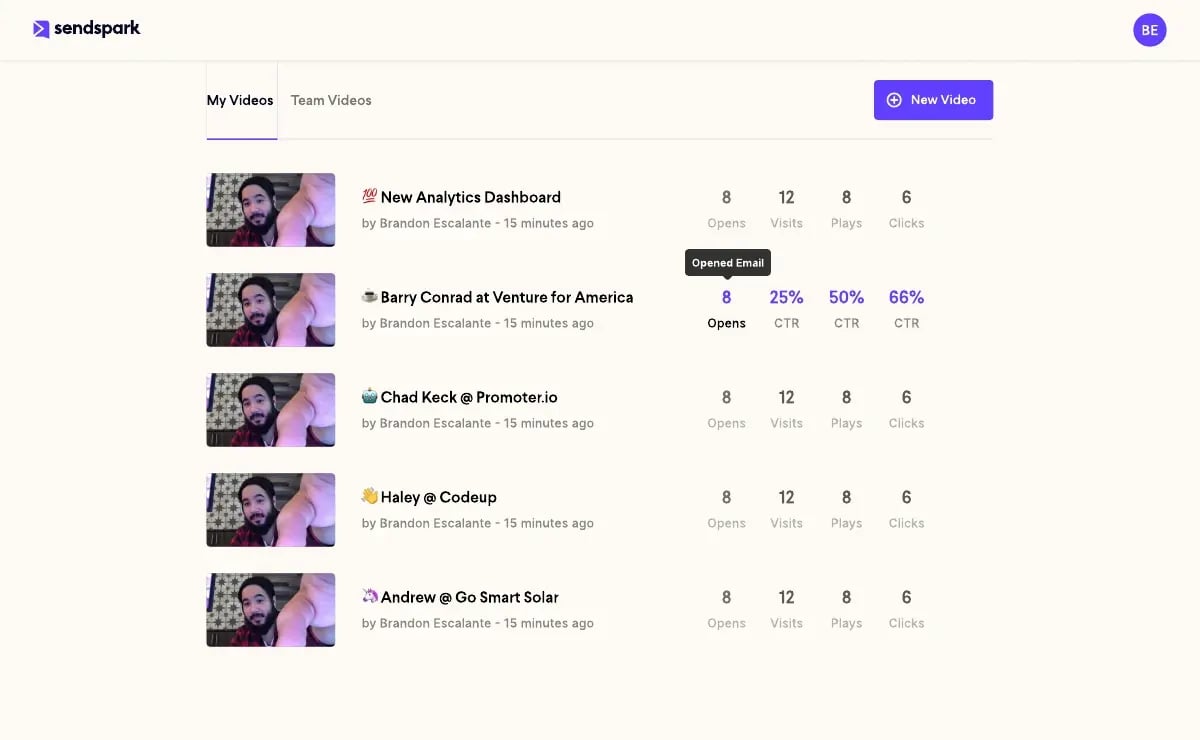
Stage 4 analytics go beyond “did they watch?” You need heatmaps showing where viewers drop off, per-segment performance data, and real-time alerts when high-value prospects engage.
According to HubSpot’s Sales Statistics research, it takes an average of 8 touchpoints to get a first meeting with a cold prospect. Multi-channel video sequences at Stage 4 compress those touchpoints because video engagement signals are stronger than email opens.
Track these metrics at Stage 4:
- Average watch percentage per campaign
- CTA click-through rate by video template
- Reply rate by channel (email vs. LinkedIn vs. SMS)
- Meeting booked rate by sequence type
- Revenue influenced by video touchpoints (pulled from CRM)
Stage 5: Scale — Enterprise AI Video
At Stage 5, video personalization operates at enterprise scale — thousands of prospects per week, across multiple reps and teams. Every video sounds individually recorded. Sendspark’s Business plan ($699/month) covers CNAME whitelabeling, advanced admin controls, and dedicated support.
AI voice cloning is the defining capability of Stage 5. You record a voice sample once, and the AI generates personalized audio for every prospect — saying their name, company, and even a trigger event reference.
Dynamic video prospecting at this scale is impossible with manual recording. The efficiency gains compound as your team grows.
Dynamic backgrounds make each video feel like you recorded it specifically for that prospect’s company. The video shows their actual website, LinkedIn profile, or a custom landing page behind you — without any extra recording needed.
The Gartner B2B Buying Journey research shows modern buyers interact with 6–10 pieces of content before making a decision. Stage 5 teams use video as a consistent thread across every touchpoint in that journey — not just cold outreach.
Enterprise teams also benefit from:
- CNAME whitelabeling — video pages appear on your own domain
- Team-level analytics — compare performance across reps and regions
- CRM ROI tracking — attribute closed deals directly to video touchpoints
- Custom branding — personalized thumbnails, branded video players, custom CTAs
Bethany Stachenfeld, Co-founder of Sendspark, puts it simply: “The goal isn’t to send more videos — it’s to make every prospect feel like you spent an hour researching them, even when AI did it in seconds.”
The 2026 Fast-Track: Skipping Stages 1-2 with AI-Native Onboarding
In 2026, new B2B sales teams don’t have to spend 6–12 months crawling through Stages 1 and 2. The AI-native entry point — starting directly at Stage 3 capabilities — is now accessible to individual reps at $49/month on Sendspark’s Solo plan. The old slow progression is no longer mandatory.
What Makes an AI-Native Entry Point Different
An AI-native entry point means your first video outreach campaign already uses AI voice cloning, dynamic backgrounds, and personalized thumbnails — from day one. You skip the manual recording habit-building phase because the tool handles personalization for you.
This stage bypass is possible because AI personalization costs have dropped dramatically. What required a full enterprise contract in 2023 is now a $49/month solo subscription. Individual reps — not just revenue operations teams — can now run AI-personalized outreach independently.
Teams using the AI-native approach are reaching Stage 3 capability in 2–4 weeks. The old model took 6–12 months of habit-building before hitting that same level of personalization.
LinkedIn Video DM Personalization as the Starting Point
LinkedIn video DM personalization is emerging as the default AI-native starting point in 2026. LinkedIn’s algorithm actively favors video content, and personalized video DMs are seeing open rates that standard InMail can’t match.
The workflow is straightforward: record one template video, generate AI-personalized versions with each prospect’s name and company, and send via LinkedIn DM at scale. Dynamic video prospecting via LinkedIn is now a genuine cold outreach channel — not just a supplementary one.
Agentic video sequences built on LinkedIn intent data (profile views, post engagements, connection requests) are the next frontier. Instead of a rep manually deciding when to send a LinkedIn video, the sequence triggers based on real-time behavior signals.
New Vocabulary for 2026 AI-Native Teams
- AI-native entry point: Starting at Stage 3 capability without progressing through Stages 1–2
- Stage bypass: Skipping early maturity stages using AI tooling available from day one
- LinkedIn video DM personalization: AI-personalized video delivered natively via LinkedIn messaging
- Agentic video sequences: Automated video outreach triggered by prospect intent signals
- Intent-triggered video: A video sent automatically when a prospect takes a qualifying action
- Dynamic video prospecting: AI-personalized video prospecting that adapts content to each recipient at scale
Common mistake
Don’t skip the scripting foundation just because AI handles personalization. Even AI-native teams need a solid 30-second script structure — poor messaging at scale just fails faster.
Self-Assessment: Find Your Current Stage
Answer these four questions to identify your stage:
- Do you record videos manually for each prospect?
- Do videos appear at specific days in a structured cadence?
- Does AI handle personalization — voice cloning and dynamic backgrounds?
- Do sequences trigger automatically based on prospect behavior?
Your answers map directly to Stages 1 through 4/5 in the table below.
| Dimension | Stage 1 | Stage 2 | Stage 3 | Stage 4/5 |
|---|---|---|---|---|
| Recording method | Manual, 1:1 | Manual templates | AI-personalized | AI voice cloning |
| Volume / week | 5–25 | 25–100 | 100–500 | 500–5,000+ |
| Personalization | Fully manual | Dynamic variables | AI-generated | Intent-triggered |
| Analytics | Basic views | Watch %, CTR | CRM sync | Heatmaps + revenue |
| Channels | Email only | Email + LinkedIn | Multi-channel | Automated sequences |
| Automation | None | Cadence triggers | CRM workflows | Agentic sequences |
| Entry cost | Free | ~$49/mo | $49–$99/mo | $299–$699/mo |
Your progression roadmap from any stage:
- Stage 1 → Stage 2: Pick two cadence days for video (Day 1 + Day 8), use tracking links, review analytics weekly
- Stage 2 → Stage 3: Set up AI Personalized Video in Sendspark, connect HubSpot, run your first 50-prospect AI campaign
- Stage 3 → Stage 4: Add LinkedIn as a video channel, build intent-triggered workflows, enable real-time engagement alerts
- Stage 4 → Stage 5: Enable AI voice cloning, activate CNAME whitelabeling, implement team-level analytics and CRM revenue attribution
- 2026 fast-track: Start at Stage 3 directly using Sendspark Solo ($49/mo) and LinkedIn video DM personalization
Frequently Asked Questions
What is the video outreach maturity model?
The video outreach maturity model is a five-stage framework that describes how B2B sales teams evolve from manual video recording to enterprise-scale AI personalization. Each stage has distinct tools, workflows, and personalization capabilities. It helps sales teams diagnose where they are today and what to build next to improve reply rates and pipeline.
How do I know which video outreach stage I’m in?
Ask yourself four questions: Do you record each video manually? Does video appear on specific days in a structured cadence? Does AI personalize videos for you? Do sequences trigger automatically based on prospect behavior? If you answered yes to the first question only, you’re at Stage 1. Each additional “yes” moves you up a stage.
When should I use AI personalization vs recording individual videos?
Record individual videos when you’re targeting fewer than 20 high-value accounts per week — the personal touch is worth the time. Switch to AI personalization when you’re sending to 50+ prospects weekly, because manually recording that volume isn’t sustainable. AI personalization via Sendspark produces comparable reply rates at a fraction of the time cost.
What video metrics should I track for sales outreach?
Start with watch percentage, CTA click-through rate, and reply rate per campaign. At Stage 3 and above, add CRM-synced engagement data — specifically which contacts watched 75%+ of your video, as that’s your strongest buying signal. At Stage 4/5, track meeting booked rate and revenue influenced by video touchpoints to calculate true ROI.
How do I get started with AI-personalized video outreach?
Sign up for Sendspark’s Solo plan ($49/month), record a 20–40 second template video, and upload a prospect list with first names and company website URLs. Sendspark generates individually personalized versions using AI voice cloning and dynamic backgrounds. Send the personalized links via email or LinkedIn DM and track engagement from your dashboard.
How long does it take to move from Stage 1 to Stage 3 in video outreach?
Traditionally, progressing from manual video recording to AI-powered personalization took 6–12 months of habit-building and tool adoption. In 2026, teams using an AI-native entry point can reach Stage 3 capability in 2–4 weeks by starting with Sendspark’s AI personalization tools from the first campaign. The 2026 fast-track effectively eliminates the need to spend months at Stages 1 and 2.
What tools do I need for enterprise-level AI video outreach?
At Stage 5 (enterprise), you need an AI video personalization platform with voice cloning, dynamic backgrounds, and CRM integration — Sendspark’s Business plan ($699/month) covers all of this. You’ll also need a CRM (HubSpot or Salesforce) connected via integration, a sales engagement platform for sequence management, and LinkedIn Sales Navigator for intent data. CNAME whitelabeling is essential for enterprise brand consistency.
Sources & References
- Salesforce. State of Sales Report. salesforce.com/resources/research-reports/state-of-sales/
- HubSpot. Sales Statistics. blog.hubspot.com/sales/sales-statistics
- Gartner. The B2B Buying Journey. gartner.com/en/sales/insights/b2b-buying-journey
- Sendspark. AI Personalized Video. sendspark.com/video-platform/ai-intros
- Sendspark. Complete Guide to Video Prospecting. sendspark.com/resources/video-prospecting-guide
Record One Video. AI Personalizes Thousands.
Sendspark is the AI video personalization platform for B2B sales. Record once, and AI voice cloning generates thousands of individually personalized videos with dynamic backgrounds and personalized thumbnails — each prospect hears their name, sees their website, in your voice. Sales teams see 2-3x more replies.
Get Started NowTopics: blog