Video prospecting can help you stand out in crowded inboxes and increase meeting bookings by up to 85%. Why does it work? Videos are memorable, personal, and engaging - viewers retain 95% of a message when delivered through video, compared to just 10% when reading text. Plus, tools like AI voice cloning and dynamic screen recording make personalization scalable and effective. For sales teams running Calendly demos, our guide to embed AI-personalized videos in your Calendly reminders walks through the full workflow. See also our collection of 10 proven video prospecting examples for real-world formats that work.
Here’s a quick summary of the 10 tips to improve your video prospecting:
- Keep videos under 90 seconds: Short videos hold attention better, especially for cold outreach.
- Be real, not perfect: Avoid scripts; focus on conversational and natural delivery.
- Use AI voice cloning: Personalize at scale by addressing prospects by name.
- Show their website in the background: Instantly grab attention with visual customization.
- Combine screen recording with webcam: Mix personal connection with relevant visuals.
- Use custom intros for demo videos: Personalize the intro, then attach a pre-recorded demo.
- Connect video tools to your CRM: Automate follow-ups and track video engagement.
- Share videos across platforms: Use email, LinkedIn, and text for broader reach.
- Track who watches and for how long: Focus on engaged prospects for follow-ups.
- Send follow-ups based on actions: Tailor outreach based on viewer behavior.
These tactics help personalize outreach, save time, and boost response rates. Start with short, engaging videos and leverage tools to track and automate your efforts for better results.
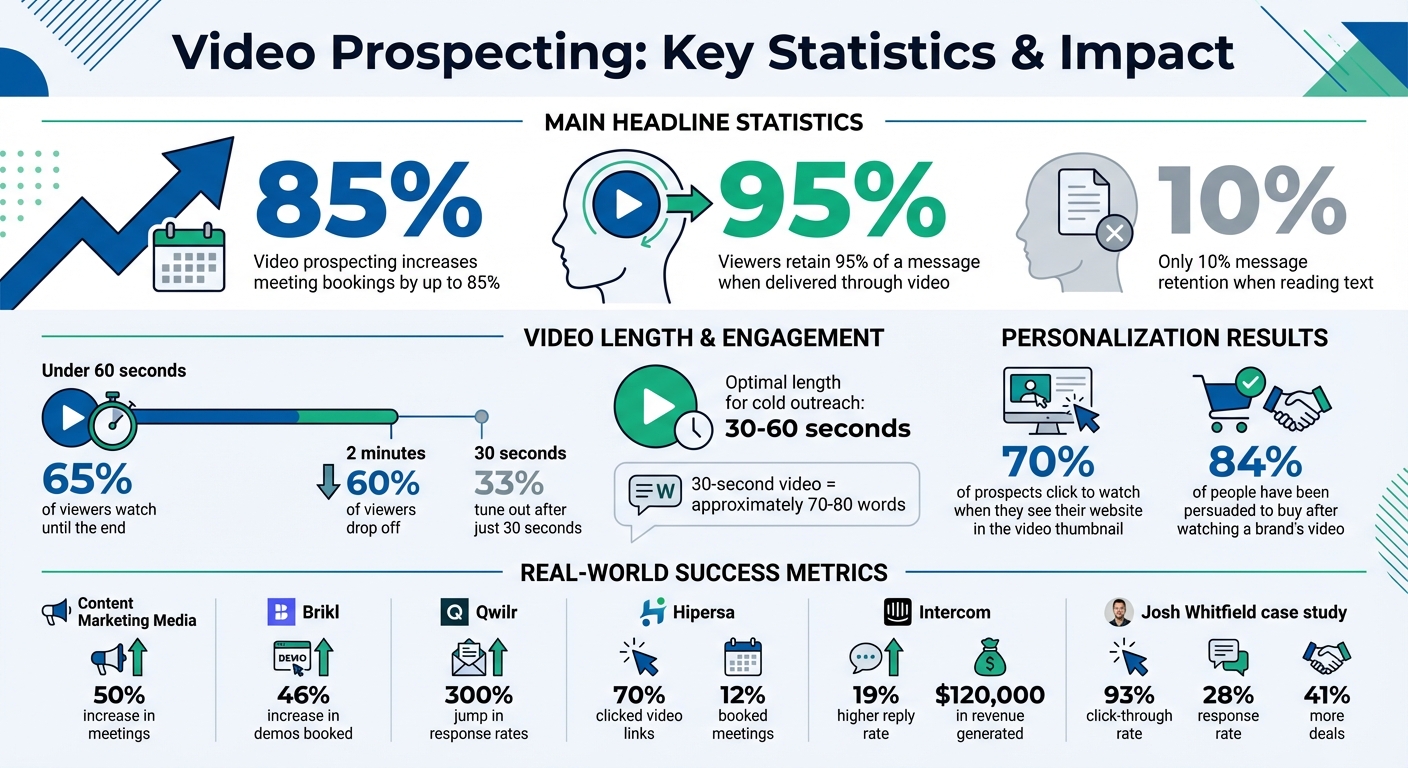
Video Prospecting Statistics: Impact on Meeting Bookings and Message Retention
8 Tips for Better Video Prospecting
1. Keep Videos Under 90 Seconds
When it comes to grabbing a prospect’s attention, brevity is key. The first thing they’ll notice when a video lands in their inbox is its length. A quick 30-second video? That’s intriguing. A five-minute one? Likely ignored.
The numbers back this up. About 65% of viewers stick around until the end for videos under 60 seconds. But stretch it beyond two minutes, and 60% of viewers drop off, with 33% tuning out after just 30 seconds. Longer videos not only risk losing your audience but also your all-important call-to-action.
So, what’s the sweet spot? It depends on the context. For cold outreach, aim for 30–60 seconds. LinkedIn follow-ups do well at around 45 seconds, while meeting recaps can stretch to one to two minutes. And here’s a tip: a 30-second video means you’ve got room for only about 70–80 words. That forces you to cut the fluff and get straight to the point.
The first 30 seconds are your golden window. Use it wisely - start with insights tailored to the prospect’s business. Shorter videos not only respect their time but also ensure they’re more likely to hear your full message.
2. Focus on Being Real, Not Perfect
People can tell when a video feels scripted. If you’re reading a script word-for-word or trying too hard to perfect your delivery, it shows - and it ruins the connection you’re aiming to build. The goal of video prospecting is to show there’s an actual person behind the message, not an automated system. This genuine approach not only builds trust but also delivers real results.
The stats back it up. Around 84% of people say they’ve been persuaded to buy a product or service after watching a brand’s video. But here’s the catch: this only works when the video feels real. Overly polished videos tend to feel like ads, and prospects are quick to tune those out.
“When someone is reading, it’s obvious and comes across as unnatural. You want your video to come across as conversational. Look at the camera and talk like you’re speaking with someone in person.” - Ben Wright, VP of Revenue, Sendspark
To strike the right balance between professionalism and authenticity, ditch the script and focus on rehearsing your main points instead. Look directly into the camera to create a sense of eye contact, use natural hand gestures to reinforce your message, and choose attire that’s professional yet comfortable. This helps you appear both credible and approachable.
The first few seconds are critical. Skip the formalities and grab attention right away with a hook - maybe a thoughtful question or a specific insight about the prospect’s business. And don’t worry about minor stumbles; they make you relatable and show that your video isn’t just another mass-produced pitch. Prospects aren’t searching for a high-production commercial - they’re looking for a real human connection. By embracing these techniques, you’ll set the stage for more engaging and effective video strategies.
3. Use AI Voice Cloning to Say Each Prospect’s Name
Creating individual videos for every prospect can be a draining task. On the other hand, sending out the same generic video to everyone often results in lower response rates. This is where AI voice cloning steps in, offering a balance between efficiency and personalization. It allows you to record a single video and automatically tailor it with each prospect’s name.
Here’s how it works: Start by recording a “base” video using a placeholder name, like “Hi Watermelon.” The AI then clones your voice and swaps out the placeholder with each prospect’s actual name - “Hi Sarah,” “Hi Michael,” “Hi Jennifer” - generating hundreds or even thousands of personalized videos from one recording. You can also upload a CSV file of your contacts, enabling the system to seamlessly fill in details like names and company info, not just in the video but also on the landing page.
This approach doesn’t just save time - it drives results. For example, Content Marketing Media saw a 50% increase in meetings, Brikl boosted demos by 46%, and Qwilr achieved a 300% jump in response rates using personalized video campaigns.
“AI personalized introductions… can help you personalize your email outreach at scale - and see up to 300% replies and conversions.”
- Bethany Stachenfeld, Co-founder, Sendspark
To make sure your AI voice cloning feels authentic, focus on recording high-quality audio. Use a quiet space and a good microphone to eliminate background noise or echoes, which can make the cloned voice sound unnatural. Look directly into the camera and pause briefly after saying the placeholder name to create a smoother transition for the AI. For your most important prospects, consider recording personalized videos manually while relying on AI for larger-scale outreach.
4. Show the Prospect’s Website in Your Video Background
Adding a visual touch to your personalized videos can make a huge difference. Imagine this: the prospect opens their inbox to see a video thumbnail featuring their own website in the background. That kind of personalization grabs attention instantly. It sparks curiosity - 70% of prospects click to watch when they see this kind of visual hook. They’ll wonder why their website is in the video and what you’re saying about their company. This simple yet effective trick can significantly boost your video open rates.
What makes this method so effective is how effortlessly it proves you’ve done your homework. Instead of starting your video with, “I was looking at your website and noticed…,” the background does the talking for you. Tools with dynamic background features make this process seamless. You can record one video in spotlight mode (where your face appears in a small bubble) and, by uploading a CSV file with website URLs, these tools will automatically display each prospect’s website behind you.
“When people see [their LinkedIn profile in the background], the natural human reaction is to wonder: ‘What are they doing on my LinkedIn profile? What are they talking about in this video?’ This encourages them to go watch the video.”
- Ben Wright, VP of Revenue, Sendspark
For even greater impact, make sure your video thumbnail stands out. A simple wave or a friendly gesture in front of the prospect’s website can catch their eye in a crowded inbox. And if their website isn’t relevant, you can always use their LinkedIn profile as the background instead. This approach combines personalization and creativity to make your outreach impossible to ignore.
Learn more about video for nonprofits.
5. Combine Screen Recording with Webcam
Blending screen recording with a webcam overlay strikes the perfect balance between demonstration and personal connection. By appearing in a small bubble on the screen, you can walk prospects through relevant content while adding a personal touch. This method not only makes your outreach feel more human but also delivers visual proof that plain text emails just can’t match. In fact, visuals help viewers retain over 60% more information than text alone.
To make this work, focus on screen content that strengthens your personalized message. This approach subtly communicates that you’ve done your research without explicitly stating it. For example, instead of saying, “I checked out your website”, you can navigate their site and explain how your solution addresses their specific challenges. Start with spotlight mode: introduce yourself in full-screen via your webcam, then switch to a smaller overlay as you transition to screen sharing.
Tie your pitch directly to their business by showing relevant pages, like their LinkedIn profile or key company sections. Highlight pain points visually - for instance, showcase pages that reveal slow website speeds or unfilled job openings. Just make sure the content you display fits your message. For example, avoid showing a “Careers” page if you’re pitching marketing software.
“In an increasingly automated sales world, I believe that the one true way to stay relevant is to be human and create a real and personalized connection with our prospects.”
- Yaniv Siegel, Associate Account Executive, HubSpot
Yaniv Siegel from HubSpot demonstrated the power of this approach in 2021. He created 197 videos, each averaging 70 seconds, spending a total of 3.8 hours on prospecting. The results? A 93% click-through rate, a 28% response rate, 31 booked meetings, and two deals closed, generating $3,143 in monthly recurring revenue. Overall, this method led to 41% more deals.
sbb-itb-afd3f9e
6. Attach Custom Intros to Standard Demo Videos
Creating fully personalized videos can be a major time sink. A smarter approach? Record a quick, 15–30 second custom intro and attach it to your pre-recorded demo video. This “sandwich” method blends a personal touch with a polished, ready-to-go product walkthrough.
The custom intro is where you grab attention. Use this moment to share your screen and show something specific about the prospect - maybe their website, LinkedIn profile, or a recent job posting. Then, hit them with a quick, tailored statement about their business. For example, you could say, “I noticed you’re hiring three SDRs this quarter”, or “Your recent product launch really stood out to me.” This approach connects on a personal level before diving into your solution.
Here’s proof it works: In September 2024, Josh Whitfield from Content Marketing Media used this tactic with tools like Sendspark and Clay. The result? A 50% increase in meetings booked and a noticeable rise in interested replies. Brikl also saw success, achieving a 46% uptick in demos booked after switching from plain text emails to this video strategy.
“Check out Sendspark’s custom intro tool to record an introduction that highlights your prospect’s pain, then seamlessly stitch it to your pre-recorded video.” - Sendspark
This method scales without losing the human element. By focusing on just the personalized intro, you can reuse your demo video repeatedly while keeping it fresh and relevant. Just make sure your intro’s tone matches the flow of your demo for a cohesive experience.
7. Connect Video Tools to Your CRM
Pairing your video platform with your CRM can make prospecting much smoother by automating personalized outreach. Imagine this: a prospect books a meeting, and your CRM instantly sends them a pre-meeting agenda video. This not only adds a personal touch but also helps reduce no-shows by setting clear expectations.
But it doesn’t stop there. Syncing video engagement data back to your CRM can be a game-changer. You’ll know who clicked your video link, how long they watched, and which parts caught their attention. All this data gets stored in each contact’s record, helping you focus on the leads that are genuinely interested. For example, in 2022, Intercom took this approach with personalized video outreach, boosting their reply rate by 19% and generating $120,000 in revenue. On top of that, they saved about 12 days’ worth of meetings and training for their 900 employees by using videos for internal communication. This integration creates a continuous feedback loop, guiding your next move.
Want to take it a step further? Get real-time notifications when a prospect finishes watching your video. This is where the “5-minute rule” comes into play: call them within five minutes of their view to keep your solution fresh in their mind. And for those prospects who’ve gone quiet, re-engagement campaigns can work wonders. Send a short video highlighting new features or a case study that’s relevant to them.
“If you’ve been ghosted by somebody and I send them a video, they respond.” - Ivana Ivanova, SDR, Cognism
This method stands out far more than another plain text email, allowing your CRM to handle the heavy lifting while you focus on building connections.
8. Send Videos Through Email, LinkedIn, and Text
Using personalized videos is a smart move, but choosing the right platform to share them is just as important. Each channel - email, LinkedIn, and text - has its own quirks, so tailoring your approach can make the difference between your video being watched or ignored.
Email is a great starting point, but it needs to grab attention quickly. Start with a subject line that stands out, like “[Prospect Company Name] Intro” or a question that addresses a specific challenge they might be facing. Pair this with a personalized GIF thumbnail - maybe featuring their website in the background - and keep your message short, around 108 characters. But here’s a tip: skip the video in your very first cold email. Spam filters can be tricky, so save the video for a follow-up email after you’ve gotten some initial engagement.
LinkedIn demands a slightly different strategy. Once your email outreach is in motion, shift your focus to LinkedIn for follow-ups. Keep in mind that videos on LinkedIn work best when sent to someone you’re already connected with; otherwise, they’ll only see a plain text link instead of a preview. Timing matters too. Try sending your messages between Tuesday and Thursday, ideally between 8:00 AM and 11:00 AM in the recipient’s time zone, to boost engagement. For instance, Hipersa found that 70% of their prospects clicked on video links, nearly half watched the entire video, and 12% even booked a meeting after receiving a LinkedIn video message.
Learn more about AI video timing best practices.
Text messages are perfect for quick, urgent follow-ups. Let’s say you call a prospect, but they don’t pick up. Leave a voicemail mentioning you’ll send a video to explain more, and then text them the link right after. This layered approach keeps you on their radar without coming across as overly persistent.
No matter the channel, personalization is key. Customizing your video thumbnails with elements like the prospect’s website or LinkedIn profile can significantly boost click-through rates. By adapting your message to match how each platform works, you’ll increase your chances of turning these interactions into scheduled meetings.
9. Monitor Who Watches Your Videos and for How Long
Sending a video is just the beginning. What happens next is where the insights lie. Tracking who watches your video and how they engage can reveal who’s genuinely interested and who might not be worth prioritizing.
Pay close attention to watch time - it’s a strong indicator of interest. For instance, if someone watches 80% or more of your video, they’re likely much more engaged than someone who clicks the link but bounces after a few seconds. Even more telling? When a prospect replays specific sections or watches your video multiple times. This behavior often signals they’re seriously evaluating your solution or sharing it with decision-makers within their team. Use these metrics to guide your follow-ups, focusing on the viewers who show the most engagement.
“Cold call your prospect within 5 minutes of them watching your video to get immediate feedback, show tenacity, and book a discovery call.” - Katherine Caldwell, Founder, Katch Consulting
If you notice prospects watching but skipping your call-to-action (CTA), it’s time to refine your messaging. Make sure the next step is crystal clear. And if there’s a noticeable drop-off around the 30-second mark, consider tightening your script or moving your key value proposition earlier in the video. These small adjustments can make a big difference in keeping viewers engaged.
10. Send Follow-Up Videos Based on Prospect Actions
Use insights from viewer engagement to craft follow-ups that align with what your prospects actually do. For example, if someone clicks a booking link but doesn’t schedule, or a trial user adds teammates but doesn’t take the next step, these behaviors signal the perfect time to reach out with a personalized video.
To make this process seamless, connect your video platform with tools like HubSpot, Salesloft, or Apollo. This integration allows you to automate follow-ups based on specific actions. For instance, you can set up a system to send a video when a prospect repeatedly opens your emails without replying, or when a trial user stops logging in after initial activity.
This approach has shown impressive results. Brikl, a SaaS platform for custom apparel teams, saw a 46% jump in booked demos, while Content Marketing Media increased meetings by 50% after shifting from text-based follow-ups to videos triggered by user behavior.
“If the prospect does a few things in the trial but then never logs in again… send them a personalized video. It proves that you’re not just another automation.”
– Ben Wright, Sendspark
Tailor your follow-up strategy based on engagement levels. For moderately interested leads, leverage AI voice cloning and dynamic video backgrounds to maintain their attention. For high-value, highly engaged prospects, invest time in creating custom videos. Together, these tactics form a powerful, data-driven video outreach strategy.
Conclusion
Video prospecting blends the power of personalization with the warmth of authentic human interaction. Keeping your videos under 90 seconds, incorporating a prospect’s website in the background, or even using AI voice cloning to pronounce their name shows that you’ve taken the time to understand their business. By combining screen recording with your webcam and focusing on being genuine rather than perfect, you can build trust in ways that written communication simply can’t match.
Research backs this up: video prospecting can lead to up to 85% more responses and significantly increase engagement rates. Companies like Content Marketing Media and Brikl have reported impressive results, with 46-50% more meetings booked after adding video to their outreach strategies. These numbers highlight how impactful video can be when integrated thoughtfully into your prospecting efforts.
To get started, focus on techniques that fit seamlessly into your workflow. For high-value accounts, try using a prospect’s website as your video background to create a tailored experience. If you’re working with a larger list of prospects, leverage AI voice cloning to personalize at scale. Connect your video tools to your CRM to track viewer engagement - like who watches your videos and for how long - so you can send follow-up videos based on their actions. This creates a more targeted and effective outreach process.
Once you’ve mastered the basics, expand your strategy. Share videos through email, LinkedIn, or even text messages to reach prospects where they’re most active. Save time by attaching personalized intros to standard demo videos, striking a balance between efficiency and customization. The aim isn’t to perfect every technique overnight but to develop a video outreach system that steadily increases your success in booking meetings.
FAQs
How can AI voice cloning improve video prospecting?
AI voice cloning adds a new layer of personalization to video prospecting, making your outreach more engaging and relatable. This works especially well in relationship-driven industries like real estate, where using video for real estate prospecting builds trust with sellers and buyers fast. By mimicking your voice, this technology allows you to craft messages that sound natural while maintaining a polished, consistent tone. Plus, it saves you time by automating repetitive tasks.
For instance, instead of manually recording a video for every prospect, you can use AI-generated voiceovers to create tailored videos in no time. This approach keeps your communication personal and approachable, helping you connect with potential clients and boosting response rates.
How long should a video prospecting message be?
When it comes to video prospecting, brevity is your best friend. Stick to a runtime of 30 to 90 seconds - just enough to get your point across without testing your viewer’s patience. This sweet spot respects their time while ensuring your message lands effectively.
Keep your approach simple: be clear, personalized, and direct. Show the recipient exactly how they’ll benefit, and don’t forget to include a strong call-to-action to prompt them to take the next step. Short videos tend to grab attention better and often result in more responses.
Why does using a prospect’s website as a video background boost engagement?
Using the prospect’s website as the backdrop in your video instantly adds a personal touch. It demonstrates that you’ve done your homework and taken the time to understand their business. This thoughtful approach not only builds trust but also makes your outreach feel uniquely tailored to them. That kind of effort stands out and grabs their attention, boosting the chances they’ll respond.
On top of that, featuring their website in the video can pique their curiosity. It makes your message feel more relevant to their specific needs, creating a stronger connection and increasing engagement with your pitch.
Related Blog Posts
- How to Create Personalized Sales Videos That Convert
- 7 Ways Video Messages Improve Customer Response Rates
- Cold Email vs Video Email: Which Gets More Replies?
- How to Use Video in Sales Outreach Without Wasting Time
Topics: blog