Most B2B video marketing strategies fail for a simple reason: they treat video like a broadcast channel when it’s actually a conversation tool. The companies pulling ahead right now are using video to start one-to-one conversations at scale — with AI handling the personalization so the sales team never has to record the same message twice. And in 2026, there’s a second reason most strategies fall short: the video itself might be great, but if it’s invisible to AI search, half your buyers will never find it.
Updated August 2026
This guide covers how to build a B2B video marketing strategy that actually drives pipeline, from defining your objectives to making sure your videos get cited by AI search tools instead of ignored by them. If you want the deeper context on using video for prospecting specifically, check out our B2B Video Marketing Ultimate Guide — this article focuses on strategic planning, execution, and discoverability.
Key Takeaways
- A B2B video marketing strategy maps specific video types to each stage of the buyer journey — from cold outreach to close and onboarding.
- According to HubSpot’s 2026 State of Marketing report, half of all Google searches now surface an AI Overview, and short-form and long-form video are the top two ROI-driving content formats marketers report.
- AI video personalization — voice cloning, dynamic backgrounds, agentic workflows — has changed the economics: sales teams now record once and personalize at scale.
- Video that isn’t transcribed, captioned, and marked up with VideoObject schema is effectively invisible to AI Overviews and answer engines, regardless of how good the content is.
- The most important video metrics for B2B are reply rate and meetings booked — not view count or watch time alone.
What Is a B2B Video Marketing Strategy (and How Do You Build One)?
A B2B video marketing strategy is a documented plan for using video content to move buyers through the sales funnel — from initial awareness through to close and retention — built starting with objectives, not production. It defines which video types serve each stage, who produces them, where they’re distributed, and how results are measured, prioritizing relevance and pipeline acceleration over broad reach.
The case for video in B2B is well-established and getting stronger, and the reason has as much to do with buyer behavior as production quality. According to a 2025 Gartner sales survey cited in Salesforce’s sales statistics roundup, 73% of B2B buyers actively avoid sellers who send irrelevant outreach — which is exactly the gap personalized video closes. What’s changed most recently is who controls production: a sales rep with a laptop can now record a personalized 45-second video in the morning and have it in 500 prospect inboxes by afternoon, with each version customized to the individual recipient.
“B2B buyers now spend only 17% of their entire buying journey in meetings with potential suppliers.” — Gartner B2B Buying Journey Research
That stat has direct implications for video strategy: the other 83% of the buyer journey happens without you in the room, and increasingly it happens inside an AI-generated summary of your content rather than on your own page. Your video content needs to do the selling, educating, and trust-building during that self-serve research phase — and it needs to be structured so AI systems can actually parse and cite it.
Building the strategy itself follows five steps:
Step 1: Define Your Video Objectives and KPIs
Every video should map to a specific business goal — awareness (KPI: view count, brand recall), pipeline acceleration (KPI: reply rate, meetings booked, demo requests), or retention and expansion (KPI: time-to-value, NPS, product adoption). Most B2B teams see the fastest ROI from pipeline-acceleration videos, particularly personalized prospecting videos at the top of the funnel. Start there before expanding to awareness campaigns.
Step 2: Map Video Types to the Buyer Journey and Choose Distribution Channels
Sketch a simple matrix: funnel stage × video type × distribution channel, so you’re not creating five top-of-funnel brand videos while neglecting demo follow-ups. The main B2B distribution channels are email outreach (best for personalized prospecting), LinkedIn, sales sequences in Outreach, SalesLoft, or Apollo, your CRM, and landing pages. For a deeper walkthrough of this exact exercise, see our guide on building a video marketing funnel.
Pro tip
Don’t try to be on every channel at once. Start with email outreach and one social channel. Nail the workflow, then expand. Teams that over-extend end up producing mediocre video for many channels instead of excellent video for one or two.
Step 3: Set Your Production Workflow
Production quality in B2B video means clarity and authenticity, not production value. A 60-second screen recording explaining exactly how you solved a customer’s problem outperforms a polished brand video that says nothing specific. Set a minimum bar — good audio, decent lighting, a clean background — and stop there. An AI video editor can help teams refine recordings, clean up footage, and turn raw clips into polished content more efficiently. invideo Editor can support this process by helping teams edit and improve videos with AI assistance. For personalized prospecting videos, AI-generated intros have become the standard production workflow for high-volume teams: record your core message once, then let AI personalize the greeting and intro for each prospect automatically.
Step 4: Build a Feedback Loop
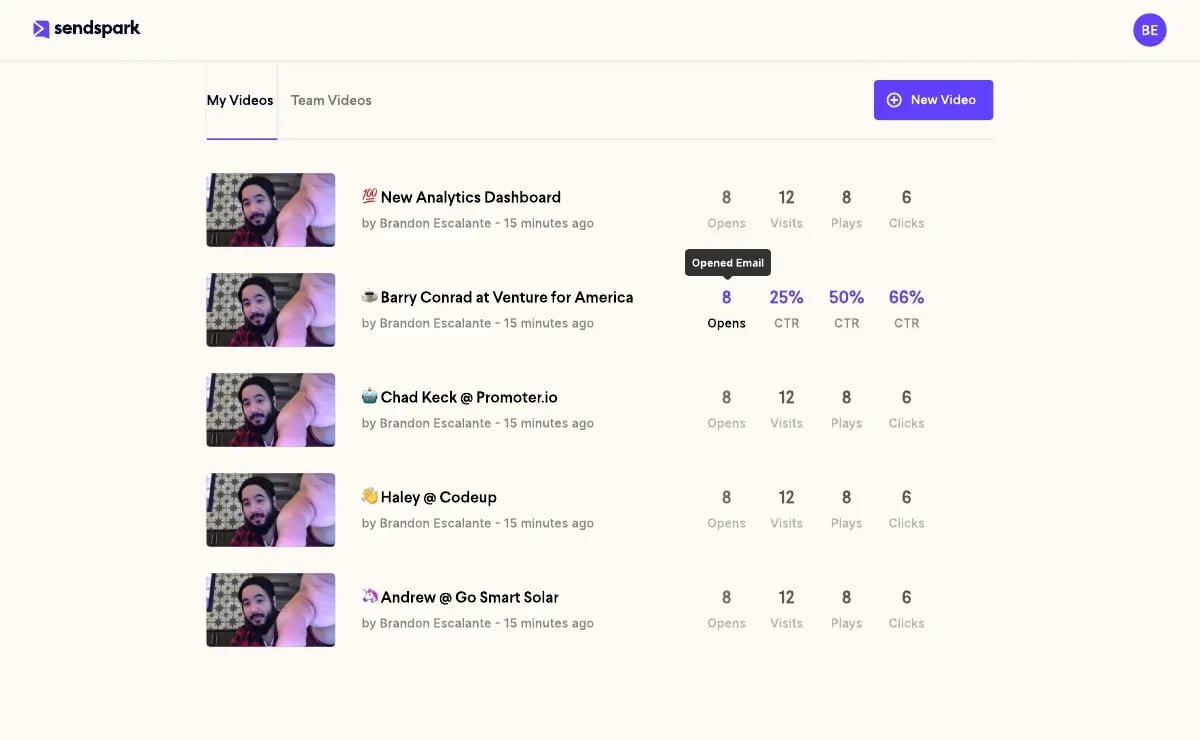
A video marketing strategy without analytics is guesswork. Your video analytics dashboard should show who watched, how much they watched, and whether they clicked through. If prospects are dropping off at 35 seconds in a 60-second video, the first 35 seconds is working but the pitch isn’t landing — use that to iterate.
Record One Video. AI Personalizes Thousands.
Sendspark is the AI video personalization platform for B2B sales. Record once, and AI voice cloning generates thousands of individually personalized videos with dynamic backgrounds and personalized thumbnails — each prospect hears their name, sees their website, in your voice. Sales teams see 2-3x more replies.
Get Started NowVideo Types That Drive B2B Pipeline
Not every video type works equally well in B2B. The formats that consistently drive measurable pipeline results are tied to a specific conversation with a specific buyer — not broadcast content hoping someone notices. Here are the four video types with the clearest ROI, mapped to where they fit in the buyer journey.
1. Personalized Prospecting Videos (Top of Funnel)
A personalized prospecting video is a short (30-90 second) video recorded for a specific prospect or account, mentioning their name, company, and a specific pain point. According to Sendspark customer data, personalized prospecting videos drive a 2-3x higher reply rate than text-only cold emails, and Sendspark customer Qwilr saw 50% higher click-through rates. The complete video prospecting guide covers script frameworks, opening hooks, and common mistakes in depth.
2. Demo and Explainer Videos (Mid Funnel)
Once a prospect shows interest, video keeps the conversation alive between meetings: a short walkthrough of the feature they asked about, a 3-minute personalized recap after a demo call, or a video explaining your pricing rationale. The video for sales guide has specific frameworks for using video throughout the deal cycle.
3. Customer Testimonial and Case Study Videos (Mid to Bottom Funnel)
Prospect testimonials from customers who look like your prospect are among the most persuasive assets in B2B. A 90-second video of a VP of Sales explaining exactly how they solved a pipeline problem beats a written case study every time. The production bar is low: a self-recorded Zoom call from a happy customer, edited to 90 seconds, is more credible than a slick agency production.
4. Onboarding and Customer Success Videos (Post-Sale)
The customer journey doesn’t end at close. Personalized onboarding videos that walk new customers through their first steps reduce time-to-value and decrease support ticket volume, and are also powerful for expansion — a QBR recap video sent to a customer account is a natural segue into an upsell conversation.
| Video Type | Funnel Stage | Ideal Length | Primary KPI | Best Channel |
|---|---|---|---|---|
| Personalized prospecting | Top of funnel | 30-60 sec | Reply rate | Email / LinkedIn DM |
| Demo / explainer | Mid funnel | 2-5 min | Demo requests / watch time | Email follow-up / CRM |
| Customer testimonial | Mid-bottom funnel | 60-90 sec | Deal velocity | Email / landing page |
| Onboarding / CS | Post-sale | 2-4 min | Time-to-value / NPS | Email / in-app |
How AI Video Personalization Transforms B2B Marketing Strategy
AI video personalization has fundamentally changed what’s possible in B2B video marketing strategy, enabling a third path beyond the old choice of personalize-or-scale: record once, then automatically generate a personalized version for every prospect on your list. A team of 10 SDRs that previously might send 50 personalized videos per day can now send 500, with the same or higher personalization quality, because AI handles the individualization work.
3 Ways SaaS Teams Book Meetings at Scale with AI Video — Sendspark
AI Voice Cloning for Personalized Greetings
With AI voice cloning, a rep records their voice once, and the AI generates new greeting audio — “Hey [Prospect Name], great to connect” — in the rep’s voice for each prospect on a list. Sendspark customer Textla, for example, saved 10 hours per campaign with this approach.
Dynamic Video Backgrounds
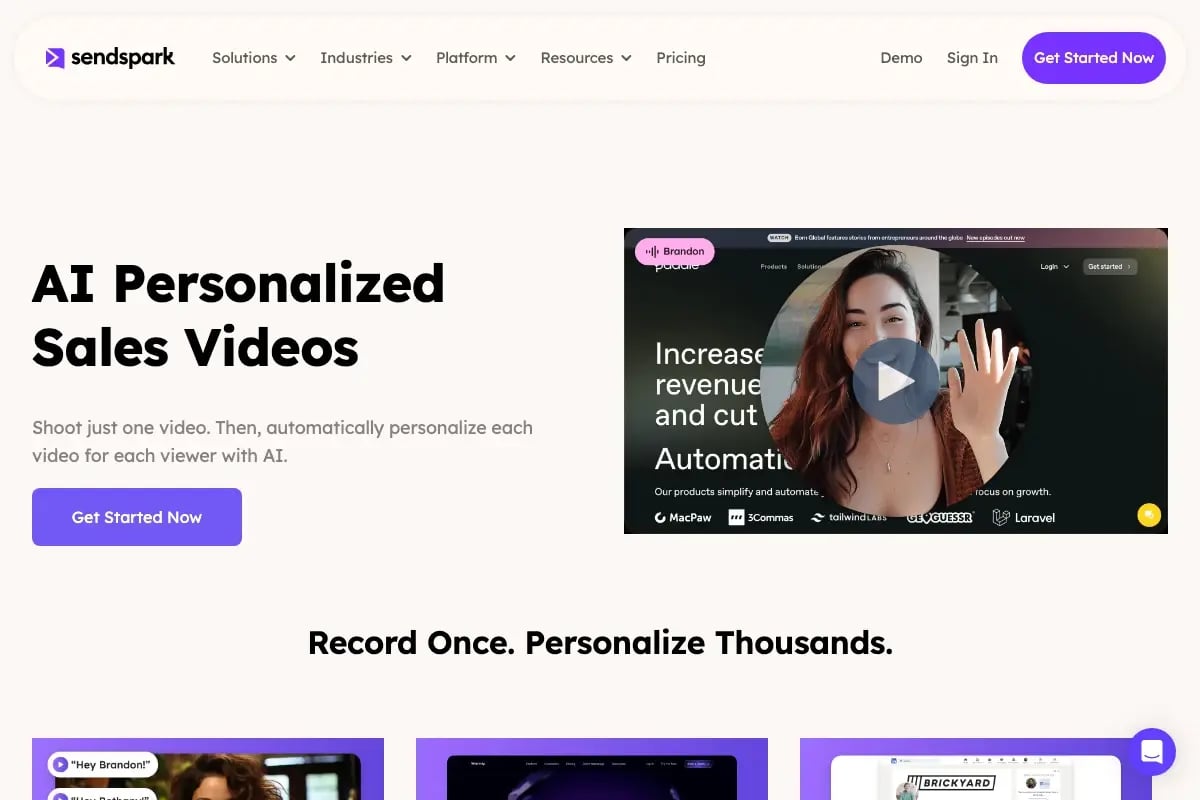
Dynamic video backgrounds take video personalization to a visual level: the video automatically renders with each prospect’s website or LinkedIn profile visible behind the speaker. According to Sendspark customer data, AI-personalized video books 40-50% more meetings than text-only email.
Agentic Workflows: Video in Automated Sales Sequences
The most advanced application is agentic workflows, where an AI agent manages the entire personalized video workflow without manual intervention: a new contact enters your Apollo or Outreach sequence, the system generates a personalized video using the contact’s name and company data, the video is embedded and sent automatically, and view data flows back to HubSpot or Salesforce in real time. This compresses time-to-personalization from hours to seconds and scales linearly, whether you’re prospecting 100 or 10,000 contacts per month.
Advanced strategy
Connect your intent data (6sense, Bombora) to your video personalization workflow. When a prospect’s company shows intent signals for your category, trigger a personalized video automatically — while they’re actively researching, not three weeks later.
For teams that want to learn more about the tactical side of using video in outbound, real scripts and approaches that are working in 2026 are worth studying alongside the personalization tactics above.
Optimizing Video Content for AI Search and Discoverability
Video content now needs answer engine optimization (AEO), not just traditional search-ranking work — it needs to be optimized for AI Overviews and answer engines directly — a video that is well-produced but has no transcript, no captions, and no structured data is effectively invisible to the systems that increasingly decide what buyers see first. Half of all Google searches now surface an AI Overview, and if your video’s content only exists inside the video file itself, there’s nothing for an AI system to read, cite, or summarize.
This is the piece most B2B video strategies still skip. Production, distribution, and personalization all get attention; discoverability by AI systems usually doesn’t, even though it now determines whether any of the other work gets seen.
Add VideoObject Schema to Every Published Video
Google’s own Search Central documentation recommends structured data so Google can understand a video and show it in search features. Google’s video structured data guide requires a name, thumbnail URL, and upload date, and recommends a description plus a content or embed URL. That markup is what enables video rich results, video carousels, and the “key moments” jump-links you see in search results (implemented with a companion property called SeekToAction markup). When you publish a video on a landing page or blog post, add the schema in the same PATCH; don’t treat it as a follow-up task.
Transcribe and Caption Every Video
A transcript turns spoken content into text a search engine or AI model can actually parse. This matters for two separate reasons: captions make video accessible to viewers watching muted and to viewers who are deaf or hard of hearing, meeting W3C WCAG accessibility guidance for video content; and transcripts hand AI systems the exact text they need to decide what your video covers and whether it earns an AI search citation. Publish the transcript as visible text near the embed, not just as a hidden caption track — that’s what makes it crawlable.
Common mistake
Embedding a video with no surrounding text at all. A page that’s just an iframe and a headline gives AI search systems nothing to summarize. Always pair a video with a short written answer to the same question the video addresses — the video demonstrates, the text gets cited.
Optimize for Video-Native Social Discovery, Not Just Google
B2B buyers increasingly discover video content through LinkedIn and YouTube search directly, not just Google. Per HubSpot’s 2026 State of Marketing report, short-form video (49%) and long-form video (29%) are now the top two ROI-driving content formats marketers report — ahead of every text-based format. Treat your video titles, descriptions, and the first line of on-screen text as their own optimization surface: front-load the specific question the video answers, the same way you’d write an answer-first opening paragraph for a blog post. For a deeper walkthrough of on-page video optimization, see our guide on how to optimize your video content for search engine optimization, and for the personalization tactics that make that content worth citing in the first place, our complete guide to personalized video marketing covers the full playbook.
Measuring Your Video Marketing Strategy Performance
A B2B video marketing strategy should be measured against revenue outcomes, not vanity metrics. View counts and completion rates matter, but they don’t tell you whether video is actually moving deals — the metrics that count are further down the funnel: reply rate, meetings booked, pipeline influenced, and close rate by sequence variant.
Core Video Metrics
- View rate — What percentage of recipients opened the video? A low view rate is a deliverability or subject line problem, not a video problem.
- Watch time % — How far through the video does the average viewer get? Drop-off before 50% means the opening hook needs work.
- Click-through rate (CTR) — Did they click your CTA after watching? This measures the quality of your ask, not just the video itself.
- Reply rate — The most important metric for outbound prospecting video. Sendspark customers see 200-300% higher reply rates on email campaigns with personalized video vs. text-only.
Pipeline Metrics
Connect video activity to your CRM to track downstream impact: meetings booked from video sequences, pipeline influenced by video touchpoints, and close rate by sequence variant. These are the metrics that matter for leadership reporting, because they connect video directly to revenue rather than engagement.
Video Performance Benchmarks for B2B
| Metric | B2B Benchmark | What It Signals |
|---|---|---|
| View rate (prospecting email) | 30-50% | Subject line and deliverability health |
| Watch time % | 60-75% | Opening hook and content quality |
| Click-through rate | 15-25% | CTA clarity and offer relevance |
| Reply rate (personalized video) | 8-15% | Personalization quality and targeting |
| Meetings booked per 100 videos | 5-12 | Full-funnel conversion efficiency |
These benchmarks are directional — your actual numbers will vary by industry, ICP, and sequence design. Use them as a baseline for diagnosing underperformance, not as pass/fail thresholds.
Frequently Asked Questions
What is a B2B video marketing strategy?
A B2B video marketing strategy is a documented plan for using video content across the buyer journey to generate awareness, accelerate pipeline, and retain customers. It defines which video types serve each funnel stage, where videos are distributed, how performance is measured, and — increasingly — how the video is structured so AI search tools can find and cite it.
How do I create a video marketing strategy for a B2B company?
Start by defining your objective (awareness, pipeline, or retention), then map one to two video types to that objective. Set up distribution on email and one social channel, establish a minimum quality bar, and connect your video platform to your CRM for attribution. Start small, measure reply rate and meetings booked, and expand what works.
What is the best video marketing strategy for B2B sales teams?
The highest-ROI strategy combines personalized prospecting videos at the top of the funnel with AI personalization at scale. Record a core message once, use AI voice cloning and dynamic video backgrounds to personalize each version, then insert those videos into your sales engagement sequences at step 2 or 3. Track reply rate and meetings booked to measure impact.
How has AI changed B2B video marketing strategy?
AI video personalization removed the trade-off between scale and quality: voice cloning generates personalized greetings in the rep’s voice, dynamic backgrounds show each prospect’s website behind the speaker, and agentic workflows automate delivery inside existing sales sequences. Teams now send hundreds of personalized videos with the effort it used to take to send a handful.
How do I optimize video content for AI search and AI Overviews?
Add VideoObject structured data to every published video, publish a full text transcript near the embed (not just a hidden caption track), and pair every video with a short written answer to the question it addresses. AI systems need readable text to summarize and cite — a video with no surrounding text or schema gives them nothing to work with.
What metrics should I track for a B2B video marketing strategy?
For outbound prospecting, track view rate, watch time %, click-through rate, and reply rate. For pipeline impact, measure meetings booked from video sequences and close rate for deals with a video touchpoint vs. those without. View counts are a vanity metric in B2B — reply rate and meetings booked are what matter.
How long should B2B marketing videos be?
Prospecting and outreach videos should be 30-60 seconds. Demo follow-up and explainer videos can run 2-5 minutes for prospects already engaged. Customer testimonials and case study videos perform best at 60-90 seconds. Onboarding and tutorial videos can be longer (3-8 minutes) since the viewer has already committed to learning.
Sources & References
- Salesforce sales statistics roundup — “73% of B2B buyers actively avoid sellers who send irrelevant outreach” (Gartner Sales Survey, 2025)
- Gartner B2B Buying Journey Research — “B2B buyers spend only 17% of their purchase journey meeting with potential suppliers” (2023)
- Google Search Central: Video SEO Best Practices and Video structured data — official guidance on VideoObject structured data requirements (2026)
- W3C Web Accessibility Initiative: Captions Guidance — technical standard for video caption accessibility
- HubSpot 2026 State of Marketing Report — “half of all Google searches now surface an AI Overview; short-form and long-form video are the top ROI-driving content formats” (2026)
Record One Video. AI Personalizes Thousands.
Sendspark is the AI video personalization platform for B2B sales. Record once, and AI voice cloning generates thousands of individually personalized videos with dynamic backgrounds and personalized thumbnails — each prospect hears their name, sees their website, in your voice. Sales teams see 2-3x more replies.
Get Started NowTopics: Tips & Tricks