In sales, personalized outreach works wonders. But creating individual videos for every prospect? That’s not realistic. Enter AI voice cloning. This tech lets you record one video, and AI personalizes it by inserting each prospect’s name. The result? A scalable way to make your outreach feel personal without extra effort.
Learn more about video length converter.
Here’s how it works:
- Record a base video with a placeholder word like “Watermelon.”
- AI replaces the placeholder with each recipient’s name using your cloned voice.
- Optional features like lip-syncing and custom backgrounds (e.g., their LinkedIn profile) enhance personalization.
This approach boosts engagement, with reply rates increasing by up to 300%. Tools like Sendspark let you automate this process, integrate with Salesforce, Hubspot, and Zoho CRMs, and track performance. It’s a simple way to connect with more leads while saving time.
How to Make AI Personalized Videos for Sales Outreach (Updated 2025)
sbb-itb-afd3f9e
What Is AI Voice Personalization?
AI voice personalization is a game-changing technology that allows you to record a single video and automatically insert each prospect’s name into the greeting - without the hassle of creating hundreds of separate videos. It’s a huge time-saver while still keeping things personal at scale.
Here’s how it works: The AI takes your recorded voice, analyzes it, and creates a digital version that mimics your tone, inflection, and speaking style. It then replaces a placeholder in your video with each recipient’s actual first name from your contact list. The result? A personalized video that feels like it was crafted specifically for every individual viewer.
But it doesn’t stop at audio. Sendspark takes things a step further by customizing the visual background, too. For example, it can display a prospect’s LinkedIn profile or their company website behind you as you speak. This combination of tailored audio and visuals creates a highly personalized experience - even when you’re reaching out to hundreds of leads at once.
Let’s dive deeper into how this AI-driven process works.
How AI Voice Cloning Works
The process starts with a simple recording where you use a placeholder word, like “Watermelon.” The AI analyzes your pitch, rhythm, tone, and overall speaking style to create a reusable digital voice model. Once you upload your contact list (via CSV or CRM integration), the system generates personalized audio clips by seamlessly replacing the placeholder with each prospect’s first name. Whether you’re making 10 videos or 1,000, the process is streamlined.
To get the best results, use a quality microphone in a quiet environment with minimal echo. Leaving a brief pause before and after the placeholder word helps the AI integrate the personalized names more smoothly.
Sendspark also offers a beta feature called “Lip Sync”, which adjusts your mouth movements in the video to match the new audio. And if a prospect’s first name isn’t available in your database, you can set a fallback word - like “there” - to ensure the video still feels polished and professional.
This technology enables sales teams to scale their B2B outreach while maintaining a personal connection, creating tangible business benefits.
Why Sales Teams Use AI Voice Personalization
The results are hard to ignore. Personalized video introductions can increase email reply and conversion rates by as much as 300%, with many sales teams reporting 2–3x more responses compared to traditional outreach methods. This kind of personalization doesn’t just grab attention - it makes prospects feel valued.
“Creating a video shows prospects that you have taken time and effort into your outreach. It makes them feel appreciated.” – Ben Wright, Sendspark
Beyond improving engagement, AI voice personalization allows sales teams to connect with more prospects in less time, all while keeping their outreach personal and impactful. It’s a win-win for efficiency and relationship-building.
How to Create Personalized Videos with Sendspark
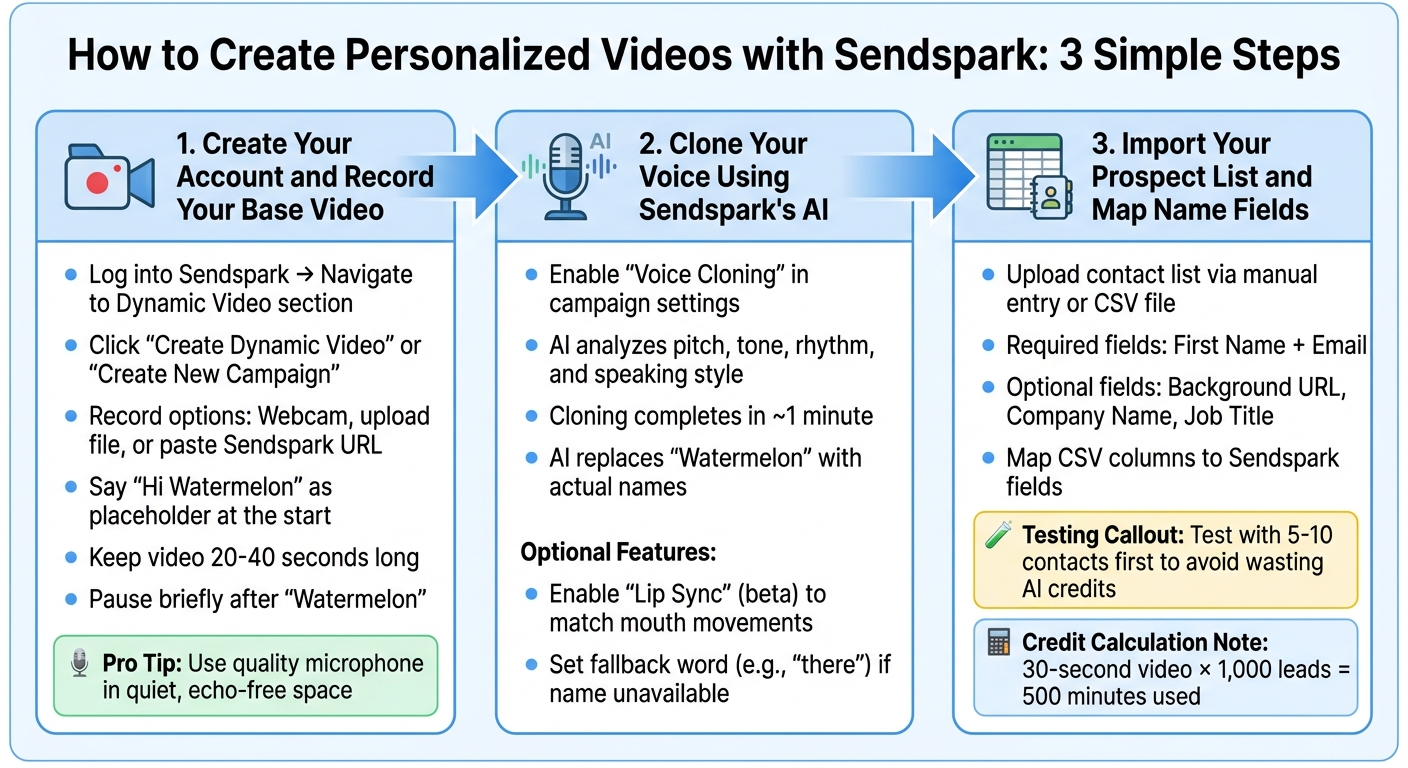
3-Step Process to Create AI-Personalized Sales Videos with Sendspark
Here’s a quick guide to creating personalized videos in just a few minutes using Sendspark’s AI tools.
Step 1: Create Your Account and Record Your Base Video
Start by logging into Sendspark and navigating to the Dynamic Video section. From there, click either Create Dynamic Video or Create New Campaign to begin. You have a few options for your base video:
- Record directly within Sendspark using your webcam.
- Upload an existing video file.
- Paste a Sendspark video URL if you’ve already recorded one.
Keep your video short and engaging - 20 to 40 seconds is ideal for holding attention.
Now, here’s a key step: begin your video with the placeholder phrase “Hi Watermelon.” Why “Watermelon”? It acts as a marker for Sendspark’s AI to replace it with each recipient’s name. After saying “Watermelon”, pause briefly before continuing your message. This pause ensures a smooth transition when the AI swaps in real names.
To ensure your audio is clear, use a quality microphone and record in a quiet, echo-free space. Once done, proceed to clone your voice.
Step 2: Clone Your Voice Using Sendspark’s AI
Enable Voice Cloning in your campaign settings to create a digital model of your voice. Sendspark’s AI will analyze your pitch, tone, rhythm, and speaking style, completing the cloning process in about a minute. This cloned voice will then replace “Watermelon” with the actual names from your contact list.
For an extra touch, you can enable Lip Sync (currently in beta) to adjust the video’s mouth movements to match the personalized audio. And if a recipient’s name isn’t available, you can set a fallback word like “there” to keep the video professional and polished.
Step 3: Import Your Prospect List and Map Name Fields
To personalize your videos, upload your contact list via manual entry or a CSV file. At a minimum, include the First Name (for voice personalization) and Email (for delivery and tracking) fields. Sendspark provides a sample CSV format to help you structure your data correctly. During the upload process, map your CSV columns to Sendspark’s fields.
You can also add extra fields, such as Background URL (to display a prospect’s website or LinkedIn profile), Company Name, and Job Title, which can be used as merge tags on the video’s landing page.
Before launching your campaign, test it with a small group of 5 to 10 contacts. This step ensures that voice cloning and field mapping are working properly, saving you from wasting AI credits on errors. For example, Sendspark calculates usage in “minutes” - a 30-second video sent to 1,000 leads uses 500 minutes. Testing helps you avoid unnecessary costs and ensures your campaign runs smoothly.
How to Send and Track Your Personalized Videos
Get your personalized videos in front of prospects and monitor their engagement with Sendspark’s integrations and analytics tools.
Connect Sendspark to Your CRM and Sales Tools
Sendspark integrates seamlessly with popular CRMs like Salesforce and HubSpot, along with sales tools such as Outreach, SalesLoft, Apollo, and Instantly. This allows you to record a single base video and automatically create personalized versions for each contact in your CRM or sales sequence.
To get started, click “Share Campaign”, choose your platform, and copy the Dynamic Video Snippet into your email template. Be sure to map the email field from your sales tool to Sendspark for precise recipient matching. If you’re using Outreach, add a “Find Prospect by Email Address” step before enrolling contacts to ensure accurate ID retrieval.
It’s a good idea to delay the first email by 15 minutes to give the AI enough time to generate the personalized videos. Sendspark also syncs engagement data - like who watched and for how long - back to your CRM, helping you focus on the most interested leads.
Once set up, you’re ready to send out your videos through email and LinkedIn.
Send Videos Through Email and LinkedIn
When sending videos via email, choose the “Copy GIF + Video Link” option instead of a plain text link. The animated GIF preview grabs attention in inboxes and can boost engagement by up to 16x. As Bethany Stachenfeld, Co-founder of Sendspark, explains:
“Adding a bit of personalization can increase email engagement see up to 16x higher engagement”.
You can also enhance the video share page by including your company logo, brand colors, and a clear call-to-action, like a Calendly link, to create a smooth transition from email to booking. For LinkedIn outreach, Sendspark works with automation tools like Expandi, enabling you to send personalized videos in connection requests or messages. Make sure to map the LinkedIn Profile URL and Video Link fields correctly, and test with a small batch of 5–10 contacts to confirm everything displays properly.
These strategies, paired with Sendspark’s CRM integrations, prepare you for detailed performance tracking.
Track Performance with Sendspark Analytics
With Sendspark Analytics, you can track viewer interactions in real-time. The dashboard provides insights into who watched your videos, how long they watched, and whether they clicked on your call-to-action. Instant email alerts notify you when a prospect engages with a video, allowing you to follow up immediately. All this data syncs directly with your CRM, updating contact timelines with video activity to help you identify your most engaged leads.
Dan Vermont, Head of Operations at Brikl, shared his experience:
“Using Sendspark transformed our customer success approach. We built a library of pre-recorded answers, allowing our team to quickly respond to common customer questions with personalized videos.”
You can also compare watch times and reply rates across different video scripts or styles to see what resonates most with your audience. Personalized AI-generated introductions that greet viewers by name can increase email outreach replies and conversions by up to 300%, while custom video messages can deliver up to 3x higher engagement in email and LinkedIn campaigns.
Wrapping Up
AI-powered name personalization takes outreach from cold and impersonal to warm and engaging. When someone hears their own name in a video, it creates an instant connection that plain text emails just can’t replicate. The numbers back it up: AI-personalized introductions can increase replies and conversions by as much as 300%, while video engagement rates on platforms like email and LinkedIn see a 2-3x boost.
The real game-changer here is scalability. With AI, you can record a single video and let the technology handle personalization for every recipient. Sales teams have seen 5x more replies and 4x more meetings booked, with dynamic video campaigns generating over $100,000 in ARR in just one month.
Sendspark makes this process seamless. By combining a single base video with AI-driven voice cloning and personalization, you can create thousands of custom videos effortlessly. Plus, the platform integrates smoothly with your CRM and sales tools while providing real-time engagement tracking.
Want to take your outreach to the next level? Try Sendspark for free and discover how AI voice personalization can transform your sales efforts and skyrocket your response rates.
FAQs
Is AI voice cloning ethical and safe for sales outreach?
The use of AI voice cloning comes with ethical and safety considerations that hinge on how it’s applied. When done transparently and with proper consent, it can add a personal touch to sales outreach - like tailoring videos to include a prospect’s name. However, unethical uses, such as crafting deepfakes or mimicking voices without permission, present serious concerns. To uphold trust, it’s crucial to clearly disclose AI-generated content and secure explicit consent, ensuring its use remains responsible and respectful.
How do I handle hard-to-pronounce or missing first names?
When dealing with hard-to-pronounce or missing names in AI-personalized video messages, there are a few ways to keep things professional and engaging. You can use phonetic spellings or even upload a recording of the correct pronunciation for better accuracy. If the name is unclear or unavailable, consider using a generic greeting or placeholder to avoid awkward mistakes.
Some tools also let you manually adjust how names are pronounced, which helps ensure your message remains clear and respectful. Taking these steps can help you avoid mispronunciations while maintaining a polished and thoughtful tone. This matters even more when you’re personalizing for prospects in other languages — see our guide on AI voice cloning accuracy in non-English languages for a testing framework before you send at scale.
How much do AI-personalized videos cost at scale?
Sendspark’s Scale plan is priced at $499 per month. It includes 25 seats and 3,000 AI minutes, making it a great option for companies that require large-scale personalized video production.
Related Blog Posts
- How AI Personalization Boosts Social Video Impact
- Personalized Video Feedback: How to Create Custom Videos at Scale
- Dynamic Video Backgrounds: How to Show Your Prospects Website
- How to Personalize Sales Videos at Scale with AI
Topics: blog