Dynamic video backgrounds let you create personalized sales videos without recording hundreds of individual clips. With Sendspark, you can record one base video and overlay it on each prospect’s website or LinkedIn profile. This approach increases email opens by 16x, clicks by 4.5x, and engagement by 2-3x. In December 2025, Warmly used this feature to generate over $100,000 in ARR in just one month. You can see similar results by following these video prospecting examples.
Here’s how it works:
- Record a single video in “camera bubble” mode.
- Upload a CSV with prospect data, including website URLs.
- Sendspark’s AI overlays your video onto their website, simulates scrolling, and personalizes voiceovers.
- Embed these videos into email campaigns or LinkedIn messages for higher reply rates and more meetings.
This method saves time, boosts engagement, and helps close deals faster by making outreach feel personal at scale.
How to Make AI Personalized Videos at Scale (2 Min Demo)
sbb-itb-afd3f9e
What Are Dynamic Video Backgrounds?
Dynamic video backgrounds adapt automatically for each viewer, creating a personalized experience. Sendspark’s AI technology overlays your camera bubble video onto unique backgrounds tailored to each recipient. For example, your prospect might see their company website or LinkedIn profile behind you, making it feel like a custom walkthrough designed just for them.
“A dynamic background means that the background can be personalized for each viewer. For example, you can show your viewer’s website or LinkedIn page without re-recording a video specifically for them.” - Bethany Stachenfeld, Co-founder, Sendspark
Here’s how it works: You upload a CSV file with your prospects’ email addresses and their corresponding website URLs (in the “Background URL” column). Sendspark takes it from there, automatically capturing each website and layering your camera bubble video over it. If you don’t have specific URLs, the platform can extract them based on the prospect’s email domain.
To make the video feel more authentic, Sendspark adds simulated scrolling and mouse cursor movements over the prospect’s website. This creates the illusion that you’re actively interacting with their site during the recording. Pair this with AI voice cloning - where placeholder words like “Watermelon” are replaced with the prospect’s actual name in your voice - and the result feels genuinely tailored.
Your original video remains consistent across all versions, while the AI handles swapping backgrounds and personalizing the voiceover. You can also set a fallback URL to ensure a polished default background appears when a specific prospect’s website link isn’t available.
Up next, find out how to set up these videos step-by-step to take your sales outreach to the next level.
How to Set Up and Use Dynamic Video Backgrounds
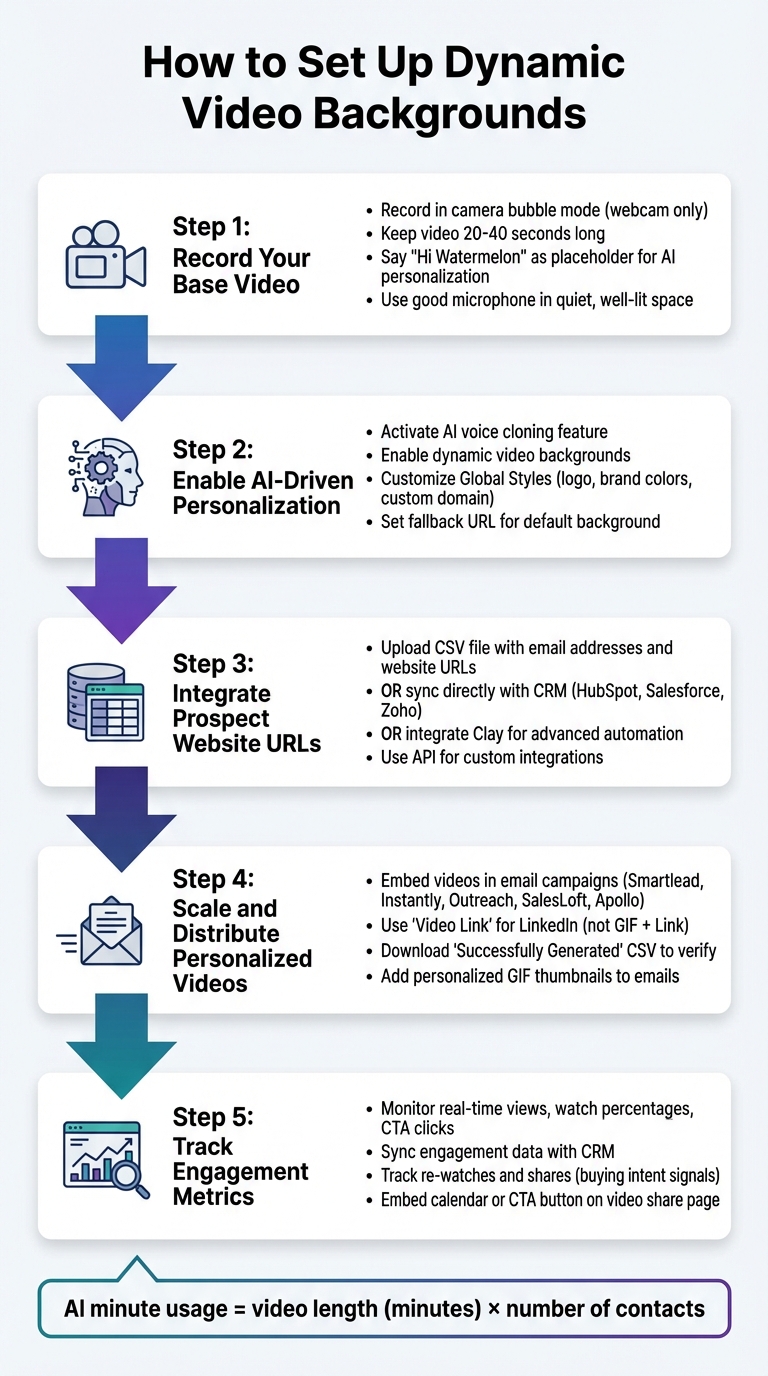
5-Step Process to Set Up Dynamic Video Backgrounds for Sales Outreach
Sendspark makes it straightforward to create dynamic video backgrounds, allowing you to focus on recording one video that can be tailored for hundreds - or even thousands - of prospects.
Step 1: Record Your Base Video
Start by recording your video using either the Sendspark Chrome Extension or Desktop App. The Chrome Extension is great for quick, browser-based recordings, while the Desktop App offers better audio and video quality.
Learn more about browser-based video recording.
To create dynamic backgrounds, record in camera bubble mode (webcam only). This ensures your video can later be placed over each prospect’s website. Keep your video short - 20 to 40 seconds is ideal - to hold your viewer’s attention.
“Start your video with the phrase ‘Hi Watermelon.’ The word ‘watermelon’ will be replaced with your viewer’s first name before you share the video.” - Bethany Stachenfeld, Co-founder, Sendspark
When recording, pause briefly before and after saying “watermelon” to make the AI-generated name sound natural. Use a good-quality microphone and record in a quiet, well-lit space for clear audio and visuals. Once your base video is ready, you can move on to the personalization settings.
Step 2: Enable AI-Driven Personalization
After recording, activate Sendspark’s AI voice cloning and dynamic video background features in your campaign settings. The AI replaces the “watermelon” placeholder with each prospect’s name and overlays your video onto their website or LinkedIn profile.
Customize your Global Styles in the workspace settings to maintain consistent branding. This includes adding your company logo, brand colors, and a custom domain (e.g., video.yourdomain.com) for video landing pages. Also, set a fallback URL as the default background for cases where a prospect’s website link isn’t available.
Step 3: Integrate Prospect Website URLs
To personalize the backgrounds, upload your prospect data. You can do this by importing a CSV file that includes email addresses and corresponding website URLs in the “Background URL” column.
If you’re using a CRM like HubSpot, Salesforce, or Zoho, you can sync directly to pull contact data automatically. This eliminates the need for manual uploads and ensures your information is always current.
For more advanced automation, integrate Clay to enrich contact fields and automate video generation for large lists. Sendspark’s API also allows custom integrations, enabling you to trigger video creation based on CRM events or pipeline stages.
Once the data is set up, you’re ready to scale your personalized videos.
Step 4: Scale and Distribute Personalized Videos
Sendspark generates personalized videos that can be embedded into your email campaigns. Copy the campaign code snippet and use it with platforms like Smartlead, Instantly, Outreach, SalesLoft, or Apollo to send videos at scale as part of your outreach.
For LinkedIn, use the “Video Link” instead of the “GIF + Link” snippet, as LinkedIn doesn’t support GIF previews. If you’re using Expandi for LinkedIn automation, you can include these personalized video links directly in connection requests or follow-ups.
Download the “Successfully Generated” CSV to verify that all personalized videos are functioning properly. Keep in mind that AI minute usage is calculated by multiplying the video length (in minutes) by the number of contacts.
You can also add personalized GIF thumbnails to your emails. These previews show prospects their own website before they even click play, boosting click-through rates.
Step 5: Track Engagement Metrics
Use the analytics dashboard to track real-time video views, watch percentages, and CTA clicks. This data helps you identify prospects who are genuinely interested, so you can prioritize follow-ups.
Sync this engagement data with your CRM to automate tasks. For instance, if a prospect watches 80% of your video, your CRM can create a task for your sales rep to call them within 24 hours.
The platform tracks metrics like views, watch time, and CTA clicks. Personalized AI-personalized videos can increase click-through rates by 300% compared to text-only emails. Some Sendspark users have even seen reply rates as high as 90% for cold outreach.
To make follow-ups easier, embed a calendar or custom CTA button directly on the video share page. This reduces friction and captures interest when prospects are most engaged.
You can also monitor which prospects re-watch or share your videos. These actions often signal strong buying intent, and integrating these insights into your workflow can make your outreach more effective.
Key Benefits of Dynamic Video Backgrounds
Dynamic video backgrounds are proving to be a game-changer for personalized sales outreach, significantly improving engagement and boosting performance throughout the sales cycle. Sales teams leveraging this approach report 2–3x higher engagement rates with their outreach efforts.
Higher Email and Outreach Engagement
Dynamic video backgrounds grab attention instantly, creating a strong visual hook that stops prospects in their tracks. Imagine scrolling through your inbox and seeing a video thumbnail featuring your own website - that’s hard to ignore. This personalized touch can boost click-through rates by up to 300% compared to plain text emails.
Cold email reply rates usually fall between 1–5%, but dynamic videos can push those numbers much higher. For instance, Brikl’s sales team experienced a 6x increase in response rates after using personalized video outreach. A prospect at Qwilr summed up the impact perfectly:
“This video stood out more than the 14 other emails I got today. I watched the whole thing.”
Time Savings with AI-Driven Automation
The “record once, personalize at scale” approach eliminates the need to create unique videos for every prospect. Instead, you can record a 20–40 second video once, and AI handles the rest - personalizing up to 1,000 videos in just minutes. The system overlays each prospect’s website, uses voice cloning to insert their name, and even simulates scrolling and cursor movements, making the video feel natural and tailored.
This level of automation can save sales teams over 10 hours per campaign, all while maintaining a highly personalized experience for each recipient.
More Meetings and Faster Deal Velocity
The benefits of dynamic videos go beyond higher open rates - they drive real results. Sales teams using personalized video backgrounds typically book 40–50% more meetings compared to text-only outreach. The visual impact of featuring a prospect’s own website establishes an immediate connection, showing you’ve done your research.
Hipersa, for example, cut their total sales cycle time by 40% after adopting dynamic video sequences. By integrating engagement data with your CRM, your team can prioritize follow-ups with the most engaged prospects, speeding up deal progression and closing more deals faster.
Traditional Videos vs. Sendspark Dynamic Backgrounds
The key difference between traditional video outreach and Sendspark’s dynamic backgrounds boils down to efficiency and scale. Traditional methods require a one-by-one approach - choosing a prospect, recording a video, and repeating the process for each lead. Imagine recording for 100 prospects - that could take hours or even days.
Sendspark changes the game. You record a single base video, and AI takes care of the rest. It personalizes the video for thousands of prospects in just minutes by overlaying their website or LinkedIn profile as the background. Dynamic touches, like simulated scrolling, make these videos feel more authentic and tailored.
A great example of this in action? In December 2025, Warmly used Sendspark’s dynamic backgrounds to re-engage closed-lost opportunities. The result? 2-3x higher engagement compared to their usual email campaigns and over $100,000 in ARR added in just one month.
Here’s a quick breakdown to compare the two approaches:
Comparison Table
| Aspect | Traditional Videos | Sendspark Dynamic Backgrounds |
|---|---|---|
| Personalization Effort | Record individually for each prospect (1:1) | Record once, AI personalizes at scale |
| Engagement Boost | Baseline | 200-300% higher response rates |
| Time Saved | None (hours per campaign) | Saves 10+ hours per campaign |
| Meetings Booked | Standard | 40-50% increase |
| Visual Context | Static or generic backgrounds | Dynamic, featuring prospect’s website or LinkedIn profile |
This comparison shows how Sendspark simplifies video outreach while boosting engagement and saving time.
“Our dynamic video feature not only significantly reduces the amount of time you spend, but also delivers the outcomes you desire: engagement from your prospects and customers.” - Ben Wright, Sendspark
Conclusion
Using these step-by-step methods, dynamic video backgrounds can transform your outreach efforts. Instead of spending countless hours recording individual videos, you can create one base video and personalize it for thousands of prospects in just minutes. The AI takes care of the hard work - integrating your video into each prospect’s website, replicating your voice to address them by name, and delivering a customized experience that feels personal.
Sales teams have reported 300% higher reply rates and double the responses with LinkedIn video prospecting. Beyond saving over 10 hours per campaign, this approach helps you book 40–50% more meetings, all while speeding up the sales process. It bridges the gap between personalization and scalability, making it easier to achieve both.
Sendspark’s AI-powered personalization fits seamlessly into your existing workflow. Whether you’re working with popular CRMs, you can embed these personalized videos directly into your outreach sequences. Add an embedded calendar to the video landing page, and prospects can instantly book meetings after watching.
Getting started doesn’t require any technical know-how. Simply record your base video, upload your CSV prospect list, and let the AI handle the rest. Keep videos short - 20 to 40 seconds - with clear audio and fallback URLs for a smooth experience. With just a few simple steps, you’ll be ready to launch your next campaign and see measurable results.
“Sendspark is video for sales, that scales! Get started with Sendspark to scale your outreach, build stronger relationships, and communicate better with leads and customers.” - Ben Wright, Sendspark
FAQs
Will prospects find these videos creepy?
When crafted with care and respect, AI-driven dynamic videos are usually well-received by prospects and don’t come across as unsettling. Adding personal touches - like referencing the prospect’s name or their website - can make the content feel more engaging and relatable.
The key is to prioritize privacy and avoid including details that might feel too invasive. Instead, focus on creating content that aligns with the recipient’s interests and needs. When done thoughtfully, these videos can leave prospects feeling appreciated rather than uncomfortable.
What if a prospect’s website won’t load?
If a prospect’s website fails to load while using a dynamic video background, it’s essential to have a backup plan to maintain professionalism. You can switch to a generic background or use a pre-recorded video that doesn’t depend on live website content. Another option is to prepare a secondary video without the dynamic background, ensuring your message stays clear and engaging despite any technical hiccups.
How do I avoid name mispronunciations?
Using AI-powered tools can help ensure you pronounce prospects’ names correctly. These tools allow individuals to provide the proper pronunciation of their names, often by creating personalized videos where names are said accurately.
Another effective approach is asking prospects to share phonetic spellings or audio recordings of their names during your outreach process. Including these phonetic guides or even visual cues in your communications - like videos - can go a long way. It shows attention to detail, professionalism, and respect for their identity, which helps build stronger connections.
Related Blog Posts
- 10 Video Prospecting Tips to Book More Meetings
- Dynamic Backgrounds for Personalized Videos
- Dynamic Backgrounds with AI: Sendspark vs. Hippo Video
- How to Build a Video-First Sales Strategy
Topics: blog