AI voice cloning is transforming sales outreach by enabling highly personalized video messages at scale. Using just 20–30 seconds of audio, you can create a master video and let AI customize it for thousands of prospects by inserting names, job titles, or company details. This approach delivers better engagement compared to traditional cold emails, with some companies reporting up to 300% higher reply rates and faster sales cycles.
Key insights:
- How it works: Record one video with placeholders; AI swaps in personalized details like names.
- Benefits: Increased engagement, shorter sales cycles, and higher revenue. For example, Warmly generated $100,000 in ARR in one month using this strategy.
- Tools: Platforms like Sendspark automate video personalization, integrate with CRMs, and offer features like dynamic backgrounds and analytics.
- Best practices: Keep videos under 40 seconds, use CRM data wisely, and track performance metrics like response rates and clickthrough rates.
- Ethical use: Secure explicit consent for voice cloning, comply with privacy laws (e.g., GDPR), and safeguard tools against misuse.
AI voice cloning bridges the gap between automation and personalization, making sales outreach more effective without adding to your workload. By following these practices and using the best AI sales tools, you can scale meaningful interactions while protecting your business and audience trust.
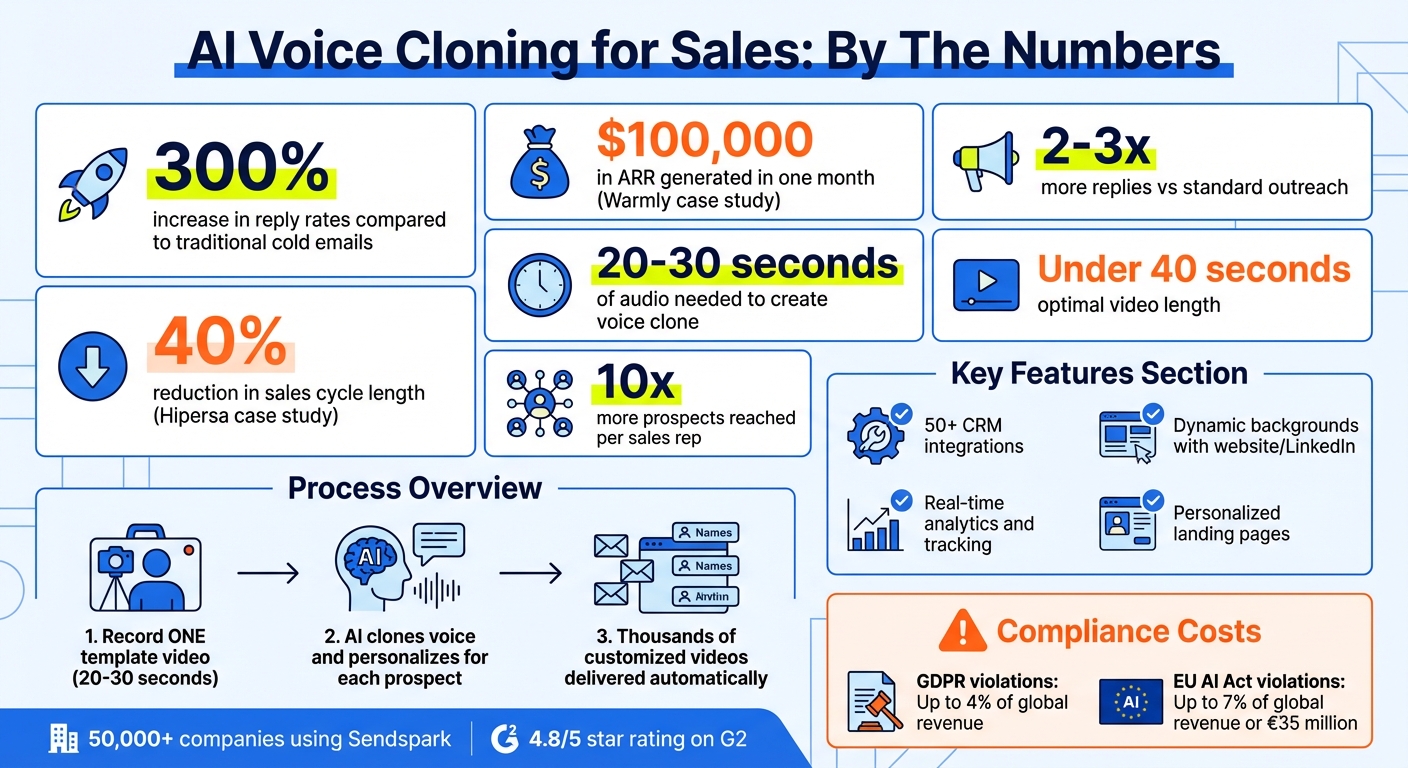
AI Voice Cloning Sales Impact: Key Statistics and Results
Create an AI Voice Clone That Talks to Your Leads and Clients
sbb-itb-afd3f9e
Sendspark’s AI Voice Cloning Features
Sendspark takes sales personalization to the next level by automating the creation of personalized videos. The platform’s standout feature? You only need to record once, and Sendspark’s AI does the rest - generating thousands of customized videos without sacrificing that human touch.
Record Once, Personalize at Scale
Here’s how it works: you record a single template video, using a placeholder word like “watermelon” instead of someone’s name. Sendspark’s AI then steps in, cloning your voice and swapping out the placeholder with each recipient’s actual name - whether it’s “Bethany”, “Michael”, or “Sarah.” The result? Videos that sound natural and personal.
“Sendspark supports AI-personalized introductions to greet each viewer by name… This can help you personalize your email outreach at scale - and see up to 300% replies and conversions.” - Bethany Stachenfeld, Co-Founder, Sendspark
To ensure the best results, record your video in a quiet space with a high-quality microphone. Avoid background noise or echoes, and leave a short pause before and after the placeholder word. This helps the AI blend the personalized name seamlessly into the video. If you’re sending to prospects outside English-speaking markets, see our guide on testing AI voice cloning accuracy in non-English languages before you scale a campaign.
Dynamic Backgrounds and Combined Videos
Sendspark doesn’t stop at voice personalization. The platform also enhances viewer engagement with dynamic backgrounds. For example, it can pull in a prospect’s website or LinkedIn profile, complete with simulated scrolling and mouse movements, to create an interactive feel. It then combines this personalized intro (usually 20–40 seconds long) with a pre-recorded demo, giving the viewer a fully customized experience - all without extra effort on your part.
CRM Integrations
To make personalization even easier, Sendspark integrates with over 50 popular CRMs, including HubSpot, Salesforce, Outreach, and Smartlead. Simply upload a CSV of your contacts and map CRM fields like first name, company name, or LinkedIn URL to the platform. Sendspark’s AI will use this information to create personalized videos in bulk.
The automation doesn’t stop there. Sendspark can trigger video creation automatically when a prospect is added to a sequence or when their CRM status changes. To ensure smooth delivery, allow 15–30 minutes between enrollment and sending the first email - this gives the AI enough time to generate the voice clone. Each video is then delivered on a personalized landing page, complete with dynamic headers, text, and call-to-action buttons tailored to the recipient. These tools make it easy to scale personalized outreach without compromising quality.
Best Practices for AI Voice Cloning in Sales
To make the most of AI voice cloning in sales, focus on crafting effective scripts, using CRM data wisely, and keeping a close eye on performance metrics. These essentials can transform your outreach efforts. Just look at Warmly: they generated over $100,000 in ARR in December 2025 with one dynamic video campaign aimed at reviving lost deals. By following these practices, you can ensure your approach stays both efficient and personal.
Write Natural and Relevant Video Scripts
Keep your script short and to the point - 20 to 40 seconds is ideal. Anything longer risks losing your audience. Hamish Stephenson, CEO at Selr.io, puts it best: “Keep your video under 40 seconds - every second counts”.
Here’s a simple structure to follow:
- First 5 seconds: Grab attention with a personalized hook - mention their name or something specific about them.
- Next 10 seconds: Address their problem and connect it to your solution.
- Following 10 seconds: Share social proof to build trust.
- Final 10 seconds: End with a clear call to action.
Make sure to record in a quiet setting with good audio equipment to maintain a professional quality.
Use CRM Data to Automate Personalization
Use your CRM data to make every video feel personal. Map fields like first name and company name to your video templates, and set fallback options - like using “there” if a name is missing - to avoid awkward gaps. Email addresses can act as unique identifiers to ensure precise delivery. Not sure whether to stop at first name or map company and job title too? See how much personalization actually improves reply rates before you decide.
To give the AI enough time to generate the personalized video, allow a 15–30 minute delay between adding a lead to your workflow and sending the first email. This ensures the process runs smoothly.
Track and Improve Video Performance
Once your scripts are polished and personalization is automated, keep an eye on performance metrics to fine-tune your strategy. Track open rates, play rates, and click-through rates for your calls to action. AI-personalized videos often lead to 2–3x more replies compared to standard outreach. If your results aren’t hitting the mark, experiment with different hooks or tweak the video length.
Start with a plain text email before sending the AI-personalized video. This boosts email deliverability and gives the AI time to finish rendering the personalized video. Lastly, include a calendar booking link on your video landing page, so prospects can schedule a meeting as soon as they’re interested.
Guardrails for Ethical and Secure Use
As you expand your personalized outreach efforts, having strong safeguards in place is critical - not just to protect your business, but also to maintain trust with your audience. Without these safeguards, you risk serious consequences like legal fines, a damaged reputation, and potential misuse of your tools. For instance, failing to comply with GDPR could cost up to 4% of your global revenue, while violations of the EU AI Act might result in fines as high as 7% of global annual revenue or €35 million. Here are key steps to protect both your business and your prospects.
Get Clear Consent for Voice Cloning
Consent is non-negotiable when it comes to voice cloning. Always secure explicit, written permission before cloning any voice. As Resemble AI emphasizes, “Access to recordings does not equal permission to clone a voice”. Starting January 27, 2026, the FCC’s One-to-One Consent Rule will require individual consent for every specific business interaction. Importantly, shared consent from lead generators won’t suffice under these rules.
Your consent agreement should spell out exactly how the voice will be used - whether for email, phone, or SMS - along with the purpose, such as transactional updates or promotional messages. Include a clear duration for usage rights, and keep thorough records of consent details, such as the text of the agreement, timestamps, IP addresses, and the method of capture [15,20].
Additionally, you must disclose upfront that the voice is AI-generated at the start of every interaction. Make it simple for users to opt out - for example, by saying “stop”, pressing a key, or replying “STOP” to an SMS - and ensure you honor these requests according to legal data retention rules.
| Consent Element | Requirement |
|---|---|
| Written Consent | Written or recorded verbal permission from the voice owner |
| Individual Consent | Separate consent for each business interaction (effective Jan 2026) |
| Disclosure | State “automated assistant” or “AI” at the start of the call |
| Scope of Use | Define specific channels (e.g., Voice, SMS, Email) |
| Duration | Specify time-limited usage rights with clear expiration terms |
| Opt-Out Retention | Store and honor opt-out requests in line with legal obligations |
Follow Data Privacy Regulations
Since voice data is classified as biometric personal data under GDPR, it requires the highest level of protection. Collect only the voice data you need for a specific purpose - this aligns with the principle of data minimization. Encrypt all voice data during transit and storage, and ensure it is automatically deleted once the legal or contractual retention period ends.
Empower users with control over their data by enabling them to access, modify, or delete their voice recordings. If you need to transfer data across borders, use standard contractual clauses and confirm that your vendors offer data residency options. Build privacy protections into your processes from the start, such as using local processing where feasible and setting protective defaults. Before signing with any vendor, run through a full vendor security and data privacy checklist covering retention windows, named sub-processors, and data hosting location.
Once privacy protocols are in place, the next step is to secure your AI tools against misuse.
Prevent Misuse with Safeguards
Protecting your AI voice cloning tools from misuse requires technical measures and constant vigilance. Start by embedding inaudible digital watermarks into cloned voices and using liveness detection to confirm authenticity and prevent spoofing. You can also use voice patterns as a biometric identifier for secure authentication, while real-time monitoring can help detect deepfakes by analyzing inconsistencies in tone, pacing, or frequency.
Limit access to your voice cloning tools by implementing Role-Based Access Control (RBAC) and securing API keys. With only 27% of organizations fully integrating AI risk and compliance into their operations, adopting these measures can set you apart.
Conduct regular “red team” drills to uncover vulnerabilities in your voice cloning pipeline. Attach metadata to audio files to define usage rights and maintain ownership details, even if the file is edited. Finally, always label synthetic content clearly. As Microsoft advises, “Design with the intention to fail the Turing Test without degrading the experience”. By informing users upfront that they’re interacting with a synthetic voice, you can reinforce trust and transparency in your communications.
Measuring the Impact of AI Voice Cloning
To understand how well your AI voice cloning campaigns are working, focus on tracking specific performance metrics. Research shows that personalized videos can boost clickthrough rates by up to 300% compared to plain text and generate 2–3 times more replies. These numbers give you a clear picture of success and help fine-tune your efforts.
Track Key Metrics Like Response Rates
Key metrics such as response rates, meeting bookings, clickthrough rates, and sales cycle velocity reveal how effective your campaigns are. For example, in December 2025, Warmly launched a dynamic video campaign targeting “closed-lost” opportunities. The result? Engagement rates doubled or tripled, leading to over $100,000 in ARR in just one month.
To measure pipeline conversion, track meeting bookings through integrated calendar links. Emails featuring video thumbnails and personalized messages often achieve 2–3 times higher clickthrough rates than plain text emails. Additionally, monitor sales cycle velocity to see if personalized videos are speeding up deal closures. Hipersa, for instance, managed to shorten their sales cycle by 40% after adopting personalized video outreach.
Use Engagement Data to Improve Outreach
Beyond surface-level metrics like response rates, dig into engagement analytics to refine your approach. Viewer data can tell you who watched your video, when they watched it, how many times they viewed it, and for how long. This kind of insight helps you identify leads with strong interest so you can prioritize follow-ups. For instance, if someone watches 80% of your video but doesn’t book a meeting, they’re likely interested - this could be a prime opportunity for a targeted follow-up sequence.
Timing is everything. Set up automated alerts to notify your team the moment a prospect watches a video, allowing you to follow up while their interest is still high. If engagement drops off in the first 10 seconds, it might be time to tweak your video’s opening or personalize the introduction more effectively. Experiment with A/B testing for calls-to-action - like comparing a Calendly link to a direct reply option - to see which approach leads to more meeting bookings.
Scale Outreach Without Adding Headcount
One of the biggest advantages of AI voice cloning is its ability to scale outreach efficiently. Instead of spending hours recording individual videos, you can create 10, 100, or even 1,000 personalized videos in just minutes. This efficiency allows you to increase your outreach volume without needing to expand your team. Ben Wright from Sendspark highlights the benefits:
“Our dynamic video feature not only significantly reduces the amount of time you spend, but also delivers the outcomes you desire: engagement from your prospects and customers”.
With AI voice cloning, each sales rep can reach up to 10 times more prospects, dramatically boosting their capacity without additional hires. Track how much time you’re saving by producing hundreds of videos in minutes instead of hours. These efficiency gains not only justify investing in AI voice cloning but also showcase its potential to transform your outreach efforts.
Conclusion
AI voice cloning is reshaping sales outreach by combining scale with a personal touch. Imagine recording just one video and having AI tailor it for each recipient - every message feels personal and unique.
Real-world examples show impressive results: boosts in ARR, higher response rates, and shorter sales cycles. Dynamic video campaigns have been shown to generate over $100,000 in ARR, increase response rates significantly, and cut sales cycles by as much as 40%.
To get the most out of this technology, follow best practices. Keep your video sales pitches concise and conversational, ensure high-quality audio, and use CRM data to personalize effectively. Always obtain clear consent before using someone’s voice, and track metrics like watch time and clickthrough rates to fine-tune your strategy. When done right, AI voice cloning not only saves time but also transforms how you connect with prospects.
Sendspark makes this process seamless with its advanced features and secure integrations. From dynamic backgrounds to CRM compatibility and detailed analytics, Sendspark empowers teams to create standout personalized videos that drive real results. Trusted by over 50,000 companies and earning a 4.8 out of 5-star rating on G2, the platform proves that scalable personalization is already delivering success for sales teams worldwide.
Start small - run a test campaign, analyze the outcomes, and scale up what works. The future of sales outreach isn’t about sending more messages - it’s about making each one matter.
FAQs
How do I get consent to clone my voice?
To replicate someone’s voice, you need to secure explicit written consent from the voice owner. This typically includes a brief verification audio to confirm their agreement. It’s essential to document this consent thoroughly and ensure it aligns with legal and ethical guidelines to prevent misuse or potential conflicts.
What data should I personalize in each video?
When creating personalized videos, focus on details that resonate with the recipient. Include their name, company, and even elements like their website or LinkedIn profile. Take it a step further with AI voice cloning to greet them by name (e.g., “Hi [First Name]”) and use dynamic backgrounds to showcase their website or LinkedIn page. These thoughtful touches help your outreach feel more personal and genuine, fostering trust and encouraging engagement.
Which metrics prove it’s working?
Metrics show how effective AI voice cloning and personalized video outreach can be. For instance, they can lead to up to 16x higher open rates, 4.5x more clicks, and a 300% boost in reply rates. On top of that, email and LinkedIn outreach see up to 3x more engagement. These numbers highlight just how impactful tailored, AI-powered communication can be for sales teams.
Related Blog Posts
- AI Video Personalization: Best Practices
- How AI Personalization Boosts Social Video Impact
- Personalized Video Feedback: How to Create Custom Videos at Scale
- How AI Video Personalization Works Without Being Creepy
Topics: blog