Most B2B cold emails never get a reply. According to HubSpot research, the average cold outreach email achieves a reply rate of just 1–5%. The difference between an email that converts and one that gets deleted in three seconds is rarely the product — it’s the template. The right structure, subject line, and timing can consistently push reply rates past 10%. For additional outreach frameworks, see our guide to business development email templates covering partnership, referral, and strategic alliance scenarios.
This guide gives you seven tested B2B lead generation email templates you can copy, paste, and adapt today — plus the framework for knowing when to use each one. For the complete picture, see your B2B demand generation playbook. To go deeper on channel strategy and email execution, see our B2B email marketing strategy guide.
Key Takeaways
- The average B2B cold email gets a 1–5% reply rate — the right template structure can push this to 10–15%.
- Effective lead generation emails share four traits: a specific subject line, a personalized first line, one clear value statement, and a single low-friction CTA.
- Adding a short personalized video to your email outreach drives 2–3x more replies compared to text-only templates.
- Follow-up emails in a sequence typically outperform the first email — most replies come after touch 2–4.
- AI-powered tools let you personalize video templates at scale — record once, send thousands of unique videos automatically.
What Makes a Great B2B Lead Generation Email?
A great B2B lead generation email does four things: grabs attention in the subject line, earns the first sentence by making it about the recipient, delivers a specific value statement in two sentences or fewer, and ends with one clear ask. Every element that doesn’t serve one of these four jobs is dead weight. Most templates fail not because of bad writing but because they try to do too much at once.. For a deeper dive into structure and length, see our guide to how to format a cold email.
Here’s what the data says about each component:
Subject Line: Be Specific, Not Clever
Vague subject lines kill open rates. According to HubSpot’s email benchmarking research, subject lines that reference a specific company name, pain point, or trigger event consistently outperform generic “quick question” or “introduction” subjects. Aim for 6–10 words. A good rule: if you could send the same subject line to 100 people without changing a word, it’s too generic.
First Line: Personalization That Proves You Did the Work
The first line is where most templates lose the deal. A vague “I came across your company and was impressed” signals you didn’t research the prospect at all. Instead, reference something specific — a funding announcement, a job posting, a LinkedIn post, or a trigger event from their industry. This signals research, not automation. The goal is to make the reader think: “How do they know that?”
Value Prop: One Pain, One Outcome
Your value statement should name one specific pain and one measurable outcome. “We help sales teams like yours book more meetings” is not a value prop — it’s a filler sentence every competitor also uses. “We help SDR teams at Series B SaaS companies cut the time to first meeting from 12 days to 4” is a value prop. Specific beats broad every time.
Call to Action: Low Friction, One Option
Ask for one thing and make it easy to say yes. A 30-minute demo request is high friction for a cold prospect. “Would it be worth a 15-minute call this week to see if there’s a fit?” is lower friction. The best CTAs are ones that give the prospect an easy path to reply even if the answer is no — “If this isn’t the right time, happy to reach back in Q3.”
| Email Element | Best Practice | Common Mistake |
|---|---|---|
| Subject Line | Specific name, pain, or trigger (6–10 words) | “Quick question” / “Following up” |
| First Line | Reference a specific, verifiable detail about them | “I came across your company…” |
| Value Prop | One specific pain → one measurable outcome | “We help companies like yours grow…” |
| CTA | One low-friction ask, easy to reply yes or no | Multiple asks / “Let me know your thoughts” |
| Length | 75–125 words for cold outreach | 200+ words with feature lists |
| Timing | Tuesday–Thursday, 8–10 AM recipient’s timezone | Friday afternoon or Monday morning |
Record One Video. AI Personalizes Thousands.
Sendspark is the AI video personalization platform for B2B sales. Record once, and AI voice cloning generates thousands of individually personalized videos with dynamic backgrounds and personalized thumbnails — each prospect hears their name, sees their website, in your voice. Sales teams see 2-3x more replies.
Get Started NowCold Outreach Email Templates
Cold outreach templates work when they feel like they were written specifically for one person — even if they weren’t. The three templates below cover the most reliable openers for B2B lead generation: problem-first, social proof, and trigger-based. Each is under 125 words and uses a single CTA. These are starting points — swap in your specific pain point, outcome, and prospect details before sending. For a broader library, see our collection of sales email templates that get replies.
Template 1: The Problem-Agitate-Solve Opener
This template works best for outbound prospecting into a defined ICP where you know the common pain point. It names the problem in the subject line, agitates it briefly in the body, then positions your solution as the specific fix. According to the Salesforce State of Sales report, 73% of buyers expect sellers to understand their business problems before reaching out — this template signals exactly that.
Subject: ’s reply rates — quick thought
Body:
Hi ,
SDR teams at companies like typically see cold email reply rates drop below 3% after Q1 — your pipeline depends on fixing that before it hurts attainment.
We help B2B sales teams [specific outcome, e.g. “double reply rates in 30 days”] by [your mechanism, e.g. “replacing text emails with personalized video outreach”].
Worth 15 minutes to see if it’s relevant to your Q2 targets?
—
When to use it: Top-of-funnel, cold contacts who match your ICP with no prior interaction. Works best in sequences that include 3–5 touches over 10–14 days. Pair this with our guide to cold email strategies that drive replies for the full playbook.
Template 2: The Social Proof Opener
Lead with a customer name and outcome your prospect will recognize. Specificity is everything here — “helped a company like yours” is useless, but “helped Notion’s SDR team cut their first-meeting time from 14 days to 5” makes the prospect’s brain fill in their own name. Keep the company reference to a similar segment, not a famous enterprise name if you’re selling to Series B companies.
Subject: How booked 40% more demos
Body:
Hi ,
() was getting <5% reply rates on cold outreach. After switching to personalized video emails, their booked demos went up 40% in 6 weeks.
They were already using ,
Congrats on the . Teams at this stage usually double down on outbound to hit the new ARR targets — and that’s when reply rates start to slip as lists scale up.
We help Series B sales teams [specific outcome] without adding headcount. Happy to share what’s worked for three similar companies in your space.
15 minutes this week?
—
When to use it: Immediately after a trigger event — within 48–72 hours. Delayed trigger-based emails lose the “you caught me at the right time” effect entirely. Use a tool like Clay or Zapier to automate trigger detection at scale.
Pro tip
Add a specific icebreaker line before your value prop — something you noticed on their company blog, LinkedIn, or product site. Even 10 words of genuine personalization increases reply rates measurably. For ready-to-use icebreaker examples, see our guide to cold email icebreakers.
Follow-Up Email Templates
Most B2B replies don’t come from the first email. The majority of responses in a well-structured sequence arrive at touches 2–4. Follow-up emails fail when they’re just “bumps” — a one-line “just wanted to resurface this” with no new value. Each follow-up should either add context, add proof, or change the angle entirely. Here are two templates that do exactly that. For a deeper look at timing and sequencing, see our guide on cold email follow-up best practices.
Template 4: The Gentle Bump With a New Angle
Send this 3–4 business days after the first email. Don’t apologize for following up. Instead, add one new piece of value — a stat, a case study link, or a different framing of the pain point. This template works because it doesn’t feel like a chase; it feels like a relevant update.
Subject: One more thing on ’s outreach
Body:
Hi ,
Wanted to add one data point to my last note: teams in your segment that added video to their outreach saw reply rates go from 4% to 11% on average — without changing their sequences or copy.
Still worth a 15-minute call to walk through how it works for teams your size?
—
When to use it: Touch 2, 3–4 days after the first email. The new data point keeps it from feeling like a plain bump. If you have an existing resource — a relevant blog post, case study, or report — link to it instead of summarizing the stat inline.
Template 5: The Value-Add Follow-Up
By touch 3 or 4, shift from asking to giving. Share something genuinely useful — a short guide, a relevant framework, or a benchmark that helps them even if they never buy. This repositions you from “sales rep chasing a deal” to “person who knows something useful.” It also gives them a low-commitment reason to reply.
Subject: — SDR outreach benchmark you might find useful
Body:
Hi ,
Not sure if my last couple of notes landed. Either way — here’s something that might be useful regardless: [link to a relevant resource, benchmark report, or short how-to].
We put it together for teams scaling from 5 to 20 reps. Let me know if it’s relevant and if a quick call might make sense.
No pressure either way.
—
When to use it: Touch 3 or 4, when you’ve sent two previous emails without a reply. The “no pressure” close lowers resistance and often gets a polite reply that reopens the thread. For the full cadence structure and timing, check our guide on cold email strategies.
Common mistake
Don’t send follow-ups that say “just checking in” or “wanted to resurface this.” These add no value and signal that you have nothing new to say. Every follow-up must bring something the last one didn’t.
Personalized Video Email Templates
Video email templates consistently outperform text-only outreach at every stage of a B2B lead generation sequence. Sendspark customers report a 2:1 meeting-to-reply ratio when using personalized video versus text email — prospects can hear your tone, see your face, and feel the personalization in a way that no written word can replicate. The templates below work whether you’re recording a new video or using AI to personalize a single recording at scale. For a full comparison of text vs. video outreach performance, see our breakdown of cold email vs video email reply rates.
Check out our guide on scaling cold email outreach to learn more.
Template 6: The Short-Form Video Intro
A short (60–90 second) personalized video recorded directly for one prospect. Use this for high-value accounts where a personal touch will move the deal faster than volume. Record using the Sendspark video messaging platform — it generates a clickable thumbnail in the email body that looks like an embedded video and opens a branded landing page when clicked.
Subject: Quick video for at
Body:
Hi ,
I recorded a short 90-second video specifically for you — figured it would be faster than a wall of text to show you what I mean.
[Insert Sendspark video thumbnail here]
Happy to chat live if it resonates. 15 minutes this week?
—
Why it works: The video thumbnail is a pattern interrupt in the inbox. Most people have never received a genuine personalized video from a sales rep — it immediately signals effort and stands out in a sea of text templates. According to Gartner research on the B2B buying journey, buyers engage with an average of 13 pieces of content before making a purchase decision — a personalized video counts as a high-quality touchpoint that text simply can’t replicate.
Template 7: The AI-Personalized Video at Scale
This is where the math changes completely. Instead of recording 500 individual videos, you record one video and use Sendspark’s AI-powered personalization to automatically create a unique version for every contact in your list — with each prospect’s name, company, and website shown in the background. The email template below works for any sequence volume from 50 to 50,000.
Subject: , made this specifically for you
Body:
Hi ,
I put together a quick video for you and the team at — it takes 90 seconds and explains exactly how teams like yours are hitting [specific outcome] without [specific friction].
[AI-personalized Sendspark video thumbnail — each recipient sees their own name and company website in the background]
Worth a quick watch? Happy to follow up if it sparks any questions.
—
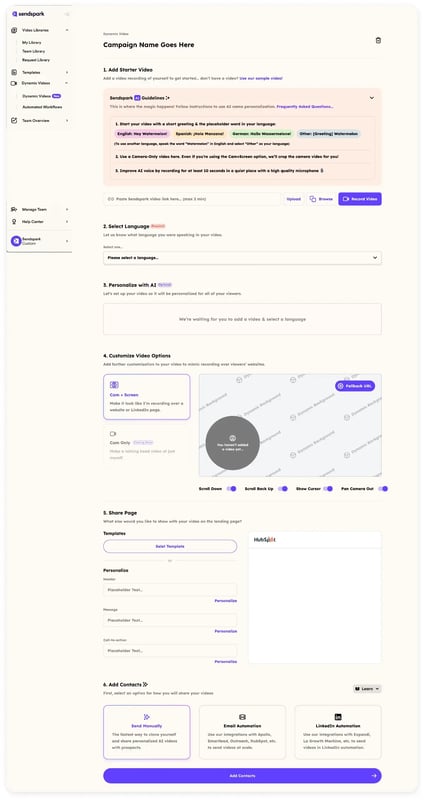
How it works at scale: Upload your prospect list to Sendspark. Record your video once. The AI clones your voice to create a personalized greeting for each contact, and dynamically shows their company website as the video background. The result: each recipient gets what feels like a custom recording — without you touching the record button more than once. Sales teams using this approach report 10+ hours saved per campaign compared to manual video recording workflows. To see how this integrates with your CRM, check out Sendspark’s HubSpot integration or sales prospecting solutions.
| Template | Best For | Funnel Stage | Typical Reply Rate |
|---|---|---|---|
| Problem-Agitate-Solve | Defined ICP with known pain | Cold / Touch 1 | 3–8% |
| Social Proof Opener | Segment with strong case studies | Cold / Touch 1 | 4–10% |
| Trigger-Based Opener | Accounts with recent trigger events | Cold / Touch 1 | 6–12% |
| Gentle Bump | No-reply after first email | Follow-up / Touch 2 | 3–7% |
| Value-Add Follow-Up | Engaged but non-responsive accounts | Follow-up / Touch 3–4 | 4–9% |
| Short-Form Video Intro | High-value individual accounts | Cold or Follow-up | 8–15% |
| AI-Personalized Video | Large lists requiring personalization at scale | Cold / Any touch | 10–20% |
Frequently Asked Questions
What is a B2B lead generation email?
A B2B lead generation email is a targeted outreach message sent to a business prospect with the goal of starting a conversation that leads to a sales opportunity. Unlike marketing newsletters, lead generation emails are usually one-to-one (or personalized at scale), sent to specific decision-makers, and focused on a single ask — typically a short introductory call or meeting.
What’s a good reply rate for B2B lead generation email templates?
According to HubSpot benchmarking data, the average cold B2B email achieves a 1–5% reply rate. A well-structured template with strong personalization can reach 8–15%. Adding video to your templates typically pushes reply rates to 10–20%, as video creates a personal connection that text cannot replicate. Anything above 10% is considered a strong result for cold outreach. The same lift shows up in niche applications like real estate lead generation, where personalized video outreach has been shown to roughly double or triple plain-text reply rates.
How long should a B2B lead generation email be?
Cold outreach emails perform best at 75–125 words. Longer emails require more commitment from the prospect to read and signal that you’re more interested in your product than their time. Follow-up emails can be even shorter — 3–5 sentences with a single CTA. Keep the first email under 150 words as a hard rule.
How many follow-up emails should I send in a lead generation sequence?
Most B2B outreach sequences include 5–7 touches over 14–21 days. RAIN Group research shows that 80% of closed deals required at least 5 contacts. The key is adding new value at each touch — a different pain point, a case study, a piece of content, or a video — rather than repeating the same message with different subject lines.
What subject lines get the highest open rates for B2B emails?
Subject lines that include the prospect’s company name, reference a specific pain point, or mention a mutual connection consistently outperform generic ones. Shorter is better: 6–10 words typically outperforms longer subjects. Avoid “quick question” and “just following up” — every sales rep uses these, so they no longer trigger curiosity. Test subject lines with a small batch before sending to your full list.
How do I personalize B2B lead generation email templates at scale?
For text personalization, use merge tags for name, company, and industry in your sequencing tool (Outreach, SalesLoft, Apollo). For deeper personalization, use tools like Clay to pull in dynamic context — job postings, recent news, or LinkedIn activity. For video personalization at scale, Sendspark’s AI lets you record one video and automatically generate a personalized version for every contact in your list, with each prospect’s name and website shown in the background.
Should I include a video in my B2B lead generation email?
Yes — especially for high-value accounts or sequences where text emails have stalled. Personalized video emails generate a 2:1 meeting-to-reply ratio compared to text-only outreach, according to Sendspark customer data. The most effective approach is to use a short video (60–90 seconds) for key accounts and AI-personalized video for broader sequences, where you record once and Sendspark generates a unique version for each recipient automatically.
Sources & References
- HubSpot Sales Blog — “Average B2B cold email reply rates range from 1–5% without personalization” (2024)
- Salesforce State of Sales — “73% of buyers expect sellers to understand their business problems before reaching out” (2024)
- RAIN Group Research — “It takes an average of 8 touches to reach a B2B prospect; 80% of closed deals required 5+ contacts” (2023)
- Gartner B2B Buying Journey — “B2B buyers engage with an average of 13 pieces of content before making a purchase decision” (2024)
Record One Video. AI Personalizes Thousands.
Sendspark is the AI video personalization platform for B2B sales. Record once, and AI voice cloning generates thousands of individually personalized videos with dynamic backgrounds and personalized thumbnails — each prospect hears their name, sees their website, in your voice. Sales teams see 2-3x more replies.
Get Started Now