Want to personalize outreach without spending hours? Clay and Sendspark make it possible. By combining Clay’s lead data with Sendspark’s AI-driven video personalization, you can create thousands of tailored videos with just one recording. This approach has led to:
- 50% more meetings booked
- 45% higher reply rates
- 3x increase in pipeline activity
Here’s how it works: Clay enriches your lead data, while Sendspark customizes a single base video for each prospect. The process is automated and takes just minutes to set up. Use these personalized videos in email campaigns, LinkedIn outreach, and CRM workflows to boost engagement and save time.
If you’re an SDR looking to streamline outreach while keeping it personal, Clay and Sendspark are a game-changer.
Clay - Send AI Personalized Videos in Sales Automation
sbb-itb-afd3f9e
What Clay and Sendspark Do for Sales Teams
Clay and Sendspark team up to simplify sales workflows. Clay organizes and enriches prospect data, while Sendspark makes video outreach personal and engaging. Together, they create a seamless process for SDRs by combining data management with creative video strategies.
What is Clay?
Clay is your go-to platform for organizing and enriching prospect data. It pulls together key details - like names, job titles, and company info - into one centralized workspace. With integrations across various tools, Clay automates everything from finding leads to initiating outreach. Plus, its Chrome extension lets SDRs grab lead info straight from LinkedIn or other websites, making data collection quick and efficient.
One standout feature is its ability to run multi-step workflows automatically. Using conditional “Run Settings”, Clay ensures that enrichments only happen when specific criteria are met. This keeps everything running smoothly and avoids common issues, like broken links in your outreach.
What is Sendspark?
Sendspark takes the personalized video game to the next level. Instead of recording individual videos for each prospect, you create one base video with placeholders for names or other details. Sendspark’s AI fills in the blanks, making every video feel personal without the extra effort.
It doesn’t stop there. Sendspark lets you use dynamic video backgrounds, like a prospect’s LinkedIn profile or website, to further personalize your message - all without needing to re-record. For each video, you get a Video Link for direct sharing, an Embed Link for websites, and a Thumbnail URL that generates an animated GIF for email campaigns. These videos are hosted on branded landing pages where you can add calls-to-action, your logo, and even a calendar for instant meeting bookings.
Sendspark also integrates with CRMs and sales engagement tools, giving SDRs the ability to track video engagement and automatically trigger follow-ups. It’s a smart way to blend creativity with strategy in your outreach efforts.
How to Connect Clay and Sendspark
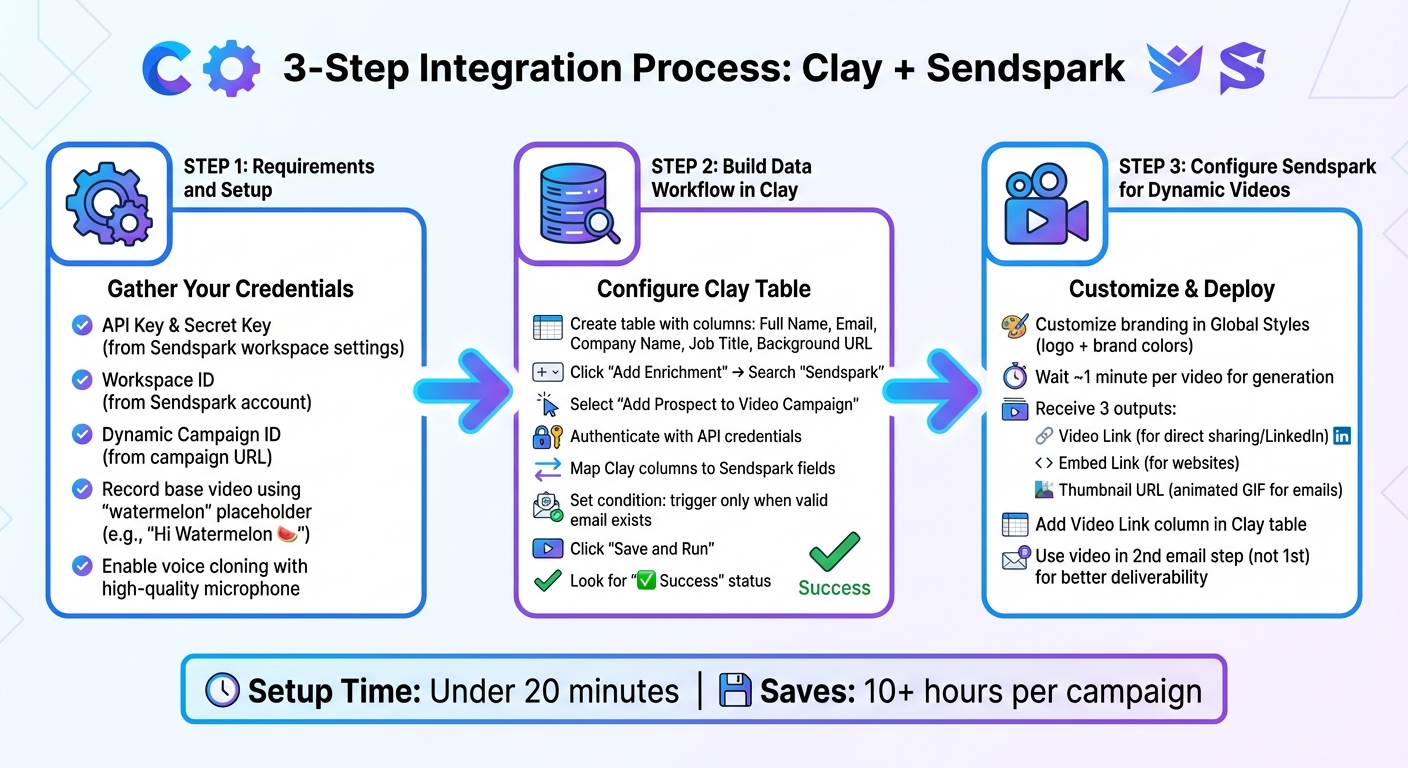
Clay and Sendspark Integration Setup Process for SDRs
Integrating Clay with Sendspark is simple and involves three main steps: preparing your accounts, setting up your data workflow in Clay, and configuring Sendspark to use that data for personalized video creation.
Requirements and Setup Steps
Before starting, make sure you have active accounts for both Clay and Sendspark. In your Sendspark workspace settings, locate your API Key and Secret Key in the API credentials section. Also, take note of your Workspace ID and Dynamic Video Campaign ID, which you can find in the campaign URL.
Begin by recording your base video in Sendspark. Use the placeholder “watermelon” for the prospect’s first name (e.g., “Hi Watermelon” 🍉). Additionally, enable voice cloning in your Sendspark settings and use a high-quality microphone to ensure clear and professional audio.
| Required Component | Where to Find It | Purpose |
|---|---|---|
| API Key & Secret Key | Sendspark workspace settings | Authenticates the connection in Clay |
| Workspace ID | Sendspark account | Routes data to the correct workspace |
| Dynamic Campaign ID | Campaign URL in Sendspark | Identifies the video template for personalization |
| “Watermelon” Video | Record in Sendspark | Acts as the base for AI-driven personalization |
Once you’ve gathered your Sendspark credentials, move to Clay to build your prospect data workflow.
Building Your Data Workflow in Clay
With your Sendspark credentials ready, organize your prospect data in Clay. Create a table that includes essential columns like Full Name, Email, Company Name, and Job Title. For added personalization, you can include a Background URL column to feature the prospect’s website on the video landing page.
Next, click “Add Enrichment” in Clay and search for “Sendspark”. Choose the “Add Prospect to Video Campaign” action and authenticate using your Sendspark API credentials. Map your Clay data columns to the corresponding Sendspark fields, set a condition to trigger the action only when a valid email exists, and then click “Save and Run”. Once the process is complete, you’ll see a “✅ Success” status in Clay, confirming the video is ready.
Setting Up Sendspark for Dynamic Videos
Before running your automation in Clay, customize your branding in Sendspark’s Global Styles. Add your logo and brand colors to ensure that all video landing pages match your branding.
Once the videos are generated (usually within about 1 minute per video), Sendspark provides three outputs: a Video Link for direct sharing or LinkedIn messages, an Embed Link for websites, and a Thumbnail URL for email campaigns. Add a column in your Clay table to capture the Video Link, ensuring it’s ready before enrolling contacts in your email sequence.
For timing, if you’re using an email sequencer like Instantly or Smartlead, include the video in the second step of your sequence instead of the first. This gives the AI enough time to generate the video and improves email deliverability by keeping the initial email as plain text.
How to Run Effective Personalized Video Campaigns
Once you’ve completed the integration process, it’s time to start using those personalized videos across key outreach channels. Tailoring videos to match each platform’s format can significantly boost engagement.
Adding Personalized Videos to Email Campaigns
Email campaigns thrive when you use a Thumbnail URL as a visual teaser. This GIF preview highlights the opening moments of your personalized video, grabbing attention right in the inbox. Make sure to hyperlink the GIF to the Video Link, directing prospects to the full landing page.
Timing is crucial. Place the video in the second email of your sequence. This gives AI about a minute to generate each video and ensures the first email remains plain text - no images or links - which helps with deliverability.
For platforms like Lemlist, switch to code view and paste your Sendspark snippet. Configure Clay to trigger the next step only when the video link column populates with data.
Ready to take this strategy beyond email? Let’s look at LinkedIn outreach.
Using Video in LinkedIn Outreach
LinkedIn messaging has its own rules - limited formatting means the Video Link becomes your main tool. This link takes prospects to a personalized landing page where their name and company website appear in the video background.
You can include the Video Link in connection requests or follow-up messages using the best LinkedIn automation tools like Expandi. These personalized landing pages can also feature custom CTAs and embedded calendars, making it easy for prospects to book a meeting directly from the page. Teams leveraging this strategy have seen a 3x increase in pipeline value, thanks to the one-to-one feel of their outreach.
For website visitor retargeting, tools like Clay and RB2B work together to identify anonymous visitors. They can automatically trigger Sendspark videos tailored to the visitor’s browsing behavior, creating a personalized follow-up that feels seamless.
Automating Video Workflows with CRM Integration
Integrating Clay with your CRM and Sendspark streamlines the video creation process. When a new lead enters your Salesforce or HubSpot pipeline, Clay pulls their details, generates a personalized video via Sendspark, and adds the video link to the CRM record - all without manual input.
Set up conditional triggers in Clay to map CRM fields like Name, Company, Job Title, and Background URL directly into Sendspark templates. This ensures every video is tailored to the prospect’s context. Before you map all three fields into every send, see how many variables you actually need for your deal size and volume.
“Combine Clay’s lead data with Sendspark’s AI-powered dynamic video personalization to make every outreach feel truly one-to-one - without the manual work.”
– Sendspark
Sendspark doesn’t just stop at video creation. Engagement data flows back into your CRM, giving your team insights into which prospects are watching and how they’re interacting with your content. This visibility can make all the difference in refining your outreach strategy.
Tracking and Measuring Campaign Performance
Once your personalized video campaigns are live, keeping an eye on engagement is crucial. Sendspark provides essential metrics like video views, total watch time, and clicks on embedded calls-to-action (CTAs). These metrics give you a clear picture of how prospects interact with your content, helping you identify the most engaged leads who are ready for follow-up. Now, let’s dive into the key video metrics that can shape your campaign strategies.
Video Engagement Metrics in Sendspark
When using the Clay and Sendspark stack, video engagement metrics offer valuable insights into your outreach efforts. For example, watch time reveals more than just whether a prospect clicked on your video. If viewers are watching most of the content but not clicking the CTA, it suggests your video is engaging, but the call-to-action might need tweaking. You can experiment with different CTA buttons - like “Book a Demo” versus “View Case Study” - to determine which one drives better results. The Thumbnail URL feature, which generates a GIF preview, can also boost email engagement.
Another key area to analyze is viewer drop-off points. If prospects are leaving early, you might want to move your value proposition closer to the start or cut down on a lengthy introduction. This data-driven approach allows you to refine your videos without relying on guesswork. When combined with CRM insights, these metrics provide a comprehensive view of how prospects are engaging with your content.
CRM Integration for Complete Data Visibility
Integrating Sendspark data into your CRM creates a seamless feedback loop within the Clay and Sendspark stack. By syncing engagement metrics with your CRM, you get a full view of each prospect’s journey. For instance, when a prospect watches a video, that engagement data is automatically reflected in their CRM record alongside other sales activities. Mapping Sendspark outputs into custom CRM fields allows you to track which video assets are driving conversions. This integration empowers your team to follow up more effectively.
Calculating ROI: Before and After Results
Using engagement data and CRM integration, you can measure the ROI of the Clay and Sendspark stack. The results speak for themselves: the integration has been shown to drive 3x higher reply rates. Case studies also highlight a noticeable increase in meetings booked after implementing this solution.
ROI Comparison:
| Metric | Before Clay + Sendspark | After Clay + Sendspark |
|---|---|---|
| Reply Rate | Standard Baseline | 3x Higher |
| Demos/Meetings Booked | Standard Baseline | 50% Increase |
| Pipeline Value | Standard Baseline | 45% Lift |
| Workflow Automation | Manual/Partial | 100% Automated |
One standout benefit is the time saved through automation. SDRs can save over 10 hours per campaign by eliminating the need for manual video recording. Before launching campaigns, use the “Success” status in Clay to confirm that each AI-generated video is working properly. This simple step ensures that your campaigns go out with functional video links, preserving both your email deliverability and reputation.
Conclusion: Scaling Personalized Outreach with Clay and Sendspark
The combination of Clay and Sendspark takes sales outreach to a whole new level. By blending advanced data enrichment with AI-driven video personalization, it allows you to scale outreach efforts without losing the personal touch. With just one video recording, you can deliver tailored, one-to-one experiences while automating the repetitive tasks that typically slow you down. All it takes is mapping your lead data, and the AI does the rest - making each interaction feel personal without the heavy lifting.
Teams using this integration have seen impressive results: a 50% increase in meetings booked, a 45% higher reply rate, and a 3x boost in their sales pipeline. Even better, you can launch your first automated video campaign in under 20 minutes, saving over 10 hours per campaign for more strategic, high-value selling activities.
This fully automated system works seamlessly with your existing outreach and CRM tools, giving you complete visibility into how prospects engage with your campaigns. The process is smooth, reliable, and designed to support your long-term growth.
If you’re looking to scale your SDR team’s performance while keeping that personal touch that drives real connections, this integration is a game-changer. Start small - try personalizing your second email in a sequence - and watch as engagement rates climb. From there, you can expand your efforts and see even greater results.
FAQs
What data fields do I need in Clay to personalize each Sendspark video?
To make your Sendspark videos more personal using Clay, you’ll need a few key data fields: Contact Full Name, Contact Email (whether it’s work or personal), Company Name, and Contact Job Title. These fields can be linked to placeholders in your video, allowing for dynamic and tailored personalization.
How do I keep email deliverability high when adding video to sequences?
When incorporating video into email sequences, Sendspark makes it easy to embed videos the right way. Keep the text concise - just 1-2 sentences - and steer clear of autoplay to avoid overwhelming recipients. Stick to solid email hygiene practices to ensure your AI-personalized videos are well-structured and less likely to be marked as spam. Well-crafted AI-personalized videos not only look professional but also tend to perform better, helping you connect with your audience more effectively.
What should I test first to improve my video replies and meeting bookings?
Creating a high-quality, personalized video with Sendspark is a great way to grab attention. Use dynamic placeholders - like the viewer’s name - to make the message feel tailored just for them. On your landing page, include clear calls-to-action to guide viewers on what to do next.
From there, test different approaches in your outreach. Try varying your scripts or adjusting the tone of your message to see what resonates best. Don’t stop there - experiment with different outreach channels like email, LinkedIn, or SMS, and tweak the timing of your messages. This kind of testing helps you figure out what drives the most engagement and leads to more meeting bookings.
Related Blog Posts
- How AI Personalization Improves Video Prospecting
- How SDRs Save Time with AI Video Follow-Ups
- Personalized Video Feedback: How to Create Custom Videos at Scale
- Why Sales Teams Are Switching from Loom to Sendspark
Topics: blog