Published August 2026
Recording a fully custom, personalized video for every name on a 300-prospect list isn’t realistic for most SDRs. Sending the same generic video to all 300 barely beats a text email. Sendspark’s Combined Videos feature is the middle path: it stitches a short segment addressed to each prospect by name and company onto one longer video you record a single time. AI voice cloning and dynamic backgrounds personalize the first few seconds automatically, then the reusable part carries the exact same pitch for everyone. Reps get the reply-rate lift of personalization without re-recording anything themselves.
This guide covers what a combined video actually is, when to use one instead of a fully custom or fully generic video, how to build one, the mistakes that undercut the format, and how to measure whether it’s working. If you’re new to AI-personalized video outreach in general, our comprehensive guide to personalized video email covers the broader strategy — this article goes deeper on one specific tactic inside it.
Key Takeaways
- A combined video merges a short AI-personalized intro (name, company, a custom line) with a longer reusable demo or pitch, so reps get personalization without re-recording the whole video for every prospect.
- Full custom video makes sense for small, high-value lists; combined video is the sweet spot from roughly 20 to 500 prospects; a fully generic video only makes sense for large, low-priority lists.
- AI-personalized video outreach drives 200-300% more email replies than text-only email, according to Sendspark customer data.
- The most common mistake is an abrupt jump-cut between the personalized intro and the reusable segment — matching background, framing, and tone keeps viewers watching into the demo.
- Track reply rate and watch-through rate by segment, not just open rate, to prove a combined video is actually outperforming a fully generic one.
What Is a Combined Video (And Why Use One)?
A combined video is an outreach video made of two parts joined into one file: a short intro segment that uses AI voice cloning and dynamic backgrounds to address a specific prospect by name and company, followed by a longer reusable segment — a demo, a pitch, or a story — that stays identical for every recipient. It’s Sendspark’s answer to the choice between personalizing everything and personalizing nothing.
The tradeoff it solves is simple. A fully custom video, where a rep re-records the entire message for each prospect, delivers the highest personalization but doesn’t scale past a handful of accounts a week. A fully generic video scales infinitely but loses the reply-rate lift that made video worth trying in the first place. Sendspark customer data shows AI-personalized video outreach drives 200-300% more email replies than text-only email — and most of that lift comes from the first ten seconds, which is exactly the part a combined video personalizes.
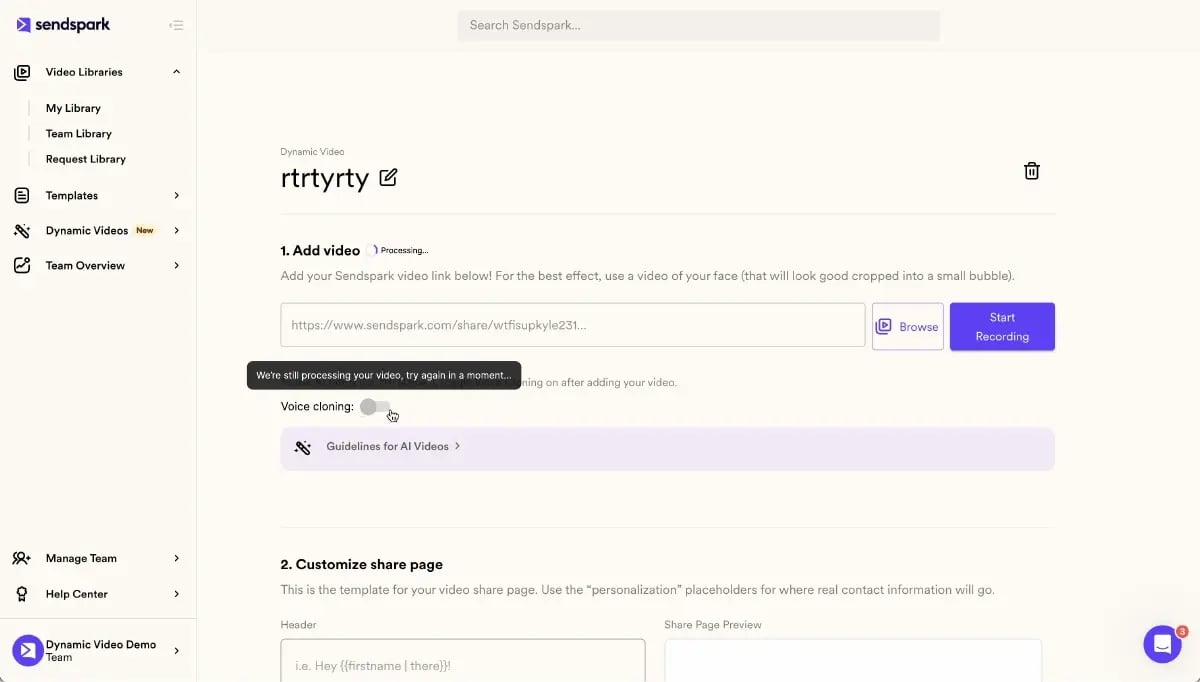
Here’s the mechanism: you record one base video — your demo walkthrough, your pitch, your case study recap — a single time. Sendspark’s AI clones your voice from that recording, then generates a short intro clip per prospect that says their name and company, shows their actual website as a dynamic background, and hands off into the base video with a matching personalized thumbnail. The prospect experiences one continuous video. Your production time stays flat no matter how many prospects you send it to.
This matters because “personalization” in most B2B outreach still means a first-name merge field dropped into a template — the sales equivalent of a form letter. A combined video raises the bar without raising the workload: the prospect sees their actual company name spoken aloud, their actual website rendered on screen, and hears it in a voice that sounds like a real person addressed them directly, not a mail-merge. That’s a meaningfully different experience even though the rep only recorded the video once.
It also solves a problem that shows up the moment outbound volume grows past a handful of accounts: a rep who fully personalizes 15 videos in a day has no time left to do outbound calling, LinkedIn outreach, or anything else on their plate. Combined video moves the personalization work from the rep’s calendar to an automated pipeline, which is the only way personalized video survives contact with a real quota.
Pro tip
Record your base video’s opening line so it works as a hand-off, not a restart — something like “Let me show you exactly how this works,” rather than “Hi, I’m Alex.” The second version repeats what the personalized intro already said.
When to Personalize the Whole Video vs. Just the Intro
The right approach depends on list size and deal value. Fully custom video works when a rep can justify five to fifteen minutes per prospect — realistically, under about 20 high-value target accounts. Combined video is the practical default from roughly 20 to 500 prospects, which covers most outbound sequences. A fully generic video, with no personalization at all, only makes sense for lists too large to personalize by any method, like a 5,000-name conference follow-up.
Gartner’s Future of Sales research predicted that 80% of B2B sales interactions between suppliers and buyers would occur in digital channels by 2025, and found that buyers considering a purchase spend only 17% of their time meeting with potential suppliers. That shift is exactly why the personalization method has to scale — a rep can’t have a live conversation with every name on a list, but a combined video gets close to one.
| Approach | Personalization level | Production time per prospect | Best for |
|---|---|---|---|
| Fully custom video | Every second personalized | 5-15 minutes | Under 20 high-value target accounts |
| Combined video | Intro personalized, rest reused | Seconds (automated) | 20-500 prospects, most outbound sequences |
| Fully generic video | None | Zero (one-time recording) | 500+ prospect blasts, lowest-priority lists |
McKinsey research on personalization found that companies that grow faster drive 40% more of their revenue from personalization than their slower-growing counterparts — and the gap comes from consistency, not from a handful of hand-crafted messages. A combined video is what makes that consistency possible at outbound volume: every prospect gets a video that opens with their name and company, backed by dynamic backgrounds pulling in their actual website, without a rep touching the base video again.
Record One Video. AI Personalizes Thousands.
Sendspark is the AI video personalization platform for B2B sales. Record once, and AI voice cloning generates thousands of individually personalized videos with dynamic backgrounds and personalized thumbnails — each prospect hears their name, sees their website, in your voice. Sales teams see 2-3x more replies.
Get Started NowHow to Build a Combined Video for Sales Outreach
Building a combined video takes four steps: record the reusable base video once, define what the personalized intro segment should say, set the point where the two segments meet, then connect the finished video to your CRM or sales engagement tool so it sends automatically as prospects enter a sequence.
1. Record the base video once. Keep it to 60-90 seconds — a demo walkthrough, a case study recap, or a direct pitch. This is the segment every prospect sees, so script it to work for the whole list, not one account.
2. Define the personalized intro segment. Decide what should vary: first name and company at minimum, plus an optional custom line pulled from a CRM field (their industry, a recent trigger event, a mutual connection). Choose a dynamic background — most teams default to the prospect’s own website, since it signals research without any extra work per send. Teams already enriching leads with a tool like Clay can feed that same data straight into the intro segment — see Clay and Sendspark: the personalization stack for SDRs for the setup.
3. Set the transition point and smooth it. The cut between the personalized intro and the base video is where combined videos succeed or fail. Match your framing, lighting, and energy level across both recordings so the hand-off reads as one continuous take, not two clips stapled together.
Advanced strategy
Reference the prospect’s dynamic background out loud in the intro line — “I pulled up yourhomepage.com before recording this” — instead of just showing it silently. Naming what’s on screen makes the personalization register consciously instead of passing by unnoticed.
4. Distribute through your CRM or sequence tool. Once the combined video is built, connect it to HubSpot, Outreach, or Smartlead so it triggers automatically as prospects enter a sequence, with each recipient’s personalized intro generated on send rather than pre-rendered in bulk.
Combined videos are also the more efficient option for the Dynamic Video Minutes included in every plan: because only the short intro segment is generated per prospect, you use a fraction of the minutes a fully personalized video of the same length would consume, which is why teams sending to larger lists default to this format even when they could technically afford full personalization for a smaller batch.
“The process has three components: enriched contact data, automated signal detection, and templated message frameworks with dynamic variables.”
A combined video is that same “dynamic variables on a fixed template” idea, applied to video instead of email copy. The reusable base video is the template; the personalized intro is the dynamic variable; your CRM data is what fills it in.
Common Mistakes With Combined and Personalized Videos
The most common mistake is an abrupt jump-cut where the personalized intro visibly changes background, lighting, or energy right before the reusable segment starts. Viewers notice the seam, and it undercuts the personalization instead of reinforcing it. One fix is to stretch the last beat of the intro with Higgsfield’s AI Video Extender, which gives you room to blend the cut. Two other mistakes show up almost as often: leaving the thumbnail generic while the video itself is personalized, and making the intro segment so long it delays the actual pitch.
Common mistake
Don’t personalize the video but leave a generic thumbnail in the email preview. A personalized thumbnail showing the prospect’s name is what gets the email opened in the first place — the personalized video only matters after that. See why thumbnails matter for video engagement for more on this.
A fourth mistake is treating the intro segment as a second full introduction instead of a hand-off. If your base video also opens with “Hi, I’m [rep name],” the prospect hears two introductions back to back. Script the base video to assume the introduction already happened.
Keep the personalized intro segment short — five to fifteen seconds is enough to say a name, a company, and one custom line. Anything longer starts to feel like a separate video rather than an opening beat, and delays the part of the message that actually makes the case. Our video length guide for B2B sales teams has the full breakdown of ideal length by video type, if you’re deciding how long the reusable base segment itself should run.
A fifth mistake worth naming: treating the combined video format as a one-time setup instead of something you revisit. The base video ages — pricing changes, product screenshots go stale, case studies get outdated — and teams that built a combined video eight months ago and never touched it again are often still sending an outdated pitch behind a fresh, current-feeling personalized intro. The mismatch is subtle but it’s there the moment a prospect asks a question the video no longer answers correctly.
Combined Video Results: What to Expect and How to Measure Them
Track reply rate and watch-through rate broken out by segment, not blended together. A combined video that gets a 12% reply rate from a cold list is doing its job even if a fully custom video would hit 20%, because the combined version took a fraction of the production time to reach the entire list. Sendspark customer data shows AI-personalized video outreach drives 200-300% more email replies and 40-50% more meetings booked than text-only email, and Sendspark customer Qwilr saw 50% higher click-through rates.
Watch-through data is the fastest way to catch a bad transition. If your video analytics show drop-off concentrated at the exact second the personalized intro ends, that’s the jump-cut problem described above, not a content problem with the base video.
| Metric | What to expect with a combined video | How to track it |
|---|---|---|
| Reply rate | 2-3x higher than text-only email (Sendspark customer data) | Compare by list segment in your CRM or sequence tool |
| Watch-through rate | Drop-off concentrated at the cut point if the transition isn’t smoothed | Per-recipient video analytics |
| Production time | Minutes total per list, not per prospect | One base recording plus automated intro generation |
A HubSpot analysis of more than 330,000 CTAs found that personalized calls-to-action convert 202% better than basic versions — the same logic applies to a personalized video intro sitting in front of a generic CTA at the end of your base video. If the intro is personalized but the closing ask isn’t, you’re leaving part of that lift on the table. A combined video also works well as its own closing technique: a short personalized intro in front of a recap segment, sent to every stakeholder after the final call.
Combined video is one tactic inside a much larger shift toward data-driven outbound. If you want the fuller picture of how B2B teams are triggering personalized sends off CRM signals and buying-stage data, our guide to personalizing outbound sales at scale covers the strategy layer this tactic sits inside.
Frequently Asked Questions
What is a combined video in sales outreach?
A combined video is a single video file made of a short AI-personalized intro segment — using the prospect’s name, company, and a dynamic background — stitched onto a longer reusable demo or pitch segment that stays the same for every recipient. It lets a rep personalize the opening of every video without re-recording the entire message.
How do you combine a personalized intro with a demo video?
Record the demo or pitch once as your reusable base video, then define a short intro segment (five to fifteen seconds) that uses AI voice cloning and a dynamic background to address each prospect by name and company. Sendspark generates the personalized intro per recipient and merges it with the base video automatically on send.
Is a combined video better than a fully personalized video?
Not universally — a fully custom video still personalizes more and can outperform a combined video on reply rate for a small, high-value list. A combined video wins on efficiency: it delivers most of the personalization lift across hundreds of prospects in the time it takes to fully customize videos for about twenty.
How long should the personalized intro segment be?
Five to fifteen seconds is enough to say a name, a company, and one custom line pulled from CRM data. Longer intros start to feel like a second, separate video and delay the pitch the base video is there to deliver.
Does a combined video hurt watch-through rate?
Only if the transition between the personalized intro and the reusable segment is abrupt — mismatched lighting, framing, or energy causes a visible seam that viewers notice and drop off at. A smooth, matched transition keeps watch-through close to what a single continuous recording would get.
Can you personalize more than just the video intro?
Yes — Sendspark supports personalizing multiple points in a single video, such as the name early, the company mid-video, and a closing line at the end, on top of the dynamic background and personalized thumbnail. Most teams start with an intro-only combined video and add more personalized spots once they’ve validated the format.
What tools let you combine a personalized intro with a reusable video?
Sendspark’s Combined Videos feature is built specifically for this: record one base video, and AI voice cloning plus dynamic backgrounds handle the personalized intro segment for every prospect automatically, distributed through HubSpot, Outreach, Smartlead, and 50+ other email and LinkedIn integrations.
Sources & References
- Gartner (via BizTechReports): “80% of B2B sales interactions between suppliers and buyers will occur in digital channels by 2025”; buyers “typically spend only 17% of their time meeting with potential suppliers” (2020)
- McKinsey: “Companies that grow faster drive 40 percent more of their revenue from personalization than their slower-growing counterparts” (2021)
- Apollo.io — “The process has three components: enriched contact data, automated signal detection, and templated message frameworks with dynamic variables” (2025)
- HubSpot: “Personalized CTAs convert 202% better than basic CTAs” (analysis of more than 330,000 CTAs)
Record One Video. AI Personalizes Thousands.
Sendspark is the AI video personalization platform for B2B sales. Record once, and AI voice cloning generates thousands of individually personalized videos with dynamic backgrounds and personalized thumbnails — each prospect hears their name, sees their website, in your voice. Sales teams see 2-3x more replies.
Get Started Now