Dynamic backgrounds in videos allow you to create personalized experiences at scale. Instead of recording individual videos for each prospect, you record one base video, and technology automatically swaps in customized backdrops like a prospect’s website or LinkedIn profile. This approach makes your outreach feel personal while saving time.
Key Benefits:
- Higher Engagement: Personalized videos can generate 16x more opens and 4.5x more clicks than generic ones.
- Time Efficiency: Produce thousands of tailored videos in minutes by uploading a contact list with URLs.
- Boosted Results: Companies like Warmly saw 2-3x higher engagement rates and added over $100,000 in ARR in a single month using this strategy.
How It Works:
- Record a single base video.
- Upload a contact list with URLs for custom backgrounds.
- AI swaps in personalized visuals and can even add customized greetings.
Dynamic backgrounds are perfect for sales teams looking to scale personalization without extra effort. They make your outreach feel relevant while delivering better results in less time.
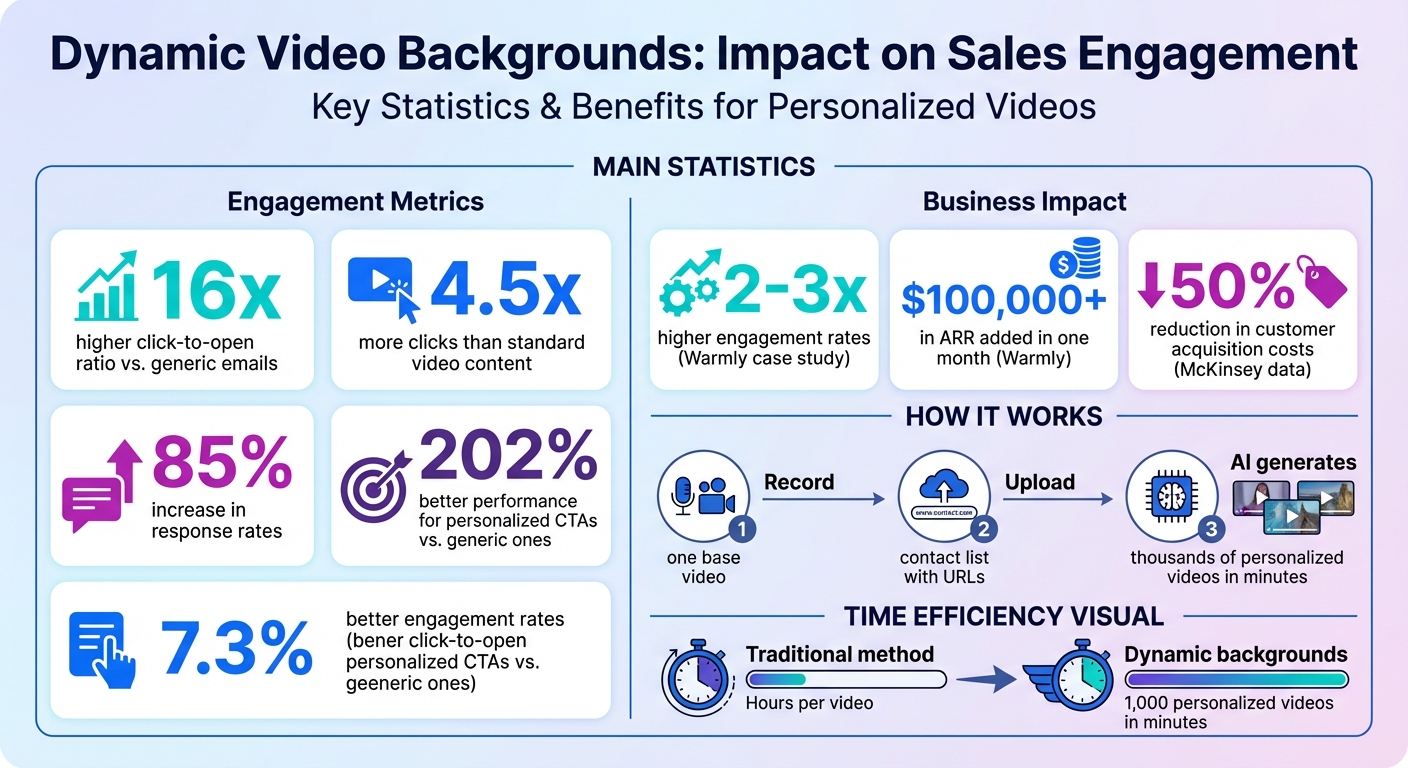
Dynamic Video Backgrounds: Key Statistics and Benefits for Sales Teams
How to Make AI Personalized Videos at Scale (2 Min Demo)
What Are Dynamic Backgrounds in Videos?
Dynamic backgrounds allow you to personalize the backdrop of a video for each viewer. For example, you could display their website or LinkedIn profile without needing to re-record the video for every recipient.
“A dynamic background means that the background can be personalized for each viewer. For example, you can show your viewer’s website or LinkedIn page without re-recording a video specifically for them.” - Bethany Stachenfeld, Co-founder, Sendspark
The main difference between dynamic and static backgrounds is flexibility. Static backgrounds stay the same for everyone, which means you’d need to re-record a new video for each prospect if you want to tailor it to them. Dynamic backgrounds, on the other hand, let you record a single video. The technology then takes care of swapping out the background for each recipient, saving you time and effort while still delivering a personalized experience. This approach opens the door to deeper levels of personalization, as explained below.
How Dynamic Backgrounds Work
The concept is simple but effective. You start by recording one “base video”, usually featuring yourself speaking. Then, AI technology overlays this video onto specific URLs pulled from your contact list.
Here’s where it gets clever: features like simulated scrolling and cursor movements mimic real-time browsing, making the video feel more genuine than just a static screenshot. This added realism grabs the viewer’s attention right away. Creators can also use AI visual effects to enhance video elements, add creative touches, and make personalized content more engaging without complex editing workflows. For teams looking to create more polished video campaigns, tools like invideo Agent can help streamline the creative process from idea to final output.
The process also incorporates AI voice cloning. By using a placeholder word - like “watermelon” - the AI replaces it with each recipient’s name seamlessly. The end result? A video that feels like it was custom-made for each viewer, without requiring hours of manual effort. This blend of personalization and automation makes creating tailored videos faster and easier than ever.
Benefits of Dynamic Backgrounds
Dynamic backgrounds don’t just streamline video production - they also boost engagement in a big way. Personalized video content can increase response rates by 85%. Adding this level of personalization to email outreach can lead to 16x higher engagement rates.
Perhaps the biggest advantage is scalability. Imagine uploading a CSV file with 1,000 leads and generating personalized videos for all of them in just minutes. The only resource you’ll use is a few minutes of credit, calculated by multiplying the video length by the number of contacts. According to McKinsey, such personalization can cut customer acquisition costs by up to 50%.
“With dynamic videos you are able to create one video, clone your voice, upload a list of contacts, and generate both personalized introductions and backgrounds in minutes.” - Ben Wright, Co-founder, Sendspark
Why Sales Teams Should Use Dynamic Backgrounds
Dynamic backgrounds are a game-changer for sales teams aiming to deliver personalized outreach quickly and effectively. They address the challenge of balancing personalization with efficiency by driving tangible results - like higher reply rates, more clicks, and increased booked meetings - without the time sink of traditional personalized video. This approach ties directly to the engagement boost discussed earlier.
Increasing Engagement Through Relevance
Imagine this: a prospect opens your video and sees their own website featured in the background. Instantly, the content feels personal and relevant. This visual connection grabs attention in a way that generic videos simply can’t. In fact, personalized videos are proven to generate up to 4.5x more clicks and a 16x higher click-to-open ratio compared to standard emails.
This level of personalization also builds trust. When prospects see their business referenced directly - even if technology is doing the heavy lifting - they feel acknowledged and valued. And this perception matters. Personalized video content can boost response rates by 85%, while tailored calls-to-action outperform generic ones by up to 202%.
Scaling Personalization Efficiently
Dynamic backgrounds don’t just enhance engagement - they make scaling personalization effortless. video prospecting tools often forces a tough choice: spend hours recording individual videos or settle for generic content that’s easy to ignore. Dynamic backgrounds remove this dilemma entirely.
Instead of spending hours creating one-off videos, sales teams can automate the process, producing thousands of personalized videos in minutes. And it’s not just about prospecting. These backgrounds are versatile, supporting personalized demos, walking clients through proposal details, or even onboarding new customers. According to McKinsey, this level of personalization can slash customer acquisition costs by up to 50%. Many teams take this a step further with a combined video: a personalized, dynamic-background intro stitched onto one longer reusable demo, so the personalization scales without re-recording the demo itself.
sbb-itb-afd3f9e
How to Create Dynamic Backgrounds in Sendspark

Sendspark makes it easy to create personalized videos by automatically swapping backgrounds for each recipient.
Step 1: Record or Upload Your Base Video
Head to the Dynamic Videos section in your dashboard and click “Create Dynamic Video” to get started. You can either record a new video, upload an MP4 file, or choose one from your library. For the best results, keep your video between 20–40 seconds long to maintain viewer interest.
If you’re using AI voice cloning, it’s recommended to record with the placeholder name “Watermelon” (e.g., “Hi Watermelon”) and include brief pauses to ensure smooth transitions. To capture clear audio, use a high-quality microphone and record in a quiet, echo-free environment.
Step 2: Add Dynamic Background Variables
Once your video is ready, upload a CSV file with your contact details. Make sure the file includes two key fields: email and backgroundUrl. The backgroundUrl should point to the specific webpage you want displayed behind your video - this could be a prospect’s website or LinkedIn profile.
If you don’t have background URLs handy, Sendspark can automatically pull them from the email domains of your contacts. You can also set a fallback URL to display a default webpage for contacts without a specific background link. For a more interactive feel, enable simulated scrolling or a mouse cursor animation to make it look like you’re actively browsing the background webpage. Once set, you’re ready to generate and share your personalized videos.
Step 3: Generate and Share Personalized Videos
Click “Generate Videos” to process your campaign. The processing time will vary depending on the video length and the number of contacts. For one-on-one video sharing, you can copy the video link or a GIF+video link. For bulk campaigns, click “Share Campaign”, select your email platform (like Outreach, HubSpot, or Salesforce), and embed the provided code.
In December 2023, Warmly used this exact approach to re-engage “close lost” opportunities. By incorporating personalized backgrounds and AI-powered intros, they boosted email engagement rates by 2–3x and closed over $100,000 in ARR in just one month.
Best Practices for Dynamic Backgrounds
Choose Clear, High-Contrast Backgrounds
Your background should highlight your message, not compete with it. Opt for high-contrast, well-lit settings that ensure your camera bubble stands out clearly against the backdrop. For example, recording in a bright space can help you remain the focal point, even if a dynamic website is displayed behind you. Avoid using private social media pages, like Instagram or non-public LinkedIn profiles, as these often cause rendering issues.
To maintain a polished appearance, always set a fallback URL. Most teams default to their company homepage, which ensures a professional look even if a custom background fails to load.
Combine with Other Personalization Features
Dynamic backgrounds are just one piece of the puzzle. Take personalization a step further by pairing them with tools like AI voice cloning to create a seamless and authentic greeting.
“The key to creating effective personalized videos is in meaningful customizations. The more you know your prospect and the better you can personalize videos to each one, the better you’ll do.” - Sendspark Insider
You can also add subtle animations, like simulated scrolling or cursor movements, to make the background feel more interactive and natural within your presentation.
Test and Optimize Your Videos
Once you’ve set up your dynamic elements, don’t skip testing. Start small by creating videos for 3–5 sample contacts to confirm that backgrounds render correctly and personalization tags display as intended. This saves resources and ensures a smooth experience before scaling up to larger campaigns. This is a critical step in any video for sales strategy to ensure high deliverability and engagement.
Keep an eye on your video analytics to see which background styles resonate most with your audience. Personalized videos can generate up to 4.5x more clicks compared to standard content. Testing different combinations of backgrounds and messaging will help you pinpoint the most effective approach for driving engagement.
Conclusion
Dynamic backgrounds bring a fresh approach to video personalization, making it possible to scale tailored outreach without compromising on quality. Instead of spending endless hours recording individual videos or settling for generic content that fails to stand out, dynamic backgrounds let you efficiently showcase your research - automatically displaying each prospect’s website or LinkedIn profile in your videos.
Here’s a real-world example: In December 2023, Warmly’s team used Sendspark’s AI-powered dynamic video features to re-engage closed-lost opportunities. The result? Engagement rates that were 2–3× higher than their standard email campaigns, along with notable ARR gains. The secret lies in the immediate connection dynamic backgrounds create - when prospects see their own website featured in your video, they instantly recognize the effort and relevance.
And it’s not just about engagement. The time-saving benefits are undeniable. Ben Wright from Sendspark puts it best: “The one thing none of us has is an excess of time… With dynamic videos you are able to create one video, clone your voice, upload a list of contacts, and generate both personalized introductions and backgrounds in minutes”. This method doesn’t just save time; it slashes costs and boosts response rates by an impressive 85%.
Ready to see these results for yourself? Sendspark makes it easy to get started. Record a base video, upload your prospect list, and let the AI handle the rest. Join over 50,000 companies already using Sendspark’s platform - rated 4.8/5 on G2 - and discover a smarter, faster way to connect.
FAQs
How do dynamic backgrounds make videos more engaging?
Dynamic backgrounds can significantly enhance video engagement by customizing the content for each viewer. For instance, you could showcase a recipient’s website or LinkedIn profile as the backdrop behind the presenter. This not only adds a personal touch but also makes the experience more relevant for the viewer. Plus, it saves time - there’s no need to record separate videos for each person, yet every message still feels uniquely tailored.
How can I create a personalized video with dynamic backgrounds?
To create a personalized video with dynamic backgrounds, here’s how you can do it:
- Start with your base video: Begin by recording or uploading a video that will act as the core of your personalized content. This is the starting point for customization.
- Add dynamic backgrounds: Use the dynamic background feature to overlay personalized visuals, like a prospect’s website or profile, behind the presenter. This can be set up to automatically pull data based on your contact list.
- Create and share: Once everything is in place, generate the personalized videos and share them through your preferred sales or marketing channels.
With these steps, you can produce engaging, customized videos quickly, making it easier to connect with your audience in a meaningful way.
How do dynamic backgrounds help sales teams improve their outreach?
Dynamic backgrounds give sales teams the power to craft personalized videos that look custom-made for every prospect - without the hassle of re-recording. By seamlessly showcasing elements like a prospect’s website or LinkedIn profile behind the presenter, these videos become more eye-catching, relevant, and engaging. This method not only saves time but also makes outreach feel more polished and effective.
Related Blog Posts
- How to Scale Personalized Video Messaging
- How AI Video Personalization Helps Revenue Teams
- How AI Personalization Boosts ABM Results
- Dynamic Video CTAs for Scalable Outreach
Topics: blog