Video outreach works because it stands out. While most prospects ignore text-heavy emails, video grabs attention with visuals, voice, and a personal touch. Sales teams using personalized video see up to 300% higher click-through rates and 6x more responses. Yet, less than half of sales teams use video, leaving a huge opportunity for early adopters.
Key takeaways:
- Why video works: Breaks the monotony of emails and builds trust faster.
- Proven results: Teams report 40% shorter sales cycles and up to 12% meeting booking rates.
- How to start: Tools like Sendspark streamline video creation, personalization, and CRM integration.
- Best practices: Keep videos under 60 seconds, personalize with context, and include a single clear call-to-action.
Sales teams using video are transforming outreach with higher engagement and faster results. This guide explains how Sendspark and video prospecting tools make video outreach scalable and effective. For team motivation resources, see our curated list of best motivational sales videos for your outbound team.
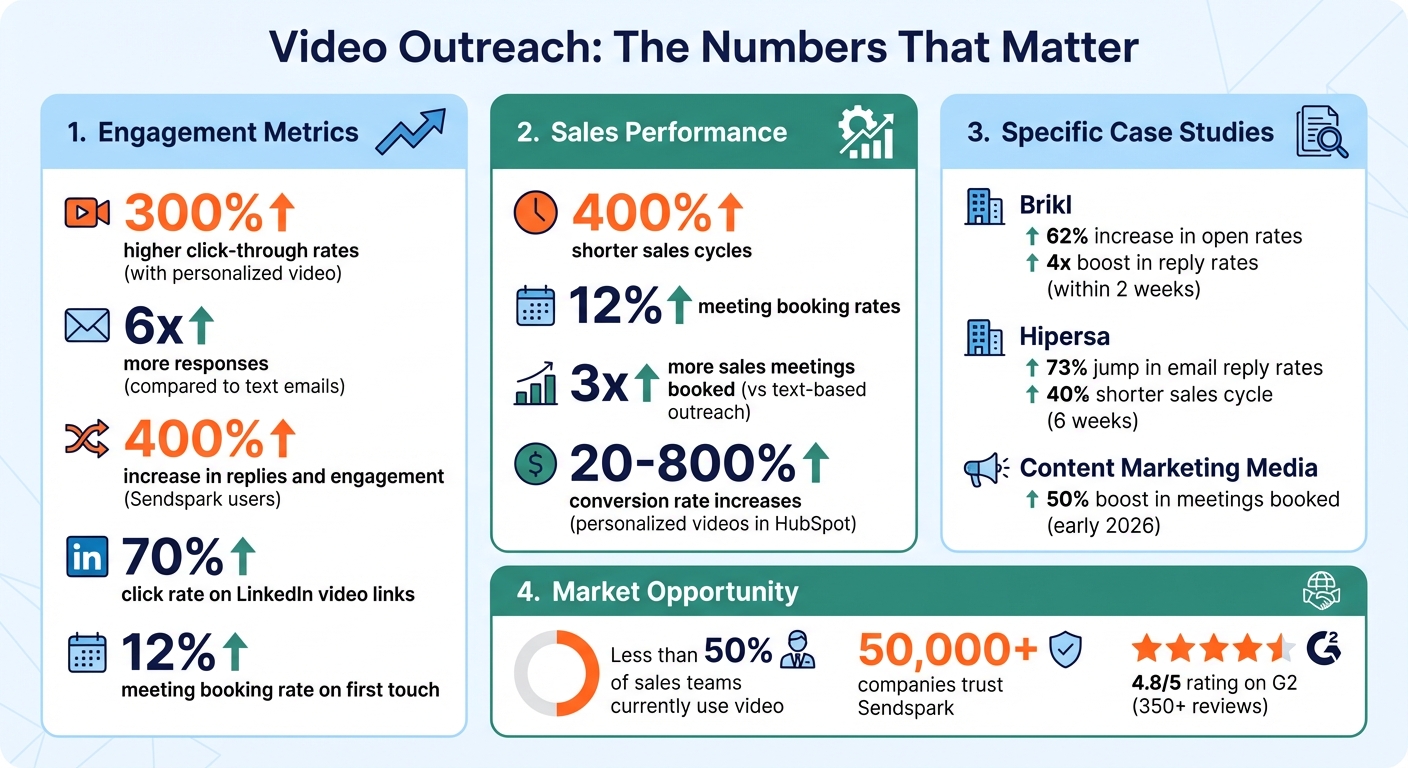
Video Outreach Statistics: Engagement Rates and Sales Performance Metrics
How to Create Personalized Outbound Videos with Sendspark
Sendspark makes creating personalized videos at scale surprisingly straightforward. The process involves recording a single video and using AI to tailor it for each prospect. Here’s how it works:
Step 1: Record Your Base Video
Sendspark provides three recording options: Face (webcam only), Screen (screen capture), or Both (a camera bubble overlaying your screen). Many sales teams prefer the “Both” option since it allows you to appear on camera while showcasing your website, proposals, or key data.
You can record your base video using one of two tools:
- Chrome Extension: Great for quick, browser-based recordings. It integrates seamlessly with Gmail, LinkedIn, and HubSpot.
- Desktop App: Ideal for higher-quality recordings, especially for non-browser tasks like PowerPoint presentations or PDFs.
| Feature | Chrome Extension | Desktop App |
|---|---|---|
| Best For | Speed and browser tasks | High quality and non-browser apps |
| Audio/Video Sync | Standard | Enhanced/High Quality |
| Integrations | Built-in (e.g., Gmail, HubSpot) | Requires manual sharing/upload |
| Recording Area | Chrome tabs, windows, or full screen | Any application (e.g., PPT, PDF) |
To make your videos more engaging, use features like the Spotlight to center your face, enable a 3-second countdown, or activate the Flip Camera for natural movement. When recording for AI personalization, include a brief pause or cue for AI voice insertion. After recording, you can trim awkward pauses, adjust the camera bubble, apply touch-ups, and even add virtual backgrounds for a polished finish.
Once your base video is ready, you can move on to the personalization step.
Step 2: Use AI for Personalization
Sendspark’s AI clones your voice and lip movements, seamlessly inserting each prospect’s name into the video. This makes it appear as though you recorded a unique video for every recipient.
The platform also allows you to overlay dynamic backgrounds, such as the prospect’s website or LinkedIn profile, while you speak. Using dynamic variables, Sendspark can automatically populate details like the recipient’s name, company, and job title. Each video even gets a unique thumbnail to boost email open and click-through rates.
The final video is hosted on a branded landing page, which can include the prospect’s logo, custom text, and an embedded calendar link for easy scheduling.
“I’m confident I’ve found the best video prospecting tool, and it’s Sendspark. Welcome to the world where AI meets video.”
- William Padilla, Account Executive, GRIN
Once your personalized videos are ready, the next step is integrating them with your CRM.
Step 3: Connect with Your CRM and Sales Tools
Sendspark works smoothly with CRMs like HubSpot, Salesforce, and Outreach. Using Share Snippets, you can embed personalized videos into email templates with merge tags, ensuring the right video reaches the right person.
Automation simplifies the process even further. For example, you can set triggers (like prospect enrollment) to automatically generate and send personalized videos. To ensure everything runs smoothly, make sure to map key fields - especially email addresses - between your CRM and Sendspark.
The Chrome Extension also lets you record, personalize, and embed videos directly within your sales tools, saving you from switching between tabs.
Sales teams using Sendspark have reported impressive results, including a 400% increase in replies and engagement. Personalized videos in HubSpot Sequences have led to conversion rate increases ranging from 20% to 800%.
“Sendspark helps us increase the level of humanization, personalization, and trust in our prospecting emails to establish ourselves in the space and land big clients.”
- Chris Draper, Head of Sales, OmniPanel
Step 4: Automate Distribution and Track Performance
Once your videos are created and integrated, Sendspark takes care of the distribution. It automatically inserts videos as clickable thumbnails into your email sequences and LinkedIn outreach campaigns. This approach preserves email deliverability while still driving engagement.
The platform offers real-time notifications and detailed analytics, such as watch duration and engagement with specific video segments. This data syncs back to your CRM, giving you valuable insights into prospect behavior. You can also customize thumbnails with company logos and include booking links on landing pages to streamline meeting scheduling.
“Sendspark videos work as pre-boarding. If prospective customers watch the videos, then they understand why they need our product better, and are more receptive to demos.”
- Emilia K, VP Marketing, Userpilot
sbb-itb-afd3f9e
Best Practices for Sales Outreach Videos
When using Sendspark to create personalized videos, following these best practices can help you grab attention and drive better engagement.
Creating sales videos that convert requires more than just recording a message. The difference between a video that gets ignored and one that generates replies often comes down to a few key strategies that successful sales teams follow.
Keep Videos Under 60 Seconds
Time is precious, especially for your prospects. For cold outreach, aim to keep your videos between 30–60 seconds. Anything longer risks losing their interest before you’ve delivered your message. Every 10 seconds should re-engage the viewer.
The first five seconds are critical for setting the tone. Use a pattern interrupt to hook the viewer - this could be a surprising statistic, a thought-provoking question, or a specific observation about their company. Avoid starting with generic intros like, “Hi, my name is X, and I work for X.” Openings like these often come across as boring and cause viewers to click away. For example, in early 2026, Content Marketing Media saw a 50% boost in meetings booked and replies by starting videos with tailored insights about prospects’ websites.
Once you’ve captured their attention, the next step is to make the video feel uniquely tailored to them.
Personalize Based on Prospect Context
Personalization sets your video apart. The most impactful sales videos don’t just mention the prospect’s name - they show that the video was made specifically for them. This could mean recording over their company website, holding up a whiteboard with their name, or referencing details like recent funding announcements or job postings.
Between late 2025 and early 2026, Hipersa used Sendspark videos to address industry-specific challenges in their outreach. Over six weeks, they experienced a 73% jump in email reply rates and shortened their sales cycle by 40%.
Make your personalization obvious from the start. Use dynamic visuals, like a screenshot of the prospect’s LinkedIn profile or website, and mention their role or a specific challenge they face in your opening. This approach can increase click-through rates by up to 300% compared to plain text emails.
Include Clear Calls-to-Action
A video without a clear call-to-action (CTA) risks losing its purpose. Guide your prospect toward one specific next step, whether it’s scheduling a meeting, replying to the email, or visiting a landing page. The single CTA strategy works best: end your video with a direct request and reinforce it on the video’s landing page. For instance, you could say, “Does this resonate? Hit reply and let me know”, or “Schedule 15 minutes with me using the link below.” Avoid including multiple CTAs, as they can dilute your message.
In February 2026, Brikl’s sales team adopted this focused approach by using Sendspark videos with one clear CTA. Within just two weeks, they saw a 62% increase in open rates and a 4x boost in reply rates, while their sales development reps produced personalized videos 40% faster than before.
The takeaway: Keep it short, show you’ve done your research, and make the next step easy and actionable with a single, compelling CTA.
When to Use Sendspark in Your Sales Process
Knowing when to send a video is just as important as knowing how to create one. Sendspark shines in three key scenarios where adding a personal touch and building a human connection can make all the difference in advancing deals.
Cold Prospecting
Cold outreach is where video can truly stand out, especially with AI-driven video personalization. A dynamic video thumbnail immediately grabs attention in the sea of text-heavy emails and templates.
The trick? Show prospects you’ve done your research. For example, record a video while navigating their website. Highlight a specific challenge they might be facing and explain how your solution can help. On LinkedIn, this approach can yield impressive results - video links can achieve a 70% click rate and a 12% meeting booking rate on the first touch. These numbers highlight how much more engaging video thumbnails are compared to plain text.
If a cold call goes unanswered, follow up with a video explaining why you reached out and how your offering could benefit them. Video can also be a great way to revive conversations when initial outreach doesn’t lead to engagement.
Re-Engaging Stalled Deals
When a prospect stops responding or a deal goes quiet, sending a generic “just following up” email rarely works. This is where Sendspark’s video capabilities can help you re-establish a connection. Tie your outreach to something timely, like a new job posting, a competitor’s announcement, or a feature release they previously asked about. Then, record a quick 30- to 60-second video with a clear call to action, such as scheduling a short call.
For added impact, use a thumbnail featuring their website or a competitor’s page. In your video, remind them of the specific challenge you discussed earlier and emphasize the cost of not addressing it.
For prospects who’ve shown interest - like opening your emails multiple times - but haven’t taken the next step, a personalized video might be the gentle push they need. You can also revisit closed-lost deals after some time, especially if you’ve added a requested feature or have new updates that could reignite their interest.
Beyond re-engaging stalled deals, video can also elevate your follow-up efforts after meetings.
Post-Meeting Follow-Ups
Instead of sending a lengthy meeting recording, use Sendspark to create a 2-minute recap summarizing the key points, benefits, and next steps. This makes it easy for stakeholders who missed the meeting to catch up quickly.
Videos are also ideal for proposal walkthroughs. Share your screen to explain pricing tiers, highlight the value of each option, and address any objections raised during the meeting. If a prospect asks a specific product question, record a quick screen share demonstrating the feature instead of drafting a long email response.
“Using Sendspark transformed our customer success approach. We built a library of pre-recorded answers, allowing our team to quickly respond to common customer questions.” - Dan Vermont, Head of Operations, Brikl
You can even send a short video reminder before a scheduled meeting to reduce no-shows. A friendly message with your face helps build rapport and keeps the momentum going. The goal is to make it as easy as possible for your prospect to move forward.
How to Measure and Improve Your Video Strategy
Scaling your outbound video efforts requires more than just creating videos - it’s about analyzing performance and refining your approach to maximize engagement. Sendspark’s analytics offer a clear view of how prospects interact with your videos, helping you focus on what works and improve where needed.
Track Performance with Sendspark Analytics
Sendspark’s dashboard provides key engagement metrics like viewer identity, watch time, and playback frequency. These insights are invaluable for spotting your most engaged leads. For example, if you notice viewers dropping off early, it might be time to tweak the opening hook. Or, if they watch the entire video but don’t act on your call-to-action, you may want to adjust its placement or messaging.
Sendspark also keeps you updated with real-time email alerts whenever prospects engage with your videos. Even better, it syncs seamlessly with your CRM, ensuring that all engagement data is readily available for follow-ups and strategy adjustments.
Armed with this data, you can test and refine specific elements of your videos to improve results.
Test Different Video Elements
A/B testing is a powerful way to discover what resonates most with your audience. Focus on testing one variable at a time - like the thumbnail, subject line, or video intro - to pinpoint what drives better engagement. For instance, compare an animated GIF thumbnail against a static image or a subject line that references the video versus one that doesn’t.
Key areas to test include:
- Thumbnails: Personalized thumbnails often grab more attention.
- Video Length: Keep videos between 30 and 60 seconds for optimal engagement.
- Opening Hooks: A strong, engaging start can prevent early drop-offs.
To get meaningful results, run tests for 5–7 days with at least 250–300 contacts per variant. Don’t just measure click-through rates - track reply rates and booked meetings to confirm your videos are driving real outcomes.
Refine and Automate for Consistency
Once you’ve identified what works, standardize those winning elements across your team. For example, if personalized thumbnails consistently boost engagement or shorter videos lead to more meetings, make those practices part of your regular workflow.
Sendspark’s automation tools can help you maintain this consistency. Use CRM triggers to automatically generate personalized videos when prospects reach specific stages in your pipeline. Additionally, build a library of pre-recorded answers to common questions, allowing your team to respond quickly while still adding a personal touch.
“Using Sendspark transformed our customer success approach. We built a library of pre-recorded answers, allowing our team to quickly respond to common customer questions with personalized videos.”
– Dan Vermont, Head of Operations, Brikl
Conclusion: Scale Your Sales Outreach with Sendspark
By applying the strategies shared earlier, you can take your sales outreach to the next level with outbound video. This method has proven to cut through the noise of crowded inboxes, helping sales teams create authentic connections with prospects. Sendspark makes this process efficient by offering scalable personalization without sacrificing quality.
Sales teams using Sendspark have reported impressive results, including up to 3x higher engagement in email and LinkedIn outreach. Personalized videos have driven reply rates up by as much as 400%. Companies like Brikl saw a 62% jump in open rates and a 4x increase in reply rates within just two weeks. Their SDRs also created videos 40% faster. Meanwhile, Hipersa managed to cut their sales cycle time by 40%, with many teams booking three times more sales meetings compared to text-based outreach.
This success is largely due to Sendspark’s innovative features, such as its record-once, personalize-thousands approach, which utilizes AI voice cloning and dynamic background insertion. With integrations across 50+ platforms - including HubSpot, Salesforce, and Outreach - Sendspark seamlessly fits into your existing workflows.
The platform also provides real-time analytics, such as watch duration and engagement by segment, allowing you to focus on high-priority leads and refine your outreach strategy and tools. Trusted by over 50,000 companies and boasting a 4.8/5 rating on G2 from more than 350 reviews, Sendspark has built a strong reputation.
“We had the best sales day of the year after our first Sendspark campaign.”
– Andrew Wood, Go Smart Solar
Whether you’re reaching out to new prospects, reviving stalled opportunities, or following up after a meeting, Sendspark empowers you to deliver that personal touch that drives results. Use these tools and insights to supercharge your outreach and achieve faster sales growth.
FAQs
How do I keep outbound videos personalized without spending hours?
Creating personalized outbound videos doesn’t have to be a time-consuming task. You can use scalable techniques like templates or pre-set messaging designed for specific buyer personas or industries. These frameworks let you quickly tweak each video to address a prospect’s unique challenges or interests without starting from scratch.
For added efficiency, tools powered by AI - like Sendspark - can automate parts of the process. They help you produce engaging, relevant videos faster, ensuring your message resonates with your audience while saving you valuable time.
What should I do if prospects click the video but don’t reply?
If your prospects watch your video but don’t respond, it might be time to send a re-engagement video. Use a relevant trigger - like recent news about their company or a notable activity - and craft a short, personalized message that ties into it. Keep it brief, make it specific to them, and highlight how you can meet their needs. This kind of tailored outreach can spark their interest again and encourage them to rejoin the conversation.
Which video metrics actually predict booked meetings?
Video metrics that can help forecast booked meetings include engagement rates such as click-through rates, video views, and reply rates. Personalized videos stand out as particularly impactful - they’re up to 4.5 times more likely to be clicked and 16 times more likely to be opened, making them a powerful tool for boosting meeting scheduling opportunities.
Related Blog Posts
- How to Use Video in Sales Outreach Without Wasting Time
- Top Tools for Personalizing Sales Videos in 2026
- Video Messaging for Business: Stand Out in Sales Outreach
- Why Sales Teams Are Switching from Loom to Sendspark
Topics: blog