
A generic gray play-button icon gets scrolled past. A video thumbnail that shows the prospect’s own website, with their name rendered directly into the frame, gets clicked. That single swap is why AI-generated dynamic video thumbnails can lift click-through rates by up to 7x compared to a plain text link in a cold email, according to 2026 outreach benchmarks. This guide breaks down how dynamic thumbnails work, why the metrics you use to judge them have changed, and how to build a thumbnail personalization system that actually holds up in 2026 inboxes.
Updated September 2026
Key Takeaways
- AI-generated video thumbnails that show a prospect’s name, company logo, or actual website screenshot can drive up to 7x more clicks than a plain text link in cold email outreach.
- Apple Mail Privacy Protection now pre-fetches tracking pixels for a large share of recipients, inflating open rates by several percentage points, so click-to-open rate and reply-rate attribution are more trustworthy signals than opens in 2026.
- Dynamic thumbnails and dynamic backgrounds are related but distinct: the thumbnail is the static preview that earns the click, the background is what plays inside the video itself.
- Gmail and Yahoo’s bulk sender requirements, fully enforced since November 2025, mean thumbnail-heavy emails need clean authentication (SPF, DKIM, DMARC) or they risk being rejected before a prospect ever sees the preview.
- Sendspark’s AI voice cloning and dynamic backgrounds let you record one video and generate thousands of individually personalized thumbnails and videos automatically, without re-recording for every prospect.
The Problem with Generic Email Thumbnails
A generic thumbnail signals a mass campaign before the recipient reads a single word, which is exactly why it gets ignored. Most cold outreach still relies on a static play-button icon, a stock photo, or no image at all, and prospects have learned to pattern-match that visual to “this wasn’t written for me.” The fix isn’t a nicer stock photo. It’s a thumbnail that visibly could not have been sent to anyone else.
Sales teams that switch from a generic thumbnail to a personalized one aren’t chasing a marginal lift. Personalized video outreach campaigns commonly see reply rates jump from the roughly 3.43% cold email average into the 8-12% range, and video thumbnails specifically have been shown to boost click-through rates by up to 7x over a text-only link. The mechanism is simple: a thumbnail that shows the prospect’s own name, logo, or website creates a pattern interrupt strong enough to stop the scroll, in a way a subject line alone rarely can.
The catch is that manually designing a unique thumbnail for every prospect doesn’t scale past a handful of accounts per week. That’s the problem AI-generated dynamic thumbnails solve. If you’re new to the format entirely, our guide on how to make personalized video emails covers the basics before you get into thumbnail-level personalization, and this tactic fits naturally into a broader sales prospecting motion.
How AI-Generated Dynamic Thumbnails Work
A dynamic video thumbnail is an AI-generated preview image that automatically swaps in recipient-specific details, such as a name, company logo, or live website screenshot, onto a base video frame before the email ever sends. Instead of designing one thumbnail per prospect, you record a single base video once and a template engine renders a unique preview image for every recipient in your list at send time.
Under the hood, most platforms combine a few layers: a base video frame, a data feed (usually pulled from your CRM or a CSV of prospect fields), and a rendering layer that overlays or replaces elements in that frame. Early versions of this technology, common through 2022-2024, mostly overlaid text or a logo on top of a static frame. The bigger shift by 2026 is generative: rather than pasting a logo over a fixed background, generative personalization at scale can render the prospect’s actual website as the scene behind the presenter, or generate a custom background scene that matches their industry, without a designer touching a single frame. This is the same underlying mechanic Sendspark uses for dynamic video backgrounds, just applied to the static preview image instead of the full video.
The result reads as one-to-one attention even though it was generated for thousands of prospects in a single batch, which is the entire point of AI video personalization: record once, and let AI voice cloning and dynamic backgrounds generate thousands of individually personalized previews automatically.
Pro tip
Keep your base video’s framing consistent (same camera position, same lighting) across every recording you plan to personalize. Thumbnail-generation engines swap in backgrounds and overlays relative to a fixed frame, and an inconsistent base shot produces previews that look obviously templated instead of personal.
Record One Video. AI Personalizes Thousands.
Sendspark is the AI video personalization platform for B2B sales. Record once, and AI voice cloning generates thousands of individually personalized videos with dynamic backgrounds and personalized thumbnails — each prospect hears their name, sees their website, in your voice. Sales teams see 2-3x more replies.
Get Started NowWhy Open Rates Lie in 2026: Measuring Thumbnails After Apple Mail Privacy Protection
Open rate is no longer a reliable way to judge whether a personalized thumbnail is working, because Apple Mail Privacy Protection (MPP) now automatically fetches every tracking pixel for a large share of recipients before a human ever opens the message. That pre-fetching registers as an “open” whether or not anyone actually saw the email, which is why click-to-open rate (CTOR), reply-rate attribution, and video watch-through rate have become the metrics that actually describe thumbnail performance.
Here’s what’s actually happening under the hood: when a recipient has Apple’s “Protect Mail Activity” setting enabled, Apple routes the message through its own proxy servers, which preload all the content, including the invisible tracking pixel, before delivering it to the inbox. One large-scale analysis found that average open rates rose by roughly four percentage points across email programs after MPP’s rollout, not because engagement improved, but because automated tracking-pixel pre-fetching inflated the metric across the board. Because Apple Mail now represents a substantial share of business inboxes, that open-rate inflation shows up in nearly every B2B sender’s dashboard, including for teams sending personalized video thumbnails.
The practical fix is to stop treating open rate as a health metric for thumbnail campaigns and shift measurement to signals Apple’s pre-fetching can’t fake: clicks, replies, and watch behavior. Click-to-open rate (CTOR) still tells you whether the thumbnail itself, not just the subject line, is what convinced someone to click, since it only counts clicks among people who genuinely opened. Reply-rate attribution ties actual conversation starts back to specific thumbnail variants, which pre-fetching can never inflate. And video watch-through rate shows whether the thumbnail’s promise held up once someone actually pressed play, which is the clearest signal that the personalization felt real rather than templated.
There’s a deliverability layer to this too. Gmail and Yahoo’s bulk sender guidelines, fully enforced since November 2025, require senders pushing meaningful volume to authenticate with SPF, DKIM, and DMARC and keep spam complaints under 0.3%. A beautifully personalized thumbnail does nothing if the message never clears authentication checks, so any thumbnail personalization rollout should be paired with a deliverability audit, not treated as a separate workstream.
How to Create Dynamic Video Thumbnails with Sendspark
Creating a dynamic video thumbnail in Sendspark takes three steps: record one base video, connect a data source with recipient details, and let Sendspark’s rendering engine generate a personalized preview for each contact automatically. There’s no per-prospect editing required once the base video and data feed are set up.
Start by recording a single video that works as a template, ideally with a clear spot in the frame where a name, logo, or background element can be swapped in. Next, connect your CRM or upload a CSV with the fields you want personalized, such as first name, company name, or website URL. Sendspark then generates a unique thumbnail and video variant for every row in that data source, using the same dynamic-backgrounds technology that powers full video personalization, just applied to the still preview frame. From there, the personalized video link (with its matching thumbnail) drops into your email, cadence tool, or CRM workflow exactly like a normal link.
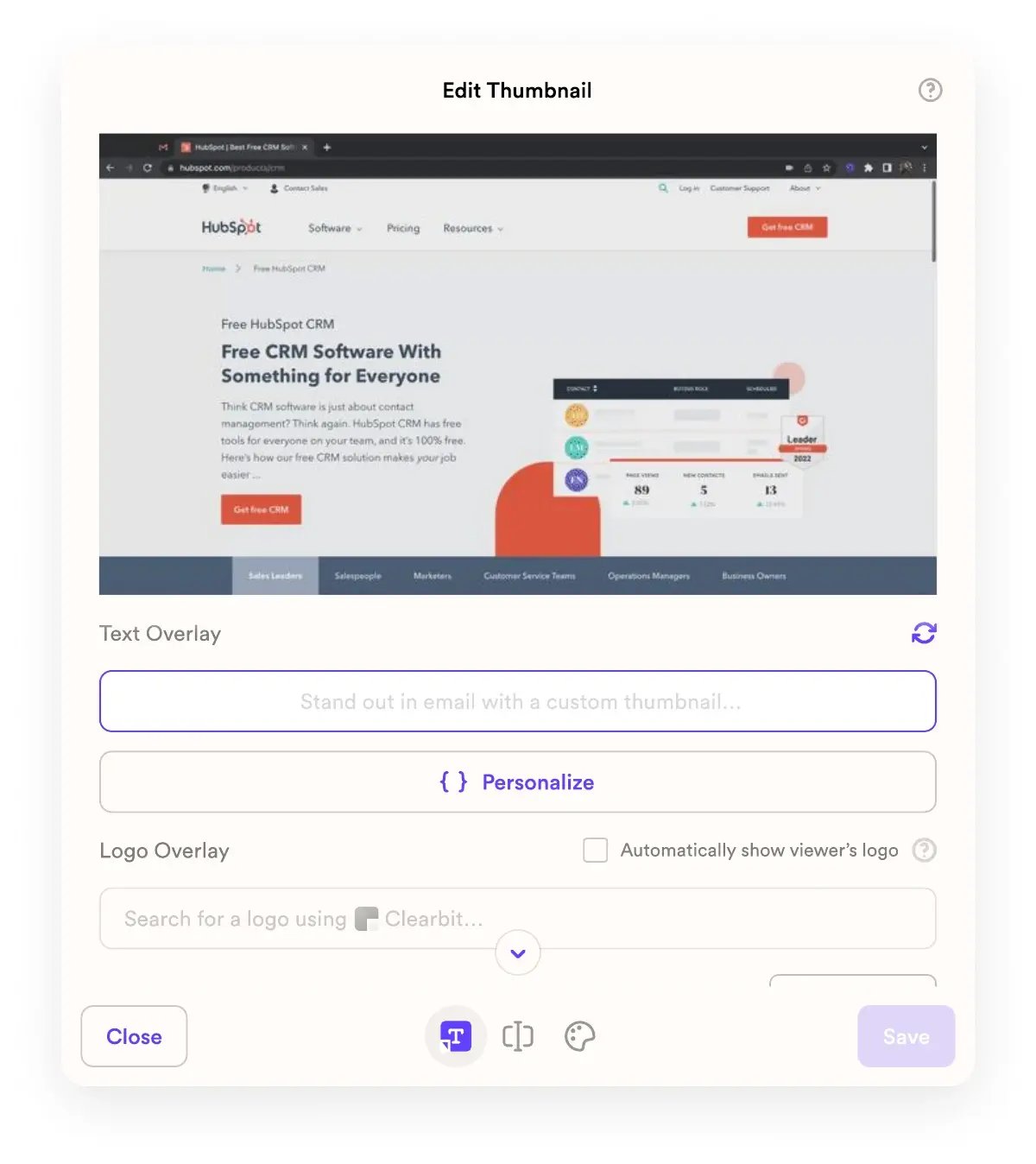
If your outreach already runs through a sequencing or CRM tool, the setup connects directly into that workflow. See our walkthrough on dynamic video CTAs for scalable outreach for how the personalized thumbnail and the call-to-action inside the video work together, and check out Sendspark’s video email platform for the full feature set behind sending personalized video directly through your existing email tool.
Best Practices for Thumbnail Personalization at Scale
The highest-performing dynamic thumbnails combine at least two personalization layers, such as a name plus a website screenshot, while staying legible at the small size most email clients render thumbnails. Personalization that’s too subtle to notice at a glance doesn’t earn the click; personalization that’s cluttered doesn’t either.
For general thumbnail design principles that apply beyond the email use case, see our guide on why thumbnails matter for video engagement. Keep the personalized element large enough to read at thumbnail size. A prospect’s company name in 10-point font buried in a corner won’t register in the half-second someone spends scanning an inbox. Test animated thumbnails against static ones for your specific audience; an animated GIF preview can outperform a static image for engagement-driven audiences, but some email clients render GIF previews inconsistently, so verify rendering across Gmail, Outlook, and Apple Mail before rolling a GIF thumbnail out broadly. Refresh your base video template on a regular cadence. A dynamic thumbnail is only as strong as the base recording behind it, and a base video that feels dated undercuts even well-executed personalization.
Common mistake
Don’t personalize past the point of usefulness. Stacking five or six dynamic fields onto one thumbnail (name, company, city, job title, industry, and a stat) tends to read as automated rather than personal, and can come across as invasive. Two to three well-chosen fields, like name and company website, land better than an information-dense preview that signals “this was generated by a script,” which is exactly what you’re trying to avoid.
Finally, keep your calibration in check as you scale. Our guide on avoiding over-personalization in video outreach covers where that line sits in more detail, and it’s worth reviewing before you push a new thumbnail template to your full list.
Video Email Thumbnails vs. Other Personalization Tactics
Dynamic video thumbnails sit in the middle of the personalization-effort spectrum: more distinctive than a merge-tag greeting, but far less time-intensive than recording a fully custom video per prospect. The table below compares where each common tactic lands on setup effort, personalization depth, and the metric that actually reflects its performance.
| Tactic | Setup Effort | Personalization Depth | Best Metric to Track |
|---|---|---|---|
| Name-only merge tag in subject line | Low | Shallow | Open rate (limited value post-MPP) |
| Static personalized image | Low-Medium | Moderate | Click-through rate |
| AI-generated dynamic video thumbnail | Medium (one-time setup) | Deep | Click-to-open rate, watch-through rate |
| AI avatar or synthetic video | Medium | Deep, less authentic | Reply-rate attribution |
| Fully custom 1:1 recorded video | Very High | Deepest, doesn’t scale | Reply-rate attribution |
For most B2B teams sending meaningful volume, the dynamic thumbnail tier is the sweet spot: it keeps the one-to-one feel that drives replies without the linear time cost of recording a unique video for every account. For a broader look at the toolset in this space, see our roundup of top tools for personalizing sales videos, and if you’re evaluating a video email platform for the first time, our complete guide to video email platforms for sales teams covers the full buying criteria.
Frequently Asked Questions
What is a dynamic video thumbnail in email?
A dynamic video thumbnail is an AI-generated preview image, shown before a recipient clicks a video link in an email, that automatically swaps in recipient-specific details like a name, company logo, or website screenshot. It’s generated at send time from a single base video, so no manual design work happens per prospect.
Do video thumbnails actually increase email click-through rates?
Yes. Adding a personalized video thumbnail to a cold email can increase click-through rates by up to 7x compared to a plain text link, and personalized video outreach overall commonly lifts reply rates from around 3.43% to the 8-12% range.
Why don’t open rates matter as much for measuring thumbnail performance anymore?
Apple Mail Privacy Protection pre-fetches tracking pixels for a large share of recipients before they ever see the message, which inflates open rates by several percentage points regardless of real engagement. Click-to-open rate, reply-rate attribution, and video watch-through rate are more reliable signals in 2026 because pre-fetching can’t fake a click or a reply.
How do you create a personalized video thumbnail for cold email?
Record one base video, connect a data source such as your CRM or a CSV with recipient fields, and use a platform like Sendspark to automatically generate a unique thumbnail and video variant for each contact. The setup happens once; the personalization scales automatically after that.
What is click-to-open rate (CTOR) and why does it matter for video email thumbnails?
Click-to-open rate measures the percentage of people who clicked your video link among those who genuinely opened the email, which isolates whether the thumbnail itself is compelling rather than just measuring inflated opens. It’s a cleaner signal than raw open rate for judging whether a specific thumbnail variant is working.
Can dynamic thumbnails hurt email deliverability?
The thumbnail itself doesn’t hurt deliverability, but the volume and authentication practices around personalized video campaigns can. Gmail and Yahoo’s bulk sender requirements, enforced since November 2025, require SPF, DKIM, and DMARC authentication and a spam complaint rate under 0.3%, so any thumbnail personalization rollout should be paired with a deliverability check.
What’s the difference between a static and animated video email thumbnail?
A static thumbnail is a single personalized image, while an animated thumbnail (usually a short GIF) shows brief motion to draw more attention in the inbox. Animated thumbnails can outperform static ones for click-through rate, but they render inconsistently across some email clients, so test across Gmail, Outlook, and Apple Mail before scaling one broadly.
Sources & References
- AiSDR — “Personalized video outreach can lift reply rates from a 3.43% average to 8-12%, and video thumbnails can increase click-through rates by up to 7x over text-only links” (2026)
- Sender.net — “Apple Mail Privacy Protection pre-fetches tracking pixels for Apple Mail users with Protect Mail Activity enabled, registering opens regardless of real engagement” (2026)
- beehiiv — “Average open rates rose by roughly four percentage points across email programs following MPP’s rollout due to automated pre-fetching, not increased engagement” (2026)
- Google Workspace Admin Help — “Bulk senders must authenticate with SPF, DKIM, and DMARC and maintain spam complaint rates below 0.3%, fully enforced since November 2025” (2026)
- HubSpot — CRM platform reference for connecting recipient data feeds to personalized video and thumbnail workflows (2026)
Record One Video. AI Personalizes Thousands.
Sendspark is the AI video personalization platform for B2B sales. Record once, and AI voice cloning generates thousands of individually personalized videos with dynamic backgrounds and personalized thumbnails — each prospect hears their name, sees their website, in your voice. Sales teams see 2-3x more replies.
Get Started NowTopics: blog