Want to boost your sales outreach? Personalized video can do just that.
Here’s why:
- Higher Engagement: Emails with personalized videos get 16x more opens, 4.5x more clicks, and up to 300% higher click-through rates.
- Improved Response Rates: Sales teams report an 85% increase in replies and 6x higher engagement.
- Efficiency: AI tools like Sendspark let you create thousands of customized videos from one recording, saving hours of work.
The challenge? Scaling personalized video production without overwhelming your team. This guide explains how tools like Sendspark solve that problem with features like AI voice cloning, dynamic backgrounds, and CRM integrations. By automating personalization, you can connect with prospects at scale while keeping the human touch intact.
Let’s break it down: how personalized video transforms sales, common hurdles, and how to make it work for your team.
How to Make AI Personalized Videos at Scale (2 Min Demo)
sbb-itb-afd3f9e
How Sendspark Handles Video Personalization
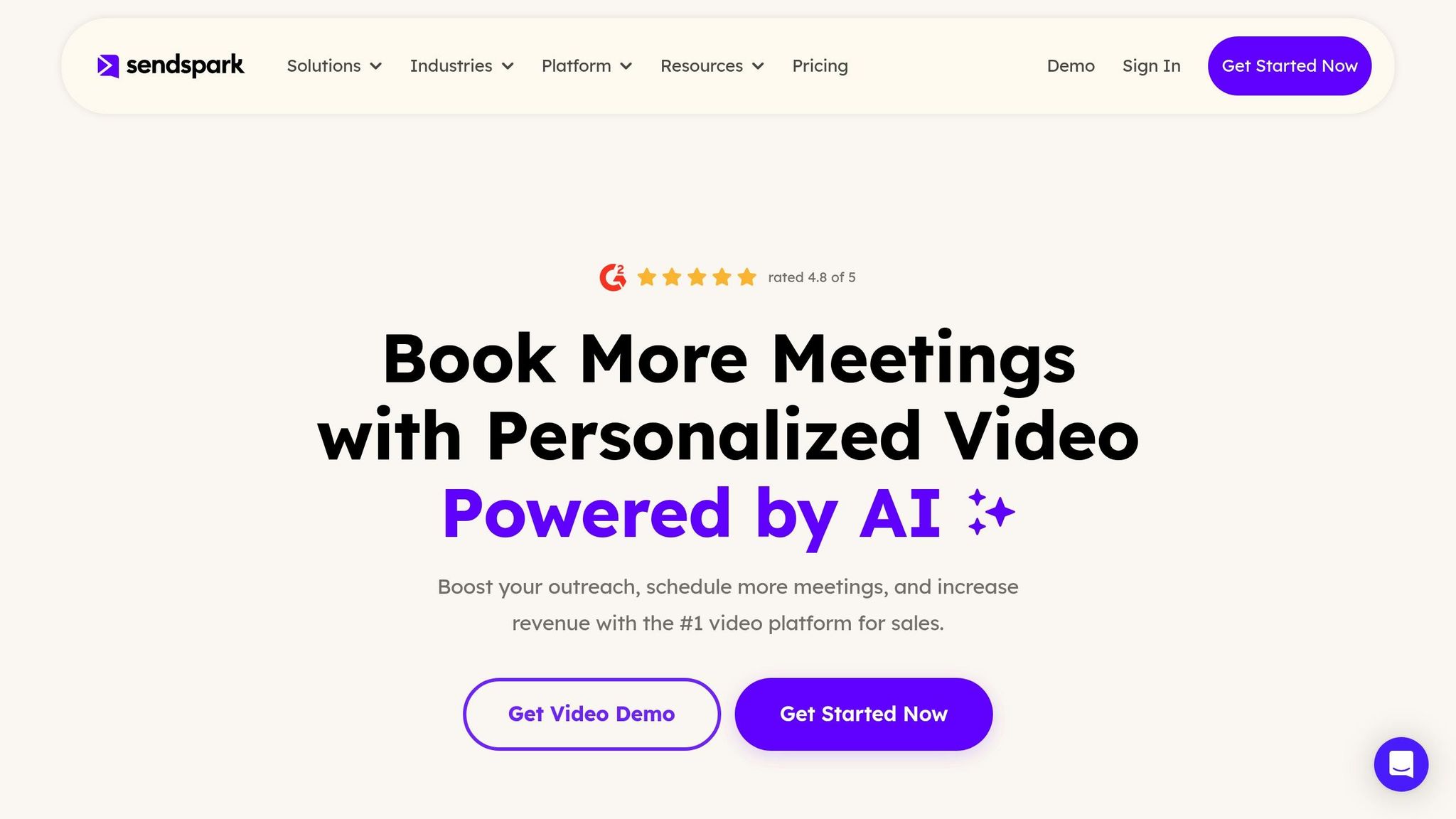
Sendspark operates on a straightforward principle: record once, personalize infinitely. By leveraging AI, it transforms a single video recording into thousands of personalized versions. This is achieved through features like AI-powered voice cloning, dynamic backgrounds, and automated workflows.
Here’s how it works: you record a video using a placeholder word - say “watermelon” - instead of the recipient’s name. Sendspark’s AI then swaps out the placeholder with the actual names of your prospects. For example, “Hey watermelon” becomes “Hey Bob” for one viewer and “Hey Sarah” for another. The voice cloning technology ensures the audio sounds natural because it uses your voice, avoiding the robotic tone of generic text-to-speech systems.
Dynamic backgrounds take personalization a step further by automatically displaying visuals like the recipient’s website or LinkedIn profile in the background of your video. Combining personalized AI video with authentic user-generated video content gives you the best of both worlds: scale from AI personalization and trust from real customer proof.
For teams balancing personalization with efficiency, Sendspark’s Combine Videos feature allows you to pair a short personalized intro with a longer pre-recorded demo or pitch. Each video is delivered on a personalized landing page that updates dynamically with the recipient’s name, company logo, and a clear call-to-action - such as an embedded calendar for easy scheduling.
Learn more about personalized dynamic videos.
Sendspark integrates seamlessly with popular tools like HubSpot, Salesforce, Outreach, SalesLoft, and Smartlead. Whether you import contacts via CSV or API, the platform generates personalized videos in bulk. Real-time analytics provide insights into viewer behavior, such as watch time and actions taken, so you can follow up at just the right moment. With an impressive 4.8 out of 5-star rating on G2 from 350+ reviews, Sendspark is celebrated for combining AI-driven efficiency with a personal touch.
Main Features of Sendspark for Sales Teams
Sendspark’s features are designed to simplify video personalization while maintaining a personal feel. At its core is AI-powered voice cloning, which allows you to record a single video with a placeholder word. The AI then replaces the placeholder with each prospect’s name, creating thousands of personalized videos automatically.
Dynamic video backgrounds further enhance this experience by overlaying visuals like a prospect’s website or LinkedIn profile, complete with simulated scrolling and mouse movements. This creates the illusion of a one-on-one video interaction without requiring manual editing.
The Combine Videos feature is another time-saver. You can record a short, personalized greeting - mentioning the recipient’s name or company - and attach it to a longer demo or product pitch. This approach delivers a tailored experience without the need for repeated recordings.
Every video is hosted on a personalized landing page that includes the recipient’s name, company logo, and branding. These pages can also feature embedded calendars for instant meeting bookings. Personalized thumbnails with animated GIFs and text overlays like “Hi [Name]” help grab attention in crowded email inboxes.
Detailed analytics track key metrics like who watched your video, how much they viewed, and what actions they took. This data syncs directly with CRMs like HubSpot and Salesforce, as well as sales engagement tools like Outreach and SalesLoft, making it easy to integrate video into your existing workflows.
“I’m confident I’ve found the best video prospecting tool, and it’s Sendspark. Welcome to the world where AI meets video.”
- William Padilla, Account Executive, GRIN
How Sendspark Addresses the Scaling Problem
Sendspark tackles the challenge of scaling personalized videos by automating the entire process. Instead of recording individual videos for each prospect - a time-consuming and exhausting task - you can record one base video and let Sendspark handle the rest. By using a CSV file or API to upload contact details, the platform generates thousands of personalized videos in minutes.
For example, in December 2025, Warmly used Sendspark’s dynamic video features for a campaign targeting “closed-lost” opportunities. By incorporating AI-generated personalized videos, they saw a 2–3× increase in email engagement and closed over $100,000 in annual recurring revenue (ARR) within a single month. These results highlight the effectiveness of personalized video in driving meaningful outcomes.
Sendspark’s integrations with tools like Outreach and SalesLoft make it easy to automate video delivery within your existing communication sequences. Once a Sendspark snippet is added to a cadence, the video automatically updates for each contact, removing the need for manual adjustments.
For teams using enrichment tools like Clay, Sendspark can pull real-time data - such as recent funding announcements, job changes, or company milestones - into your videos. Backup URLs for dynamic backgrounds ensure your videos always look polished, even if specific website data isn’t available.
“Using Sendspark transformed our customer success approach. We built a library of pre-recorded answers, allowing our team to quickly respond to common customer questions with personalized videos.”
- Dan Vermont, Head of Operations, Brikl
With Sendspark, you get the best of both worlds: the warmth of personalized video communication and the efficiency of automation. It’s a solution that saves time while maintaining the human connection critical to successful outreach.
How to Create Personalized Videos at Scale
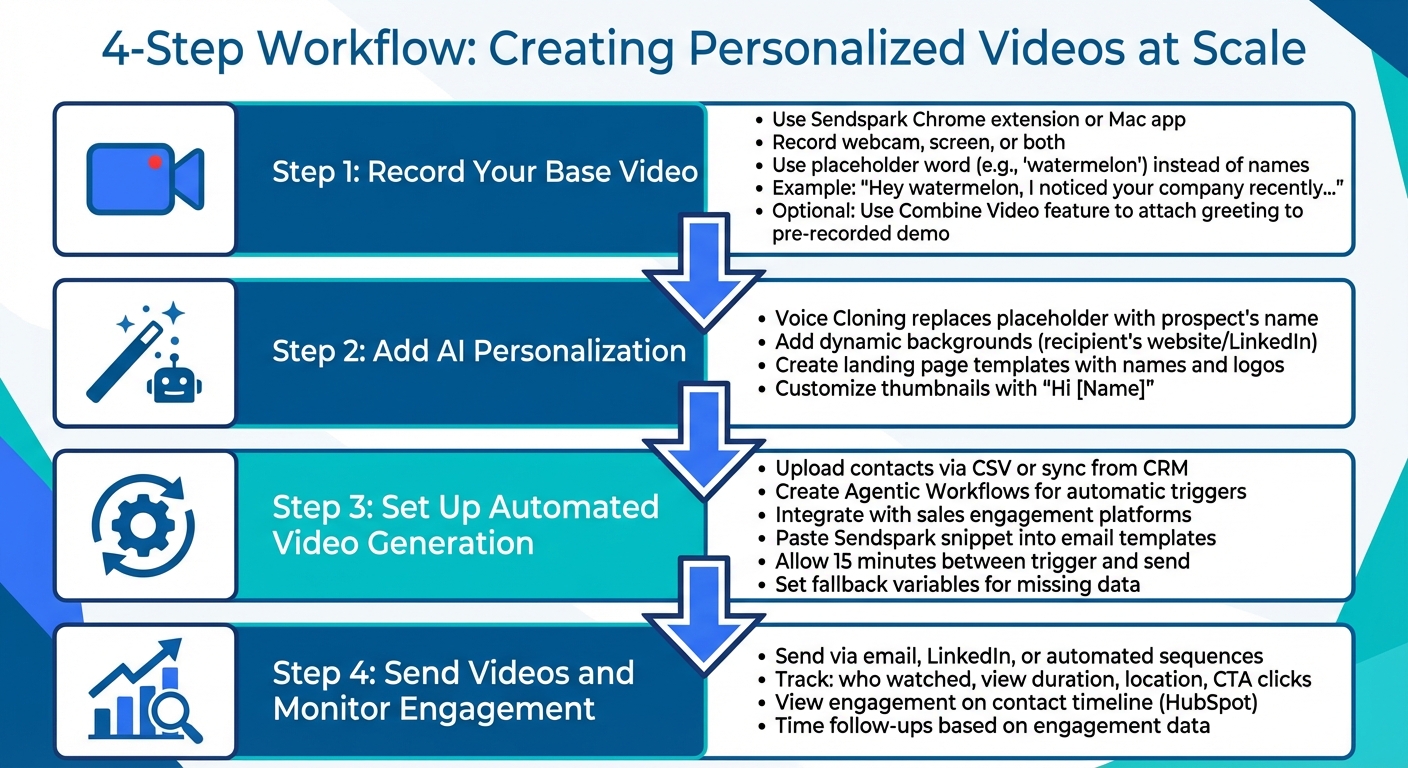
4-Step Process for Creating Personalized Videos at Scale
AI-driven personalization has made it easier than ever to create scalable video outreach while keeping that all-important personal touch. The process revolves around a simple idea: record one core video and let AI handle the rest. This way, you avoid the hassle of making individual videos for each prospect, yet still deliver engaging, customized content.
Step 1: Record Your Base Video
Start by creating a single foundational video with the Sendspark Chrome extension or Mac app. You can record yourself on webcam, capture your screen, or combine both. When referencing recipient-specific details, use a placeholder word - like “watermelon” - instead of a name or company.
For example, say: “Hey watermelon, I noticed your company recently…” instead of “Hey Sarah, I noticed your company recently…”. This placeholder will later be swapped out by AI with each recipient’s actual name. This base video becomes your go-to starting point, letting you scale outreach without constantly re-recording. You can even use Sendspark’s Combine Video feature to attach a personalized greeting to a pre-recorded demo, saving time while keeping things personal.
Step 2: Add AI Personalization
After recording your base video, use Sendspark’s AI tools to customize it for each recipient. With Voice Cloning, the placeholder word - like “watermelon” - is replaced seamlessly with the prospect’s name.
Take it a step further by adding dynamic backgrounds that overlay visuals tailored to the recipient. Create landing page templates that automatically insert names and company logos. You can also customize video thumbnails with text or logos, such as “Hi [Name]”, to grab attention in crowded inboxes. Once your personalized video is ready, it’s time to automate its delivery.
Step 3: Set Up Automated Video Generation
Upload your contact list via a CSV file, or sync it directly from your CRM. For a hands-off approach, create Agentic Workflows that automatically trigger video generation based on specific actions - like when a lead fills out a form, qualifies in your CRM, or visits your website. This automation ensures your outreach is consistent while reducing manual work.
Integrate Sendspark with your sales engagement platform. Simply paste a Sendspark video placeholder snippet into your email template, and the system will handle the rest. It generates and inserts the correct personalized video for each prospect in your sequence. Allow about 15 minutes between the trigger and the email being sent to give the system time to generate the video. Don’t forget to set fallback variables (e.g., using “there” if a name is missing) to maintain a polished, professional tone.
Step 4: Send Videos and Monitor Engagement
Send your personalized videos through email templates, LinkedIn messages, or automated sequences. Then, track their performance using Sendspark’s analytics dashboard. You’ll see who watched your video, how much they viewed, where they’re located, and whether they clicked your call-to-action. If you’re using HubSpot, you can even add tracking codes to see video engagement directly on a contact’s timeline.
This data helps you time your follow-ups perfectly with prospects who show interest. By combining personalization with real-time engagement insights, videos shift from being a one-way message to becoming an interactive sales tool.
Connecting Sendspark to Your Sales Tools
Sendspark makes it easy to embed personalized videos into your existing sales process by integrating with CRMs, sales engagement platforms, and data tools. These integrations allow video to become an automated part of your workflow, saving time and keeping everything aligned.
CRM Connections for Data Syncing
Sendspark works seamlessly with HubSpot and Salesforce, enabling you to record, share, and track videos directly within your CRM. By adding a tracking code to Sendspark, you can sync video engagement data - like views, heatmaps, and watch percentages - straight to contact timelines in HubSpot. This lets you see when a prospect watched your video alongside their other activities.
The integration also pulls contact details like , , and from your CRM to populate video variables and thumbnails. With the Sendspark Chrome Extension, you can record and add videos to Gmail or Outlook while keeping your CRM data updated. To avoid awkward blanks, configure fallback variables - for instance, if “First Name” is missing, the video can use a generic term like “there”.
Once your CRM is set up, you can incorporate these videos into your sales engagement platforms to scale your outreach.
Sales Engagement Platforms for Outreach at Scale
Platforms like Outreach, Salesloft, and Apollo work with Sendspark to personalize videos for every recipient in your email sequences. Sendspark provides a “Share with Personalization” snippet, which you can paste into email templates. When automating workflows, include a short delay between lead enrollment and the first email to give the system time to generate personalized videos.
“Sendspark videos are added as thumbnails with ‘play’ buttons; not fully embedded videos. This means deliverability is not negatively effected.” - Sendspark
To ensure everything runs smoothly, double-check that the “email” field is mapped correctly between your sales platform and Sendspark. Sendspark’s Agentic Workflows can even trigger video creation based on specific events, like a lead enrolling in a sequence or filling out a form.
To take personalization even further, consider using data tools to add dynamic elements to your videos.
Using Data Tools for Dynamic Personalization
Clay is a key data tool that integrates with Sendspark to automate highly personalized video creation. By mapping Clay columns - like First Name, Company, or Role - to Sendspark placeholders, you can trigger AI voice cloning and text overlays. Clay also supports “Background URL” fields (such as a prospect’s website or LinkedIn), which Sendspark uses to generate custom screen-share backgrounds.
When Clay’s “Add Prospect To Video Campaign” feature is paired with Sendspark, it automates video creation and returns links, embed codes, and thumbnail URLs directly to your Clay table. In 2024, Content Marketing Media used this integration to map lead data from Clay to Sendspark’s AI video templates, achieving a 50% increase in meetings booked and a 45% higher reply rate. This workflow fully automated video generation while maintaining a personal touch for thousands of prospects.
“Combine Clay’s lead data with Sendspark’s AI-powered dynamic video personalization to make every outreach feel truly one-to-one - without the manual work.” - Sendspark
Conclusion: Getting the Most from Personalized Video
Scaling personalized video outreach is about working smarter, not harder. With tools like Sendspark, sales teams can record a single video and rely on AI to handle the personalization - delivering content that feels one-on-one to thousands of prospects. Features like AI-powered voice cloning, dynamic video backgrounds, and automated workflows make it possible to maintain a personal touch without sacrificing efficiency.
The numbers speak for themselves: personalized videos lead to much higher engagement and conversion rates. In fact, one customer reported generating over $100,000 in ARR in just one month using Sendspark.
A streamlined workflow is key to achieving this kind of success. By integrating Sendspark with your CRM, sales engagement platform, and data tools, video outreach becomes a natural part of your process. Not only can your team save over 10 hours per campaign, but your prospects also receive content that feels custom-made for them. Everything - from recording the initial video to syncing with your tools - works together to support a scalable, personalized strategy.
To make the most of these advantages, stick to a clear plan. Start by recording a base video, use AI for personalization, connect with your tools, and track engagement. The results will show why sales teams are shifting from text-based outreach to personalized video on a larger scale.
FAQs
How do I keep AI-personalized videos sounding natural?
Creating a natural feel in AI-personalized videos starts with high-quality audio and a well-thought-out script. Here’s how you can achieve that:
- Invest in a good microphone: Clear audio is essential. A quality mic ensures your voice sounds crisp and professional.
- Minimize background noise: Record in a quiet environment to avoid distractions or interference in the audio.
- Pace your speech naturally: Speak at a steady, conversational pace - neither too fast nor too slow.
A small but effective trick is to begin with a friendly phrase like “Hi there” and pause slightly before saying the recipient’s name. This helps the AI mimic your voice more convincingly. Combine this with a conversational tone and clear delivery to make your videos feel engaging and relatable.
What data do I need to generate videos in bulk?
To produce videos in bulk, you’ll need specific recipient data like names, company names, or other personalized details. These details act as dynamic variables or placeholders, allowing you to tailor content efficiently and on a larger scale.
How do I prevent blank names or broken backgrounds?
When creating personalized videos, double-check that all dynamic fields - like recipient names or background elements - are populated with valid data before generating the final video. Blank names or broken backgrounds can ruin the viewer’s experience. To prevent this, test your videos with sample data to identify and fix any issues early on. Additionally, use AI tools thoughtfully to ensure placeholders are replaced accurately and backgrounds appear as intended, preserving both the quality and personalization of your videos.
Related Blog Posts
- Top Tools for Personalizing Sales Videos in 2026
- How AI Personalization Boosts Social Video Impact
- Video Messaging for Business: Stand Out in Sales Outreach
- Personalized Video Feedback: How to Create Custom Videos at Scale
Topics: blog