Published October 2026
Your sales team closed the business case. The champion is bought in. Then the deal goes quiet for three weeks because someone in IT you’ve never spoken with is reading a spreadsheet about your SOC 2 report. A security review is now a standard late-stage gate in most B2B SaaS deals, and it has almost nothing to do with how good your product is. Sixty-five percent of B2B buyers now require proof of security compliance before they’ll sign a contract, and 41% of companies say missing documentation is what actually delays their deals, according to Secure.com’s 2026 SaaS compliance benchmark. This guide covers what a security review actually is, why it stalls deals that should already be won, and a six-step framework for getting through procurement without losing momentum — including a video-personalization tactic most sales teams aren’t using yet.
Key Takeaways
- 65% of B2B buyers now require proof of security compliance before signing a contract, and 41% say missing documentation actively delays their sales cycles.
- A security review is not the same document as an RFP — RFPs compare vendors on capability and price, security questionnaires evaluate risk, and conflating the two slows both down.
- Treat the security or IT reviewer as a distinct stakeholder, not an afterthought — looping them in late is the single biggest reason reviews stall a deal already in motion.
- A pre-built trust packet turns a multi-week review into a faster approval, because vague answers (not the review itself) are what trigger the follow-up requests that eat the calendar.
- Per-recipient video analytics let a rep see whether the security reviewer actually opened the trust packet, instead of guessing why a deal went quiet.
What Is a Security Review in B2B SaaS Sales?
A security review is a buyer’s formal evaluation of a vendor’s data handling, infrastructure, and compliance controls, run by the buyer’s IT or security team in parallel with contract negotiation rather than as part of the sales pitch. It’s the stage where a deal that’s already “won” on paper can still stall for weeks, because the person evaluating you has never spoken to your rep and doesn’t share the champion’s urgency to close — the same deal-progression risk covered in Sendspark’s deal progression solutions.
Sales teams often lump a security review together with two other procurement documents, and that confusion costs time. A security review is a risk-focused audit of your actual controls. A security questionnaire is a standard intake form — often built on a template like SIG or CAIQ — that gathers baseline security data to kick off that audit. An RFP (request for proposal) is a competitive, business-focused comparison of price, features, and fit, and it typically runs earlier in the deal, well before security gets involved. Our guide to the RFP response process covers that earlier stage in detail, and our AI video vendor security checklist covers the questions a buying committee should ask when evaluating an AI video vendor specifically — this guide covers the mirror image, how your own sales team gets through that same kind of review as the vendor being evaluated.
| Artifact | Primary Goal | Typical Timing | Who Owns It | Typical Output |
|---|---|---|---|---|
| RFP | Compare vendors on price, features, fit | Early-to-mid deal, before shortlisting | Procurement, business stakeholders | Vendor scorecard, shortlist |
| Security Questionnaire | Collect baseline security data | Mid-deal, once a vendor is shortlisted | Security or compliance team | Completed SIG/CAIQ-style form |
| Security Review | Verify actual controls and risk posture | Late-deal, alongside contract terms | Security, risk, or legal team | Approval, remediation request, or rejection |
Treat the security review as a parallel track that starts the moment a prospect becomes a serious opportunity, not a box to check after the contract is drafted. A strategic account plan that names the security reviewer as a stakeholder from day one is what keeps this stage from becoming a surprise.
Why Security Reviews Stall B2B Deals
Security reviews stall deals because the person running them has no relationship with your rep, answers to a different set of priorities than the economic buyer, and treats a slow or vague response as a red flag rather than noise. Buyer caution is rising fast: 80% of mid-market SaaS RFPs now demand a SOC 2 Type II report before a vendor is even considered, up from a requirement once reserved for enterprise deals, according to Docket’s 2026 AI procurement research.
The numbers explain why buyers have gotten stricter. The average global cost of a data breach is $4.44 million, and 55% of companies report having experienced a SaaS security incident of some kind, per Secure.com’s compliance data. Buyers aren’t asking security questions to be difficult — they’re pricing in a real, expensive risk. That’s also why 41% of companies say missing continuous compliance documentation is what actively delays their deals: the review itself isn’t the bottleneck, the scramble to produce evidence on request is.
“Teams check the SOC 2 box and think they’re done. They never ask the hard follow-up questions about the architecture of the AI.”
— Arjun Pillai, CEO of Docket
Pillai’s point matters even more for an AI video personalization platform like Sendspark, where a reviewer’s questions go beyond a standard SOC 2 checklist into how AI voice cloning handles voiceprint data, and how dynamic backgrounds pull in a prospect’s own website. A vendor that can only point to a certificate, without being able to explain the actual data flow behind it, gives a security reviewer every reason to open a follow-up thread instead of closing the file.
Common mistake
Assuming a SOC 2 badge alone satisfies a security review. 72% of S&P 500 companies now flag AI specifically as a material risk in public disclosures, so a reviewer evaluating an AI vendor will ask AI-specific questions a generic certification doesn’t answer.
A 6-Step Framework to Pass a Security Review Without Losing Momentum
Passing a security review without losing deal momentum comes down to preparing the evidence before it’s requested, naming a real stakeholder early, and giving the reviewer a reason to respond quickly. The six steps below move the process from something that happens to your deal to something your team runs on its own timeline.
Step 1: Build the Trust Packet Before You Need It
Don’t wait for a prospect to ask for documents one at a time. Assemble a standing trust packet — your SOC 2 report, privacy policy, data processing agreement, sub-processor list, and incident response summary — so you can hand over everything a reviewer needs in one message instead of a week of back-and-forth email requests.
Step 2: Identify the Reviewer as a Named Stakeholder Early
Find out who actually runs the security review before you’re in the middle of it, the same way multi-threading a deal means mapping every stakeholder instead of just the champion. A named reviewer with a direct line to your team moves faster than a shared security@ inbox that routes to whoever’s free.
Step 3: Maintain a Self-Serve Trust Center
Sendspark’s own Trust Center at security.sendspark.com is the model worth copying: a current SOC 2 Type 2 report (Security Trust Services Criteria, covering August 2025 through July 2026, issued by Thoropass Assurance with no exceptions noted) across 62 listed controls, available on request under NDA. A reviewer who can self-serve the basics doesn’t need to open a ticket just to confirm you have a report at all — see our SOC 2 Type 2 announcement for the full detail.
Record One Video. AI Personalizes Thousands.
Sendspark is the AI video personalization platform for B2B sales. Record once, and AI voice cloning generates thousands of individually personalized videos with dynamic backgrounds and personalized thumbnails — each prospect hears their name, sees their website, in your voice. Sales teams see 2-3x more replies.
Get Started NowStep 4: Personalize the Handoff to the Reviewer
A generic email with four PDFs attached reads like every other vendor’s security packet. Record one short video once, and let AI voice cloning personalize the greeting so the reviewer hears their own name and company instead of “Dear Security Team” — the same record-once, personalize-at-scale mechanism used for mutual action plan check-ins. Dynamic backgrounds can show the reviewer’s own company website behind you as you walk through the trust packet, which signals you did your homework instead of mass-blasting a template. See our guide to personalized video email for the setup mechanics.
Pro tip
Keep the video under 90 seconds and lead with the one thing the reviewer cares about — where to find the SOC 2 report — before anything else. A reviewer skimming between a dozen vendor reviews won’t sit through a sales pitch.
Step 5: Track Engagement With Per-Recipient Video Analytics
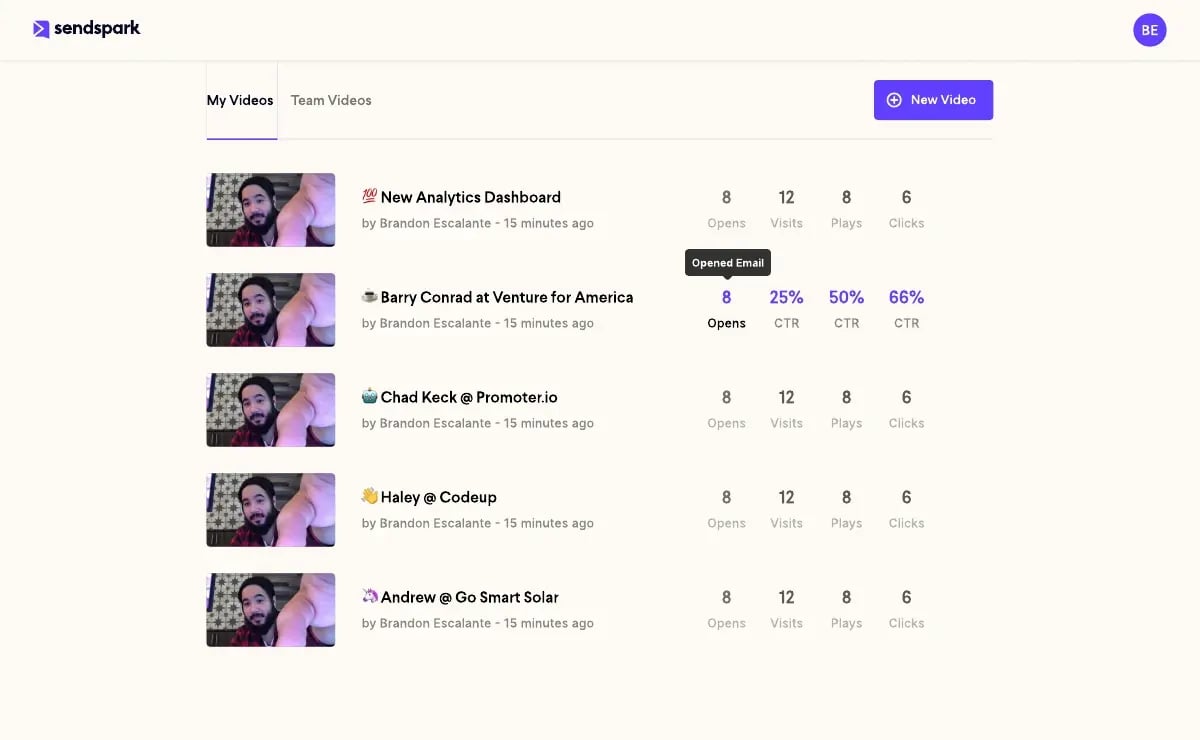
Don’t guess why a security review has gone quiet. Sendspark’s video analytics show whether the reviewer opened the video, how much of it they watched, and whether they clicked through to the trust packet — a concrete signal your sales team can act on instead of sending a third “just checking in” email into the void.
Step 6: Set a Mutual Timeline With an Escalation Path
Agree on dates for document delivery, reviewer feedback, and a decision — the same discipline behind a mutual action plan — so a stalled review has an obvious next step instead of drifting. If a reviewer goes silent past the agreed date, your named internal contact (not the rep) should be the one to escalate, since a rep chasing a security team directly can read as pressure rather than process.
DIY Checklist vs. Dedicated Trust Center Software vs. a Video-Personalized Handoff
A DIY shared drive is the cheapest way to pass a security review and the slowest at scale; dedicated trust center software like Vanta, Drata, SafeBase, Conveyor, or Whistic automates document freshness and self-serve access; and a short personalized video layered on top of either one adds a human handoff that a static document repository can’t. These three approaches aren’t competing — most growing B2B SaaS teams end up running the first two together, with video added for deals that matter most.
| Approach | Setup Cost | Speed at Scale | Best Fit |
|---|---|---|---|
| DIY shared drive + email | Low | Slow — manual updates, no self-serve | Early-stage teams with few enterprise deals |
| Dedicated trust center software | Medium-high (subscription) | Fast — always-current, self-serve | Mid-market teams running multiple reviews per quarter |
| Video-personalized handoff | Low (add-on to existing process) | Fast — one recording, personalized per reviewer | Any deal where the reviewer relationship, not just the documents, affects the timeline |
None of these tools answer a security questionnaire for you — a reviewer still needs a human to confirm your controls match what’s written. What changes is how much of the back-and-forth happens by email versus how much is resolved the moment the reviewer opens your trust packet.
Common Mistakes That Slow Down Security Reviews
Most security review delays trace back to four avoidable habits: treating the review like a generic vendor form, answering vaguely, routing requests to no one in particular, and starting the process too late to matter. Each one is fixable with a small process change, not a bigger compliance team.
Mistake 1: Treating It Like a Generic Vendor Evaluation
A reviewer evaluating an AI video personalization platform asks different questions than one evaluating a project management tool — voiceprint retention, dynamic background data sourcing, and where personalized video is hosted are all fair game. Fix: prep answers specific to what your product actually does with data, not a generic SaaS script.
Mistake 2: Vague Answers That Trigger Follow-Ups
A vague answer like “we take security seriously” reads as a non-answer to a trained reviewer, and a single follow-up request can add roughly a week to a review simply by forcing another round-trip through two calendars. Fix: answer with the specific control, policy, or document link every time, even if the honest answer is “not yet, here’s our remediation date.”
Mistake 3: No Named Point of Contact
Routing a security review to a shared inbox guarantees it sits unanswered the first time a question needs a human judgment call instead of a copy-pasted document. Fix: assign one named owner per deal, the same way a strategic account plan assigns an owner to every other deal milestone.
Mistake 4: Starting the Review Too Late in the Cycle
Waiting until a contract is drafted to loop in security compresses weeks of review into days a legal team won’t tolerate, and it’s often the reason a deal that was “about to close” slips a quarter. Fix: flag every opportunity likely to need a security review the moment it’s qualified, not after the demo.
| Mistake | Why It Slows the Deal | Fix |
|---|---|---|
| Generic vendor evaluation answers | Misses the product-specific questions a reviewer actually asks | Prepare answers specific to your actual data flows |
| Vague answers | Each one triggers a follow-up round-trip | Answer with a specific control, policy, or link every time |
| No named point of contact | Requests stall in a shared inbox | Assign one named owner per deal |
| Late start | Compresses the review into an unrealistic window | Flag the review requirement at qualification, not at contract draft |
Frequently Asked Questions
What is a security review in B2B SaaS sales?
A security review is a buyer’s formal evaluation of a vendor’s data handling, infrastructure, and compliance controls before contract signing. It runs separately from the sales pitch, usually owned by the buyer’s IT or security team rather than procurement.
How long does a vendor security review take?
There’s no fixed timeline — it depends on how ready your trust packet is. A single vague answer can add roughly a week to a review by triggering a follow-up request, so a vendor with a pre-built SOC 2 report and trust center moves through far faster than one assembling documents on request.
What’s the difference between a security questionnaire and an RFP?
A security questionnaire evaluates risk and security controls, often using a standard format like SIG or CAIQ. An RFP compares vendors on price, features, and fit, and typically runs earlier in the deal. Confusing the two means answering the wrong level of detail at the wrong stage.
Who should own the security review process on the sales side?
The account executive should own deal momentum, but a named security or compliance lead should own technical accuracy. Without a named owner on both sides, requests get routed to a generic inbox and the review stalls.
What is a vendor trust center?
A trust center is a dedicated, often self-serve webpage where a vendor hosts security documentation like SOC 2 reports, a privacy policy, and a sub-processor list. It lets a reviewer find answers to common questions without emailing your team and waiting.
Can AI help answer security questionnaires faster?
AI can draft first-pass answers to repetitive questionnaire fields and flag missing documents, cutting manual busywork. It can’t replace a human confirming your actual controls match what’s written, since an inaccurate answer is worse than a slow one.
Does Sendspark publish a SOC 2 report?
Yes. Sendspark holds a current SOC 2 Type 2 report (Security Trust Services Criteria, covering August 2025 to July 2026, issued by Thoropass Assurance with no exceptions noted) across 62 listed controls, available to request through its Trust Center.
Sources & References
- Secure.com — “65% of buyers now ask for compliance proof before signing contracts” and “41% of companies report that missing continuous compliance documentation actively delays their sales cycles” (2026)
- Conveyor — Framework distinguishing security questionnaires from RFPs by purpose, timing, and content (2025)
- Docket — “80% of mid-market SaaS RFPs now demand SOC 2 Type II” and “72% of S&P 500 companies now flag AI as a material risk in public disclosures” (2026)
- TechWise Group — “An evidence-first security model is how you pass vendor security reviews faster” and the cost of vague answers triggering follow-up requests (2026)
Record One Video. AI Personalizes Thousands.
Sendspark is the AI video personalization platform for B2B sales. Record once, and AI voice cloning generates thousands of individually personalized videos with dynamic backgrounds and personalized thumbnails — each prospect hears their name, sees their website, in your voice. Sales teams see 2-3x more replies.
Get Started Now