Video ROI in sales is all about proving how video content drives revenue, speeds up deal cycles, and saves time for sales teams. While only 43.8% of sales teams currently use video in prospecting, those who do report impressive results, like a 43% increase in demo bookings and deals closing 30–50% faster when video is used.
Here’s what matters most when measuring video ROI:
- Pipeline Metrics: Track lead-to-opportunity conversion, deal velocity, and demo bookings. For example, a five-video campaign generated $6M in revenue for Gordian.
- Engagement Metrics: Focus on completion rates (aim for 60%), response rates, and CTA clicks. Personalized videos can boost response rates by 85%.
- Efficiency Metrics: Measure time saved by replacing repetitive tasks with video, reducing acquisition costs by up to 50%.
- Retention Metrics: Use video to improve upsells, reduce churn, and increase customer lifetime value.
To track these effectively, integrate your video platform with tools like Salesforce or HubSpot, use UTM parameters, and automate workflows. Attribution models (like multi-touch) help connect video engagement to revenue outcomes, while real-time alerts ensure timely follow-ups.
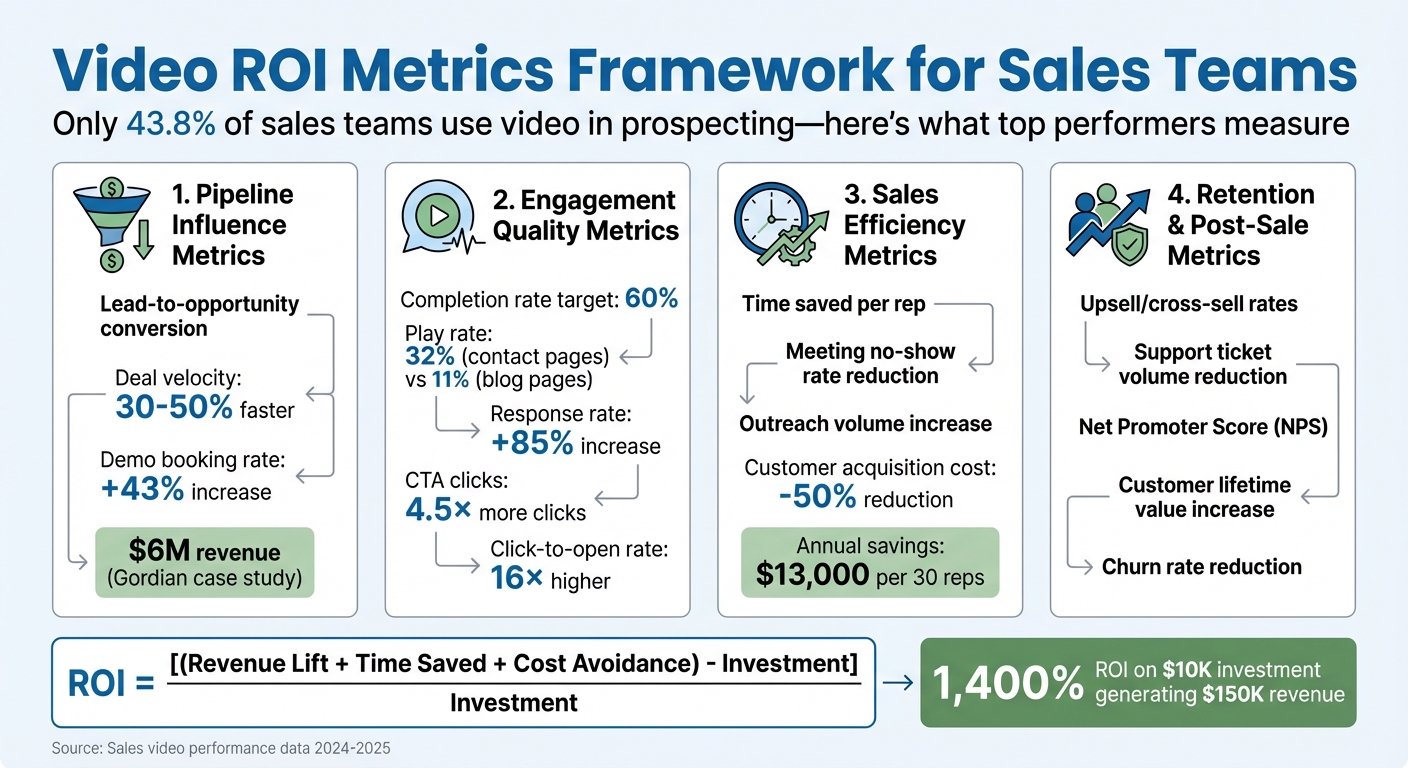
Video ROI Metrics Framework for Sales Teams
Key Metrics for Measuring Video ROI
Tracking the right metrics separates teams that guess video works from those that prove its impact. The focus should move beyond vanity metrics like total views and zero in on data directly tied to revenue. Here’s what matters most when evaluating video ROI in sales.
Pipeline Influence Metrics
The big question for sales leaders is simple: Does video help close deals? Start by monitoring how many leads turn into opportunities after engaging with your videos. For instance, Gordian’s five-video campaign, integrated with Marketo and Salesforce, tracked lead engagement by view percentage and generated $6M in revenue.
Another key metric is deal velocity. Sales teams using video for outreach and follow-ups report deals closing 30–50% faster. Demo booking rates are also worth tracking. Brikl, a B2B platform, used personalized videos within 24 hours of receiving new leads and saw a 43% jump in demo bookings.
“Since these leads are worth real dollars to your business, finding out how much revenue to expect based on leads your video generates is crucial.” – Wistia
Next, dig into how viewer behavior signals deeper engagement.
Engagement Quality Metrics
Not all video views are created equal. A viewer who watches most of your video shows much higher intent than someone who clicks away early. Focus on your completion rate - aim for at least 60%. If you’re falling short, your video might be too long or losing viewers at a specific point.
Play rate measures how enticing your thumbnail and subject line are. Different types of pages yield different results: contact pages average a 32% play rate, while blog pages see around 11%. Calls-to-action (CTAs) are another critical bridge between engagement and action. Personalized videos, for example, can drive up to 4.5× more clicks than non-personalized content, and emails featuring personalized videos can achieve 16× higher click-to-open rates.
The most telling engagement metric for sales is response rate. Some teams report reply rates as high as 90% when using personalized video, building on the noted 85% increase in prospect engagement. These aren’t just views - they’re conversations starting.
But engagement isn’t the only way video delivers value. It also boosts efficiency.
Sales Efficiency Metrics
Video ROI isn’t just about closing deals - it’s also about saving time and cutting costs. Track how many hours your team saves by replacing repetitive tasks with video. For example, recording a product demo once and sharing it with leads frees up reps for more meaningful conversations.
Keep an eye on your meeting no-show rate before and after introducing pre-meeting video agendas. When prospects know what to expect and see a friendly face ahead of time, they’re less likely to skip the meeting. Also, measure how many personalized outreach videos each rep can send. With AI-powered tools, reps can send hundreds of customized videos in the time it would take to manually record just a few. This efficiency can slash customer acquisition costs by up to 50%.
Platforms like Sendspark make it easy to track these metrics with built-in analytics and CRM integrations, so your team can focus on what really matters.
Retention and Post-Sale Metrics
Video doesn’t just help you close deals - it can also boost customer retention and lifetime value. Track upsell and cross-sell rates for customers who engage with video content compared to those who don’t. Educational videos can also reduce support ticket volumes. Measure the number of support requests per new customer before and after introducing video onboarding.
Another key metric is your Net Promoter Score (NPS), segmented by video engagement. Customers who watch explainer videos and walkthroughs often have a better understanding of the product, leading to higher satisfaction and more referrals. Compare retention rates for customers who experience video during onboarding versus those who don’t. This can reveal how video helps reduce churn and strengthens long-term relationships.
| Metric Category | Key Data Points | What Success Looks Like |
|---|---|---|
| Pipeline Influence | Lead-to-opportunity conversion, Deal velocity, Demo booking rate | 30–50% faster deal progression |
| Engagement Quality | Completion rate, Play rate, CTA click-through rate | 60% completion rate; 4.5× more clicks |
| Sales Efficiency | Time saved per rep, Meeting no-show rate, Outreach volume | 50% reduction in acquisition costs |
| Retention & Post-Sale | Support ticket volume, NPS, Upsell/cross-sell rates | Reduced churn and increased lifetime value |
Setting Up Your Video ROI Tracking System
Link your video platform with your sales tools to seamlessly capture engagement data and connect it to revenue - all without adding extra effort.
Choosing Tools and Integrations
Start by integrating your video platform with your CRM, like Salesforce, HubSpot, or Zoho. This connection allows you to automatically push viewer data - such as who watched, how long they watched, and what actions they took - directly into contact records. With this setup, your sales team can instantly see which prospects are interacting with videos, all from their CRM dashboard.
You can also integrate marketing automation tools, such as Marketo or Outreach, to create automated follow-up actions when viewers hit specific engagement milestones. For instance, if a prospect watches 75% of your demo video, an automatic follow-up email can be sent, or the assigned rep can get an alert. On top of that, tools like Google Analytics and Google Tag Manager let you track video events (such as starts, completions, or CTA clicks) alongside other conversion metrics. This gives you a complete understanding of how video contributes to your overall sales funnel.
To ensure precise tracking, use UTM parameters for every video link to monitor campaign performance. Additionally, include in-video lead capture forms to collect viewer information and sync it directly to your CRM.
Once your integrations are in place, the next step is to create attribution models that link video engagement directly to sales outcomes.
Creating Attribution Models for Video
Attribution models help you assign credit to video engagement throughout the buyer journey. For example, a first-touch model gives full credit to the video if it was the prospect’s initial interaction with your company. However, since most B2B sales involve multiple interactions, a multi-touch model might be better. This approach divides credit among various touchpoints, including video, at different stages of the sales process.
To track the conversion path, monitor how viewers transition from watching a video to taking action. For instance, using short URLs like Bitly on your video’s call-to-action buttons can show how many viewers click through to your sign-up or pricing page. A practical example: in 2024, Brikl’s sales team used Sendspark to send personalized video messages within 24 hours of receiving new leads. This strategy led to a 43% increase in demo bookings. Additionally, by integrating video engagement data into your CRM - using custom fields to tag deals influenced by video - you can measure the total pipeline value impacted by your video efforts each quarter.
Once you’ve tied engagement to outcomes, focus on automating data collection for smoother tracking.
Automating Metric Tracking
Manually tracking video engagement data is not scalable. Instead, automate the process by integrating attribution data directly into your CRM. Set up workflows that automatically log engagement, update lead scores, and send alerts for high-value activities - like when a decision-maker watches your pricing video twice. This ensures your team can act promptly based on real-time data.
For example, Sendspark’s AI allows you to record one video and personalize it for each recipient, complete with unique tracking links. This lets you see exactly which prospects watched their personalized video and how they interacted with it. Plus, all engagement data syncs back to your CRM in real time, keeping your team informed without any manual effort.
| Tracking Component | What It Does | Where to Implement |
|---|---|---|
| CRM Integration | Syncs viewer data to contact records | Salesforce, HubSpot, Zoho |
| UTM Parameters | Tracks campaign and channel performance | Email links, LinkedIn messages |
| In-Video Forms | Captures leads directly from the video player | Video landing pages |
| Automated Workflows | Triggers follow-ups based on engagement | Marketing automation platforms |
| Real-Time Alerts | Notifies reps of high-value prospects | CRM + video platform integration |
How to Improve Video ROI Performance
Fine-tuning your video content, targeting strategies, and follow-up timing can significantly boost engagement and conversions.
A/B Testing Video Elements
Experimenting with different video components like thumbnails, scripts, visuals, CTAs, and landing pages can help identify what resonates most with your audience.
Start with your thumbnail - it’s like the billboard for your video. Test options such as mid-profile shots, action scenes, product close-ups, or even backgrounds from a prospect’s website. With an average play rate of about 30% across industries, even small improvements here can lead to a noticeable uptick in views. Next, focus on the first 5–10 seconds of your video - this is your hook. These opening moments are critical for grabbing attention and keeping viewers engaged.
Use video heatmaps to see where viewers lose interest or rewatch specific parts. If you notice a significant drop-off around the 30-second mark, try creating a shorter version. The most effective prospecting videos typically last between 20–40 seconds. You can also test the level of personalization. Compare fully personalized videos, like manually tailored ones, with scalable options that use dynamic elements such as names, logos, or website backgrounds. Personalized videos can boost response rates by 85%, and viewers are 35% more likely to watch them all the way through.
Finally, experiment with the placement of your CTA. Test in-player buttons, post-play screens, or links embedded within the email body to see which option drives the most clicks. Emails featuring personalized video content can achieve up to 16x higher click-to-open rates and a 4.5x increase in unique click-throughs compared to non-personalized emails.
Once you’ve optimized these elements, the next step is tailoring your messages to match each stage of the buyer’s journey.
Segmenting Audiences by Buyer Stage
After refining your video components, align your content with the buyer journey. Tailoring your messaging by buyer stage ensures your videos are both scalable and relevant.
“Instead, think of your ideal customer profiles (ICPs). Then, make personalized videos based on each of your customer segments or stages in the sales funnel.” – Bethany Stachenfeld, CEO of Sendspark
For top-of-funnel prospects (awareness stage), create videos that address problems they might not yet recognize or introduce your value proposition in a simple, engaging way. In the middle of the funnel (consideration stage), focus on highlighting key differentiators or demonstrating how your solution integrates with their existing tools. For bottom-of-funnel prospects (decision stage), consider proposal walkthroughs to explain pricing and value or meeting recaps to summarize key details for stakeholders. After the sale, personalized onboarding videos and periodic check-ins can help nurture long-term relationships.
You can use your CRM to automate the delivery of stage-specific videos as prospects progress through your pipeline. This approach can pay off - adding a video to a sales proposal can increase close rates by up to 41% and speed up deal cycles by 26%.
Using Engagement Data to Time Follow-Ups
With your video elements and audience segments in place, real-time engagement data becomes essential for timing your follow-ups effectively. Timing follow-ups based on when prospects interact with your video can make all the difference.
Set up instant notifications for when a prospect views your video, allowing you to follow up while they’re still engaged. Instead of sending a generic “just checking in” email, reference the specific part of the video they watched. Use engagement metrics like lead scoring to prioritize follow-ups with prospects who watched the entire video or clicked on a CTA. For example, you can automate workflows to send a “Meeting Request” email once a prospect has viewed 50–75% of a video. For a focused workflow, see video analytics for sales follow-ups.
“If prospective customers watch the videos, then they understand why they need our product better, and are more receptive to demos.” – Emilia K, VP Marketing at Userpilot
Timing is everything - engaged viewers are more likely to respond positively. Encourage high-value prospects to reply with their own video to create a two-way dialogue, which can build trust faster than text-based communication.
| Optimization Strategy | What to Test/Implement | Expected Impact |
|---|---|---|
| Thumbnail Testing | Mid-profile shots, action shots, website backgrounds | Improve average play rate by 30% |
| Hook Optimization | First 5–10 seconds with personalization | Reduce early drop-offs |
| Stage-Based Segmentation | Different videos for awareness, consideration, decision | 41% higher close rates |
| Real-Time Follow-Ups | Instant notifications plus contextual messaging | 85% increase in response rates |
sbb-itb-afd3f9e
Translating Video Metrics into Revenue Impact
When it comes to justifying video investments, the focus should be on measurable revenue outcomes. This means linking video usage to pipeline growth, cost reductions, and long-term customer value.
Measuring Pipeline Acceleration
One of the clearest ways to evaluate video’s impact is by tracking how much faster deals close when video is used. Compare the average days-to-close for CRM-tagged video viewers versus non-viewers. For example, Brikl’s 2022 strategy with Sendspark showed that incorporating video early in outreach boosted demo bookings by 43% and helped deals close 30–50% faster.
To quantify this, use a simple formula: (Average Days for Non-Video Deals) - (Average Days for Video Deals) = Days Saved. Multiply the days saved by the number of deals closed, and you’ll have a compelling case for leadership, showing how video accelerates revenue generation. Faster deal closures also translate to time and cost savings, as detailed below.
Calculating Time and Cost Savings
Beyond speeding up the pipeline, video delivers significant productivity gains. For instance, if 30 sales reps each save 10 minutes a week thanks to video, that adds up to 5 hours of additional selling time per week. At an average cost of $50 per hour per rep, this equals $250 in weekly productivity gains - or $13,000 annually.
To calculate overall return on investment (ROI), apply this formula:
ROI = [(Revenue Lift + Time Saved Value + Cost Avoidance) – Investment] / Investment
Here’s an example: If video generates $100,000 in revenue, saves $15,000 in rep time, avoids $5,000 in production costs, and costs $10,000, the ROI is an impressive 1,000%.
Additionally, tracking metrics like “Time Played” can highlight hours saved from live demos. Wistia emphasizes this point:
“If you can show that 500 hours were spent reading 20 blog posts, but 700 hours were spent watching five videos, it surely makes the case for investing in video”.
Tracking Long-Term Customer Value
Video doesn’t just impact the short-term pipeline; it also boosts long-term customer value. Post-sale videos can improve retention, drive upsells, and increase lifetime value (LTV). To calculate LTV, use this formula:
LTV = Average Revenue Per User (ARPU) / Churn Rate.
Compare the LTV of customers who engaged with video content to those who didn’t. Personalization through video can also significantly reduce customer acquisition costs (CAC). For instance, if your typical CAC is $2,000 and video-driven personalization reduces it to $1,000, that’s $1,000 saved per customer.
By integrating your video platform with your CRM, you can directly attribute video views to closed-won deals. This makes it easy to demonstrate revenue impact. For example:
ROI = (Revenue Generated − Cost of Video) / Cost of Video × 100.
A $10,000 investment in video that generates $150,000 in attributed revenue delivers a 1,400% ROI.
| Revenue Impact Category | Calculation Method | Example Outcome |
|---|---|---|
| Pipeline Acceleration | Days saved × deals closed | 30–50% faster deal velocity |
| Productivity Gains | (Reps × time saved) × hourly cost | $13,000 annual savings per 30 reps |
| Customer Acquisition | CAC reduction × customers acquired | 50% lower CAC |
| Direct Revenue | Video-attributed deals − investment | 1,400% ROI on $10K investment |
Common Video ROI Measurement Challenges
Sales teams often face difficulties in tying video performance directly to revenue. The problem lies in disconnected systems, intricate buyer journeys, and inconsistent or incomplete data, all of which undermine confidence in the numbers. These hurdles highlight the importance of seamless integration and accurate attribution methods to unlock the full potential of video in driving revenue.
Fixing Data Silos Between Systems
A major issue arises when video analytics live on external platforms while sales data is locked away in CRM systems. This separation makes it nearly impossible to connect a specific video to a final purchase. Instead, teams may focus on surface-level metrics like views and likes, leaving revenue impact unmeasured. The fix? Integrate your CRM with video analytics. When video engagement data automatically flows into your sales system, you can track exactly which prospects watched your content and for how long. This creates a clearer link between video performance and sales outcomes.
Attribution in Multi-Touch Sales Cycles
B2B sales often involve numerous touchpoints, and video can play a role at multiple stages - whether in cold outreach, follow-ups after demos, meeting recaps, or proposal walkthroughs. This makes it challenging to pinpoint video’s exact influence on a deal. Relying on last-click attribution can overlook the value of organic video engagement and contributions at the top of the funnel. To address this, track video impact throughout the buyer journey. Simple tools like UTM codes or short URLs for video CTAs can help connect views to key actions like sign-ups.
For example, in 2023, construction tech company Gordian launched a five-video campaign using Vidyard integrated with Marketo and Salesforce. By gating videos with Marketo forms and assigning lead scores based on how much of the video was watched, they directly attributed $6 million in revenue to the campaign.
“It proved that strategic planning and detailed video analytics can generate a tremendous return on investment for the organization.”
- Glenn Hughes, Former Video Producer, Gordian
Maintaining Data Accuracy
Beyond integration and attribution, ensuring data accuracy is critical. ROI calculations are only as reliable as the data they’re based on. If contact lists aren’t properly synced or viewing data isn’t tied to specific leads, the entire attribution process can fall apart. Dedicated video hosting platforms are a better choice than social media for this purpose, as they provide detailed, lead-specific data rather than aggregated metrics.
In-AI-personalized video forms can also sync viewer information directly to your CRM, enabling you to assign lead scores based on engagement. For instance, watching a full 10-minute demo might earn a higher score than viewing a 30-second teaser. Regular audits are key to reconciling data across platforms, and with 83% of businesses now using video analytics to measure content effectiveness, the tools to maintain accuracy are more accessible than ever.
Conclusion
Measuring video ROI in sales requires moving beyond surface-level metrics to create a clear framework that links video engagement directly to revenue. The best strategies combine hard data - like click-through and conversion rates - with softer metrics, such as brand perception and customer trust. By integrating video analytics into your CRM, you can establish a closed-loop system that reveals which prospects are engaging and how their engagement impacts your sales pipeline. This approach lays the groundwork for refining and improving your sales strategy over time.
Personalized video content is a game-changer. It can increase response rates by 85% and generate up to 4.5x more clicks. For example, in 2025, Brikl’s sales team used Sendspark to deliver personalized video messages within 24 hours, resulting in a 43% rise in demo bookings.
Scaling personalization doesn’t have to mean sacrificing quality. Tools like Sendspark make it possible to record once and personalize at scale using features like AI voice cloning and dynamic backgrounds. When paired with your CRM (like HubSpot, Salesforce, or Zoho), these platforms allow you to track engagement at an individual lead level, trigger automated follow-ups based on viewing behavior, and calculate cost savings from replacing repetitive live demos with video. These insights can lead to immediate, actionable improvements in your sales process.
Start with the basics: establish accurate attribution models, automate metric tracking through CRM integrations, and consistently A/B test video elements to refine performance. With only 43.8% of sales teams currently leveraging video in their prospecting efforts, adopting a data-driven video strategy gives you a measurable edge - from the very first view to the final closed deal.
FAQs
How does personalized video help speed up the sales process?
Personalized video speeds up the sales process by creating instant, meaningful connections with prospects. Instead of relying on static emails or phone calls, video gives sales reps the opportunity to highlight product benefits and directly address a prospect’s unique challenges. For example, a video that greets a prospect by name and features their website in the background can boost response rates by 85%, paving the way for faster follow-up conversations.
Because video grabs attention better than plain text, it significantly improves key metrics like email conversions and LinkedIn responses, resulting in more meetings scheduled in less time. Plus, real-time video analytics allow sales reps to focus on leads showing the most interest and customize their outreach efforts, helping deals move forward more efficiently. By blending personalization, engagement, and actionable data, video helps make the sales process faster and more reliable.
How can I track video ROI directly within my CRM system?
Sendspark connects effortlessly with well-known CRM platforms such as HubSpot, Salesforce, and Zoho, allowing you to track video performance directly within your current workflows. With Sendspark’s video analytics tools integrated into your CRM, you can easily keep tabs on essential metrics like views, watch time, and call-to-action clicks - all without needing to switch between platforms.
This seamless integration gives sales teams a clear picture of how personalized video campaigns impact revenue, empowering you to make smarter, data-backed decisions to get the most out of your efforts.
How does personalized video improve customer engagement and response rates?
Personalized video content has a knack for grabbing attention and keeping it. Why? Because it makes messages feel relevant and tailored to the viewer. In fact, viewers are 35% more likely to watch a personalized video from start to finish. But it doesn’t stop there - these videos can generate up to 4.5× more clicks than their generic counterparts. Even better, response rates can jump by around 85%, proving that personalized videos are an incredibly effective way to engage both prospects and customers.
Related Blog Posts
- How to Use Video in Sales Outreach Without Wasting Time
- Best Practices for Video-Based Lead Scoring
- Best Practices for Video in Sales Engagement Platforms
- How to Use Video Analytics for Better Outreach
Topics: blog