Want to stand out in a crowded inbox? With over 121 business emails hitting your prospects daily, most get ignored. Why? They’re generic, impersonal, and lack effort. But personalization - done the right way - can change everything. Want the calibration framework? Read avoiding over-personalization in video outreach.
Here’s the deal:
- Thoughtful, professional personalization can boost response rates by 85% and click-through rates by 300%.
- Avoid over-automation and focus on specific, business-relevant details (like recent company achievements or industry trends).
- Use tools like personalized videos in email to create a human connection - viewers are 35% more likely to watch these fully than generic ones.
This guide shows you how to craft tailored outreach at scale, avoid common pitfalls, and measure success with actionable templates and scripts. Ready to make your outreach matter? Let’s dive in.
How To Make Killer Personalized Videos For Cold Outreach
sbb-itb-afd3f9e
Authentic Personalization vs. Over-Automation
Personalization in outreach is a balancing act. It’s about using meaningful, research-driven insights to connect with your prospect’s challenges while avoiding the pitfalls of relying too heavily on video personalization software. Done right, it feels tailored and relevant. Done wrong, it feels like a cookie-cutter email blast. Let’s break down how authentic personalization stands apart from generic automation - and how to ensure your efforts don’t veer into uncomfortable territory.
Genuine vs. Generic Personalization
The key to effective personalization lies in the details. When you reference something specific - like a company’s recent product launch or a new hire in their sales team - you’re showing that your outreach is thoughtful and tailored. Compare that to a generic greeting like, “Hi , I hope this email finds you well.” That kind of message screams automation and lacks any real connection to the recipient’s unique situation.
The data doesn’t lie: personalized videos generate 4.5 times more clicks and 16 times more opens than their generic counterparts. Even better, viewers are 35% more likely to watch personalized videos all the way through. These stats highlight one thing - people can tell when you’ve taken the time to craft a message that speaks directly to them, rather than just plugging their name into a template.
Avoiding the ‘Creepy’ Factor
While personalization can build trust, overstepping boundaries can have the opposite effect. Mentioning professional milestones or public achievements is fair game, but referencing personal details - like someone’s vacation photos or their child’s soccer game - crosses the line into uncomfortable territory. This isn’t personalization; it’s prying. Stick to publicly available, business-relevant information like LinkedIn updates, press releases, or industry accolades.
Here’s why this matters: 72% of consumers report that poor personalization erodes their trust in brands. And nothing screams “mass email” like a broken placeholder - “Hi “ - thanks to a failed automation. To avoid this, always test your variables and include fallback options to ensure your message reads naturally, even if some data points are missing.
The goal is to use insights that help prospects see how you can address their specific challenges. Focus on details like team growth, industry trends, or common pain points within their field. Always ask yourself: Does this information help explain why I’m reaching out? Or does it just prove I did a quick Google search? By sticking to relevant, professional insights, you can create outreach that feels personal, respectful, and genuinely helpful. That’s the human touch that drives effective sales communication.
Psychology of Personalization: Building Trust and Engagement
Personalized videos have a unique ability to capture attention and foster connections by leveraging perceived effort, emotional resonance, and the element of surprise.
Why Personalized Videos Outperform Generic Emails
When compared to plain text emails or generic videos, personalized videos consistently deliver stronger engagement metrics. Why? Because they signal effort and authenticity, which naturally encourages reciprocity. As Ben Wright from Sendspark explains:
“Human connection isn’t dead. It’s actually what sets you apart. Personalized video stands out because it builds trust faster - your face and voice make the message more real”.
A personalized video thumbnail is like a pattern-breaker in a sea of text, instantly grabbing attention. And here’s the kicker: viewers are 35% more likely to watch a personalized video all the way through compared to generic content.
Unlike text, video conveys tone, energy, and emotion in a way that words simply can’t. Your facial expressions, voice, and enthusiasm make your message feel genuine and relatable. This human touch creates a sense of psychological safety, making it less likely that your outreach will be ignored before you even have a chance to schedule a meeting.
These advantages pave the way for deeper emotional connections, which play a key role in turning prospects into collaborators.
The Role of Emotional Connection in Sales Outreach
Personalized outreach doesn’t just grab attention - it transforms interactions into meaningful, one-on-one conversations. When you address a prospect’s specific challenges or goals, it shows empathy and relevance. For example, referencing a recent professional milestone or acknowledging a specific business issue demonstrates that you’ve taken the time to understand their world. This level of effort fosters a sense of similarity, encouraging prospects to see you as a trusted ally rather than just another salesperson.
The numbers speak for themselves: 96% of marketers agree that personalization is critical for engaging customers and building trust. Meanwhile, 71% of consumers now expect personalized experiences. By delivering thoughtful, tailored video outreach, you not only stand out but also fulfill a basic human need for recognition. This approach transforms cold outreach into genuine dialogue, turning initial contacts into lasting relationships.
Templates and Scripts for Personalized Outreach
Let’s talk about putting personalization into action with some practical templates and scripts. These tools can help you craft videos that feel genuine while still being efficient to produce.
Video Template Framework
A strong personalized video follows a simple four-part structure:
- Start with a personalized hook. This should grab attention in the first five seconds, whether it’s a verbal cue or a visual element. For example, you could overlay visuals from the prospect’s website or hold up a whiteboard with their name. Hamish Stephenson, CEO of Selr.io, highlights the importance of this moment:
“The first 5 seconds is the most important. Hook them in with thought provoking personalization about them. Humor here is key”.
- Present your value proposition. Address a specific pain point you’ve identified. Don’t just talk about the problem - show it. For instance, overlay visuals highlighting an SEO issue or an unfilled job posting on their site.
- Add social proof. Share a relevant success story or result that builds credibility.
- Close with a clear call-to-action. End with something simple and direct, like: “Reply with your availability for a 15-minute call.”
Keep these videos short - ideally under 60 seconds. For sales prospecting, aim for under 40 seconds. Tools like Sendspark’s teleprompter can help you stay on track while maintaining eye contact with the camera, making your delivery feel natural and confident.
This structure is designed to grab attention, deliver value, and leave a lasting impression.
Scripts for Common Sales Scenarios
Here are scripts tailored for three common sales situations. Each one includes placeholders for dynamic personalization, so you can easily customize them with merge tags like , , and .
Merge-tag word-swaps like these are one end of the personalization spectrum. If you want to know when it’s worth layering on dynamic backgrounds or full AI voice cloning instead of a plain name-swap, see our guide to AI personalization levels.
Initial Prospecting (45 seconds):
Record over the prospect’s homepage:
“Hi , I was checking out ’s site and noticed [specific observation - e.g., ‘your blog hasn’t been updated since last quarter’]. I work with companies to [specific outcome], and we helped [Similar Company] achieve [specific result] in [timeframe]. I’d love to show you how we could do something similar for . Are you free for a 15-minute call this week?”
Re-engaging Dormant Leads (40 seconds):
Record in spotlight mode, then share your screen to highlight a new feature:
“Hey , it’s been a while since we last talked about [previous pain point]. Since then, we’ve added [specific new feature] that directly addresses that issue. I thought of you when we launched this. Here’s a quick look at how it works. [Show feature for 10 seconds]. Would you be open to a catch-up call to see if this changes things for ?”
Post-Event Follow-Up (50 seconds):
Record over the event website or a LinkedIn post they interacted with:
“Hi , I saw you commented on [specific LinkedIn post topic] yesterday, and your thoughts on [their specific comment] really resonated with me. At , we developed [solution] specifically to address that challenge. We’re helping companies like [Similar Company] achieve [specific metric improvement]. I’d love to continue this conversation - are you available for a call next Tuesday or Wednesday?”
Pro Tips for Personalization
If you’re using AI voice cloning in Sendspark, here’s a trick: record your base video with a placeholder word like “Watermelon” where the prospect’s name would go. Leave a short pause before and after the placeholder to make AI transitions seamless. Also, set fallback values for merge tags (e.g., use “there” if the first name is missing) to ensure your message stays polished and professional.
Dan Vermont, Head of Operations at Brikl, shared how this approach transformed their workflow:
“Using Sendspark transformed our customer success approach. We built a library of pre-recorded answers, allowing our team to quickly respond to common customer questions with personalized videos”.
The results speak for themselves - Brikl saw response rates increase by six times after adopting this strategy.
Best Practices for Building Trust Through Personalization
Personalization can be a powerful tool for building trust in AI-driven outreach, but it requires a careful balance. These practices help ensure your efforts feel genuine and respectful, while also scaling your video outreach effectively.
Data Points That Feel Relevant, Not Intrusive
The key to effective personalization lies in the data you choose to reference. The line between helpful and invasive often depends on how you gather and use information. Stick to public and professional data that prospects would expect you to know through basic research.
Use details like a prospect’s first name, job title, or company name to establish relevance. Referencing publicly available information, such as a company’s website or LinkedIn profile, shows you’ve done your homework without crossing privacy boundaries.
Behavioral triggers can also be great conversation starters. For instance, you might reference a webinar they attended, a LinkedIn comment on an industry topic, or a recent visit to your pricing page. Similarly, showcasing company-specific insights - like recent funding announcements, job postings, or stated company values - demonstrates a genuine interest in their business.
McKinsey reports that personalization can slash customer acquisition costs by up to 50%. Including technographic data (the tools a company uses) and contextual sales information (like notes from prior conversations or demo bookings) further enriches your outreach while maintaining trustworthiness.
Mastering these data points is the first step to avoiding common pitfalls in personalized communication.
Mistakes to Avoid in Personalized Outreach
Even with the right data, personalization can fall flat if executed poorly. Here are some common mistakes to sidestep:
-
Mismatched placeholders: Few things erode trust faster than errors like “[First Name]” appearing in your message. Always set fallback values (e.g., “there” or “team”) and rigorously test merge tags before launching campaigns.
-
Shallow personalization: Simply using someone’s name isn’t enough to make your outreach stand out. Personalization should address specific pain points, recent interactions, or industry challenges. If your message or video could apply to anyone in their field, it’s not truly tailored.
-
The “stalker effect”: Overpersonalization can backfire. As one expert puts it:
“Excessive personal details can make you seem invasive rather than thoughtful”.
Mentioning a prospect’s city or public professional achievements is fine, but referencing personal family details or overly specific private information can feel unsettling. -
Technical missteps: Poor execution can ruin even the best intentions. Errors like robotic-sounding AI voiceovers, noisy recording environments, or videos that don’t play well on mobile devices can make your outreach seem unpolished. Always aim for clear audio, professional visuals, and a simple, actionable call-to-action.
-
Funnel misalignment: Save hyper-personalized efforts for warm leads or active opportunities where the potential payoff justifies the time investment. Spending hours on a custom video for a cold prospect unfamiliar with your brand is a poor use of resources.
Scaling Personalization in Your Workflow
When it comes to personalization, the real challenge isn’t crafting one standout video - it’s creating hundreds without burning out your team. The good news? You can scale this process while keeping it personal by using the right tools and strategies.
With Sendspark’s dynamic video campaigns, you can record a single “master” video and let automation do the heavy lifting. The result? Thousands of personalized videos that feel custom-made. And the payoff is huge - personalized videos get 4.5x more clicks and 16x more opens than generic ones.
Here’s how it works: Instead of recording individual names, you say a placeholder word like “Watermelon.” Sendspark’s AI then swaps that placeholder with the recipient’s actual name, turning a generic “Hi” into a friendly “Hi Brandon.” Combine this with dynamic backgrounds that display the recipient’s website or LinkedIn profile, and you’ve got a video that feels like it was made just for them - in seconds. This approach builds on the trust factor of personalization, making each interaction feel meaningful, even at scale.
Even better, Sendspark integrates seamlessly with tools you already use, like Outreach, HubSpot, Salesforce, and Instantly. Through shareable snippets, recipient data is mapped directly to video variables. You can even automate workflows to trigger video creation when a lead fills out a form or reaches a specific CRM stage. For even greater efficiency, try combining videos - for example, a short personalized intro stitched to a pre-recorded demo. It’s a time-saver and cuts down on processing demands.
Preparing Data for Personalization
The backbone of scalable personalization is accurate data. Your CRM should include key fields like First Name, Email, and Background URL for the AI to work effectively.
Start by cleaning up your contact list. Remove incomplete entries, fix formatting issues, and ensure URLs lead to active pages. You can enrich your data with LinkedIn insights, such as job titles, recent company news, or shared connections. Just stick to publicly available information - referencing a company’s new funding round is fine, but avoid personal details.
Set up fallback variables to cover gaps in your data. For instance, if a first name is missing, default to “there,” and if a background URL is unavailable, use a generic image. These safeguards prevent awkward gaps or errors in your videos.
To keep things organized, map variables consistently across platforms using email addresses as unique identifiers. This ensures the right video reaches the right person, avoiding embarrassing mix-ups.
Testing and Quality Control
Before launching a large-scale campaign, always test it with a small sample - 10 to 20 contacts is a good starting point. Generate preview videos to catch potential issues like mismatched placeholders, broken background URLs, or unnatural AI voice quality. This step helps maintain the personal touch that makes your videos resonate.
If you’re using AI voice cloning, record in a quiet space with a high-quality microphone. Leave a brief pause before and after saying the placeholder word to help the AI blend the recipient’s name naturally into the sentence. Poor audio can make the voice sound robotic, which undermines the authenticity you’re aiming for.
Check how your videos perform on different devices to ensure smooth playback, properly aligned dynamic backgrounds, and well-placed calls-to-action. Features like simulated scrolling or mouse animations on dynamic backgrounds can add a polished, realistic touch.
Finally, manually review a subset of videos using Sendspark’s list view before sending them out in bulk. Look for issues like distorted audio, misaligned visuals, or weak personalization. If a video doesn’t feel personal enough, tweak your script or add more relevant details. Remember, shallow personalization can feel worse than no personalization at all. A little extra effort here can make a big difference.
Measuring Success: Engagement Metrics for Personalization
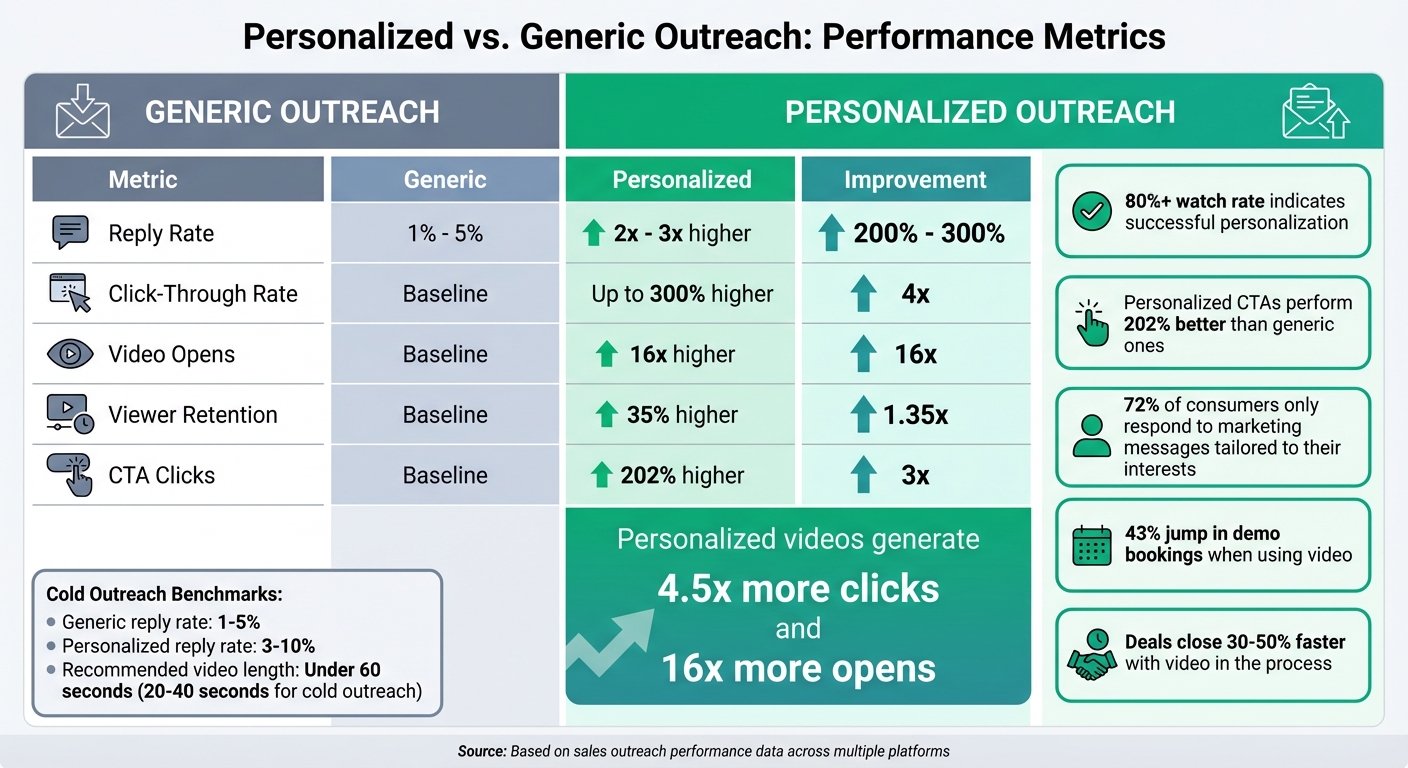
Personalized Video Outreach Performance Metrics vs Generic Email
Once your personalized video campaigns are up and running, it’s time to see if they’re hitting the mark. To do this, focus on metrics like watch completion rates, reply rates, and CTA clicks - these numbers reveal how well your audience is engaging with your content.
Start with the basics. Video opens show whether your thumbnail and subject line are grabbing attention, while watch time tells you if viewers are sticking around. If your videos have an 80%+ watch rate, that’s a strong sign your personalization is working. In fact, personalized videos hold attention at rates 35% higher than generic ones. If you notice replays, it could mean your video is being shared with colleagues or decision-makers.
Next, look at click-through rates on CTAs to see if your content builds enough trust to encourage action. Personalized CTAs can perform up to 202% better than generic ones. Similarly, personalized videos often generate 2x to 3x more replies than standard outreach. For cold outreach, where reply rates usually range between 1% and 5%, hitting 3% to 10% shows your personalization efforts are paying off.
Here’s a quick snapshot of the difference personalization can make:
| Metric | Generic | Personalized | Improvement |
|---|---|---|---|
| Reply Rate | 1% - 5% | 2x - 3x higher | 200% - 300% |
| Click-Through Rate | Baseline | Up to 300% higher | 4x |
| Video Opens | Baseline | 16x higher | 16x |
| Viewer Retention | Baseline | 35% higher | 1.35x |
| CTA Clicks | Baseline | 202% higher | 3x |
Tools like Sendspark’s analytics dashboard make it easy to track these metrics in real time. You can also sync this data with your CRM to automate follow-ups. For instance, prospects who watch more than 80% of a video or click a CTA can trigger immediate responses. This strategy helped Brikl’s sales team achieve a 6x increase in response rates with personalized video outreach, and Hipersa cut its sales cycle by 40% using the same approach. These results highlight how tracking the right metrics can lead to real business impact.
Analyzing Video Performance
Beyond basic engagement metrics, deeper analysis can uncover important viewing behaviors. For example, heatmaps can show where viewers rewatch, pause, or stop watching entirely. If many viewers drop off early, it might be time to move your most compelling points to the start or tighten up your script.
You can also segment watch completion rates by audience type. If enterprise leads watch a higher percentage of your videos than SMB leads, it might indicate that your messaging resonates more with larger companies.
Real-time view notifications are another game-changer. Reaching out right after a prospect finishes your video keeps your brand fresh in their mind. Sales teams using video prospecting have reported a 43% jump in demo bookings, and deals tend to close 30% to 50% faster when video is part of the process.
Experimentation is key. A/B test thumbnails - such as a whiteboard with the prospect’s name versus a dynamic website background - to see what grabs attention. Even small changes can lead to noticeable improvements. For cold outreach, keep videos under 60 seconds to maximize completion rates.
Iterating Based on Prospect Feedback
Metrics are vital, but don’t overlook direct feedback from your prospects. Their responses can provide valuable clues about what’s working. If someone mentions a specific detail they liked, make that a staple in future campaigns. Comments about your video standing out from the competition underscore the power of authentic personalization.
Combine this qualitative feedback with your data. Are prospects asking follow-up questions, requesting demos, or sharing your video? These actions show you’re building trust. On the other hand, if you’re seeing high view rates but low replies, your CTA might need tweaking - it could be too aggressive or unclear.
Use these insights to refine your approach. For example, if retention drops after 45 seconds, shorten your videos. If CTAs aren’t getting clicks, experiment with different wording or placement. Keep in mind that 72% of consumers only respond to marketing messages tailored to their interests. The more relevant your outreach feels, the better your results will be.
Conclusion
Personalization works best when it feels real and thoughtful, not mass-produced. The key difference between meaningful outreach and off-putting automation lies in showing that you genuinely understand your prospect’s world - without crossing personal boundaries. Stick to professional details, like insights from their website, LinkedIn profile, or recent company updates, and steer clear of overly personal information that might feel invasive.
The templates and scripts in this guide are just a starting point, but it’s your authentic delivery that truly makes the impact. As Ben Wright from Sendspark says:
“Human connection isn’t dead. It’s actually what sets you apart.”
For cold outreach, keep your videos short - ideally 20–40 seconds. Start with a visual hook, such as the prospect’s name on a whiteboard, and close with one clear call to action.
Personalized videos consistently outperform generic outreach in every way - from higher open and reply rates to faster deal progression. But the magic only happens when your message feels sincere. Use AI to automate personalized videos to help scale your efforts - like voice cloning for names or dynamic video backgrounds - but keep your tone natural and conversational.
Now it’s time to act. Start small: choose one template from this guide and test it with 10 prospects this week. Use Sendspark’s analytics to track your watch rates, replies, and CTA clicks, then tweak your approach based on what works. And don’t forget Hamish Stephenson’s golden rule:
“If you can’t get it done in under 40 seconds, don’t send it.”
With your prospects receiving over 121 emails daily, a personalized video that addresses their specific challenges stands out. It shows you’ve taken the time to understand their business, building trust and connection faster than any text-based message ever could.
FAQs
What counts as ‘creepy’ personalization in B2B outreach?
Creepy personalization happens when outreach tactics cross the line from helpful to invasive. This can include using data without permission, tracking someone’s actions too closely, or sending messages that are so specific they feel unsettling.
The key to effective personalization is striking a balance: make your outreach relevant, but never at the expense of someone’s privacy. If your approach makes the recipient feel like they’re being watched, you’ve likely gone too far. Instead, aim for authentic, respectful communication that builds trust naturally - without making anyone uncomfortable.
How can I personalize videos at scale without sounding automated?
You can create personalized videos at scale while maintaining a natural touch by leveraging AI-powered tools. Features like dynamic personalization, AI-generated scripts, and teleprompters make it easier to deliver customized, meaningful messages efficiently. This approach ensures your communication feels personal and keeps your audience engaged.
Which metrics best show personalized video outreach is effective?
When it comes to personalized video outreach, the numbers speak for themselves. Metrics show it can lead to open rates up to 16 times higher, click-through rates that are 4.5 times greater, and reply rates increasing by as much as 300%. These results clearly demonstrate how much more engaging and impactful this approach can make your outreach efforts.
Related Blog Posts
- Best Video Message Templates for Sales Teams
- Video Messaging for Business: Stand Out in Sales Outreach
- How Top-Performing SDRs Use Video to Book More Meetings
- How AI Video Personalization Works Without Being Creepy
Topics: blog