A first-name merge tag used to be enough to stand out in a cold inbox. Now every SDR uses one, so it barely registers. The next question sales teams ask is whether adding more, company name, job title, even a cloned voice saying all of it, is worth the extra setup time, or whether it just makes the message feel more obviously automated. It’s also one of the clearest ways to close the gap our warm outbound vs. cold outbound comparison identifies between a cold send and a referral-backed one.
The honest answer is: it depends on what you’re personalizing and how well the pieces match. Going from zero personalization to a first name roughly doubles reply rates. Going further, to two or three variables spoken in a cloned voice, helps too, but only if the voice and pacing stay consistent. Get that wrong and a prospect notices the seams before they hear your pitch.
Key Takeaways
- Personalizing beyond just a first name roughly doubles cold outreach reply rates (SalesHive: about 9% to about 18%), but depth needs to match deal size and audience sophistication, not just be maxed out for its own sake.
- Sendspark’s Multiple Variables feature (private beta, Growth plan and above) lets you swap up to three fields, first name, company, and job title, inside one AI voice cloning recording without re-recording per prospect.
- A Gartner survey of 1,464 B2B buyers found personalization creates negative experiences for 53% of customers and makes them 2x more likely to feel overwhelmed, meaning more variables is not automatically better.
- Multi-variable rendering currently takes 15 minutes to 3 days during high demand, slower than single-variable AI Greeting videos, so plan lead time before a high-volume send.
- Gong’s analysis of 28 million cold emails puts a 10%+ reply rate as the “gold standard” for elite senders, a bar that targeted two- or three-variable personalization can help clear without a full AI avatar.
What Counts as Video Personalization Beyond a First Name?
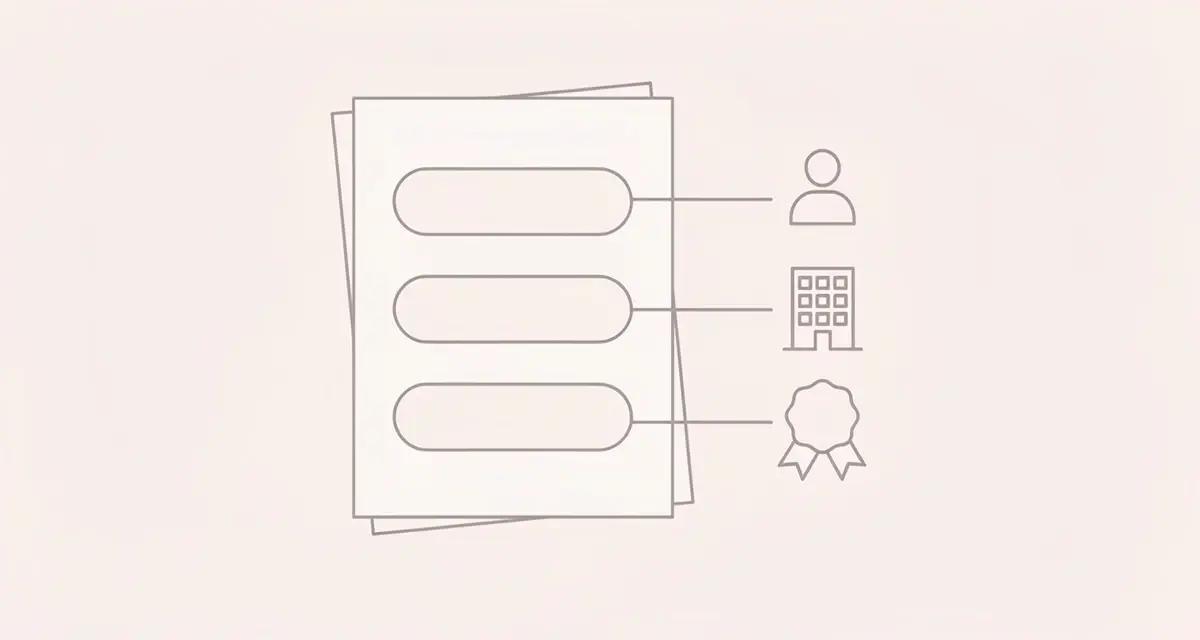
Personalization beyond a first name means swapping in two or more data points, typically company name and job title, instead of just a greeting. In video, this ranges from a simple on-screen text merge tag, to a dynamic background showing the prospect’s website, to an AI voice cloning recording that speaks each variable in the rep’s own voice.
It helps to separate two different axes, because sales teams often confuse them. One axis is which mechanism you use: a merge tag swaps text, a dynamic background swaps the visual, and voice cloning swaps what’s spoken aloud. Our guide to AI personalization levels covers that mechanism-by-mechanism framework in depth. The other axis, the one this article focuses on, is how many variables you personalize within whichever mechanism you pick: name only, name plus company, or name plus company plus job title.
A rep recording a single “Hey [First Name]” video and a rep recording a video that says “Hey [First Name], congrats on the Series B at [Company], I know as [Job Title] you’re probably…” are both using AI voice cloning. But the second one is personalizing three variables instead of one, which changes both the reply-rate math and the risk of something sounding off.
This distinction matters for planning, too. A single-variable campaign can run at high volume with almost no manual review, since one word is being swapped per video. A three-variable campaign needs each combination checked for accuracy, since a wrong job title or a mismatched company name is more noticeable, and more damaging to trust, than a wrong first name alone.
How Much Does Personalization Depth Actually Improve Reply Rates?
Personalization beyond a first name roughly doubles cold outreach reply rates, moving from about 9% for generic sends to about 18% for messages that reference company-specific details, according to sales outsourcing firm SalesHive. That gain plateaus quickly: adding a third or fourth variable rarely doubles results again, it mostly reduces the odds that a prospect notices the message was automated.
Gong’s analysis of more than 28 million cold emails found that top-performing reps get 4.2 times more replies than average reps, and put 10%+ as the realistic ceiling for what the analysis called “elite” performance.
“Top reps get 4.2x more replies than average reps. Honestly, the overall reply rate for top reps was lower than anticipated. 10%+ is the gold standard.”
— Jason Bay, CEO of Outbound Squad, quoted in Gong’s analysis of 28M+ cold emails
That 10%+ ceiling matters because it reframes the goal. You don’t need a fourth or fifth variable to hit “elite” performance by Gong’s own benchmark, you need the first two or three to land cleanly. The table below breaks down what each personalization depth typically costs in setup effort against what it tends to return.
| Personalization Depth | Typical Reply Rate Range | Setup Effort | Main Risk |
|---|---|---|---|
| Generic, no personalization | ~7-9% | None | Ignored as mass outreach |
| First name only | ~9-12% | Low, one merge tag | Now the baseline, not a differentiator |
| Name + company (2 variables) | ~14-18% | Moderate, needs clean CRM/enrichment data | Wrong or stale company data breaks trust fast |
| Name + company + title (3 variables) | ~16-20% | Higher, voice/lip-sync consistency matters | Audible seams between spoken variables read as “AI” |
| Full AI avatar / synthetic presenter | Varies widely, trust-dependent | Lowest per-video, highest trust risk | Best-fit-for buyers who value authenticity may disengage |
Record One Video. AI Personalizes Thousands.
Sendspark is the AI video personalization platform for B2B sales. Record once, and AI voice cloning generates thousands of individually personalized videos with dynamic backgrounds and personalized thumbnails — each prospect hears their name, sees their website, in your voice. Sales teams see 2-3x more replies.
Get Started NowWhen Multi-Variable Personalization Backfires
Multi-variable personalization backfires when it draws attention to the mechanism instead of the message, or when it overloads the prospect with detail instead of making one clear point. A Gartner survey of 1,464 B2B buyers found that personalization creates a negative experience for 53% of customers, who were three times more likely to regret a purchase and less likely to buy again.
The same Gartner survey found personalized buyers were 2x more likely to feel overwhelmed by the volume of information they received, and 2.8x more likely to feel time pressure. Applied to video, that means a third or fourth spoken variable can cost you more trust than it buys in relevance.
B2B sales agency Martal Group puts the underlying rule simply: “one signal, one consequence, one ask is the structure that holds.” Piling on a third or fourth personalized detail can shift a prospect’s attention from your value proposition to wondering how much research went into finding it, which reads as invasive rather than relevant.
Common mistake
Adding a second or third spoken variable without checking voice consistency first. If the cloned voice sounds slightly different or the pacing hitches on the inserted word, prospects notice the seam before they hear your pitch, and it can make even a well-researched video feel less authentic than a plain first-name greeting.
Sendspark customers evaluating this feature during onboarding raise a consistent, practical concern: what happens to voice quality once you go beyond a single spoken variable. Some reps have specifically asked whether they can keep the recording close to their original voice, swapping in only a name and company, while others have flagged that early multi-variable previews looked rougher than the surrounding footage, which made it a harder internal sell to sales leadership skeptical of anything that reads as obviously AI-generated. Both are the right questions to ask before scaling a multi-variable campaign past a small test batch.
How Sendspark’s Multiple Variables Feature Works
Sendspark’s Multiple Variables feature lets you personalize up to three fields, first name, company name, and job title, inside a single AI voice cloning recording, so you don’t re-record a video for each combination of prospect details. It’s currently in private beta, available on the Growth plan and above, and capped at 250 videos per campaign while in beta.
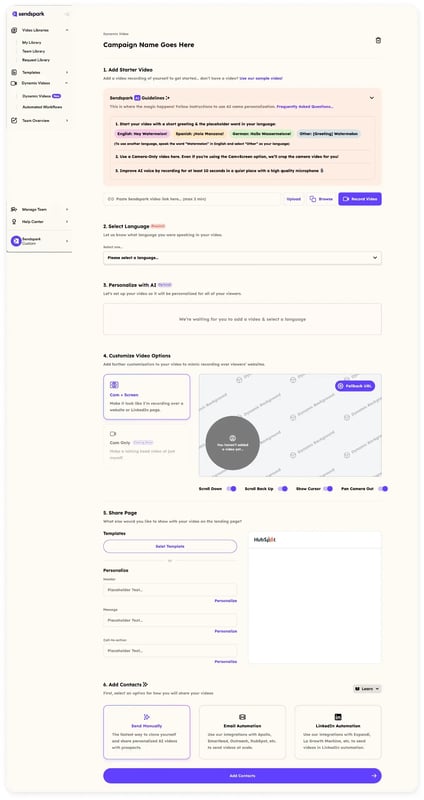
Setting it up follows the same recording workflow as a standard dynamic video, with one extra step:
- Create a dynamic video campaign. From the dynamic videos section in Sendspark, start a new campaign and request access to the Multiple Variables beta if you don’t see the option yet (approval typically takes up to 48 business hours).
- Record once, using placeholders or real names. Say the video as if speaking to one person: “Hi Dan, I was looking at Sendspark…” or use fallback words like “Hi there, I was looking at your company…”
- Mark your variables in the editor. Select the words you spoke, First Name, Company, or Job Title, and tag them as variables in the transcript editor.
- Confirm your background and save. Pair the spoken variables with a dynamic background if you want the visual and audio personalization to match, then launch the campaign.
Two practical limits are worth planning around before you commit a campaign to this feature. First, rendering time varies with demand: as little as 15 minutes when traffic is low, but up to 2 or 3 days during high demand, since the beta caps throughput to keep quality stable. Second, if you only need a name swap and not a full multi-variable video, Sendspark’s single-variable AI Greeting type renders faster, supports higher import volumes, and covers more languages, so it’s still the better default for simple first-name personalization at high volume.
Advanced strategy
Run your first multi-variable batch as a 20-30 video test before scaling to the full 250-video beta cap. Listen back to five or six renders yourself before sending, since the voice-consistency issues that cause internal pushback are usually easy to catch in a quick review but hard to walk back once a campaign is live.
If you’re pulling company name and job title from enrichment tools rather than typing them manually, our Clay and Sendspark personalization stack guide covers how to source and clean those fields before they hit a multi-variable campaign. For the broader workflow around planning, recording, and sending personalized video at scale, our video prospecting guide walks through the full process end to end. If you’re sending these campaigns through a cold email sequencer, see how to connect AI-personalized video to Instantly.ai and Smartlead without a manual CSV of per-recipient links.
Choosing Your Personalization Depth: A Decision Framework
Choose personalization depth based on three factors: deal size, audience sophistication, and send volume, not on which feature is newest. Larger deals and smaller, more sophisticated audiences can absorb more setup effort per video and more scrutiny of quality; high-volume, lower-touch outreach should default to the fastest mechanism that still clears a first-name baseline.
A useful gut check before adding a variable: could a prospect’s assistant read this video’s script aloud and have it sound like a real, individually written email rather than a form letter? If yes, you’re probably at the right depth. If the added variable feels like a party trick, “look, I found your company,” it’s more likely to trip the overwhelm response Gartner’s survey found in more than half of B2B buyers than to book a meeting. The fastest way to know which variables actually matter is to have a real buyer persona for the recipient, built from research rather than a guess at what might land.
| Situation | Recommended Depth | Why |
|---|---|---|
| High-volume top-of-funnel prospecting | First name + dynamic background | Fastest to generate at scale, clears the “not mass outreach” bar |
| Mid-size deals, sophisticated buyers (SaaS, tech) | Name + company (2 variables) | Signals real research without needing job-title-level precision |
| Named-account / ABM outreach to a buying committee | Name + company + title (3 variables) | Worth the setup time when each recipient is high-value and distinct |
| Trust-sensitive or regulated buyers, executive outreach | First name only, real recorded voice | Minimizes any risk of an “AI look” undermining credibility |
Whichever depth you choose, our AI voice cloning guardrails guide covers the consent and disclosure practices worth putting in place before any voice-cloned variable goes out at volume, and our guide to personalizing outbound at scale covers how to combine this with CRM signal data rather than static fields alone.
Frequently Asked Questions
Does personalizing beyond a first name actually increase reply rates?
Yes. According to SalesHive, personalization beyond a first name roughly doubles cold outreach reply rates, from about 9% for generic sends to about 18% for messages referencing company-specific details. Gains taper off after the second or third variable, since the goal shifts from “clearly not automated” to “clearly relevant,” which additional fields don’t guarantee on their own.
How many personalization variables should a sales video use?
Most B2B teams get the best return from two variables, first name and company, since that’s enough to signal real research without adding meaningful setup risk. A third variable, like job title, is worth adding for high-value, low-volume outreach such as account-based selling, where each recipient justifies the extra review time.
What is Sendspark’s Multiple Variables feature?
Multiple Variables is a private-beta Sendspark feature, available on the Growth plan and above, that lets you personalize up to three fields, first name, company name, and job title, within one AI voice cloning recording. Campaigns are capped at 250 videos while in beta, and rendering takes 15 minutes to up to 3 days depending on demand.
Can personalization hurt reply rates instead of helping?
Yes. A Gartner survey of 1,464 B2B buyers found personalization creates a negative experience for 53% of customers and makes them 2x more likely to feel overwhelmed by the amount of information referenced. Overloading a message with every available data point tends to make prospects focus on how the message was assembled rather than what it’s offering.
What’s the difference between personalization variables and personalization levels?
Variables are how many fields you personalize, name, company, title, within one video. Levels, covered in our AI personalization levels guide, describe which mechanism you use to personalize, from on-screen merge tags to dynamic backgrounds to full AI voice cloning. You choose both independently: a single-variable video can use any level, and a multi-variable video still needs a level to render through.
Do I need AI voice cloning to personalize a sales video with multiple variables?
For spoken variables, yes, since the AI has to render the new words in your voice. If you only want on-screen text personalization, like a name and company shown as a caption or lower-third, you can use Sendspark’s merge tags without any voice cloning at all.
What reply rate should I consider “good” for personalized cold video outreach?
Gong’s analysis of more than 28 million cold emails found top-performing senders clear 10%+ replies, roughly 4.2 times the average sender’s rate. That benchmark is a reasonable target for two- or three-variable personalized video outreach without needing a full AI avatar or synthetic presenter to hit it.
Sources & References
- Gong — Analysis of 28M+ cold emails found top reps get 4.2x more replies than average, with 10%+ as the “gold standard” reply rate; quote from Jason Bay, CEO of Outbound Squad (2026)
- SalesHive — “Personalization beyond the first name roughly doubles response rates,” from about 9% to about 18% (2026)
- Martal Group — “One signal, one consequence, one ask is the structure that holds” on avoiding over-personalization (2026)
- Demand Gen Report, citing Gartner — Survey of 1,464 B2B buyers found personalization creates negative experiences for 53% of customers, who are 2x more likely to feel overwhelmed (2025)
Published September 2026
Record One Video. AI Personalizes Thousands.
Sendspark is the AI video personalization platform for B2B sales. Record once, and AI voice cloning generates thousands of individually personalized videos with dynamic backgrounds and personalized thumbnails — each prospect hears their name, sees their website, in your voice. Sales teams see 2-3x more replies.
Get Started Now