Sales reps spend only 28% of their week actually selling, according to the Salesforce State of Sales report. The remaining 72% goes to data entry and RevOps automation, internal meetings, scheduling, and follow-up admin — tasks that generate zero revenue on their own. Sales process automation is how high-performing B2B teams reclaim those hours and redirect them toward closing deals.
Key Takeaways
- Sales reps spend only 28% of their time actually selling — automation reclaims those hours for high-value conversations.
- There are 5 key areas to automate: lead capture, qualification, outreach sequencing, follow-up, and pipeline updates.
- AI-personalized video outreach delivers 2-3x more replies than manual text email — and Sendspark automates it at scale with AI voice cloning and dynamic backgrounds.
- The most effective automation stacks connect CRM, enrichment tools, and outreach sequences so data flows between all systems without manual entry.
- Start with your biggest time sink — most B2B teams automate follow-up sequences first, then layer in AI video personalization for a compounding effect.
What Is Sales Process Automation?
Sales process automation is the use of software to handle repetitive, rules-based tasks in the sales cycle — so reps can focus on conversations, relationships, and decisions that require human judgment. It covers everything from auto-enriching a new lead in your CRM to triggering a follow-up sequence when a prospect goes quiet. The goal is not to replace salespeople, but to remove the friction that keeps them from selling.
According to McKinsey’s B2B Growth research, companies that automate their sales processes see a 10-15% revenue lift and a 10-20% reduction in cost of sales. Those numbers come from compounding small efficiencies across dozens of daily tasks. For context on the broader framework, see our guide on a dedicated RevOps strategy.
It’s important to separate two things people often conflate:
- Sales automation — software handling repetitive tasks (data entry, scheduling, follow-up triggers)
- Sales AI — software making recommendations or generating content (lead scoring models, AI-written emails, AI voice cloning for personalized video)
The most effective modern sales stacks combine both. Automation handles the workflow; AI improves the output quality of each automated touchpoint.
What Sales Automation Does NOT Replace
Automation handles the logistics. It does not replace discovery calls, negotiation, relationship-building, or the judgment calls that close deals. Any workflow that requires reading a prospect’s emotional state, adapting in real time, or making a strategic exception still needs a human. The goal is to compress everything else so reps spend more time on those high-value moments.
The 5 Key Areas to Automate in Your Sales Process
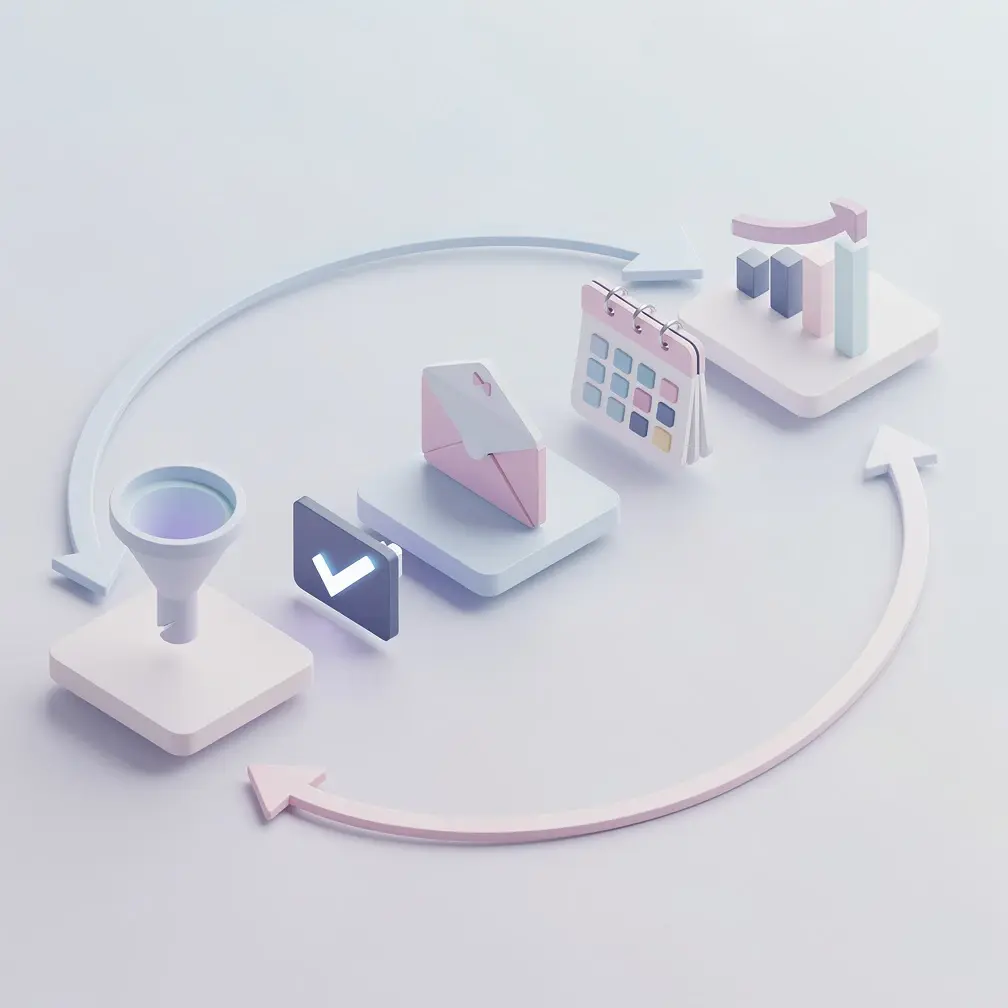
Most B2B sales processes have five stages where automation delivers the clearest ROI: lead capture, qualification, outreach sequences, meeting scheduling, and pipeline updates. Each one removes a different category of manual work. Together, they free up the hours that Salesforce found are currently consumed by non-selling activity.
1. Lead Capture and Enrichment
Every lead that enters your system should arrive pre-enriched — with company size, tech stack, funding stage, and job title already filled in. Manual research takes 5-10 minutes per prospect; enrichment tools like Clay, ZoomInfo, or Clearbit do it instantly at the moment of capture.
Set up automation to trigger when a lead fills a form, visits a pricing page, or is imported from a list:
- Auto-create a CRM contact with enriched firmographic data
- Assign to the correct rep based on territory or account size rules
- Tag with source and intent signals for later scoring
2. Lead Qualification and Scoring
Lead scoring models assign a numeric value to each contact based on fit (company size, industry, role) and behavior (email opens, page visits, demo requests). When a lead crosses a threshold, it automatically moves to an SDR queue — no manual review required.
Most CRMs (HubSpot, Salesforce) include basic scoring natively. For behavioral signals, tools like 6sense or Bombora add intent data. The key is defining your ICP criteria clearly in the model so scores reflect real purchase readiness, not just activity volume.
Common mistake
Don’t score leads purely on activity (email opens, page views). A prospect who opens every email but never replies may be a content consumer, not a buyer. Combine behavioral signals with firmographic fit for scoring that actually predicts conversion.
3. Outreach Sequences and Follow-Up
This is where most B2B teams see the biggest impact. HubSpot’s sales research found that 44% of salespeople give up after a single follow-up. Automated sequences eliminate that human failure point by scheduling every touchpoint — email, LinkedIn, call — in advance.
A typical outreach sequence for a cold B2B prospect:
- Day 1: Personalized first email (or AI-personalized video — more on that below)
- Day 3: LinkedIn connection request
- Day 5: Follow-up email with a new angle (case study, ROI data)
- Day 8: Call attempt + voicemail script
- Day 12: Final email (“should I close your file?”)
See our guide on building effective sales sequences for more detail on cadence timing and channel mix.
4. Meeting Scheduling
Meeting scheduling is one of the highest-friction, lowest-value tasks in sales. A rep and prospect exchanging 4-6 emails to find a time slot is a common pattern — and entirely avoidable. Tools like Calendly, Chili Piper, or HubSpot Meetings let prospects self-schedule directly from a link embedded in the outreach sequence. When a meeting is booked, it auto-creates the CRM deal, sends a confirmation, and adds the call to both calendars.
5. Pipeline and CRM Updates
Manual CRM hygiene is one of the biggest time sinks in sales. Automation can handle most of it: moving deals to the next stage when a meeting is completed, logging email activity, updating close dates when a prospect goes dark, and triggering deal reviews when a high-value opportunity stalls.
This is also where bidirectional CRM sync matters. Your HubSpot integration should write engagement data back to the contact record — email opens, video views, link clicks — so every rep has full context before every call without manual research.
| Automation Area | Task Removed | Time Saved (est.) | Tools |
|---|---|---|---|
| Lead Capture | Manual research per lead | 5-10 min/lead | Clay, ZoomInfo, Clearbit |
| Lead Scoring | Manual lead review and prioritization | 30-60 min/day | HubSpot, Salesforce, 6sense |
| Outreach Sequences | Writing and scheduling each touchpoint | 1-2 hrs/campaign | Outreach, SalesLoft, Apollo |
| Scheduling | Back-and-forth scheduling emails | 15-20 min/meeting | Calendly, Chili Piper |
| CRM Updates | Manual deal stage and activity logging | 45-90 min/day | HubSpot, Salesforce, Zapier |
How to Build a Sales Automation Stack
Building a sales automation stack means layering tools in the right order — starting with your CRM as the system of record, then adding enrichment, outreach sequencing, and finally AI-powered personalization on top. Most teams that fail at automation do so because they add tools before their data foundation is solid.
Here’s the order that works for most B2B teams with 5-25 reps:
Step 1: Lock Down Your CRM
Every other tool in your stack sends data to and from your CRM. If your CRM data is messy — duplicate contacts, missing fields, inconsistent stage definitions — automation amplifies the problem. Before adding any other tool, clean your CRM and define:
- Required fields at each pipeline stage
- Deal stage exit criteria (what must be true to advance)
- Lead source taxonomy (how leads are categorized)
- Territory or rep assignment rules
Pro tip
Run a CRM audit before connecting any automation tools. Export your contacts, check for duplicates, missing company data, and stale deals. A clean CRM foundation means automation flows work the first time instead of creating a bigger mess.
Step 2: Add Lead Enrichment
Once your CRM is clean, add an enrichment layer so every new lead arrives with complete data. Clay is the most flexible option for complex enrichment workflows. ZoomInfo or Clearbit work well if you need a simpler plug-and-play setup. Connect enrichment to trigger whenever a new contact is created in your CRM.
Step 3: Set Up Your Outreach Sequencer
Your sequencing tool (Salesflow, Outreach, SalesLoft, Apollo, or the Outreach integration) is where you build the multi-step cadences that run on autopilot. Start with one sequence — your best-performing cold outreach cadence — and automate it fully before building more. Test send times, subject lines, and step count before scaling to other personas.
For deeper reading, our guide to tools that automate sales workflows covers the full stack options by category.
Record One Video. AI Personalizes Thousands.
Sendspark is the AI video personalization platform for B2B sales. Record once, and AI voice cloning generates thousands of individually personalized videos with dynamic backgrounds and personalized thumbnails — each prospect hears their name, sees their website, in your voice. Sales teams see 2-3x more replies.
Get Started NowStep 4: Automate Scheduling and Handoffs
Add a scheduling tool (Calendly or Chili Piper) and wire it to your CRM so every booked meeting auto-creates the deal and logs the activity. Set up routing rules so inbound leads from high-priority accounts skip the standard sequence and go directly to an AE. This handoff automation eliminates the gap where warm leads go cold waiting for a human to respond.
Step 5: Build Pipeline Automation Rules
Set up deal stage automation in your CRM: when a meeting is completed, advance the deal to “Demo Done” automatically. When a deal hasn’t been updated in 14 days, trigger a task reminder. When a deal moves to “Closed Won,” trigger a customer success onboarding sequence. These rules keep your pipeline clean without manual effort.
For a reference on what good pipeline stages look like before you automate them, see our breakdown of sales pipeline stages.
Automating Video Outreach at Scale
AI-personalized video is the highest-ROI channel in modern outreach automation — and the most underused. Sendspark’s data shows sales teams using AI-personalized video see 2-3x more replies than text-only sequences. The challenge was always the time cost: recording individual videos at scale isn’t realistic. AI solves that.
Here’s how it works with Sendspark’s sales prospecting workflow:
- Record one video — you record a single 30-60 second prospecting video with your message and offer
- AI clones your voice — Sendspark’s AI voice cloning creates a personalized greeting for each prospect (“Hi [Name], I noticed [Company]…”) in your exact voice
- Dynamic backgrounds — each video automatically shows the prospect’s own website or LinkedIn profile behind you as the background
- Personalized thumbnails — each recipient sees a thumbnail with their name on it in their inbox, stopping the scroll
- Insert into your sequence — the personalized video link drops into Step 1 of your outreach sequence automatically
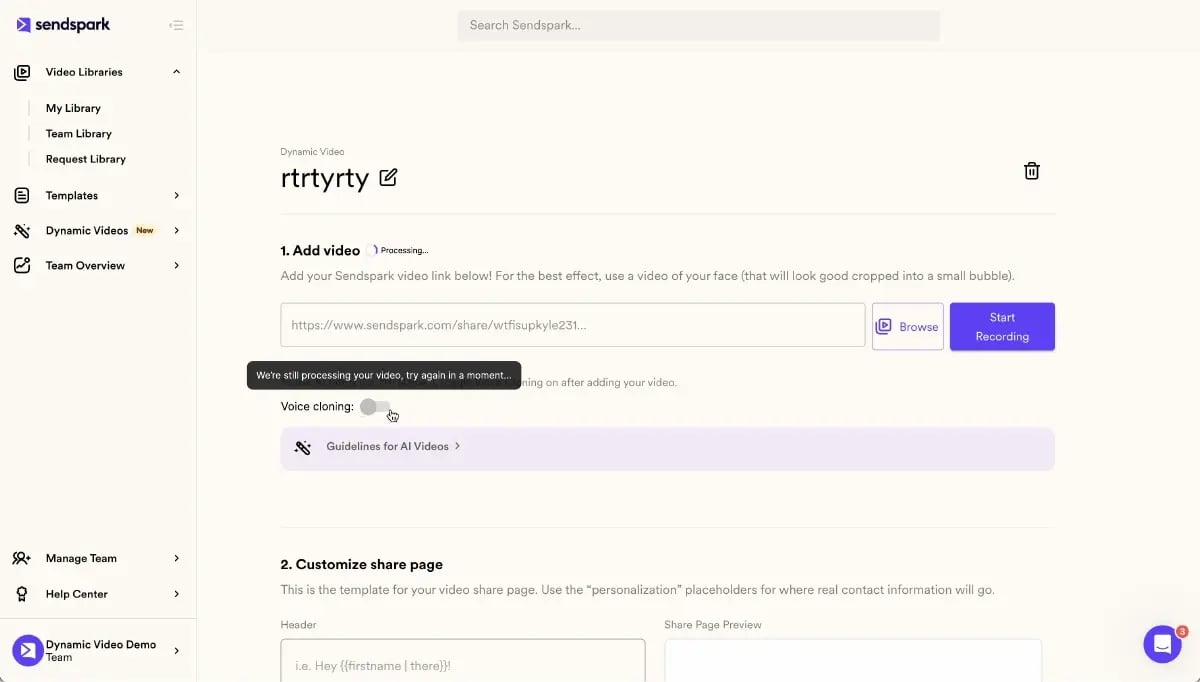
The result: each prospect receives what looks like a fully custom video made just for them — at the same time cost as sending a text email. When this replaces the first step in your cold outreach sequence, it lifts reply rates across the entire cadence because more prospects enter the conversation funnel.
Connecting Video to Your CRM and Sequencer
Sendspark integrates directly with HubSpot, Outreach, SalesLoft, Apollo, and 50+ other platforms. Video engagement data — who viewed, how long, whether they clicked the CTA — flows back into the CRM contact record automatically. This means your reps know which prospects have watched the video before they dial, which dramatically improves call relevance.
“We recorded 12 videos total. Sendspark turned them into 4,000 personalized versions — each prospect heard their own name and saw their own website. Our reply rate tripled in the first week.”
— SDR team using Sendspark at a B2B SaaS company (from Sendspark customer stories)
For a full breakdown of how AI personalization works at each level of the video, read our guide to sales automation software — the section on video automation covers the workflow in detail.
How to Measure Sales Automation ROI
Sales automation ROI shows up in two places: time saved and revenue metrics. Measure both. Time savings are easy to feel but hard to credit to pipeline without pairing them to outcome metrics. Track the metrics below at the 30-, 60-, and 90-day marks after implementing each automation layer.
Key Metrics to Track
| Metric | What It Measures | Benchmark (B2B) |
|---|---|---|
| Email reply rate | Sequence effectiveness | 5-10% cold; 10-20% warm |
| Meetings booked per rep/week | Outreach efficiency | 3-5 (SDR), 1-2 (AE) |
| Time on admin tasks/day | Automation coverage | <1 hr (well-automated), 2-3 hrs (manual) |
| Pipeline velocity | Deal cycle speed | Varies; track vs. your pre-automation baseline |
| CRM data completeness | Data quality | >90% required fields filled |
| Video view rate | Video outreach engagement | 40-60% (AI-personalized video) |
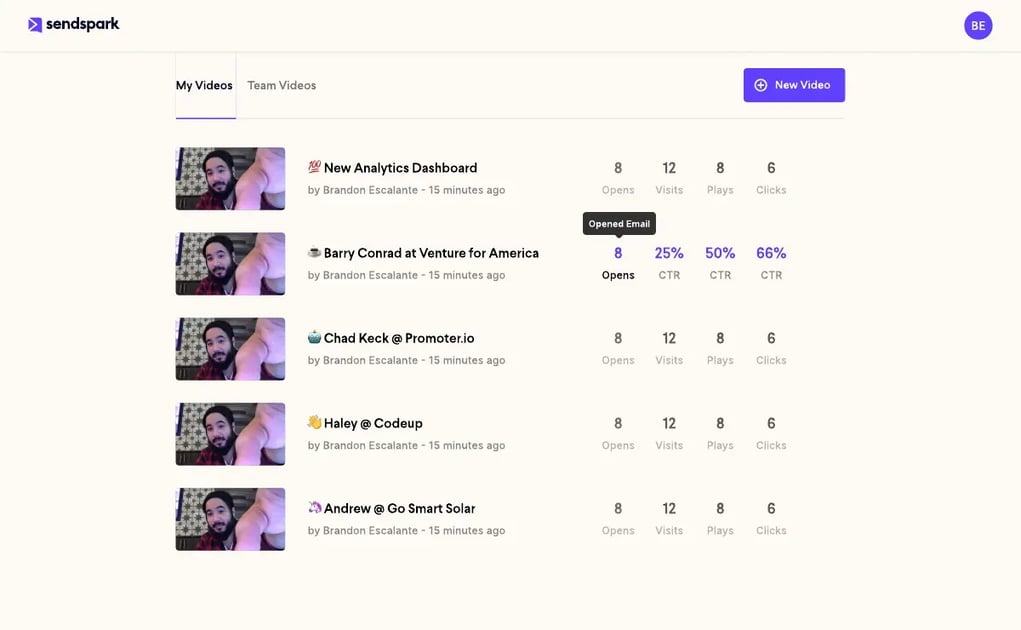
Use your video analytics dashboard to track video engagement at the individual and campaign level. Pair those engagement signals with sequence metrics from your outreach tool to see which combination of touchpoints drives the most replies.
Mistakes That Kill Automation ROI
According to Gartner’s sales process research, organizations with a defined and automated sales process achieve 18% more revenue — but only when the process is well-designed before being automated. The most common failure modes:
- Automating a broken process — if your manual sequence has a low reply rate, automating it just generates more bad emails faster
- Over-automating too fast — teams that automate everything at once often lose visibility into what’s working; layer in automation one stage at a time
- Ignoring data feedback loops — automation without analytics is flying blind; every tool should report back to your CRM
- Skipping personalization — generic automated sequences have some of the lowest reply rates in outreach history; AI personalization (especially video) reverses this trend
One practical way to validate your automation investment: run a 30-day test where half your reps use the automated sequence with AI-personalized video at step 1, and the other half use your current process. Compare reply rates, meetings booked, and pipeline created. The data builds the business case for full rollout and shows exactly which steps deliver the most value.
Frequently Asked Questions
What is sales process automation?
Sales process automation is the use of software to handle repetitive, rules-based tasks in the sales cycle — including lead capture, data enrichment, outreach sequencing, meeting scheduling, and CRM updates. The goal is to free sales reps from admin work so they can spend more time in actual selling conversations.
How much time does sales process automation save?
According to the Salesforce State of Sales report, sales reps spend only 28% of their week actually selling. With a well-implemented automation stack covering enrichment, sequences, and CRM updates, most B2B teams reclaim 10+ hours per rep per week. That’s roughly 40% more capacity redirected to pipeline-generating activity.
What are the best tools for automating the sales process?
The core stack for most B2B teams is: a CRM (HubSpot or Salesforce) as the system of record, a sequencing tool (Outreach, SalesLoft, or Apollo) for outreach automation, an enrichment tool (Clay or ZoomInfo) for data quality, a scheduling tool (Calendly or Chili Piper), and an AI video personalization platform like Sendspark for high-impact video outreach at scale.
How does AI-personalized video fit into sales process automation?
AI-personalized video replaces generic first-touch emails with videos where each prospect hears their name and sees their company website — generated automatically from one recording using AI voice cloning and dynamic backgrounds. Sendspark integrates with outreach sequences so the personalized video drops into step 1 of your cadence automatically, with video engagement data flowing back to your CRM.
Can small sales teams benefit from automation?
Yes — in fact, automation is proportionally more valuable for small teams. A 3-5 person SDR team that automates enrichment, sequences, and scheduling can produce the outreach volume of a 10-person manual team. The key is starting with one bottleneck (usually follow-up sequences) and building from there rather than trying to automate everything at once.
What is the difference between sales automation and sales AI?
Sales automation handles rules-based, repetitive tasks: triggering a follow-up email after 3 days, moving a deal stage when a meeting completes, or enriching a new contact. Sales AI makes decisions or generates content: scoring lead quality, writing personalized email copy, or cloning a rep’s voice for personalized video greetings. Modern sales stacks use both — automation for workflow, AI for output quality.
How do I measure if sales process automation is working?
Track these metrics before and after implementing each automation layer: email reply rate, meetings booked per rep per week, time spent on admin tasks per day, and pipeline velocity. Set a 30-day baseline before turning on automation, then compare at 30, 60, and 90 days. If reply rates and pipeline velocity improve while admin time drops, the automation is working.
Sources & References
- Salesforce State of Sales — “Sales reps spend only 28% of their week actually selling; the rest goes to administrative tasks, internal meetings, and data entry.” (2024)
- McKinsey & Company — The New B2B Growth Equation — “B2B companies that automate their sales processes see a 10-15% revenue lift and a 10-20% reduction in cost of sales.” (2023)
- HubSpot Sales Statistics — “44% of salespeople give up after one follow-up attempt, missing the majority of prospects who convert on touches 5-12.” (2024)
- Gartner Sales Research — “Organizations with a defined and consistently followed sales process achieve 18% more revenue than those without.” (2023)
Record One Video. AI Personalizes Thousands.
Sendspark is the AI video personalization platform for B2B sales. Record once, and AI voice cloning generates thousands of individually personalized videos with dynamic backgrounds and personalized thumbnails — each prospect hears their name, sees their website, in your voice. Sales teams see 2-3x more replies.
Get Started Now