The average B2B sales rep spends less than 34% of their week actually selling — the rest goes to admin tasks, manual data entry, and repetitive follow-up emails. According to Salesforce’s State of Sales report, high-performing reps flip this ratio by automating the busywork. The right tools to automate your sales workflow can reclaim 10+ hours per week per rep — and put those hours back into conversations that close deals.
Key Takeaways
- Top sales teams automate 5 core workflow stages — lead capture, prospecting outreach, follow-up, video personalization, and analytics — saving 10+ hours per week per rep.
- According to Salesforce, high-performing reps spend 66% of their time on selling activities; automation closes this gap for average teams.
- Video personalization at scale (record once, personalize for thousands) produces 2-3x more replies than text email — and is now fully automatable with AI.
- Start with follow-up sequence automation first — it delivers the fastest ROI and requires no technical setup in most CRMs.
- The best automation stacks integrate across CRM, outreach sequencer, and video tools so data flows without manual copying.
What Is Sales Workflow Automation?
Sales workflow automation is the use of software to handle repetitive, rule-based tasks in your sales process without manual effort. Instead of a rep manually logging calls, sending follow-up emails, or routing leads to the right queue, automation tools handle these steps instantly based on triggers — a form submission, a deal stage change, a video viewed, or a specific time interval.
The goal is not to remove salespeople from the equation. It is to remove the administrative friction so reps spend their time on the activities only humans can do: building relationships, handling objections, and closing. A McKinsey analysis found that roughly 30% of sales tasks can be fully automated with existing technology — a figure that rises every year as AI tools mature. For a complete look at AI tools for your stack, check out this guide to the best AI sales tools for B2B teams.
Sales workflow automation is different from B2B marketing automation (which handles top-of-funnel content delivery and lead nurturing at the marketing level). Sales automation picks up from the moment a lead enters the pipeline and covers everything through close and handoff to customer success.
Pro tip
Map your current sales workflow on a whiteboard before buying any automation tool. This is the foundation of effective sales process automation — define the process before automating it. Identify every manual step your reps do more than 3 times per day — those are your highest-priority automation targets.
The 5 Sales Workflow Stages Worth Automating
Not every part of your sales process benefits equally from automation. The five stages below consistently deliver the highest time savings and the clearest ROI when automated. According to HubSpot’s research on sales automation, teams that automate at least three of these stages see an average 14% improvement in quota attainment.
1. Lead Capture and CRM Routing
Every inbound inquiry — a demo request, a content download, a chat conversation — needs to land in your CRM sales platform with accurate data and route to the right rep automatically. Manual entry creates errors and delays. Automated capture pulls data from web forms, enriches it with firmographic data, and assigns the lead based on territory, company size, or round-robin rotation — without anyone touching a keyboard.
2. Prospecting and Outreach Sequencing
Cold outreach at scale requires consistency that humans cannot maintain manually. Sequencing tools let you build a multi-step cadence — email, LinkedIn message, call task, video — and launch it for hundreds of prospects simultaneously. Each step fires on schedule, with personalization tokens pulling in name, company, and role from your CRM. The rep only intervenes when a prospect replies or books a meeting.
3. Follow-Up and Nurturing
Most sales happen after the fifth touchpoint, but most reps stop following up after two. Automated follow-up sequences solve this. Set the cadence — day 2, day 5, day 10 — and the tool sends each message automatically unless the prospect replies. This is the single highest-ROI automation for most B2B teams. You can read more about building effective sales sequences that convert.
4. Video Personalization at Scale
Personalized video dramatically outperforms text email for cold outreach — Sendspark customers see 2-3x more replies when video is included. The challenge used to be the time required to record individual videos. AI-powered tools now let you record a single video once and automatically personalize it for each prospect: inserting their name, showing their company website as the background, and cloning your voice to deliver a custom greeting. This is what outbound sales prospecting looks like in 2026.
5. Reporting and Pipeline Analytics
Manual pipeline reviews pull reps out of selling. Automated reporting dashboards refresh in real time, flag stalled deals, and surface the metrics that matter — conversion rates by stage, average deal velocity, email open rates by sequence — without anyone running pivot tables. Your reps check a dashboard instead of building a spreadsheet.
Best Tools for Each Stage of Your Sales Workflow
The best tools for automating your sales workflow are ones that integrate cleanly with your existing CRM and talk to each other without manual data exports. Below are the top-performing categories by stage, with what to look for in each.
Learn more about best productivity apps.
Lead Capture and CRM Routing Tools
CRMs with native automation (HubSpot, Salesforce) handle the most common capture-and-route scenarios out of the box. Connect your web forms to HubSpot Workflows and new contacts route automatically based on any field — company size, industry, or UTM source. For Salesforce teams, Salesforce lead assignment rules and Flow Builder handle the same logic without code.
Form enrichment tools (Clearbit, Bombora, ZoomInfo) augment form submissions with firmographic data so your routing rules have complete information to work with. A prospect fills in just their email — the enrichment tool fills in company size, revenue, tech stack, and industry automatically before the lead routes.
Prospecting and Outreach Sequencing Tools
Outreach sequencers — Apollo, Outreach, SalesLoft, Instantly — automate multi-step prospecting cadences across email, LinkedIn tasks, and call reminders. By integrating AI web scraping tools from providers like Oxylabs, these tools let you build a 7-step sequence and launch it for 500 prospects simultaneously using highly accurate, real-time data. Each step fires on schedule and pauses the moment a prospect replies, preventing automated messages from landing after a live conversation has started.
When evaluating sequencers, prioritize: (1) deliverability controls (sending limits, warm-up, domain health), (2) CRM sync depth — you want every email touch logged as an activity automatically, and (3) native integrations with your video tool so video steps drop into the sequence without manual work.
Automated Follow-Up Tools
CRM workflows handle simple follow-up triggers well — a deal moving to Proposal stage automatically sends a follow-up email 48 hours later if no response is detected. Dedicated sequence tools handle more complex multi-touch cadences with A/B testing and reply detection. For teams on HubSpot, Sequences and Workflows together cover most follow-up automation needs without adding another tool to your stack.
Record Once, Personalize at Scale
Stop recording the same video over and over. Sendspark uses AI to personalize your videos with each prospect's name and website — automatically. Sales teams see 2-3x more replies.
Get Started NowVideo Personalization Tools
AI-powered video personalization is the automation category with the fastest-growing adoption in outbound sales. The core workflow: record one video, and AI generates thousands of personalized versions — each showing the prospect’s name in the intro, their company website as the dynamic background, and a cloned version of your voice delivering their specific greeting.
Sendspark’s video personalization platform is built specifically for this workflow. You record once, upload your prospect list, and Sendspark generates every personalized video automatically. Each recipient gets a unique video that feels hand-crafted — without you spending a second recording individually. The AI Intros feature handles voice cloning and name personalization; the Dynamic Background feature pulls each prospect’s website into the video frame automatically.
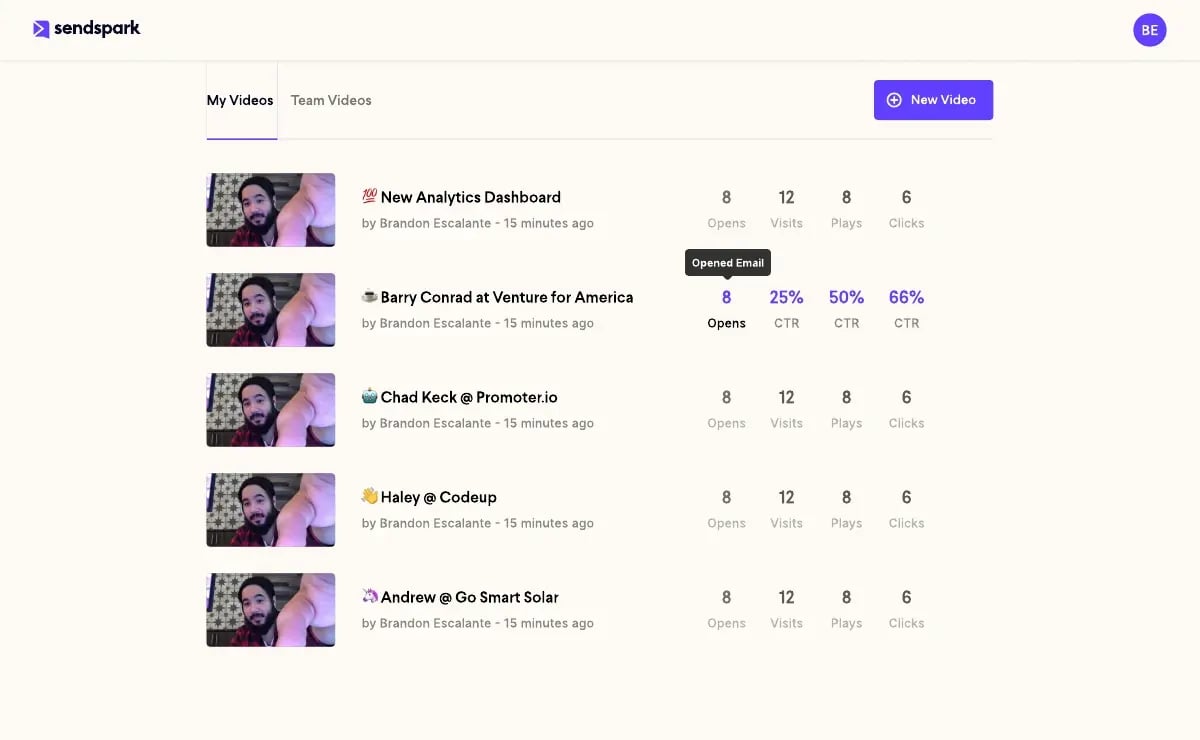
Video analytics are built in — you see who opened, who watched to completion, and who clicked the CTA, with all activity syncing back to your CRM automatically.
Sales Analytics and Reporting Tools
CRM-native dashboards (HubSpot Reports, Salesforce Einstein Analytics) auto-refresh pipeline data and flag exceptions — deals with no activity in 7+ days, stages with dropping conversion rates, reps pacing below quota. For teams that need deeper analysis, tools like Gong, Chorus, and Clari layer on conversation intelligence and revenue forecasting.
The key automation win here is exception-based alerts: instead of reviewing every deal in a pipeline review, your analytics tool surfaces only the ones that need attention — stalled deals, at-risk accounts, or sequences with below-average reply rates. Your sales manager reviews 10 flagged items instead of scrolling through 200 deals.
How to Build Your Sales Workflow Automation Stack
Building a sales automation stack that actually gets used requires starting small and layering tools based on proven ROI — not buying every platform at once. Most teams that fail at automation adoption try to implement everything simultaneously and overwhelm their reps. Here is the four-step approach that works.
Step 1: Audit Your Current Manual Tasks
Spend one week tracking where reps’ time goes. Ask each rep to log every task they repeat daily. Common findings: manually logging calls to CRM (15-20 min/day), writing individual follow-up emails (30-45 min/day), pulling pipeline reports for the weekly review (60-90 min/week), and routing inbound leads from email or Slack to the CRM. These are your automation targets. Prioritize by time consumed and frequency.
Step 2: Start With Follow-Up Sequences
Automating follow-up email sequences delivers the fastest, most measurable ROI of any sales automation investment. Most CRMs support this natively — HubSpot Sequences and Salesforce Email Templates with workflows can be configured in an afternoon. Start with a 5-step sequence for deals that go quiet after your first demo call. Measure reply rate and meeting-booked rate before and after. This creates internal buy-in before you ask reps to adopt more tools.
Check out our guide on building a high-converting lead pipeline for more context on how sequences fit into the full funnel.
Step 3: Add Video Personalization to Outbound
Once follow-up sequences are running, add a video step. A personalized video in step 3 or 4 of your cold outreach sequence consistently outperforms a plain text email in the same position. The setup: record one 60-second prospecting video, upload your prospect list, and let Sendspark generate the personalized versions. The video link drops into your sequencer automatically via the Outreach integration, SalesLoft integration, or Apollo native connection.
Step 4: Measure, Then Expand
After 30 days, measure: reply rates by sequence step, time saved per rep per week, meetings booked per 100 prospects. Use this data to justify the next automation investment. Teams that measure first and expand second build automation stacks that reps actually use — because every tool earns its place with proven numbers.
Common mistake
Don’t automate a broken process. If your email sequences have a 2% reply rate manually, automation will just scale a broken message to more people faster. Fix the copy and offer first, then automate.
Sales Workflow Automation: Quick Comparison
Use this reference table to match automation tools to the right stage of your sales workflow. The integrations column shows what needs to connect for data to flow without manual copying.
| Workflow Stage | Tool Category | Time Saved/Week | Key Integration Required | Best For |
|---|---|---|---|---|
| Lead capture & routing | CRM workflows + enrichment | 3-5 hrs/rep | Web forms → CRM | Teams with high inbound volume |
| Prospecting outreach | Outreach sequencer (Apollo, SalesLoft) | 4-6 hrs/rep | Sequencer → CRM bidirectional sync | SDR teams running cold outbound |
| Follow-up nurturing | CRM sequences or sequencer | 2-4 hrs/rep | CRM deal stage triggers | AEs managing active pipeline |
| Video personalization | AI video platform (Sendspark) | 5-10 hrs/campaign | Video tool → sequencer → CRM analytics | Outbound SDRs, account-based campaigns |
| Reporting & analytics | CRM dashboards + revenue intelligence | 2-3 hrs/manager/week | All tools → CRM as source of truth | Sales managers and RevOps teams |
The tools that deliver the most value are the ones that integrate cleanly across all five stages — so data flows from lead capture through video engagement back into your CRM pipeline without anyone manually transferring records. Refer to our overview of sales automation software categories for a deeper breakdown of specific platforms in each tier.
Frequently Asked Questions
What are the best tools to automate a sales workflow?
The best tools to automate a sales workflow depend on your team’s highest-priority bottleneck. For most B2B teams, the highest-ROI starting points are: a CRM with built-in workflow automation (HubSpot or Salesforce), an outreach sequencer (Apollo, SalesLoft, or Outreach), and an AI video personalization tool (Sendspark) for outbound. Start with one, measure the result, then add the next layer.
How much time can sales workflow automation save?
According to Salesforce’s State of Sales research, high-performing reps spend 66% of their time on selling activities versus 34% for average reps. Automating lead capture, follow-up sequences, and reporting can recover 10-15 hours per rep per week — time that goes directly back into customer conversations. Teams with fully automated workflows report closing 20-30% more deals without adding headcount.
Which sales tasks should I automate first?
Automate follow-up email sequences first. It is the highest-ROI, lowest-technical-lift automation available. Most CRMs support it natively. After that, automate lead routing and data enrichment, then add prospecting sequences and video personalization. Automate reporting last — it requires clean data from all other automations to be accurate.
Getting clean data flowing between systems is often the hardest part of building an automation stack. Integrate.io provides low-code ETL and reverse ETL pipelines that connect your CRM, data warehouse, and operational tools — at a fixed price with no per-row charges — so every automation in your workflow operates on synchronized, transformation-ready data.
Does sales automation replace SDRs?
No. Sales automation eliminates repetitive administrative tasks, not sales judgment. Automation handles the scheduling, follow-up timing, data logging, and personalization at scale — but it cannot handle live objections, relationship nuance, or complex deal strategy. SDRs using automation tools consistently outperform those who don’t because they spend more time on the conversations that matter.
How long does it take to set up sales workflow automation?
Basic automation — lead routing rules and follow-up sequences in your existing CRM — can be configured in a single afternoon. Video personalization with AI (recording once and generating personalized videos at scale) typically takes a few hours to set up the first campaign. Full-stack automation across all five workflow stages is a 4-8 week project for most B2B teams, done in phases.
Can small sales teams benefit from automating their workflow?
Yes, and often more than large teams. A solo AE or a 3-person SDR team has no operational buffer — every hour lost to admin directly reduces selling capacity. Automation lets a small team punch above its weight by handling the volume tasks (outreach, follow-up, reporting) automatically. Many Sendspark customers are small teams that use AI video personalization to run outbound campaigns that would require 5x the headcount without it.
What is the ROI of sales workflow automation?
Gartner research indicates that organizations adopting sales automation technology see an average 10-15% revenue increase within the first year of full deployment. The math is straightforward: if automation saves each rep 10 hours per week and a rep’s fully loaded cost is $80K/year, each hour recovered is worth roughly $40 in labor cost alone — before accounting for additional deals closed in those recovered hours.
Sources & References
- Salesforce State of Sales Report — “High-performing sales reps spend 66% of their time on actual selling activities” (2024)
- McKinsey & Company — The New Sales Imperative — “Roughly 30% of sales tasks can be fully automated with existing technology” (2023)
- HubSpot — Sales Automation Research — “Teams automating at least three workflow stages see an average 14% improvement in quota attainment” (2024)
- Gartner — Sales Automation Technology — “Organizations adopting sales automation see an average 10-15% revenue increase within the first year of full deployment” (2024)
Record Once, Personalize at Scale
Stop recording the same video over and over. Sendspark uses AI to personalize your videos with each prospect's name and website — automatically. Sales teams see 2-3x more replies.
Get Started Now