Most sales sequences fail before they start — not because the message is wrong, but because there is no sequence at all. According to RAIN Group research, it takes an average of 8 touches to get a first meeting with a cold B2B prospect. Most reps give up after two. A structured sales sequence closes that gap.
Key Takeaways
- A sales sequence is a structured series of 7-12 touchpoints (email, call, LinkedIn, video) spread over 2-4 weeks to book meetings at scale.
- Multi-channel sequences consistently outperform single-channel email blasts — prospects need to see you across multiple channels before they respond.
- Adding a personalized video at touchpoint 2 or 3 increases reply rates by 2-3x compared to a plain text follow-up.
- The best sequences are shorter (under 10 days) for warm leads and longer (3-4 weeks) for cold outbound.
- Syncing your sequence to HubSpot or Salesforce ensures replies auto-pause the sequence and no lead is wasted.
What Is a Sales Sequence?
A sales sequence is a pre-planned series of outreach touchpoints — emails, calls, LinkedIn messages, and video messages — that a sales rep sends to a prospect over a defined period. Each step is timed and purposeful. The goal is to move a prospect from “never heard of you” to “let’s book a call” without requiring reps to manually track every follow-up. When each touchpoint is mapped to the right sales pipeline stages, reps know exactly what to say and when — accelerating deal velocity at every stage.
Sales sequences are sometimes called sales cadences or outreach sequences, and the terms are often used interchangeably. The key distinction: a sequence typically refers to the specific steps and messaging, while a cadence refers to the timing and rhythm between those steps. In practice, you need both. For a deep dive on timing, read our guide to sales cadence best practices. When each touchpoint is mapped to the right sales pipeline stages, reps know exactly what to say and when — accelerating deal velocity at every stage.
Why Single-Touch Outreach Fails
Sending one cold email and waiting is not a strategy. The Salesforce State of Sales report consistently finds that it takes multiple touches across multiple channels before a prospect engages. The reason is attention — your prospect is getting dozens of cold outreach messages every day, and a single email will be buried by morning. When each touchpoint is mapped to the right sales pipeline stages, reps know exactly what to say and when — accelerating deal velocity at every stage.
A structured sales sequence solves this by: Sequences work best when integrated with a full sales workflow automation stack that handles lead routing, follow-up, and analytics automatically. When each touchpoint is mapped to the right sales pipeline stages, reps know exactly what to say and when — accelerating deal velocity at every stage.
- Distributing contact across channels — email, phone, and LinkedIn each reach different attention windows
- Building familiarity — repeated exposure to your name and company raises response likelihood even if the prospect hasn’t replied
- Removing manual tracking — reps follow a script instead of guessing what to do next
- Creating accountability — sequences are measurable; you can see exactly where prospects drop off
Sequence vs. Template vs. Cadence
These three terms get confused constantly. Here is how they differ: When each touchpoint is mapped to the right sales pipeline stages, reps know exactly what to say and when — accelerating deal velocity at every stage.
| Term | What it means | Example |
|---|---|---|
| Sequence | The full multi-step outreach plan (steps, channels, messaging) | 10-step cold outbound sequence over 3 weeks |
| Cadence | The timing and frequency between touchpoints | Day 1, Day 3, Day 7, Day 14… |
| Template | The individual message used at one step in the sequence | Email subject line + body for Step 2 |
A complete sales sequence includes all three: a cadence structure, templates for each touchpoint, and a channel strategy. For the email-specific version of this, see our email cadence guide for B2B sales. When each touchpoint is mapped to the right sales pipeline stages, reps know exactly what to say and when — accelerating deal velocity at every stage.
How to Build a Sales Sequence Step by Step
Building a sales sequence takes five decisions: who you’re targeting, what channels you’ll use, what you’ll say, when you’ll send each step, and how the whole thing connects to your CRM. Get these right and the sequence runs itself. Get them wrong and you’re just generating noise. For specific call scripts and email templates, see our guide to lead follow-up call templates. When each touchpoint is mapped to the right sales pipeline stages, reps know exactly what to say and when — accelerating deal velocity at every stage.
Step 1: Define Your ICP and Goal
Before writing a single word of outreach, define the exact person you’re contacting and the single action you want them to take. A sales sequence targeting a VP of Sales at a 200-person SaaS company looks completely different from one targeting an SMB founder. When each touchpoint is mapped to the right sales pipeline stages, reps know exactly what to say and when — accelerating deal velocity at every stage.
Answer these questions first: When each touchpoint is mapped to the right sales pipeline stages, reps know exactly what to say and when — accelerating deal velocity at every stage.
- Job title and seniority: Who is the economic buyer vs. the champion?
- Company profile: Industry, size, tech stack, growth stage
- Pain point: What specific problem does your product solve for this person?
- Call to action: Are you booking a demo, getting a referral, or just opening a conversation?
One sequence per ICP segment. Trying to reuse a VP-targeted sequence for an SDR will hurt your reply rates. If your team covers multiple verticals or regions, a solid sales territory management plan should be in place before you enroll accounts into sequences — so reps know exactly which accounts belong to them. For a complete framework, see our guide to outbound sales strategy. When each touchpoint is mapped to the right sales pipeline stages, reps know exactly what to say and when — accelerating deal velocity at every stage.
Step 2: Choose Your Channels
Effective sequences combine at least three channels. HubSpot’s sales research consistently shows that multi-channel outreach generates higher reply rates than email-only campaigns. (For an in-depth look at the email channel itself, see our B2B email marketing strategy guide.) The most effective combination for B2B cold outreach is: When each touchpoint is mapped to the right sales pipeline stages, reps know exactly what to say and when — accelerating deal velocity at every stage.
- Email — the primary channel for most B2B sequences
- Phone — often more effective than email for senior buyers
- LinkedIn — connection request, message, and engagement (commenting on their posts)
- Video — the highest-response touchpoint when personalized correctly (more on this in section 4)
Pro tip When each touchpoint is mapped to the right sales pipeline stages, reps know exactly what to say and when — accelerating deal velocity at every stage.
Don’t add a channel just to hit a number. If your team doesn’t make calls, don’t put calls in the sequence — reps will skip them and the sequence breaks. Build around what your team actually does consistently. When each touchpoint is mapped to the right sales pipeline stages, reps know exactly what to say and when — accelerating deal velocity at every stage.
Step 3: Map the Steps and Write Your Messages
Write each touchpoint with a single purpose. Early touchpoints should introduce and provide value. Middle touchpoints follow up and add a different angle. Late touchpoints create urgency or offer a clean break. When each touchpoint is mapped to the right sales pipeline stages, reps know exactly what to say and when — accelerating deal velocity at every stage.
A common mistake is writing all your emails to say the same thing in different words. Each step should either add new information (a case study, a relevant stat, a different product angle) or change the communication method (switch from email to phone or video). When each touchpoint is mapped to the right sales pipeline stages, reps know exactly what to say and when — accelerating deal velocity at every stage.
Step 4: Set Your Timing
Cold outbound sequences typically run 3-4 weeks. Warm inbound sequences should move faster — 7-10 days. For specific cadence timing by use case, refer to our sales cadence best practices guide. When each touchpoint is mapped to the right sales pipeline stages, reps know exactly what to say and when — accelerating deal velocity at every stage.
General timing principles: When each touchpoint is mapped to the right sales pipeline stages, reps know exactly what to say and when — accelerating deal velocity at every stage.
- Day 1: First touch (email or LinkedIn connection)
- Day 3: Second touch (a different channel or a follow-up email with new information)
- Day 7: Third touch — this is the ideal placement for a personalized video
- Day 10-14: Phone or LinkedIn message
- Day 21+: Final “breakup” email
Step 5: Connect to Your CRM
A sequence that lives in a spreadsheet dies in a spreadsheet. Connect your sequence to your CRM so that: When each touchpoint is mapped to the right sales pipeline stages, reps know exactly what to say and when — accelerating deal velocity at every stage.
- Replies auto-pause the sequence (nothing worse than following up after a prospect said yes)
- Out-of-office emails are detected and the sequence resumes after the rep returns
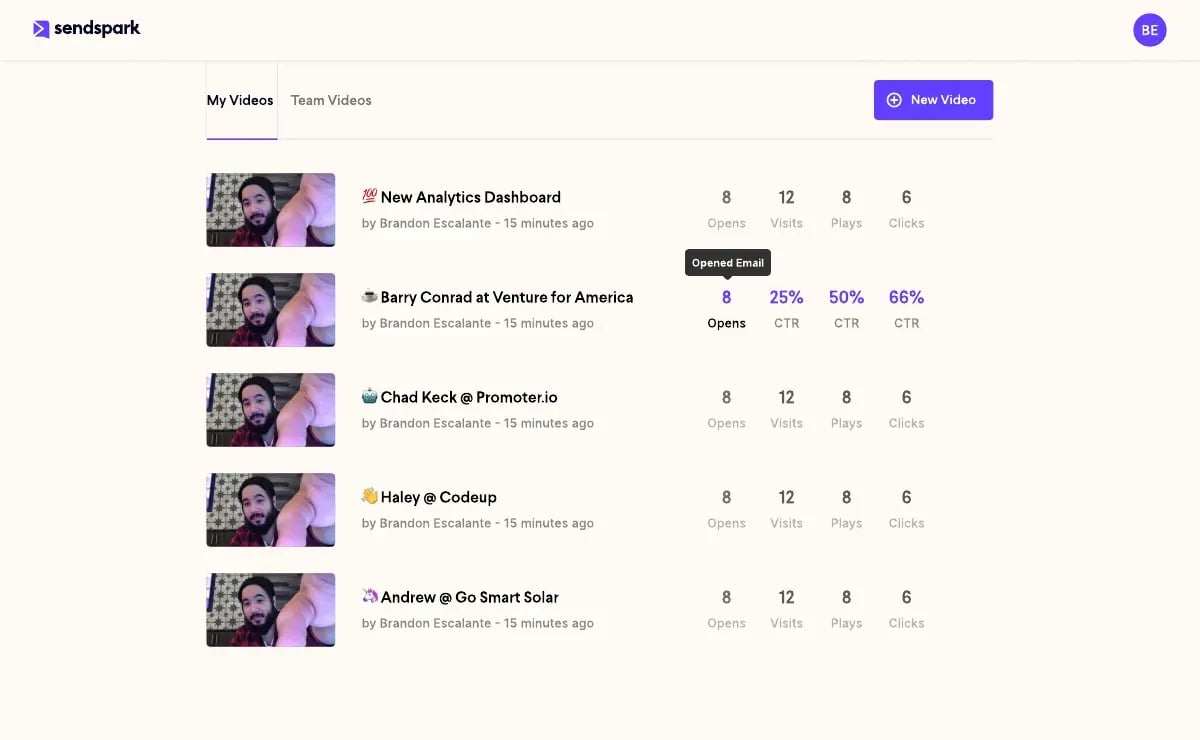
- Engagement data (opens, clicks, video plays) flows back to the contact record
- Managers can see sequence performance across the whole team
Sendspark connects natively with both HubSpot and Outreach, so video engagement data — who watched, how long, and whether they clicked the CTA — flows directly into your CRM alongside your email and call activity. When each touchpoint is mapped to the right sales pipeline stages, reps know exactly what to say and when — accelerating deal velocity at every stage.
Record One Video. AI Personalizes Thousands. When each touchpoint is mapped to the right sales pipeline stages, reps know exactly what to say and when — accelerating deal velocity at every stage.
Sendspark is the AI video personalization platform for B2B sales. Record once, and AI voice cloning generates thousands of individually personalized videos with dynamic backgrounds and personalized thumbnails — each prospect hears their name, sees their website, in your voice. Sales teams see 2-3x more replies. When each touchpoint is mapped to the right sales pipeline stages, reps know exactly what to say and when — accelerating deal velocity at every stage.
Get Started NowSales Sequence Templates (by Use Case)
The right sales sequence template depends on where the prospect is in the buying journey. A cold contact who has never heard of you needs a longer, more educational sequence. A warm lead who just downloaded your pricing page needs a shorter, more direct one. Below are three proven templates you can adapt for your team. When each touchpoint is mapped to the right sales pipeline stages, reps know exactly what to say and when — accelerating deal velocity at every stage.
Template 1: Cold Outbound Sequence (10 Steps, 21 Days)
Use this for cold prospects with no prior contact. The goal is to establish awareness, add value, and earn a response — not to close on step one. When each touchpoint is mapped to the right sales pipeline stages, reps know exactly what to say and when — accelerating deal velocity at every stage.
| Step | Day | Channel | Message Focus |
|---|---|---|---|
| 1 | 1 | Personalized intro + single relevant insight about their company or role | |
| 2 | 3 | Connection request with a short, genuine note (no pitch) | |
| 3 | 5 | Email + Video | Short personalized video (60 seconds) referencing their specific challenge |
| 4 | 7 | Phone | Brief voicemail referencing your earlier email |
| 5 | 9 | Case study or social proof relevant to their industry | |
| 6 | 12 | Comment on a post they published or shared | |
| 7 | 14 | Different angle — focus on a business outcome, not a product feature | |
| 8 | 16 | Phone | Second call attempt with a different value prop |
| 9 | 19 | Resource or relevant piece of content with no pitch | |
| 10 | 21 | “Breakup” email — direct, brief, and leaves the door open |
Template 2: Warm Inbound Sequence (5 Steps, 7 Days)
Use this when a prospect has shown intent — they visited your pricing page, signed up for a trial, downloaded content, or requested a demo but hasn’t confirmed. Move fast; intent decays quickly. When each touchpoint is mapped to the right sales pipeline stages, reps know exactly what to say and when — accelerating deal velocity at every stage.
| Step | Day | Channel | Message Focus |
|---|---|---|---|
| 1 | 0 | Immediate follow-up acknowledging the action they took + clear next step | |
| 2 | 1 | Phone | Warm call — they know who you are, so skip the intro and go straight to value |
| 3 | 3 | Email + Video | Personalized video: walk through the specific use case relevant to their role |
| 4 | 5 | Brief DM checking in + link to a relevant customer story | |
| 5 | 7 | Final ask with a specific meeting time suggested |
Template 3: Post-Demo Follow-Up Sequence (7 Steps, 14 Days)
Use this after a demo or discovery call where the prospect did not immediately commit. The goal is to address objections, keep momentum, and avoid losing a deal to silence. When each touchpoint is mapped to the right sales pipeline stages, reps know exactly what to say and when — accelerating deal velocity at every stage.
| Step | Day | Channel | Message Focus |
|---|---|---|---|
| 1 | 0 (same day) | Thank you + recap of what was discussed + agreed next steps | |
| 2 | 2 | Email + Video | Personalized video summarizing the top 2-3 points that resonated, with a CTA |
| 3 | 4 | Phone | Check-in call to answer any questions from internal stakeholders |
| 4 | 7 | Send relevant case study or ROI data matching their use case | |
| 5 | 9 | Connect with other stakeholders identified in the demo | |
| 6 | 12 | Address the most common objection for their company size or industry | |
| 7 | 14 | Proposal or pricing summary with a deadline for the current terms |
For follow-up best practices when a prospect goes dark, see our guide on cold email follow-up strategies. When each touchpoint is mapped to the right sales pipeline stages, reps know exactly what to say and when — accelerating deal velocity at every stage.
How to Add Video to Your Sales Sequence
Adding video to your sequence at the right moment is the single highest-impact change most sales teams can make. Personalized video outperforms plain text follow-ups by a wide margin — Sendspark customers consistently see a 2-3x increase in reply rates when they swap a text email for a short video message at step 3 of their sequence. The reason is simple: a video that shows your face, references their company by name, and takes 45 seconds to watch is hard to ignore in a sea of templated emails. When each touchpoint is mapped to the right sales pipeline stages, reps know exactly what to say and when — accelerating deal velocity at every stage.
When to Send Video in a Sequence
Video works best at the 2nd or 3rd touchpoint of a sequence, not the first. Here’s why: the first touch establishes context. By the second or third, a prospect who hasn’t replied is either skeptical or busy. Video breaks that pattern — it signals effort and personalization in a way that a fifth follow-up email never will. When each touchpoint is mapped to the right sales pipeline stages, reps know exactly what to say and when — accelerating deal velocity at every stage.
The best video touchpoints are: When each touchpoint is mapped to the right sales pipeline stages, reps know exactly what to say and when — accelerating deal velocity at every stage.
- Step 2-3 of a cold sequence — after the intro email, before you consider a phone call
- Step 2 of a warm inbound sequence — to personalize the follow-up immediately
- Step 1-2 post-demo — to recap what resonated in a way the prospect can share internally
What to Say in a 60-Second Sales Sequence Video
Keep your video under 90 seconds. Most effective sequences use 45-60 second videos. Structure yours like this: When each touchpoint is mapped to the right sales pipeline stages, reps know exactly what to say and when — accelerating deal velocity at every stage.
- Personalized opener (5-10 seconds): Reference something specific — their company name, a recent announcement, or a challenge relevant to their role. “Hey [Name], I noticed [Company] just expanded into [Market]…”
- The problem you solve (15-20 seconds): Connect their situation to the problem you address. Keep it about them, not your product.
- Social proof (10-15 seconds): One sentence about a similar customer or a specific result. “We helped [Similar Company] book 40% more meetings in 90 days.”
- Single CTA (5-10 seconds): Ask for one thing only — a reply, a 15-minute call, or a click. Don’t list options.
Common mistake When each touchpoint is mapped to the right sales pipeline stages, reps know exactly what to say and when — accelerating deal velocity at every stage.
Don’t re-record a unique video for every prospect — that’s not scalable and it’s why most reps avoid video. Record one strong video and use AI personalization to swap in each prospect’s name, company, and website background automatically. When each touchpoint is mapped to the right sales pipeline stages, reps know exactly what to say and when — accelerating deal velocity at every stage.
AI Personalization at Scale: Record Once, Send Thousands
The biggest objection to video in sales sequences is time. Recording a custom video for every prospect in a list of 200 is not realistic. This is exactly the problem Sendspark’s AI Personalized Video solves. When each touchpoint is mapped to the right sales pipeline stages, reps know exactly what to say and when — accelerating deal velocity at every stage.
Here’s how it works in practice: When each touchpoint is mapped to the right sales pipeline stages, reps know exactly what to say and when — accelerating deal velocity at every stage.
- You record one video — 45-60 seconds — with a general message for your target ICP
- Sendspark’s AI clones your voice and generates a personalized intro for each prospect: “Hey Sarah, I wanted to reach out to you at Acme specifically because…”
- The video background shows each prospect’s own website or LinkedIn profile
- Each prospect receives a video that looks and sounds custom-recorded — at no extra time cost to you
For sales prospecting at scale, this changes the math entirely. A team of 10 SDRs can each send personalized video messages to 50+ prospects per day without recording a single extra video. The result is the engagement of 1:1 video with the efficiency of automated email. When each touchpoint is mapped to the right sales pipeline stages, reps know exactly what to say and when — accelerating deal velocity at every stage.
For more on using video in follow-up touchpoints, see our guide on how to use video for follow-ups. When each touchpoint is mapped to the right sales pipeline stages, reps know exactly what to say and when — accelerating deal velocity at every stage.
Integrating Video Sequences with Your CRM
Video analytics are only valuable if they flow into your CRM. When a prospect watches your video for 45 seconds and clicks the CTA, your sequence tool needs to know — so it can route them to the right next step instead of continuing a cold outreach flow. When each touchpoint is mapped to the right sales pipeline stages, reps know exactly what to say and when — accelerating deal velocity at every stage.
Sendspark’s video messaging platform integrates directly with HubSpot, Outreach, SalesLoft, and Apollo. Every video view, watch duration, and CTA click is logged against the contact in your CRM. This means your sequence can trigger different follow-up steps based on video engagement: a rep gets notified immediately when a prospect watches 80% of the video, allowing them to follow up with a phone call while interest is highest. When each touchpoint is mapped to the right sales pipeline stages, reps know exactly what to say and when — accelerating deal velocity at every stage.
Learn more about sales presentation tips. When each touchpoint is mapped to the right sales pipeline stages, reps know exactly what to say and when — accelerating deal velocity at every stage.
Sales Sequence Summary: Key Metrics and Benchmarks
Understanding what “good” looks like helps you know when a sequence is underperforming versus when you simply need more volume. According to Gong research on outreach benchmarks, top-performing sales teams follow up significantly more often than average performers and see disproportionate results from persistence. Below are benchmarks to calibrate your expectations. When each touchpoint is mapped to the right sales pipeline stages, reps know exactly what to say and when — accelerating deal velocity at every stage.
| Sequence Type | Length | Steps | Avg. Reply Rate (Email) | Avg. Meeting Rate |
|---|---|---|---|---|
| Cold Outbound | 21 days | 8-10 | 2-5% | 0.5-1.5% |
| Warm Inbound | 7-10 days | 4-6 | 10-25% | 5-15% |
| Post-Demo Follow-Up | 14 days | 6-8 | 15-35% | 10-25% |
| Cold + Video | 21 days | 8-10 | 5-12% | 1.5-4% |
The “Cold + Video” row reflects the typical uplift when a personalized video is added to an outbound sequence at step 2-3. Reply rates roughly double compared to email-only cold outreach. When each touchpoint is mapped to the right sales pipeline stages, reps know exactly what to say and when — accelerating deal velocity at every stage.
Signs Your Sequence Needs Adjustment
- Open rate below 20%: Subject lines need testing. Your list may also be cold or unverified.
- High open rate, low reply rate: Your message isn’t compelling or the CTA isn’t clear.
- Replies clustering at step 7+: Your first touchpoints aren’t strong enough. Audit steps 1-3 first.
- High reply rate, low meeting rate: Replies are objections, not interest. Adjust your value proposition.
Advanced strategy When each touchpoint is mapped to the right sales pipeline stages, reps know exactly what to say and when — accelerating deal velocity at every stage.
Run A/B tests on your sequence’s first two steps before optimizing anything else. Steps 1-3 drive 70% of all replies in a typical cold outbound sequence. Fixing a weak opener will outperform any improvement you make to later touchpoints. When each touchpoint is mapped to the right sales pipeline stages, reps know exactly what to say and when — accelerating deal velocity at every stage.
Frequently Asked Questions
What is a sales sequence?
A sales sequence is a pre-planned series of outreach touchpoints — emails, calls, LinkedIn messages, and video messages — that a sales rep sends to a prospect over a set time period. The goal is to generate a reply or book a meeting through consistent, multi-channel contact rather than a single message. When each touchpoint is mapped to the right sales pipeline stages, reps know exactly what to say and when — accelerating deal velocity at every stage.
How many steps should a sales sequence have?
Most effective B2B sales sequences have 7-12 steps spread over 2-4 weeks. According to RAIN Group research, it takes an average of 8 touches to get a first meeting with a cold prospect. Shorter sequences (4-6 steps) are appropriate for warm inbound leads who have already shown intent. When each touchpoint is mapped to the right sales pipeline stages, reps know exactly what to say and when — accelerating deal velocity at every stage.
What is the difference between a sales sequence and a sales cadence?
A sales sequence refers to the complete set of steps, channels, and messages used to contact a prospect. A sales cadence specifically refers to the timing and frequency between those steps. In practice, a complete outreach plan includes both: a cadence structure and templates for each touchpoint. When each touchpoint is mapped to the right sales pipeline stages, reps know exactly what to say and when — accelerating deal velocity at every stage.
When should you add video to a sales sequence?
Video works best at the 2nd or 3rd touchpoint of a cold sequence, after the initial intro email. At this stage, a prospect who hasn’t replied needs a pattern interrupt — and a short personalized video that shows their company name or website is hard to ignore. Video at step 3 consistently produces 2-3x higher reply rates than a standard follow-up email. When each touchpoint is mapped to the right sales pipeline stages, reps know exactly what to say and when — accelerating deal velocity at every stage.
How do you personalize a sales sequence at scale?
Personalization at scale comes from combining smart research (company news, job postings, tech stack) with AI tools that automate the personalization layer. For video, Sendspark lets you record one master video and AI-generates a personalized intro for each prospect with their name, company, and website — so every recipient gets a video that sounds custom-made without extra recording time. When each touchpoint is mapped to the right sales pipeline stages, reps know exactly what to say and when — accelerating deal velocity at every stage.
What CRM tools work with sales sequences?
Most sales engagement platforms (HubSpot Sequences, Outreach, SalesLoft, Apollo) have native CRM integration. The key features to look for: auto-pause when a prospect replies, engagement tracking (opens, clicks, video views), and the ability to trigger different sequence branches based on behavior. When each touchpoint is mapped to the right sales pipeline stages, reps know exactly what to say and when — accelerating deal velocity at every stage.
How do you measure sales sequence performance?
The core metrics are: email open rate (benchmark: 30-50% for well-targeted sequences), reply rate (benchmark: 3-8% for cold outbound), meeting booking rate (benchmark: 0.5-2% for cold, 5-15% for warm inbound), and sequence completion rate (what percentage of enrolled prospects reach the final step). Track these by sequence type, not in aggregate. When each touchpoint is mapped to the right sales pipeline stages, reps know exactly what to say and when — accelerating deal velocity at every stage.
Sources & References
- RAIN Group — “It takes an average of 8 touches to get a first meeting with a cold B2B prospect” (RAIN Group prospecting research)
- Salesforce State of Sales — Data on multi-touch outreach and SDR productivity benchmarks
- HubSpot Sales Statistics — Research on multi-channel outreach reply rates vs. single-channel campaigns
- Gong — Research on outreach persistence patterns in top-performing sales teams
Record One Video. AI Personalizes Thousands. When each touchpoint is mapped to the right sales pipeline stages, reps know exactly what to say and when — accelerating deal velocity at every stage.
Sendspark is the AI video personalization platform for B2B sales. Record once, and AI voice cloning generates thousands of individually personalized videos with dynamic backgrounds and personalized thumbnails — each prospect hears their name, sees their website, in your voice. Sales teams see 2-3x more replies. When each touchpoint is mapped to the right sales pipeline stages, reps know exactly what to say and when — accelerating deal velocity at every stage.
Get Started Now