Your prospect will almost certainly see the text message you send them. SMS gets read about 98% of the time, compared to roughly 20% for email, according to Mailchimp. But a bare link in a text does nothing on its own — it has to earn the tap. That’s where a personalized video changes the math: instead of “click this link,” the text becomes “here’s a 20-second video made just for you.”
SMS video marketing sounds simple until you try to answer two questions a prospect (or your own compliance team) will ask: will they actually see a preview of the video, and can you prove anyone watched it? This guide answers both with the actual mechanics — not guesses — plus a step-by-step setup and the compliance rules you need to follow before you send a single text.
Published September 2026
Key Takeaways
- SMS gets a ~98% open rate vs. ~20% for email (Mailchimp), but a plain text link rarely converts on its own — pairing it with a personalized video gives the recipient a reason to actually tap it.
- Whether your video shows a rich thumbnail preview in a text depends on the recipient’s phone — iMessage and RCS can unfurl a link into a preview card, but plain carrier SMS only shows a bare URL. No platform can force this.
- Sendspark tracks plays and views server-side against the video link itself, not with an email-style tracking pixel — so engagement data works the same way whether the link was sent by SMS, email, or LinkedIn.
- Merge tags generate one unique, personalized video and link per contact in bulk, which is what makes per-recipient SMS tracking possible in the first place.
- The TCPA requires prior express written consent before sending marketing texts — video texting doesn’t change your compliance obligations, so treat it like any other SMS marketing channel.
What Is SMS Video Marketing?
SMS video marketing is the practice of sending a personalized video — usually as a link — over text message instead of, or alongside, email. It works because it stacks two things that individually already outperform plain email: SMS’s near-universal open rate, and video’s ability to make a cold message feel like it was made for one specific person.
Sendspark’s multichannel email, SMS, and video guide covers how the three channels fit together in a sequence, and our comprehensive guide to personalized video email covers the email side in depth; this article focuses specifically on the SMS-and-video mechanics.
The reason this matters right now is simple: most B2B teams already know email opens are shaky. Text messages don’t have that problem. SMS marketing delivers an average open rate of around 98%, compared to about 20% for email, according to Mailchimp. The gap is even more pronounced for cold outbound, where most emails never get opened at all. A text message removes that first hurdle — the challenge shifts from “will they open it” to “will they watch it.”
Here’s how SMS compares to the other two channels most B2B sales teams already use for personalized video outreach.
| Channel | Typical open/view rate | Best use case | Tracking method |
|---|---|---|---|
| SMS | ~98% opened (Mailchimp) | Warm follow-ups, appointment reminders, re-engaging a cold thread | Server-side, via the unique video link |
| ~20% opened (Mailchimp) | First touch with full context, case studies, longer pitches | Tracking pixel (increasingly unreliable — see below) | |
| Varies by connection status and message type | Warm intros, social proof, multi-threading a buying committee | Platform-native (views/replies), not owned by you |
None of these channels replace the others — they solve different problems in a sequence. What SMS specifically adds is speed and near-certain visibility, which is exactly why it’s worth getting the video and tracking mechanics right before you use it for outbound sales prospecting.
Why Some Video Texts Show a Thumbnail and Others Just Show a Link
Whether a recipient sees a video thumbnail or a bare link in your text comes down to what messaging protocol their phone is using, not anything you configure in your video platform. Plain carrier SMS was built to carry 160 characters of text, with no way to embed an image or video file.
So a link inside a plain SMS renders as exactly that: a plain, blue, clickable link.
iMessage and RCS are a different story. When you send a link over iMessage (iPhone-to-iPhone) or over RCS — the GSMA-backed successor to SMS that Twilio describes as supporting rich media and interactive messages — the messaging app can “unfurl” that link into a preview card using the page’s metadata, showing a thumbnail image and title above the raw URL. That’s the same mechanism that makes a shared article or YouTube link show a preview card in iMessage or WhatsApp.
Common mistake
Don’t promise a prospect (or your own sales team) that every video text will show a thumbnail preview. It depends entirely on the recipient’s device and carrier — plain Android SMS and older iPhones without RCS enabled will only ever show a link, no matter which platform sent it.
This is also why a GoHighLevel SMS workflow can be configured to format the outgoing text with proper link metadata, increasing the odds of a preview appearing on supporting devices — but it can’t guarantee one. The practical takeaway: write the text itself to work as a link-only message (“Hey [First Name], made you a quick video — [link]”), and treat any thumbnail preview as a bonus, not something the copy depends on.
How Sendspark Tracks Engagement on SMS the Same Way It Does on Email
Sendspark tracks who plays and watches a video the same way regardless of whether the link arrived by SMS, email, or LinkedIn, because the tracking happens on the video’s hosted page, not inside the message that delivered it. That’s a meaningfully different (and more reliable) mechanism than how email open tracking works, and it’s worth understanding why.
Email open tracking relies on a tracking pixel — a tiny, invisible image embedded in the email body that “phones home” to a server when it loads. That mechanism has gotten shakier every year. Apple Mail Privacy Protection now pre-loads every image in an email — including the tracking pixel — the moment it hits an Apple Mail inbox, whether or not a human ever opens it. As Postmark explains, “When a sender sends an email to an Apple Mail user, Apple caches the entire email on its own server. When doing so, they download all images, including tracking pixels” — which means open-rate data for a huge share of any list is now effectively noise.
SMS never had pixel-based open tracking to begin with — a text message doesn’t load remote images the way an email client does. So how does per-recipient video tracking work over SMS at all? The answer is that Sendspark isn’t tracking the text message — it’s tracking the video. Merge tags generate one unique, personalized video (and one unique link) per contact when you create videos in bulk. When that specific link gets clicked and the video plays, Sendspark logs the play and view server-side, tied directly to that video’s URL — the same event fires whether the click came from a text message, an email, or a LinkedIn DM.
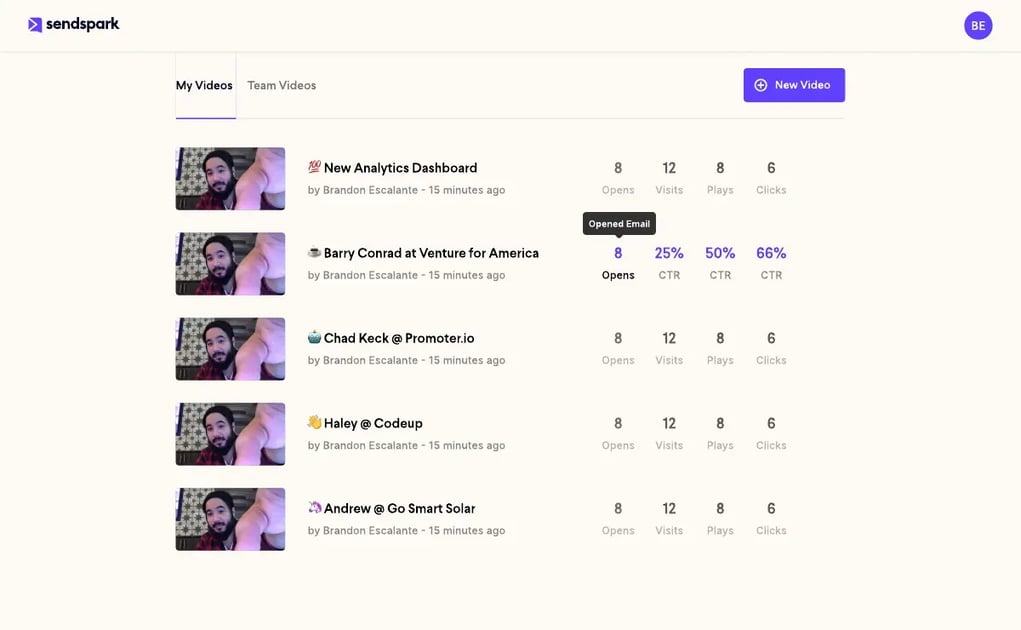
That’s the real mechanism behind “can you track who watches a text” — it isn’t a special SMS feature, it’s a side effect of how Sendspark’s video analytics already work. Every play is logged against the video, not the delivery channel, and every video is unique to one recipient because of how merge tags generate it. If you send the exact same link to two different people, you’ll see combined plays for that link, not two separate identities — so per-recipient attribution over SMS depends on generating a distinct dynamic video per contact, the same requirement that already applies to a personalized email campaign.
Advanced strategy
If per-contact tracking matters for your SMS campaign, generate videos through a CSV upload or an Agentic Workflow trigger, not by copy-pasting one shared link to your whole list. One link per recipient is what makes the analytics attributable in the first place.
Record One Video. AI Personalizes Thousands.
Sendspark is the AI video personalization platform for B2B sales. Record once, and AI voice cloning generates thousands of individually personalized videos with dynamic backgrounds and personalized thumbnails — each prospect hears their name, sees their website, in your voice. Sales teams see 2-3x more replies.
Get Started NowHow to Set Up Personalized Video Texting for Sales
Setting up personalized video texting takes four steps: record one base video, map merge tags to personalize it, generate the dynamic videos in bulk, and send the resulting links by text — either manually or through a CRM workflow. None of this requires re-recording anything per prospect; the “record one video, personalize at scale” approach is the same one used for AI-personalized video email, just delivered over a different channel.
The most common automated version of this uses GoHighLevel, since it’s the CRM most often used by agencies and local-service businesses running SMS-heavy campaigns. It works as a two-workflow pattern: one workflow generates the video, a second one sends the text once the video is ready.
| Step | What happens |
|---|---|
| 1. Trigger | A contact meets a condition in GoHighLevel — a tag, a form submission, a pipeline stage. |
| 2. Generate the video | The workflow’s “Create Dynamic Video” action maps the contact’s name and other fields to your video template. Sendspark generates a personalized video for that one contact. |
| 3. Store the link | The unique video URL is saved to a custom contact field, and a “ready to send” tag is applied. |
| 4. Send the text | A second workflow triggers off the “ready” tag and sends an SMS containing that contact’s unique video link. |
The same underlying steps work with any CSV-based bulk generation and any texting tool, not just GoHighLevel — GoHighLevel just happens to be the most common setup because its native SMS sending and its Agentic Workflow trigger live in the same platform. If you’re building your own CTA into the video page, consider adding a “Text Me” button — it uses a simple sms: URI that opens the recipient’s messaging app pre-addressed to your number, turning a one-way video into an actual conversation. That specific CTA requires Sendspark’s Solo plan or higher.
SMS Video Marketing Compliance and Best Practices
SMS video marketing is still SMS marketing, which means it’s still governed by the Telephone Consumer Protection Act (TCPA) — adding a video to the text doesn’t create an exception. You need documented, prior consent before you send a marketing text to anyone, video or not, and you need a working opt-out.
“Under the TCPA, businesses must obtain ‘prior express written consent’ in order to send marketing text messages, make marketing robocalls, or send fax advertisements.”
— Bryan Cave Leighton Paisner (BCLP), “The TCPA’s New Opt-Out Rules,” 2025
In practice, that means a few concrete rules for any video texting program:
- Get consent before the first text, not after. A prospect who gave you their number on a form, at an event, or in a phone call hasn’t automatically opted in to marketing texts — check what they actually agreed to.
- Always include a working opt-out. “Reply STOP to unsubscribe” is the standard, and you’re expected to honor it immediately, not at the end of a campaign.
- Be cautious about a video as a true cold first touch. A link in a first message to a number that’s never heard from you carries more deliverability and compliance risk than the same video sent as a follow-up to an existing conversation or opted-in list.
- Keep the text itself short. Let the video do the selling — the text just needs to earn the tap.
Branding is the other practical consideration. On Sendspark’s Starter and Solo tiers, texted video links carry the default Sendspark branding and thumbnail text. Growth tier and above removes that branding for a fully white-labeled link and video page, which matters if you’re an agency sending on a client’s behalf or simply want the text to look like it came entirely from your own number and brand, not a third-party tool.
| Do | Don’t |
|---|---|
| Get and document written consent before texting | Assume a phone number on a form is an opt-in to marketing texts |
| Generate one unique video/link per recipient | Send the same shared link to your whole list and expect per-contact tracking |
| Write the text to work even without a thumbnail preview | Promise a rich preview will show on every device |
| Lead with video in a warm follow-up text | Use a video link as a cold, unsolicited first touch |
Frequently Asked Questions
Is SMS marketing legal for B2B sales outreach?
Yes, but the TCPA requires prior express written consent before you send a marketing text, and that rule applies to B2B outreach the same way it applies to consumer texting. Get documented consent, include an opt-out, and honor STOP requests immediately.
How do you create a video for a text message?
You record one base video, set up merge tags for fields like first name or company, and generate a personalized version in bulk via CSV upload or a CRM-triggered workflow. Each generated video gets its own unique, shareable link that you send by text.
Can you track who watches a video sent by text?
Yes, as long as each recipient has a unique video link. Sendspark logs plays and views server-side against that specific video URL, so a click from a text message produces the same tracked engagement data as a click from an email.
Why doesn’t my video show a thumbnail preview in every text?
Plain carrier SMS can only render a bare link — it has no way to embed an image. Rich previews only appear on protocols like iMessage or RCS that support link unfurling, so some recipients will see a preview card and others will only see the URL.
Do I need consent before texting a sales video to a prospect?
Yes. The TCPA’s consent requirement applies to the text message itself, not the content inside it — a video doesn’t change your obligation to get prior express written consent before sending a marketing text.
What’s the difference between SMS and RCS for video texting?
SMS is the original, text-only protocol with no support for rich media, while RCS is the newer, carrier-backed standard that can render richer previews and formatting. Not every phone or carrier supports RCS yet, so a video text campaign should still work as a plain link for recipients without it.
Can I remove Sendspark branding from a texted video?
Yes. Sendspark’s Growth tier and above removes the default branding and “Watch on Sendspark” thumbnail text, so the video page and link appear fully under your own brand — the Starter and Solo tiers keep the default branding.
Sources & References
- Mailchimp — “SMS marketing delivers an impressive average open rate of around 98%, which puts it well ahead of email’s typical rate of about 20%” (2026)
- Bryan Cave Leighton Paisner (BCLP) — “Businesses must obtain ‘prior express written consent’ in order to send marketing text messages” (2025)
- Twilio — RCS is the GSMA-backed successor to SMS supporting rich media and interactive messages (2026)
- Postmark — Apple Mail Privacy Protection auto-downloads tracking pixels, inflating email open-rate data (2026)
Record One Video. AI Personalizes Thousands.
Sendspark is the AI video personalization platform for B2B sales. Record once, and AI voice cloning generates thousands of individually personalized videos with dynamic backgrounds and personalized thumbnails — each prospect hears their name, sees their website, in your voice. Sales teams see 2-3x more replies.
Get Started Now