
Loom and Sendspark are tools designed for AI-personalized video outreach, but they excel in different areas. If you're comparing video prospecting tools, here's the quick takeaway:
- Loom: Best for quick, one-off videos and internal communication. It’s simple to use, integrates with tools like Slack, and includes editing features like trimming and annotations. Pricing starts at $12.50–$15.00 per user/month.
- Sendspark: Ideal for scalable, personalized outreach. It uses AI to customize videos for hundreds of prospects and integrates deeply with CRMs like HubSpot and Salesforce. Pricing starts at $49/month, with advanced plans for team use.
Quick Overview:
- Loom is great for small teams needing fast, direct communication or polished internal updates.
- Sendspark is perfect for sales teams focused on large-scale prospecting and automating personalized outreach.
Both tools offer free trials, so you can test which fits your needs better. Keep reading for a detailed breakdown of features and use cases.
Loom vs Vidyard vs Sendspark 2024 | Which is the best video tool for sellers?
sbb-itb-afd3f9e
What Loom Offers Sales Teams
Loom is a video messaging platform trusted by over 25 million users across 400,000 companies. It allows sales reps to record their screen, webcam, or both simultaneously using a picture-in-picture format. Once recorded, videos can be shared instantly through an auto-generated link.
The platform’s AI tools simplify post-production by automatically generating titles, summaries, chapters, and even drafting emails while removing filler words. Its "Variables" feature takes personalization to another level, letting reps insert prospect-specific details into videos. Plus, embedded call-to-action buttons enable viewers to book meetings directly through tools like Calendly.
Loom's Main Features
Loom goes beyond basic video sharing, offering tools that make video creation and editing both efficient and impactful. Sales reps can record their entire screen, a specific app window, or just their webcam. The platform also supports automatic transcriptions and closed captions in over 50 languages, ensuring accessibility for a global audience.
Editing features include trimming clips, combining multiple videos, and adding visual elements like arrows, overlays, and drawing tools. Engagement tracking is another standout feature, providing real-time notifications when prospects view videos and delivering analytics on watch time and drop-off points. These insights sync with CRMs like Salesforce, helping reps prioritize follow-ups.
Loom integrates with popular tools such as Slack, Gmail, Zoom, Calendly, and Jira, automatically converting video links into embedded previews. These integrations and features give teams the ability to improve both internal communication and external outreach.
How Sales Teams Use Loom
Sales teams use Loom to streamline video sales enablement and elevate their outreach efforts. Internally, teams create "Monday Musings" videos - weekly updates shared in Slack that highlight wins and customer stories, replacing traditional all-hands meetings. Reps also use Loom to record sales forecasts and handoffs between Account Executives and Customer Success teams, preserving important context and reducing the need for lengthy meetings.
Externally, Loom helps sales reps stand out in crowded inboxes. For instance, Intercom boosted its email reply rates by 19% and generated $120,000 in revenue by incorporating Loom videos into its sales process. Jesse Vohwinkel, a former Account Executive at Seamless.AI, used Loom for personalized demos, closing over six figures in software sales. Additionally, Loom’s own sales team found that deals involving video messages have a 36% higher win rate.
"I think it's the plug-and-play, intuitive, frictionless nature of Loom that allows us to create personalized videos so quickly and see such an impressive increase in our response rate."
- Bucky Henry, Sales Manager, Intercom
Sales reps commonly use Loom for post-demo recaps to address technical questions, pre-meeting videos to outline call objectives, and re-engagement messages for unresponsive leads. The stitching feature is especially useful, allowing reps to create a polished product demo and then add a short, personalized intro for each prospect - striking a balance between efficiency and customization.
What Sendspark Offers Sales Teams
Sendspark is a game-changer for sales leaders aiming to scale personalized communication without sacrificing the human touch. Designed specifically for sales teams, Sendspark transforms outreach by turning a single recording into thousands of unique, customized videos. Its standout feature? AI voice cloning technology. This allows you to record one master video using placeholders (like "Watermelon") and automatically personalize it with each prospect's name - seamlessly and naturally.
By uploading a CSV or syncing with a CRM, sales teams can generate personalized videos in just minutes. This means sending tailored outreach to hundreds - or even thousands - of prospects without compromising on quality.
Sendspark's Main Features
Sendspark's AI-powered tools make personalization at scale effortless. Here’s what stands out:
- AI Voice Cloning: Record one master video, and the AI personalizes it by saying each recipient's name naturally across thousands of videos.
- Dynamic Backgrounds: These automatically pull in personalized elements like a prospect’s website or LinkedIn profile, making every video feel tailored.
- Combine Video Tool: Sales reps can merge a personalized intro with a pre-recorded product demo. This approach combines efficiency with a personal touch, offering the polished quality of a demo alongside a custom greeting.
- AI Script Generator & Teleprompter: These features help reps deliver smooth, compelling video sales pitches.
- Appearance Enhancements: One-click tools refine your look or replace distracting backgrounds with professional virtual settings.
Each video is paired with a dynamic landing page tailored to the recipient. These pages include the prospect’s name, company logo, and personalized calls-to-action, creating a fully customized experience. The platform also ensures high deliverability, so your videos land in primary inboxes - not spam folders. Plus, detailed analytics track everything from watch time to CTA clicks, helping sales leaders measure the impact of their campaigns on pipeline progression.
How Sales Teams Use Sendspark
Sales teams use Sendspark to craft outreach that cuts through the noise of crowded inboxes. A great example comes from December 2025, when the team at Warmly used Sendspark to re-engage "closed lost" opportunities. By leveraging AI to personalize videos at scale, they saw a 2–3× boost in email engagement and closed over $100,000 in ARR in just one month.
Reps also rely on Sendspark for cold outreach, follow-ups after LinkedIn connection requests, and re-engagement campaigns for stalled deals. The Chrome extension makes it easy to record and embed videos directly into Gmail, LinkedIn, or Outreach, while CRM triggers automate delivery based on prospect behavior.
The results speak for themselves. Sales teams using Sendspark’s AI personalization typically see reply rates double or triple. Personalized videos receive 16× more opens and 4.5× more clicks compared to generic video content. These numbers translate directly into better sales performance, helping leaders fine-tune their strategies and maximize ROI. When it comes to scalable, high-impact prospecting, Sendspark bridges the gap where generic outreach falls flat.
Feature Comparison: Loom vs Sendspark
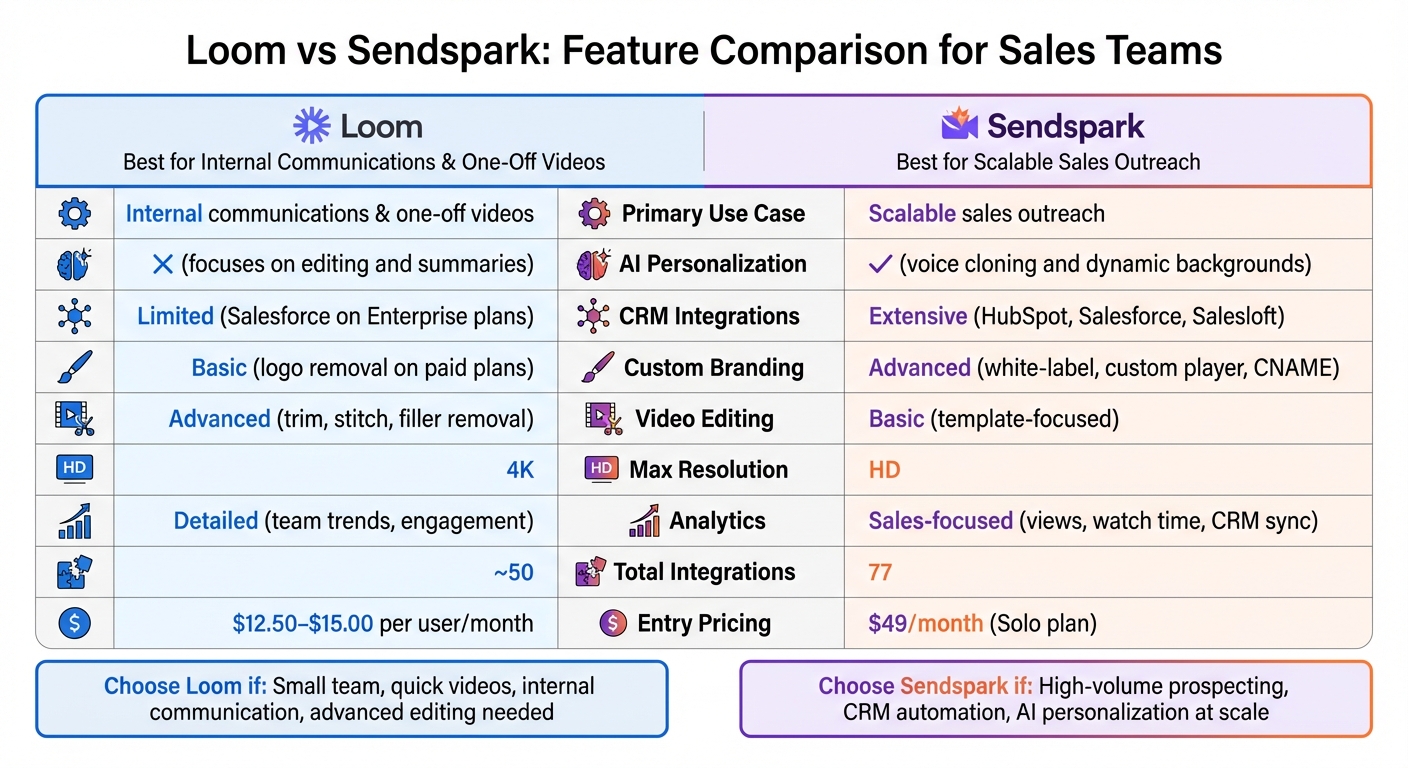
Loom vs Sendspark Feature Comparison for Sales Teams
Both Loom and Sendspark offer powerful tools for recording and sharing videos, but they serve different purposes. Loom is tailored for internal collaboration and quick, one-off messages, making it a favorite for teams looking to streamline communication. On the other hand, Sendspark is designed for scalable, personalized outreach, making it a go-to for sales and marketing teams.
Loom stands out with its advanced editing tools, AI-generated summaries, and smooth integration with platforms like Slack and Notion. It’s commonly used by sales teams to clarify product issues, share meeting recaps, or send targeted responses. Sendspark, however, takes personalization to another level. Its AI-driven features, such as voice cloning and dynamic video backgrounds, make creating tailored videos effortless. Additionally, Sendspark's CRM triggers automate video delivery based on prospect activity, allowing teams to scale outreach without sacrificing a personal touch.
Here’s a breakdown of how these two platforms compare in features, integrations, and pricing:
Comparison Table: Features, Integrations, and Scale
| Feature | Loom | Sendspark |
|---|---|---|
| Primary Use Case | Internal communications & one-off videos | Scalable sales outreach |
| AI Personalization | No (focuses on editing and summaries) | Yes (voice cloning and dynamic backgrounds) |
| CRM Integrations | Limited (Salesforce on Enterprise plans) | Extensive (HubSpot, Salesforce, Salesloft) |
| Custom Branding | Basic (logo removal on paid plans) | Advanced (white-label, custom player, CNAME) |
| Video Editing | Advanced (trim, stitch, filler removal) | Basic (template-focused) |
| Max Resolution | 4K | HD |
| Analytics | Detailed (team trends, engagement) | Sales-focused (views, watch time, CRM sync) |
| Total Integrations | ~50 | 77 |
| Entry Pricing | $12.50–$15.00 per user/month | $49/month (Solo plan) |
The table highlights the key differences. Loom excels in high-quality recording and advanced editing, making it ideal for teams focused on producing polished content. Sendspark, with its deep CRM integrations and automated personalization, is perfect for high-volume sales campaigns. Its ability to sync engagement data directly into CRMs like HubSpot or Salesforce and trigger videos based on workflows ensures efficient, scalable outreach.
When Loom Is the Better Choice
Loom is the go-to option when speed and ease of use are more important than automation or large-scale personalization. If your sales team needs to whip up a quick video and share it instantly - without worrying about templates, CRM triggers, or dynamic variables - Loom’s Chrome extension is a lifesaver. It allows you to record and share videos in seconds, making it perfect for situations where fast responses are a priority and setup time is limited.
It’s especially effective for one-off communications, like addressing a specific prospect’s question or resolving a unique customer issue that doesn’t fit into a pre-existing template. Instead of typing out a long email, you can record a quick screen share. Plus, Loom’s AI tools, such as filler-word removal and content summarization, make editing a breeze. This straightforward approach makes Loom ideal for situations where a personalized, immediate response is needed.
For internal sales operations, Loom is also an excellent choice. Sales teams often rely on it for internal updates, training sessions, meeting recaps, and product tutorials. With the ability to record in up to 4K resolution and access advanced editing tools, Loom is a great fit for creating polished, detailed content like educational videos or in-depth product walkthroughs.
Best Use Cases for Loom
Loom’s flexibility shines for small teams and direct, video for sales outreach. It’s a solid choice for small sales teams that don’t depend on CRM-driven workflows or automated campaigns. If your team values personal, one-on-one communication over scaling outreach to hundreds of prospects, Loom’s no-frills approach keeps things simple. Jesse Vohwinkel, Sales Director at Seamless.AI, highlighted its impact:
"The $60–$120 I spent paying for Loom out of pocket when I first became an Account Executive at Seamless.AI has helped me close well over 6 figures in software here - not a bad ROI, right?"
Loom also stands out for collecting feedback. Its timestamped comments and emoji reactions let team members or prospects respond to specific parts of your video. This makes it easier to refine proposals or gather input on sales presentations. If your focus is producing polished, high-quality videos for training or documentation - rather than scaling outreach to a large audience - Loom’s editing tools and AI features are exactly what you need.
When Sendspark Is the Better Choice
Sendspark is perfect for scaling personalized outreach without losing that human touch. If your sales team needs to connect with hundreds - or even thousands - of prospects, Sendspark's "record once, personalize infinitely" feature makes it possible. You can create a single template video, and with the help of AI, it dynamically personalizes each version by adding prospect names, company logos, or even their website as the video background. This approach is ideal for high-volume prospecting campaigns, saving time while keeping the outreach personal.
Where Sendspark truly stands out is in its CRM automation and workflow integration. It works seamlessly with platforms like HubSpot and Salesforce, enabling you to automate personalized video sends. For example, you can set up triggers to send videos when a lead fills out a form, moves to a specific pipeline stage, or gets added to a sequence. This ensures no lead falls through the cracks, allowing your team to focus on closing deals instead of manual follow-ups.
If your team runs omnichannel campaigns across email, LinkedIn, and SMS, Sendspark integrates with over 50 sales tools, including Apollo, Lemlist, Salesloft, Outreach, and Instantly. With features like animated GIF thumbnails and custom domain whitelabeling (CNAME), Sendspark ensures your videos bypass spam filters and corporate firewalls, making it easier to reach decision-makers. Plus, its detailed engagement tracking shows who watched your video and for how long, helping you focus follow-ups on the most engaged prospects.
Best Use Cases for Sendspark
Sendspark’s strengths in automation and personalization shine in specific scenarios:
- High-volume prospecting and automated sequences: If your team is reaching out to hundreds of leads weekly, Sendspark can help you maintain a personal touch without recording individual videos. For example, Mitch Malendrino, an Enterprise Account Executive at Quickly, shared that after switching to Sendspark in February 2026, his video creation time dropped from 3 hours to just 15 minutes. The impact? A 60% boost in open rates, 40% higher response rates, and a 75% reduction in time spent on video creation.
- CRM-triggered automation and pipeline tracking: For teams leveraging CRM tools to manage their sales pipeline, Sendspark delivers measurable results. Brikl’s sales team, for instance, saw a sixfold increase in response rates after integrating Sendspark's personalized video library into their prospecting and customer success workflows. If your goal is to secure more meetings, track engagement metrics directly in your CRM, and deliver a polished, branded experience, Sendspark is the tool to get you there.
How to Decide Between Loom and Sendspark
Your decision should depend on your team's size, how much personalization you need, and the sales metrics you aim to improve. Here's a practical framework to help you choose the right tool for better sales outreach.
Step 1: Assess Team Size and Goals
Start by evaluating your team's size and what you're trying to achieve. If you're part of a smaller team that mainly focuses on internal updates or creating occasional videos for existing clients, Loom might be your go-to. Its straightforward interface and affordable pricing - ranging from $12.50 to $15.00 per user per month - make it an attractive option. Loom also integrates with tools like Slack and Notion, helping teams cut down on unnecessary meetings and stay on the same page.
On the other hand, if your team handles large-scale outbound campaigns, reaching hundreds or even thousands of prospects every week, Sendspark could be the better fit. Its automation features justify the investment, with pricing starting at $49 per month for solo users and team plans ranging from $99 to $299 per month, depending on the number of seats and AI credit requirements.
Once you’ve considered team size and goals, it’s time to dive into how much personalization your outreach demands.
Step 2: Evaluate Personalization Needs
Think about whether you need to create a unique video for each prospect or if you’d benefit from automating personalization within your sales engagement platform. With Loom, you’ll need to record separate videos for each recipient, which can become a time-consuming task when scaling up.
Sendspark, however, offers tools like AI voice cloning and dynamic video backgrounds that let you record a single video and personalize it for multiple recipients. For example, you can add each prospect's name, display their company logo, or even feature their website in the video background. Teams using these features have reported 2–3x higher reply rates. If personalization at scale is a priority for your outreach strategy, Sendspark provides a more effective solution.
Finally, match these considerations with your sales performance goals and budget.
Step 3: Match with Sales Metrics and Budget
Your choice should align with the sales metrics that matter most to you. If you’re optimizing for reply rates, meeting bookings, or pipeline conversions, you’ll need a tool that tracks these outcomes. Sendspark excels here, offering campaign-level tracking, including link clicks and CRM integrations with platforms like HubSpot and Salesforce. These insights help you pinpoint which videos are truly driving results. Loom, on the other hand, focuses more on analytics such as views and reactions - helpful for internal feedback but less tied to revenue-driving activities.
Budget is another critical factor. Instead of focusing solely on the cost per seat, consider the cost per outcome. For example, Sendspark’s automation features can save your team 10+ hours per campaign while boosting reply rates by 200–300%. In such cases, the higher monthly cost can quickly justify itself.
Both tools offer free trials to help you test their potential. Loom provides a 14-day Business trial, while Sendspark offers a 7-day trial. Use these trials to measure initial engagement metrics and see which tool aligns better with your goals.
Conclusion
Deciding between Loom and Sendspark really depends on your goals. If your team’s focus is on internal updates, bug reporting, or occasional customer communications, Loom’s simple interface and budget-friendly pricing - starting at $12.50 per user per month - makes it a practical option. It’s great for quick, one-off communication needs.
On the other hand, if your priority is scaling personalized outreach across large prospect lists, Sendspark is designed for that challenge. Features like AI voice cloning and dynamic backgrounds let you create one video and personalize it for multiple recipients. Plus, with CRM integrations for tools like HubSpot and Salesforce, you can track engagement and see how your videos contribute to pipeline growth and revenue, making Sendspark an excellent choice for targeted sales strategies.
The decision ultimately hinges on your specific workflows and goals. If your focus is driving reply rates, securing meetings, and boosting conversions, you’ll need a tool that tracks these metrics and integrates seamlessly with your sales tools. But if your aim is to cut down on internal meetings and share quick updates, a straightforward solution like Loom might be a better fit.
FAQs
Can I use Loom and Sendspark together?
Loom and Sendspark work well together because they cater to different needs. Loom is perfect for creating quick, one-off videos, while Sendspark shines when it comes to scalable, personalized outreach efforts. By combining these tools, you can build a more well-rounded video communication strategy, leveraging the strengths of each platform.
How do I calculate ROI for Sendspark vs Loom?
To figure out ROI, weigh the value each tool brings - like engagement, conversions, or efficiency - against its cost. For Sendspark, prioritize its ability to scale personalized outreach and automate video campaigns, aiming to drive higher conversions. With Loom, focus on how well it supports internal communication or one-off videos, measuring gains in productivity or engagement. Think about how scalability, personalization, and automation features align with your specific sales and marketing objectives.
What’s the fastest way to pilot each tool with my team?
To get started with Sendspark, you can install the Chrome extension for seamless video recording directly in your browser, or opt for the Desktop App if you need to use it outside of Chrome. The platform also provides self-guided walkthroughs to help your team quickly begin sharing personalized videos on a larger scale.
On the other hand, Loom features a user-friendly interface that enables instant video recording and link sharing, making it perfect for quick updates or single-use videos. Both tools are designed for fast and easy setup, requiring little effort to get up and running.