Your email subject line is the first thing your recipient sees, and it can make or break your email’s success. A strong subject line grabs attention, communicates value, and sets clear expectations. Here’s how to write one that gets your AI-personalized videos opened:
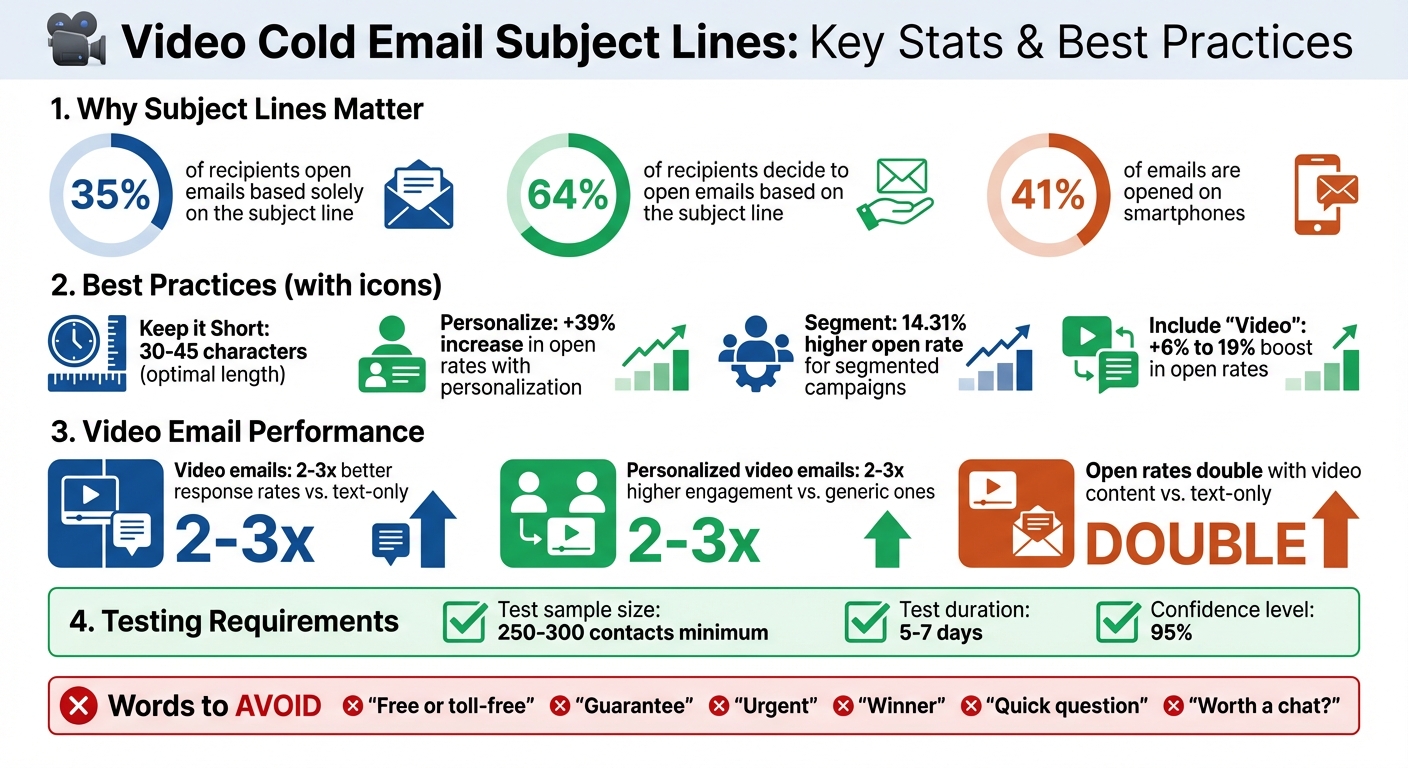
- Keep it short and mobile-friendly: Use 30–45 characters to ensure it’s readable on smartphones, where 41% of emails are opened.
- Personalize naturally: Reference specific details about the recipient or their business to show you’ve done your homework. Avoid cookie-cutter phrases.
- Highlight value: Answer “What’s in it for me?” with clear benefits, not vague hooks.
- Use curiosity and CTAs: Ask relevant questions or hint at the video content with phrases like “Recorded this for you 📹.”
Avoid spam triggers (e.g., “Free”, “Urgent”) and overused phrases (“Quick question”). Test different subject lines using A/B testing to find what resonates with your audience. Including the word “video” or a camera emoji can increase open rates significantly. Focus on clarity, personalization, and value to stand out in crowded inboxes.
6 Best Subject Line Templates for Cold Email Outreach | Matt Lucero
sbb-itb-afd3f9e
How to Write Subject Lines That Get Opened
An email’s open rate depends heavily on three key factors: brevity, natural personalization, and clear value. In fact, 35% of recipients open emails based solely on the subject line. These elements become even more important when you’re introducing personalized video content. Nail these basics before diving into creativity.
Keep It Short and Mobile-Friendly
Most emails are opened on smartphones - 41% to be exact. That means your subject line needs to fit neatly on a mobile screen. Subject lines longer than 50 characters can get cut off, so aim for a sweet spot of 30 to 45 characters.
Short doesn’t mean boring, though. Use active verbs and get straight to the point. For example, instead of a vague, long-winded phrase like “I wanted to reach out about something that might interest you”, try something punchier like “Recorded this for you 📹” or “Quick intro video for [Company].” Including an emoji, like a camera, can hint at video content and add a touch of visual appeal.
Once you’ve kept it concise, make sure your subject line feels personal and direct.
Add Personalization That Feels Natural
Nobody likes robotic, cookie-cutter emails. Starting with “Hi [First Name]” can feel impersonal if it’s clear the email is a template. Instead, tie your subject line to specific details about the recipient. For example, reference a recent funding milestone (“Congrats on the Series A”), hiring activity, or a known challenge they’re facing, like “Slow website speeds” or “Unfilled SDR roles.” Using the right video prospecting tools can help automate this research.
Personalized emails work. Segmented campaigns, which group prospects by industry, role, or challenges, achieve a 14.31% higher open rate than non-segmented ones. For example, if you know a prospect uses a competitor’s tool, you could try a line like “[Competitor Name] Alternative for [Company].” This kind of detail shows you’ve done your homework and makes the email feel thoughtful rather than automated.
But personalization alone isn’t enough - recipients need to see the value.
Highlight the Benefit or Value
Your subject line should answer one question: “What’s in it for me?” Avoid vague hooks like “Thought you’d like this” and focus on clear, specific benefits. For example, try “Saving [Company] time on [Process]” or “Quick tip to improve your [Metric].”
33% of people open emails because of an effective subject line. But “effective” doesn’t mean overly clever or gimmicky - it means relevant and useful.
As Alex Berman, author of The Cold Email Manifesto, explains:
“To really thrive, for each cold email, you need a specific offer and a specific customer”.
If your video addresses a tangible problem - like reducing onboarding time or fixing a workflow issue - spell out the benefit right in the subject line. Vague promises won’t cut it, but clear, actionable value will grab attention and drive opens.
Using Curiosity and Calls-to-Action
Once you’ve nailed personalization and clarity, adding a touch of curiosity paired with well-thought-out calls-to-action can take engagement to the next level. The trick? Strike a balance. You want to pique interest without leaning on clickbait tactics. The aim is to intrigue while being upfront about what the recipient can expect. This is a key part of learning how to break through the noise with cold email in a crowded inbox.
Ask Questions That Spark Interest
Questions are a powerful tool - they create a mental gap that people naturally want to close. Instead of saying something like, “Solution for your hiring challenges”, try asking, “Could this be the answer to your unfilled SDR roles?” This approach directly addresses a specific pain point, making it more engaging.
Keep your questions focused and relevant. Broad queries like “Want to grow your business?” often miss the mark. Instead, tailor your question to what you know about the recipient. For instance, if you’ve done your homework on their tech stack, you might ask, “Having trouble with [Competitor Name]?” or “Is your [process] delivering the results you need?” These types of questions make your message feel personal, almost like a one-on-one conversation.
If you’re including a video, add a visual cue like 📹 to highlight it. Video email examples tend to perform better, with open rates doubling compared to text-only emails. Even better, personalized AI-personalized videos can boost response rates by 2–3x compared to generic ones.
Now, let’s talk about guiding your recipient with a clear next step.
Include Clear Calls-to-Action
Your subject line should subtly hint at the action you want the recipient to take. For example, phrases like “Watch this quick demo” or “See how we achieved [specific result]” set clear expectations without sounding pushy. The key here is to make your call-to-action feel helpful, not sales-driven. Instead of saying, “Book a meeting now”, you could try, “{Name}, thought this might save you time”.
Focus on one action at a time. If your subject line encourages them to watch a video, don’t muddy the waters by also asking them to schedule a meeting or reply. Keeping it simple makes it easier for them to take the step you want.
As Hamish Stephenson, CEO of Selr.io, wisely points out:
“The first 5 seconds is the most important. Hook them in with thought-provoking personalization about them.”
Your subject line is your hook. Combine curiosity with a clear, value-driven call-to-action that respects their time and directly addresses their needs.
Common Subject Line Mistakes to Avoid
To ensure your emails are both engaging and make it to the inbox, it’s crucial to steer clear of common mistakes that can undermine their effectiveness. Even with the best intentions, subject lines can backfire if they trigger spam filters or appear too generic. Knowing what to avoid is just as important as crafting what works. Here’s a breakdown of pitfalls that can harm your open rates before your email even gets seen.
Avoid Spam Trigger Words
When writing subject lines, you’re not just appealing to your recipient - you’re also navigating email service providers (ESPs) and their spam filters. These filters are designed to flag certain words and patterns that are often associated with spam. If your subject line raises red flags, your email might never see the light of day in your recipient’s inbox.
Be cautious with words like “Free or toll-free”, “Guarantee”, “Increase sales”, “Winner”, and “Special promotion” - these are notorious for setting off spam alarms. Similarly, avoid deceptive tactics like using “Re:” without an actual reply, “Did I miss your call” to fake familiarity, or “Urgent” when there’s nothing time-sensitive about your message. These tricks can quickly erode trust.
Formatting also matters. Subject lines with ALL CAPS, excessive exclamation points, or too many emojis not only look unprofessional but can also trigger spam filters.
Ben Wright from Sendspark highlights this dual audience for subject lines:
“Remember, you’re writing subject lines for both your recipient and the spam filter.”
For example, instead of something spammy like “Free demo - click here now!”, opt for a subject line that’s professional and specific, like “Recorded this for you 📹” or “Quick intro video for [Company Name]”. These approaches maintain your credibility while helping your email avoid the spam folder. Plus, AI-personalized videos often perform 2-3 times better than text-based emails because their higher engagement rates signal to ESPs that you’re a legitimate sender.
Beyond avoiding spam triggers, it’s also important to steer clear of generic language that fails to grab attention.
Skip Generic and Overused Phrases
While spammy words can harm deliverability, generic subject lines are equally damaging because they fail to engage readers. Phrases like “Worth a chat?”, “Can we connect?”, and “Just wanted to bump this up” are so overused they’ve lost all impact. Buyers today are quick to spot AI-generated emails, and these tired phrases immediately signal impersonal outreach.
Ben Wright from Sendspark explains it well:
“Buyers are jaded - they’ve seen every ‘quick question’ and ‘worth a chat?’ email already.”
The problem with generic phrases is their lack of specificity. They don’t give the recipient a compelling reason to open the email or explain what value they’ll get. Instead of vague hooks, focus on being precise. For example, try something like “[Competitor Name] Alternative for [Company]” or “We’ve helped [Similar Company] increase [Specific Outcome] by [Amount]”.
The difference is striking. A generic subject line feels like spam, while a tailored one feels like it was written just for the recipient. Specificity shows you’ve done your homework - it references their company, role, or a particular challenge they’re facing. That’s how you stand out in an inbox flooded with cookie-cutter outreach.
Testing and Improving Your Subject Lines
Creating great subject lines is just the beginning. To keep your emails effective, you need to test and refine them regularly. What grabs attention today might fall flat tomorrow as inboxes become more cluttered and recipients grow pickier. The best way to stay ahead? Test consistently and dig into the data to see what resonates.
Set Up A/B Tests
A/B testing is a simple but powerful tool. Focus on testing one variable at a time. For example, compare a subject line that includes the word “video” with one that’s more generic. Make sure each version is sent to at least 250–300 contacts and let the test run for 5–7 days. To ensure accuracy, use an A/B testing calculator to confirm your results hit a 95% confidence level.
If you’re using video in your cold emails, try experimenting with phrases like “I recorded a quick video for you”. You can also test adding a video emoji (📹) to see if it grabs more attention in crowded inboxes.
Use Data to Improve Performance
Once your tests are complete, it’s time to dive into the results. Look at your metrics to figure out what’s working. The open rate is your go-to metric for measuring how effective your subject line is - it shows whether it caught the recipient’s eye. But don’t stop there. Check the reply rate to see if your subject line is attracting the right prospects.
Hans Dekker from Instantly.ai sums it up well:
“If your open rate is high but replies are low? Your subject wins attention but does not set the right expectation.”
For AI-personalized videos, take it a step further and track the play rate - the percentage of recipients who click play after landing on the video page - and watch time. These metrics help you determine if your subject line aligns with the content of your video. If people open your email but skip the video, it’s a sign your subject line might be misleading or overpromising.
Conclusion
Creating effective AI-personalized video subject lines means keeping them short, personal, value-focused, and backed by data. With 64% of recipients deciding to open emails based solely on the subject line, every word matters. Aim for mobile-friendly lengths (30–45 characters), and remember, adding personalization can increase open rates by 39%. This approach lays the groundwork for testing and refining your strategy.
Your subject line should answer the question, “What’s in it for me?” while sparking just enough curiosity to encourage a click. Including the word “video” can boost open rates by 6% to 19% [26,27], and adding a 📹 emoji can help your email stand out in a crowded inbox.
“Email marketing takes just a moment to learn… But it truly requires a lifetime of constant optimizing and tinkering to master.” – Simone Morgan, Content Creator, Nutshell
Testing is essential to discover what resonates with your audience. What works for one group might not work for another, so consistently run A/B tests and closely monitor your metrics. Use the insights from your data to refine your approach. Personalized video emails, when crafted thoughtfully and adjusted based on real performance, can significantly improve engagement.
Start applying these strategies today. Focus on natural personalization, steer clear of spam triggers, and let your testing data guide your adjustments. With concise, personalized, and data-driven subject lines, your AI-personalized videos can rise above the noise in crowded inboxes.
FAQs
How can I write AI-Personalized Video subject lines that avoid spam filters?
To ensure your AI-personalized video subject lines don’t get caught in spam filters, steer clear of words or phrases that sound like spam, overusing punctuation, or writing in all-caps. Aim for a subject line that’s straightforward, truthful, and to the point - keeping it under 60 characters is a good rule of thumb. Adding a personal touch, like the recipient’s name or specific details, can make it feel more engaging and customized.
How can I create personalized subject lines for video cold emails?
Crafting subject lines for video cold emails that grab attention requires personalization, clarity, and brevity. Start by making it personal - include the recipient’s name or company to immediately connect with them. For example, “John, a quick video for Acme Co.” feels tailored and engaging. Tools like Sendspark can help you automate this personalization by adding names or logos effortlessly.
Keep your subject lines short - ideally under 60 characters - so they don’t get cut off in inbox previews. Adding a specific reference, like a recent achievement or challenge, shows you’ve done your research. For instance, “Congrats on your Series B – here’s a 20-second tip” feels relevant and thoughtful. Including a hint about the video, such as “Watch this quick demo”, also signals there’s a visual element, which often leads to higher open rates.
Lastly, make your subject line intriguing or highlight a clear benefit. Something like “How to save 30% on prospecting time” promises value while sparking curiosity. By blending personalization, relevance, and a concise value proposition, you’ll create subject lines that stand out and encourage recipients to click.
How can I use A/B testing to improve open rates for video cold emails?
To improve the open rates of your video cold emails, consider using A/B testing. Here’s how it works: send two variations of the same email to groups of similar size (ideally around 250–300 contacts). Change just one element - such as the subject line, thumbnail image, or call-to-action text - and then compare the results to see which version gets better open rates.
After identifying the version that performs best, use it as a reference point for future campaigns. Also, to maintain good deliverability, make sure to include a clickable thumbnail that links directly to your video on a dependable hosting platform.
Related Blog Posts
- Cold Email vs Video Email: Which Gets More Replies?
- Sales Video Best Practices: A Complete Checklist
- Best Video Message Templates for Sales Teams
- How To Schedule Video Outreach For Maximum Views
Topics: blog