Updated September 2026
Your agency is managing more client accounts with a leaner team than it was two years ago, and every one of those clients expects to feel like your only priority. That’s a hard combination to deliver over email threads and back-to-back Zoom calls. The fix most growing agencies have landed on is video: short, personal recordings that replace status-update calls, speed up onboarding, and let one account manager stay genuinely present with twenty clients instead of five.
This guide walks through seven ways agencies use video across the client lifecycle, plus what’s changed since the pandemic-era “just record a Loom” advice: AI voice cloning and dynamic video personalization now let you scale that same personal touch across your entire book of business instead of manually re-recording for each account. It’s a pattern that shows up well beyond agencies too — see how async-first sales teams have adopted it on the revenue side of the business.
Key Takeaways
- Video shortens the client lifecycle at every stage: prospecting, onboarding, upselling, and support all move faster when you show instead of type.
- The typical B2B buying decision now involves 13 internal stakeholders and 9 external influencers, according to Forrester’s 2026 State of Business Buying report — a single video can reach that whole buying committee asynchronously instead of requiring a live call everyone attends.
- AI voice cloning and dynamic video backgrounds let agencies personalize a single recorded video for hundreds of client accounts without re-recording, closing the gap between “personal” and “scalable.”
- 93% of marketers consider video a crucial part of their overall strategy, per Wistia’s 2024 State of Video Report (via HubSpot).
- Moving client updates to a digital sales room with a video analytics dashboard lets agencies track watch-through rate and prove ROI at renewal time, instead of guessing whether a client actually read last quarter’s report.
Win New Clients: Prospecting, Selling, and Onboarding with Video
Video shortens the distance between “cold prospect” and “onboarded client” by letting agencies show their work instead of describing it. A short, personal video in a first outreach email — walking through a prospect’s website or a specific problem you noticed — reliably converts better than a text-only pitch, and the same video habit carries a new client through their first weeks with you. This applies whether you’re a marketing agency, a recruitment shop, or any agency built around client services — the mechanics are the same even when the deliverable differs.
Prospect and Sell
The best time to start using video with a client is before they’re a client. A screen-recorded walkthrough that says “I noticed your website is slow, here’s why” makes a prospect feel seen in a way a generic cold email never will. Two approaches work especially well: showing past examples as proof of your agency’s work, and diagnosing a specific problem or pain point live on camera and recommending a fix.
Here’s a real example: an agency rep sent a first-touch video, then a follow-up with a proposal walkthrough, and that’s what turned a cold lead warm. For more examples and scripts you can adapt, see our video prospecting examples roundup, or our comprehensive guide to video prospecting if you’re building this motion out from scratch.
Welcome New Clients
A pre-recorded welcome video is a small thing that signals a lot: you cared enough to make something one-to-one instead of sending a templated “welcome aboard” email. A good welcome video does three things — thanks the client for their business, lays out the next steps (like onboarding calls or key dates), and includes a small personal touch, like a callback to something they mentioned during the sales process.
If individual videos aren’t practical at your volume — say you serve hundreds of small accounts — a “canned” welcome video by client segment or service line is a reasonable middle ground, and it’s exactly the gap AI video personalization closes (more on that below).
Onboard Clients Faster
Video onboarding beats a wall of onboarding documents because clients can watch, pause, and rewatch on their own schedule. Give new clients one or two long-form walkthrough videos covering your process, drip shorter videos via email as they hit each milestone, or build a self-serve library they can return to any time. A simple shared doc linking out to a handful of short Sendspark videos is often enough — you don’t need a fancy LMS to make onboarding feel guided. If you want a structured starting point, our breakdown of video types for customer onboarding covers exactly which videos to build first and in what order.
The underlying goal is the same one behind good sales onboarding: get the client to their first “aha” moment as fast as possible. A client who understands your process and sees early value in week one is far less likely to churn in month three — which is worth remembering, since onboarding quality shapes retention long before a renewal conversation ever happens.
Pro tip
Address your three most common onboarding questions in a single FAQ video up front. It cuts down on repetitive kickoff calls and gives new clients something to reference before they even think to ask.
Support, Retain, and Grow Existing Accounts with Video
Once a client is onboarded, video keeps paying off by making support faster, upsells more credible, and testimonials easier to collect. Instead of a support ticket turning into a 30-minute call, a two-minute screen recording showing exactly what you’re seeing (or fixing) resolves most issues asynchronously — and the same recording habit works for expansion conversations and case studies.
Teach and Troubleshoot Asynchronously
Even your most experienced clients will hit points where they need to relearn part of your process. Respond to problems with a quick recorded walkthrough as they come up, and once you notice the same question repeating, turn it into a permanent piece of your knowledge library. This lets your team respond to client issues asynchronously — no scheduling a call just to say “click here, then here.” It’s the same principle behind asynchronous video communication on the sales side, just applied after the deal closes instead of before it.
This is also where a dedicated customer success motion pays off. Agencies that treat post-sale support as seriously as they treat prospecting tend to retain accounts longer, because clients notice when problems get solved quickly instead of sitting in a ticket queue.
Upsell and Expand Accounts
Video is just as useful for growing an account as it is for winning one. Use it to show clients new capabilities or services you’ve added since they signed, to build short case studies proving you can replicate another client’s results for them, and to highlight recent wins when a renewal or expansion conversation comes up. None of this requires new leads — it just requires making the value you’re already delivering visible. This is really just AI video personalization applied to your existing accounts instead of new prospects: the same one-to-one feel, aimed at expansion revenue instead of net-new pipeline.
Collect Testimonials and Feedback
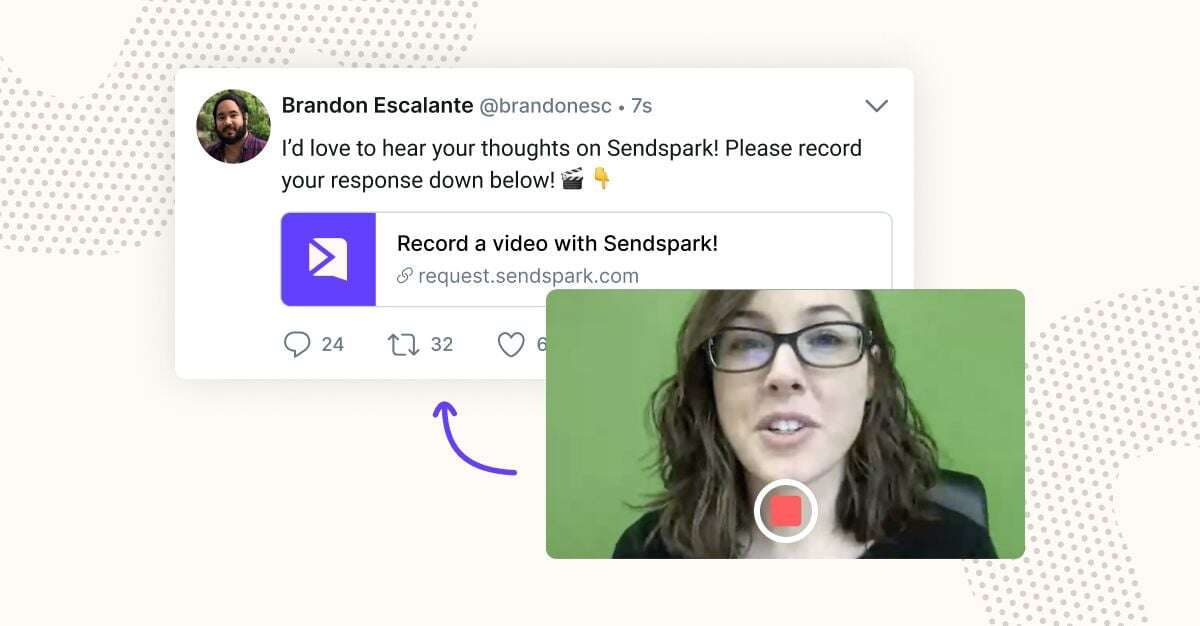
Video testimonials are some of the highest-converting content an agency can produce, and asking for one takes seconds with the right tool — see our guide on how to ask for customer video testimonials. The same request-a-video flow works in reverse for feedback: if a client reports a bug you can’t reproduce, ask them to record their screen so you can see exactly what they’re seeing.
Move Your Agency to Async-First Client Communication
Async-first communication means defaulting to a recorded video or written update instead of a live call whenever a live call isn’t strictly necessary — and it has moved from a pandemic workaround to a deliberate operating model for agencies managing more accounts with smaller teams. The payoff is real: async-first habits mean fewer status meetings and more protected time for actual client work.
The reasoning holds up under research, not just anecdote. Research summarized in Harvard Business Review found that it’s specifically time spent on camera in live meetings that drives fatigue — not video content itself. A pre-recorded video removes the live-camera pressure entirely while keeping the face-to-face feel clients respond to.
There’s a coordination benefit too. Forrester’s 2026 State of Business Buying report found the typical B2B buying decision now involves 13 internal stakeholders and 9 external influencers — far more people than fit on one Zoom call, and far more than any account manager can brief individually. A recorded update sent once reaches all of them on their own schedule. That matters even more given Gartner’s finding that 74% of B2B buyer teams show “unhealthy conflict” during their decision process — the more consistently every stakeholder hears the same message, the less room there is for that internal friction to stall a renewal.
Record One Video. AI Personalizes Thousands.
Sendspark is the AI video personalization platform for B2B sales. Record once, and AI voice cloning generates thousands of individually personalized videos with dynamic backgrounds and personalized thumbnails — each prospect hears their name, sees their website, in your voice. Sales teams see 2-3x more replies.
Get Started NowScale Client Communications with AI Video Personalization
AI voice cloning and dynamic video backgrounds now let agencies personalize one recorded video across an entire book of client accounts, instead of manually re-recording a version per client. You record a single quarterly update once; AI swaps in each client’s name, logo, and account-specific metrics in your own cloned voice, so every client still gets something that sounds and looks personal.
If you’re running that personalization across client accounts that each need their own branding, not just their own name and logo swapped into a shared template, see our guide on how agencies manage multiple client brands with separate Sendspark workspaces.
This closes a gap the original “just record more videos” advice never solved: personal doesn’t scale past a handful of accounts if a human has to record every version. It’s part of why 93% of marketers now consider video a crucial part of their overall strategy, per Wistia’s 2024 State of Video Report (via HubSpot): the tooling finally caught up to the demand.
In practice, this shows up in a few places specific to agency client work:
- Quarterly business reviews (QBRs) at scale. Instead of building 40 individual QBR decks and presenting each live, record one structure and let AI personalize the account-specific numbers and client name for every account manager’s book.
- A digital sales room per client. Instead of emailing a video as a one-off attachment, house it in a branded hub alongside proposals, case studies, and next steps — a persistent space the client (and every member of their buying committee) can revisit.
- A video analytics dashboard. Track watch-through rate per client so you know who actually engaged with last quarter’s update before a renewal conversation, instead of assuming silence means satisfaction.
- Video CRM integration. When video views and watch-through data sync directly into HubSpot or Salesforce, account managers see engagement alongside every other signal about client churn risk — not in a disconnected third-party tool.
Common mistake
Don’t treat AI-personalized videos as “spam at scale.” The point is preserving the personal feel of a 1:1 recording across more accounts — not blasting a generic template to everyone. Keep the substance genuinely account-specific even as the delivery scales.
| Approach | Best for | Time cost per client | Scales past ~10 accounts? |
|---|---|---|---|
| Live calls (Zoom/Meet) | Complex negotiations, sensitive conversations | High — full meeting per client | No |
| Manually recorded async video | High-touch accounts, key milestones | Medium — one recording per client | Not easily |
| AI-personalized video at scale | Recurring updates (QBRs, renewals, onboarding steps) | Low — one recording, many outputs | Yes |
Frequently Asked Questions
How can agencies use video to improve client communication?
Agencies use video across the client lifecycle: personalized prospecting videos to win new business, welcome and onboarding videos for new clients, async screen recordings for support and troubleshooting, and update videos for upsells and renewals. The common thread is replacing a live call with a recording the client can watch on their own schedule.
What is asynchronous video communication?
Asynchronous video communication means sending a recorded video instead of holding a live call, so the recipient can watch, pause, and respond whenever it fits their schedule. It removes the scheduling friction of live meetings while keeping the personal, face-to-face quality that plain text lacks.
How do you send a video update to a client?
Record a short screen or webcam video addressing the client’s specific situation, then send it as a link in an email, a message in your client communication tool, or embedded in a digital sales room alongside related documents. Keep it short — two to five minutes covers most updates without asking too much of the client’s time.
Can AI personalize client videos at scale?
Yes. AI voice cloning and dynamic video backgrounds let you record one video and automatically generate personalized versions for each client — swapping in their name, company details, and account-specific data in your own voice — without re-recording manually for every account.
What is a digital sales room?
A digital sales room is a persistent, branded hub where an agency shares videos, proposals, case studies, and next steps with a client, instead of scattering that content across one-off email attachments. It gives every member of a client’s buying committee one place to revisit materials on their own time.
Is video better than email for agency client communication?
Video and email serve different purposes rather than one replacing the other outright. Video communicates tone, nuance, and complex or visual information faster than text, and 93% of marketers consider it a crucial part of their overall strategy (Wistia) — but quick confirmations and reference details still belong in writing.
How often should agencies send clients video updates?
Most agencies find a monthly or quarterly cadence works well for standing updates like QBRs, supplemented by ad hoc videos whenever there’s a milestone, a new deliverable, or a support issue worth showing rather than describing. Consistency matters more than frequency — clients should know roughly when to expect an update.
Sources & References
- Forrester, “The State Of Business Buying, 2026” — typical B2B buying decisions now involve 13 internal stakeholders and 9 external influencers (2026)
- Gartner, sales survey on B2B buyer team dynamics — 74% of B2B buyer teams demonstrate “unhealthy conflict” during the decision process (2025)
- HubSpot, “Video Marketing Statistics” — citing Wistia’s 2024 State of Video Report: 93% of marketers consider video a crucial part of their overall strategy (2024)
- Harvard Business Review, “Research: Cameras On or Off?” — time spent on camera in live meetings, not meeting time itself, drives videoconferencing fatigue (2021)
Videos can help you prospect, sell, and upsell. They can help you welcome, onboard, and teach clients. And with AI video personalization, the same personal touch that used to cap out around a handful of high-touch accounts now scales across your entire book of business.
Record One Video. AI Personalizes Thousands.
Sendspark is the AI video personalization platform for B2B sales. Record once, and AI voice cloning generates thousands of individually personalized videos with dynamic backgrounds and personalized thumbnails — each prospect hears their name, sees their website, in your voice. Sales teams see 2-3x more replies.
Get Started NowTopics: Tips & Tricks