Updated September 2026
Most of the people you’re trying to reach will open your personalized video on a phone, not a desktop. Mobile devices now account for 82% of global video views, and the average person spends nearly 3 hours and 44 minutes a day watching video on a smartphone. If your personalized videos aren’t built mobile-first — the right format, the right length, the right measurement approach — you’re optimizing for the 18% of viewers who matter least.
The good news: the same AI that makes personalized video possible at scale — voice cloning, dynamic backgrounds, CRM-driven templates — also makes it possible to get mobile right without redoing your whole workflow. See our guide to responsible AI voice cloning for the guardrails side of this. This guide covers what’s changed since last year: the formats that actually perform on mobile, how to connect personalization to your CRM, and a mobile privacy shift that’s quietly breaking the way most teams measure video engagement.
Key Takeaways
- Mobile now drives 82% of global video views, and vertical (9:16) video sees roughly 76% completion rates versus 54% for horizontal — format is no longer optional, it’s the default.
- Apple’s Mail Privacy Protection and Link Tracking Protection (expanded through iOS 18) have made email open rates and some click tracking unreliable on mobile, pushing teams toward platform-native video analytics instead.
- AI voice cloning and dynamic backgrounds let you record one video and personalize the name, company, and visual context for thousands of recipients without re-recording.
- Watch-through rate, not open rate, is now the most trustworthy signal for mobile video engagement — track it directly in your video platform rather than relying on email pixels.
- Teams that pair mobile-optimized formatting with CRM-triggered personalization see meaningfully higher reply rates than those sending generic, desktop-formatted video.
Core Elements of Mobile Video Personalization
Mobile video personalization comes down to three techniques working together: AI voice cloning that swaps in each recipient’s name and details, dynamic visuals that change what’s on screen per viewer, and modular creation that lets you build one template and generate thousands of unique videos from it. None of these require re-recording anything — that’s the entire point of AI voice cloning and dynamic backgrounds as a mechanism, and it’s the same mechanism behind personalized video at scale for full outbound sequences, not just one-off sends.
AI Voice Personalization
AI voice cloning lets you record one video with a placeholder name and have it automatically replaced with each recipient’s actual name in your own cloned voice, while the rest of the message stays exactly as you recorded it. William Padilla, Account Executive at GRIN, put it simply:
“I’m confident I’ve found the best video prospecting tool, and it’s Sendspark. Welcome to the world where AI meets video.”
Set CRM fallback variables so a missing first name defaults to something neutral like “there” rather than leaving an awkward blank. You can go beyond first names too — job titles, company names, and even recent activity can be pulled in from your CRM — but don’t overdo it. Repeating a prospect’s name three or four times in ninety seconds reads as robotic, not personal.
Dynamic Visual Customization
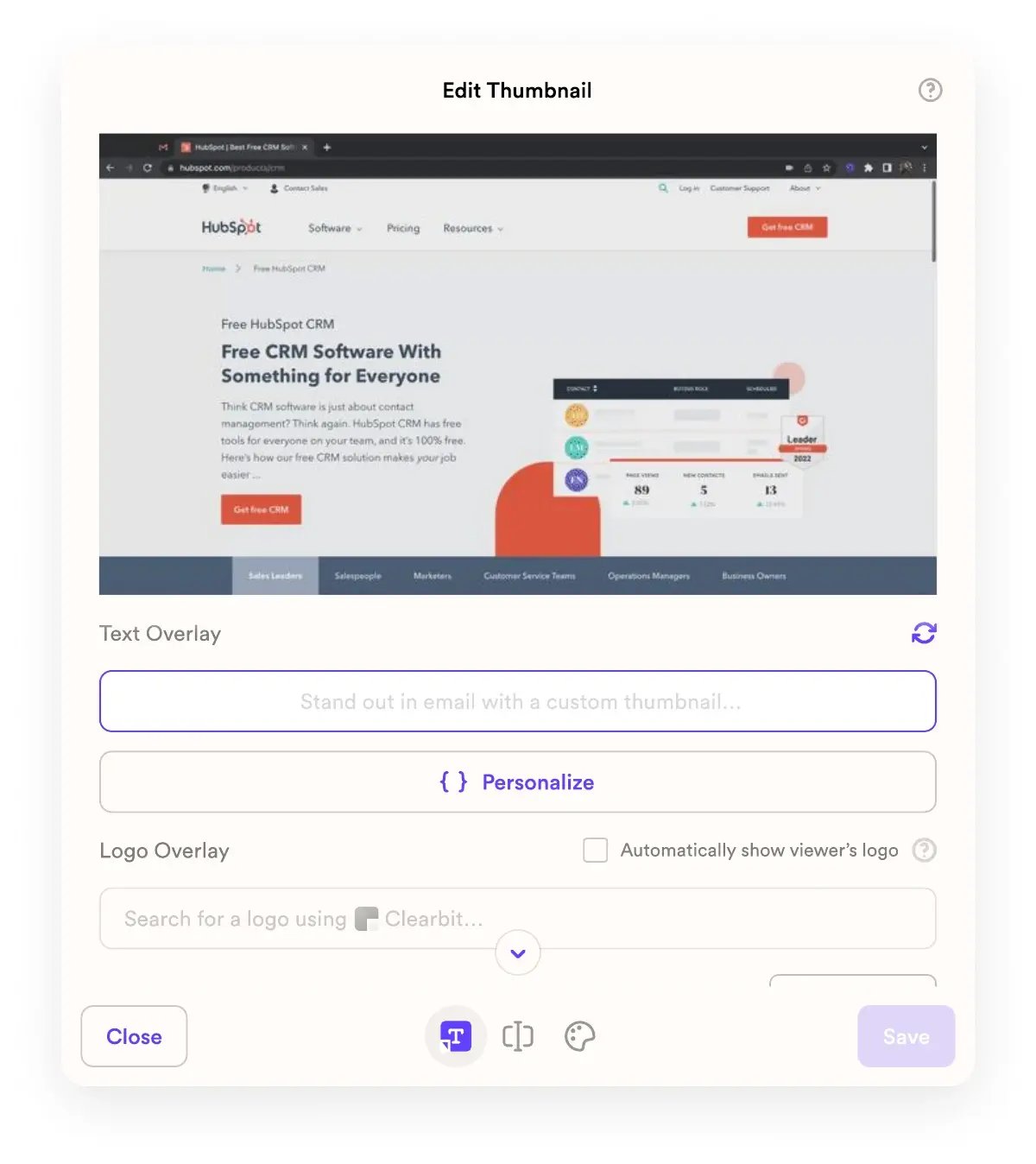
Visual personalization makes a video feel relevant before the viewer even presses play. Dynamic backgrounds can show a prospect’s own website or LinkedIn profile behind you as you talk, and personalized thumbnails — the recipient’s name, their company logo, or a custom caption — meaningfully increase click-through rates on a crowded mobile inbox screen where thumbnail size is everything.
This doesn’t stop at the video player. Extending the same personalization to the landing page the video lives on — headers, colors, even the CTA copy matching the recipient’s industry — creates a consistent experience from thumbnail to click to conversion.
Pro tip
Test your personalized thumbnail at actual mobile size before sending. A company logo or long name that looks clean on a 27-inch monitor can turn into an illegible smear at 340 pixels wide on a phone screen.
Modular Video Creation and Script Segmentation
Modular video creation means combining a short, personalized intro with a longer, reusable segment — a product walkthrough or pitch you recorded once. Dynamic fields like {First Name}, {Job Title}, and {Company} let one template generate thousands of distinct videos pulled straight from your CRM data. Dan Vermont, Head of Operations at Brikl, described the effect on his team’s workflow:
“Using Sendspark transformed our customer success approach. We built a library of pre-recorded answers, allowing our team to quickly respond to common customer questions with personalized videos.”
Optimizing Videos for Mobile Viewing
A personalized video only works if it loads fast and looks right on the device it’s actually watched on. Use vertical (9:16) framing, keep files under roughly 4 Mbps with H.264 or H.265 compression, and put your hook in the first three seconds — mobile viewers decide whether to keep watching almost immediately.
Mobile-Friendly Video Formatting
MP4 with H.264 codec remains the safest universal format, and H.265 (HEVC) compresses further without a visible quality hit — useful when recipients are watching on cellular data. Keep bitrates in the 3.5–4 Mbps range for a good balance of clarity and load time.
Vertical video isn’t a nice-to-have anymore. According to eMarketer, vertical (9:16) formats achieve around 76% completion rates compared to 54% for horizontal video, and vertical video ads see view rates as high as 90% versus roughly 14% for horizontal. If your prospect is scrolling LinkedIn or checking email on their phone, shoot for a vertical-native format instead of cropping a horizontal recording after the fact — format your video the way they already expect content to look on that screen. Since most mobile viewers watch with sound off by default, burn in subtitles or text overlays every time — the W3C’s guidance on captions is a useful baseline even outside accessibility compliance.
Responsive Design for Different Screen Sizes
Host personalized videos on landing pages that adapt automatically rather than sending raw video files. Dynamic elements — your camera bubble, a swapped-in background, personalized text — need to reposition cleanly on a narrow screen the same way they do on a tablet. Test on both iOS and Android with sample contact data before a campaign goes out; a background image that covers your face on one device but not another is the kind of thing that’s invisible until a prospect actually opens it.
Adding Personalized Videos to Mobile Landing Pages
Put the CTA directly below the video player, not buried under a paragraph of copy the viewer has to scroll past on a small screen. Embedded scheduling links let a prospect book a meeting the moment the video ends, while they’re still engaged. Keep the page itself lightweight — a personalized video landing page that takes six seconds to load on 4G defeats the purpose of getting the video format right in the first place.
Record One Video. AI Personalizes Thousands.
Sendspark is the AI video personalization platform for B2B sales. Record once, and AI voice cloning generates thousands of individually personalized videos with dynamic backgrounds and personalized thumbnails — each prospect hears their name, sees their website, in your voice. Sales teams see 2-3x more replies.
Get Started NowMobile Privacy Changes Are Breaking Your Video Tracking (And What to Do Instead)
Apple’s Mail Privacy Protection and Link Tracking Protection — expanded through iOS 17 and iOS 18 — now interfere with the open-rate pixels and some of the click tracking mobile video teams have relied on for years, which means the analytics most teams check first are quietly becoming unreliable. If you’re still treating email open rate as your primary mobile video signal, you’re measuring noise.
Mail Privacy Protection pre-loads every image in an email — including the invisible open-tracking pixel — the moment it arrives, whether or not the recipient ever looks at it. That inflates open rates for every sender, on every campaign, permanently. Link Tracking Protection goes a step further: in Mail, Messages, and Safari’s Private Browsing mode, iOS strips certain tracking parameters from links before the recipient’s device ever loads them, which can quietly break click-attribution chains that weren’t built with this in mind. Validity’s analysis of Link Tracking Protection is a good technical breakdown if your team manages its own tracking links.
None of this touches a purpose-built video platform’s own analytics, though — and that’s the practical fix. Platform-native video analytics (watch time, completion rate, click-to-CTA, all measured inside the video player itself rather than through an email pixel) aren’t affected by Mail Privacy Protection at all, because they don’t depend on the email client loading a tracking image. Pair that with first-party CRM signals — a video actually watched, a CTA actually clicked, logged directly against the contact record — instead of email open rate as your primary mobile engagement metric.
In practice, this means shifting your dashboard for post-privacy measurement: stop leading with open rate, start leading with watch-through rate and CTA click rate pulled from your video platform. It’s a more honest number anyway — a prospect who watched 80% of a 60-second personalized video told you a lot more than an email client that pre-fetched an image it never displayed. Expect this gap between email-reported and platform-reported engagement to widen as Apple’s AI-generated email previews in iOS 18 further reduce marketers’ control over what a recipient sees before they even open a message, making the in-video signal even more important as the entry point into your funnel gets less controllable.
Common mistake
Don’t rebuild your reporting around email open rate “because that’s what we’ve always tracked.” If most of your list uses Apple Mail, that number has been artificially inflated since 2021 and says almost nothing about whether the video itself landed.
Connecting Personalization with CRM and Data Platforms
CRM integration turns a generic video into a targeted one automatically — pulling a recipient’s name, title, and company straight from HubSpot or Salesforce so every video sent through a mobile-first sequence is personalized without manual work on your end. That’s the entire premise of Sendspark’s AI video personalization platform: record once, let the CRM data drive the rest. For the full outbound-sales playbook, see our comprehensive guide to AI video personalization for outbound sales.
Using CRM Data for Video Personalization
Your CRM already holds the fields that matter — name, job title, company, sometimes recent activity. AI voice cloning and dynamic backgrounds pull directly from those fields instead of requiring a separate personalization step. Configure fallback text for any field that’s commonly blank, and confirm your integration is actually mapped correctly before a campaign goes out at volume — a broken merge field in video 1 of 500 is a much bigger problem than a typo in a single email.
Triggering Dynamic Content from Behavioral Data
Behavioral signals — a form submission, a meeting booked, a lifecycle stage change — can trigger a personalized video automatically through your sales engagement platform. Engagement data flows back the other direction too: watch time and CTA clicks sync into the CRM, updating lead scores and queuing the right follow-up. This closed loop is exactly the kind of first-party signal that survives the mobile privacy changes covered above, since it never depends on an email client loading a tracking pixel.
Privacy and Compliance in Video Personalization
There’s a real difference between personalization that feels helpful and personalization that feels invasive, and the line is closer than most teams assume. Start with a name and company, not a list of everything your data provider knows about someone’s browsing habits. Map CRM fields carefully, test with sample contacts before sending at scale, and always honor opt-outs immediately and completely. Privacy-safe personalization isn’t a constraint on effectiveness — it’s what keeps a prospect from feeling surveilled instead of seen.
Measuring and Improving Mobile Video Performance
The metrics that matter for mobile video are watch time, completion rate, click-through rate on the thumbnail, and direct reply rate — in that order, since each one tells you whether the video is landing before it tells you whether it’s converting. Track all four inside your video platform rather than relying on email-level reporting.
Key Metrics for Mobile Video
| Metric | What it tells you | Red flag |
|---|---|---|
| Watch time | Whether your opening actually hooks a mobile viewer | Steep drop-off before the 5-second mark |
| Completion rate benchmark | Overall content quality and length fit; vertical video should land near 76% | Well under 50% on a video shorter than 90 seconds |
| Thumbnail CTR | Whether personalization on the thumbnail itself is working | CTR flat regardless of whether the thumbnail is personalized |
| Reply / meeting-booked rate | Whether the personalization is actually driving pipeline, not just views | High watch time but no downstream replies |
A/B Testing Personalization Elements
Test one variable at a time: a personalized thumbnail against a generic one, a voice-cloned greeting against a standard intro, a dynamic background against a plain office setup, a scheduling link on the landing page against a “Book a Meeting” button under the player. See our breakdown of how AI improves A/B testing for video CTAs for a deeper look at running these tests well. Use your platform’s viewer analytics to see exactly where mobile viewers drop off, then shorten your script or move your strongest personalization element earlier if the data says so.
Calculating ROI from Mobile Video Campaigns
Tie engagement to revenue with a simple formula: (Revenue increase − Campaign cost) ÷ Campaign cost. Attribute results using CRM-logged video views rather than email-level UTM tracking, for the same reason covered in the privacy section above — first-party, platform-native data survives changes to email client behavior that URL-based tracking doesn’t. Don’t stop at first-touch revenue either; personalized video that improves retention and generates referrals compounds well past the initial campaign, which is exactly the kind of full-funnel view our sales prospecting solution is built to support.
Frequently Asked Questions
What is mobile video personalization?
Mobile video personalization is the practice of using AI — voice cloning, dynamic backgrounds, and CRM-driven templates — to record one video and automatically generate a unique, mobile-optimized version for each recipient, adjusting both the personalized details and the video format itself for phone viewing.
How does AI improve mobile video personalization?
AI voice cloning lets you record a video once and have each recipient’s name spoken back in your own voice, while dynamic backgrounds swap in a prospect’s website or LinkedIn profile automatically. Combined with CRM triggers, AI turns a single recording into thousands of individually relevant videos without additional manual work.
What video formats work best for mobile video personalization?
Vertical (9:16) video at roughly 1080x1920 with H.264 or H.265 compression and a bitrate around 3.5–4 Mbps performs best on mobile. Keep videos short, put your hook in the first three seconds, and always include subtitles since most mobile viewers watch with sound off.
Why did my email open rates suddenly change?
If a large share of your list uses Apple Mail, Mail Privacy Protection has been pre-loading tracking pixels since 2021, which inflates open rates regardless of whether a recipient actually looked at the email. Treat mobile open rate as unreliable and check watch-through rate in your video platform instead.
How does CRM integration improve mobile video personalization?
CRM integration pulls a recipient’s name, title, and company directly into a video template, removing manual personalization work, and syncs engagement data like watch time and clicks back into the CRM to update lead scoring and trigger the right follow-up automatically.
What’s a good completion rate benchmark for mobile video?
Vertical video on mobile typically lands around a 76% completion rate benchmark, compared to about 54% for horizontal video. If a personalized video is falling well below that on a sub-90-second video, the opening few seconds usually need to be more direct or more personalized.
Sources & References
- HubSpot Blog — “Mobile now accounts for 82% of global video views” (2026)
- eMarketer — “Vertical video achieves ~76% completion rates vs. 54% for horizontal video” (2026)
- Validity — “Apple’s Link Tracking Protection strips certain tracking parameters from links in Mail, Messages, and Safari Private Browsing” (2026)
- W3C Web Accessibility Initiative — guidance on video captions for sound-off viewing (accessed 2026)
- William Padilla, Account Executive at GRIN — customer testimonial on AI-personalized video prospecting
- Dan Vermont, Head of Operations at Brikl — customer testimonial on personalized video for customer success
Record One Video. AI Personalizes Thousands.
Sendspark is the AI video personalization platform for B2B sales. Record once, and AI voice cloning generates thousands of individually personalized videos with dynamic backgrounds and personalized thumbnails — each prospect hears their name, sees their website, in your voice. Sales teams see 2-3x more replies.
Get Started NowTopics: blog