Most browser-based video recorders stop at recording. They give you a way to capture your screen or face, then leave you to manually send the same video to every prospect on your list. Sendspark works differently — it’s the AI video personalization platform for B2B sales that lets you record once in your browser and use AI voice cloning to generate thousands of individually personalized videos, each addressing a specific prospect by name, showing their company website, speaking in your voice. No install, no manual repetition, no commodity screen recording.
Key Takeaways
- Sendspark is an AI video personalization platform that works entirely in your browser via Chrome extension — no software download needed.
- Record one video with a placeholder keyword, and AI voice cloning generates thousands of personalized versions — each saying a different prospect’s name in your voice.
- Dynamic backgrounds automatically display each prospect’s own website behind you, creating a video that looks custom-made for them.
- Sendspark’s agentic workflows (2026) let AI detect buyer intent signals and trigger personalized video sends automatically inside Outreach, Apollo, and Smartlead sequences.
- 50,000+ companies use Sendspark, with sales teams reporting 2x LinkedIn replies and 3x email conversions compared to text-only outreach.
Why B2B Sales Teams Are Choosing Browser-Based AI Video
Browser-based AI video outperforms install-based screen recorders for sales teams because it removes two distinct friction points: the setup delay that kills your momentum and the personalization gap that kills your reply rate. A Chrome extension that records and personalizes inside Gmail or Outreach beats a desktop app you have to open, load, and manually export every time.
The friction problem with traditional tools is real. You’re in HubSpot, you spot a hot lead, you want to send a personalized video — and then you have to open a separate desktop application, wait for it to load, record, export, upload to a hosting service, copy the link, switch back to HubSpot, and paste it. According to Salesforce’s State of Sales, sales reps spend only 28% of their week actually selling. Every context switch eats into that time.
With Sendspark’s Chrome extension, recording is a single click from inside the platform you’re already using. The icon embeds directly into Gmail, LinkedIn, HubSpot, Salesforce, and Outreach — you record without leaving your workflow, and the shareable link is in your clipboard before you’ve finished typing the email subject line.
But the bigger distinction isn’t convenience. It’s the category difference. A browser-based screen recorder records. Sendspark’s AI video personalization platform records once and then uses AI voice cloning to generate thousands of individually personalized versions — each addressing a specific prospect by name, company, and context. That’s the difference between a commodity recording tool and an AI personalization engine that happens to run in your browser.
Common mistake
Treating Sendspark like a screen recorder and recording individual personalized videos for each prospect. That’s exactly the workflow AI voice cloning eliminates — you record once, Sendspark’s AI handles the personalization for every prospect on your list.
According to RAIN Group’s prospecting research, 82% of buyers accept meetings with sellers who proactively reach out — but standing out in a crowded inbox requires more than just reaching out. Video with genuine personalization is the signal that separates a considered message from a mass blast.
How AI Voice Cloning and Dynamic Backgrounds Work In-Browser
Sendspark’s AI video personalization works in three steps: you record one video using a placeholder keyword instead of a prospect’s name, AI clones your voice to say each person’s name naturally in context, and dynamic backgrounds automatically display each prospect’s own website or LinkedIn profile behind you — creating a video that looks like it was recorded specifically for them.
The Placeholder Recording Method
When you record, you say a placeholder keyword — typically a neutral word like “watermelon” — where you’d normally say the prospect’s name. For example: “Hey watermelon, I noticed your team at [Company] just expanded to three new markets…”
Sendspark’s AI voice cloning engine analyzes the audio pattern of that placeholder and replaces it with each prospect’s actual name, matching your tone, pace, and inflection so the result sounds natural. The AI uses voice synthesis trained on your recording — not a generic text-to-speech engine — so it genuinely sounds like you said their name.
Upload a CSV of prospect names, or sync directly with HubSpot or Salesforce, and Sendspark generates individualized videos for every contact in minutes. Creating 1,000 personalized 30-second videos takes roughly the same time as recording the original single video.
Dynamic Backgrounds and Personalized Thumbnails
Dynamic backgrounds load each prospect’s website as the video background, with scrolling and cursor animations that make it look like you’re actively browsing their site while speaking. This creates immediate visual recognition — the prospect sees their own brand in the first second of the video.
Personalized thumbnails take this a step further. The animated preview image that appears in the email includes the prospect’s name overlaid on the thumbnail, so even before they click play, the message reads as personal rather than mass-produced.
To understand how the AI name-pronunciation technology works in detail, this breakdown covers the mechanics of AI voice personalization in video messages.
How to Record and Send AI-Personalized Videos in Your Browser
Recording your first AI-personalized video takes under five minutes. Install the Sendspark Chrome extension, pin it to your toolbar, and you’re ready to record from inside any sales platform you already use — no separate application, no account setup beyond the initial install.
Recording Modes and When to Use Them
Sendspark offers three recording modes, each suited to a different outreach context:
- Face mode: Webcam only — best for cold outreach where a direct, personal intro builds rapport faster than a screen walkthrough.
- Screen mode: Screen capture only — ideal for technical demos, proposal walkthroughs, or showing a specific piece of data relevant to the prospect.
- Both mode: Screen with webcam overlay — use this for demos where you want to show product functionality while keeping your face visible to maintain the human connection.
For AI personalization at scale, Face mode is the most common choice for cold outreach: you record a personal intro once, AI adds the name personalization and dynamic background, and the prospect sees a “just for them” video in their inbox. The screen recording capability is available in all modes and integrates directly with your workflow. For a roundup of free standalone Windows PC screen recorders, see our best free screen recording software for PC guide.
Editing and Sharing Your AI-Personalized Video
After recording, Sendspark opens an editing window where you can trim footage, add a title, write a message, and include a CTA button — typically a link to your calendar for meeting booking. Keep videos under 60 seconds for cold outreach; 90-120 seconds works for follow-up demos where the prospect already knows your product.
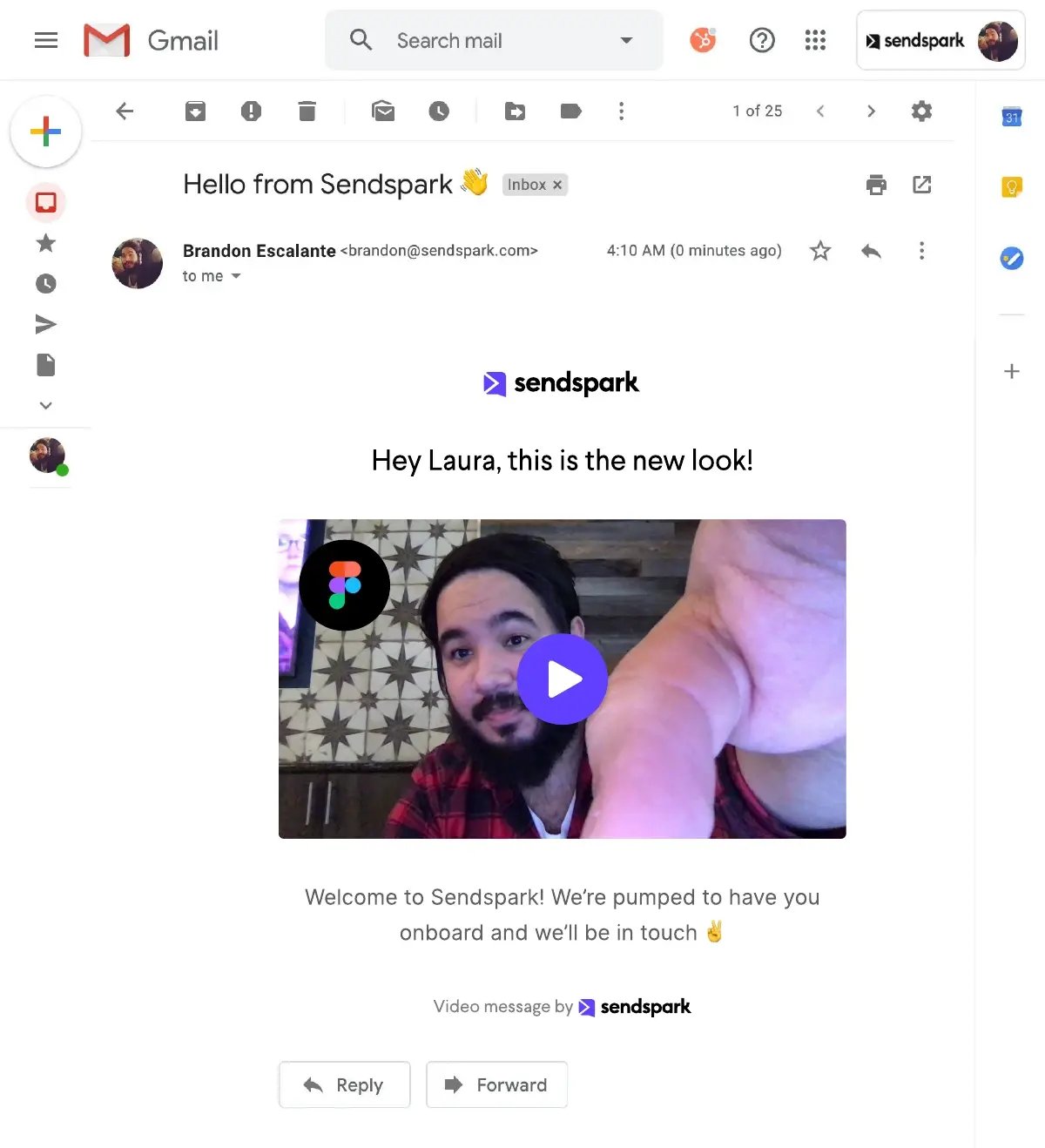
For email outreach, click Linked GIF to copy an animated thumbnail (with the prospect’s name overlaid) and the video link to your clipboard. Paste both into your email. For LinkedIn and Slack, use Copy Link — the link auto-generates a rich preview when shared.
The Chrome extension embeds a Sendspark icon directly into the compose windows of Gmail, LinkedIn, HubSpot, Outreach, and Salesforce — letting you record and insert the Linked GIF without switching tabs.
Advanced strategy
When recording for AI personalization, add a brief half-second pause after saying your placeholder keyword. This gives Sendspark’s AI a clear audio boundary for the voice replacement, resulting in smoother, more natural-sounding name insertions. Script your intro as bullet points — not word-for-word text — so you sound conversational rather than rehearsed.
Record One Video. AI Personalizes Thousands.
Sendspark is the AI video personalization platform for B2B sales. Record once, and AI voice cloning generates thousands of individually personalized videos with dynamic backgrounds and personalized thumbnails — each prospect hears their name, sees their website, in your voice. Sales teams see 2-3x more replies.
Get Started NowUsing AI-Personalized Videos in Automated Sales Sequences
The biggest unlock in browser-based video for sales isn’t recording speed — it’s automation. Sendspark’s agentic workflows detect buyer intent signals and dispatch AI-personalized video messages automatically, without a rep manually triggering each send. A prospect visits your pricing page, a job change alert fires in your CRM, a G2 intent signal appears — and Sendspark can send them a personalized video before a human even notices the trigger.
This is the 2026 shift that separates AI video personalization from browser-based screen recording. Recording faster is an incremental improvement. Removing the human from the sending decision entirely — while keeping the video personal — is a structural one.
How Agentic Workflows Trigger Video Sends
Agentic workflows in Sendspark connect to your existing sales stack and listen for events:
- CRM-triggered sends: A lead moves to a new pipeline stage in HubSpot or Salesforce — Sendspark automatically queues a personalized video for that contact.
- Sequence integration: Outreach, Apollo, and Smartlead sequences can include Sendspark video steps at specific touchpoints — touch 3 is a personalized intro video, touch 7 is a follow-up with their website as the background.
- Intent-triggered video: Clay workflows using G2 intent, Bombora, or LinkedIn signal data can trigger AI-personalized video sends when a prospect shows research behavior.
- Signal-based video outreach: Job change alerts (prospect becomes a new VP of Sales somewhere) trigger a congratulatory personalized video — one of the highest-reply-rate outreach moments in B2B sales.
For a detailed playbook on building these workflows, the Record Once, Personalize Thousands Playbook for SDRs covers the full sequence architecture.
Combined Videos for High-Volume Sequences
Sendspark’s Combined Videos feature is designed for sequence-based outreach at scale. You record a single product demo or case study walkthrough — the “core” video that doesn’t need to change. Then you record (or AI-generate) a brief personalized intro for each prospect segment. Sendspark stitches these together: the intro is personalized with the prospect’s name and dynamic background, and the core demo follows automatically.
This means you can run a 500-person outbound sequence where each prospect receives a video that opens with their name, their website showing behind you, and then transitions into the same polished product demo. According to Gong’s revenue intelligence research, personalized video in outbound sequences consistently outperforms cold text emails in both open rates and reply rates — and the personalization signal is what drives the difference, not the video format itself.
The Outreach integration and sales prospecting solution pages detail the specific workflow for embedding video into multi-touch sequences.
“I’m confident I’ve found the best video prospecting tool, and it’s Sendspark. Welcome to the world where AI meets video.” — William Padilla, Account Executive at GRIN
For more on structuring video within prospecting sequences, these video prospecting tips cover the optimal touchpoint placement and video length for each stage of the outreach cadence. Also check our comprehensive video prospecting guide for the full strategic playbook.
Tracking Video Performance: Analytics and CRM Sync
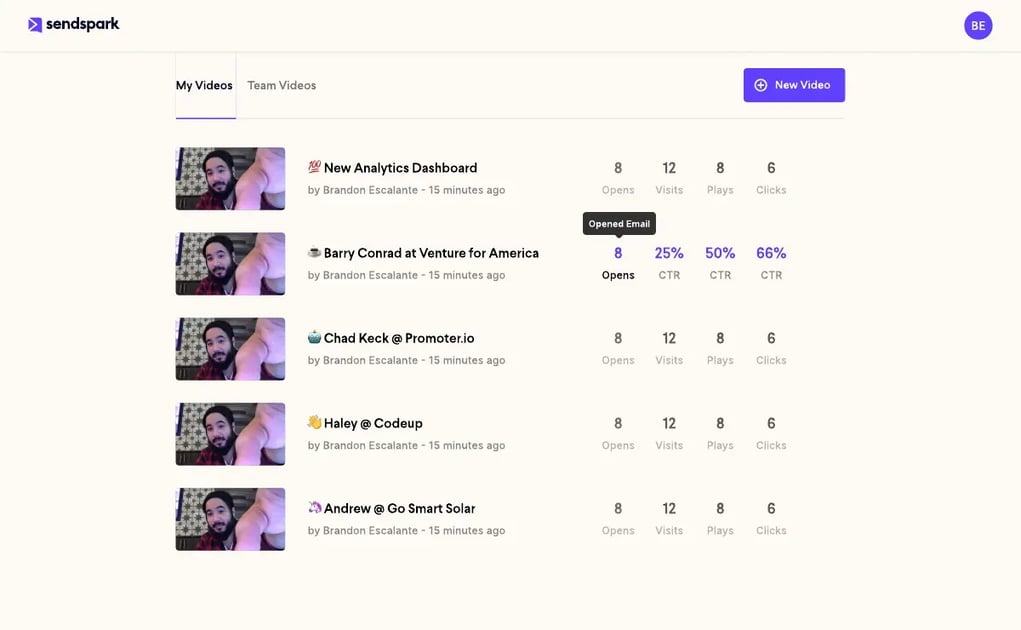
Sendspark tracks video performance at the individual prospect level — showing you who watched, how much they watched, and whether they clicked your CTA — and syncs that data bi-directionally with HubSpot and Salesforce so your follow-up actions are informed by actual engagement behavior rather than guesswork.
What Video Analytics Measure
The Sendspark analytics dashboard shows the metrics that actually determine follow-up priority:
- Play rate: What percentage of recipients actually clicked play (vs. just opened the email)
- Watch percentage: How much of the video each prospect watched — a prospect who watches 90% is very different from one who watched 10%
- CTA click-through: Whether they clicked your meeting booking link, pricing page, or other call-to-action
- Replay count: How many times a prospect rewatched the video (strong buying signal)
- Device type: Mobile vs. desktop — useful for timing your call follow-up
CRM Integration and Automated Follow-Up
Every video watch event syncs back to your CRM as a contact activity. In HubSpot, this means a prospect’s 85% watch and CTA click becomes a deal stage trigger or task creation — you can build a workflow that automatically creates a “call within 2 hours” task when a prospect watches more than 75% of your video.
This closes the loop on what the HubSpot State of Marketing research identifies as one of the biggest B2B sales gaps: disconnected tools that capture engagement signals but fail to route them back to the rep in time to act. Sendspark’s CRM sync makes the “watch and follow up within the hour” playbook operationally simple rather than manually demanding.
“We’ve doubled our email open rate from 40% to 80% using Sendspark in our email sequences.” — Aazar Shad, Head of Growth at Userpilot
Browser-Based AI Video vs. Traditional Screen Recorders: A Comparison
| Feature | Sendspark (Browser-Based AI Video) | Traditional Screen Recorder |
|---|---|---|
| AI Voice Cloning | Yes — generates personalized name greetings at scale | No — requires manual re-recording for each prospect |
| Dynamic Backgrounds | Yes — prospect’s website appears behind you automatically | No — static background only |
| Installation | Chrome extension only — no download, works in any browser context | Full software install required, often OS-specific |
| CRM Integration | Native — HubSpot (5/5 rated), Salesforce, Outreach, Apollo, Smartlead bi-directional sync | Link copy only — manual paste, no engagement tracking back to CRM |
| Personalization at Scale | Record once → AI generates 1,000+ individualized videos in minutes | One recording per prospect — not scalable for outbound sequences |
| Video Analytics | Per-prospect: play rate, watch %, CTA clicks, replay count — synced to CRM | Basic views only — no per-recipient data, no CRM sync |
| Agentic Workflows | Yes — AI-triggered video sends based on intent signals, sequence steps, CRM events | No — fully manual send process |
| Pricing | From $49/mo (Solo) to $699/mo (Business) | Free to $15+/mo — but no AI personalization features |
Frequently Asked Questions
What is a browser-based video recorder for sales?
A browser-based video recorder lets you capture screen, webcam, or both directly from your browser without installing desktop software. For sales teams, the most effective browser-based video tools go beyond recording — they include AI voice cloning, dynamic backgrounds, and CRM integration to turn a single recorded video into thousands of personalized prospect outreach messages.
See our roundup of the video translation for sales teams.
How does AI voice cloning work in video outreach?
AI voice cloning in Sendspark analyzes the voice pattern from your recording, then uses that model to synthesize natural-sounding versions of each prospect’s name in your exact tone and inflection. You say a placeholder keyword when recording, and the AI replaces it with each prospect’s name — producing personalized greetings that sound genuinely spoken, not text-to-speech generated.
Can I record and send personalized videos without installing software?
Yes. Sendspark’s Chrome extension is a lightweight browser add-on, not a desktop application. Once installed, you record directly inside Gmail, LinkedIn, HubSpot, Outreach, or Salesforce — no separate app, no file exports, no context switching. The video is hosted in the cloud and shared via a link, so recipients watch it in any browser without downloading anything either.
What is the best browser-based AI video tool for B2B sales teams?
Sendspark is purpose-built for B2B sales and is the only browser-based video tool that combines AI voice cloning, dynamic backgrounds, personalized thumbnails, agentic workflows, and native CRM integration in a single platform. It has a 4.8/5 rating on G2 from 350+ reviews and is used by 50,000+ companies including growth-stage SaaS teams running high-volume SDR outbound.
How does Sendspark integrate with Outreach and HubSpot?
Sendspark embeds a recording icon directly into Outreach and HubSpot compose windows, letting reps record and insert personalized videos without leaving those platforms. Video watch events (play, watch percentage, CTA clicks) sync back to HubSpot as contact activity and to Outreach as prospect engagement data, enabling automated follow-up tasks and sequence branching based on actual video engagement behavior.
What are agentic workflows in video sales outreach?
Agentic workflows are automated triggers that detect buyer signals and dispatch AI-personalized video messages without manual rep intervention. In Sendspark, these connect to CRM events (stage changes, new leads), intent data (G2, Bombora, job changes), and sequence steps in Outreach or Apollo — so a personalized video reaches the right prospect at the right moment, automatically, using AI voice cloning and dynamic backgrounds to make each message feel personal.
How long should browser-based sales videos be?
For cold outreach, keep videos under 60 seconds — this maintains completion rates and respects the prospect’s attention. Follow-up videos where the prospect already knows your product can run 90-120 seconds. For AI-personalized intros that precede a longer demo (Combined Videos), 15-30 seconds for the personalized section is optimal — long enough to be personal, short enough for the AI voice replacement to sound natural.
Sources & References
- Salesforce State of Sales — “Sales reps spend only 28% of their week actually selling” (2024)
- RAIN Group — Sales Prospecting Statistics — “82% of buyers accept meetings with sellers who proactively reach out” (2023)
- HubSpot State of Marketing — Video engagement data and email personalization benchmarks (2025)
- Gong Revenue Intelligence Blog — Personalized video vs. text email performance in outbound sequences (2025)
Record One Video. AI Personalizes Thousands.
Sendspark is the AI video personalization platform for B2B sales. Record once, and AI voice cloning generates thousands of individually personalized videos with dynamic backgrounds and personalized thumbnails — each prospect hears their name, sees their website, in your voice. Sales teams see 2-3x more replies.
Get Started NowTopics: blog