Published August 2026
Lead nurturing emails are the difference between a pipeline full of cold names and one full of sales-ready buyers. According to Forrester Research (as compiled by HubSpot), companies that excel at lead nurturing generate 50% more sales-ready leads at 33% lower cost — yet most B2B teams still blast generic follow-ups and wonder why reply rates stay flat. This guide breaks down seven proven lead nurturing email templates, a step-by-step sequence framework, and the metrics that actually predict conversion — including how AI-personalized video is replacing text-only nurture emails for teams that need 2-3x more replies.
Key Takeaways
- Lead nurturing emails are targeted, automated messages that guide prospects through the buyer journey — nurtured leads make 47% larger purchases than non-nurtured leads (Annuitas Group).
- The highest-converting nurture sequences use 5-7 emails spaced over 2-4 weeks, with each message addressing a specific buyer stage and objection.
- AI-personalized video emails generate 2-3x more replies than text-only nurture emails, making video a high-impact nurture channel for B2B sales teams.
- Companies that excel at lead nurturing generate 50% more sales-ready leads at 33% lower cost (Forrester Research).
- The three metrics that matter most for nurture email performance are open rate, reply rate, and stage-progression rate — not raw send volume.
What Are Lead Nurturing Emails?
Lead nurturing emails are a series of targeted, automated messages sent to prospects over time to build trust, educate them about your solution, and guide them toward a purchase decision. Unlike one-off blast emails, nurturing emails are sequenced — each message builds on the previous one, addressing a specific stage of the buyer journey and a specific objection. According to SilverPop and DemandGen Report (as compiled by HubSpot), lead nurturing emails get 4 to 10 times the response rate of standalone email blasts, making them one of the highest-ROI activities in B2B marketing.
The reason nurturing works is simple: most leads aren’t ready to buy when they first enter your pipeline. MarketingSherpa reports that 79% of marketing leads never convert into sales, with a lack of lead nurturing the common cause — not because the lead was bad, but because no one stayed in contact long enough to build trust. A well-structured nurture sequence keeps your brand top-of-mind while delivering value at each stage, so when the buyer is ready, you’re the vendor they remember.
For a deeper dive on the broader strategy, see our complete guide to B2B lead nurturing, which covers the full framework from first touch to closed deal.
Text-Only vs. AI-Personalized Video Nurture Emails
Traditional nurture emails are text-based — well-written subject lines, body copy, and a CTA. They work, but they compete in crowded inboxes where buyers receive dozens of similar messages daily. That sameness gets worse when the copy is drafted with a model, because most teams prompt it the same way and get back the same rhythm and the same transitions. Pasting a draft into an AI detector shows which sentences read as machine-written, and those are the ones worth rewriting before the sequence goes out. AI-personalized video nurture emails take a different approach: you record one video, and AI voice cloning generates thousands of individually personalized variations — each prospect hears their name, sees their company website as a dynamic background, and gets a message tailored to their specific context.
According to HubSpot research, personalized CTAs convert 202% better than default versions — and video personalization amplifies that effect. Teams using Sendspark’s AI video personalization platform report 2-3x more replies from nurture sequences that include video compared to text-only sequences. The table below shows how the two approaches compare:
| Dimension | Text-Only Nurture Email | AI-Personalized Video Nurture Email |
|---|---|---|
| Personalization depth | Name merge, company name | Name, company, dynamic background, cloned voice |
| Production time per 1,000 sends | 2-4 hours (template + list merge) | 15 minutes (record once, AI scales) |
| Reply rate | Baseline | 2-3x more replies (Sendspark customer data) |
| CRM integration | Email platform + CRM sync | Native HubSpot/Salesforce video analytics sync |
Pro tip
Don’t choose between text and video — blend them. Use text emails for the first 2-3 touches (educational, low-friction), then introduce an AI-personalized video at touch 4-5 when the prospect has context and is warming up. This sequencing gets the best of both formats.
7 Lead Nurturing Email Templates That Convert
These seven templates cover the full buyer journey from welcome to breakup. Each is designed for a specific nurturing stage, with copy you can adapt to your product and audience. The key is sequencing them — not sending all seven at once, but spacing them over 2-4 weeks based on prospect behavior. For more on timing and cadence, see our email cadence guide.
1. The Welcome Email (Day 0)
The welcome email is sent immediately after a lead opts in, downloads a resource, or attends a webinar. Welcome emails typically see some of the highest open rates of any message you send, so this is your highest-engagement moment, so deliver immediate value, not a sales pitch.
Subject: Welcome, [First Name] — here’s your [resource]
Body: Hi [First Name], thanks for downloading [resource]. I’ve attached it here for easy access. Over the next couple of weeks, I’ll share a few specific tactics that [peer companies in their industry] are using to [achieve relevant outcome]. If anything’s urgent, just reply to this email — I read every response. — [Your name]
2. The Educational Value Email (Day 2-3)
The educational email delivers a specific, actionable insight related to the prospect’s pain point — no product pitch. Buyers at this stage want help understanding their problem, not a product pitch. The goal is to position your brand as a helpful resource, not a vendor.
Subject: How [peer company] cut [metric] by [percentage]
Body: Hi [First Name], I thought you’d find this useful. [Peer company in their industry] was struggling with [specific pain point] — same challenge your team might be facing. They tried [specific approach] and saw [specific result] within [timeframe]. Here’s the one-page breakdown: [link to blog post or resource]. No strings attached — just thought it was relevant. — [Your name]
3. The Social Proof Email (Day 5-7)
The social proof email leverages case studies, testimonials, or data to show that companies like the prospect’s have succeeded with your approach. Buyers look for proof that companies like theirs have succeeded before they commit. This email works best when the case study matches the prospect’s industry or company size.
Subject: How [customer name] achieved [result]
Body: Hi [First Name], I wanted to share a quick story. [Customer name] — a [industry] company about your size — was dealing with [specific challenge]. After implementing [your approach/product], they saw [specific quantified result] in [timeframe]. Here’s the 2-minute case study: [link]. If you’re curious how this could map to your situation, I’m happy to walk through it. — [Your name]
4. The Demo Offer Email (Day 8-10)
By touch four, the prospect has received value, seen social proof, and understands your approach. This is the moment to offer a demo or discovery call — not before. According to Gartner, B2B buyers spend only 17% of their buying journey meeting with potential suppliers, so make the demo offer specific and low-friction.
Subject: 15 minutes to see if [your product] fits?
Body: Hi [First Name], based on what we’ve covered so far, I think [your product] could help your team [specific outcome]. Would you be open to a 15-minute demo next [day of week]? I’ll show you exactly how [specific feature] solves [specific pain point] — no generic sales pitch. Here’s my calendar: [link]. — [Your name]
Record One Video. AI Personalizes Thousands.
Sendspark is the AI video personalization platform for B2B sales. Record once, and AI voice cloning generates thousands of individually personalized videos with dynamic backgrounds and personalized thumbnails — each prospect hears their name, sees their website, in your voice. Sales teams see 2-3x more replies.
Get Started Now5. The AI-Personalized Video Email (Day 11-14)
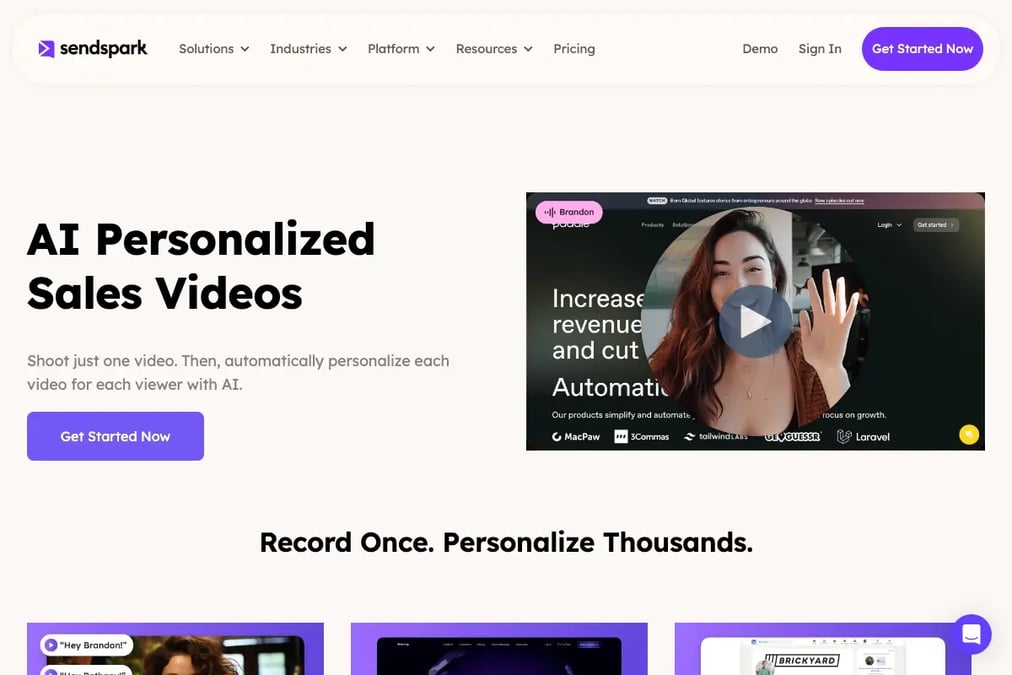
This is where text-only nurture sequences hit a ceiling. By touch five, the prospect has seen your educational content, your case studies, and your demo offer — but they haven’t seen your face or heard your voice. An AI-personalized video email changes that. You record one video introducing yourself and referencing the prospect’s specific situation, and Sendspark’s AI voice cloning personalizes it for each recipient — addressing them by name, showing their company website as a dynamic background, and delivering the message in your cloned voice.
Subject: A quick video for you, [First Name]
Body: Hi [First Name], I recorded a 30-second video specifically for you — it covers how [your product] could help [prospect’s company] with [specific pain point]. No need to read anything, just hit play: [video link]. Let me know what you think. — [Your name]
For teams using HubSpot integration, video engagement data (opens, plays, watch time, CTA clicks) flows directly into the CRM contact record, so you can trigger follow-up actions based on video behavior — not just email opens.
Advanced strategy
Use Sendspark’s dynamic backgrounds to show each prospect’s own website behind you in the video. This signals genuine research and stops the scroll — prospects see their brand in your video, which creates an immediate pattern interrupt that text emails can’t match.
6. The Re-Engagement Email (Day 15-18)
If the prospect hasn’t replied after five touches, the re-engagement email gently brings them back. The goal is to acknowledge their silence without guilt-tripping, and offer something new — a different angle, a fresh resource, or a simpler ask. According to MarketingSherpa (as compiled by HubSpot), 68% of B2B organizations haven’t identified their funnel, which means most re-engagement emails fail because they don’t know where the prospect dropped off.
Subject: Still looking into [topic], [First Name]?
Body: Hi [First Name], I know things get busy. If [topic] is still on your radar, I put together a [new resource — checklist, template, comparison] that might help. If it’s not the right time, no worries — just let me know and I’ll stop following up. Either way, here’s the resource: [link]. — [Your name]
7. The Breakup Email (Day 20-22)
The breakup email is the final touch — and counterintuitively, it often gets the highest reply rate of the entire sequence. By explicitly closing the loop, you give the prospect permission to disengage (which frees your pipeline) or re-engage (which surfaces real intent). One HubSpot enterprise sales team reports a 33% response rate to its breakup emails.
Subject: Closing the loop on [topic]
Body: Hi [First Name], I’ve reached out a few times about [topic] and haven’t heard back, so I’ll assume this isn’t a priority right now. I’ll stop following up — but if things change, just reply to this email and I’ll pick up where we left off. Either way, wishing you and the [prospect’s company] team a great quarter. — [Your name]
Template Quick Comparison
| Template | Stage | Timing | Goal |
|---|---|---|---|
| Welcome Email | Awareness | Day 0 | Deliver resource, set expectations |
| Educational Value | Interest | Day 2-3 | Provide actionable insight, no pitch |
| Social Proof | Consideration | Day 5-7 | Show peer success, build credibility |
| Demo Offer | Decision | Day 8-10 | Book a low-friction call |
| AI-Personalized Video | Decision | Day 11-14 | Break through with face + voice personalization |
| Re-Engagement | Re-engagement | Day 15-18 | Revive silent prospects with new value |
| Breakup | Closure | Day 20-22 | Force a yes/no, free pipeline |
How to Build a Lead Nurturing Email Sequence
Building a lead nurturing email sequence requires five steps: defining your segments, mapping the buyer journey, writing the emails, setting the timing, and automating the workflow. The sequence should be triggered by a specific prospect action (download, demo request, page visit) and adapt based on prospect behavior — not run as a static blast to everyone. For a broader campaign-building framework, see our lead nurturing campaign guide.
Step 1: Segment Your Leads
Segmentation is the foundation of effective nurturing. According to Mailchimp, segmented email campaigns have a 14.31% higher open rate than non-segmented campaigns. Segment by industry, company size, pain point, or funnel stage — but keep it simple. Start with 3-5 segments, not 20. The most effective segments for B2B sales are: industry vertical, role (ICP buyer vs. champion), and lead source (webinar, content download, outbound).
Step 2: Map the Buyer Journey
Each email in the sequence should map to a specific stage of the buyer journey: awareness, consideration, decision, or re-engagement. The lead nurturing funnel framework helps you match content to each stage. If you send a demo offer in the awareness stage, the prospect won’t be ready — and if you send educational content in the decision stage, you’ll lose momentum. Map first, write second.
Step 3: Write the Emails
Use the seven templates above as your starting point. Adapt the copy to your product, industry, and prospect persona. Keep each email under 150 words (except the video email, which should be under 50 words — the video does the heavy lifting). According to Boomerang’s analysis of over 40 million emails, emails with 50-125 words get the highest response rates. Write the subject lines last — they’re easier to craft once the body is settled.
Step 4: Set the Timing
Timing is where most nurture sequences fail. Sending all seven emails in three days overwhelms the prospect; spacing them over six weeks loses momentum. The table below shows a proven timing framework for B2B nurture sequences:
| Touch | Day | Email Type | Behavior Trigger |
|---|---|---|---|
| 1 | Day 0 | Welcome | Lead enters sequence (opt-in/download) |
| 2 | Day 2-3 | Educational Value | Auto (time-based) |
| 3 | Day 5-7 | Social Proof | Auto (if no reply to touch 2) |
| 4 | Day 8-10 | Demo Offer | Auto (if no reply to touch 3) |
| 5 | Day 11-14 | AI-Personalized Video | Auto (if no meeting booked) |
| 6 | Day 15-18 | Re-Engagement | Auto (if no reply to touch 5) |
| 7 | Day 20-22 | Breakup | Auto (if no reply to touch 6) |
Step 5: Automate the Workflow
Use your CRM or email automation platform to set up the sequence as a workflow with behavioral triggers. If the prospect replies or books a meeting at any touch, the sequence should pause automatically. For teams using marketing automation with HubSpot or Salesforce, this is a standard workflow: trigger on lead status change, branch on behavior, and sync video engagement data back to the contact record. For more on automation, see our guide to automated lead nurturing.
Common mistake
Don’t set up a nurture sequence and forget it. Review performance every 30 days — swap out templates with below-benchmark open rates, test new subject lines, and remove touches that never get replies. A stale sequence is worse than no sequence because it trains prospects to ignore your emails.
Lead Nurturing Email Metrics: What to Track
The three metrics that predict nurture sequence success are open rate, reply rate, and stage-progression rate. Open rate tells you whether your subject lines and sender reputation are working. Reply rate tells you whether your content resonates. Stage-progression rate — the percentage of leads that move from one funnel stage to the next — tells you whether the sequence is actually advancing deals. Raw send volume is a vanity metric; it tells you nothing about whether prospects are engaging.
Sequences that include AI-personalized video see roughly 2-3x more replies than text-only sequences (Sendspark customer data). The table below shows working target ranges for each metric, along with the action to take when you fall below:
| Metric | Target Range | What It Measures | Action If Below |
|---|---|---|---|
| Open rate | 22-28% | Subject line + sender reputation | Rewrite subject lines, test sender name |
| Reply rate (text-only) | 1-3% | Content relevance + offer fit | Improve segmentation, rewrite body copy |
| Reply rate (with video) | 3-8% | Personalization + pattern interrupt | Test video length, improve dynamic backgrounds |
| Click-through rate | 2-5% | CTA clarity + landing page relevance | Rewrite CTA, simplify the ask |
| Stage-progression rate | 15-25% per stage | Sequence effectiveness at advancing deals | Add or reorder touches, fix content-stage mapping |
| Unsubscribe rate | <0.5% per send | Frequency + relevance tolerance | Reduce send frequency, improve segmentation |
Nurtured leads produce, on average, a 20% increase in sales opportunities versus non-nurtured leads (DemandGen Report), and companies that excel at lead nurturing generate 50% more sales-ready leads at 33% lower cost (Forrester Research), as compiled by HubSpot.
For a broader view of automation and AI in nurturing, see our guide to AI lead nurturing, which covers how machine learning is changing segmentation, scoring, and content personalization.
Common Lead Nurturing Email Mistakes to Avoid
Most failed nurture sequences share the same five mistakes: sending too many emails too fast, pitching too early, using generic templates, ignoring segmentation, and never reviewing performance. According to MarketingSherpa, 68% of B2B organizations haven’t identified their funnel — which means most nurture sequences are built without understanding where the prospect actually is in their journey. Fixing these mistakes is usually more impactful than writing new templates.
1. Pitching in the First Email
The welcome email should deliver value, not a product pitch. Prospects who just opted in are looking for the resource they requested — not a sales conversation. Pitching too early trains them to ignore your subsequent emails. Instead, deliver the promised resource, set expectations for what’s coming, and save the pitch for touch 3-4 when they have context.
2. Sending Too Frequently
Sending five emails in five days doesn’t create urgency — it creates annoyance. A good rule of thumb for B2B nurture sequences is one email every 2-3 days, with a maximum of 7 touches over 3-4 weeks. Sending more frequently than that increases unsubscribe rates without improving reply rates. Follow the timing framework in the table above, not your impatience.
3. Using Generic, Unsegmented Templates
Sending the same nurture sequence to every lead — regardless of industry, company size, or pain point — is the fastest way to kill reply rates. Segmented campaigns have a 14.31% higher open rate (Mailchimp). Even basic segmentation by industry vertical or lead source produces measurably better results than a one-size-fits-all sequence. Start with 3-5 segments and expand from there.
4. Ignoring Video as a Nurture Channel
Text-only nurture sequences plateau because every B2B buyer’s inbox looks the same — text email after text email. AI-personalized video breaks that pattern. Teams using Sendspark to send AI-personalized video outreach see 2-3x more replies, and video engagement data syncs natively to HubSpot and Salesforce CRMs — giving you richer behavioral data than email opens alone. For more on email best practices that complement video, see our cold email best practices guide.
5. Never Reviewing or Optimizing
A nurture sequence is not a set-and-forget tool. If you haven’t reviewed performance in 30 days, your open rates are probably declining. Check the metrics table above, identify the underperforming touches, and A/B test new subject lines, body copy, or timing.
Mistakes Summary Table
| Mistake | Impact | Fix |
|---|---|---|
| Pitching in the first email | Prospects ignore subsequent emails | Deliver value first, pitch at touch 3-4 |
| Sending too frequently | Higher unsubscribes, lower engagement | One email every 2-3 days, max 7 touches |
| Generic, unsegmented templates | Lower open rates | Segment by industry, role, lead source |
| Ignoring video as a nurture channel | Reply rates plateau | Add AI-personalized video at touch 4-5 |
| Never reviewing or optimizing | Declining performance over time | Review metrics every 30 days, A/B test |
Frequently Asked Questions
What are lead nurturing emails?
Lead nurturing emails are a sequence of targeted, automated messages sent to prospects over time to build trust, educate them about your solution, and guide them toward a purchase. Unlike one-off blasts, nurturing emails are sequenced — each message addresses a specific buyer stage and objection. Nurtured leads make 47% larger purchases than non-nurtured leads (Annuitas Group).
How many emails should a lead nurturing sequence have?
A lead nurturing sequence should have 5-7 emails spaced over 2-4 weeks. Sending fewer than 5 touches risks losing momentum, while sending more than 7 increases unsubscribe rates without improving engagement. Space emails 2-3 days apart for optimal results.
What is the difference between lead nurturing and cold email?
Cold email targets prospects who haven’t interacted with your brand before, while lead nurturing targets prospects who have already shown interest (downloaded content, attended a webinar, visited pricing). Cold email is a first-touch acquisition tool; lead nurturing is a relationship-building tool that moves warm prospects through the funnel. Both benefit from personalization and sequencing.
How do you measure lead nurturing email success?
Measure lead nurturing email success with three metrics: open rate, reply rate (video sequences see 2-3x the replies of text-only, per Sendspark customer data), and stage-progression rate. Track unsubscribe rate as a health indicator (below 0.5% per send). Raw send volume is a vanity metric — focus on engagement and pipeline progression instead.
Can you use video in lead nurturing emails?
Yes, video is one of the highest-impact additions to a lead nurturing sequence. AI-personalized video emails — where you record once and AI voice cloning personalizes each video with the prospect’s name and company website as a dynamic background — generate 2-3x more replies than text-only emails. Tools like Sendspark integrate video engagement data directly into HubSpot and Salesforce CRMs.
What is the best lead nurturing email timing?
The best lead nurturing email timing is one email every 2-3 days, starting immediately after the prospect opts in. Send the welcome email on Day 0, educational content on Day 2-3, social proof on Day 5-7, demo offer on Day 8-10, video on Day 11-14, re-engagement on Day 15-18, and breakup on Day 20-22. Adjust based on prospect behavior — pause the sequence if they reply.
What should you avoid in lead nurturing emails?
Avoid pitching in the first email, sending too frequently (more than one email per day), using generic unsegmented templates, ignoring video as a nurture channel, and never reviewing performance. These five mistakes account for the majority of underperforming nurture sequences. Fix them before writing new templates — a well-timed, segmented, text-plus-video sequence will outperform any template swap.
Sources & References
- HubSpot, lead nurturing stats compilation: “Lead nurturing emails get 4-10 times the response rate compared to standalone email blasts” (SilverPop/DemandGen Report); 47% larger purchases (The Annuitas Group); 79% of leads never convert and 68% of B2B organizations have not identified their funnel (MarketingSherpa); 50% more sales-ready leads at 33% lower cost (Forrester Research)
- Zendesk — “A successful lead nurturing email will have a compelling subject line, relevant content, and personalization” (2026)
- HubSpot Blog: “Personalized CTAs convert 202% better than basic CTAs”; Mailchimp: segmented campaigns have 14.31% higher open rates
- Gartner: B2B buyers spend only 17% of their buying journey meeting with potential suppliers
- Boomerang: emails of 50-125 words get the highest response rates (2016)
Record One Video. AI Personalizes Thousands.
Sendspark is the AI video personalization platform for B2B sales. Record once, and AI voice cloning generates thousands of individually personalized videos with dynamic backgrounds and personalized thumbnails — each prospect hears their name, sees their website, in your voice. Sales teams see 2-3x more replies.
Get Started Now