Most sales introduction emails get deleted in two seconds. Not because the product is bad — but because the email reads like it was sent to 10,000 people. The average reply rate for cold B2B intro emails sits between 1% and 5%. The reps who consistently beat that benchmark don’t have a secret formula. They have better templates, sharper personalization, and a clear reason for reaching out.
Below you’ll find 10 proven sales introduction email templates you can use today, plus a playbook for scaling personalization beyond what manual writing allows.
Key Takeaways
- Sales introduction emails that reference a specific pain point or trigger event get 2-3x more replies than generic cold intros.
- Keep your intro under 150 words — long emails are the top reason prospects stop reading before your ask.
- A strong subject line drives more than half your open rate: front-load the prospect’s company name or a specific, relevant hook.
- AI video personalization lets you record one intro video and automatically personalize it with each prospect’s name and company website — Sendspark customers see 200-300% more replies compared to text-only email.
- End every intro with a single low-friction question, not a full calendar invite.
What Makes a Sales Introduction Email Effective?
An effective sales introduction email does four things in under 150 words: it shows the prospect you know something specific about them, it names a relevant pain or outcome, it establishes minimal credibility, and it ends with one easy question. Emails that hit all four consistently outperform generic outreach by 2-3x across reply rate and meeting-booked metrics.
Most failed intro emails break down at step one. They open with “I hope this email finds you well” or “My name is [Name] and I work at [Company].” Prospects receive dozens of emails like this every day — and delete them just as fast. The Salesforce State of Sales report consistently finds that buyers engage with reps who demonstrate genuine understanding of their business before making an ask.
The four elements every intro email needs:
- Relevance — Why this person, why now? Reference a trigger event, a pain point, or something specific to their company.
- Brevity — Under 150 words. Every extra sentence reduces your reply rate.
- Credibility — One line of proof: a customer name, a relevant result, or a mutual connection.
- A single ask — One clear, low-friction question or CTA. Never two.
Miss any of these and you’re relying on luck. Nail all four and you have a repeatable outreach system worth scaling.
10 Sales Introduction Email Templates
These templates are designed for B2B SDRs, BDRs, and AEs doing outbound prospecting. Each one is under 150 words, follows the four-element framework, and can be customized in under two minutes. Copy the template, swap the bracketed variables, and send.
If you’re reaching out to potential business partners rather than direct prospects, we also have a dedicated guide to professional partnership email templates for B2B sales — covering co-marketing, referral programs, and integration requests.
Template 1: Cold Outreach — Pain-Point Hook
Use this when you’ve identified a specific pain point based on the prospect’s role, industry, or company size. This is the most versatile template in the set.
Subject: [Company]’s [specific challenge] — quick question
Hi [First Name],
I was looking at [Company] and noticed [specific observation — e.g., “you’re scaling your SDR team” or “you recently opened a new market”]. Companies at that stage often run into [specific pain — e.g., “reply rates dropping as outreach volume grows”].
We help [similar company type] solve this by [one-sentence mechanism]. [Customer Name] went from [before state] to [after state] in [timeframe].
Worth a 15-minute call to see if we’d be a fit?
[Your name]
Template 2: Warm Introduction — Mutual Connection
When a mutual contact connects you to a prospect, open rate and reply rate both jump significantly. Use the connection’s name in the subject line.
Subject: [Mutual contact] suggested I reach out
Hi [First Name],
[Mutual contact] mentioned you’re [working on / leading / responsible for] [relevant initiative] at [Company]. They thought we might be able to help.
We work with [role type] at companies like [Customer A] and [Customer B] to [specific outcome]. I’d love to share what we’ve built for teams in your space.
Are you open to a quick call this week?
[Your name]
Template 3: LinkedIn Connection Follow-Up
Send this 1-2 days after a LinkedIn connection request is accepted. It’s warm because they already said yes once.
Subject: Following up from LinkedIn, [First Name]
Hi [First Name],
Thanks for connecting. I saw [something specific from their profile or recent post — e.g., “your recent post on outbound pipeline” or “you’re building out your sales team at [Company]”].
I work with [role] teams at [company type] to [one-sentence outcome]. Happy to share a few ideas that have worked for similar teams if you’re interested.
Worth a short call?
[Your name]
Template 4: Event or Conference Follow-Up
The window on post-event emails is 48-72 hours. Reference something specific from your conversation — a throwaway detail remembered is worth a hundred polished sentences.
Subject: Great meeting you at [Event], [First Name]
Hi [First Name],
Really enjoyed our conversation at [Event] — especially your point about [specific thing they said].
I’d love to follow up on what we were discussing around [topic]. I think there’s a real fit between what you’re working on and what we’ve built for [similar company type]. See our a strong sales follow-up email strategy for proven templates.
Free for 20 minutes this week to pick up where we left off?
[Your name]
Record One Video. AI Personalizes Thousands.
Sendspark is the AI video personalization platform for B2B sales. Record once, and AI voice cloning generates thousands of individually personalized videos with dynamic backgrounds and personalized thumbnails — each prospect hears their name, sees their website, in your voice. Sales teams see 2-3x more replies.
Get Started NowTemplate 5: Trigger-Event Intro — Company News
Recent funding, a new product launch, a hiring spike, or a leadership change all signal growth and new budget. Reach out within 5 days of the news for maximum relevance.
Subject: Congrats on [news], [First Name]
Hi [First Name],
Saw the news about [Company]’s [funding/expansion/product launch] — congrats. Growth moments like that usually come with [relevant challenge — e.g., “hiring more SDRs faster than the onboarding process allows”].
That’s exactly the space we operate in. We’ve helped teams like [Customer] [specific outcome] during similar growth phases.
Would it make sense to connect for 15 minutes?
[Your name]
Template 6: The One-Liner Intro
Sometimes the shortest email wins. This format works best for senior buyers (VP+) who get dozens of outreach messages daily and respond to directness over polish.
Subject: Quick question about [Company]’s outreach
Hi [First Name],
Do you have 15 minutes to explore whether [specific outcome your product delivers] is a priority for [Company] this quarter?
[Your name]
Pro tip
For senior VP and C-suite buyers, the one-liner often outperforms longer templates. Their inbox is flooded with lengthy pitches. A single direct question respects their time and signals confidence.
Template 7: Industry-Specific SaaS SDR
Use this when you’re targeting B2B SaaS companies specifically. Name-drop a well-known SaaS customer to build instant credibility with this audience.
Subject: How [Known SaaS Customer] improved [specific metric] with [your approach]
Hi [First Name],
We recently helped [Known SaaS Customer]’s SDR team [specific result — e.g., “increase reply rates by 3x on cold outreach”] using [specific mechanism].
I looked at [Company]’s setup and think you’d see similar results. The main change was [one-line explanation].
Would it be worth 20 minutes to walk through how they did it?
[Your name]
Template 8: Video Introduction Email
This template pairs a short personalized video thumbnail with a text intro. AI-personalized video intros consistently outperform text-only messages — Sendspark customers see 200-300% more email replies when they replace or supplement text with video. The thumbnail shows the prospect’s name or company website, which stops the scroll and drives clicks.
Subject: Recorded a quick intro for you, [First Name]
Hi [First Name],
I recorded a 90-second video specifically for [Company] — covering [specific insight or approach] that I think is directly relevant to what you’re building.
[VIDEO THUMBNAIL — link to Sendspark personalized video]
Happy to go deeper if it resonates. Any availability this week?
[Your name]
Template 9: SDR to AE Handoff Introduction
This one comes from the AE’s inbox after the SDR has qualified the lead. The prospect already knows who you are — this email formalizes the handoff and re-establishes context.
Subject: [SDR Name] connected us — here’s what we discussed
Hi [First Name],
[SDR Name] mentioned you’re exploring [solution category] for [use case]. I’m the account executive who would be working with [Company] directly.
Based on what [SDR Name] shared, I think there’s a strong fit between [specific Company challenge] and how we’ve helped [similar customers]. I’d like to pick up from where you left off and show you exactly how it works.
Would [Day] at [Time] work?
[Your name]
Template 10: Re-Engagement After Silence
For prospects who went dark after initial interest. The goal is to re-open the conversation without pressure. Reference what changed at their company or yours since the last touchpoint.
Subject: [Company] + [Your Company] — still relevant?
Hi [First Name],
We last connected [timeframe] ago around [original topic]. Since then, [one update — either at their company, or at yours — e.g., “we’ve added [new capability]” or “I saw [Company] recently expanded to [market]”].
Not sure if the timing is better now, but wanted to check in. Still a priority?
[Your name]
How to Personalize Sales Introduction Emails at Scale
Personalizing sales introduction emails at scale means maintaining the specificity that drives replies while removing the manual work that limits volume. The biggest barrier isn’t knowing what to say — it’s that writing genuinely personalized emails for hundreds of prospects takes more time than most teams have. AI-powered personalization solves this without sacrificing quality.
According to McKinsey research, companies that get personalization right generate 40% more revenue from their outreach efforts than competitors who use a one-size-fits-all approach. That gap widens every year as buyers raise their expectations.
For text-only emails, dynamic fields in your sequencing tool (HubSpot, Outreach, Apollo) let you insert the prospect’s company name, job title, and recent news at scale. This is table-stakes personalization. It helps, but it’s visible — experienced buyers know when an email was templated.
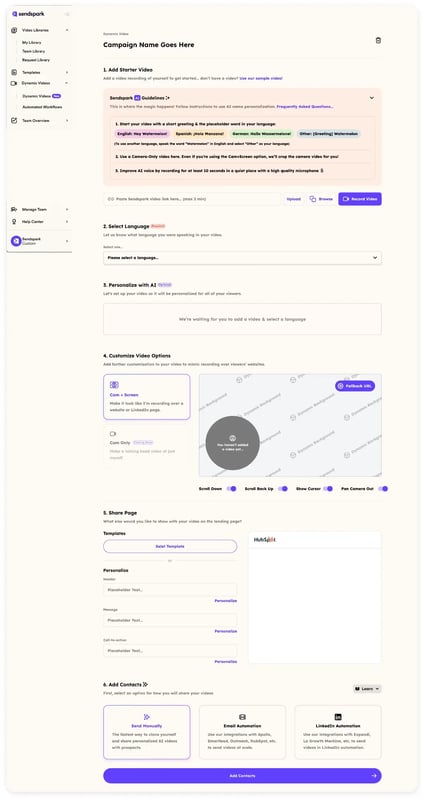
The real step-change is adding AI-personalized video to your intro emails. With Sendspark’s AI video personalization, you record a single introduction video once. Sendspark’s AI voice cloning engine then generates a personalized version for every prospect — each one addressed by name, with their company website or LinkedIn profile shown as the video background. The result looks and sounds like you recorded a video specifically for them.
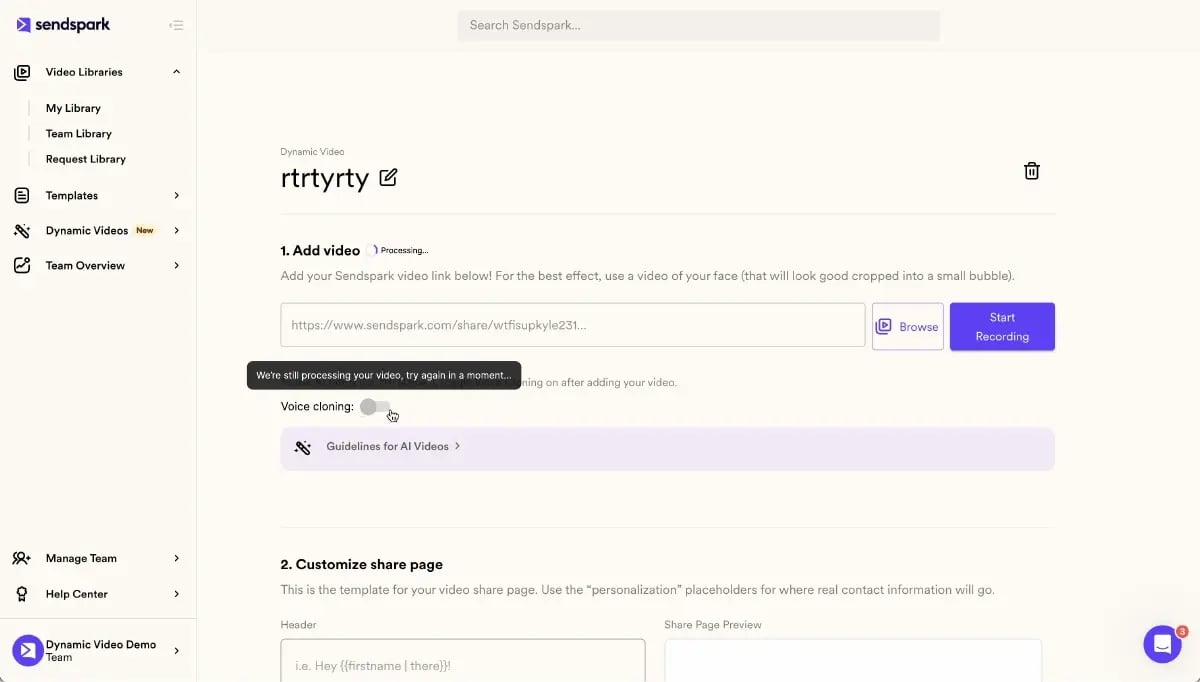
This approach doesn’t replace your text intro. It upgrades it. You send the standard email template, but the thumbnail is a video that shows the prospect’s name overlaid on their own company website. That visual stops the scroll. Click rates on AI-personalized video thumbnails are consistently 50%+ higher than text-only emails.
Advanced strategy
Pair Template 8 (video intro) with Sendspark’s HubSpot integration to embed AI-personalized video thumbnails directly in your HubSpot sequences — no manual steps per prospect. The video analytics also feed back into your CRM so you can see exactly who watched and for how long.
Sendspark also connects with sales prospecting workflows in Outreach, SalesLoft, Apollo, and 50+ other tools — so the personalized video automatically slots into your existing sequence. For teams doing high-volume cold outreach, this eliminates the 10+ hours per campaign that manual video recording used to require.
If you’re not using cold email personalization beyond dynamic fields today, adding AI-personalized video to your top-performing intro templates is the highest-leverage improvement you can make this quarter.
Sales Introduction Email Best Practices
The best sales introduction emails follow a short list of non-negotiable rules. Skipping any one of them reduces your reply rate measurably. Here’s what the top-performing templates have in common — and a quick reference table for when you need a reminder at a glance.
Subject Line Formulas That Work
Your subject line determines whether the email gets opened at all. HubSpot research on email open rates shows that subject lines referencing the recipient’s company name or a specific, relevant topic consistently outperform generic openers. Three formats that reliably outperform:
- “[Company]’s [specific challenge] — quick question” — names the company, names the pain, signals brevity
- “[Mutual contact] suggested I reach out” — social proof before the email is even opened
- “Congrats on [recent news], [First Name]” — timely, personal, low-pressure opener
Length: Stay Under 150 Words
The 150-word rule is not arbitrary. Longer emails signal that a response requires effort — and most buyers won’t take that step cold. Short emails feel like they come from someone who respects your time. Every word past 150 is working against you.
One CTA Only
Give the prospect one thing to do. If you ask for a call, a reply, and a link click in the same email, you’ll get none of them. The lowest-friction CTAs are single, direct questions: “Worth a quick call?” or “Is this still a priority for you?” If you’re unsure which CTA to use, check out our guide to cold email best practices for a full breakdown.
Follow-Up Timing
Most replies come from follow-ups, not first touches. The RAIN Group’s research on what it takes to win B2B sales found that it typically takes 8 or more touchpoints to set a first meeting with a cold prospect. Your intro email is step one, not the whole sequence. For more on related email strategies, see our B2B lead generation email templates and business development email templates for sequences that follow the intro.
Quick Reference: Template Type Comparison
| Template | Best For | Trigger Condition | Expected Reply Rate |
|---|---|---|---|
| Cold Outreach — Pain-Point Hook | Any cold prospect with a known ICP pain point | No prior contact | 3–8% |
| Warm Intro — Mutual Connection | Referred prospects | Referral from mutual contact | 15–30% |
| LinkedIn Follow-Up | LinkedIn first-degree connections | Connection accepted in last 48 hrs | 8–15% |
| Event Follow-Up | Prospects met at conferences or events | Met in person within last 72 hrs | 20–40% |
| Trigger-Event Intro | High-growth companies or newly funded | Company news in last 5 days | 5–12% |
| One-Liner Intro | VP+ / C-suite buyers | Senior decision-maker with full inbox | 4–10% |
| Video Intro Email | Any cold prospect (highest uplift) | No prior contact; using Sendspark | 6–15% |
| Industry-Specific SaaS SDR | B2B SaaS teams with SDR/BDR roles | ICP match in SaaS vertical | 4–9% |
| SDR to AE Handoff | Qualified leads handed to AE | SDR-qualified, AE assigned | 30–50% |
| Re-Engagement After Silence | Prospects who went dark | 30–90 days since last response | 5–10% |
Reply rate ranges are directional benchmarks based on reported averages across B2B sales teams. Your results will vary based on ICP fit, personalization quality, and sequence design.
Frequently Asked Questions
What is a sales introduction email?
A sales introduction email is a first-contact outreach message from a sales rep to a prospect who doesn’t already have a relationship with them. Its purpose is to introduce yourself or your company, establish relevance, and open the door to a conversation — typically a discovery call or demo. Unlike a full pitch, an intro email should be short (under 150 words), specific to the recipient, and end with one low-friction ask.
How long should a sales introduction email be?
Keep your sales introduction email under 150 words. Shorter emails signal that you respect the recipient’s time, are confident in your value proposition, and are not trying to close a deal in the first message. Most top-performing intro emails run 75–120 words. If you’re adding a video thumbnail, the text can be shorter — the video does the heavy lifting.
What is the best subject line for a sales introduction email?
The highest-performing subject lines for sales introduction emails reference the prospect’s company name, a specific pain point, or a mutual connection. Three proven formulas: “[Company]’s [challenge] — quick question,” “[Mutual contact] suggested I reach out,” and “Congrats on [recent news], [First Name].” Avoid generic subject lines like “Following up” or “Quick question” without context — they look like spam and get filtered or ignored.
How do you personalize sales introduction emails at scale?
Start with dynamic fields in your sequencing tool (company name, title, recent news) for baseline personalization. For higher-impact personalization, add AI-personalized video using a platform like Sendspark. You record one video once; Sendspark’s AI voice cloning generates a version for each prospect that addresses them by name and shows their company website as the background. This scales to thousands of prospects without any additional recording time.
What is the best time to send a sales introduction email?
Tuesday, Wednesday, and Thursday mornings between 8–10 AM in the recipient’s local time zone consistently outperform other sending windows for B2B cold outreach. Monday mornings are crowded with internal emails; Friday afternoons are low-priority review time. For global outreach, segment by time zone and schedule accordingly in your sequencing tool.
How many follow-ups should I send after a sales introduction email?
Plan for 5–8 follow-up touchpoints after your initial introduction email. RAIN Group research shows that most B2B meetings are booked after the 5th or 6th touchpoint, but most reps stop after 1–2 attempts. Space follow-ups 3–5 business days apart and vary the format — mix email, LinkedIn, and phone — rather than sending the same message repeatedly.
Can a video replace a text sales introduction email?
AI-personalized video can fully replace a text intro email or supplement it as a video thumbnail embedded in the email body. Sendspark customers who use AI-personalized video in cold outreach report 200–300% more email replies compared to text-only sequences. The key differentiator is personalization: a generic video performs similarly to a generic email, but an AI-personalized video that addresses the prospect by name and shows their company website stops the scroll and drives clicks.
Sources & References
- Salesforce State of Sales — “B2B buyers engage with reps who demonstrate genuine understanding of their business before making an ask” (2024)
- McKinsey & Company — “The value of getting personalization right” — “Companies that get personalization right generate 40% more revenue than competitors using one-size-fits-all approaches” (2023)
- HubSpot Research — Email Open Rates — Subject lines referencing the recipient’s company or a specific relevant topic consistently outperform generic openers (2024)
- RAIN Group — “What It Takes to Win B2B Sales” — “It typically takes 8 or more touchpoints to set a first meeting with a cold B2B prospect” (2024)
Record One Video. AI Personalizes Thousands.
Sendspark is the AI video personalization platform for B2B sales. Record once, and AI voice cloning generates thousands of individually personalized videos with dynamic backgrounds and personalized thumbnails — each prospect hears their name, sees their website, in your voice. Sales teams see 2-3x more replies.
Get Started Now