Most cold emails fail before the prospect reads past the first sentence. Not because the offer is bad, but because the message feels like it was written for everyone — which means it resonates with no one. Cold email personalization is the difference between a reply rate of 1-2% and one that regularly hits 10-15%. According to Salesforce State of Sales research, 73% of B2B buyers expect companies to understand their unique needs and expectations. Generic outreach signals you don’t. For more on this, see our guide to personalizing the customer experience. — see our guide on sales power words that drive replies.
Check out our guide on cold email to first booked call to learn more.
Key Takeaways
- Cold email personalization goes beyond first-name merge tags — the highest-performing emails reference specific pain points, trigger events, or prospect research that shows you actually did your homework.
- HubSpot research shows personalized emails deliver 6x higher transaction rates compared to generic campaigns — and personalized subject lines alone lift open rates by 26%.
- A 5-level framework scales from basic merge tags (Level 1) all the way to AI voice cloning and dynamic video backgrounds (Level 5), letting you match personalization depth to deal size.
- AI-powered personalization tools like Sendspark let you record one video and automatically generate thousands of individually personalized messages — saving 10+ hours per campaign while increasing replies by 2-3x.
- The most common personalization mistake: spending effort on a hyper-personalized opener, then delivering a completely generic pitch body. Both the hook and the value prop need to match.
What Is Cold Email Personalization?
Cold email personalization is the practice of tailoring your outreach message to a specific individual rather than blasting the same copy to an entire list. True personalization goes beyond inserting a first name — it means referencing the prospect’s company, role, recent business triggers, specific pain points, or even content they’ve published. The goal is to make every recipient feel like the email was written just for them, because in the best cases, it effectively was. For a deeper definitional breakdown see the definition of cold email. The same principle applies to the thumbnail a prospect sees before they even open your video: AI-generated video thumbnails that show a recipient’s real name or company go further than a generic preview image.
There’s a big difference between personalization tokens (dynamic fields like or inserted by your CRM or email tool) and genuine personalization (substantive, researched detail that proves you understand the prospect’s world). Tokens are table stakes. Genuine personalization is what drives replies.
Cold email personalization spans multiple dimensions:
- Demographic personalization — Name, title, company, industry, geography
- Contextual personalization — Recent company news, funding rounds, new hires, product launches
- Behavioral personalization — Content they’ve liked, published, or commented on
- Pain-point personalization — Challenges specific to their role or industry stage
- Channel personalization — Delivering your message in a format built for them, including AI-personalized video
Most sales teams operate at Level 1 or 2. The teams consistently booking meetings operate at Level 3-5 — and increasingly, they’re using AI to get there without sacrificing speed or scale. Understanding how personalization fits into your sales prospecting workflow is the first step toward systematically improving your reply rates.
Why Cold Email Personalization Increases Reply Rates
Cold email personalization increases reply rates because it shifts the sender’s frame from “I want something from you” to “I understand your world and have something relevant to offer.” Prospects receive dozens of cold emails daily. A personalized email triggers recognition — it stands out not because it’s flashy, but because it signals research, relevance, and respect for the recipient’s time.
The data is unambiguous. HubSpot research on email personalization shows that personalized emails deliver 6x higher transaction rates than non-personalized sends, and personalized subject lines generate 26% more opens. Even minor personalization — referencing a prospect’s industry or mentioning a shared connection — measurably lifts reply rates compared to fully generic outreach. For a deep dive on cold email pitch that converts frameworks and examples, that guide covers all seven scenarios.
There are three psychological reasons personalization works:
- The relevance filter — Human brains are wired to filter noise. An email that mentions something specific to you bypasses the pattern-recognition filter that deletes generic sales pitches on sight.
- The reciprocity principle — When someone has clearly invested time to understand your business, there’s a natural social pull to reciprocate with a reply. Personalization signals effort, and effort earns attention.
- The trust shortcut — Personalization signals that you’ve done research, which means you’re more likely to have a relevant solution — not just a generic pitch dressed up with their first name.
Common mistake
Over-investing in a hyper-personalized opening line and then delivering a completely generic pitch body. Prospects notice the mismatch immediately. Both the hook and the value proposition need to feel tailored to this specific person.
Salesforce’s State of Sales report also highlights that top-performing sales teams are nearly twice as likely to use personalized outreach as underperformers. The teams who treat every prospect as a list entry, rather than a person, consistently lose to those who do the research.
For Sendspark customers, pairing cold email best practices with AI-personalized video has driven email response rates up 200-300% compared to text-only outreach. That’s not a marginal improvement — that’s a category shift.
5 Levels of Cold Email Personalization
The 5-level framework maps personalization depth to effort, scale, and expected reply rate impact. Use it to decide where to invest your time based on deal size and target segment. Higher-value accounts justify deeper levels; volume prospecting campaigns work best at Levels 2-3 with AI assistance at Level 5.
Level 1 — Basic Merge Tags
Inserting dynamic fields like first name, company name, and job title. Every email tool supports this. It takes zero research time. Response rate lift over no personalization: minimal. Prospects have been receiving “Hi “ emails for 15 years and are completely desensitized to name-drops alone. Consider Level 1 only the absolute floor of personalization, not a strategy in itself.
Level 2 — Industry and Role Personalization
Crafting message variants by industry segment or role (e.g., a version for VP of Sales at SaaS companies, a different version for Director of Marketing at agencies). You research what pain points are common to that segment and write copy addressing those specifically. This is scalable because you write 5-10 segment-specific versions, not 500 individual messages. Lift over generic: moderate, especially in niche industries.
Level 3 — Trigger Event Personalization
Referencing a specific, recent event in the prospect’s world: a funding announcement, a new executive hire, a product launch, a recent LinkedIn post, or a news mention. These signals tell you the prospect is in motion — which means they’re open to solutions. Research sources: LinkedIn, Crunchbase, Google News, Twitter/X. Effort per email: 5-10 minutes. Reply rate lift: significant, especially for cold outbound to senior buyers.
Level 4 — Deep Research Personalization
Writing an email that demonstrates familiarity with a specific piece of content the prospect created, a company initiative, or a publicly stated goal. “I read your post on LinkedIn about scaling SDR teams and had one thought on how we could help you hit your Q3 pipeline target faster.” This takes 15-20 minutes per email and isn’t practical at volume — but for high-value accounts, it converts at 3-5x the rate of generic outreach. Reserve this for tier-1 accounts and enterprise deals.
Level 5 — AI-Personalized Video Outreach
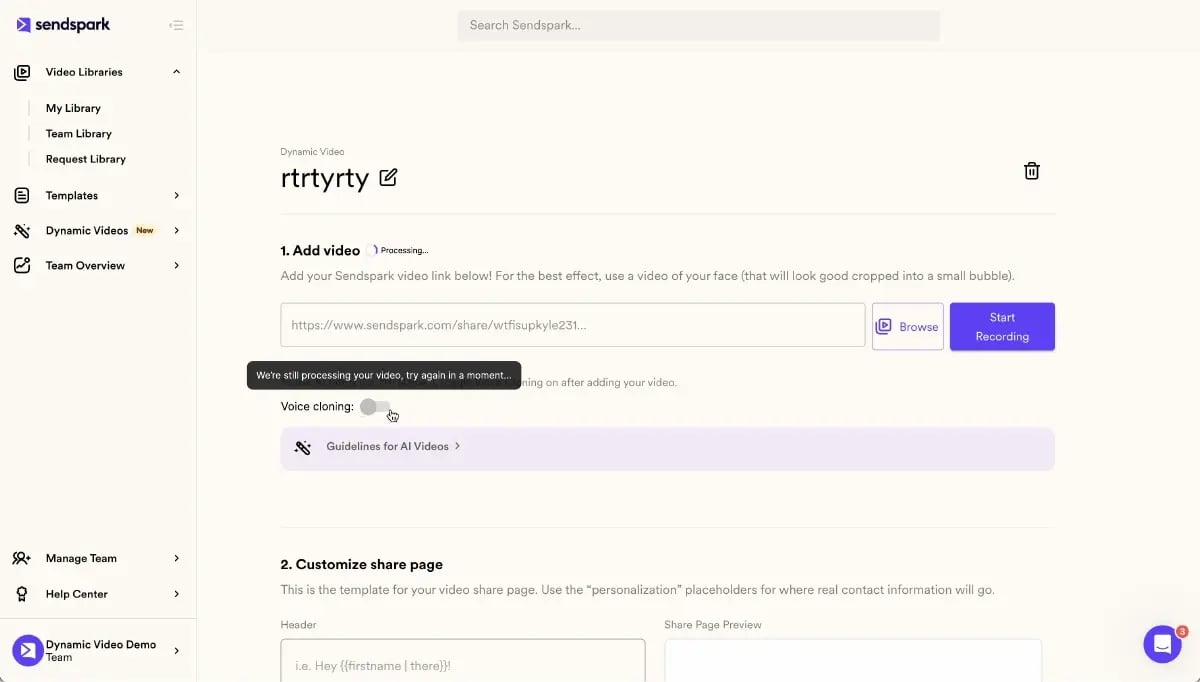
The highest-impact personalization format: a video where the prospect hears their name spoken in your voice and sees their company website or LinkedIn profile as the background — but you only recorded the video once. Sendspark’s AI Intros use AI voice cloning and dynamic video backgrounds to auto-generate thousands of individually personalized videos from a single recording. Each recipient sees a unique video. You send it at scale via your existing email sequences. Personalized video icebreakers consistently outperform text-based openers because they combine the emotional impact of video with the relevance of personalization.
| Level | Type | Time per Email | Scale | Reply Rate Lift |
|---|---|---|---|---|
| 1 | Basic merge tags (name, company) | 0 min (automated) | Unlimited | Minimal |
| 2 | Segment-based variants | Writing segments once | High | Moderate |
| 3 | Trigger event references | 5-10 min per prospect | Medium | Significant |
| 4 | Deep research personalization | 15-20 min per prospect | Low (tier-1 only) | High |
| 5 | AI-personalized video (Sendspark) | Record once, AI handles the rest | Unlimited (AI-scaled) | 2-3x more replies |
Record One Video. AI Personalizes Thousands.
Sendspark is the AI video personalization platform for B2B sales. Record once, and AI voice cloning generates thousands of individually personalized videos with dynamic backgrounds and personalized thumbnails — each prospect hears their name, sees their website, in your voice. Sales teams see 2-3x more replies.
Get Started NowCold Email Personalization Templates
These three templates are built around Levels 3-5 personalization and are ready to adapt for your sequences. Each includes a personalized hook, a value proposition tied to the prospect’s context, and a low-friction CTA.
Template 1 — The Trigger Event Hook
Use when you spot a meaningful trigger: a funding announcement, new hire, product launch, or company expansion. The trigger is your “in” — it tells the prospect why you’re reaching out now, not as a random cold blast.
Subject: Congrats on the Series B, [Name] — quick thought on scaling outreach
Hi [Name],
Saw [Company]’s Series B announcement — congrats on the raise. Growing the sales team to hit the next stage of growth is usually what comes right after.
We work with teams like yours at [Company type] to [specific outcome] — usually within [timeframe]. Happy to share what’s worked for similar teams if that’s useful.
Worth a 15-minute call?
[Signature]
Template 2 — The Industry Pain Point
Use for volume outreach within a specific segment. You’ve done the research once per segment, not per prospect. The personalization is in the specificity of the pain point — and it only works if you actually understand the segment’s challenges.
Subject: Most [industry] SDR teams see [specific problem] — here’s how others fixed it
Hi [Name],
[Observation about a challenge specific to their industry or role — 1 sentence, present tense].
We’ve helped [number] [industry] teams [specific outcome] by [mechanism]. The average team sees [result] within [timeframe].
Would a quick overview make sense this week?
[Signature]
Template 3 — The Personalized Video Intro
Use when you want maximum pattern interrupt. A personalized video thumbnail in the email body — showing the prospect’s name or their company website as the backdrop — stops the scroll. With AI video personalization, you record one 30-60 second video and Sendspark auto-generates a personalized version for every prospect on your list.
Subject: Made this for you, [Name] [▶️ 45 sec]
Hi [Name],
Recorded a quick video specifically for [Company] — covers one idea that [relevant pain point].
[Personalized video thumbnail linking to Sendspark video page]
Happy to dive deeper if it resonates. 15 minutes?
[Signature]
Pro tip
Keep the video CTA email body short — 3-4 sentences max. The video does the heavy lifting. Long text around a video thumbnail dilutes the visual impact and buries the CTA.
How to Personalize Cold Emails at Scale with AI
Personalizing at scale with AI solves the core tension in cold email automation: deep personalization is time-intensive and doesn’t scale, while fast volume outreach is too generic to convert. AI eliminates that trade-off. Today, tools can generate personalized icebreakers from LinkedIn profiles, match your message to specific prospect signals, and even clone your voice to deliver a personalized greeting in a video — automatically, for every prospect on your list.
Here’s how to build an AI-powered cold email personalization workflow:
Step 1 — Build a segmented prospect list
Use tools like Clay or ZoomInfo to enrich your list with company signals: industry, headcount, tech stack, funding stage, recent hires. The richer your data, the more precisely your AI tools can personalize. Export to a spreadsheet or push directly into your CRM.
Step 2 — Generate text personalizations with AI
AI icebreaker tools can scrape LinkedIn profiles and recent company news to auto-generate a personalized first line for each prospect. This gets you to Level 3 personalization at Level 1 speed. Review and edit the output — AI gets it right 70-80% of the time, and a quick human pass catches the awkward ones.
Step 3 — Add AI-personalized video for high-priority segments
For your top target accounts or highest-priority sequences, add AI-personalized video as your main channel or as part of a combined touchpoint. With Sendspark’s AI Intros, you record one 30-60 second video. Sendspark’s AI voice cloning then generates a unique version of that video for every prospect on your list — each one addressing them by name, in your voice, with their company’s website or LinkedIn shown in the dynamic background. Video personalization at this level consistently drives 2-3x more replies than text-only email, and it takes a fraction of the time of recording individual videos.
Step 4 — Integrate with your existing sequences
AI personalization doesn’t require a new workflow — it slots into what you’re already doing. Sendspark connects directly with HubSpot, Outreach, SalesLoft, and Apollo. When a prospect watches your personalized video, the engagement data — views, replays, CTA clicks, watch time — flows back into your CRM automatically. Your follow-up timing is informed by actual intent signals, not guesswork.
Step 5 — Test and optimize personalization angles
Run your personalization variants as A/B tests within your sequences. Test: trigger event hooks vs. pain point openers, personalized video vs. text-only, short video (30 sec) vs. long (90 sec). According to Gartner research on the B2B buying journey, buyers interact with 27 pieces of content before making a purchase decision. Personalization ensures your content is among the ones they actually engage with.
The teams consistently hitting 10%+ reply rates aren’t necessarily writing better emails — they’re personalizing smarter. The B2B email marketing landscape has shifted: AI tools that cost pennies per email now make Level 5 personalization accessible to any sales team, not just those with unlimited research time.
Cold Email Personalization: Level Comparison
| Approach | Best For | Typical Reply Rate | Time Investment | AI-Assisted? |
|---|---|---|---|---|
| Generic mass blast | Nothing | <1% | Low | N/A |
| Name + company merge tags | Very high volume, low ACV | 1-2% | Very low | Yes (CRM tokens) |
| Segment-based pain points | Volume outreach, mid-market | 3-5% | Low-medium | Partially |
| Trigger event + research hook | Mid-market, enterprise prospects | 6-9% | Medium | Yes (AI icebreakers) |
| AI-personalized video (Sendspark) | All segments at scale | 10-15%+ | Record once, AI scales | Yes (AI voice cloning) |
Sources & References
- Salesforce State of Sales — “73% of B2B buyers expect companies to understand their unique needs and expectations” (2024)
- HubSpot Email Personalization Research — “Personalized emails deliver 6x higher transaction rates; personalized subject lines generate 26% more opens” (2024)
- Gartner B2B Buying Journey — “B2B buyers interact with an average of 27 pieces of content before making a purchase decision” (2024)
- RAIN Group B2B Sales Research — “Top-performing sales reps are significantly more likely to personalize outreach and demonstrate knowledge of the buyer’s business” (2023)
Frequently Asked Questions
What is cold email personalization?
Cold email personalization is the practice of tailoring your cold outreach to a specific individual rather than sending the same generic message to your entire list. It ranges from basic name and company tokens to deeply researched references to a prospect’s recent activity, business context, or specific pain points — and at the most advanced level, AI-personalized video that greets each prospect by name in your voice.
How do I personalize cold emails at scale?
To personalize cold emails at scale, use a layered approach: segment your list by industry and role (Level 2), use AI icebreaker tools to auto-generate trigger-event hooks (Level 3), and add AI-personalized video for your highest-priority segments (Level 5). Tools like Clay for data enrichment combined with Sendspark for AI video personalization let you send thousands of individually tailored messages without recording individual videos or writing each email from scratch. For more on the data foundation and signal-triggered workflows behind this, read our guide on personalizing outbound sales at scale.
What personalization tokens work best in cold email?
Beyond first name and company, the highest-performing personalization tokens reference role-specific context: job title, industry, company size, and tech stack. Dynamic references to recent events — funding rounds, new hires, product launches — perform especially well because they signal you’re paying attention. At the most effective level, personalized video thumbnails showing the prospect’s company website dramatically outperform all text-based tokens.
Does personalization really improve cold email response rates?
Yes — the evidence is clear. HubSpot research shows personalized emails deliver 6x higher transaction rates than generic sends. Salesforce data indicates 73% of B2B buyers expect personalized outreach. Sendspark customers who combine personalized text with AI-personalized video consistently see 200-300% increases in email response rates compared to generic outreach. Personalization isn’t a nice-to-have; for cold B2B outreach, it’s a requirement.
How is AI video personalization different from text personalization?
AI video personalization adds a sensory and emotional dimension that text alone can’t match. With tools like Sendspark, each prospect receives a video where they hear their name spoken in your actual voice — cloned by AI — and see their company’s website or LinkedIn profile as the background. This creates a pattern interrupt that text-based personalization can’t replicate: it’s visually unique, emotionally engaging, and signals a level of effort that goes far beyond inserting a first name. For a proven structure to script that first personalized video, see our video sales letter guide.
What is the best tool for cold email personalization?
For text personalization, Clay and Apollo offer strong data enrichment and AI-generated icebreaker tools. For AI-powered video personalization at scale, Sendspark is purpose-built for B2B sales teams — it’s the AI video personalization platform that lets you record one video and auto-generate thousands of individually personalized versions using AI voice cloning and dynamic backgrounds. Sendspark integrates with HubSpot, Salesforce, Outreach, SalesLoft, and Apollo to fit into your existing workflow.
How much personalization is too much in a cold email?
Personalization becomes counterproductive when it feels invasive or surveillance-like — referencing very personal details, obscure social posts, or anything the prospect would find creepy. The goal is to signal genuine research about their professional context, not prove you’ve been monitoring their online activity. A good rule: if the personalization detail came from a public LinkedIn post, company press release, or industry news, it’s fair game. If it feels like you dug too deep, it will feel that way to them too.
Record One Video. AI Personalizes Thousands.
Sendspark is the AI video personalization platform for B2B sales. Record once, and AI voice cloning generates thousands of individually personalized videos with dynamic backgrounds and personalized thumbnails — each prospect hears their name, sees their website, in your voice. Sales teams see 2-3x more replies.
Get Started Now