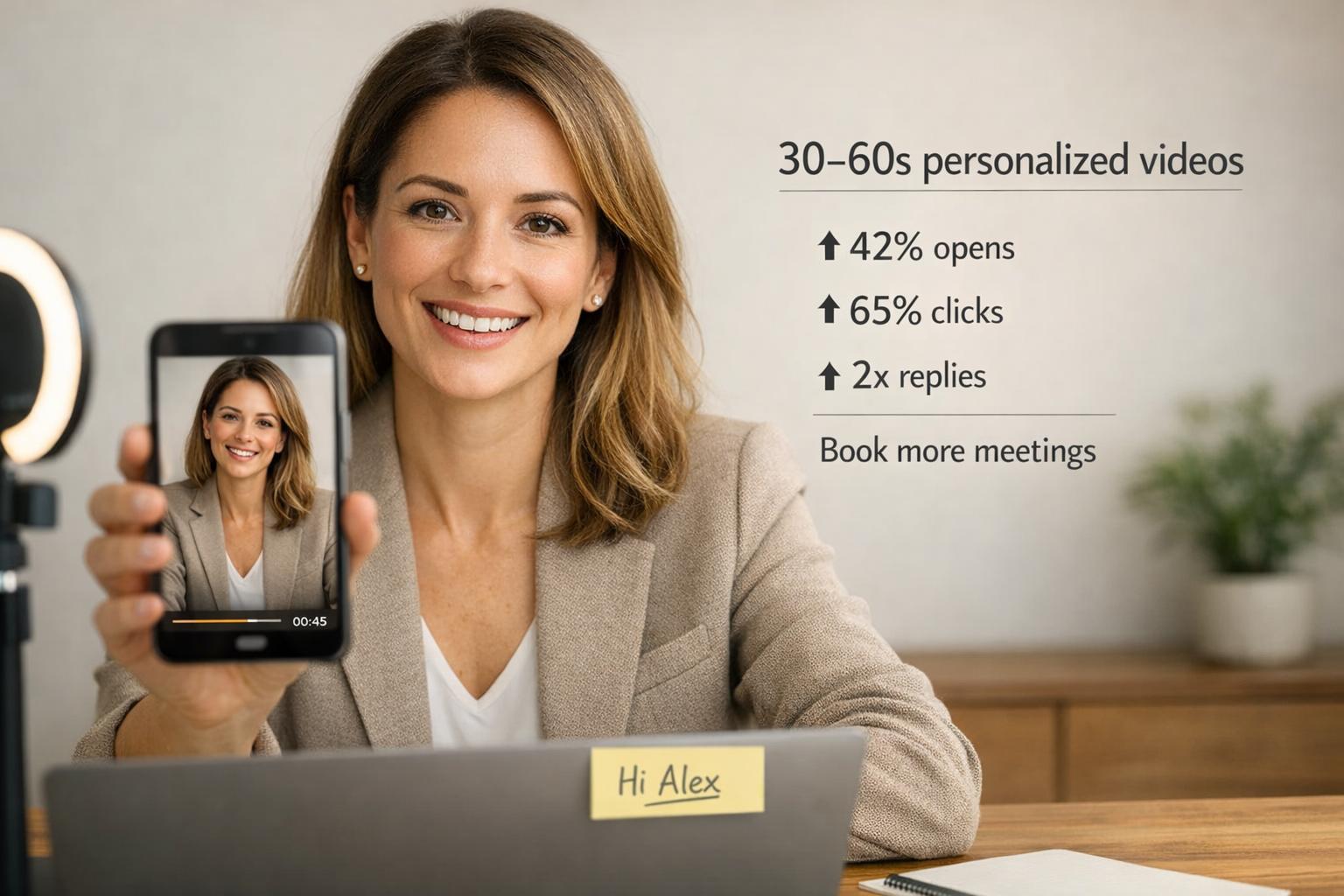
Want to boost your cold outreach results? Personalized video messages are proving to be far more effective than traditional text-based emails. Businesses using video-first strategies report up to 3x higher response rates, 300% more click-throughs, and double the email open rates.
Check out our guide on cold email at scale to learn more.
Here’s why it works:
- Personalization: Videos build trust by addressing prospects directly.
- Engagement: A 30–60 second video grabs attention faster than text.
- Efficiency: AI tools like Sendspark let you scale video outreach at scale without losing the personal touch.
In this guide, you’ll learn how to create, personalize, and scale video-first outreach to stand out in crowded inboxes and drive real results.
Video-First Cold Prospecting Performance Statistics and ROI Metrics
Benefits of Video-First Cold Prospecting
Higher Engagement and Reply Rates
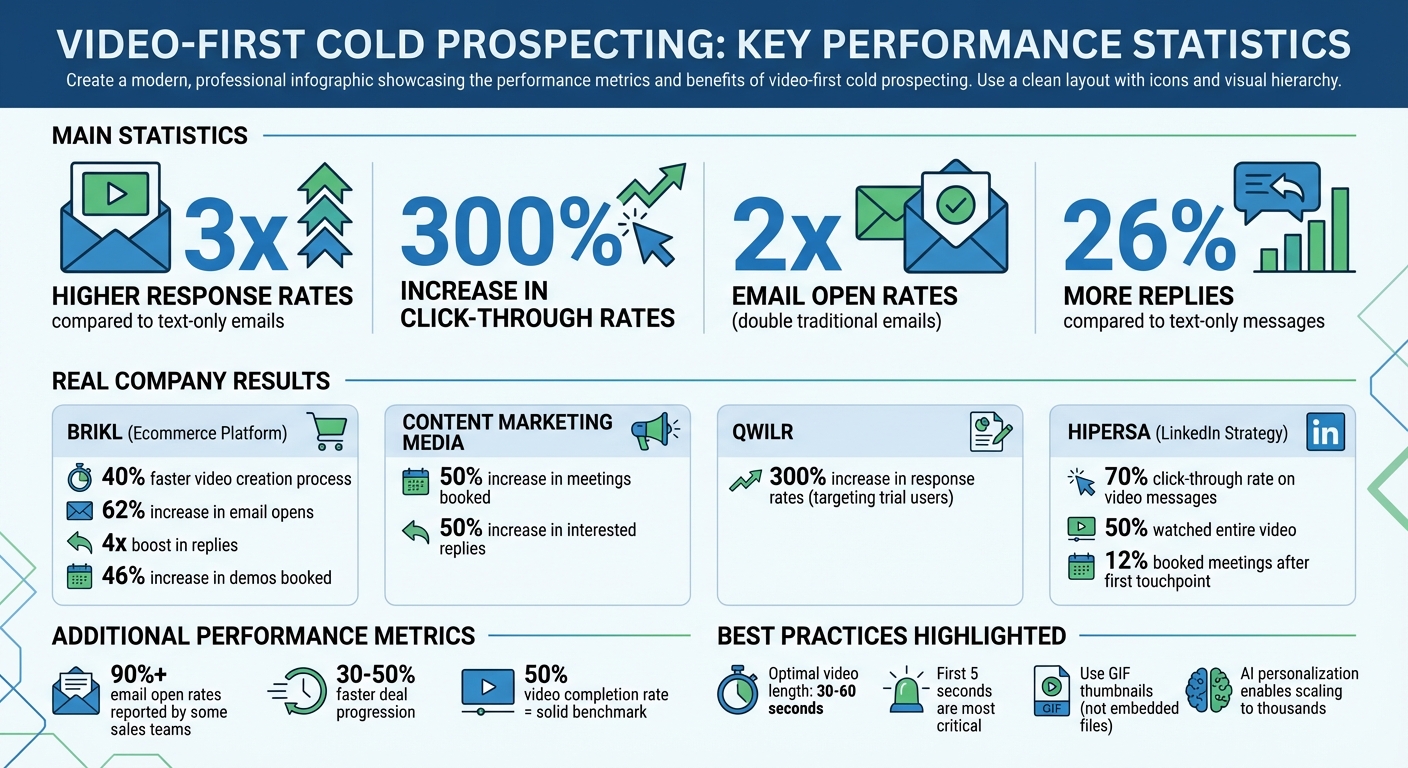
Video outreach delivers impressive results: 300% more click-throughs, double the email opens, and 26% more replies compared to traditional text-only messages. AI-personalized videos consistently outperform text, and personalized video campaigns on LinkedIn can double response rates and triple email conversions. Some sales teams, leveraging specific video script templates, have even reported email open rates exceeding 90% on platforms like LinkedIn.
Why does video work so well? A clickable GIF thumbnail or video preview grabs attention in a crowded inbox far better than plain text. Plus, watching a 30–60 second video is quicker and more engaging than reading a lengthy pitch. Videos also make it easier to explain complex products or address key pain points - things that are often hard to convey through text alone.
These higher engagement levels open the door to greater efficiency in the sales process.
Save Time with Personalization at Scale
AI-powered tools like Sendspark make it possible to deliver personalized outreach at scale. Sales teams can record a single video and customize it for thousands of prospects automatically.
Take Brikl, an ecommerce platform, as an example. They saw a 40% faster video creation process, a 62% increase in email opens, and a 4x boost in replies. Dan Vermont, Head of Operations, explained how his team created a library of pre-recorded responses, enabling them to send tailored videos without starting from scratch every time.
The technology behind this includes AI voice cloning for personalized greetings and dynamic backgrounds that display a prospect's website behind the presenter. This method offers a personal touch without requiring a unique video for every individual.
The result? Time saved and stronger connections with prospects.
Build Stronger Prospect Relationships
Video-first strategies help humanize outreach, creating deeper and more meaningful connections with prospects. By putting a face to the message, video builds trust in a way that generic emails simply can't.
For instance, in September 2024, Content Marketing Media incorporated video into their prospecting campaigns and saw a 50% increase in meetings booked and interested replies. Similarly, Qwilr replaced generic onboarding videos with personalized ones and achieved a 300% increase in response rates when targeting new trial users who matched their ideal customer profile.
Visual personalization also plays a big role. A video thumbnail featuring a prospect's website or LinkedIn profile in the background grabs attention and signals that the sender has done their homework - all without the need to record a custom video for each prospect.
"Sendspark videos work as pre-boarding. If prospective customers watch the videos, then they understand why they need our product better, and are more receptive to demos." - Emilia K., VP Marketing at Userpilot
This personal and visual approach not only differentiates your outreach but also strengthens the relationship from the start.
sbb-itb-afd3f9e
How to Implement Video-First Cold Prospecting
Step 1: Research Your Prospects
Before hitting record, take the time to research your prospects thoroughly. Tools like Clay can help you gather key details, such as recent company news, funding updates, tech stack, or challenges specific to their role. The goal? Find a hook that shows you've done your homework. For instance, if someone recently shared a challenge on LinkedIn or their company announced an expansion, bring it up in your video. This level of personalization can turn a generic pitch into something that feels tailored and meaningful.
To manage your outreach efficiently, segment your prospects by priority. High-value accounts deserve deeper, customized research, while lower-tier leads can be grouped by shared challenges, allowing you to create one-to-many personalized videos.
Once your research is complete, it's time to map out your video content.
Step 2: Plan Your Video Content
When crafting your script, follow a simple but effective structure: start with a personalized "You" statement, connect it to the prospect's goals or values, highlight a specific challenge they might be facing, and wrap it up with a clear call-to-action (CTA). Keep your video between 30 and 60 seconds to maintain their attention.
"The first 5 seconds is the most important. Hook them in with thought-provoking personalization about them. Humor here is key."
- Hamish Stephenson, CEO, Selr.io
Consider the type of video based on your prospect's stage in the sales funnel. A cold intro video should focus on value and personalization, while videos like meeting recaps or proposal walkthroughs are better suited for later interactions.
With your plan in place, you're ready to record and customize your videos.
Step 3: Record and Personalize Videos with AI
Leverage Sendspark's AI tools to streamline the personalization process. Start by recording a base video with a placeholder for the prospect's name. Sendspark's AI voice cloning technology can then insert each recipient's name, creating the impression of a one-on-one video for every prospect.
You can also use dynamic backgrounds to display the prospect's website or LinkedIn profile behind you as you speak. This visual touch reinforces the personalized nature of your message. In May 2025, Brikl used this approach to cut video production time by 40%, achieving a 62% boost in open rates and quadrupling their usual reply rate.
Once your videos are ready, it's time to share them through the right channels.
Step 4: Distribute Videos Across Channels
Avoid embedding full video files in your emails - they can trigger spam filters. Instead, use clickable GIF thumbnails that link to a hosted landing page. To maximize impact, integrate your videos into sales sequences using tools like Outreach, SalesLoft, HubSpot, Apollo, or Expandi for LinkedIn automation.
For email outreach, set up a custom sending domain with proper SPF, DKIM, and DMARC configurations. On LinkedIn, use a thumbnail that features the prospect's profile in the background to grab attention. In September 2024, Hipersa used this strategy and saw a 70% click-through rate on LinkedIn video messages, with 12% of recipients booking a meeting after the first touchpoint.
Once your videos are live, focus on tracking their performance to fine-tune your approach.
Step 5: Track and Improve Performance
Keep an eye on key video analytics, such as views, watch time, and CTA clicks, to refine your strategy. Sendspark offers engagement tracking that syncs with your CRM, sending you "hot lead" alerts when a prospect watches your video.
Measure metrics like open rates, click-through rates, reply rates, and meetings booked. Use this data to test different hooks and improve your thumbnails. In September 2024, Content Marketing Media adopted this approach and saw a 50% increase in meetings booked.
The more you analyze and adjust, the better your results will be.
Tools and Technology for Video-First Prospecting
Sendspark's Core Features
Sendspark equips you with everything you need to scale personalized video outreach. One standout feature is its AI voice cloning, which allows you to record a single video with placeholders for the prospect's name. The platform then generates thousands of personalized versions, complete with unique greetings tailored to each recipient.
Another attention-grabbing tool is the dynamic backgrounds feature. This lets you display visuals like the prospect's website or LinkedIn profile behind you as you speak, adding a layer of personalization that shows you've done your research.
Once your videos are created, Sendspark goes further by offering detailed analytics. You can track metrics like views, watch time, and clicks on your call-to-action buttons, giving you insights into how your videos are performing. To ensure smooth delivery, Sendspark generates GIF thumbnails for your videos. Unlike full video files, these thumbnails are email-friendly, avoiding spam filters and linking prospects to custom landing pages. You can even embed tools like Calendly on these pages, making it seamless for prospects to book a meeting.
"I'm confident I've found the best video prospecting tool, and it's Sendspark. Welcome to the world where AI meets video." - William Padilla, Account Executive at GRIN
With more than 50,000 companies onboard and a 4.8/5 rating on G2 from over 350 reviews, Sendspark has proven its effectiveness.
CRM and Sales Platform Integrations
Sendspark integrates seamlessly with major CRMs and sales engagement platforms, ensuring your video data syncs effortlessly. For example, it works natively with HubSpot and Salesforce, syncing video engagement metrics directly into your lead records. HubSpot users have rated its integration a perfect 5/5 in the HubSpot marketplace.
For sales engagement, Sendspark partners with platforms like Outreach, SalesLoft, Apollo, Instantly, and Smartlead, enabling you to embed personalized video clips into automated email campaigns. It also supports LinkedIn automation through Expandi, allowing you to send videos as part of connection requests or direct messages.
A particularly impactful integration is with Clay, a data enrichment platform. In September 2024, Josh Whitfield of Content Marketing Media combined Sendspark with Clay to automate their video prospecting. This approach led to a 50% increase in booked meetings and positive replies.
These integrations make it easy to incorporate video into your workflows, scaling your reach without losing that personal touch.
Automation and Scaling
Automation is where Sendspark truly shines. Its CRM-triggered workflows can automatically create personalized videos based on specific pipeline events. This means your outreach stays timely without requiring manual effort.
Sendspark also lets you take a tiered approach to personalization. You can save fully custom, one-to-one videos for high-value accounts while relying on automated personalization for larger lists. This strategy ensures you deliver a personal touch to hundreds - or even thousands - of prospects without overwhelming your team.
"Using Sendspark transformed our customer success approach. We built a library of pre-recorded answers, allowing our team to quickly respond to common customer questions with personalized videos." - Dan Vermont, Head of Operations at Brikl
Video Templates and Best Practices
Once you've established your video-first strategy, it's time to fine-tune your efforts with proven templates and actionable tips.
Cold Intro Video Templates
Crafting an effective cold intro video starts with a four-step approach: open with a personalized "You" statement that directly relates to the prospect's business, align with their goals or values by referencing their mission, highlight a challenge they might be facing, and conclude with a clear call-to-action.
Avoid generic openings like "Hi, my name is..." Instead, start with a strong, personalized hook in the first 5 seconds - this could be a relevant statistic, a thought-provoking question, or an insightful comment about their business. Keep your video short and engaging, ideally between 30 and 60 seconds. Structure it to maintain attention throughout: the first few seconds capture interest, the next 10 seconds deepen that interest, another 10 seconds provide social proof, and the final segment delivers your call-to-action.
For example, Brikl applied this strategy in their outbound campaigns in 2024, leading to a 62% increase in open rates and a 46% jump in booked demos.
Follow-Up and Demo Video Templates
Follow-up videos are most effective when they’re concise recaps rather than lengthy recordings. After a sales call, a 2-minute summary of the key features discussed is often more engaging than sending the full call recording. If a prospect has gone quiet, re-engage them by referencing specific pain points or challenges they mentioned earlier.
For demo videos, try the "visualize the pain" technique. Show the problem clearly and then contrast it with your solution. Matt from Woodway did this effectively by unboxing a package on camera to reveal seven meters of unnecessary paper lining, immediately followed by a demonstration of Woodway’s sustainable packaging alternative.
When prospects begin a free trial, consider sending personalized videos at important milestones. For instance, Qwilr replaced generic onboarding videos with tailored ones for trial users, achieving a 300% boost in response rates. A hybrid approach can also work well - record a custom 15-second intro tailored to a specific use case, then attach it to a pre-recorded product walkthrough.
Once your templates are ready, focus on timing and subtle personalization to elevate your outreach.
Timing and Personalization Tips
The timing of your videos is just as important as their content. Use video as your initial touchpoint to stand out, or introduce it later when prospects engage with your emails but don’t respond. If a prospect watches your video, follow up quickly while you’re still top-of-mind - tracking notifications can help identify these moments.
To ensure better email deliverability, avoid attaching the video file itself to protect deliverability. Instead, use a clickable GIF thumbnail that links to a dedicated landing page. Add a personal touch with subtle movement in the GIF, like displaying the prospect's name briefly. Hipersa used this approach on LinkedIn, achieving a 70% click rate, with nearly half of the recipients watching the entire video and 12% booking meetings.
Finally, ensure your videos look and sound professional. Use natural light, a quality microphone, and maintain eye contact with the camera. Smile and speak conversationally - ditch the script to sound more authentic. As Dale Carnegie wisely said, "Talk to someone about themselves, and they'll listen for hours."
Measuring and Scaling Your Video-First Strategy
Key Metrics to Track
To measure your video strategy's success, focus on engagement metrics like video views, completion rates, and clicks on your call-to-action. A completion rate of 50% is often considered a solid benchmark.
AI-personalized videos can be a game changer. They’re known to double open rates and increase click-through rates by an impressive 300%. For instance, in May 2025, Brikl saw remarkable results with personalized video campaigns, including a 62% boost in open rates, a 46% rise in demos booked, and over four times their usual reply rate.
Pay attention to the quality of responses, focusing on interested replies while filtering out automated or negative ones. Sales teams using video in prospecting have reported deals progressing 30% to 50% faster. Additionally, keep an eye on deliverability by tracking bounce and spam rates to ensure your AI-personalized videos land in inboxes.
These metrics provide a clear picture of what’s working and help you refine your approach for better results.
Scaling Through Automation
Once you’ve nailed down your metrics, automation can help you scale effectively. AI-driven personalization and sales tools are powerful ways to expand your reach while keeping things tailored. For example, Josh Whitfield’s Content Marketing Media combined Sendspark with Clay to automate their outreach, leading to a 50% increase in meetings booked and interested replies.
A tiered approach can be highly effective: save one-to-one videos for high-value accounts while using AI to personalize videos for broader audiences. Integrating your video platform with CRM tools like HubSpot or Salesforce allows you to automate video creation based on pipeline events and track engagement data directly within contact timelines. Real-time view notifications also enable your team to follow up immediately when prospects engage.
Hipersa provides a great example of what’s possible. By using personalized video messages on LinkedIn, they achieved a 70% click rate, with nearly 50% of recipients watching to the end and 12% booking meetings after the very first outreach. Combining AI-driven personalization with smart automation allows your team to connect with thousands of prospects while still maintaining the personal touch that drives meaningful results.
Conclusion
Video-first cold prospecting is reshaping the way businesses connect with potential clients. In an inbox overflowing with AI-generated messages, video stands out by creating a genuine human connection that builds trust almost instantly. Companies that incorporate video into their cold outreach strategies report up to 3x higher response rates compared to text-only emails. Plus, adding videos to emails can lead to a 300% increase in click-through rates.
The ability to scale this approach with AI video prospecting tools takes it to the next level. Platforms like Sendspark allow you to record a single video and generate thousands of personalized versions effortlessly. AI-powered tools like voice cloning can include each prospect's name, while dynamic backgrounds display their website or LinkedIn profile. For example, Brikl saw a 62% jump in open rates and a 4x increase in reply rates in just two weeks. These tools make personalized outreach easier and more effective than ever.
To maximize impact, grab attention in the first five seconds with tailored content, keep your videos between 30–60 seconds, and use GIF thumbnails that link to clear calls-to-action (CTAs). Real-time analytics provide the insights you need to follow up with high-intent leads right away.
Sendspark’s widespread adoption and integrations with platforms like HubSpot, Salesforce, and over 50 other systems make it simple to incorporate video into your workflow. Whether you’re creating one-to-one videos for key accounts or scaling personalized outreach for larger audiences, this approach provides the tools and support to drive growth effectively.
FAQs
How can I personalize video messages for cold outreach effectively?
When it comes to cold outreach, personalization can make all the difference. AI-powered tools are a great way to create tailored video messages without spending endless hours recording individual clips. Take Sendspark, for example - it lets you record one video and then customize it at scale. Features like AI voice cloning, dynamic backgrounds (like your prospect's website), and recipient-specific names make it feel personal without the extra effort.
Another smart trick? Use placeholders like or {name=your company}. These placeholders automatically adapt when you send videos through platforms like HubSpot or Salesforce. This way, your outreach feels specific and genuine, helping you grab attention, build trust, and improve response rates - all while saving time.
Why is using video more effective than traditional text emails for cold outreach?
Using video in cold outreach works wonders because it captures attention, creates a sense of trust, and delivers messages in a way that feels more genuine. Unlike plain text, video lets you show your personality, express your tone, and share your enthusiasm, making your outreach feel personal and relatable.
It’s also a great way to break down complex ideas. By combining visuals and audio, videos stick in people’s minds better than text alone. This often translates into higher response rates and stronger relationships with prospects - giving you an edge over competitors who stick to text-only communication.
How does AI make personalized video outreach more scalable?
AI takes personalized video outreach to a whole new level by making it scalable. Instead of creating individual videos for each recipient, you can produce one video and let AI handle the personalization for thousands of people. This includes cloning voices to greet prospects by name, adding custom backgrounds like their website, and seamlessly incorporating unique details tailored to each viewer. These features save time, cut down on manual effort, and dramatically increase engagement - making your outreach not just easier but far more impactful.